
Overview
Singdata Lakehouse is a cloud lakehouse platform developed by Singdata. Built on an incremental computing engine, it delivers up to 10x better performance than traditional open-source architectures such as Spark, enabling end-to-end, low-cost, real-time processing for large-scale data. The platform supports the integration, storage, and computation of all data types, providing the data infrastructure enterprises need to move from Spark-based systems to AI-ready data platforms.
For enterprises with existing data lakes (S3 / OSS / COS), Singdata Lakehouse can mount existing object storage and query Hive, Iceberg, Delta Lake, and other data formats through External Catalog. This provides high-performance SQL analytics without data migration and offers a low-cost path from a data lake to a unified lakehouse.
Singdata Lakehouse supports seven cloud providers worldwide, is available in multiple Asia-Pacific regions, and also supports private deployment. Deployment costs can be reduced to 1/5-1/3 of traditional solutions, with operations costs close to zero.
Migration Guide · Migration Best Practices · SQL Syntax Comparison · Spark Connector · Performance Benchmarks
On-Site Acceleration Implementation Guide · External Catalog Federation Query · External Tables · Object Storage Mount · Performance Benchmarks
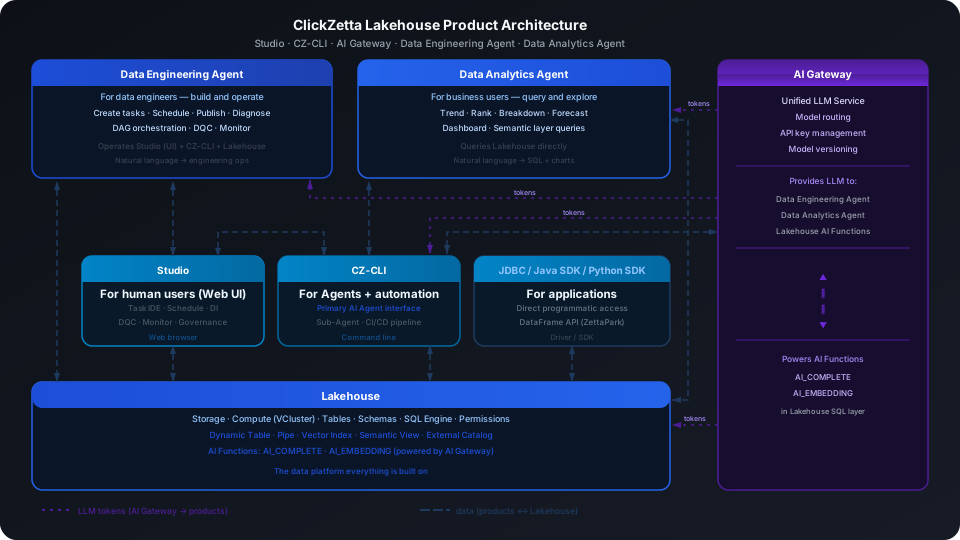
Lakehouse AI Overview · AI Data Preparation · Vector Search · AI Gateway · Data Analytics Agent · Data Engineering Agent
First Time Here?
5 minutes
Register an account, activate a service instance, and complete initial setup
Get Started →
30 minutes
Walk through data ingestion, SQL querying, and Dynamic Table incremental computing
Start Exploring →
On demand
Dedicated paths for data engineers, analysts, AI engineers, and administrators
Choose Your Path →
| Role / Scenario | Recommended Starting Point |
|---|---|
| Data Integration / Data Sync Data ingestion, CDC sync, file import, streaming writes | Studio Data Integration (visual configuration for 40+ data sources) · Real-time Sync Tasks (MySQL / PG / Oracle full-database CDC) · Batch Sync Tasks (scheduled batch sync) · Pipe Continuous Ingestion (object storage / Kafka automatic writes) · COPY INTO (one-time file import) · Complete Data Integration Guide |
| Data Engineer Build data pipelines, process ETL jobs, and manage data warehouse layers | Dynamic Table Incremental Computing · Dynamic Table Overview · Streaming Data Pipeline · Studio Task Development & Scheduling · DDL Syntax Reference · SQL Reference · cz-cli Command Line Tool · Data Engineering Agent · TPC-DS Benchmark |
| Data Analyst SQL queries, BI connections, ad-hoc analysis | Run Your First SQL Query · Connect BI Tools · Data Analytics Agent (natural language queries) · Semantic Views · SSB Benchmark · TPC-H Benchmark |
| AI / ML Engineer Vector search, RAG, AI functions, model invocation | AI Data Preparation · Vector Search · AI Functions (AI_COMPLETE / AI_EMBEDDING) · AI Gateway · Python SDK · ZettaPark (DataFrame API) |
| Platform Administrator User management, permissions, compute clusters, cost control | Account and Service Instance Setup · User and Permission Management · Compute Cluster Management · Pricing and Billing |
| AI Agent / Automation Deterministic API calls, semantic layer queries, automated data pipelines | cz-cli Command Line Tool (deterministic interface, suitable for Agent calls) · Semantic Views (business semantic layer) · Python SDK · ZettaPark · Data Analytics Agent · Data Engineering Agent · Singclaw |
Core Capabilities
Data Integration
Data Integration Guide · Studio Data Integration · Pipe · COPY INTO
Unified Lakehouse
External Catalog · External Volume · On-Site Acceleration Guide
Incremental Computing
Incremental Computing · Dynamic Table Overview · Streaming Data Pipeline
High-Performance SQL Analytics
AI Native
Lakehouse AI Overview · Vector Search · AI Functions · Semantic Views · Data Analytics Agent · Data Engineering Agent
Studio & AI Agent Integration
Studio User Manual · cz-cli Installation and Usage · Semantic Views
What's New
In This Section
| Page | Description |
|---|---|
| Before You Begin | Ways to access Lakehouse: Studio, CLI, drivers and connectors |
| Account Signup and Setup | Register an account, activate a service instance, and complete initialization |
| Cloud Services and Regions | Supported cloud providers and available regions |
| Trial Account Quotas and Limits | Resource quotas during the trial period |