Migrating Spark Data Engineering Best Practices Project to Singdata Lakehouse
New Solution Highlights
- Full cloud migration, focus on data: Move all on-premises managed environments to the cloud, eliminating non-data-related tasks such as resource preparation and system operations.
- You don't need to rewrite existing code: Singdata Lakehouse SQL and ZettaPark are highly compatible with Spark SQL and PySpark respectively. Existing Spark engineers can get started immediately without retraining.
- Reduced total cost and complexity: Singdata Lakehouse has built-in workflow services and data quality control services, eliminating the need for separate Airflow and Great Expectations. This greatly simplifies the system architecture and reduces total cost and complexity.
- Openness: At the same time, Airflow and Great Expectations can be retained in the architecture, using Airflow to schedule Python tasks and continuing to call Great Expectations for data quality checks within Python code.
- Resource management and task queue management: Use different Virtual Clusters to handle ETL, BI, and data quality workloads, achieving resource isolation and task queue management.
Introduction to the Spark Data Engineering Best Practices Project
Project Background
Building data pipelines without sufficient guidance can be overwhelming, making it difficult to determine whether you are following best practices. If you are a data engineer looking to assess your technical skills in building data pipelines, but unsure whether you are following industry standards or how you compare to data engineers at large tech companies, then the Spark Data Engineering Best Practices project on GitHub is tailor-made for you. This article reviews best practices for designing data pipelines, understanding industry standards, considering data quality, and writing maintainable and operable code. After completing this project, you will understand the key components and requirements of designing data pipelines and be able to quickly familiarize yourself with any new codebase.
Project Scenario
Assume we extract customer and order information from upstream sources and create hourly reports on order counts.
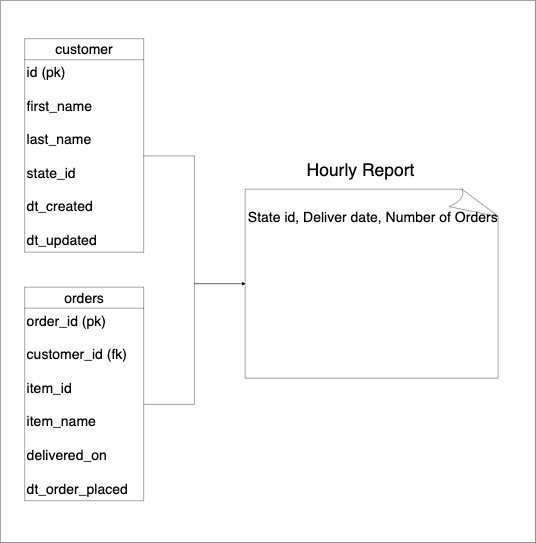
The components and environment used are as follows:
- Data storage: MinIO with Delta Table Format
- Data processing: Spark
- Code language: PySpark + Spark SQL
- Data quality: Great Expectations
- Workflow: Airflow
- Runtime environment: Local Docker (Spark, Airflow)
Best Practices from the Spark Data Engineering Best Practices Project
Transform Data Incrementally Using Standard Patterns
Following established data processing workflows helps address common potential issues, and you can reference a wealth of resources. Most industry-standard patterns follow a three-layer data warehouse architecture, as follows:
- Raw Layer: Store data in its original form as received from upstream sources. This layer sometimes involves data type changes and column name standardization.
- Transformation Layer: Transform data from the raw layer according to the chosen modeling principles to form a set of tables. Common modeling principles include dimensional modeling (Kimball), Data Vault models, entity-relationship data models, etc.
- Consumption Layer: Combine data from the transformation layer to form datasets that directly correspond to end-user use cases. The consumption layer typically involves joining and aggregating transformation layer tables to facilitate end-user analysis of historical performance. Business-specific metrics are typically defined at this layer. We should ensure that a metric is defined in only one location.
- Interface Layer (Optional): Data in the consumption layer typically follows data warehouse naming/data types, etc. However, data presented to end users should be easy to use and understand. The interface layer is typically views that serve as the interface between warehouse tables and their consumers.
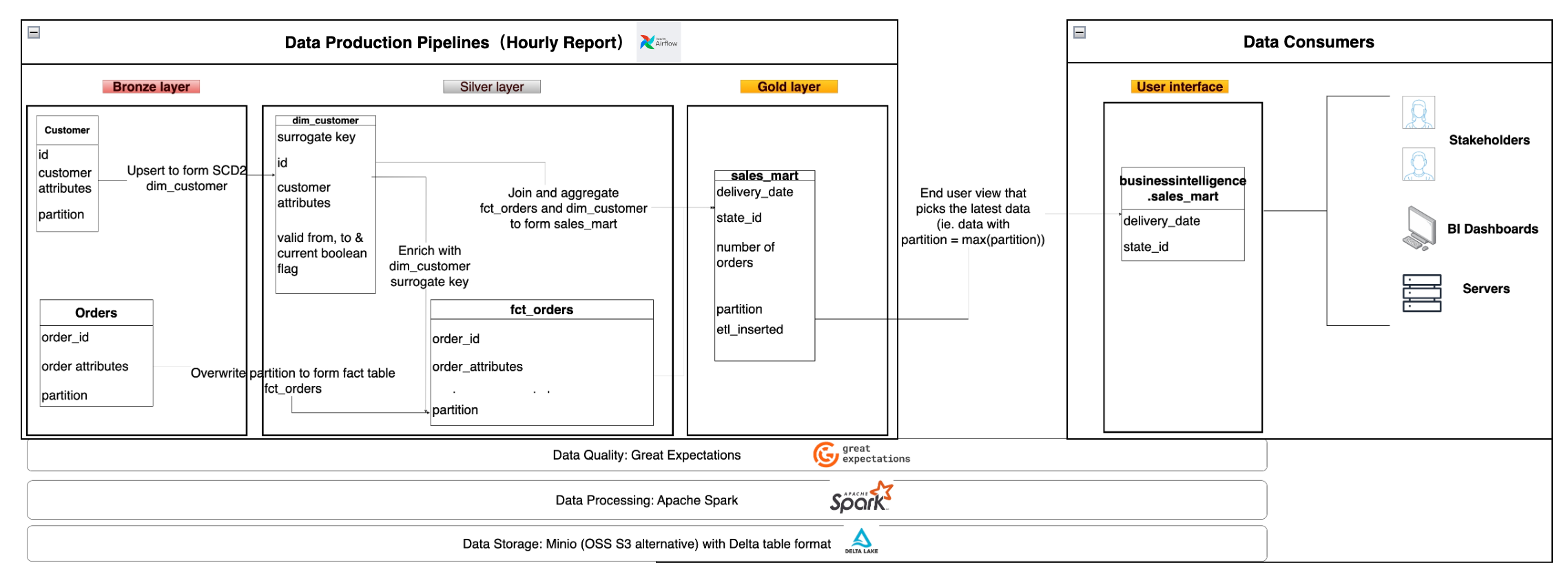
The Bronze Layer, Silver Layer, Gold Layer, and User Interface in the diagram above correspond to the Raw Layer, Transformation Layer, Consumption Layer, and Interface Layer described above, respectively. We adopted dimensional modeling for the Silver layer. For pipelines/transformation functions/tables, inputs are called "upstream" and outputs are called "downstream" consumers. In larger companies, multiple teams work at different layers. The data collection team may import data into the Bronze layer, while other teams can build their own Silver and Gold layer tables according to their needs.
Ensure Data Is Valid Before Providing It to Consumers (i.e., Data Quality Checks)
When building datasets, it is crucial to clarify expectations about the data. Expectations for a dataset can be as simple as column values meeting requirements, or as complex as meeting more sophisticated business needs. If downstream consumers use bad data, the consequences can be catastrophic. For example, sending incorrect data to customers or spending funds based on incorrect data. The process of correcting the use of bad data typically requires significant time and re-running all affected processes!
To prevent consumers from accidentally using bad data, we should check data before providing it for use.
This project uses the Great Expectations library to define and run data checks.
Use Idempotent Data Pipelines to Avoid Data Duplication
Re-running, i.e., re-executing a data pipeline, is a common operation. When re-running a data pipeline, we must ensure that the output does not contain duplicate rows. The property of a system always producing the same output given the same input is called idempotency.
The following demonstrates two techniques for avoiding data duplication when re-running data pipelines:
- Run-ID-Based Overwrite: Used for append-only output data. Ensure your output data has a run ID as a partition column (e.g., the partition column in our Gold tables). The run ID represents the time range to which the created data belongs. When reprocessing data, overwrite based on the given run ID.
- Natural-Key-Based UPSERTS: Used when the pipeline performs inserts and updates on output data using natural keys. When existing rows' dimension data needs to be updated (e.g., SCD2 uses this approach). Duplicates from re-running the pipeline result in updates to existing rows (rather than creating new rows in the output). We use this method to populate the dim_customer table.
Migration Solution
New Architecture Based on Singdata Lakehouse
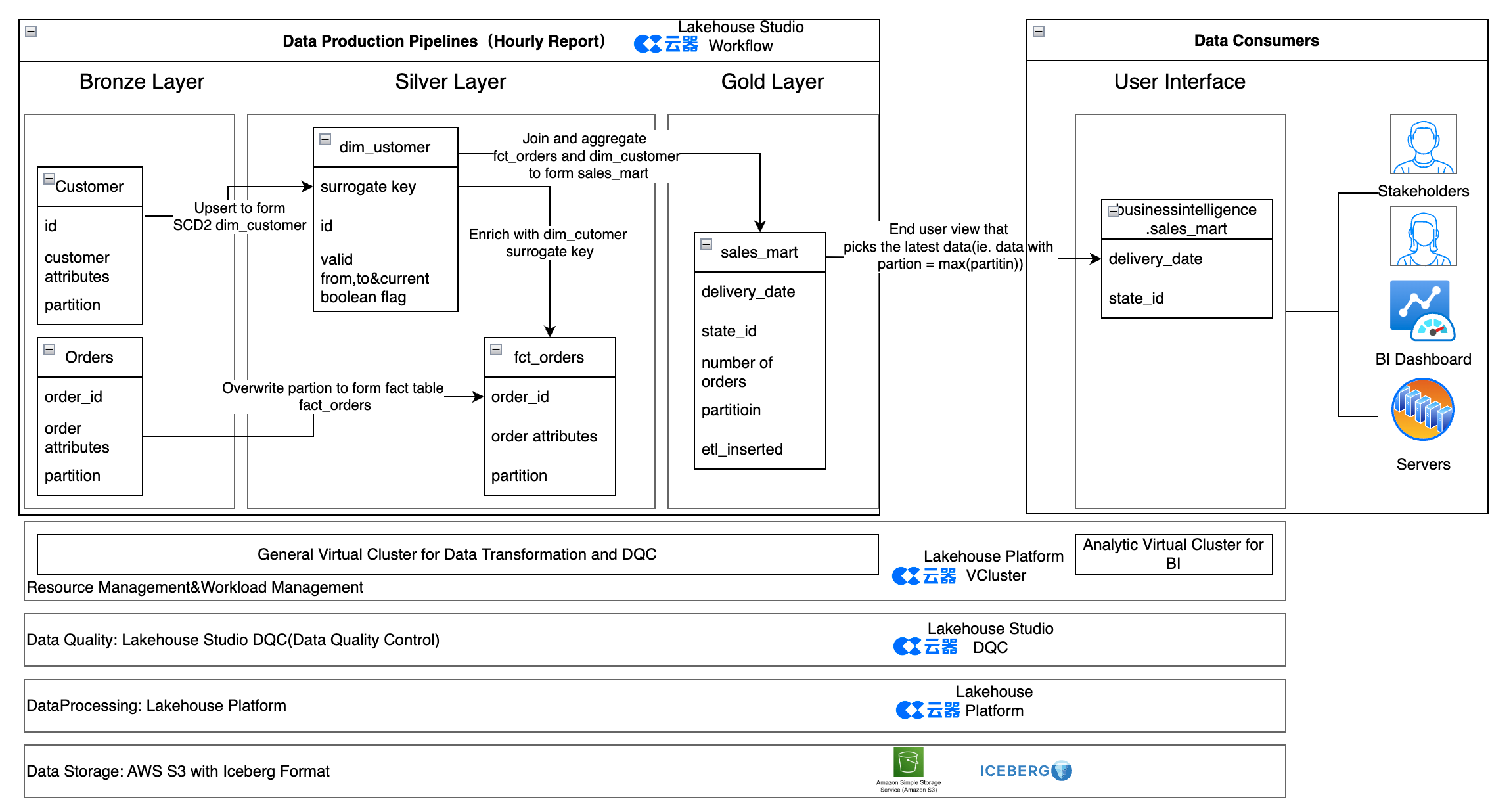
Component Comparison of the Two Solutions
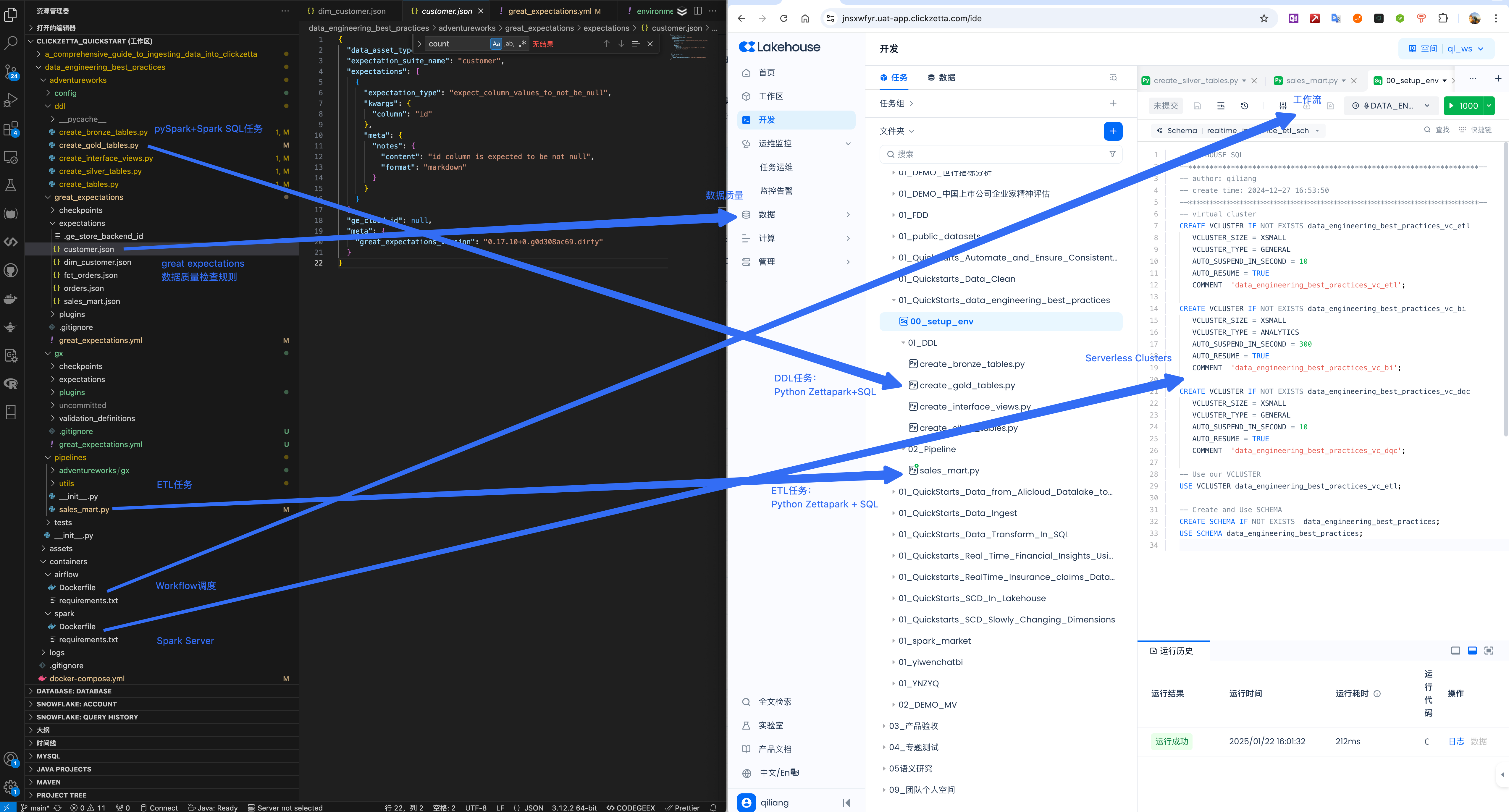
| Component | Spark Solution | Singdata Lakehouse Service |
|---|---|---|
| Data Storage | MinIO with Delta Table Format | Alibaba Cloud OSS (or AWS S3, etc.) with Iceberg Table Format |
| Data Processing | Spark | Singdata Lakehouse |
| Code Language | PySpark + Spark SQL | ZettaPark + Lakehouse SQL |
| Data Quality | Great Expectations | Singdata Lakehouse DQC (Data Quality Control) |
| Workflow | Airflow | Singdata Lakehouse Workflow |
| Runtime | Local Docker (Spark, Airflow) | Cloud Serverless Service |
Syntax Differences
| Feature | Spark Syntax | Singdata Lakehouse Syntax |
|---|---|---|
| Create Table DDL | CREATE TABLE ... USING DELTA ... LOCATION '{path}/customer' | CREATE TABLE, no need for USING DELTA and LOCATION '{path}/customer' |
| Create Session | SparkSession.builder.appName | Session.builder.configs(connection_parameters).create() |
Features of the New Solution
- Full cloud migration, focus on data: Move all on-premises managed environments to the cloud, eliminating non-data-related tasks such as resource preparation and system operations.
- You don't need to rewrite existing code: Singdata Lakehouse SQL and ZettaPark are highly compatible with Spark SQL and PySpark respectively. Existing Spark engineers can get started immediately without retraining.
- Reduced total cost and complexity: Singdata Lakehouse has built-in workflow services and data quality control services, eliminating the need for separate Airflow and Great Expectations. This greatly simplifies the system architecture and reduces total cost and complexity.
- Openness: At the same time, Airflow and Great Expectations can be retained in the architecture, using Airflow to schedule Python tasks and continuing to call Great Expectations for data quality checks within Python code.
- Resource management and task queue management: Use different Virtual Clusters to handle ETL, BI, and data quality workloads, achieving resource isolation and task queue management.
Migration Steps
Task Code Development
Navigate to Lakehouse Studio Development -> Tasks, and build the following task tree:
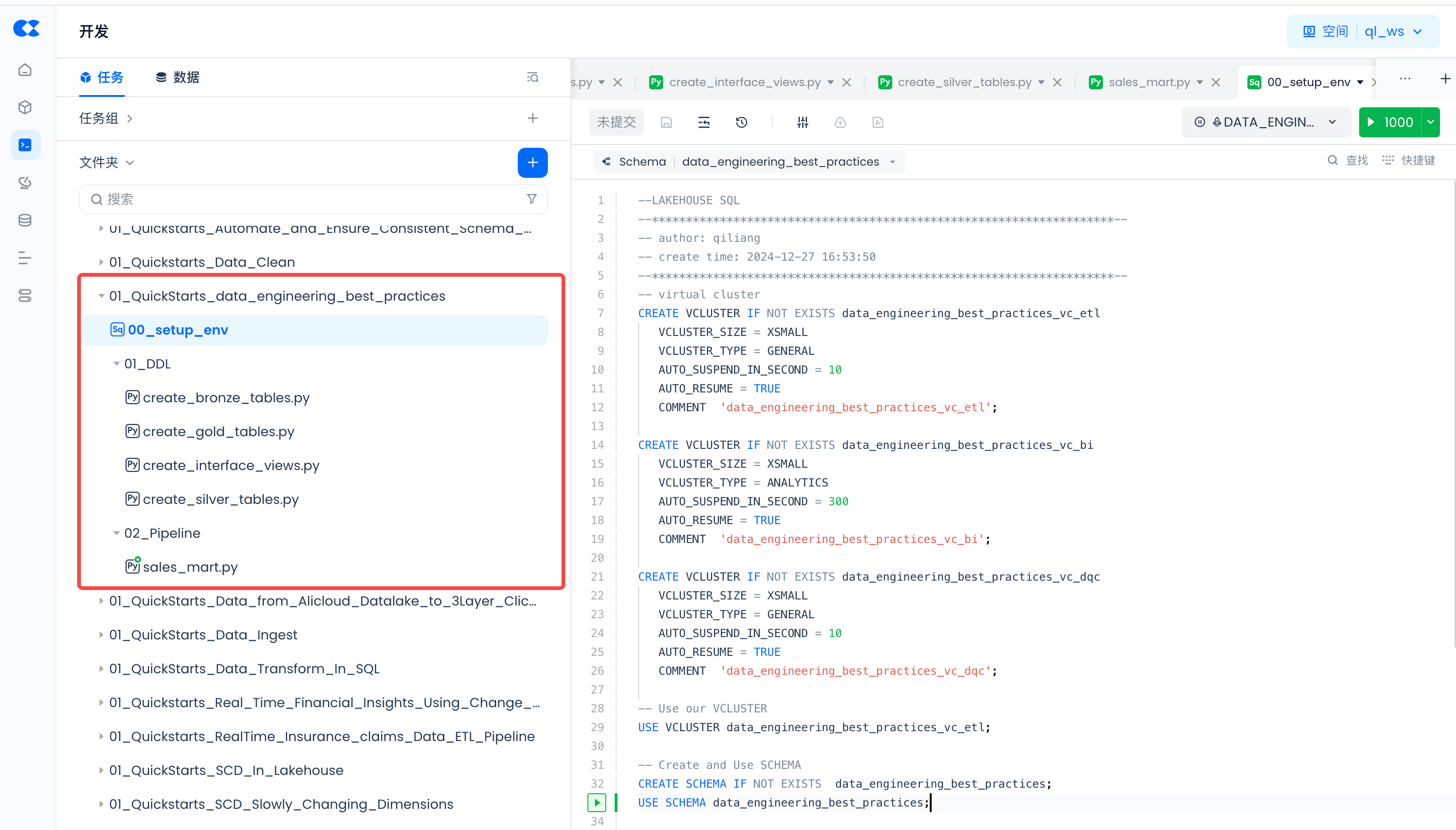
Click "+" to create the following directory:
- 01_QuickStarts_data_engineering_best_practices
Click "+" to create the following SQL task:
- 00_setup_env
Click "+" to create the following Python tasks:
- 01_DDL
- create_bronze_tables.py
- create_gold_tables.py
- create_interface_views.py
- create_silver_tables.py
- 02_Pipeline
- sales_mart.py
Visit the GitHub repository for this migration project and copy the code into the corresponding tasks.
Resource Management and Task Queue Management
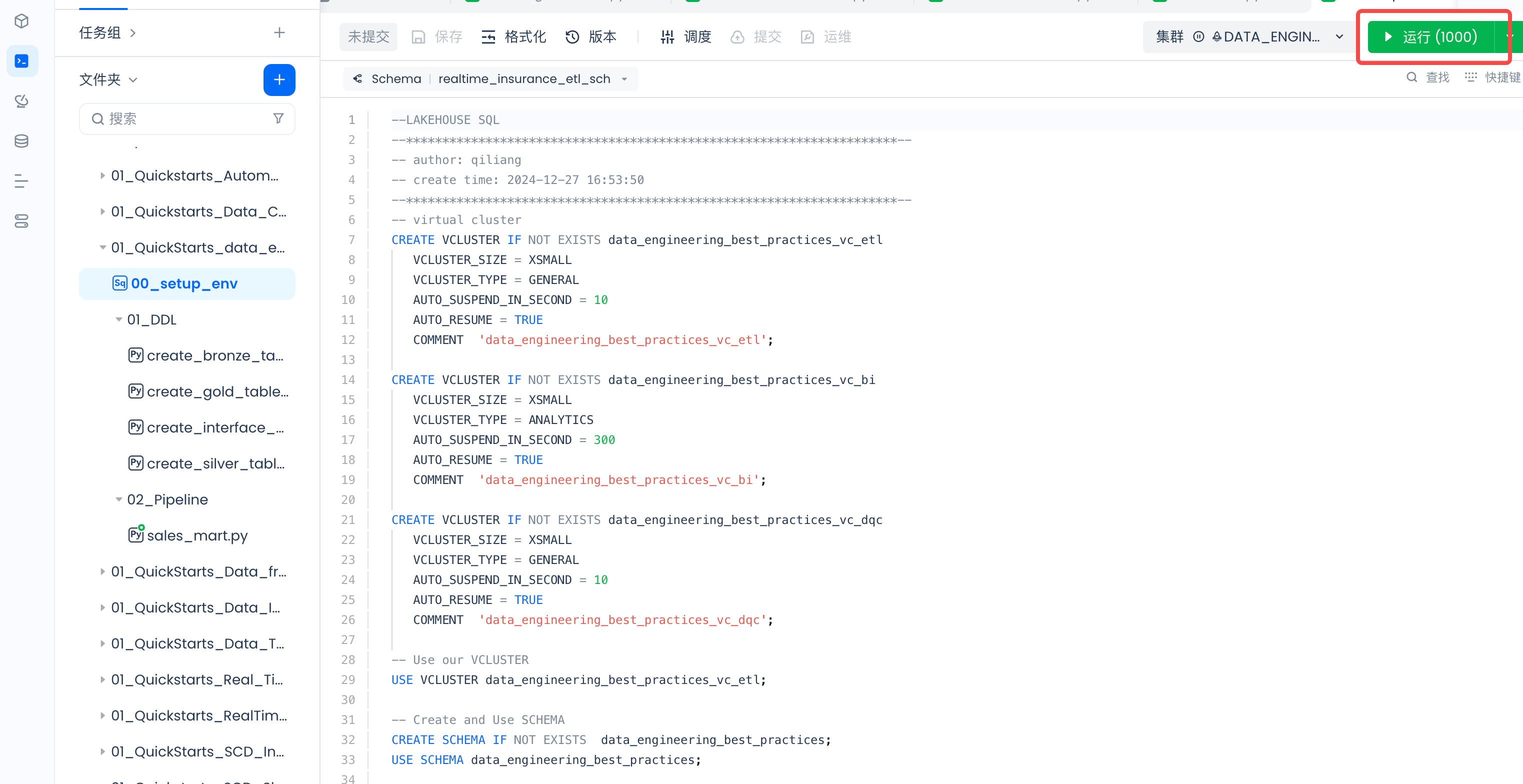
In the setup_env task, create three Virtual Clusters to run different tasks:
Task Parameter Configuration
01_DDL Task Parameter Configuration
Configure parameters for the following four tasks:
- create_bronze_tables.py
- create_gold_tables.py
- create_interface_views.py
- create_silver_tables.py
Open the task and click "Schedule":

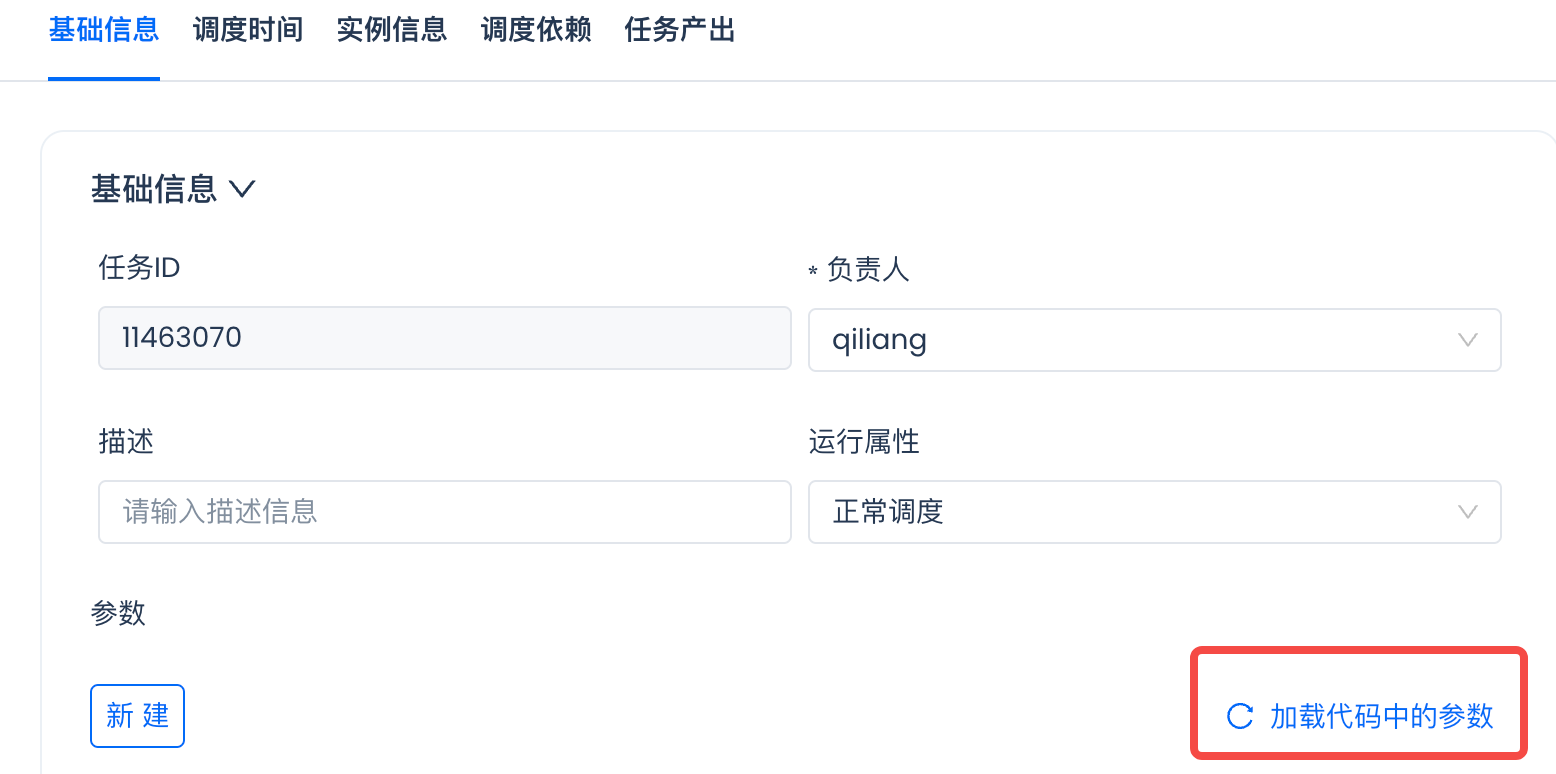
On the popup page, click "Load Parameters from Code":
Set the value for each parameter:
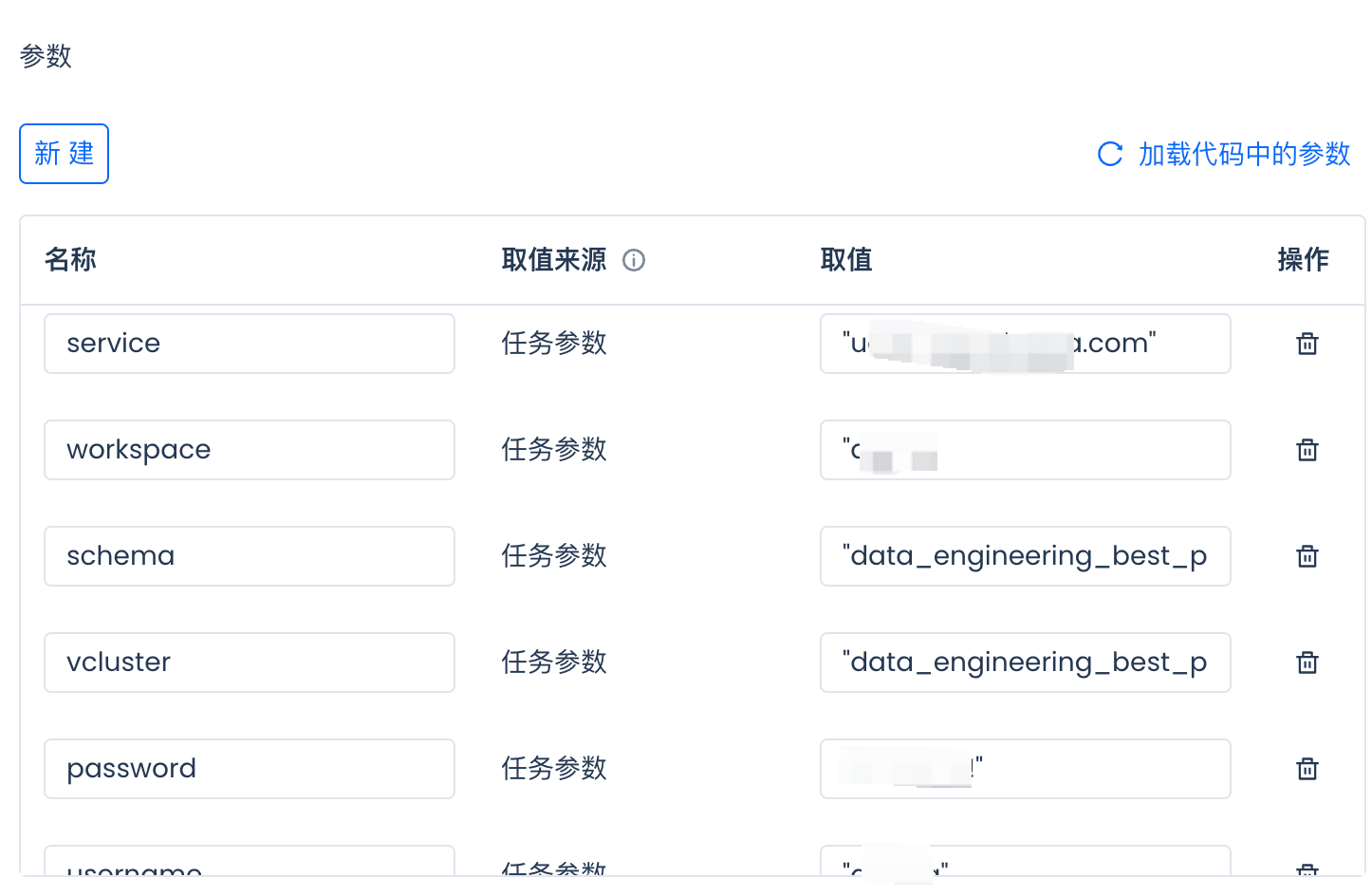
For how to obtain parameter values, please refer to this article.
02_Pipeline ETL Task Parameter Configuration
Configure parameters for the following task using the same method as above.
- sales_mart.py
Create the Environment
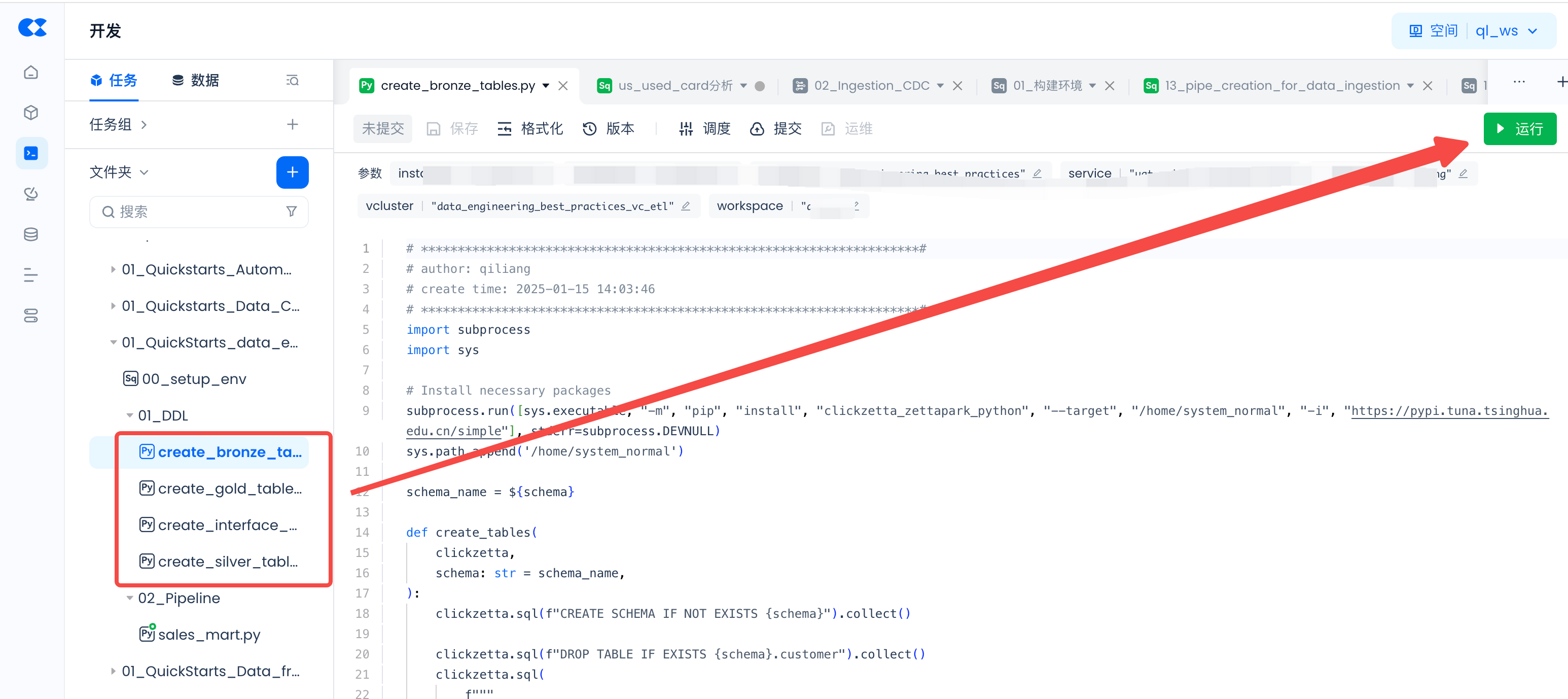
Run the setup_env and DDL temporary tasks to create the required virtual compute clusters, database Schema, and Tables.
Create the required virtual compute clusters and database Schema:
Create Tables:
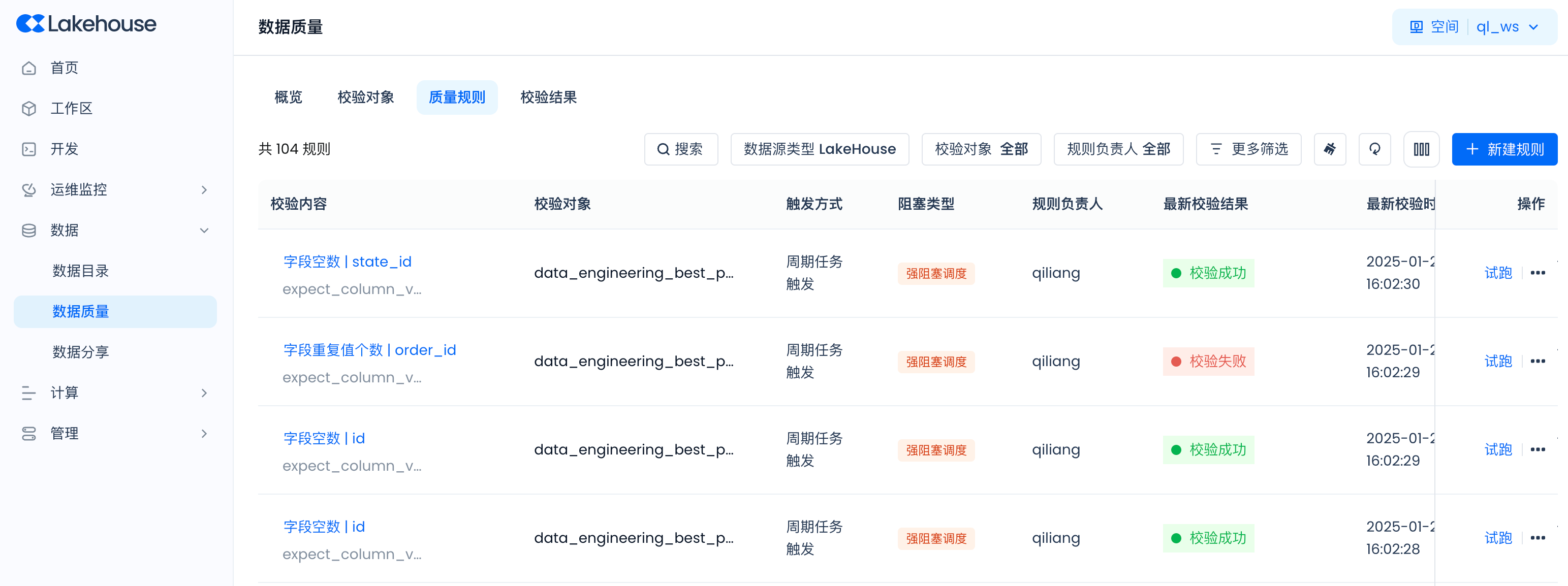
Configure Data Quality Monitoring Rules
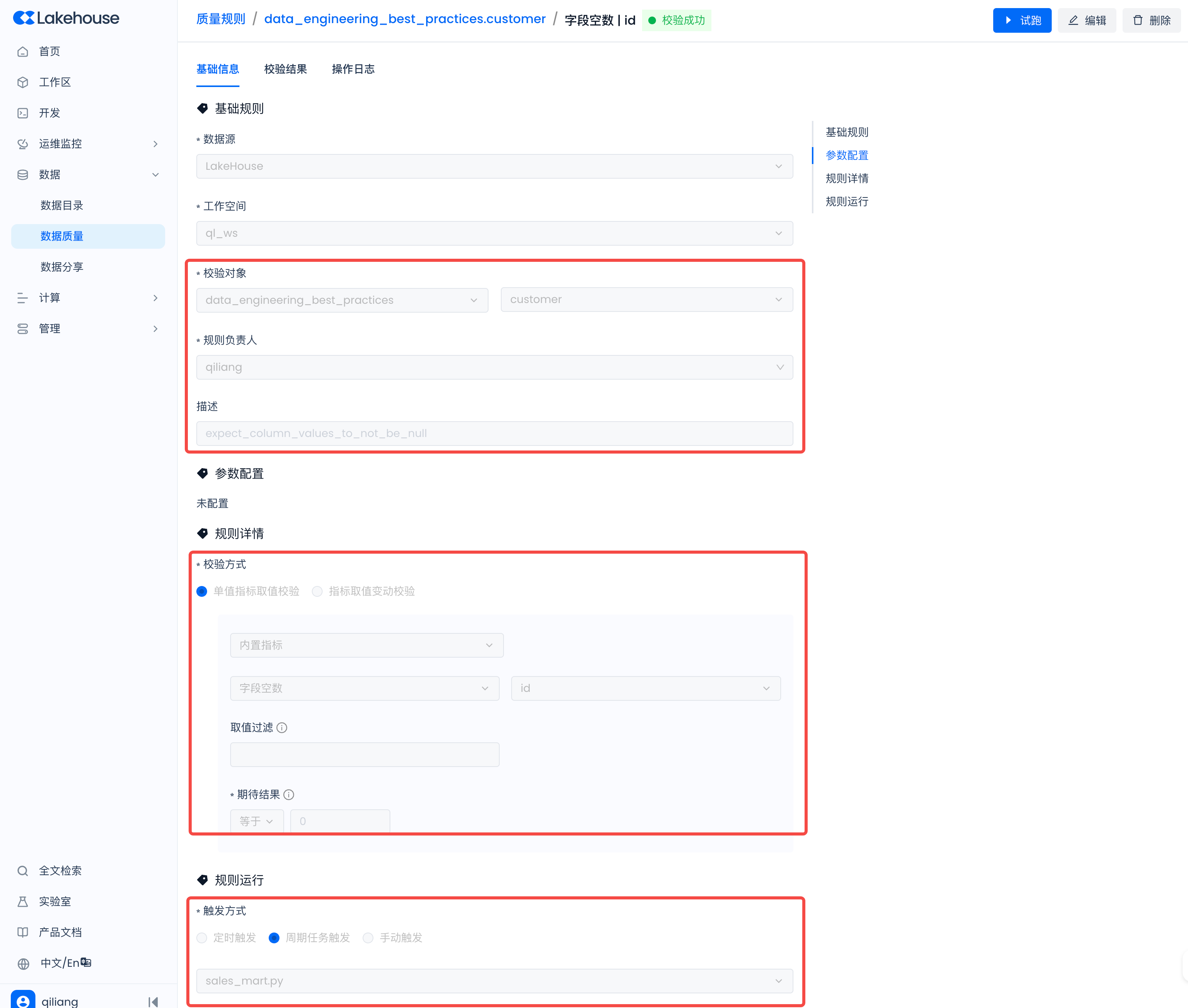
Navigate to Lakehouse Studio Data -> Data Quality -> Quality Rules, and create the following rules:
Example with expectation_suite_name as customer:
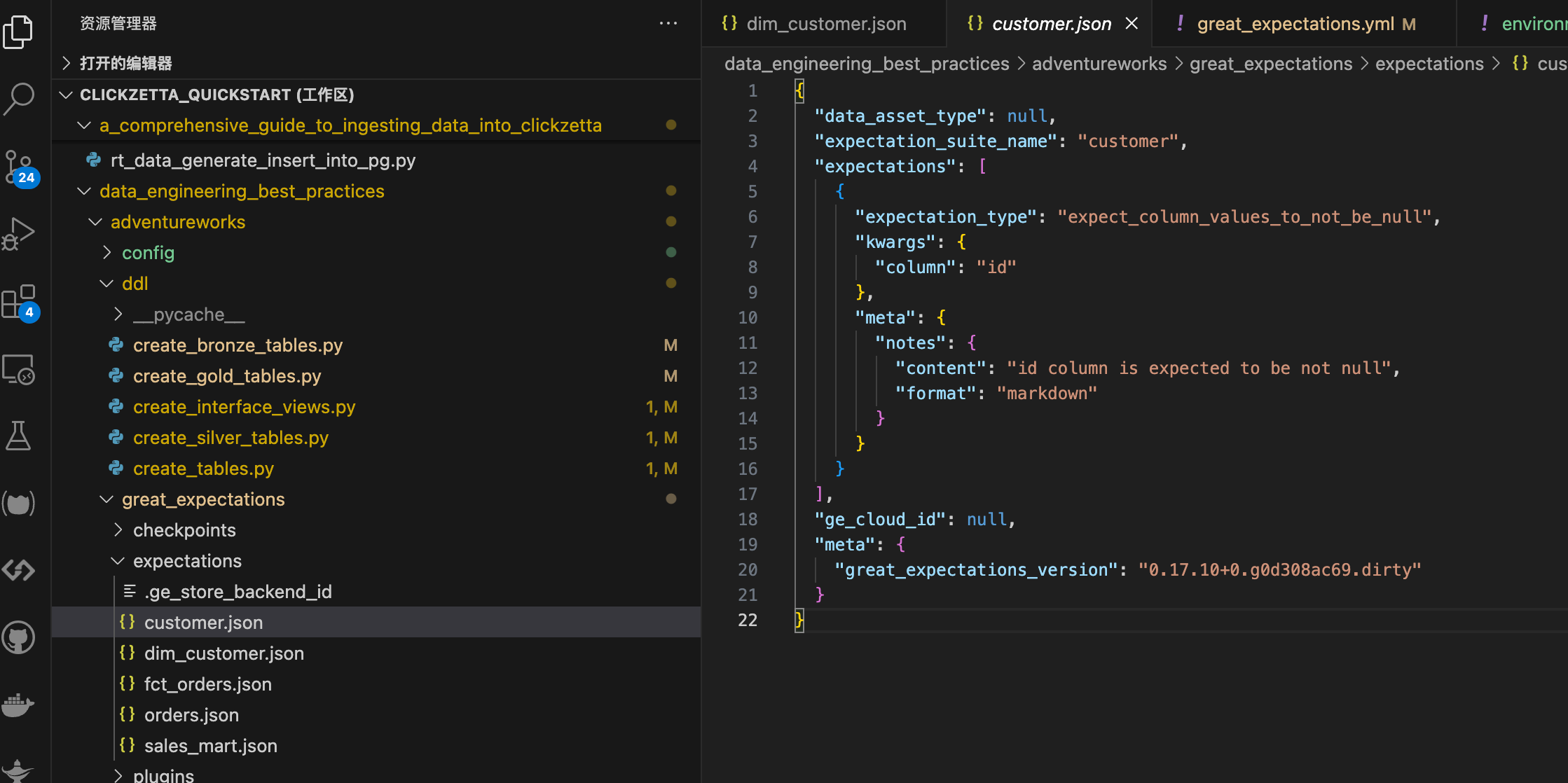
Configure the following rules:
Workflow Scheduling
Navigate to Lakehouse Studio Development -> Tasks, Configure the schedule for the sales_mart.py ETL task:
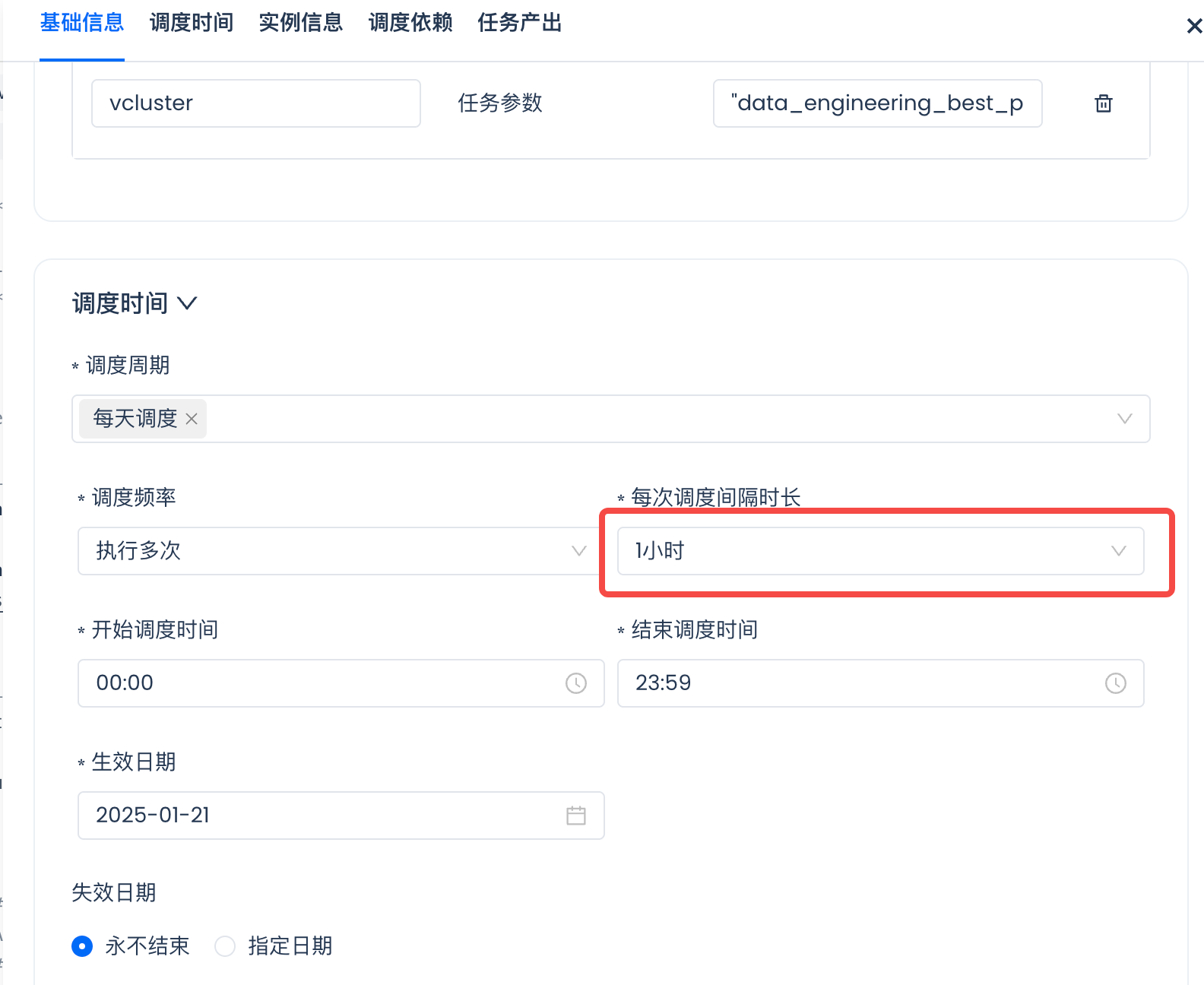
This enables hourly report data refresh.
Then click "Submit" to run this ETL task periodically:

Task Operations
ETL Task Operations
Navigate to Lakehouse Studio Operations Monitoring -> Task Operations to view task status, execution logs, instance management, etc.

Data Quality Control
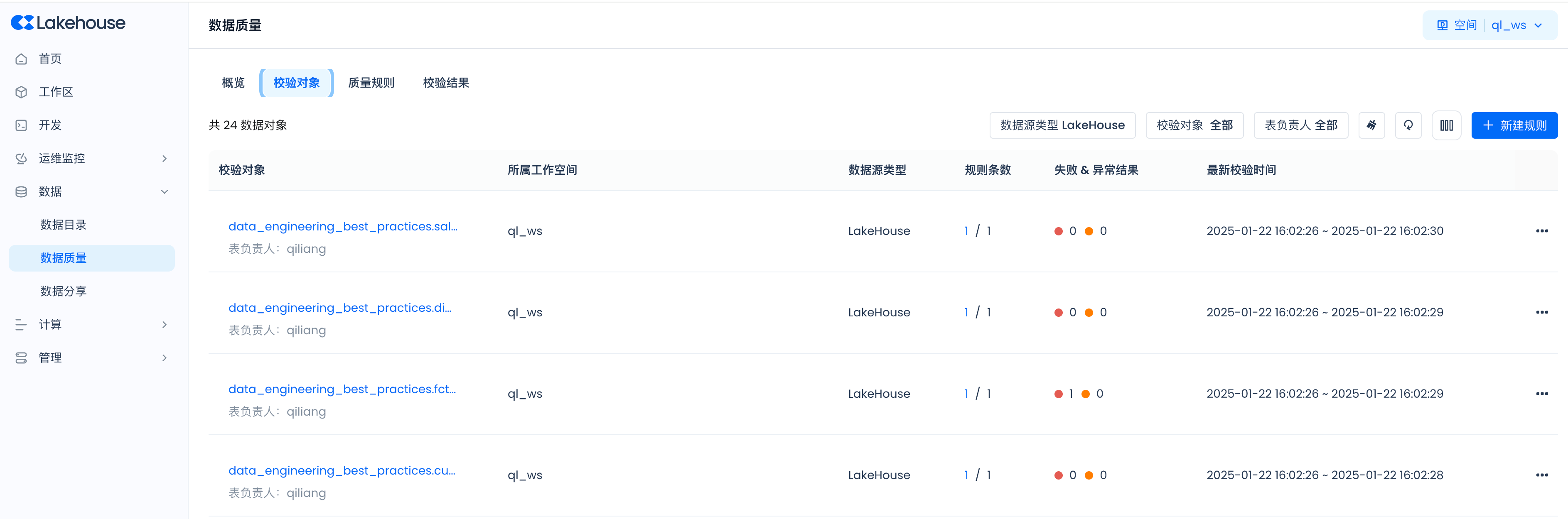
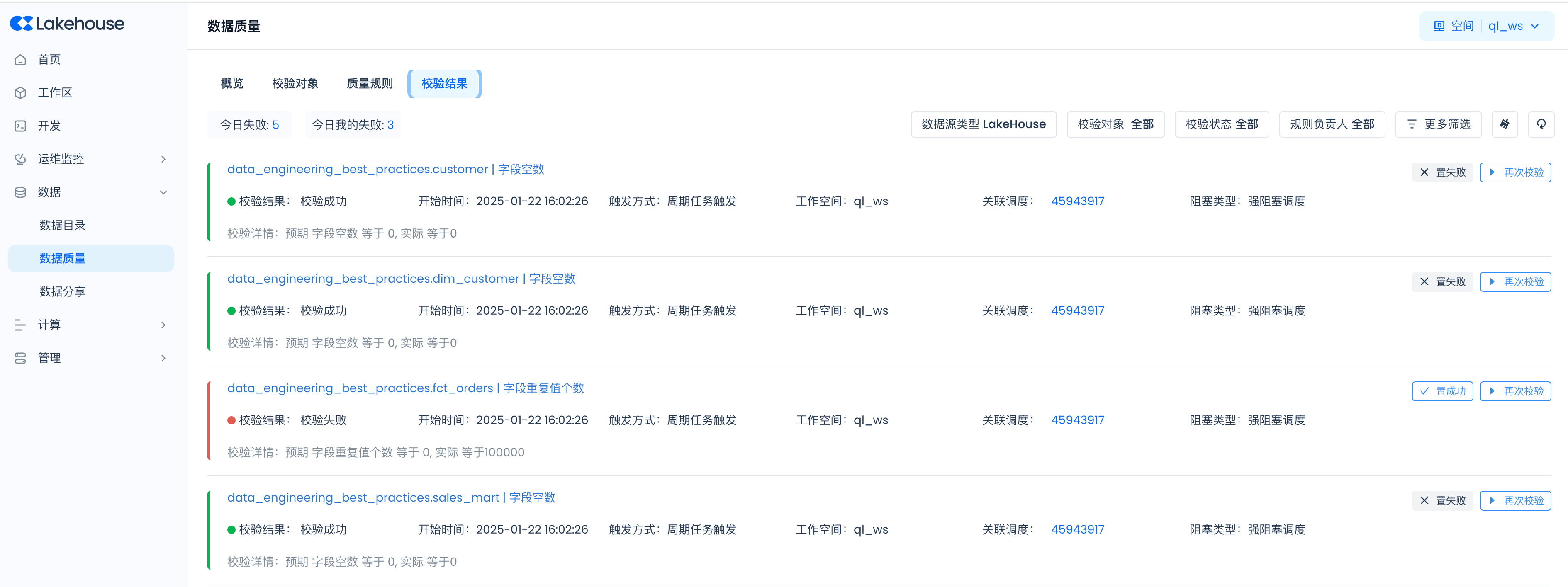
Navigate to Lakehouse Studio Data -> Data Quality. In Data Quality, you can configure quality rules to monitor whether data table outputs are normal.
View validation objects:
View validation results:
Monitoring and Alerting Configuration
Next, navigate to Operations Monitoring -> Monitoring and Alerting to add alert rules for real-time alerting on ETL tasks and data quality control.
Using built-in monitoring and alerting rules:
The system has the following built-in general monitoring and alerting rules. When data quality validation fails, alerts via email, SMS, phone, etc. will be triggered based on the specific configuration in the rules.
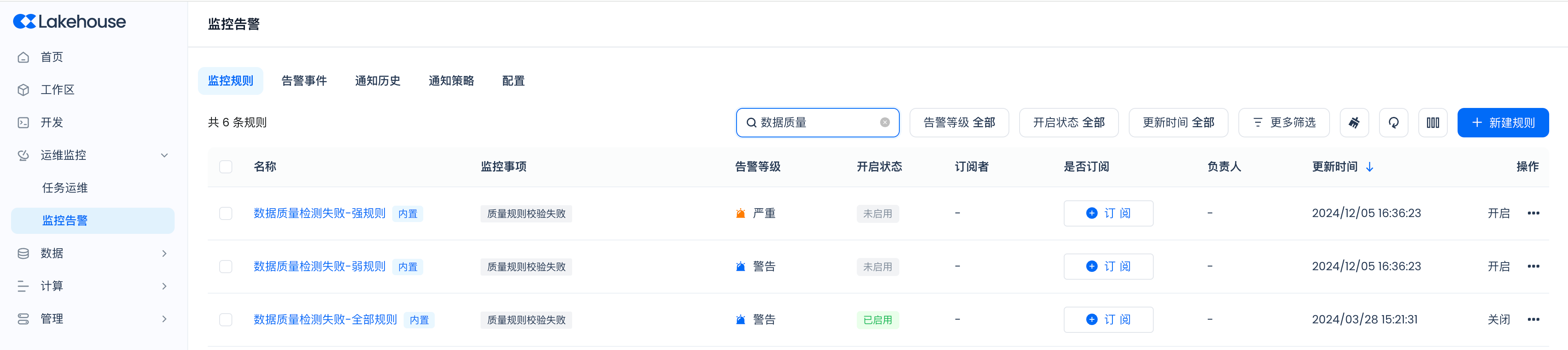
Using custom monitoring and alerting rules:
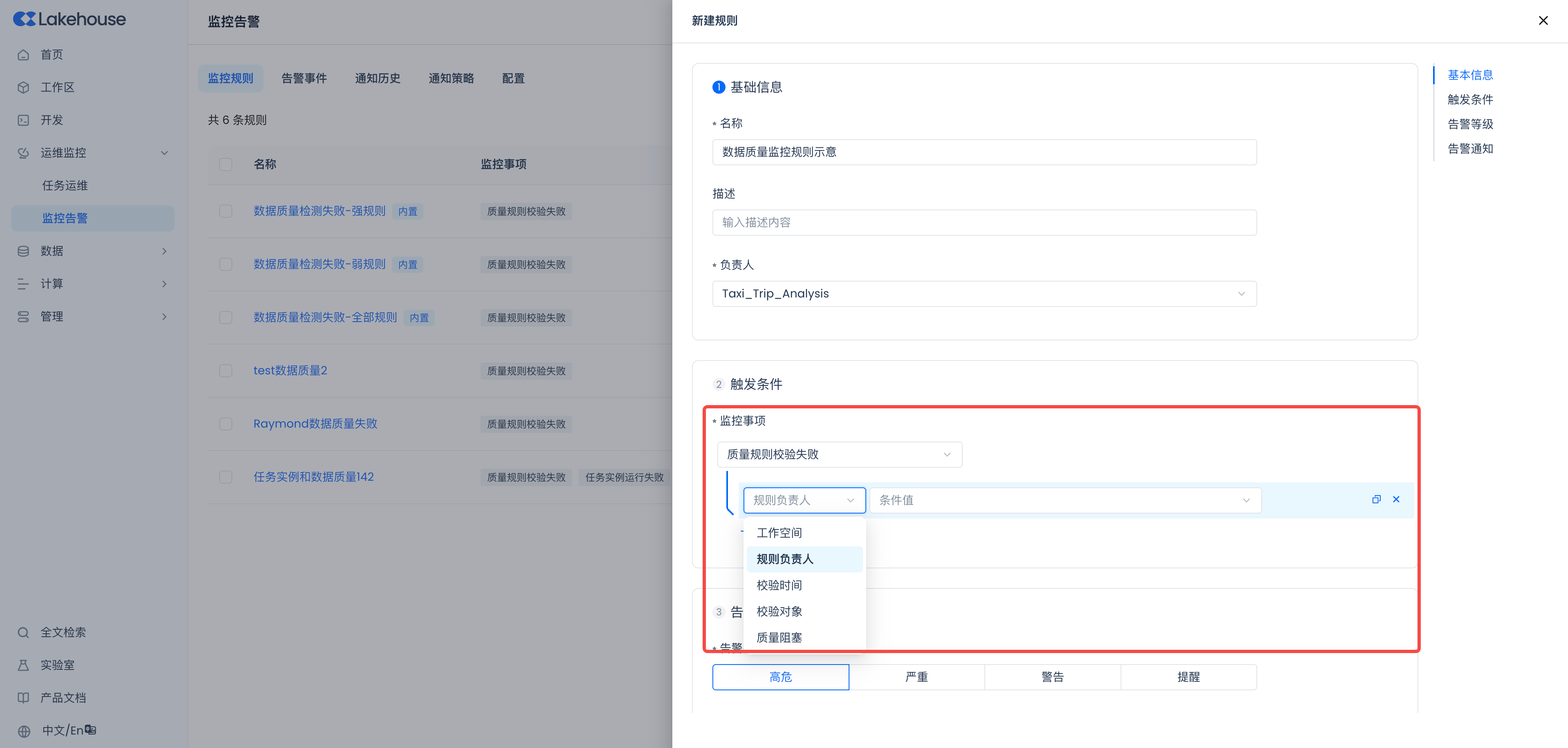
The above built-in monitoring and alerting rules apply to validation results of all global quality monitoring rules. If you want more fine-grained control over alert monitoring scope and alerting strategies, you can also create custom rules, as shown below. Select the "Quality Rule Validation Failed" monitoring item and provide filtering conditions to limit the scope. For a detailed guide on monitoring and alerting configuration, refer to the Monitoring and Alerting user guide.