
Incremental Computing
Incremental computing is a core capability of Singdata Lakehouse. It reduces compute resource usage by processing only the data changed since the last refresh instead of recalculating all data each time, while keeping results consistent with full computation.
GIC: Generic Incremental Computation Model
GIC (Generic Incremental Computation) is Singdata's self-developed incremental computation model and the underlying engine for Dynamic Tables.
Traditional incremental computation approaches typically handle only specific operators, such as simple aggregations, or specific data patterns, such as append-only data. They fall back to full recomputation for JOINs, nested subqueries, UPDATE/DELETE, and similar scenarios. GIC is designed for generality: it decomposes any standard SQL query into operator-level incremental plans. Each operator processes upstream Deltas independently and outputs its own Delta downstream, forming a complete incremental execution pipeline.
GIC's three core properties:
- Generality: Supports incremental execution for mainstream SQL operators, including Filter, Project, Join, Aggregate, and Window, without limiting query complexity.
- Cost awareness: Dynamically selects incremental or full execution plans for each refresh based on data statistics instead of static rules.
- Semantic consistency: Keeps incremental execution results consistent with full recomputation results, using MVCC version management and Exactly-Once semantics.
Because GIC is general, Dynamic Tables can use standard SQL for both batch and streaming scenarios. AI processing results, such as outputs from AI_COMPLETE() and AI_EMBEDDING(), can also flow back into the data processing pipeline in real time. After AI processing completes, downstream Dynamic Tables automatically detect the change and refresh incrementally, without manual triggers or extra pipelines.
Why Incremental Computing Is Needed
Before incremental computing emerged, data processing mainly had two modes:
| Mode | Characteristics | Issues |
|---|---|---|
| Batch Processing | Full recalculation each time, T+1 or day-level delivery | As data volume grows, compute time and resource usage grow linearly, making near-real-time delivery difficult. |
| Streaming Processing | Long-running service, row-by-row processing, second-level delivery | Requires complex concepts such as Watermark, Window, and Trigger; state storage expands as windows grow; Retraction handling is difficult. |
To meet both low latency and low cost requirements, enterprises often had to adopt the Lambda Architecture: one batch processing pipeline and one streaming processing pipeline. This means maintaining two sets of code and makes data consistency harder to guarantee.
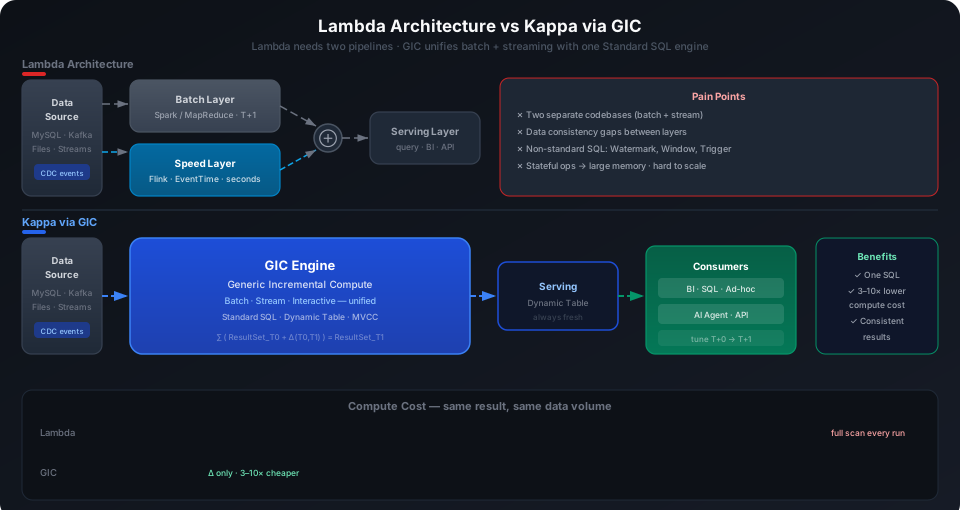
Goal of incremental computing: Use a single standard SQL definition for both batch and streaming scenarios, eliminate Lambda Architecture, and implement Kappa Architecture with one engine for real-time processing across the pipeline.
Three Computing Paradigms Compared
| Dimension | Batch Computing | Streaming Computing | Incremental Computing |
|---|---|---|---|
| Design Goal | Throughput first | Freshness first | Flexible balance of throughput, freshness, and latency |
| Trigger Method | Active computation (scheduled triggers) | Passive computation (data-driven) | Active computation (scheduled, dependency-triggered, and real-time triggered) |
| Compute Model | Full computation | Streaming computing model (a specialization of incremental) | General Incremental Computing model (GIC) |
| Storage Model | Static storage | Pipe pipeline data model (without full set) | Dynamic Data (supports full/incremental reads and writes) |
| Data Modeling | Standard dimensional modeling (ODS/DWD/ADS) | None (pipeline mode, intermediate data not queryable) | Standard dimensional modeling (supports layering, intermediate data queryable) |
| Language Expression | Standard SQL + UDF | Non-standard SQL (requires EventTime, Watermark, etc.) | Standard SQL + UDF |
| Version Management | Supports MVCC | Not supported | Supports MVCC (version-based recomputation possible) |
| Retraction Handling | No such concept | Requires state storage to hold full data within window | Unified as a form of incremental data (incremental subtraction) |
When to Choose Which?
- Choose batch processing: One-time historical data loading, full repair, or workloads that are not sensitive to latency (T+1 is acceptable).
- Choose streaming processing: Workloads that require second-level response, complex time windows (sliding windows or session windows), or out-of-order data processing.
- Choose incremental computing: Workloads where data arrives in batches, minute-level or hour-level freshness is required, resource cost should be lower than streaming computing, and development should use standard SQL.
Core Concepts
Incremental computing is built on three fundamental data concepts:
1. Snapshot
A collection of all data in a dataset at a specific point in time.
2. Delta
A set of data change records generated between two dataset snapshots.
3. Change Data Capture (CDC)
A standard database concept used to capture data changes. Each row change is generated by one of three operations:
| Operation | Meaning | Example |
|---|---|---|
| Insert | Add a new row | +F |
| Update | Modify a row | -B(old) -> +B(new) |
| Delete | Remove a row | -C |
Relationship Between the Three
The system abstracts input data into Delta sets through CDC. Jobs detect and consume upstream Deltas, then output their own Deltas downstream, forming a complete incremental pipeline.
Incremental Computing Principles
MVCC Mechanism
Lakehouse maintains multiple historical versions for each table. Each data change (INSERT/UPDATE/DELETE) generates a new version, while old versions remain accessible. Dynamic Tables locate Delta data by recording the source table version checkpoint from the last refresh.
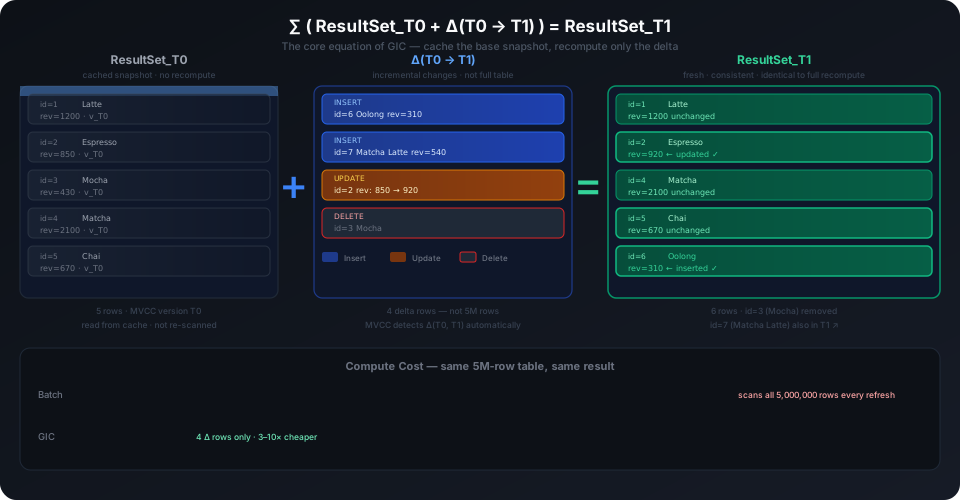
Incremental Algorithm
Different operators handle incremental data differently:
| Operator | Incremental Processing Method | Needs to Read Historical Data |
|---|---|---|
| Filter | Apply filter conditions only to incremental data | No |
| Project | Apply column pruning/computation only to incremental data | No |
| Join | Join incremental data with historical data from the right table | Yes, needs to read right table history |
| Aggregate | Merge incremental data with existing aggregation results | Yes, needs to read its own historical results |
Example: Coffee Sales Statistics
Suppose a coffee shop has two tables:
Business requirement: Calculate total sales for each type of coffee, excluding lattes.
Declarative definition (the user only writes this):
Internal incremental execution process:
The process handles only the 3 newly added rows instead of scanning the entire orders table again.
Scheduling Modes
Incremental computing supports three scheduling modes. The same SQL can switch between them without changing query logic:
1. Immediate Consumption on Data Arrival (Real-Time Triggered)
When a data change occurs on the source table, incremental computing is triggered immediately.
- Latency: Second-level
- Best for: Scenarios that require very high freshness, such as risk control and real-time monitoring
- Note: Higher compute overhead; query complexity should not be too high
2. Periodic Scheduling by Time Interval
Triggered periodically at preset intervals (minutes/hours/days).
- Latency: Depends on refresh interval
- Best for: Most near-real-time scenarios, such as minute-level or hourly reports
- Advantage: Can accumulate data for batch processing, use cluster elasticity, and simplify capacity planning
3. Dependency-Triggered Scheduling (DAG Cascading)
Downstream computation is automatically triggered after upstream tasks complete, forming a data pipeline.
- Best for: Data warehouse layering scenarios where you want to monitor leaf-node freshness and let upstream tasks adapt automatically
- Advantage: Only leaf-node scheduling needs to be configured; upstream tasks are arranged automatically
Performance and Cost
Comparison with Streaming Computing
In typical scenarios, incremental computing uses fewer resources than streaming computing engines such as Apache Flink, mainly because:
- No long-running state storage: Streaming computing must maintain full window state and checkpoints. Incremental computing is based on MVCC and reads data on demand.
- Vectorized execution engine: The Native Vector Engine can be several times to tens of times more efficient than Java row-based processing.
- Batch Join optimization: Incremental Join performs a single-pass Hash Join between incremental rows from the left table and the right table. The right table is read only once and can use the storage cache.
4 Factors Affecting Performance
| Factor | Impact | Description |
|---|---|---|
| Query Complexity | Higher complexity means higher cost | Outer joins with large amounts of historical data may generate many retraction operations. |
| Data Change Type | Append-only data has the lowest cost | Update/Delete requires interaction with historical data, which increases compute cost. |
| Data Change Rate | Higher change rates mean higher cost | 1 million new rows per second costs much more than 10,000 new rows per second. |
| Scheduling Frequency | Higher frequency means higher cost | Higher frequency increases the share of fixed system overhead, such as plan generation and resource allocation. |
Cost-Based Optimization Framework
Singdata Lakehouse uses cost-based incremental optimization instead of rule-based optimization:
- Rule-based: The incremental execution plan is fixed when the SQL is defined and cannot adapt to changing data.
- Cost-based: During each refresh, the system dynamically selects the optimal execution plan, including full or incremental execution and operator algorithms, based on data statistics, cluster resources, and incremental data volume.
The system will automatically fall back to full computation in the following situations:
- Source table historical versions exceed Time Travel retention period
- Incremental data volume is so large that full computation is more efficient
- The Dynamic Table SQL definition has changed
Applicable Scenarios
Incremental computing is a good fit when the workload meets the following conditions:
- Computation logic can be described with standard SQL or UDF
- Data arrives in batches and forms a continuous incremental dataset
- Minute-level or hour-level freshness is required, with lower cost than streaming computing
- The workload does not involve complex time windows (sliding windows or session windows) or Watermark mechanisms
- The team wants to upgrade the data warehouse architecture gradually and validate near-real-time results step by step
Inapplicable Scenarios
- Requires sub-second latency (consider streaming processing)
- Involves complex out-of-order data processing and Watermark mechanisms
- Performs one-time full data loading (use INSERT INTO or COPY INTO directly)
Limitations
Non-Deterministic Functions
Non-deterministic functions can be used in Dynamic Table definitions without causing a creation error, but they can cause row-level data inconsistency. Incremental computation re-executes SQL only for changed rows, while unchanged rows retain their old values. As a result, values in the same column may come from different execution times. For related Dynamic Table limitations, see Dynamic Table Overview.
Other Limitations
- When source table changes are too large, incremental computing may approach the cost of full computation.
- Some complex queries, such as multi-level nested subqueries with non-equi joins, may not support incremental execution. The system automatically falls back to full computation.
Complete Example: User Behavior Log Analysis
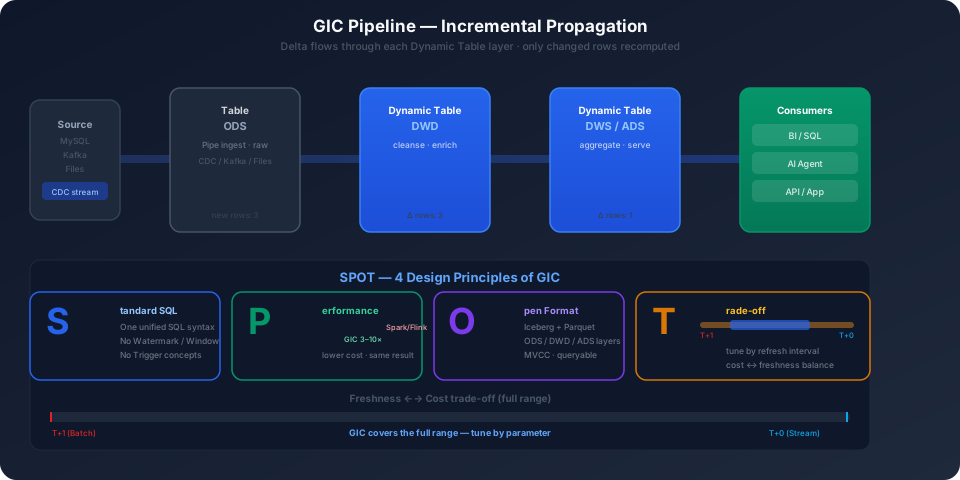
Business Scenario
An internet company wants to analyze user actions on different pages in real time and associate those actions with user attributes such as age, gender, and region.
Data Sources:
- User behavior logs: Kafka real-time event stream
- User information dimension table: MySQL CDC -> Kafka
Step 1: Real-Time Log Data Loading
Step 2: Dimension Table Incremental Update
Step 3: Log and Dimension Table Join (DWD Layer)
Step 4: Aggregate Analysis (DWS Layer)
Architecture Summary
- Data ingestion: Pipe automatically loads from Kafka in batches and supports append and CDC writes.
- ETL processing: Dynamic Tables use declarative definitions and refresh incrementally.
- Data warehouse layering: ODS -> DWD -> DWS, showing a layered warehouse design.
- No manual intervention: The system handles scheduling, incremental optimization, and dependency propagation automatically.
FAQ
Q: What is the difference between incremental computing and materialized views?
| Feature | Dynamic Table (Incremental Computing) | Materialized View |
|---|---|---|
| Design Goal | Build multi-layer data pipelines | Transparently improve single-table query performance |
| Query Rewrite | Does not automatically rewrite queries; must explicitly reference | Optimizer automatically rewrites queries to use MV |
| Data Sources | Supports complex queries such as multi-table JOIN, UNION | Only supports single table |
| Refresh Method | Incremental refresh, only processes Delta | Full or incremental (limited) |
| Applicable Scenarios | ETL pipelines, data warehouse layering | Accelerating specific queries |
Q: How to confirm whether a refresh is incremental or full?
Check the refresh mode and duration in the output. If a refresh takes much longer than usual, a full refresh may have been triggered.
Q: What happens to downstream Dynamic Tables after a full refresh?
Downstream Dynamic Tables detect the upstream full refresh and adapt during their next refresh. If all upstream data changes, downstream computation may also be close to a full computation.
Q: How to avoid unnecessary full refreshes?
- Ensure
data_retention_daysis long enough to prevent source table historical versions from expiring. - Avoid using non-deterministic functions in Dynamic Table SQL.
- Before modifying SQL definitions, evaluate whether the change is necessary.
Q: Can incremental computing guarantee Exactly-Once semantics?
Yes. Based on MVCC version management, each refresh uses a specific source table version checkpoint. After fault recovery, recomputation can start from the last checkpoint, keeping results consistent with full computation.
Related Documentation
- Dynamic Table — object concept, use cases, and limits
- Dynamic Table Overview — getting started and hands-on demo
- Create Dynamic Table — DDL syntax and parameter descriptions
- View Refresh History — monitor refresh status and mode
- Time Travel — MVCC version management fundamentals
- Pipe Continuous Ingestion — external data real-time ingestion
- Table Stream — incremental data consumption and CDC output