DataOps Pipeline Data Quality Gates Best Practices
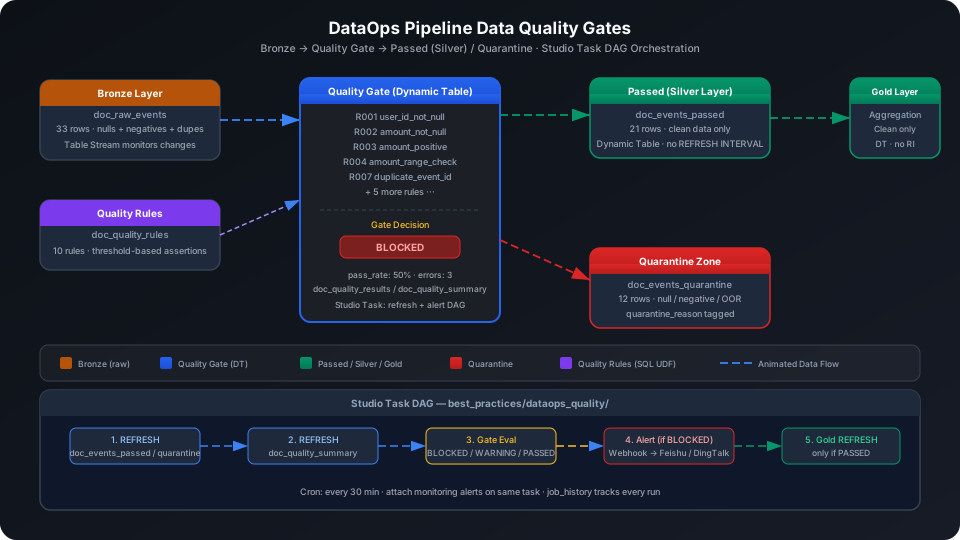
This guide shows how to automatically run assertion checks after each pipeline layer refresh, quarantine non-conforming data, and trigger alerts on gate failures — the core of DataOps closed-loop quality control. Using an e-commerce event stream as the dataset, it demonstrates the full Bronze → Quality Gate → Passed (Silver) / Quarantine build process end to end, covering three key capabilities: Dynamic Table embedded quality filtering, Studio Task DAG dependency orchestration, and information_schema.job_history trend tracking.
Overview
The core question in DataOps data quality is: after a data warehouse refresh, how do you know whether the newly ingested data is trustworthy? Singdata Lakehouse answers this with the following combination:
Problem
Solution
Bronze layer contains null values, negative numbers, and out-of-range anomalies
Dynamic Table embeds WHERE filters so only rows that pass checks flow into Silver
Non-conforming data needs separate storage and manual review
doc_events_quarantine Dynamic Table automatically tags rows with a quarantine_reason
Quality check results need to be traceable and trend-analyzable
doc_quality_results + doc_quality_summary persist check details for every run
Refresh order between pipeline and quality checks must be guaranteed
Studio Task DAG: refresh Passed/Quarantine first → refresh Summary → evaluate gate → trigger Gold
Gate failures need timely push notifications
Studio Task configures a Webhook to push alerts to operations channels
SQL Commands Used
Command / Function
Purpose
Notes
CREATE TABLE
Create the Bronze raw event table, quality rules table, and quality results table
Static tables used as upstream data sources for Dynamic Tables
CREATE DYNAMIC TABLE
Create Passed / Quarantine / Summary layers
Omit REFRESH INTERVAL; scheduling managed by Studio Task
REFRESH DYNAMIC TABLE
Trigger a manual refresh
Use during initial build or debugging
FILTER (WHERE ...)
Conditional filter for aggregate functions; counts rows of each dirty data type
Used to calculate the failed row count for quality rules
SHOW TABLES
View all objects under a Schema
Confirm table creation status
sys.information_schema.job_history
Track the duration and status of each Dynamic Table refresh
Analyze quality check run trends
Prerequisites
All examples in this guide run under the best_practice_dataops_quality Schema.
CREATE SCHEMA IF NOT EXISTS best_practice_dataops_quality;
Bronze Layer: Raw Event Table with Dirty Data
Create Tables
CREATE TABLE IF NOT EXISTS best_practice_dataops_quality.doc_raw_events (
event_id STRING,
user_id STRING,
event_type STRING,
amount DOUBLE,
ts TIMESTAMP,
region STRING,
platform STRING,
status STRING
);
Load Sample Data (Including Dirty Data)
The dataset intentionally includes four categories of quality issues: user_id IS NULL (3 rows), amount IS NULL (4 rows), purchase type with amount < 0 (1 row: EVT012), refund type with amount < 0 (4 rows: EVT003/EVT011/EVT021/EVT028 — legitimate negative refunds), amount > 10000 (2 rows), and logical duplicates across events (EVT001/EVT006/EVT016 have the same user_id + ts + amount).
Import from a local CSV file (recommended):
-- Step 1: Upload the local CSV file to User Volume via SQL PUT
PUT '/path/to/doc_raw_events.csv' TO USER VOLUME FILE 'doc_raw_events.csv';
-- Step 2: COPY INTO the table from User Volume
COPY INTO best_practice_dataops_quality.doc_raw_events
FROM USER VOLUME
USING csv
OPTIONS('header'='true', 'sep'=',', 'nullValue'='')
FILES ('doc_raw_events.csv');
You can also insert a small batch of test data inline (no CSV file required):
SELECT COUNT(*) AS total_rows FROM best_practice_dataops_quality.doc_raw_events;
total_rows
----------
33
Quality Rule Definitions
Quality rules are maintained as table-driven configuration. Each rule includes: a check SQL expression (returning a failure rate), an acceptable threshold, and an alert severity level.
-- Step 1: Upload the local CSV file to User Volume via SQL PUT
PUT '/path/to/doc_quality_rules.csv' TO USER VOLUME FILE 'doc_quality_rules.csv';
-- Step 2: COPY INTO the table from User Volume
COPY INTO best_practice_dataops_quality.doc_quality_rules
FROM USER VOLUME
USING csv
OPTIONS('header'='true', 'sep'=',', 'nullValue'='')
FILES ('doc_quality_rules.csv');
You can also insert a small batch of test data inline (no CSV file required):
INSERT INTO best_practice_dataops_quality.doc_quality_rules VALUES
('R001','user_id_not_null', 'doc_raw_events','user_id',
'COUNT(*) FILTER (WHERE user_id IS NULL) * 1.0 / COUNT(*)',
0.02, 'ERROR', 'user_id null rate must be below 2%'),
('R002','amount_not_null', 'doc_raw_events','amount',
'COUNT(*) FILTER (WHERE amount IS NULL) * 1.0 / COUNT(*)',
0.05, 'ERROR', 'amount null rate must be below 5%'),
('R003','amount_positive', 'doc_raw_events','amount',
'COUNT(*) FILTER (WHERE event_type = ''purchase'' AND amount < 0) * 1.0 / COUNT(*)',
0.0, 'ERROR', 'purchase amount must not be negative'),
('R004','amount_range_check', 'doc_raw_events','amount',
'COUNT(*) FILTER (WHERE amount > 10000) * 1.0 / COUNT(*)',
0.01, 'WARNING', 'amount > 10000 rate must be below 1%'),
('R005','event_type_whitelist', 'doc_raw_events','event_type',
'COUNT(*) FILTER (WHERE event_type NOT IN (''purchase'',''refund'',''login'')) * 1.0 / COUNT(*)',
0.0, 'ERROR', 'event_type must be in whitelist'),
('R006','status_whitelist', 'doc_raw_events','status',
'COUNT(*) FILTER (WHERE status NOT IN (''completed'',''pending'',''error'')) * 1.0 / COUNT(*)',
0.0, 'ERROR', 'status must be in whitelist'),
('R007','duplicate_event_id', 'doc_raw_events','event_id',
'(COUNT(*) - COUNT(DISTINCT event_id)) * 1.0 / COUNT(*)',
0.0, 'ERROR', 'event_id must be unique'),
('R008','ts_not_future', 'doc_raw_events','ts',
'COUNT(*) FILTER (WHERE ts > CURRENT_TIMESTAMP()) * 1.0 / COUNT(*)',
0.0, 'ERROR', 'ts must not be in the future'),
('R009','region_not_null', 'doc_raw_events','region',
'COUNT(*) FILTER (WHERE region IS NULL) * 1.0 / COUNT(*)',
0.0, 'WARNING', 'region should not be null'),
('R010','duplicate_events', 'doc_raw_events','*',
'(COUNT(*) - COUNT(DISTINCT event_id || CAST(ts AS STRING) || COALESCE(user_id,''''))) * 1.0 / COUNT(*)',
0.05,'WARNING', 'logical duplicate rate must be below 5%');
The sql_expr field stores a directly executable SQL expression. The quality check task dynamically assembles and executes it at runtime. threshold = 0.0 means zero-tolerance: any single failing row triggers an alert.
Quality Gate Layer: Passed and Quarantine Dynamic Tables
Passed Layer: Let Only Clean Data into Silver
CREATE DYNAMIC TABLE IF NOT EXISTS best_practice_dataops_quality.doc_events_passed
AS
SELECT
event_id,
user_id,
event_type,
amount,
ts,
region,
platform,
status
FROM best_practice_dataops_quality.doc_raw_events
WHERE user_id IS NOT NULL
AND amount IS NOT NULL
AND (event_type != 'purchase' OR amount >= 0)
AND amount <= 10000
AND event_type IN ('purchase','refund','login')
AND status IN ('completed','pending','error');
⚠️ Note: Do not write REFRESH INTERVAL in the Dynamic Table DDL. Refresh scheduling is managed by Studio Task (see the "Studio Task DAG Orchestration" section).
💡 Tip: The WHERE conditions map directly to quality rules R001–R006. (event_type != 'purchase' OR amount >= 0) enforces amount >= 0 only for purchase events; negative amounts for refund events (refunds) are legitimate and should not be filtered out. When new data is written to the Bronze layer, the Dynamic Table refreshes incrementally, and only rows that pass all gate conditions appear in doc_events_passed.
Quarantine Layer: Store Non-Conforming Data
CREATE DYNAMIC TABLE IF NOT EXISTS best_practice_dataops_quality.doc_events_quarantine
AS
SELECT
event_id,
user_id,
event_type,
amount,
ts,
region,
platform,
status,
CASE
WHEN user_id IS NULL THEN 'null_user_id'
WHEN amount IS NULL THEN 'null_amount'
WHEN event_type = 'purchase' AND amount < 0 THEN 'negative_amount'
WHEN amount > 10000 THEN 'amount_out_of_range'
WHEN event_type NOT IN ('purchase','refund','login') THEN 'invalid_event_type'
ELSE 'other'
END AS quarantine_reason
FROM best_practice_dataops_quality.doc_raw_events
WHERE user_id IS NULL
OR amount IS NULL
OR (event_type = 'purchase' AND amount < 0)
OR amount > 10000
OR event_type NOT IN ('purchase','refund','login');
Quality Summary Dynamic Table
CREATE DYNAMIC TABLE IF NOT EXISTS best_practice_dataops_quality.doc_quality_summary
AS
SELECT
pipeline_run,
check_ts,
COUNT(*) AS total_rules,
COUNT(*) FILTER (WHERE passed = true) AS passed_rules,
COUNT(*) FILTER (WHERE passed = false) AS failed_rules,
COUNT(*) FILTER (WHERE passed = false AND severity = 'ERROR') AS error_count,
COUNT(*) FILTER (WHERE passed = false AND severity = 'WARNING') AS warning_count,
ROUND(COUNT(*) FILTER (WHERE passed = true) * 1.0 / COUNT(*), 4) AS pass_rate,
CASE
WHEN COUNT(*) FILTER (WHERE passed = false AND severity = 'ERROR') > 0 THEN 'BLOCKED'
WHEN COUNT(*) FILTER (WHERE passed = false AND severity = 'WARNING') > 0 THEN 'WARNING'
ELSE 'PASSED'
END AS gate_decision
FROM best_practice_dataops_quality.doc_quality_results
GROUP BY pipeline_run, check_ts;
gate_decision is the final gate verdict: if any ERROR rule fails, the output is BLOCKED. When the downstream Gold layer Studio Task sees BLOCKED, it does not trigger a refresh.
Of the 33 raw events, 23 passed all quality gates and entered the Silver layer; 10 were quarantined. The main quarantine reasons are amount nulls (4 rows: EVT005/EVT014/EVT023/EVT033) and user_id nulls (3 rows), followed by oversized amounts (EVT007/EVT019) and negative purchase amounts (EVT012). Negative refund amounts (EVT003/EVT011/EVT021/EVT028) are legitimate refunds and passed the quality gate into Silver.
In this run, 5 of 10 rules failed, including 3 ERRORs (user_id null rate, amount null rate, negative purchase amount) and 2 WARNINGs (oversized amount, logical duplicates). gate_decision = BLOCKED means the downstream Gold layer should not refresh after this run.
View Rule Details
SELECT rule_id, rule_name, total_rows, failed_rows, fail_rate, threshold, passed, severity
FROM best_practice_dataops_quality.doc_quality_results
ORDER BY passed ASC, severity DESC, fail_rate DESC;
task_gate_eval: Query doc_quality_summary; if gate_decision = 'BLOCKED', abort and trigger an alert
Depends on: task_refresh_summary
task_alert_webhook (optional): Call a Webhook to push gate_decision + fail_rate to an operations channel
Depends on: task_gate_eval (only on the BLOCKED branch)
task_refresh_gold: Execute the downstream Gold layer refresh
Depends on: task_gate_eval (only on the PASSED branch)
Schedule configuration: Cron expression 0/30 * * * ? (trigger every 30 minutes), configured in the task_refresh_gate task properties.
💡 Tip: After attaching monitoring alert rules to Studio Tasks, quality check failures, task timeouts, and node run errors can all be notified through the same task alert configuration, with no separate monitoring setup needed.
⚠️ Note: The REFRESH DYNAMIC TABLE command waits synchronously for the refresh to complete. Studio Task execution logs display the actual refresh duration, making it easy to track performance regressions.
Tracking Quality Trends with information_schema
sys.information_schema.job_history records the execution status of each Dynamic Table refresh and can be used to track quality check run history:
SELECT
job_id,
status,
ROUND(execution_time, 2) AS exec_s,
rows_produced,
rows_inserted,
start_time,
SUBSTR(job_text, 1, 80) AS sql_preview
FROM sys.information_schema.job_history
WHERE pt_date = CAST(CURRENT_DATE() AS STRING)
AND LOWER(job_text) LIKE '%best_practice_dataops_quality%'
ORDER BY start_time DESC
LIMIT 10;
💡 Tip: Wrap the query above in a Dynamic Table doc_pipeline_run_trend, aggregating daily success/failure counts and average duration. This can then be connected directly to a BI tool as the data source for a DataOps quality dashboard.
Do not write REFRESH INTERVAL in Dynamic Table DDL: Manage all Dynamic Table refresh schedules in Studio Task. This lets you attach monitoring alerts and dependency conditions to the same task, avoiding split configuration between DDL and scheduling.
Quarantine data is not auto-repaired: Data in doc_events_quarantine requires manual review to decide whether to fix and write back to the Bronze layer or discard. Run periodic cleanup tasks on the Quarantine table to prevent historical junk data from accumulating.
FILTER (WHERE ...) semantics: COUNT(*) FILTER (WHERE condition) counts only rows satisfying the condition, equivalent to SUM(CASE WHEN condition THEN 1 ELSE 0 END) but with cleaner syntax. Not all aggregate functions support FILTER; MEDIAN does not.
Dynamic Table first full refresh: The first REFRESH DYNAMIC TABLE performs a full upstream scan. Subsequent incremental refreshes process only rows added or changed since the last refresh checkpoint. If the Bronze layer uses INSERT OVERWRITE, the Dynamic Table degrades to a full refresh every time.
Gate thresholds need business-specific tuning: The R001 threshold of 0.02 (2%) is reasonable for real-time data streams, but bulk historical data migrations may need a temporary relaxation. Maintain threshold versions in the doc_quality_rules table and restore strict thresholds after migration.
gate_decision = BLOCKED does not roll back already-refreshed Silver data: BLOCKED only signals the downstream Gold layer not to refresh after this run. Data already in doc_events_passed is not rolled back. To roll back, use Time Travel (RESTORE TABLE ... TO TIMESTAMP) to restore the snapshot from before the last refresh.