Internal Enterprise Data Productization (Data Mesh) Best Practices
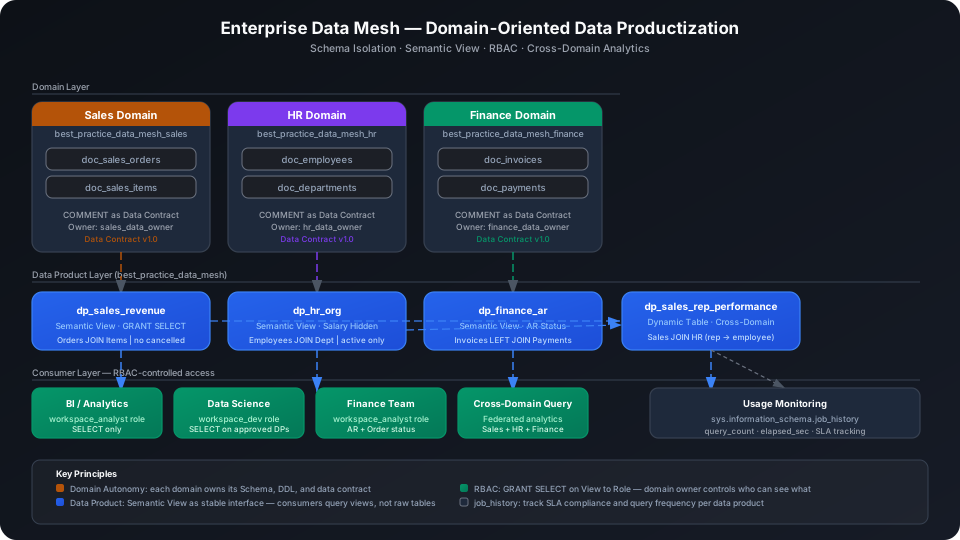
This guide shows how to publish data from each business domain as a "data product." Each domain manages its own Schema, defines data contracts, and controls consumer permissions. Cross-domain analysis uses a unified data product layer for federated queries rather than accessing source tables directly. Using Sales, HR, and Finance as three example business domains, this guide demonstrates the full Domain Schema → Data Contract → Semantic View → RBAC → Cross-Domain Analytics implementation path end to end.
Overview
The core problems with traditional centralized data warehouses, and Singdata Lakehouse solutions under a Data Mesh architecture:
Problem
Singdata Solution
Multiple business teams contending for the same Schema cause mutual interference
Each domain has its own independent Schema (e.g., best_practice_data_mesh_sales), with full autonomy
Semantic View encapsulates business logic and serves as a stable interface for the data product
No fine-grained control over who can see which data
GRANT/REVOKE on specific views; role-level authorization
Cross-domain JOINs require data movement or manual alignment
Dynamic Table does cross-domain Schema federated queries directly; no data copying needed
No visibility into who uses which data product or how often
sys.information_schema.job_history tracks query frequency and SLA compliance
SQL Commands Used
Command / Function
Purpose
Notes
CREATE SCHEMA
Create an independent Schema for each business domain
Foundation of inter-domain isolation
CREATE TABLE
Create source data tables under the domain Schema; column comments serve as the data contract
The COMMENT field is the data contract
CREATE VIEW
Create a Semantic View in the data product layer
Encapsulates business logic; consumers query this view
CREATE DYNAMIC TABLE
Cross-domain aggregation with automatic incremental refresh
Cross-Schema references without data copying
GRANT SELECT ON VIEW
Grant view access to a role
The data product owner controls who can consume it
REVOKE SELECT ON VIEW
Revoke access
Use when a data product is retired or consumers change
SHOW GRANTS ON VIEW
View the current grant list for a view
Audit data product consumers
REFRESH DYNAMIC TABLE
Manually trigger a cross-domain aggregation refresh
Use during initial build or debugging
Prerequisites
This guide uses four Schemas. Each domain Schema is fully independent; the data product layer has its own dedicated Schema.
-- Data product layer (unified interface layer)
CREATE SCHEMA IF NOT EXISTS best_practice_data_mesh;
-- Per-domain Schemas
CREATE SCHEMA IF NOT EXISTS best_practice_data_mesh_sales;
CREATE SCHEMA IF NOT EXISTS best_practice_data_mesh_hr;
CREATE SCHEMA IF NOT EXISTS best_practice_data_mesh_finance;
Sales Domain: Create Tables and Data Contracts
Create Source Tables
The Sales domain manages two tables independently. Column comments (COMMENT) are the primary way to express the data contract. Consumers read them to understand field semantics without relying on verbal agreements.
CREATE TABLE IF NOT EXISTS best_practice_data_mesh_sales.doc_sales_orders (
order_id STRING COMMENT 'Unique order identifier',
customer_id STRING COMMENT 'Customer identifier',
sales_rep_id STRING COMMENT 'Sales representative identifier',
region STRING COMMENT 'Sales region',
order_date DATE COMMENT 'Date the order was placed',
status STRING COMMENT 'Order status: pending/confirmed/shipped/cancelled',
total_amount DOUBLE COMMENT 'Total order amount in USD',
currency STRING COMMENT 'Currency code'
) COMMENT 'Sales domain: order header table (data contract v1.0)';
CREATE TABLE IF NOT EXISTS best_practice_data_mesh_sales.doc_sales_items (
item_id STRING COMMENT 'Unique line item identifier',
order_id STRING COMMENT 'Reference to doc_sales_orders.order_id',
product_id STRING COMMENT 'Product identifier',
product_name STRING COMMENT 'Product display name',
category STRING COMMENT 'Product category',
quantity INT COMMENT 'Ordered quantity',
unit_price DOUBLE COMMENT 'Unit price at time of order',
line_total DOUBLE COMMENT 'quantity * unit_price'
) COMMENT 'Sales domain: order line items table (data contract v1.0)';
The table-level COMMENT includes a version number (data contract v1.0) at the end, making it easy to query the contract version via DESC TABLE and determine whether consumers need to update their code.
Load Sample Data
Import from a local CSV file (recommended):
-- Step 1: Upload the local CSV file to User Volume via SQL PUT
PUT '/path/to/your/doc_sales_orders.csv' TO USER VOLUME FILE 'doc_sales_orders.csv';
-- Step 2: COPY INTO the table from User Volume
COPY INTO best_practice_data_mesh_sales.doc_sales_orders
FROM USER VOLUME
USING csv
OPTIONS('header'='true', 'sep'=',', 'nullValue'='')
FILES ('doc_sales_orders.csv');
You can also insert a small batch of test data inline (no CSV file required):
INSERT INTO best_practice_data_mesh_sales.doc_sales_orders VALUES
('ORD001','CUST001','REP001','APAC', CAST('2026-01-05' AS DATE),'shipped', 15200.00,'USD'),
('ORD002','CUST002','REP001','APAC', CAST('2026-01-08' AS DATE),'shipped', 8500.00,'USD'),
('ORD003','CUST003','REP002','EMEA', CAST('2026-01-12' AS DATE),'confirmed', 23000.00,'USD'),
('ORD004','CUST004','REP003','AMER', CAST('2026-01-15' AS DATE),'cancelled', 4200.00,'USD'),
('ORD005','CUST005','REP002','EMEA', CAST('2026-01-20' AS DATE),'shipped', 31500.00,'USD'),
('ORD006','CUST001','REP001','APAC', CAST('2026-02-03' AS DATE),'shipped', 9800.00,'USD'),
('ORD007','CUST006','REP004','AMER', CAST('2026-02-10' AS DATE),'pending', 6750.00,'USD'),
('ORD008','CUST007','REP003','AMER', CAST('2026-02-14' AS DATE),'shipped', 18400.00,'USD'),
('ORD009','CUST008','REP002','EMEA', CAST('2026-02-18' AS DATE),'confirmed', 11200.00,'USD'),
('ORD010','CUST009','REP005','APAC', CAST('2026-02-25' AS DATE),'shipped', 27600.00,'USD'),
('ORD011','CUST010','REP004','AMER', CAST('2026-03-02' AS DATE),'shipped', 5300.00,'USD'),
('ORD012','CUST002','REP001','APAC', CAST('2026-03-07' AS DATE),'shipped', 14100.00,'USD');
INSERT INTO best_practice_data_mesh_sales.doc_sales_items VALUES
('ITEM001','ORD001','PROD001','Laptop Pro 15','Electronics', 2, 4200.00, 8400.00),
('ITEM002','ORD001','PROD002','USB-C Hub', 'Accessories', 5, 160.00, 800.00),
('ITEM003','ORD001','PROD003','Laptop Bag', 'Accessories', 2, 80.00, 160.00),
('ITEM004','ORD002','PROD004','Wireless Mouse','Peripherals', 10, 85.00, 850.00),
('ITEM005','ORD003','PROD001','Laptop Pro 15', 'Electronics', 4, 4200.00, 16800.00),
('ITEM006','ORD003','PROD005','Monitor 27in', 'Electronics', 2, 3100.00, 6200.00),
('ITEM007','ORD005','PROD001','Laptop Pro 15', 'Electronics', 6, 4200.00, 25200.00),
('ITEM008','ORD005','PROD003','Laptop Bag', 'Accessories', 6, 80.00, 480.00),
('ITEM009','ORD006','PROD002','USB-C Hub', 'Accessories', 3, 160.00, 480.00),
('ITEM010','ORD006','PROD004','Wireless Mouse','Peripherals', 8, 85.00, 680.00),
('ITEM011','ORD008','PROD005','Monitor 27in', 'Electronics', 4, 3100.00, 12400.00),
('ITEM012','ORD010','PROD001','Laptop Pro 15', 'Electronics', 5, 4200.00, 21000.00),
('ITEM013','ORD010','PROD006','Keyboard MX', 'Peripherals', 10, 195.00, 1950.00),
('ITEM014','ORD011','PROD004','Wireless Mouse','Peripherals', 5, 85.00, 425.00),
('ITEM015','ORD012','PROD001','Laptop Pro 15', 'Electronics', 2, 4200.00, 8400.00);
Verify Sales domain data volume:
SELECT COUNT(*) AS order_count FROM best_practice_data_mesh_sales.doc_sales_orders;
SELECT COUNT(*) AS item_count FROM best_practice_data_mesh_sales.doc_sales_items;
The HR domain contains two tables: employees and departments. The salary field stores actual values in the source table but is not exposed to consumers directly. The Semantic View in the data product layer omits this field and outputs only organizational structure dimensions.
CREATE TABLE IF NOT EXISTS best_practice_data_mesh_hr.doc_departments (
dept_id STRING COMMENT 'Unique department identifier',
dept_name STRING COMMENT 'Department name',
cost_center STRING COMMENT 'Finance cost center code',
location STRING COMMENT 'Office location',
head_count INT COMMENT 'Planned headcount'
) COMMENT 'HR domain: department master table (data contract v1.0)';
CREATE TABLE IF NOT EXISTS best_practice_data_mesh_hr.doc_employees (
employee_id STRING COMMENT 'Unique employee identifier',
dept_id STRING COMMENT 'Reference to doc_departments.dept_id',
full_name STRING COMMENT 'Employee full name',
job_title STRING COMMENT 'Job title',
hire_date DATE COMMENT 'Date of hire',
salary DOUBLE COMMENT 'Annual salary in USD',
status STRING COMMENT 'active / on_leave / terminated',
manager_id STRING COMMENT 'Direct manager employee_id (nullable for top level)'
) COMMENT 'HR domain: employee master table (data contract v1.0)';
Load Sample Data
INSERT INTO best_practice_data_mesh_hr.doc_departments VALUES
('DEPT01','Sales', 'CC-SALE','Shanghai', 30),
('DEPT02','Engineering', 'CC-ENG', 'Beijing', 80),
('DEPT03','Finance', 'CC-FIN', 'Shanghai', 20),
('DEPT04','Human Resources','CC-HR', 'Shanghai', 15),
('DEPT05','Marketing', 'CC-MKT', 'Shenzhen', 25);
INSERT INTO best_practice_data_mesh_hr.doc_employees VALUES
('EMP001','DEPT01','Alice Wang', 'Sales Manager', CAST('2020-03-01' AS DATE),180000.00,'active', NULL),
('EMP002','DEPT01','Bob Chen', 'Sales Rep', CAST('2021-06-15' AS DATE),110000.00,'active', 'EMP001'),
('EMP003','DEPT01','Carol Liu', 'Sales Rep', CAST('2021-09-20' AS DATE),108000.00,'active', 'EMP001'),
('EMP004','DEPT02','David Zhang', 'Engineering Lead', CAST('2019-01-10' AS DATE),220000.00,'active', NULL),
('EMP005','DEPT02','Eva Sun', 'Senior Engineer', CAST('2020-07-22' AS DATE),180000.00,'active', 'EMP004'),
('EMP006','DEPT02','Frank Zhao', 'Engineer', CAST('2022-04-05' AS DATE),140000.00,'active', 'EMP004'),
('EMP007','DEPT03','Grace Li', 'Finance Manager', CAST('2018-11-01' AS DATE),190000.00,'active', NULL),
('EMP008','DEPT03','Henry Wu', 'Accountant', CAST('2021-02-28' AS DATE),120000.00,'active', 'EMP007'),
('EMP009','DEPT04','Ivy Zhou', 'HR Manager', CAST('2019-05-15' AS DATE),160000.00,'active', NULL),
('EMP010','DEPT04','Jack Luo', 'HR Specialist', CAST('2022-08-01' AS DATE),100000.00,'on_leave','EMP009'),
('EMP011','DEPT05','Karen Xu', 'Marketing Manager', CAST('2020-10-12' AS DATE),170000.00,'active', NULL),
('EMP012','DEPT01','Leo Ma', 'Sales Rep', CAST('2023-01-16' AS DATE),105000.00,'active', 'EMP001');
Finance Domain: Create Tables and Data Contracts
Create Source Tables
The Finance domain manages two tables: invoices and payments. They are linked by invoice_id to form an accounts receivable (AR) system.
CREATE TABLE IF NOT EXISTS best_practice_data_mesh_finance.doc_invoices (
invoice_id STRING COMMENT 'Unique invoice identifier',
order_id STRING COMMENT 'Reference to sales domain order_id',
customer_id STRING COMMENT 'Customer identifier',
issue_date DATE COMMENT 'Invoice issue date',
due_date DATE COMMENT 'Payment due date',
amount DOUBLE COMMENT 'Invoice amount in USD',
status STRING COMMENT 'draft / issued / paid / overdue'
) COMMENT 'Finance domain: invoice header table (data contract v1.0)';
CREATE TABLE IF NOT EXISTS best_practice_data_mesh_finance.doc_payments (
payment_id STRING COMMENT 'Unique payment identifier',
invoice_id STRING COMMENT 'Reference to doc_invoices.invoice_id',
payment_date DATE COMMENT 'Date payment was received',
amount_paid DOUBLE COMMENT 'Amount paid in USD',
method STRING COMMENT 'Payment method: bank_transfer / credit_card / check',
status STRING COMMENT 'completed / failed / pending'
) COMMENT 'Finance domain: payment records table (data contract v1.0)';
Load Sample Data
INSERT INTO best_practice_data_mesh_finance.doc_invoices VALUES
('INV001','ORD001','CUST001', CAST('2026-01-06' AS DATE), CAST('2026-02-06' AS DATE), 15200.00,'paid'),
('INV002','ORD002','CUST002', CAST('2026-01-09' AS DATE), CAST('2026-02-09' AS DATE), 8500.00,'paid'),
('INV003','ORD003','CUST003', CAST('2026-01-13' AS DATE), CAST('2026-02-13' AS DATE), 23000.00,'paid'),
('INV004','ORD005','CUST005', CAST('2026-01-21' AS DATE), CAST('2026-02-21' AS DATE), 31500.00,'overdue'),
('INV005','ORD006','CUST001', CAST('2026-02-04' AS DATE), CAST('2026-03-04' AS DATE), 9800.00,'paid'),
('INV006','ORD008','CUST007', CAST('2026-02-15' AS DATE), CAST('2026-03-15' AS DATE), 18400.00,'issued'),
('INV007','ORD009','CUST008', CAST('2026-02-19' AS DATE), CAST('2026-03-19' AS DATE), 11200.00,'paid'),
('INV008','ORD010','CUST009', CAST('2026-02-26' AS DATE), CAST('2026-03-26' AS DATE), 27600.00,'issued'),
('INV009','ORD011','CUST010', CAST('2026-03-03' AS DATE), CAST('2026-04-03' AS DATE), 5300.00,'paid'),
('INV010','ORD012','CUST002', CAST('2026-03-08' AS DATE), CAST('2026-04-08' AS DATE), 14100.00,'draft');
INSERT INTO best_practice_data_mesh_finance.doc_payments VALUES
('PAY001','INV001', CAST('2026-01-28' AS DATE), 15200.00,'bank_transfer','completed'),
('PAY002','INV002', CAST('2026-02-01' AS DATE), 8500.00,'credit_card', 'completed'),
('PAY003','INV003', CAST('2026-02-10' AS DATE), 23000.00,'bank_transfer','completed'),
('PAY004','INV005', CAST('2026-02-25' AS DATE), 9800.00,'bank_transfer','completed'),
('PAY005','INV007', CAST('2026-03-05' AS DATE), 11200.00,'credit_card', 'completed'),
('PAY006','INV009', CAST('2026-03-20' AS DATE), 5300.00,'check', 'completed');
Data Product Layer: Semantic Views
The data product layer (best_practice_data_mesh) is the sole access entry point for consumers. Each data product is a Semantic View that encapsulates business filtering, JOIN logic, and calculations. Consumers see only the "cleaned" fields and are not exposed to the physical table structure inside the domain.
Sales Data Product: Order Revenue View
CREATE OR REPLACE VIEW best_practice_data_mesh.dp_sales_revenue AS
SELECT
o.order_id,
o.customer_id,
o.region,
o.order_date,
o.status,
o.total_amount,
i.product_name,
i.category,
i.quantity,
i.unit_price,
i.line_total
FROM best_practice_data_mesh_sales.doc_sales_orders o
JOIN best_practice_data_mesh_sales.doc_sales_items i
ON o.order_id = i.order_id
WHERE o.status NOT IN ('cancelled');
This view does two things: it JOINs order headers with line items, and it filters out cancelled orders. Consumers do not need to worry about the source table JOIN logic, and cancelled orders cannot accidentally affect revenue calculations.
Verify revenue by region:
SELECT region, COUNT(*) AS orders, ROUND(SUM(total_amount), 2) AS revenue
FROM best_practice_data_mesh.dp_sales_revenue
GROUP BY region ORDER BY revenue DESC;
SELECT category, COUNT(*) AS item_lines, ROUND(SUM(line_total), 2) AS category_revenue
FROM best_practice_data_mesh.dp_sales_revenue
GROUP BY category ORDER BY category_revenue DESC;
The Electronics category contributes 98,400 USD in revenue, accounting for more than 94% of total sales.
HR Data Product: Organization Structure View
The HR domain only exposes organizational dimensions to the outside. The salary field does not appear in the data product view. Only employees with status = 'active' are returned; on_leave and terminated records are retained within the domain.
CREATE OR REPLACE VIEW best_practice_data_mesh.dp_hr_org AS
SELECT
e.employee_id,
e.dept_id,
d.dept_name,
d.cost_center,
d.location,
e.job_title,
e.hire_date,
e.status,
e.manager_id
FROM best_practice_data_mesh_hr.doc_employees e
JOIN best_practice_data_mesh_hr.doc_departments d
ON e.dept_id = d.dept_id
WHERE e.status = 'active';
Verify headcount by department:
SELECT dept_name, COUNT(*) AS headcount, location
FROM best_practice_data_mesh.dp_hr_org
GROUP BY dept_name, location ORDER BY headcount DESC;
⚠️ Note: The HR data product view returns only active employees. Employees with on_leave status (such as Jack Luo) are not included in consumer results. If a consumer needs to include resigned or on-leave records, they must request a dedicated view from the HR domain owner or add a versioned option to the data product definition.
Finance Data Product: Accounts Receivable View
The Finance domain aggregates the invoice and payment tables and exposes the outstanding balance and AR status for each invoice.
CREATE OR REPLACE VIEW best_practice_data_mesh.dp_finance_ar AS
SELECT
inv.invoice_id,
inv.order_id,
inv.customer_id,
inv.issue_date,
inv.due_date,
inv.amount,
inv.status AS invoice_status,
COALESCE(SUM(pay.amount_paid), 0) AS total_paid,
inv.amount - COALESCE(SUM(pay.amount_paid), 0) AS outstanding_balance,
CASE
WHEN inv.status = 'paid' THEN 'CLOSED'
WHEN inv.status = 'overdue' THEN 'OVERDUE'
WHEN CURRENT_DATE() > inv.due_date THEN 'OVERDUE'
ELSE 'OPEN'
END AS ar_status
FROM best_practice_data_mesh_finance.doc_invoices inv
LEFT JOIN best_practice_data_mesh_finance.doc_payments pay
ON inv.invoice_id = pay.invoice_id
GROUP BY
inv.invoice_id, inv.order_id, inv.customer_id,
inv.issue_date, inv.due_date, inv.amount, inv.status;
Verify accounts receivable summary:
SELECT ar_status, COUNT(*) AS cnt, ROUND(SUM(outstanding_balance), 2) AS total_outstanding
FROM best_practice_data_mesh.dp_finance_ar
GROUP BY ar_status ORDER BY total_outstanding DESC;
There are currently 4 overdue invoices with a total outstanding balance of 91,600 USD, which the finance team needs to prioritize for collection.
View details:
SELECT invoice_id, customer_id, amount, total_paid, outstanding_balance, ar_status
FROM best_practice_data_mesh.dp_finance_ar
ORDER BY ar_status, outstanding_balance DESC;
Data product owners use GRANT SELECT ON VIEW to control who can access which data product. The grant target is the view, not the source table. Even if a consumer has Schema-level access, they cannot bypass the view to query the source table directly because SELECT on the source table has not been granted.
Grant Data Products to Consumer Roles
-- Grant the three data product views to the analyst role
GRANT SELECT ON VIEW best_practice_data_mesh.dp_sales_revenue TO ROLE workspace_analyst;
GRANT SELECT ON VIEW best_practice_data_mesh.dp_hr_org TO ROLE workspace_analyst;
GRANT SELECT ON VIEW best_practice_data_mesh.dp_finance_ar TO ROLE workspace_analyst;
Verify Grant Results
SHOW GRANTS ON VIEW best_practice_data_mesh.dp_sales_revenue;
When a data product is retired or consumer permissions need to change:
REVOKE SELECT ON VIEW best_practice_data_mesh.dp_sales_revenue FROM ROLE workspace_analyst;
⚠️ Note: GRANT/REVOKE applies to the view object, not to the source tables referenced by the view. If a consumer role already has ALL privileges on the source Schema through another path (such as workspace_dev), revoking the view does not prevent direct queries to the source table. When designing permissions, make sure source tables in each domain Schema are accessible only to the domain owner.
Cross-Domain Joint Analysis
Cross-Domain Correlation Query: Orders + AR Status
Data products from different domains can be JOINed directly without copying data. The Finance team queries which orders have collection risk:
CREATE OR REPLACE VIEW best_practice_data_mesh.dp_cross_domain_order_ar AS
SELECT
s.order_id,
s.customer_id,
s.region,
s.order_date,
ROUND(s.total_amount, 2) AS order_amount,
f.invoice_status,
ROUND(f.total_paid, 2) AS total_paid,
ROUND(f.outstanding_balance, 2) AS outstanding_balance,
f.ar_status
FROM best_practice_data_mesh.dp_sales_revenue s
LEFT JOIN best_practice_data_mesh.dp_finance_ar f
ON s.order_id = f.order_id;
Query overdue or open orders:
SELECT order_id, customer_id, order_amount, invoice_status, outstanding_balance, ar_status
FROM best_practice_data_mesh.dp_cross_domain_order_ar
WHERE ar_status IN ('OVERDUE', 'OPEN')
ORDER BY outstanding_balance DESC;
ORD005 for CUST005 (31,500 USD) is overdue and uncollected — the highest-risk receivable.
Cross-Domain Dynamic Table: Sales Rep Performance
The cross-domain Dynamic Table references source tables from both the Sales and HR domains directly, aggregates incrementally, and requires no manual ETL.
CREATE DYNAMIC TABLE IF NOT EXISTS best_practice_data_mesh.dp_sales_rep_performance
AS
SELECT
o.sales_rep_id,
emp.full_name AS rep_name,
emp.dept_id,
o.region,
COUNT(DISTINCT o.order_id) AS order_count,
ROUND(SUM(o.total_amount), 2) AS total_revenue,
ROUND(AVG(o.total_amount), 2) AS avg_order_value,
SUM(CASE WHEN o.status = 'shipped' THEN 1 ELSE 0 END) AS shipped_count
FROM best_practice_data_mesh_sales.doc_sales_orders o
LEFT JOIN best_practice_data_mesh_hr.doc_employees emp
ON o.sales_rep_id = emp.employee_id
WHERE o.status != 'cancelled'
GROUP BY o.sales_rep_id, emp.full_name, emp.dept_id, o.region;
⚠️ Note: In this example, sales_rep_id (e.g., REP001) and employee_id (e.g., EMP001) use different encoding conventions, causing rep_name to be NULL in JOIN results. In a real Data Mesh scenario, ID alignment for cross-domain JOINs is a core data product design challenge. The Sales domain must specify the sales_rep_id encoding convention in its data contract, or the HR domain must provide an ID mapping view. Both parties resolve this through data contract negotiation.
SELECT sales_rep_id, rep_name, region, order_count, total_revenue, avg_order_value, shipped_count
FROM best_practice_data_mesh.dp_sales_rep_performance
ORDER BY total_revenue DESC;
REP002 and REP001 are the top sales reps for EMEA and APAC, contributing 65,700 USD and 47,600 USD respectively.
Configure Scheduled Refresh (Studio Task)
Manage Dynamic Table refresh scheduling by creating tasks in Studio rather than writing REFRESH INTERVAL in the DDL. Steps:
Go to Development → Tasks and select the skill_test profile.
Create a new task under the path best_practices/data_mesh/ named refresh_dp_sales_rep_performance.
Set the task SQL to: REFRESH DYNAMIC TABLE best_practice_data_mesh.dp_sales_rep_performance;
Configure the Cron schedule (for example, hourly: 0 * * * *).
Attach data quality rules (for example, order_count > 0) and alert notifications to the same task.
💡 Tip: Binding refresh tasks and data quality rules to the same Studio Task lets you manage everything in one place: scheduled trigger → refresh → quality check → alert notification, with no additional monitoring scripts.
Data Product Usage Monitoring
Use sys.information_schema.job_history to track data product query frequency and SLA compliance:
SELECT
SUBSTR(job_text, 1, 60) AS sql_preview,
COUNT(*) AS query_count,
ROUND(AVG(execution_time), 3) AS avg_elapsed_sec,
MAX(rows_produced) AS max_rows_produced,
SUM(CASE WHEN status = 'SUCCEED' THEN 1 ELSE 0 END) AS success_count
FROM sys.information_schema.job_history
WHERE workspace_name = 'quick_start'
AND pt_date = CURRENT_DATE()
AND job_text LIKE '%best_practice_data_mesh%'
GROUP BY SUBSTR(job_text, 1, 60)
ORDER BY query_count DESC
LIMIT 10;
Filter query records for data product views using job_text LIKE '%dp_%' to calculate each product's daily average query count and P99 response time, which can serve as inputs for SLA reports.
Object Summary
All objects in the best_practice_data_mesh data product layer:
Three Semantic Views (is_dynamic = false) correspond to single-domain data products. One Dynamic Table (dp_sales_rep_performance) handles cross-domain aggregation. One cross-domain View (dp_cross_domain_order_ar) supports joint queries between Sales and Finance.
Notes
Source tables are not granted to consumers: GRANT applies only to data product views. SELECT on source tables within the domain is held only by the domain owner. If a role can access the source Schema through inherited permissions, revoke access explicitly at the Schema level or isolate it through role design.
Version your data contracts: Add a version number to the end of the table-level COMMENT (e.g., data contract v1.0). When a column COMMENT changes, update the version number and notify authorized consumers. Consumers can see the contract version in DESC TABLE or SHOW TABLES and adapt accordingly.
Cross-domain ID alignment is an implicit coupling point: When different domains use different entity encoding conventions (such as REP001 vs EMP001), cross-domain JOINs must establish an alignment path through the data contract, or one side must provide an ID mapping view. This is the most common friction point in Data Mesh implementation and requires cross-domain negotiation; neither side can make unilateral assumptions.
Permissions for cross-domain Dynamic Table references: dp_sales_rep_performance references tables from both best_practice_data_mesh_sales and best_practice_data_mesh_hr. The user creating the Dynamic Table needs SELECT on source tables in both domains. If the Dynamic Table is created by the data product layer technical team, they must request read-only access from both domains in advance.
View depth and performance: dp_cross_domain_order_ar queries two views (dp_sales_revenue and dp_finance_ar). Each query expands two view layers before executing. If query frequency is high and performance becomes a bottleneck, convert the cross-domain union view to a Dynamic Table to trade materialized results for faster queries.