
Data Governance
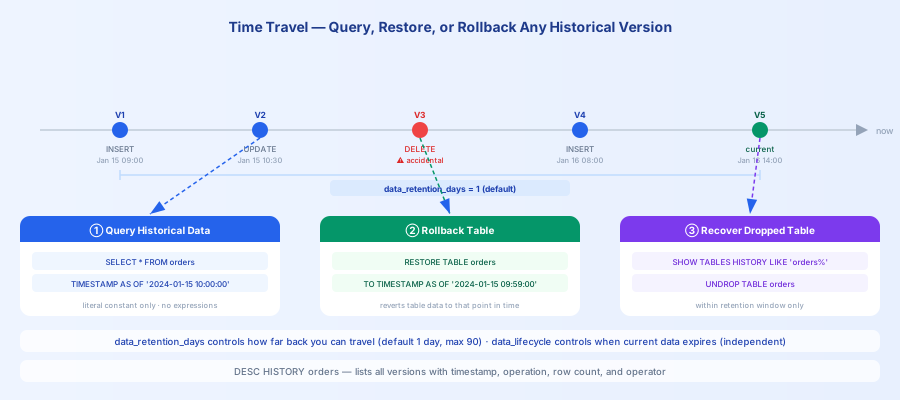
Data governance features help you manage historical versions, lifecycle, and change tracking for your data. The core capability is Time Travel — based on the MVCC mechanism, every data change retains historical versions, allowing you to query the data state at any point in time, recover accidentally deleted data, or roll back unintended operations.
This Section
| Page | Description |
|---|---|
| Time Travel Overview | Time Travel feature introduction, retention period configuration, supported operations |
| Time Travel | Quick examples: query historical data, roll back a table, recover a dropped table |
| Time Travel Concept | MVCC working mechanism, three core capabilities (query/recover/rollback), typical scenarios |
| Data Lifecycle Management | Automatically reclaim expired data to control storage costs |
Quick Reference
| What I want to do | Method | Reference |
|---|---|---|
| Query historical data at a specific point in time | SELECT ... TIMESTAMP AS OF '...' | TIME TRAVEL |
| View the version history of a table | DESC HISTORY table_name | DESC HISTORY |
| Recover an accidentally dropped table | UNDROP TABLE table_name | UNDROP TABLE |
| Roll back table data to a historical version | RESTORE TABLE ... TO TIMESTAMP AS OF '...' | RESTORE TABLE |
| Set the number of days to retain historical data | ALTER TABLE ... SET PROPERTIES ('data_retention_days'='7') | Time Travel Overview |
| Automatically clean up expired data | ALTER TABLE ... SET PROPERTIES ('data_lifecycle'='30') | Data Lifecycle Management |
Two Easily Confused Concepts
| Concept | Purpose | Parameter | Default |
|---|---|---|---|
data_retention_days | Controls how long Time Travel can access historical versions; versions older than this are physically deleted | 0–90 days | 1 day |
data_lifecycle | Controls how long table data survives from its last modification time; data is automatically reclaimed after expiry | Positive integer (days) | Disabled (-1) |
Common Scenarios
Recovering after accidental data deletion
Recovering after an accidental DROP TABLE
Tracing data change history