
Multi-Cloud Unified Data Lake Acceleration
The core concept of "data lake acceleration" is no data migration—directly querying and processing files in existing object storage using Singdata Lakehouse's Serverless compute, replacing traditional Spark/Hive ETL and Presto/Trino ad hoc queries.
Alibaba Cloud OSS, Tencent Cloud COS, and AWS S3—the three mainstream object storage services—are unified through a single approach: Volume mount → Pipe continuous ingestion → Dynamic Table incremental aggregation. Aside from different parameter names when creating Storage Connections, all other SQL syntax is identical.
Why a Multi-Cloud Unified Approach
- Enterprise data is spread across multiple cloud providers and needs a unified query entry point
- Different cloud object storage APIs differ, but Lakehouse data processing logic should remain consistent
- Reduces the mental overhead and operational costs of switching between cloud environments
Singdata Lakehouse's abstraction layer solves this perfectly: the same SQL, with just a Connection parameter change, runs on different clouds.
SQL Commands Involved
| Command / Function | Purpose | Multi-Cloud Differences |
|---|---|---|
CREATE STORAGE CONNECTION | Establish object storage authentication channel | The only step with differences (different parameter names) |
CREATE EXTERNAL VOLUME | Mount object storage path | Syntax fully unified (only change protocol prefix) |
COPY INTO VOLUME | Export data to Volume | Fully unified |
SELECT FROM VOLUME | Directly query Volume files | Fully unified |
DIRECTORY() | List files in a Volume | Fully unified |
COPY INTO | Import data from Volume to table | Fully unified |
CREATE PIPE | Create continuous ingestion pipeline | Fully unified |
ALTER PIPE | Pause/resume Pipe | Fully unified |
load_history() | View historical load records | Fully unified |
CREATE DYNAMIC TABLE | Create incremental refresh aggregation table | Fully unified |
REFRESH DYNAMIC TABLE | Manually trigger refresh | Fully unified |
Core Architecture
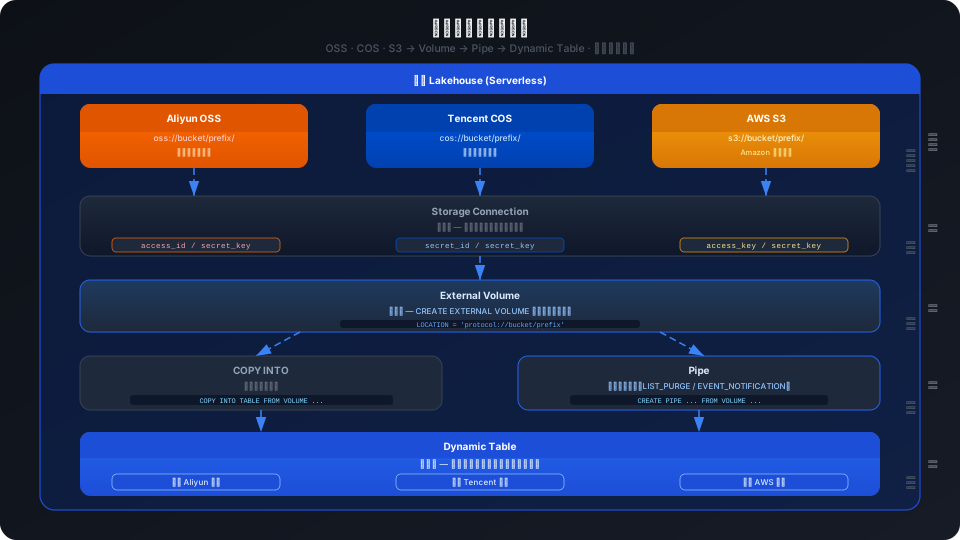
Cross-Cloud Comparison
The exact same Volume + Pipe test cases were executed on Alibaba Cloud Shanghai (f8866243) and Tencent Cloud Shanghai (0c3c358d):
Configuration Differences
| Configuration | Alibaba Cloud OSS | Tencent Cloud COS |
|---|---|---|
| Connection type | TYPE OSS | TYPE COS |
| Auth parameter names | access_id / access_key (lowercase) | ACCESS_KEY / SECRET_KEY (uppercase) |
| Endpoint | ENDPOINT = 'oss-cn-shanghai.aliyuncs.com' | No ENDPOINT required |
| Region parameter | Embedded in ENDPOINT | REGION = 'ap-shanghai' |
| APP_ID | Not applicable | APP_ID = '1253896122' |
| Volume location syntax | LOCATION 'oss://bucket/path/' | LOCATION 'cos://bucket-appid/path/' |
| Recommended Endpoint | oss-cn-shanghai-internal.aliyuncs.com (internal) | Auto-resolved, no configuration needed |
Feature Consistency
| Test Item | Alibaba Cloud OSS | Tencent Cloud COS | Conclusion |
|---|---|---|---|
| Storage Connection creation | ✅ | ✅ | Different parameter names, otherwise identical |
| External Volume creation | ✅ | ✅ | Syntax fully identical |
| COPY INTO VOLUME export CSV | ✅ | ✅ | Identical |
| COPY INTO VOLUME export Parquet | ✅ | ✅ | Identical |
| DIRECTORY() file listing | ✅ | ✅ | Identical |
| SELECT FROM VOLUME (CSV) | ✅ f0-f4 column names | ✅ f0-f4 column names | Identical |
| SELECT FROM VOLUME (Parquet) | ✅ preserves column names | ✅ preserves column names | Identical |
| COPY INTO TABLE from Volume | ✅ | ✅ | Identical |
| PIPE LIST_PURGE creation | ✅ | ✅ | Identical |
| PIPE load trigger | ✅ ~30s | ✅ ~30s | Identical |
| PIPE PURGE delete source files | ✅ | ✅ | Identical |
| PIPE load_history dedup | ✅ | ✅ | Identical |
| PIPE pause/resume | ✅ | ✅ | Identical |
| Dynamic Table incremental refresh | ✅ | ✅ | Identical |
Key finding: Aside from different parameter names when creating the Connection, all other 12 test items are completely identical. Volume, Pipe, and Dynamic Table SQL syntax has no differences.
Unified Implementation
Step 1: Create Storage Connection (the only step with differences)
Step 2: Create External Volume (unified syntax across all three clouds)
Step 3: Data Import/Export (fully unified)
Step 4: Pipe Continuous Ingestion (fully unified)
Step 5: Dynamic Table Incremental Aggregation (fully unified)
Best Practices for Multi-Cloud Unification
1. Code Reuse Strategy
Only the Connection creation SQL needs to be written per cloud. The remaining 90% of the code can be reused directly.
2. Naming Convention Recommendations
| Object | Convention | Example |
|---|---|---|
| Storage Connection | <cloud>_<purpose> | oss_prod_conn, cos_archive_conn |
| External Volume | <source_system>_vol | orders_vol, logs_vol |
| Pipe | <source_system>_pipe | orders_pipe, logs_pipe |
Do not embed cloud provider information in Volume/Pipe names—these objects may appear in multi-cloud reuse scenarios.
3. Cost Optimization
| Strategy | Description |
|---|---|
| Use internal Endpoints | Alibaba Cloud: *-internal.aliyuncs.com, no egress fees, lower latency |
| T+1 refresh frequency | Most analytics scenarios do not need minute-level refresh; 1 DAY is sufficient |
| PURGE=true | LIST_PURGE mode auto-deletes source files, prevents OSS/COS storage accumulation |
| GP type Virtual Cluster | Use DEFAULT (GENERAL type), Serverless on-demand billing |
| Keep file size at 128-256MB | Large CSV/Parquet files are 3-5x more efficient than many small files |
4. Security Recommendations
- Do not use root account AK/SK; create sub-accounts with minimum permissions (Bucket read + specific directory write)
- Internal Endpoints can bind VPC policies to restrict access sources
- AK/SK in Storage Connection is not visible in
SHOW STORAGE CONNECTIONS(masked) - When using AWS S3, prefer IAM Role (
ROLE_ARN) over long-lived AK/SK
FAQ
Q: How is cross-cloud data transfer latency calculated?
Volume does not migrate data—files always remain in the original object storage. Query network latency depends on the link from the Lakehouse instance's region to the object storage. Same-region internal Endpoint is recommended (such as oss-cn-shanghai-internal.aliyuncs.com), with latency typically under 10ms.
Q: Can you access Tencent Cloud COS from an Alibaba Cloud instance?
Not supported. Storage Connection must be in the same cloud provider as the Lakehouse instance. For cross-cloud queries, the following alternatives are available:
- Create a Lakehouse instance in the target cloud, use External Catalog for federated queries
- Sync data cross-cloud to Lakehouse internal tables via data integration (Studio Sync)
- Use Private Link to bridge the network, then access via External Schema
Q: Is EVENT_NOTIFICATION mode for Pipe supported on all three clouds?
| Cloud | LIST_PURGE | EVENT_NOTIFICATION |
|---|---|---|
| Alibaba Cloud OSS | ✅ | ✅ (requires MNS queue configuration) |
| Tencent Cloud COS | ✅ | ❌ |
| AWS S3 | ✅ | ✅ (requires SQS queue configuration) |
EVENT_NOTIFICATION mode supports Alibaba Cloud OSS and AWS S3, with lower latency (near real-time) and without deleting source files. Tencent Cloud COS does not support it yet.
Q: Why does COPY INTO VOLUME require SUBDIRECTORY?
COPY INTO VOLUME without the SUBDIRECTORY clause will throw Syntax error at or near 'FROM'. This is a mandatory SQL parser requirement, unrelated to the cloud platform. To export to the Volume root path, use SUBDIRECTORY '/'.
Related Documents
- Volume + Pipe Data Lake Acceleration Practice — Alibaba Cloud OSS end-to-end walkthrough
- Medallion Pure SQL DT Architecture — Bronze→Silver→Gold three-layer modeling
- Create Storage Connection — Complete syntax for all three clouds
- Create External Volume — Parameter details
- Pipe Overview — LIST_PURGE vs EVENT_NOTIFICATION
- Alibaba Cloud OSS Connection — OSS-specific configuration
- Tencent Cloud COS Connection — COS-specific configuration
- AWS S3 Connection — S3-specific configuration