
Data Pipelines and Change Data Capture
This chapter covers two types of objects: Pipe (continuous data ingestion) and Table Stream (change data capture). Pipe automatically writes data from external files or message streams into tables; Table Stream records incremental changes on a table for downstream incremental computation.
Pipe is the continuous data ingestion object in Singdata Lakehouse. Once created, it runs automatically, continuously reading data from object storage (OSS/COS/S3) or Kafka and writing it to a target table — no manual triggering required.
Analogy: Pipe is like a continuously running conveyor belt. Once files are uploaded to an OSS subdirectory, Pipe automatically detects and loads them within about 30 seconds. When Kafka messages are written, Pipe continuously consumes and writes them in batch intervals. Unlike scheduled tasks, Pipe runs persistently and processes new data as it arrives.
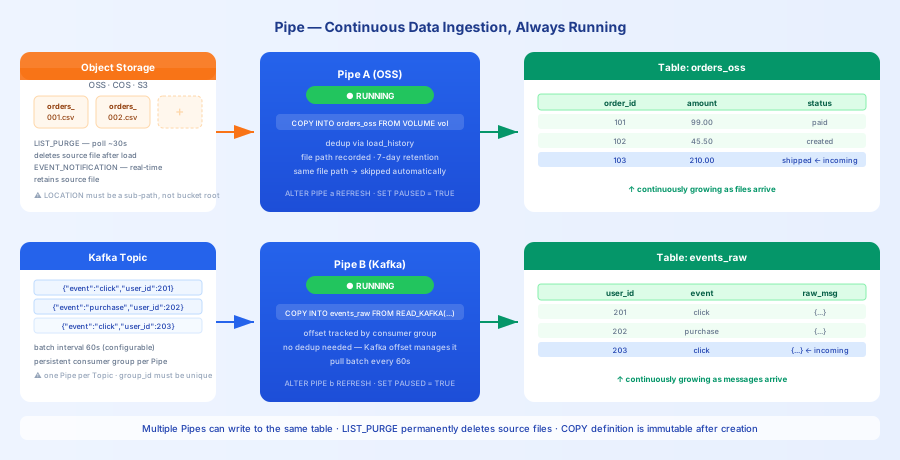
Pipe Types
| Type | Data Source | Detection Latency | Typical Use Case |
|---|---|---|---|
| Object Storage Pipe | OSS / COS / S3 | ~30 seconds | Automatic ingestion of periodically uploaded CSV/Parquet/JSON files |
| Kafka Pipe | Kafka Topic | Per batch interval (default 60 seconds) | Real-time ingestion of logs and business events |
Pipe and Studio sync tasks are functionally equivalent. The difference is: Pipe is created and managed via SQL DDL, suitable for code-based pipeline management; Studio sync tasks are configured through a visual interface and support more data sources (including relational databases).
Continuous Ingestion from Object Storage
Prerequisites: Create a Storage Connection → Create an External Volume (must point to a specific subdirectory, not the bucket root) → Create the target table → Create the Pipe.
Once created, the Pipe starts running immediately and checks the Volume for new files approximately every 30 seconds.
Two Ingestion Modes
| Mode | Trigger | Source File Handling | Use Case |
|---|---|---|---|
LIST_PURGE | Periodic polling scan (~30 seconds) | Deletes source files after ingestion | Simple configuration, suitable for most scenarios |
EVENT_NOTIFICATION | Object storage event notification (near real-time) | Keeps source files | When source files need to be retained; OSS and S3 only |
Deduplication Mechanism
Pipe records ingested file paths in load_history. The same file path is only imported once — re-uploading the same file will not trigger a duplicate import. load_history records are retained for 7 days.
Continuous Consumption from Kafka
Pipe creates a persistent consumer group, pulling data from a Kafka Topic in batches and writing it to a table.
Monitoring and Management
Key fields in DESC PIPE output:
| Field | Description |
|---|---|
pipe_status | RUNNING / PAUSED |
pipe_kind | VOLUME (object storage) or KAFKA |
properties | Configuration such as ingest_mode, vcluster |
input_name | Data source (Volume or Kafka Topic) |
output_name | Full path of the target table |
invalid_reason | Error reason when Pipe is in an error state |
To view Pipe execution history: filter job history by query_tag, in the format pipe.workspace_name.schema_name.pipe_name.
Notes
- Volume must point to a subdirectory:
LOCATIONcannot be the bucket root, otherwise Pipe creation will fail - Each Pipe requires its own Volume: Different Pipes cannot share the same Volume
- COPY statement cannot be modified: To change the ingestion logic, drop and recreate the Pipe
- Data loading order is not guaranteed
- Recommended file sizes: gzip compressed files should be under 50MB; uncompressed CSV/Parquet files should be 128MB–256MB
- EVENT_NOTIFICATION mode requires additional MNS message queue configuration, supports only Alibaba Cloud OSS and AWS S3, and must use RoleARN authorization
Related Documentation
- Object Storage Pipe — Full configuration for LIST_PURGE and EVENT_NOTIFICATION
- Kafka Pipe — READ_KAFKA parameter reference, consumer offset management
- Pipe Syntax Reference — Complete DDL syntax
- Table Stream — Change data capture, CDC-driven incremental computation