
Customer Complaint Intelligent Labeling
Based on Singdata Lakehouse Dynamic Table + AI_COMPLETE, this solution converts manual classification and labeling of customer service tickets into a fully automated SQL pipeline. New complaints are written in real time, incrementally inferred, and labels continuously updated. End-to-end latency from data ingestion to classification completion is ≤5 minutes, with an implementation lead time of ≤1 day.
1. Business Background
E-commerce and retail platforms handle massive volumes of customer service tickets daily. Complaint classification is the foundational data for operational decisions. Correct category labels determine ticket routing, response SLAs, root-cause attribution, and product improvement priorities.
| Industry | Typical Scenario | Core Complaint Types |
|---|---|---|
| E-commerce Platforms | Order after-sales, returns/exchanges | Logistics delays, product quality, refund progress |
| Retail Chains | In-store experience, home delivery | Service attitude, product mismatch, damaged packaging |
| Cross-border E-commerce | International logistics, customs clearance | Logistics anomalies, customs duties, false descriptions |
| Local Services | Food delivery, in-store services | Delivery timeout, food issues, courier attitude |
2. Industry Pain Points
Quantitative Data
- Manual labeling accuracy is only 60–70%, while AI auto-labeling reaches 89–96% (Unthread 2026)
- Each misrouted ticket costs $22+ (including reassignment, repeated communication, customer churn)
- Traditional manual processing costs $6–12 per ticket, automation reduces this to $0.25–0.50, a cost reduction of ~96%
- About 30% of backlogged tickets require reassignment due to misclassification (Unthread 2026)
- Mid-sized e-commerce platforms typically handle 5,000–50,000 tickets per day, with peaks 10x higher during promotions
Three Key Flaws of Traditional Approaches
Flaw 1: Manual labeling efficiency bottleneck Customer service agents handle approximately 19–25 tickets per day, with severe backlogs during peak periods. Manual labeling relies on subjective judgment — the same complaint may receive different classifications from different agents, resulting in poor data quality for downstream analysis.
Flaw 2: High rule engine maintenance cost Keyword-rule solutions cannot keep up with new types of complaints (e.g., livestream commerce disputes, AI product review false positives). The rule library requires continuous manual maintenance, and rule conflicts are hard to troubleshoot.
Flaw 3: Data silos, no real-time feedback CRM systems, customer service tools, and data warehouses each operate independently. Complaint data typically lags T+1 from generation to analysis reports. Critical signals like surges in quality complaints cannot trigger real-time business responses.
Transition
The key to solving these issues is: embedding LLM semantic understanding into the data pipeline so that classification inference happens synchronously with data ingestion — without deploying independent inference services or building complex microservice architectures. Singdata Lakehouse's in-SQL AI capability is designed exactly for this scenario.
3. Solution
Architecture Overview
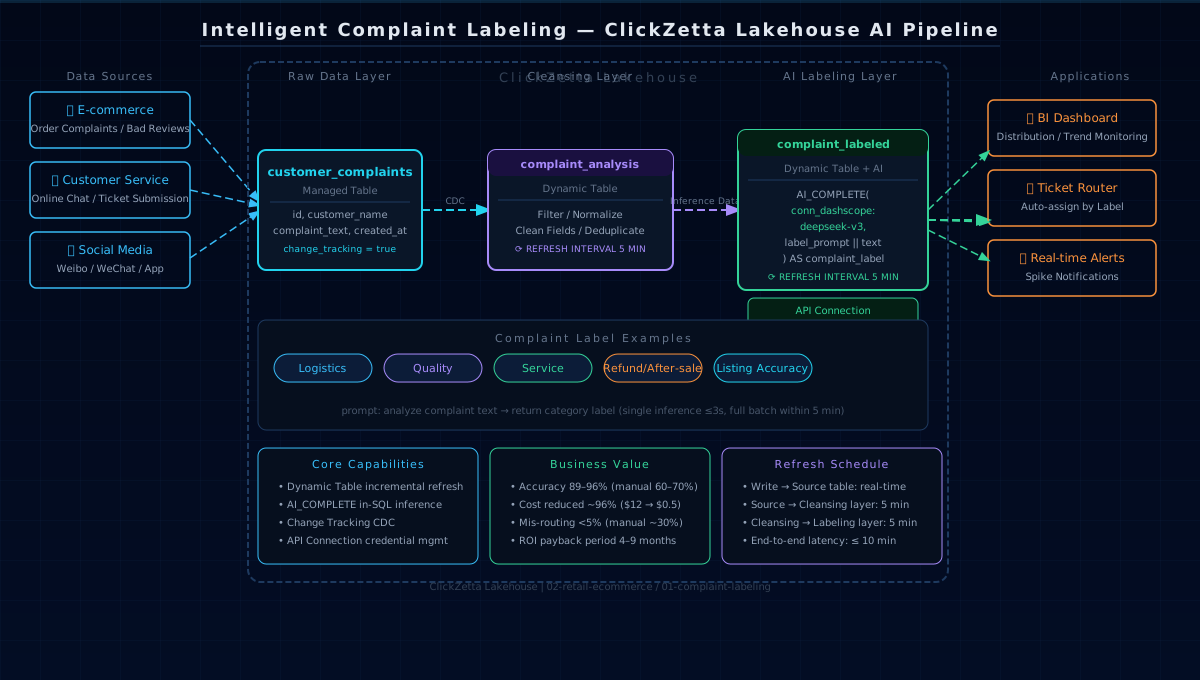
Data Model
Three-Layer Pipeline
Layer 1 (Source Table): Accepts raw complaint writes from all channels. change_tracking = true records row-level changes as the basis for Dynamic Table incremental refresh.
Layer 2 (Cleaning Layer): complaint_analysis serves as an isolation layer responsible for data filtering and standardization. It decouples inference logic from data preparation for independent debugging and field expansion.
Layer 3 (Labeling Layer): complaint_labeled calls AI_COMPLETE per row, sending complaint text to DeepSeek-V3 and receiving a classification label. The Dynamic Table mechanism ensures inference is only triggered for new data, avoiding repeated API quota consumption.
4. Singdata Technical Advantages
Dynamic Table — Incremental Inference Without a Scheduler
Why Dynamic Table is ideal for this scenario: complaints are continuously written, but inference results depend only on the current row's text — no cross-row aggregation needed. Dynamic Table's incremental refresh precisely identifies newly added rows and calls AI only for those rows, rather than rescanning the full table. Compared to alternatives (Spark Streaming / Flink) that require maintaining independent clusters, Dynamic Table expresses the entire inference pipeline in SQL alone, with near-zero operational overhead.
AI_COMPLETE — In-SQL LLM Inference
Why AI_COMPLETE is ideal for this scenario: complaint classification is a typical row-by-row, single-turn inference — no context memory or multi-turn conversation needed. AI_COMPLETE integrates LLM calls into the SQL execution engine, requiring zero Python code. Model switching only requires changing the connection name; prompt iteration is simply editing the SQL string.
Change Tracking — Precise Incremental Capture
With Change Tracking enabled, the Lakehouse engine maintains row-level change logs for the source table. During Dynamic Table refresh, only rows added since the last refresh are read — ensuring AI_COMPLETE does not reprocess already-labeled data. API call volume scales linearly with new complaints, not total table size.
API Connection — Unified Credential Management
Connection decouples the API Key from SQL logic, with permissions centrally managed by Lakehouse — no secrets exposed in SQL scripts. Switching models only requires changing the model name in conn_dashscope:deepseek-v3.
5. Customer Value
ROI Comparison
| Metric | Manual Labeling | Rule Engine | Lakehouse AI Pipeline |
|---|---|---|---|
| Labeling accuracy | 60–70% | 70–80% | 89–96% |
| Cost per ticket | $6–12 | $2–4 | $0.25–0.50 |
| Misrouting rate | ~30% | ~15% | <5% |
| New category adaptation cycle | Manual training 1–2 weeks | Rule update 3–5 days | Prompt modification, immediate effect |
| System go-live cycle | — | 2–4 weeks | ≤1 day |
| Payback period | — | — | 4–9 months |
Operational Efficiency
- Real-time routing: Complaints are classified within ≤5 minutes of being written, directly driving ticket routing rules and eliminating manual sorting
- Promotion resilience: Dynamic Table requires no pre-scaling and automatically absorbs traffic surges — complaint spikes during promotions do not affect labeling timeliness
- Data quality: A unified AI classification standard eliminates subjective variation from manual labeling; historical data can be retroactively re-labeled, significantly improving analytical reliability
Build Cost Comparison
| Solution | Build Cost | Operational Complexity | Scalability |
|---|---|---|---|
| Custom NLP service | High (model training + inference service deployment) | High | Low (high model iteration cost) |
| Third-party labeling platform | Medium (SaaS subscription) | Low | Medium (vendor dependency) |
| Lakehouse AI Pipeline | Low (SQL + API fees only) | Very low | High (just change the prompt) |
6. Quick Start
Prerequisites
- Singdata Lakehouse workspace (AI_COMPLETE feature enabled)
- DashScope API Key (or other OpenAI-compatible model service)
- API Connection already created:
Execution Order
Validation Queries
7. Extension Directions
Near-term (1–2 weeks)
- Structured output: Change
complaint_labelto JSON to simultaneously extract label + sentiment score + keywords for multi-dimensional analysis - Confidence filtering: Automatically route tickets where AI returns uncertain results (e.g., mixed labels containing "/") to a manual review queue
- Multi-language support: Append
please detect the language first and output the label in Englishto the prompt to support multi-language complaints on cross-border platforms
Mid-term (1–2 months)
- Alert integration: Trigger real-time notifications (Webhook / DingTalk / WeCom) when "Service Attitude" complaint volume surges
- Hierarchical classification: Level-1 label (logistics) + level-2 label (delay/lost/damaged), supporting more granular routing
- Email customer service integration: Connect with the Email Customer Support Auto-Triage solution to achieve unified labeling across multiple channels
Long-term (quarterly)
- Labeling quality feedback: Corrections made by customer service agents to AI labels automatically accumulate as training data for continuous prompt refinement
- Predictive routing: Predict complaint escalation probability based on historical labels + user profiles, pre-assigning senior agents
- Cross-platform aggregation: Connect to multi-platform complaint data via Lakehouse external tables for unified labeling standards
Related Documents
AI Functions
| Document | Description |
|---|---|
| AI Functions Overview | Overview of AI functions, model selection, invocation methods, and billing |
| AI_COMPLETE | General LLM completion function, used in this solution for per-complaint text classification inference |
| CREATE API CONNECTION | Create API Connection to decouple API Key from SQL logic; used here to manage DashScope credentials |
Dynamic Table
| Document | Description |
|---|---|
| Dynamic Table Summary | Core concepts, incremental refresh mechanism, and comparison with Spark Streaming / Flink |
| Dynamic Table Development Guide | End-to-end examples for table creation, refresh, and history review |
| CREATE DYNAMIC TABLE | Table creation syntax reference, including change_tracking, REFRESH INTERVAL, and other parameters |
| View Dynamic Table Refresh Mode | Incremental vs. full refresh mode explained, and how to confirm the current refresh strategy |
| Dynamic Table Refresh Scheduling | Scheduled refresh configuration to control the complaint labeling pipeline's end-to-end latency |
| Near-Real-Time Incremental Processing with Dynamic Tables | Dynamic Table pipeline hands-on case, same three-layer pipeline pattern as this solution |
External Tables (Extension Directions)
| Document | Description |
|---|---|
| External Table Guide | External table usage guide, applicable for aggregating multi-channel complaint data across platforms |
| Kafka External Table | Connecting to message queues for real-time ingestion of customer service complaint event streams |