
Singdata Lakehouse AI Functions Overview
AI Functions work like "an AI assistant built into SQL" — you write a SELECT, and the system automatically calls a large language model for each row of data. Results appear directly in the query result set, with no Python code, no external service setup, and no need to export data to external systems.
When to use AI Functions vs. other approaches:
| Scenario | Recommended approach |
|---|---|
| Classify, extract, translate, or analyze sentiment on text in a table row by row | AI Functions (this page) |
| Custom complex logic or multi-step AI workflows | Python UDF + AI SDK |
| One-off calls or interactive Q&A | Call the model API directly |
| Existing external AI service, just need to call it from SQL | API Connection + AI Functions |
The core mechanism: AI computation runs inside the SQL execution engine. Each row's model call is completed within the platform — no data leaves the system, ensuring both data security and batch processing efficiency.
AI ETL Pipeline Architecture
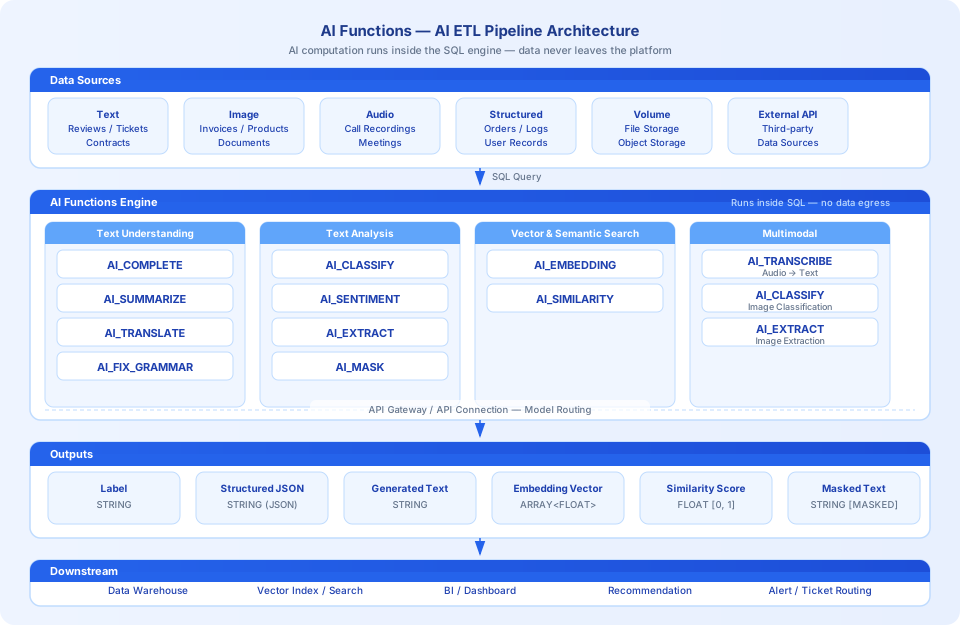
AI Functions process various data sources (text, images, audio, structured data) through AI at the SQL engine layer and output structured results, writing directly back to the data warehouse or flowing to downstream applications — forming a complete AI ETL pipeline:
Quick Start
The examples below show typical usage patterns. Replace endpoint: with your actual configured Endpoint name and the table name with your actual business table.
Function Categories
Text Understanding and Generation
| Function | Description |
|---|---|
| AI_COMPLETE | General-purpose LLM completion with custom prompts; suitable for complex reasoning, code generation, and more |
| AI_SUMMARIZE | Generate text summaries; supports max_words to control summary length |
| AI_TRANSLATE | Multi-language translation with automatic source language detection; supports 20+ languages |
| AI_FIX_GRAMMAR | Grammar and spelling correction; supports Chinese, English, and mixed-language text |
Text Analysis and Classification
| Function | Description |
|---|---|
| AI_CLASSIFY | Classify text or images into user-defined categories without writing prompts |
| AI_SENTIMENT | Sentiment analysis returning positive / negative / neutral / mixed |
| AI_EXTRACT | Extract structured JSON fields from unstructured text or images |
| AI_MASK | Identify and mask PII sensitive information in text, replacing it with [MASKED] |
Vector and Semantic Search
| Function | Description |
|---|---|
| AI_EMBEDDING | Convert text to high-dimensional vectors for semantic retrieval, recommendations, and more |
| AI_SIMILARITY | Compute cosine similarity between two texts based on embeddings; returns a score in [0, 1] |
Multimodal Processing
| Function | Description |
|---|---|
| AI_TRANSCRIBE | Transcribe audio files in a Volume to text (ASR) |
| AI_CLASSIFY | Supports image input for classifying image content |
| AI_EXTRACT | Supports image input for extracting structured information from images |
| AI_COMPLETE | Supports image input for generating responses combining images and text prompts |
Choose a Function by Use Case
| Business scenario | Recommended function |
|---|---|
| Product/content classification, ticket routing | AI_CLASSIFY |
| Contract/invoice/shipping label information extraction | AI_EXTRACT |
| User review sentiment analysis, public opinion monitoring | AI_SENTIMENT |
| News summarization, conversation summarization | AI_SUMMARIZE |
| Multi-language content translation | AI_TRANSLATE |
| UGC content cleaning, text correction | AI_FIX_GRAMMAR |
| Data masking, compliance processing | AI_MASK |
| Semantic search, similarity recommendations | AI_EMBEDDING + AI_SIMILARITY |
| Customer service recording transcription and analysis | AI_TRANSCRIBE + AI_CLASSIFY / AI_EXTRACT |
| Image content recognition and structuring | AI_CLASSIFY / AI_EXTRACT (image mode) |
| Complex reasoning, code generation, custom tasks | AI_COMPLETE |
Model Connection Methods
The first parameter of all AI Functions is model, which supports two connection methods:
Method 1: API Gateway Endpoint (Recommended)
A platform administrator pre-configures model services in the API Gateway. Regular users reference them with the endpoint: prefix, without needing to know the underlying connection details.
Method 2: API Connection Object
Users create their own connection objects via CREATE API CONNECTION, suitable for custom service addresses, private deployment models, and similar scenarios.
Typical Pipeline Examples
Customer Service Recording Analysis Pipeline
Document Structuring and Ingestion Pipeline
Semantic Search Pipeline
Common options Parameter
AI_CLASSIFY, AI_EXTRACT, AI_SIMILARITY, AI_TRANSCRIBE, and other functions support an optional options JSON parameter:
| Key | Type | Description |
|---|---|---|
response.timeout | STRING | Per-request timeout in seconds, e.g. "300" |
task.concurrency | STRING | Batch processing concurrency, e.g. "12" |
model.params | JSON | Parameters passed through to the model, e.g. {"enable_thinking": false} |
Usage Notes
- Model selection: Use
qwen3.5-plusorqwen3-max-previewfor text understanding tasks; use a dedicated embedding model (e.g.text-embedding-v4) for vector tasks; use an ASR model (e.g.qwen3-asr-flash) for speech transcription. - Thinking mode: Some models (e.g. the qwen3 series) enable thinking mode by default, which increases latency and token consumption. For batch processing, disable it via
model.params:{"enable_thinking": false}. - NULL behavior: When a model cannot process input (e.g. empty content, exceeds length limit), most functions return NULL without affecting other rows. See the Error Behavior section of each function's documentation for specifics.
- Image input: Images must first be uploaded to a Volume, then accessed via
GET_PRESIGNED_URL()to generate a pre-signed URL, passed to the function using(url AS image)syntax. - Prefer specialized functions: When a task can be completed with a specialized function (e.g. AI_TRANSLATE, AI_SENTIMENT), use it — these functions have built-in prompts optimized for specific tasks, producing more stable results at lower cost.
Prerequisites
- A model Endpoint has been configured in the API Gateway, or a connection object has been created via
CREATE API CONNECTION. - The current user has permission to call the relevant Endpoint or Connection.
- For image and audio processing, files must be uploaded to a Volume and accessed via
GET_PRESIGNED_URL().
Related Documentation
- AI_COMPLETE — General-purpose LLM completion for custom prompt scenarios
- AI_CLASSIFY — Text and image classification
- AI_EXTRACT — Extract structured JSON from text or images
- AI_SENTIMENT — Sentiment analysis
- AI_SUMMARIZE — Text summarization
- AI_TRANSLATE — Multi-language translation
- AI_FIX_GRAMMAR — Grammar and spelling correction
- AI_MASK — PII sensitive data masking
- AI_EMBEDDING — Text vectorization
- AI_SIMILARITY — Semantic text similarity
- AI_TRANSCRIBE — Audio transcription (ASR)