
Supply Chain Inventory Optimization
Business Background
Inventory management in manufacturing spans the entire supply chain: raw material procurement → work-in-progress → finished goods warehouse → regional distribution centers → retail outlets. Every node must balance stockouts against overstocking that ties up capital.
As global supply chain complexity increases — multi-warehouse layouts, multi-SKU management, seasonal demand fluctuations, unstable supplier lead times — the static safety-stock models that traditional ERP/MRP systems rely on can no longer cope with real-world challenges.
Core Data Sources:
These data sources are scattered across multiple systems and are difficult to aggregate for real-time analysis. Procurement and supply chain teams rely on manual reports and weekly summaries, making it impossible to respond the moment inventory runs critically low.
Industry Pain Points
1. Static Safety Stock Cannot Adapt to Demand Fluctuations
Safety stock in traditional MRP systems is a one-time static setting that does not adjust automatically with seasons, promotions, or market changes. The industry average for inventory days on hand is 60–90 days, with slow-moving inventory tying up roughly 15–20% of working capital.
2. Replenishment Decisions Are Delayed and Rely on Manual Judgment
Buyers managing hundreds of SKUs make replenishment decisions based on experience and Excel. When demand suddenly spikes, by the time reports are generated, meetings held, and purchase orders approved, stockouts may have already lasted several days — with rush shipping fees on top.
3. Unbalanced Multi-Warehouse Inventory Makes Transfer Decisions Difficult
It is common for the same SKU to be overstocked at one warehouse while out-of-stock at another. Cross-warehouse transfers involve logistics costs, inventory age prioritization, and in-transit tracking; manual decisions are inefficient, and teams often prefer to reorder rather than transfer.
4. Low Demand Forecast Accuracy, Unable to Detect Anomalies
Traditional moving-average methods cannot account for holiday effects, competitor launches, or promotional lifts. Demand anomalies can only be reviewed after the fact.
5. Supplier Lead Time Variability Not Incorporated into Replenishment Decisions
The lead_time_days field in ERP is a static setting, and supplier delay information cannot be updated automatically. Replenishment plans use "what the lead time should be" rather than "what it actually will be," systematically underestimating stockout risk.
Data Source Details
WMS — Inventory Snapshots (→ supply_chain_inventory)
| Company Size | Typical Products | Recommended Ingestion Method |
|---|---|---|
| Large | SAP EWM, Oracle WMS Cloud, Manhattan WMS | API / CDC real-time push |
| Mid-size | Kuangshi Lanche, Kejie Logistics, Hongjing WMS | Scheduled CSV export → COPY INTO |
| Small | Guanyiyun, Wangdiantong | MySQL CDC (see 03-mysql-cdc-sync) |
ERP replenishment parameters (lead_time_days, reorder_point) change infrequently (monthly); merge them with the inventory snapshot on write, and recommend a daily full overwrite.
OMS — Historical Demand (→ supply_chain_demand)
| Company Size | Typical Products | Recommended Ingestion Method |
|---|---|---|
| Large manufacturers | SAP SD, Oracle Order Management | BAPI/RFC or DB sync |
| E-commerce / Retail | Wangdiantong, Guanyiyun, Tmall/JD ERP | Platform open API scheduled pull |
| B2B Manufacturing | Kingdee Cloud Xingkong, Yonyou U9 | Custom API or direct DB connection |
When demand data covers fewer than 7 days, urgency is automatically set to "Insufficient Data" and no replenishment suggestion is triggered, preventing erroneous actions.
Supplier Systems — Real-Time Lead Times (→ supply_chain_supplier_lead_time)
| Data Source | Ingestion Method |
|---|---|
| Supplier SRM portal | API / EDI |
| Logistics tracking platform | Cainiao / AfterShip open API |
| Supplier emails / notifications | AI_EXTRACT structured parsing, auto-written to lead time table |
supply_chain_replenishment_plan prioritizes the latest record in this table over the ERP static value. The lead_time_source field records the data origin (SRM/EDI/AI_EXTRACT/ERP Static) for full traceability.
Solution Based on Singdata Lakehouse
After multi-system data flows into the Lakehouse, Dynamic Table incremental computation + window functions for multi-window analysis + real-time supplier lead time integration form an auto-refreshing replenishment decision system.
Overall Architecture
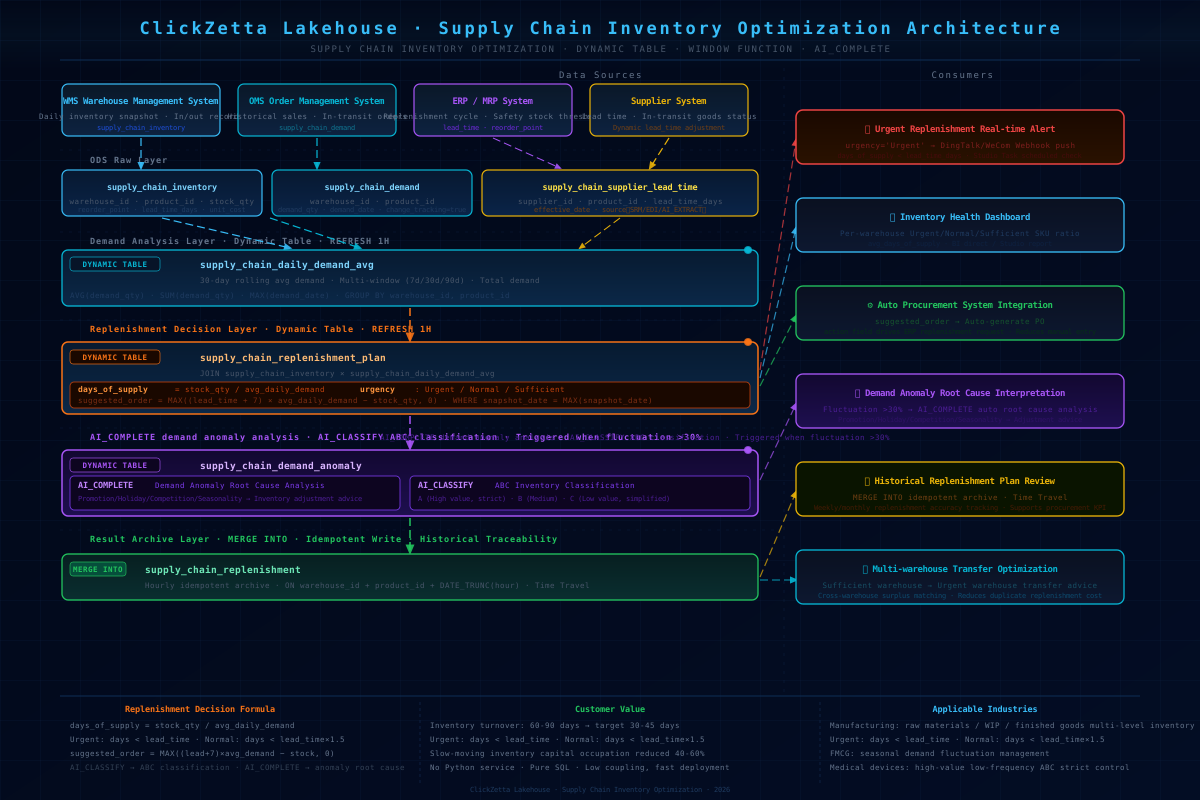
Core Calculation Logic
Technical Advantages
1. Supplier Real-Time Lead Times Dynamically Override ERP Static Values
This is the core differentiator from traditional MRP: supply_chain_supplier_lead_time is updated in real time, and effective_lead_time in supply_chain_replenishment_plan automatically uses the latest value. Supplier delays → the system immediately recalculates urgency, with no manual notification or ERP parameter update required.
2. Multi-Window Demand Trend Detection with AI-Powered Anomaly Explanation
3. Insufficient-Data Guard Prevents Large Replenishment Orders Driven by Minimal History
When demand_data_days < 7, urgency is set to "Insufficient Data" and no replenishment suggestion is triggered, preventing newly listed SKUs with only 1–2 days of history from generating erroneous high-frequency replenishment orders.
4. MERGE INTO Idempotent Archive Enables Historical Replenishment Plan Traceability
Results are automatically archived every hour. Time Travel lets you look back at replenishment recommendations at any point in time, supporting procurement decision post-mortems and accountability reviews.
5. Pure SQL, Low Coupling with Existing ERP/WMS
Only periodic data pushes from each system to the Lakehouse are required — no modification to existing systems. Replenishment suggestions are pushed to the procurement system via Studio Task, with a go-live timeline measured in days, not months.
Customer Value
Supply Chain / Procurement Teams: Replenishment priorities are visible in real time; urgent SKUs trigger automatic alerts, eliminating reliance on weekly reports to discover stockouts.
Inventory Management Teams: days_of_supply visualizes health across all warehouses; multi-warehouse comparisons surface transfer opportunities, reducing redundant replenishment costs.
Finance Teams: The est_replenishment_cost field calculates replenishment amounts in real time to support cash planning, with a target of reducing inventory days on hand from 60–90 days to 30–45 days.
IT / Digitalization Teams: No additional Python forecasting service or dedicated inventory system is needed; the Lakehouse integrates everything in one place for unified operations.
Solution Files
| File | Contents |
|---|---|
setup.sql | Create tables: inventory snapshots, historical demand, supplier lead times, replenishment archive |
test_data.sql | Test data: 3 warehouses × 3 SKUs, 14 days of demand history, supplier delay scenarios |
pipeline.sql | Core pipeline: daily demand DT → replenishment plan DT (with supplier lead time integration) → MERGE INTO |
teardown.sql | Clean up all objects (Dynamic Tables before regular tables) |
UAT Validation Results
Full Replenishment Plan Output
| Warehouse | Product | Days of Supply | Effective Lead Time | Lead Time Source | Suggested Order | Est. Cost | Urgency |
|---|---|---|---|---|---|---|---|
| WH_SH | 27" Monitor | 1.9 days | 18 days | AI_EXTRACT | 37 units | ¥35,150 | Urgent |
| WH_SH | Wireless Mouse M100 | 2.2 days | 5 days | SRM | 35 units | ¥875 | Urgent |
| WH_BJ | Wireless Mouse M100 | 1.6 days | 6 days | SRM | 108 units | ¥2,700 | Urgent |
| WH_BJ | Mechanical Keyboard K200 | 24.0 days | 10 days (+3 delay) | EDI | 0 | — | Healthy |
| WH_GZ | Mechanical Keyboard K200 | 16.7 days | 7 days | EDI | 0 | — | Healthy |
| WH_GZ | 27" Monitor | 22.5 days | 14 days | SRM | 0 | — | Healthy |
Key Validation Points
- Supplier real-time lead time applied ✅: WH_SH monitor
lead_time_daysextracted by AI_EXTRACT from supplier notification as 18 days (ERP static value: 14 days); the 4-day delay directly causes urgency to be marked "Urgent", suggested order 37 units · ¥35,150 - COALESCE fallback logic correct ✅: Real-time supplier values used when available; falls back to ERP static values when no record exists;
lead_time_sourcefully records origin (SRM/EDI/AI_EXTRACT/ERP Static) - WH_BJ keyboard delayed but not urgent ✅: Supplier delayed 3 days (EDI, 10 days), but inventory has 24 days of supply,
urgency=Healthy, confirming thatCOALESCE+ urgency calculation correctly distinguishes "delayed but not dangerous" from "delayed and dangerous" - MERGE INTO idempotent archive ✅: 6 records successfully written to
supply_chain_replenishment - Insufficient-data guard not triggered ✅: All SKUs have ≥ 7 days of demand data; no false "Insufficient Data" flags
- Demand anomaly detection not triggered ✅: 7d/30d fluctuations in the 14-day test dataset do not exceed 30% (as designed)
Supplier Lead Time Impact Analysis
| Product | Warehouse | ERP Lead Time | Actual Lead Time | Delay Days | Source | Urgency Impact |
|---|---|---|---|---|---|---|
| 27" Monitor | WH_SH | 14 days | 18 days | +4 | AI_EXTRACT | Urgent (would be Normal without delay) |
| Mechanical Keyboard K200 | WH_BJ | 7 days | 10 days | +3 | EDI | No impact (inventory sufficient) |
| Wireless Mouse M100 | WH_BJ | 7 days | 6 days | -1 | SRM | No impact (already Urgent) |
Core Queries
Notes
Replenishment Parameters
effective_lead_timeprefers the latest record fromsupply_chain_supplier_lead_time; falls back to ERP static value when no record exists. Thelead_time_sourcefield labels the origin for auditability.- The safety-stock buffer days (+7 days) are currently hard-coded; in production, extract this to a parameter table and configure it differently by ABC classification.
Data Quality
- When demand data covers fewer than 7 days, urgency is set to "Insufficient Data" and no replenishment suggestion is triggered.
- Inventory snapshots are written once per day;
WHERE snapshot_date = MAX(snapshot_date)ensures only the latest snapshot is used. When multiple writes occur on the same day, pay attention to timestamp precision. demand_anomaly_flagrequires both 7-day and 30-day data to be non-NULL before it triggers (already guarded); newly listed SKUs with fewer than 30 days of history will not generate false anomaly flags.
Supplier Lead Times (UAT validated)
supply_chain_supplier_lead_timeretrieves the single latesteffective_daterecord per(warehouse_id, product_id); only the most recent value is used when multiple updates exist.- After AI_EXTRACT parses a supplier notification, the result must be written to
supply_chain_supplier_lead_timebefore it takes effect; the Dynamic Table will use the new lead time automatically on the next REFRESH. - "Delayed but sufficient inventory" and "Delayed and at risk" are correctly distinguished: WH_BJ keyboard delayed 3 days but has 24 days of supply, remaining "Healthy" (UAT validated).
Dynamic Table
- Partitioned table PRIMARY KEY must include the partition key (
snapshot_date,demand_date,effective_date). - Dynamic Tables do not support DML; historical data corrections must be made on the source tables.
- Teardown order: DROP Dynamic Tables before regular tables, otherwise dependency errors will occur.
AI Functions (Extension Layer)
- Lakehouse currently has no native time-series forecasting function (
SHOW FUNCTIONS LIKE '%FORECAST%'returns 0 rows, confirmed in UAT). AI_COMPLETEis suitable for demand anomaly explanation; precise numerical forecasting can be deployed via External Function using Prophet/ARIMA.
Extension Directions
- Demand anomaly AI explanation: When
demand_anomaly_flag=TRUE, triggerAI_COMPLETEto analyze the cause (promotion / holiday / competitor / seasonal). - ABC inventory classification: Use
AI_CLASSIFYto automatically classify SKUs; apply tighter buffer days for Class A, and relax them for Class C. - Multi-warehouse transfer optimization: Suggest transfers from "healthy warehouse → urgent warehouse" for the same SKU, reducing redundant replenishment costs.
- Integration with defect detection (02-defect-detection-ai): High-defect-rate batches trigger raw-material stockout risk alerts.
- SPC statistical process control: Use Dynamic Table to compute stockout-rate control limits; auto-alert when production line supply is interrupted.
Related Documentation
AI Functions
| Document | Description |
|---|---|
| AI Functions Overview | Overview of AI functions: model selection, invocation methods, billing |
| AI_EXTRACT | Structured information extraction function; used here to extract new lead times and delay reasons from supplier notification text |
| AI_COMPLETE | General-purpose LLM completion function; used here to explain demand anomaly causes (promotion / holiday / competitor / seasonal) |
| AI_CLASSIFY | Classification function; can be extended for automated SKU ABC classification |
Dynamic Table
| Document | Description |
|---|---|
| Dynamic Table Overview | Core concepts of Dynamic Table, incremental refresh mechanism, and comparison with materialized views |
| Dynamic Table Development Guide | End-to-end example: create, refresh, and view history |
| CREATE DYNAMIC TABLE | Syntax reference including change_tracking, refresh scheduling, and other parameters |
| Dynamic Table Refresh Scheduling | Scheduled refresh configuration for controlling replenishment pipeline frequency |
| Monitoring Dynamic Tables in Studio | Visualize Dynamic Table refresh status and pipeline health in Studio |
Window Functions
| Document | Description |
|---|---|
| Window Functions Overview | Window function syntax: OVER / PARTITION BY / ORDER BY / ROWS BETWEEN |
| Data Transformation with Window Functions | Complete examples of multi-window sliding averages, period-over-period comparisons, and ranking |
| User Behavior Funnel Analysis: Tracking Conversions from Impression to Order | Window function practical case; useful as a reference for multi-window calculation patterns |
MERGE INTO
| Document | Description |
|---|---|
| MERGE INTO | Syntax reference including MATCHED/NOT MATCHED branches and idempotent write patterns |
| Product Dimension History Tracking: SCD Type 2 with MERGE INTO | MERGE INTO idempotent archive practical case, using the same pattern as replenishment plan archiving in this solution |
Time Travel
| Document | Description |
|---|---|
| Time Travel Overview | Introduction to the Time Travel mechanism and how to look back at data at any point in time |
| Data Recovery: Restoring Deleted or Incorrectly Modified Data with Time Travel | Time Travel practical case; applicable to replenishment plan history review and decision post-mortems |
Studio Tasks
| Document | Description |
|---|---|
| Studio Task Development and Operations | Create, deploy, and schedule Studio Tasks for pushing replenishment suggestions to procurement systems on a schedule |
| Studio Task Development Best Practices | Studio Task development best practices, including scheduled triggers and alert notification configuration |