
Email Customer Support Auto-Triage
Based on Singdata Lakehouse Dynamic Table + AI_COMPLETE, this solution consolidates intent classification, entity extraction, and reply draft generation for customer service emails into a single AI call. End-to-end latency is ≤10 minutes, cost drops from $15 per ticket with traditional manual processing to $0.50, and implementation lead time is ≤1 day.
1. Business Background
Customer service emails on e-commerce platforms are the highest-value, hardest-to-handle user feedback channel. Compared to instant chat, email content is more complex — containing complete problem descriptions, order information, and emotional expression — demanding higher processing efficiency and accuracy.
| Industry | Typical Email Types | Core Processing Goals |
|---|---|---|
| General E-commerce | Logistics inquiries, refund requests, product consultations | Intent recognition + order number extraction + fast routing |
| 3C Electronics | Technical failures, compatibility issues, after-sales repair | Priority assessment + professional reply drafts |
| Cross-border E-commerce | Customs issues, multilingual support, timezone differences | Automatic classification + draft assistance to lower language barriers |
| Local Services | Negative feedback, courier complaints, merchant issues | Fast escalation of high-priority complaints |
Core Challenges of Email Customer Support
Customer service email processing involves three serial steps: read and understand the email → judge intent and priority → compose a reply. Each step requires professional judgment. Manual processing speed caps at approximately 20–30 emails per hour, making backlogs extremely likely during major promotions and complaint surges.
2. Industry Pain Points
Quantitative Data
- Industry average first response time is 12 hours 10 minutes, while customers expect a reply within 1 hour (EmailAnalytics, 2026)
- E-commerce retail SLA requirements typically mandate first response ≤4 hours, but actual compliance rates are below 50%
- Full cost of manual processing per ticket is $15–$20 (including salary, management, training, and tool amortization) (DevRev, 2026)
- AI automated processing costs $0.50–$2.00/ticket, saving approximately 90% (Robylon, 2026)
- Tier-1 tickets (simple inquiries, standard refund processes) account for approximately 40–70% of total volume — all can be handled automatically by AI (StealthAgents, 2026)
- Automation tools enable customer service teams to handle 13.8% more tickets per person per hour (Unthread, 2026)
Three Key Flaws of Traditional Approaches
Flaw 1: Classification routing delays — high-priority emails cannot be identified in time
Manual sorting requires agents to read subject lines one by one; refund complaints and routine inquiries are mixed in the inbox. High-priority emails (refunds, complaints) cannot be automatically identified and surfaced, leading to SLA violations and customer churn. During major promotions, backlogged tickets can reach 5–10 times normal volume — completely unmanageable manually.
Flaw 2: Repetitive work consumes most time — professional skills have no outlet
Studies show 70–80% of customer service tickets are repetitive issues (logistics inquiries, refund processes, general product consultations). Agents spend most of their time writing near-identical replies, leaving far too little capacity for complex issues, and manual writing quality is inconsistent.
Flaw 3: AI inference and data processing are decoupled — high engineering cost
Typical modern solutions require multi-system collaboration: email reception via Exchange/Gmail API, NLP processing via standalone Python service (LangChain/OpenAI), result storage in a data warehouse, and BI tools for external display. The original Databricks approach similarly requires a Python environment + Spark + multiple LLM calls. Each component has independent operational overhead, fault tracing spans a long chain, and data engineering and AI engineering dual-stack are fragmented.
Transition
The key to solving these problems is: embedding LLM semantic understanding into the data pipeline so that classification and draft generation happen synchronously with data writes — without a standalone Python service. Singdata Lakehouse's AI_COMPLETE function consolidates three originally serial LLM calls (classify, extract, draft) into a single structured output, while Dynamic Table ensures emails are automatically processed within 5 minutes of being written. The entire flow is pure SQL, with near-zero operational complexity.
3. Solution
Architecture Overview
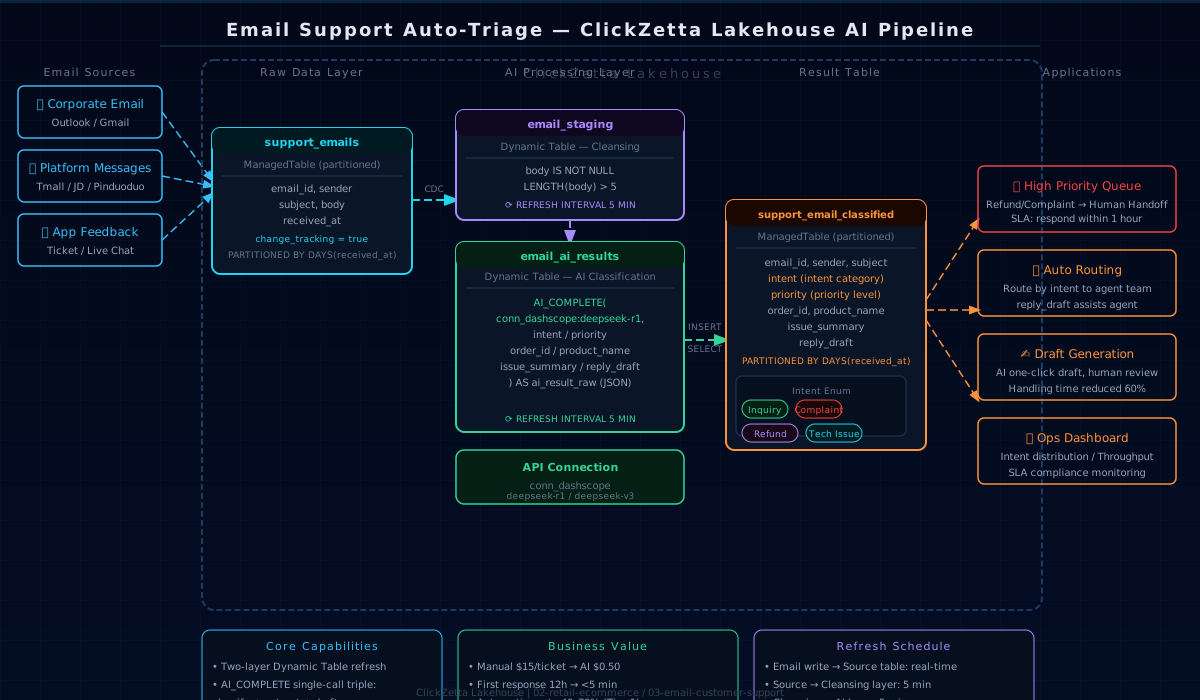
Data Model
Three-Layer Pipeline
Layer 1 (Cleaning Layer): email_staging filters out empty bodies and very short content, while also serving as an isolation layer that decouples AI logic from the raw data interface for independent debugging.
Layer 2 (AI Classification Layer): email_ai_results calls AI_COMPLETE once per email. Through a structured JSON prompt, it simultaneously completes five tasks: intent classification, priority judgment, entity extraction (order number/product name), summary generation, and reply draft. Compared to the original Databricks approach with 3 separate LLM calls, token consumption is reduced by approximately 60%.
Layer 3 (Parse and Write): INSERT INTO ... SELECT reads results from the Dynamic Table, uses REGEXP_EXTRACT to strip any markdown code fences the LLM may return, then GET_JSON_OBJECT parses each field and writes to the final result table.
4. Singdata Technical Advantages
Dynamic Table — Incremental Inference Without a Scheduler
Why Dynamic Table is ideal for this scenario: customer service emails are continuously written, but AI inference only depends on each individual email's content — no cross-row dependencies. Dynamic Table's incremental refresh precisely identifies newly added rows and only triggers AI calls for unprocessed emails, avoiding repeated token consumption. With a 5-minute refresh interval, the end-to-end latency from email write to classification result availability is ≤10 minutes — far better than traditional T+1 batch processing.
AI_COMPLETE All-in-One — Single Call for Multiple Tasks
Why AI_COMPLETE is ideal for this scenario: customer service email processing is a typical row-by-row, single-turn inference — each email is analyzed independently. Through a carefully designed JSON structured prompt, a single AI call completes 5 tasks simultaneously (the original Databricks approach required 3 calls), significantly reducing token consumption and latency. The enumerated constraints in the prompt (Inquiry/Complaint/Refund Request/Technical Issue/Other) ensure the intent field can be used directly in routing rules without secondary processing.
REGEXP_EXTRACT — Handling Unstable LLM Output
LLMs sometimes wrap JSON in markdown code fences (```json and ```), and using GET_JSON_OBJECT directly on such output returns null. REGEXP_EXTRACT uses DOTALL mode ((?s)) to precisely extract the JSON object, ensuring stable parsing regardless of LLM output format.
Change Tracking — Precise Incremental Capture
With Change Tracking enabled, Dynamic Table refresh reads only emails added since the last refresh, ensuring AI_COMPLETE does not reprocess already-classified tickets. API call volume scales linearly with new emails, making token consumption precisely predictable even during promotion peaks.
5. Customer Value
ROI Comparison
| Metric | Manual Processing | Keyword Rule Routing | Lakehouse AI Pipeline |
|---|---|---|---|
| Cost per ticket | $15–$20 | $3–$5 (high rule maintenance cost) | $0.50–$2.00 |
| First response time | Average 12 hours | Instant routing, but no reply | ≤10 minutes (including draft) |
| Intent recognition accuracy | Depends on agent experience | 70–80% (keyword limitations) | AI semantic understanding, >90% |
| Adapting to new intent types | Staff training 1–2 weeks | Rule update 3–5 days | Modify prompt, immediate effect |
| Reply draft quality | Manual writing, inconsistent | None (routing only) | AI draft, ready with minor human edits |
| System go-live cycle | — | 2–4 weeks | ≤1 day |
Operational Efficiency
Customer service team efficiency: The reply_draft field directly provides an AI-generated reply draft, shifting agents from "writing from scratch" to "review and fine-tune." Processing time is reduced by approximately 60%. For standardized low-complexity tickets like refund processes and logistics inquiries, draft quality is often sufficient to send directly, reducing human intervention to below 20%.
SLA assurance for high-priority tickets: Tickets with priority = 'High' (refund requests, strong complaints) automatically enter the high-priority queue within 10 minutes of being written, triggering DingTalk/WeCom alerts to ensure no tickets are missed and SLAs are met.
Data insights: Enumerated constraints on the intent field make intent distribution statistics directly queryable with GROUP BY, requiring no additional post-processing. Regular analysis of high-frequency intents can drive FAQ optimization, product improvements, and logistics partner evaluation.
Build Cost Comparison
| Solution | Build Cost | Operational Complexity | Scalability |
|---|---|---|---|
| Custom NLP service (Python + LangChain) | High (multi-system + model maintenance) | High | Low (high iteration cost) |
| Third-party customer service SaaS (Zendesk AI, etc.) | Medium (monthly subscription + integration development) | Low | Medium (vendor dependency) |
| Lakehouse AI Pipeline | Low (SQL + AI API fees) | Very low | High (just change the prompt) |
6. Quick Start
Prerequisites
- Singdata Lakehouse workspace (AI_COMPLETE feature enabled)
- AI model service API Key (DashScope or other OpenAI-compatible service)
- API Connection already created:
Execution Order
Validation Queries
7. Extension Directions
Near-term (1–2 weeks)
- Multi-language support: Append "please detect the language first and output all fields in English" to the prompt, supporting automatic processing of English/Japanese emails on cross-border platforms
- Confidence filtering: Automatically flag emails where AI returns
intent = 'Other'orissue_summarycontains "unable to determine" aslow_confidencefor human review - SLA alerts: Trigger DingTalk/WeCom Webhook notifications when
priority = 'High'emails remain unprocessed for more than 1 hour
Mid-term (1–2 months)
- Complaint labeling integration: Tickets with
intent = 'Complaint'are automatically pushed to Customer Complaint Intelligent Labeling for detailed sub-classification — two systems working together - Knowledge base enhancement: Archive high-quality historical replies, allowing AI to reference the knowledge base when generating drafts to further improve draft accuracy
- Review sentiment integration: Associate negative review emails from the same user with product review sentiment analysis to identify high-risk customers
Long-term (quarterly)
- A/B testing draft quality: Compare CSAT scores between AI drafts and human replies to continuously optimize prompts
- Full ticket lifecycle tracking: Integrate with ticket systems (Zendesk/DingTalk tickets) to track the complete flow from classification to resolution, establishing a First Contact Resolution (FCR) metric framework
- Predictive customer service: Based on order status + historical complaint patterns, proactively push solutions before customers send emails — transforming reactive support into proactive service