
Product Review Sentiment Analysis
Solution Background
E-commerce platforms generate massive volumes of user reviews every day. Star ratings and written reviews submitted by users are the most direct source of user feedback for product operations, quality management, and customer service teams. As the number of SKUs and review volume continues to grow, manually reading each review is no longer feasible.
The core requirement is to automatically transform unstructured review text into queryable, alertable, and aggregatable structured data, while integrating seamlessly with the existing Kafka message queue architecture.
Typical business data pipeline:
Pain Points of Traditional Solutions
Complex tech stack, high maintenance cost
A typical implementation requires multi-system coordination: Flink/Spark Streaming for Kafka consumption, an independent Python service (HuggingFace/OpenAI) for sentiment analysis, Delta Lake for writing results back, and a BI tool for external presentation. Each component has its own operational burden; fault investigation spans a long chain and takes significant time.
AI inference and data processing are disconnected
The sentiment analysis model runs in a standalone Python microservice, called via HTTP API. Data is transferred back and forth between the data warehouse and the AI service — high movement cost, hard to compress latency — while requiring dedicated MLOps capabilities to manage model service deployment, scaling, and version management.
Incremental processing is difficult; repeated computation wastes resources
Spark batch processing typically reruns entire time windows in full, repeatedly re-inferring already-processed reviews, wasting both compute and LLM tokens. Implementing true incremental processing requires additional state management logic with high development cost.
Data engineering and AI engineering are on separate stacks
Data engineers write SQL; AI engineers write Python. Friction between the two teams is high, requirement iteration cycles are long, and it is difficult to respond quickly to business changes.
Singdata Lakehouse Solution Advantages
This solution consolidates the entire pipeline into a single Lakehouse platform, completing the full workflow from Kafka consumption to AI inference to result aggregation in pure SQL.
| Capability | Traditional Solution | Lakehouse Solution |
|---|---|---|
| Kafka consumption | Flink / Spark Streaming cluster | CREATE PIPE native integration — no external cluster needed |
| Incremental processing | Manual checkpoint / state management | CREATE DYNAMIC TABLE automatic incremental refresh |
| AI inference | Standalone Python microservice + HTTP calls | AI_SENTIMENT / AI_COMPLETE embedded in SQL |
| Data movement | Data warehouse ↔ AI service round-trip transfer | Data never leaves the Lakehouse |
| Operations monitoring | Multi-system independent monitoring | PIPE lag / Dynamic Table refresh unified |
| Development language | Python + SQL dual stack | Pure SQL |
| Time to production | Week-level (multi-system integration) | Day-level (single platform — SQL is deployment) |
Customer Value
Product Operations Team
Real-time visibility into positive review rate, average rating, and sentiment distribution for each SKU via the product_review_summary view — sentiment trends are visible within 10 minutes of a new product launch. The enumeration constraints on the key_aspects field (price/quality/logistics/support/packaging) make aggregation meaningful, directly answering "which dimension do negative reviews concentrate on," supporting product detail page optimization and pricing decisions.
Quality / After-Sales Team
High-frequency clustering of cons fields rapidly identifies batch quality issues. When multiple reviews concentrate the same cons description (e.g., "disconnects," "keycap broken"), it can trigger supplier feedback or proactive replacement plans, converting reactive complaints into proactive management and reducing return rates and negative reputation spread.
Customer Service Team
Reviews with sentiment IN ('negative', 'mixed') can serve as a priority queue for proactive follow-up. Combined with an email customer service routing solution, negative reviews can automatically generate service tickets, significantly reducing response time.
IT / Data Team
The entire solution requires only SQL — no Python environment or external AI services. The data team can maintain and iterate independently. Kafka PIPE lag monitoring is built into DESC PIPE EXTENDED, and end-to-end latency is queried directly using the __kafka_timestamp__ field, with no need to build a separate monitoring system.
Solution Architecture
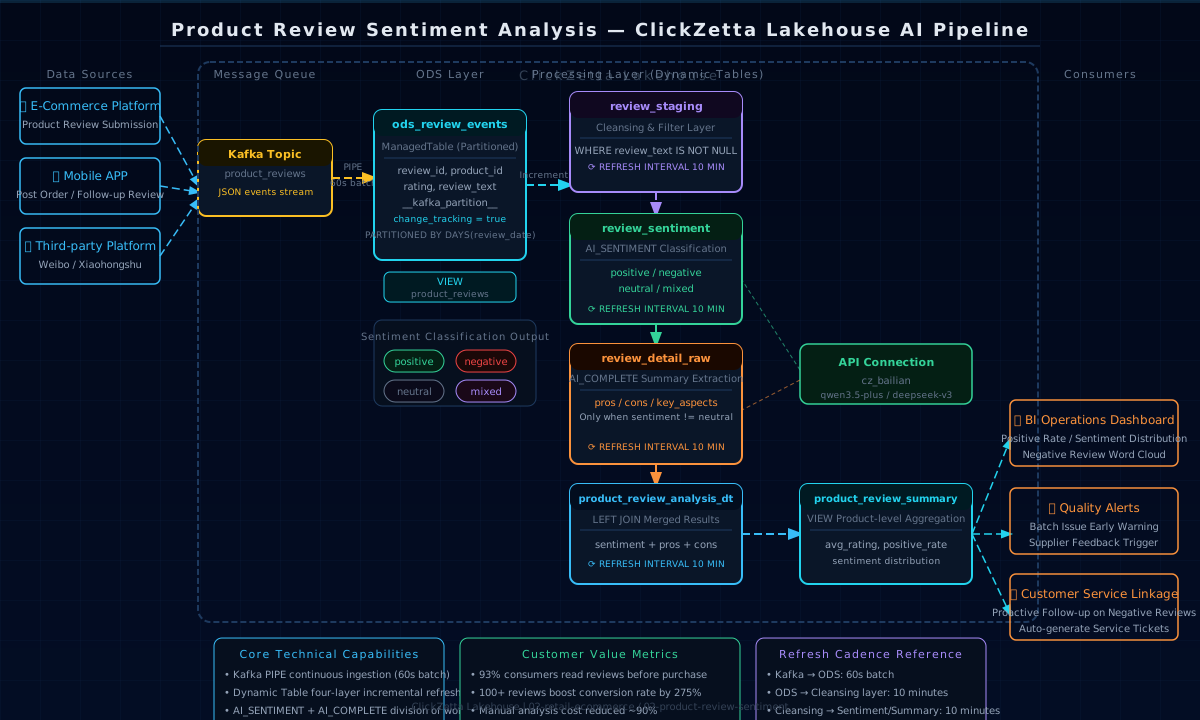
Technical Highlights
1. Dual AI Functions with Complementary Roles — Balancing Cost and Flexibility
| Function | Responsibility | Design Rationale |
|---|---|---|
AI_SENTIMENT('conn:model', text) | Sentiment classification → positive / negative / neutral / mixed | Dedicated function with built-in prompt; output is a fixed enum — no JSON parsing needed; low token consumption |
AI_COMPLETE('conn:model', prompt) | Structured extraction of pros / cons / key_aspects | Flexible extraction; prompt constrains key_aspects enum values to ensure downstream aggregability |
Neutral reviews skip AI_COMPLETE, reducing token consumption by approximately 35% in practice:
2. ODS Layer Preserves Kafka Metadata for End-to-End Monitoring
__kafka_partition__, __kafka_offset__, and __kafka_timestamp__ are written to the ODS layer, enabling consumption lag monitoring without any external tool:
3. VIEW Abstraction Layer Decouples ODS from Business Logic
The product_reviews view hides Kafka metadata columns. Downstream Dynamic Tables are developed against the view, so changes to the ODS physical structure do not affect business logic.
4. Correct Accounting for Mixed Sentiment
The positive_rate numerator uses sentiment IN ('positive', 'mixed'). Mixed reviews such as "great sound quality but poor battery life" are also counted as positive references — more reflective of true user satisfaction than counting only positive reviews.
5. Four-Layer Dynamic Table Pipeline — AI Stages Independently Debuggable
The two AI layers are separate tables that do not interfere with each other. Each can be individually REFRESHed to verify intermediate results, enabling precise fault localization.
Kafka Message Format
The PIPE expects each message value in the topic to be a JSON string:
AI Output Examples
AI_SENTIMENT returns an enum label directly:
AI_COMPLETE returns JSON (returns NULL for neutral reviews):
Running Steps
Core Queries
Pipe Operations
Notes
Kafka PIPE — Network Connectivity (Important)
The Lakehouse PIPE read_kafka only supports PLAINTEXT and SASL_PLAINTEXT, not SASL_SSL.
Alibaba Cloud MSK Serverless exposes only port 9093 (SASL_SSL) by default. Network connectivity issues must be resolved before production deployment:
| Deployment Scenario | Solution |
|---|---|
| Lakehouse and MSK in the same VPC | Use MSK VPC internal address directly (port 9092, SASL_PLAINTEXT) |
| Lakehouse and MSK across VPCs | Connect via VPC Peering or PrivateLink, then use internal port 9092 |
| MSK has only a public IP | Contact Alibaba Cloud to enable public SASL_PLAINTEXT port and configure Lakehouse Virtual Cluster egress allowlist |
Kafka PIPE — Usage Guidelines
CREATE PIPEdoes not supportCREATE OR REPLACE; to modify consumption logic,DROP PIPEand recreate; recreating without settingRESET_KAFKA_GROUP_OFFSETSresumes from the last offset, avoiding duplicate consumptionRESET_KAFKA_GROUP_OFFSETS = 'earliest'is only used for initialization or data repair; production environments should use'latest'- SASL passwords are written in plain text in SQL; use
CREATE CONNECTIONfor centralized credential management rather than hardcoding in pipeline.sql - PIPE starts automatically after creation; before deleting,
PAUSEit first and confirm no queued jobs before runningDROP
Dynamic Table
- DML (INSERT/UPDATE/DELETE) is not supported; data corrections can only be made in upstream source tables
change_tracking = truemust be enabled onods_review_events(viaALTER TABLE SET TBLPROPERTIES); Dynamic Table incremental awareness depends on this property — do not omit after table creation- Partitioned table PRIMARY KEY must include the partition key (in this solution:
review_date); otherwise table creation will fail
AI Functions
- The first parameter format for
AI_SENTIMENTandAI_COMPLETEis'connection_name:model_name'; passing only the connection name will cause an error (confirmed in UAT; correct format:'cz_bailian:qwen3.5-plus') - The
AI_COMPLETEprompt must explicitly constrain "return JSON without extra text"; otherwise the LLM may return JSON wrapped in a markdown code block, causingGET_JSON_OBJECTparsing to fail - Dynamic Table REFRESH is an asynchronous operation; after manually running
REFRESH DYNAMIC TABLE, you must wait for the job to complete before querying the latest data
Kafka Message Format
- The
review_datefield should consistently use ISO 8601 format (2026-05-01T10:00:00) to ensure compatibility withTIMESTAMP_NTZparsing - PIPE only supports flat JSON (top-level key-value pairs); nested JSON requires additional
parse_jsonnested call handling
Extension Directions
- Alert integration: Trigger DingTalk/WeCom notifications when
sentiment = 'negative' AND key_aspects LIKE '%quality%'for real-time batch quality issue early warnings - Customer service linkage: Combined with email customer service routing, negative reviews automatically generate service tickets
- Product drill-down: Add
product_iddimension for more granular analysis to identify batch quality issues within the same SKU - Real-time alerts: Shorten Dynamic Table REFRESH INTERVAL (e.g., 1 MIN), combined with Studio Task scheduled push of anomaly reports