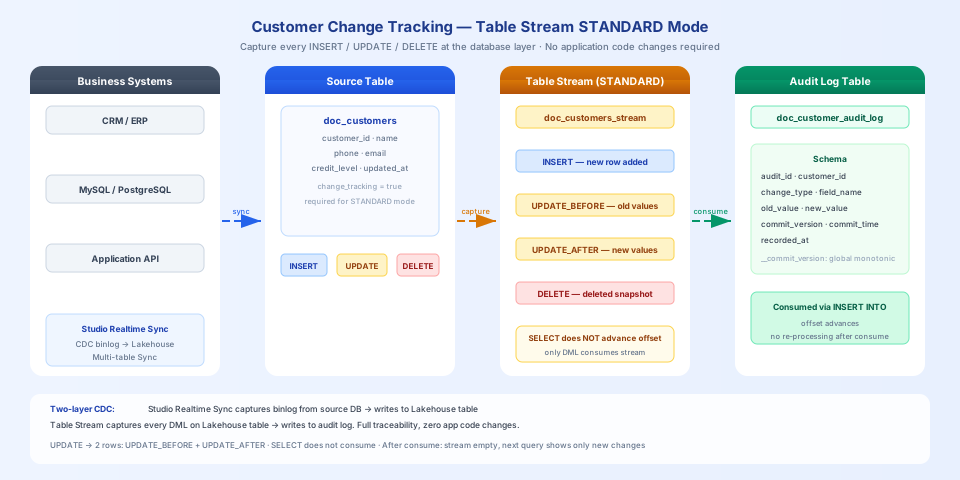
Customer Data Change Tracking: Retaining a Complete Change History with Table Stream
Business Background
Industries such as finance, healthcare, and e-commerce all face compliance requirements: every change to critical business data must leave a traceable record — who changed what, what it was changed to, and when.
Typical scenarios:
Financial compliance: Adjustments to a customer's credit rating must retain the before and after values for regulatory review
E-commerce after-sales: Order status change history, used for dispute resolution and refund verification
HR systems: Salary and job level change records, used for audits and labor arbitration
Healthcare systems: Patient information modification logs, satisfying data protection regulations such as HIPAA
The traditional approach is to write dual-write logic at the application layer — every UPDATE also writes an audit record. The problem with this approach is that application-layer code is easy to miss, easy to lose during refactoring, and cannot capture SQL changes executed directly against the database.
Table Stream STANDARD mode captures all DML changes at the database layer, including UPDATE_BEFORE (the old value before the change) and UPDATE_AFTER (the new value after the change). It does not depend on application-layer code and will not miss any changes.
SQL Commands Involved
Command
Purpose
ALTER TABLE ... SET PROPERTIES ('change_tracking' = 'true')
Enable change tracking (required for STANDARD mode)
External data sources (business databases / application systems / ...)
│ real-time writes
▼
doc_customers (customer information table)
│
│ changes captured automatically
▼
doc_customers_stream (Table Stream, STANDARD mode)
│
│ consumed (INSERT INTO ... SELECT)
▼
doc_customer_audit_log (audit log table)
How base table data is written in real time
This guide uses INSERT INTO to simulate customer data inserts, updates, and deletes so you can quickly reproduce the examples in a test environment. In production, customer data typically comes from CRM, ERP, and other business systems. Singdata Lakehouse provides multiple ways to continuously sync this data to the base table:
Data source
Recommended method
Description
Reference
MySQL / PostgreSQL / Oracle, etc.
Studio real-time sync task (CDC)
Captures the source database's binlog and syncs to Lakehouse with millisecond-level latency
💡 Tip: Studio real-time sync tasks are themselves based on CDC principles and can capture INSERT / UPDATE / DELETE from the source database. After syncing to the Lakehouse base table, Table Stream captures those changes again and writes them to the audit log — two layers of CDC stacked together, enabling end-to-end change tracking from the source database to the audit log, all without modifying any business application code.
Prerequisites
Create the Customer Information Table and Enable Change Tracking
CREATE TABLE IF NOT EXISTS doc_customers (
customer_id STRING,
name STRING,
phone STRING,
email STRING,
credit_level STRING,
updated_at TIMESTAMP
);
⚠️ Note: Table Stream in STANDARD mode requires the source table to have change_tracking enabled. This must be done before creating the Stream:
ALTER TABLE doc_customers SET PROPERTIES ('change_tracking' = 'true');
Insert Initial Customer Data
INSERT INTO doc_customers VALUES
('C001', 'Zhang Wei', '13800001111', 'zhangwei@example.com', 'gold', CAST('2026-01-10 09:00:00' AS TIMESTAMP)),
('C002', 'Li Na', '13800002222', 'lina@example.com', 'silver', CAST('2026-01-12 10:30:00' AS TIMESTAMP)),
('C003', 'Wang Fang', '13800003333', 'wangfang@example.com', 'gold', CAST('2026-01-15 14:00:00' AS TIMESTAMP)),
('C004', 'Zhao Lei', '13800004444', 'zhaolei@example.com', 'bronze', CAST('2026-02-01 08:00:00' AS TIMESTAMP)),
('C005', 'Chen Jing', '13800005555', 'chenjing@example.com', 'silver', CAST('2026-02-05 11:00:00' AS TIMESTAMP));
Create the Table Stream and Audit Log Table
-- Create a STANDARD mode Stream (only captures changes that occur after the Stream is created)
CREATE TABLE STREAM IF NOT EXISTS doc_customers_stream
ON TABLE doc_customers
WITH PROPERTIES ('TABLE_STREAM_MODE' = 'STANDARD');
💡 Tip: The default is SHOW_INITIAL_ROWS = 'FALSE', meaning data that existed before the Stream was created is not visible — only changes that occur after the Stream is created are captured. To include historical data in the audit, add 'SHOW_INITIAL_ROWS' = 'TRUE' when creating the Stream.
Scenario 1: Capturing Customer Information Changes
Simulate four typical business operations: credit level upgrade, phone number update, new customer added, and customer account closed.
-- Credit level upgrade
UPDATE doc_customers
SET credit_level = 'platinum',
updated_at = CAST('2026-05-28 19:00:00' AS TIMESTAMP)
WHERE customer_id = 'C001';
-- Phone number change
UPDATE doc_customers
SET phone = '13900009999',
updated_at = CAST('2026-05-28 19:05:00' AS TIMESTAMP)
WHERE customer_id = 'C002';
-- New customer added
INSERT INTO doc_customers VALUES
('C006', 'Liu Yang', '13800006666', 'liuyang@example.com', 'silver',
CAST('2026-05-28 19:10:00' AS TIMESTAMP));
-- Customer account closed
DELETE FROM doc_customers WHERE customer_id = 'C004';
View the Raw Changes Captured by the Stream
SELECT __change_type, __commit_version, __commit_timestamp,
customer_id, name, phone, credit_level
FROM doc_customers_stream
ORDER BY __commit_version, customer_id, __change_type;
C001: UPDATE_BEFORE (old value: gold) + UPDATE_AFTER (new value: platinum) — complete before-and-after record
C002: Phone changed from 138****2222 to 139****9999 — also has two rows, before and after
C004: Only a DELETE row, recording a snapshot of the data at the time of deletion
C006: Only an INSERT row, recording the initial values when the record was added
💡 Tip: Phone numbers and email addresses in query results are automatically masked (138****1111, w***@example.com) — this is Singdata Lakehouse's data protection mechanism and does not affect the completeness of the audit log.
⚠️ Note: A SELECT query does not advance the Stream's offset; you can view the same batch of changes multiple times. Only a DML statement that includes the Stream (such as INSERT INTO ... SELECT FROM stream) advances the offset.
Scenario 2: Consuming Changes and Writing to the Audit Log
INSERT INTO doc_customer_audit_log
SELECT
CONCAT(customer_id, '_', CAST(__commit_version AS STRING), '_', __change_type) AS audit_id,
customer_id,
__change_type AS change_type,
'full_row' AS field_name,
NULL AS old_value,
NULL AS new_value,
__commit_version AS commit_version,
__commit_timestamp AS commit_time,
current_timestamp() AS recorded_at
FROM doc_customers_stream;
After execution, the Stream offset advances automatically. Querying the Stream again returns an empty result:
SELECT COUNT(*) AS remaining FROM doc_customers_stream;
-- remaining = 0
Query the audit log:
SELECT audit_id, customer_id, change_type, commit_version, commit_time
FROM doc_customer_audit_log
ORDER BY commit_version, customer_id, change_type;
Scenario 3: Continuous Consumption — Processing Only New Changes
After consumption, when new changes occur, the Stream contains only the new batch of data — previously consumed records do not reappear.
-- Second round of changes
UPDATE doc_customers
SET credit_level = 'bronze',
updated_at = CAST('2026-05-28 19:20:00' AS TIMESTAMP)
WHERE customer_id = 'C003';
UPDATE doc_customers
SET email = 'liuyang_new@example.com',
updated_at = CAST('2026-05-28 19:25:00' AS TIMESTAMP)
WHERE customer_id = 'C006';
Query the Stream — only the 4 changes from this round are present:
SELECT __change_type, __commit_version, customer_id, credit_level, email
FROM doc_customers_stream
ORDER BY __commit_version, customer_id, __change_type;
The changes for C001, C002, C004, and C006 from the first round no longer appear. After consuming this round and writing to the audit log, the complete history contains 10 records.
Clean Up Resources
DROP TABLE STREAM IF EXISTS doc_customers_stream;
DROP TABLE IF EXISTS doc_customer_audit_log;
DROP TABLE IF EXISTS doc_customers;
💡 Tip: Use DROP TABLE STREAM to delete a Stream, not DROP STREAM.
Key Takeaways
STANDARD mode prerequisite: The source table must first have ALTER TABLE ... SET PROPERTIES ('change_tracking' = 'true') executed; otherwise the Stream cannot capture changes after it is created
UPDATE produces two rows: Each UPDATE generates an UPDATE_BEFORE (old value) and an UPDATE_AFTER (new value) record in the Stream, enabling precise before-and-after comparison
SELECT does not consume: Querying the Stream does not advance the offset and can be done repeatedly; only DML statements that include the Stream (INSERT INTO, MERGE INTO) advance the offset
No duplicates after offset advances: After consumption, the Stream is cleared and only new changes appear next time — naturally prevents duplicate consumption
__commit_version is globally monotonically increasing: Can be used for sorting, deduplication, and tracing the order of changes