
Real-Time Sales Dashboard: Building a Multi-Layer Incremental Data Warehouse with Dynamic Tables
Business Context
E-commerce operations teams face a common challenge every day: during a promotion, GMV and rankings across categories are changing in real time, but the data dashboard only refreshes the next day. Missing real-time data means missing the window to adjust campaign strategy — a category is already selling out, but the decisions to restock and boost spend have to wait until tomorrow.
The traditional solution is to write a scheduled SQL job that recalculates everything from scratch every minute. This approach has two problems:
- Wasted computation: Every run scans all historical orders. The larger the data, the slower it gets, and cost grows linearly with data volume.
- Operational burden: You have to manage scheduling yourself, handle task failure retries, and ensure idempotency.
The value of Dynamic Tables is this: you write SQL with full-scan semantics, and the system automatically identifies new data and only computes the changed portion — it never recomputes history. If data volume grows 10x, the cost of incremental computation stays the same.
Use Cases
| Scenario | Description |
|---|---|
| Real-time sales leaderboard | Category/product/store GMV rankings, updated by the minute |
| Promotion monitoring | Track SKU sales and inventory consumption in real time during campaigns |
| Automated daily operations report | Daily GMV, order count, and average order value summarized automatically — no manual queries needed |
| Multi-layer data warehouse maintenance | Full-chain incremental refresh across ODS → DWD → ADS, replacing scheduled full-scan jobs |
SQL Commands Involved
| Command | Purpose |
|---|---|
CREATE DYNAMIC TABLE | Define a table that refreshes automatically |
REFRESH INTERVAL | Set the data update frequency |
SHOW DYNAMIC TABLE REFRESH HISTORY | View refresh status and duration for each layer |
DROP DYNAMIC TABLE | Clean up resources |
Data Architecture
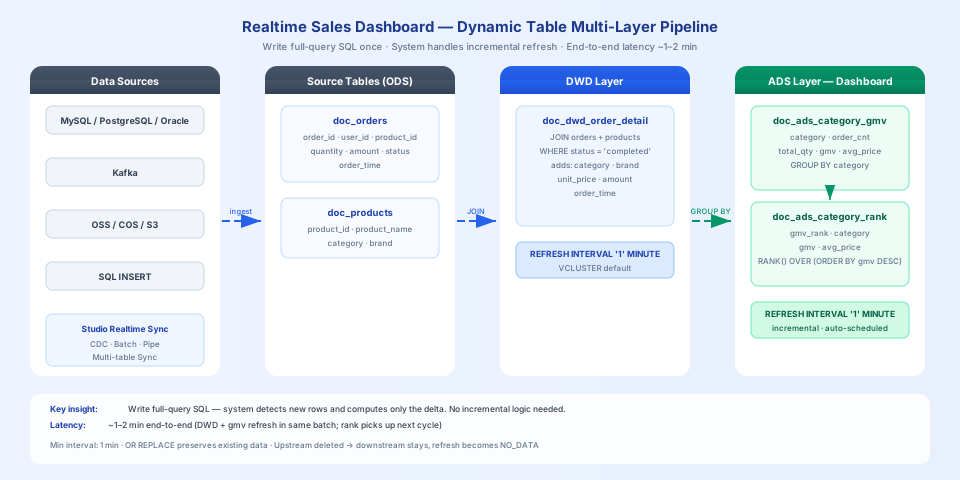
A three-layer Dynamic Table pipeline, each layer refreshing every 1 minute:
How data is written to the base tables in real time
This guide uses INSERT INTO to simulate data writes so you can reproduce the example quickly in a test environment. In production, order data typically comes from a business database or message queue. Singdata Lakehouse provides several ways to continuously write to the base tables:
| Data source | Recommended approach | Reference |
|---|---|---|
| MySQL / PostgreSQL / Oracle and other relational databases | Studio real-time sync task (CDC) | Real-time sync task |
| Multiple business tables in one migration | Studio multi-table real-time sync | Multi-table real-time sync task |
| Kafka message queue | Pipe continuous ingestion | Continuous ingestion via read_kafka function |
| Object storage (OSS / COS / S3) files | Pipe continuous ingestion | Continuous ingestion from object storage with Pipe |
| Offline batch sync (T+1 or hourly) | Studio offline sync task | Offline sync task |
Once new data is written to the base tables, the Dynamic Table pipeline automatically detects it at the next refresh cycle and computes incrementally — no additional configuration needed.
Prerequisites
Create the source tables
Insert initial data
Scenario 1: Create the Three-Layer Dynamic Tables
Layer 1 (DWD): Enrich Orders
Join the orders table with the products table to add category and brand information, keeping only completed orders.
Layer 2 (ADS): Category GMV Summary
Aggregate by category to compute order count, total quantity, GMV, and average price.
Layer 3 (ADS): Category Leaderboard
Compute real-time rankings based on the GMV summary table.
Verify Initial Results
Wait about 2 minutes, then query the leaderboard:
Sports & Outdoors ranks first with 1570 in GMV, from 4 orders across running shoes (2 orders), yoga mat (1 order), and jump rope (1 order), with an average price of 196.25.
Scenario 2: New Orders Written, Rankings Update Automatically
Simulate the next batch of orders coming in — Electronics and Computer Peripherals each have new orders:
Wait about 2 minutes, then query the leaderboard again:
Electronics added an insulated tumbler (178), USB-C charger (387), and wireless earbuds (299) for a total of 686 in new GMV, rising from 1155 to 1841 and overtaking Sports & Outdoors to claim first place. The ranking change is computed automatically by the system — no manual intervention required.
Scenario 3: Modify a Dynamic Table Definition
When business requirements change, you can update the SQL logic with CREATE OR REPLACE DYNAMIC TABLE. Existing data will not be lost.
Changes suitable for OR REPLACE: modifying WHERE filter conditions, adding pass-through columns (columns that come directly from upstream without any computation).
Changes that require DROP + recreate: modifying column types, modifying aggregation logic (e.g., adding a computed column like avg_price).
After OR REPLACE, if no new data has been written upstream, the system will not recompute existing rows — the new column values will remain null until the next refresh is triggered by new data.
View Refresh Status
Example output from a real run:
| state | refresh_mode | start_time | rows_inserted | Meaning |
|---|---|---|---|---|
| SUCCEED | INCREMENTAL | 18:11:48 | 4 | Normal incremental refresh, 4 rows written |
| SUCCEED | NO_DATA | 18:12:48 | — | No new data upstream, computation skipped |
| FAILED | FULL | 18:09:41 | — | Full refresh failed, see error_message |
Key field descriptions:
| Field | Meaning |
|---|---|
state | SUCCEED success / FAILED failure |
refresh_mode | INCREMENTAL incremental / FULL full scan / NO_DATA no new data, skipped |
refresh_trigger | SYSTEM_SCHEDULED automatic / MANUAL manually triggered |
start_time / end_time | Refresh start and end time |
stats | rows_inserted / rows_deleted — rows written and deleted in this refresh |
error_message | Error details when state is FAILED |
Behavior When an Upstream Table Is Dropped
When an upstream Dynamic Table is dropped, downstream Dynamic Tables will not error out or cascade-delete. Their refresh state changes to NO_DATA and the objects continue to exist.
This means: if you accidentally drop an upstream Dynamic Table, downstream data will not disappear. Once the upstream is recreated, the downstream will automatically resume incremental computation at the next refresh cycle.
Clean Up Resources
Key Takeaways
- Write full-scan SQL, let the system handle incremental computation: The SQL for all three Dynamic Table layers is plain SELECT — no incremental logic needed. The system automatically identifies new data and only computes the changed portion.
- Changes propagate through the pipeline automatically: New data in the source table → DWD layer refreshes → ADS summary layer refreshes → leaderboard updates. The entire pipeline requires no manual triggering.
- End-to-end latency is about 1–2 minutes: In practice, the DWD and GMV layers refresh in the same batch, and the rank layer detects the change in the next cycle, giving an end-to-end latency of about 1–2 minutes when the refresh interval is set to 1 minute.
- OR REPLACE has limitations: Column types cannot be changed, and modifying aggregation logic requires DROP + recreate. After OR REPLACE, if no new data arrives upstream, new column values will be null until the next refresh.