Is 1 TB of Free Cloud Storage Too Good to Be True?

You see a 1 TB Free Cloud Storage offer and wonder if it’s real. Most of the time, these deals look tempting but come with strings attached. You might face hidden fees or tricky requirements. If you want to keep your files safe, you need to know how to spot the risks. Let’s make sure you don’t fall for a trap.
Key Takeaways
Free cloud storage often comes with hidden limits like time restrictions and file size caps. Always check the terms before signing up.
Beware of hidden costs. Some services require you to watch ads or complete tasks to maintain your free storage.
Look for trusted providers with strong security features. Check for HTTPS in the URL and read user reviews to ensure safety.
Free services may not protect your data as well as paid options. Use strong passwords and consider services with end-to-end encryption.
Always keep backup copies of important files in multiple locations. Relying on one service can lead to data loss.
Free Cloud Storage: Realities
Common Limitations
When you see a Free Cloud Storage offer, you might think you can use it forever with no problems. That is not always true. Most of these offers come with rules that make things harder for you. Here are some common limits you might face:
Time Limits: Some services only let you use the free storage for a short time. After that, you may have to pay or lose your files.
Bandwidth Caps: You might not be able to upload or download as much as you want. Some companies set daily or monthly limits.
File Size Restrictions: Many providers do not let you upload very large files. You may need to split your files or shrink them.
Device Limits: Some Free Cloud Storage services only work on a few devices. If you want to use more, you may need to upgrade.
Account Activity: If you do not log in often, some companies may delete your files or close your account.
Most Free Cloud Storage deals are just promotions. They want you to try the service and then pay later. You might get a big amount of storage at first, but it can disappear if you do not follow the rules. This can make it hard to trust these offers for important files.
Hidden Costs and Ads
You may think Free Cloud Storage means you never pay. That is not always the case. Some companies make you watch ads or do extra tasks to keep your storage. Here are some ways this can happen:
Degoo gives you 100GB of free cloud storage, but you have to see ads to keep using it.
Some services ask you to invite friends or finish tasks to get more storage or keep your free space.
Tip: Always read the fine print before you trust a Free Cloud Storage offer. If you see words like "ad-supported" or "invite friends," you know there are extra steps.
Sometimes, hidden costs show up later. You might need to pay to get your files back or to keep your account active. Some companies even face legal trouble for not being clear about their offers. Here is an example:
Provider | Legal Action | Description |
|---|---|---|
Apple | Mass damages suit | People said Apple misled them about free storage on iCloud. Apple says the lawsuit should not count because it targets users who did not pay. |
Free Cloud Storage can sound great, but you need to look for these hidden costs and ads. If you do not, you could lose your files or end up paying more than you planned.
Trustworthiness Check
Spotting Legit Offers
You want to know if a Free Cloud Storage deal is real or just a trick. Start by checking the basics. Look at the website address. Real cloud services use HTTPS and official domains. If you see a strange URL or no padlock, you should walk away.
Next, read reviews from real users. Trusted platforms like Trustpilot or Reddit can help you spot fake promises. If most people say the service is safe and easy to use, you can feel better about signing up.
Here are some things cybersecurity experts recommend:
Look for genuine user feedback on trusted review sites.
Stay away from offers that sound too good to be true.
You can also look at what popular providers offer. MEGA gives you 20 GB of free space with strong encryption. Google Drive offers 15 GB and is known for reliability. pCloud gives you 10 GB and gets praise for security. These services have good reputations and strong safety features.
Tip: Always read the privacy policy. Make sure the company explains how it protects your files.
Warning Signs
Scammers use tricks to get your personal details. They might send emails that say your account will be deleted if you do not act fast. Real companies give you time to fix problems. If you feel rushed, you should be careful.
In 2023, a fake service called 'CloudVault Secure' promised cheap storage. It disappeared overnight and took users’ files. Another scam, 'QuickCloud Free Storage,' gave away 100GB but later sold user data on the dark web.
Watch out for these red flags:
Urgent emails that pressure you to act quickly.
Offers that ask for too much personal information.
Unclear company reputation or no real reviews.
Here is a table to help you check for safety:
Factor | Description |
|---|---|
Data security and encryption | Look for strong encryption for files at rest and in transit. |
Confidentiality policies | Read privacy policies and check where servers are located. |
Extraterritoriality of US law | US laws may allow access to data stored by US companies, which can affect your privacy. |
If you see any warning signs, it is better to choose a trusted provider. Free Cloud Storage can be safe, but only if you know what to look for.
Free Cloud Storage Risks
Data Security Issues
When you use Free Cloud Storage, you might think your files are safe. But many free services do not protect your data as well as paid ones. Some skip important security steps. This can put your photos, homework, or private documents at risk.
Let’s look at how free and paid cloud storage compare:
Paid Cloud Storage | ||
|---|---|---|
End-to-end encryption | Lacking | Available |
Two-factor authentication | Lacking | Available |
Secure data centers | Lacking | Available |
Paid services often use strong encryption like 256-bit AES to lock your files when they sit on the server. They also use TLS 1.3 to protect your files while you upload or download them. Some even offer zero-knowledge encryption. That means your files get scrambled on your device before they leave, and only you have the key to unlock them. The company cannot peek at your stuff, even if they want to.
Note: With zero-knowledge encryption, your data is encrypted on your device. Only you can read it. The service provider cannot access or understand your files.
Most free services skip these steps. They may not check their workers as carefully or set up strong security rules. Sometimes, hackers can break in and steal files. You might not even know it happened until it is too late.
Service Reliability
You want to trust that your files will always be there when you need them. But Free Cloud Storage can disappear without warning. Some companies shut down because they run out of money. Others change their rules and delete accounts that do not pay.
Here are some risks you might face:
The service could close down overnight. You might lose all your files.
The company could lock your account if you do not log in often.
You might have trouble downloading your files if the website is slow or broken.
Some services do not back up your data. If their servers crash, your files are gone for good.
😟 Imagine losing your school project or family photos because the service vanished. That happens more often than you think.
Paid cloud storage companies usually have backup plans. They use secure data centers and test their systems. They want to keep your trust, so they work hard to stay online. Free services do not always have the money or staff to do this.
If you use Free Cloud Storage, always keep a copy of your important files somewhere else. Do not trust one service with everything.
Safer Storage Alternatives
Realistic Free Options
You want a safe place for your files, but you also want to avoid surprises. Most trusted providers offer free storage, but the space is usually smaller than those flashy deals you see online. Here’s a quick look at some reliable choices:
Service | Notes | |
|---|---|---|
Blomp | 200 GB | No hidden costs, supports many file types |
Degoo | 100 GB | Good for backing up lots of data |
MEGA | 50 GB | Generous space, strong privacy features |
MediaFire | 10 GB | Can grow with referrals |
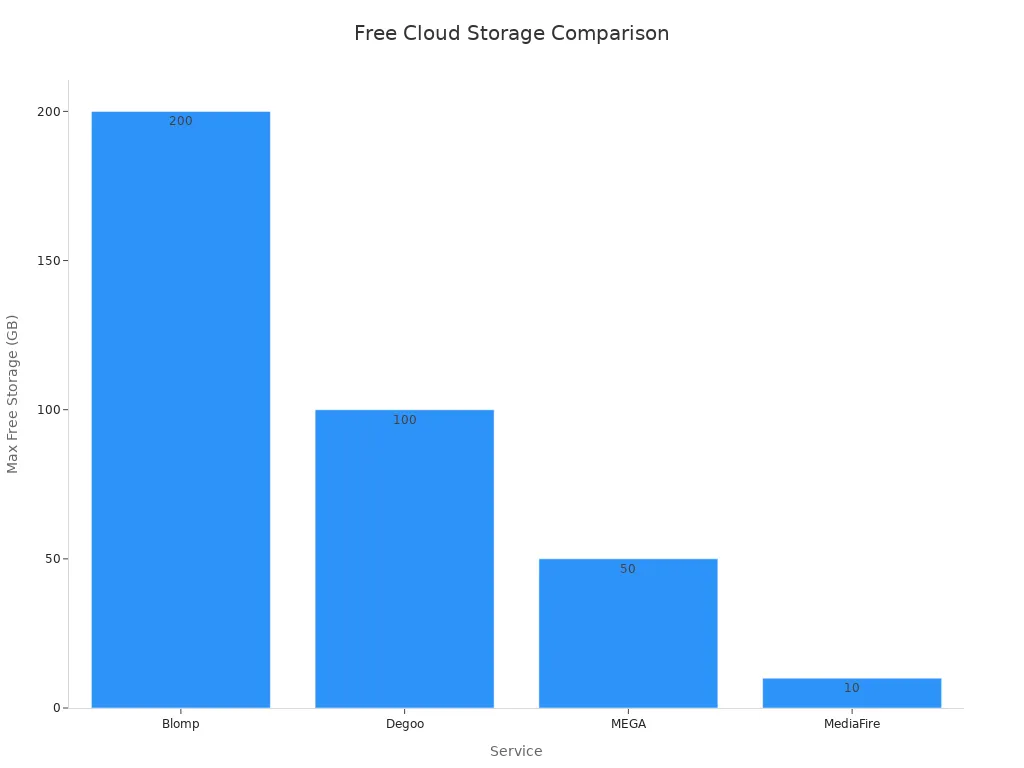
Most big names like Google Drive, Microsoft OneDrive, and pCloud offer less space, but they have strong privacy and security features. You get 15 GB with Google Drive, 5 GB with OneDrive, and up to 10 GB with pCloud. MEGA stands out with end-to-end encryption and zero-knowledge privacy, so only you can see your files.
If you see an offer for huge free storage, check the company’s reputation and read the terms. Trusted brands rarely give away massive space without limits.
Best Practices
You want your files to stay safe, no matter where you store them. Here are some smart habits to keep your data protected:
Use strong passwords and turn on multi-factor authentication for your accounts.
Pick services that offer end-to-end encryption and secure data centers.
Limit who can see or edit your files. Only share with people you trust.
Watch for strange activity in your account. Set up alerts if you can.
Always keep backup copies of your important files in more than one place.
Here’s a table with backup strategies that help you avoid losing your files:
Strategy | Description |
|---|---|
Hybrid backup solutions | Mix local and cloud storage for fast recovery and extra safety. |
Cross-cloud backup | Store files on different cloud platforms to avoid downtime. |
Cross-region backup | Save backups in different locations to protect against outages. |
Data redundancy | Make several copies in different places for better security. |
Backup versioning | Keep old versions so you can go back if you make a mistake. |
Continuous data protection (CDP) | Save every change in real time for easy recovery. |
Periodic automated backup | Set up automatic backups to keep files safe without extra work. |
🛡️ Tip: Never trust just one service with your most important files. Use backups and strong security to keep your data safe.
So, is 1 TB of free cloud storage too good to be true? Most of the time, yes. You often face limits, hidden costs, or security risks. If you want to keep your files safe, use trusted providers and follow smart habits:
Use multi-layered security for your cloud data.
Run regular security checks and keep local backups.
Always read the terms and watch what you upload.
Stay alert and make choices that protect your data. Your files deserve it! 🛡️
FAQ
Can you really get 1 TB of free cloud storage with no strings attached?
You almost never get 1 TB for free without limits. Most offers have time limits, ads, or hidden costs. Always check the details before you trust any big offer.
What happens if a free cloud storage service shuts down?
You could lose all your files. Free services may close without warning. Always keep backup copies of your important files somewhere else.
How do you know if a free cloud storage offer is safe?
Look for trusted brands, read user reviews, and check for strong security features. If something feels off or the company is unknown, walk away.
Are there any risks to storing personal photos or documents on free cloud storage?
Yes! Free services may not protect your privacy. Hackers or even the company could see your files. Use strong passwords and pick services with good security.
What should you do if you need more storage than free plans offer?
Try combining several free accounts or upgrade to a paid plan for more space and better security. Always back up your files in more than one place.
See Also
Affordable Cloud Database Solutions For Managing Large Data
Grasping The Fundamentals Of Cloud Data Structures
Defining Data Centralization And Its Importance In Business
Navigating Data Management Challenges In Modern Organizations

