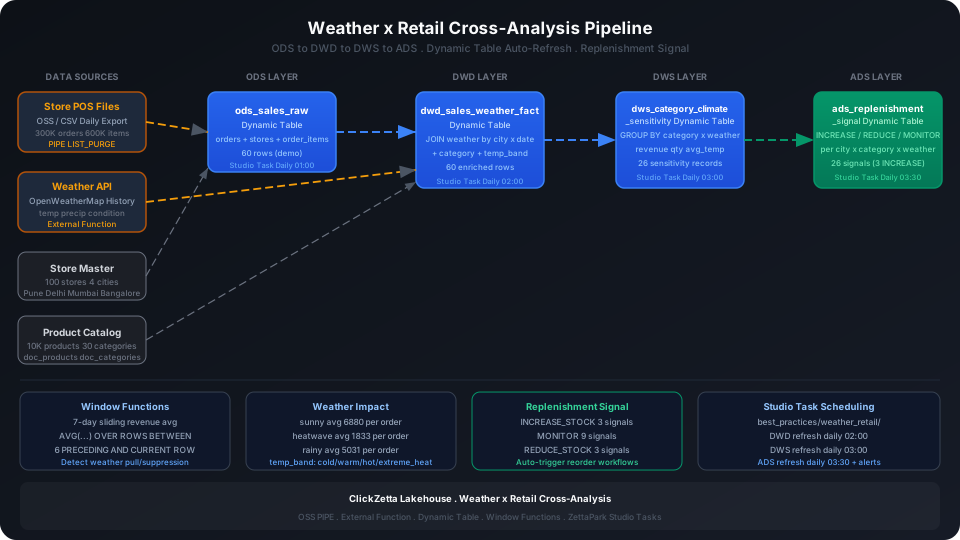
Associate meteorological historical data with store sales data to analyze the boosting or suppressing effects of weather on different product category sales, supporting dynamic replenishment decisions. This guide uses a retail dataset of 100 stores across four Indian cities with 300K orders, combined with manually constructed weather observation data, to walk through the complete OSS PIPE → ODS → DWD → DWS → ADS weather-enhanced data warehouse pipeline, covering three key capabilities: External Function integration with weather APIs, Dynamic Table automatic incremental computation, and rolling averages with window functions.
Overview
The challenge in retail replenishment decisions: historical sales data is inside the system, but weather data that influences sales is external. Joining the two requires a city × date dimension, and needs periodic refresh to reflect the latest weather forecasts.
Singdata Lakehouse addresses the core challenges with the following combination:
Problem
Solution
Store POS files auto-imported daily without needing a custom consumer
OSS PIPE (LIST_PURGE mode) — scans for new files and automatically ingests them
Pull weather API data and write to Lakehouse
External Function encapsulates HTTP calls for direct SQL use
Multi-dimensional sales × weather joins with automatic incremental computation
Dynamic Table with declarative SQL; the system automatically schedules the dependency chain
7/30-day rolling averages to identify weather-driven effects
Window functions (ROWS BETWEEN N PRECEDING AND CURRENT ROW)
-- Store master data (100 stores in Pune/Delhi/Mumbai/Bangalore)
CREATE TABLE IF NOT EXISTS best_practice_weather_retail.doc_stores (
store_id INT,
city STRING
);
-- Product categories (30 categories)
CREATE TABLE IF NOT EXISTS best_practice_weather_retail.doc_categories (
category_id INT,
category_name STRING
);
-- Product information
CREATE TABLE IF NOT EXISTS best_practice_weather_retail.doc_products (
product_id INT,
category_id INT,
supplier_id INT,
price DOUBLE
);
-- Orders master table (300K rows)
CREATE TABLE IF NOT EXISTS best_practice_weather_retail.doc_orders (
order_id INT,
customer_id INT,
store_id INT,
order_date DATE,
promotion_id INT
);
-- Order items detail (600K rows)
CREATE TABLE IF NOT EXISTS best_practice_weather_retail.doc_order_items (
order_item_id INT,
order_id INT,
product_id INT,
qty INT,
price DOUBLE
);
Verify row counts:
SELECT
(SELECT COUNT(*) FROM best_practice_weather_retail.doc_stores) AS stores,
(SELECT COUNT(*) FROM best_practice_weather_retail.doc_orders) AS orders,
(SELECT COUNT(*) FROM best_practice_weather_retail.doc_order_items) AS order_items,
(SELECT COUNT(*) FROM best_practice_weather_retail.doc_products) AS products,
(SELECT COUNT(*) FROM best_practice_weather_retail.doc_categories) AS categories;
(This guide uses a subset of the first 50 orders for demonstration. In production, import the full 300K+ rows.)
OSS PIPE: Auto-Ingest Store POS Files
In production, store POS systems export daily sales records as CSV files and upload them to OSS; PIPE enables unattended automatic ingestion:
-- First create an OSS Storage Connection (replace with actual access key)
CREATE STORAGE CONNECTION IF NOT EXISTS best_practice_weather_retail.conn_pos_oss
TYPE = OSS
ACCESS_ID = '<your-access-key-id>'
ACCESS_KEY = '<your-access-key-secret>'
ENDPOINT = 'oss-cn-hangzhou.aliyuncs.com';
-- Create Volume mapping to the OSS bucket path
CREATE EXTERNAL VOLUME IF NOT EXISTS best_practice_weather_retail.vol_pos_daily
TYPE = OSS
BUCKET = '<your-oss-bucket>'
PATH = '/retail/pos-daily/'
CONNECTION = best_practice_weather_retail.conn_pos_oss;
-- Create PIPE: scans new CSVs and auto-writes to doc_orders
CREATE PIPE IF NOT EXISTS best_practice_weather_retail.pipe_pos_orders
VIRTUAL_CLUSTER = 'DEFAULT'
AUTO_PURGE = TRUE
AS
COPY INTO best_practice_weather_retail.doc_orders
FROM (
SELECT $1::INT, $2::INT, $3::INT, TO_DATE($4, 'yyyy-MM-dd'), $5::INT
FROM best_practice_weather_retail.vol_pos_daily
)
USING csv
OPTIONS('header'='true', 'sep'=',');
⚠️ Note: AUTO_PURGE = TRUE automatically deletes source files from the Volume after successful ingestion to prevent duplicate ingestion. If you need to keep original files for audit purposes, change to AUTO_PURGE = FALSE and archive periodically.
💡 Tip: This guide's demo environment uses INSERT INTO to write test data. In production, replace with PIPE — the downstream Dynamic Table logic is identical.
Weather Data: External Function Pull + Manual Construction
Option 1: Call OpenWeatherMap History API via External Function (recommended)
An External Function encapsulates the weather API call for direct SQL use:
-- Assumes a cloud function is already deployed (see External Function development guide)
CREATE EXTERNAL FUNCTION IF NOT EXISTS best_practice_weather_retail.fetch_weather_history(
city STRING,
date_str STRING
)
RETURNS STRING
CONNECTION = '<your-api-connection>'
AS '<your-lambda-or-fc-arn>';
Example call:
-- Pull weather for Delhi on 2023-06-14
SELECT best_practice_weather_retail.fetch_weather_history('Delhi', '2023-06-14') AS weather_json;
After receiving the JSON response, parse and write to doc_weather_daily:
INSERT INTO best_practice_weather_retail.doc_weather_daily
SELECT
TO_DATE(date_str, 'yyyy-MM-dd') AS weather_date,
city,
GET_JSON_OBJECT(weather_json, '$.avg_temp_c')::DOUBLE AS avg_temp_c,
GET_JSON_OBJECT(weather_json, '$.min_temp_c')::DOUBLE AS min_temp_c,
GET_JSON_OBJECT(weather_json, '$.max_temp_c')::DOUBLE AS max_temp_c,
GET_JSON_OBJECT(weather_json, '$.precipitation_mm')::DOUBLE AS precipitation_mm,
GET_JSON_OBJECT(weather_json, '$.condition')::STRING AS weather_condition,
GET_JSON_OBJECT(weather_json, '$.humidity_pct')::INT AS humidity_pct
FROM (
SELECT city, date_str,
best_practice_weather_retail.fetch_weather_history(city, date_str) AS weather_json
FROM city_date_pairs -- pre-built city × date dimension table
);
Option 2: Manual INSERT construction (when no API environment is available)
If External Function is not configured yet, insert simulated weather observation data directly to verify downstream Dynamic Table and analysis logic:
CREATE TABLE IF NOT EXISTS best_practice_weather_retail.doc_weather_daily (
weather_date DATE,
city STRING,
avg_temp_c DOUBLE,
min_temp_c DOUBLE,
max_temp_c DOUBLE,
precipitation_mm DOUBLE,
weather_condition STRING, -- sunny / rainy / cloudy / heatwave / cold
humidity_pct INT
);
Import from a local CSV file (recommended):
-- Step 1: Upload the local CSV file to User Volume via SQL PUT
PUT '/path/to/your/doc_weather_daily.csv' TO USER VOLUME FILE 'doc_weather_daily.csv';
-- Step 2: COPY INTO the table from User Volume
COPY INTO best_practice_weather_retail.doc_weather_daily
FROM USER VOLUME
USING csv
OPTIONS('header'='true', 'sep'=',', 'nullValue'='')
FILES ('doc_weather_daily.csv');
You can also insert a small batch of test data inline (no CSV file required):
INSERT INTO best_practice_weather_retail.doc_weather_daily VALUES
(CAST('2021-08-26' AS DATE), 'Pune', 28.5, 22.0, 34.0, 12.3, 'rainy', 82),
(CAST('2022-03-19' AS DATE), 'Delhi', 24.0, 16.5, 31.5, 0.0, 'sunny', 45),
(CAST('2021-01-21' AS DATE), 'Delhi', 14.0, 8.0, 20.0, 0.0, 'sunny', 40),
(CAST('2021-01-16' AS DATE), 'Mumbai', 26.5, 20.0, 33.0, 0.0, 'sunny', 62),
(CAST('2022-09-14' AS DATE), 'Delhi', 29.5, 24.0, 35.0, 8.5, 'cloudy', 75),
(CAST('2023-02-03' AS DATE), 'Mumbai', 28.0, 22.5, 33.5, 0.0, 'sunny', 58),
(CAST('2022-10-29' AS DATE), 'Delhi', 22.5, 15.0, 30.0, 2.1, 'cloudy', 52),
(CAST('2022-10-10' AS DATE), 'Bangalore', 21.0, 16.0, 26.0, 18.7, 'rainy', 88),
(CAST('2021-07-09' AS DATE), 'Bangalore', 22.0, 18.0, 26.0, 45.2, 'rainy', 92),
(CAST('2022-06-03' AS DATE), 'Delhi', 38.5, 30.0, 45.0, 0.0, 'heatwave', 28),
(CAST('2021-04-26' AS DATE), 'Mumbai', 32.5, 26.0, 39.0, 0.0, 'sunny', 65),
(CAST('2023-01-05' AS DATE), 'Mumbai', 27.0, 20.0, 34.0, 0.0, 'sunny', 60),
(CAST('2023-06-14' AS DATE), 'Delhi', 40.0, 33.5, 46.5, 0.0, 'heatwave', 22),
(CAST('2022-03-08' AS DATE), 'Mumbai', 29.5, 23.0, 36.0, 0.0, 'sunny', 62),
(CAST('2022-08-06' AS DATE), 'Mumbai', 29.0, 25.0, 33.0, 22.1, 'rainy', 86),
(CAST('2023-05-31' AS DATE), 'Bangalore', 23.5, 18.0, 29.0, 0.0, 'sunny', 55),
(CAST('2022-02-03' AS DATE), 'Pune', 22.0, 14.5, 29.5, 0.0, 'sunny', 48),
(CAST('2020-04-27' AS DATE), 'Delhi', 36.0, 28.0, 44.0, 0.0, 'heatwave', 25),
(CAST('2023-05-02' AS DATE), 'Bangalore', 24.0, 18.5, 29.5, 0.0, 'sunny', 52),
(CAST('2021-12-21' AS DATE), 'Delhi', 15.5, 9.0, 22.0, 0.0, 'cold', 35);
Verify weather data row count:
SELECT COUNT(*) AS weather_rows FROM best_practice_weather_retail.doc_weather_daily;
weather_rows
------------
20
ODS (Raw Data Layer): Raw Sales Wide Table
The ODS layer joins the three fact tables (orders, stores, order items) into a single wide table to make it easy for the downstream DWD layer to JOIN weather data directly.
Create Tables
CREATE DYNAMIC TABLE IF NOT EXISTS best_practice_weather_retail.ods_sales_raw
AS
SELECT
o.order_id,
o.customer_id,
o.order_date,
o.promotion_id,
s.store_id,
s.city AS store_city,
oi.order_item_id,
oi.product_id,
oi.qty,
oi.price AS unit_price,
oi.qty * oi.price AS line_revenue
FROM best_practice_weather_retail.doc_orders o
JOIN best_practice_weather_retail.doc_stores s ON o.store_id = s.store_id
JOIN best_practice_weather_retail.doc_order_items oi ON o.order_id = oi.order_id;
⚠️ Note: Dynamic Table DDL does not include REFRESH INTERVAL. Refresh scheduling is managed through Studio Tasks, where data quality checks and alert rules can be attached to the same task.
Studio Task Scheduling
Create a refresh task under Studio best_practices/weather_retail/ path:
💡 Tip: The examples below use cz-cli (the Singdata Lakehouse command-line tool). If cz-cli is not installed, see the cz-cli Installation and Usage Guide. If you prefer not to use the command line, you can run the SQL in Singdata Studio → Development → SQL Editor and configure / trigger scheduling tasks on the Studio → Tasks page.
REFRESH DYNAMIC TABLE best_practice_weather_retail.ods_sales_raw;
SELECT COUNT(*) AS ods_rows FROM best_practice_weather_retail.ods_sales_raw;
ods_rows
--------
60
60 rows: 50 orders × average 1.2 order items — confirms the JOIN logic is correct.
DWD (Detail Data Layer): Sales × Weather Fact Wide Table
The DWD layer is the core of this guide. Building on the ODS wide table, it LEFT JOINs weather data by store city × order date dimension and appends product category and temperature band labels. The LEFT JOIN ensures order rows without weather data are not filtered out.
Create Tables
CREATE DYNAMIC TABLE IF NOT EXISTS best_practice_weather_retail.dwd_sales_weather_fact
AS
SELECT
f.order_id,
f.order_date,
f.store_city,
f.product_id,
p.category_id,
c.category_name,
f.qty,
f.unit_price,
f.line_revenue,
-- Weather dimension (from doc_weather_daily, joined by city × date)
w.avg_temp_c,
w.min_temp_c,
w.max_temp_c,
w.precipitation_mm,
w.weather_condition,
w.humidity_pct,
-- Temperature band label for downstream aggregation analysis
CASE
WHEN w.avg_temp_c >= 35 THEN 'extreme_heat'
WHEN w.avg_temp_c >= 28 THEN 'hot'
WHEN w.avg_temp_c >= 22 THEN 'warm'
WHEN w.avg_temp_c >= 15 THEN 'mild'
ELSE 'cold'
END AS temp_band
FROM best_practice_weather_retail.ods_sales_raw f
JOIN best_practice_weather_retail.doc_products p ON f.product_id = p.product_id
JOIN best_practice_weather_retail.doc_categories c ON p.category_id = c.category_id
LEFT JOIN best_practice_weather_retail.doc_weather_daily w
ON f.order_date = w.weather_date
AND f.store_city = w.city;
Temperature band standard description:
Band
Definition
Typical Scenario
extreme_heat
≥ 35°C
Summer heat in Beijing/Delhi — significant boost for cold beverages
hot
28–35°C
Regular summer days — sunscreen and air conditioning-related categories sell well
warm
22–28°C
Comfortable temperature range — normal sales
mild
15–22°C
Autumn — seasonal demand starts rising for some categories
cold
< 15°C
Winter — warming and hot beverage categories benefit
REFRESH DYNAMIC TABLE best_practice_weather_retail.dwd_sales_weather_fact;
SELECT COUNT(*) AS dwd_rows FROM best_practice_weather_retail.dwd_sales_weather_fact;
dwd_rows
--------
60
View sales distribution by temperature band:
SELECT
temp_band,
COUNT(*) AS order_cnt,
ROUND(SUM(line_revenue), 0) AS total_revenue
FROM best_practice_weather_retail.dwd_sales_weather_fact
WHERE weather_condition IS NOT NULL
GROUP BY temp_band
ORDER BY total_revenue DESC;
The results show: hot and warm bands contributed the majority of revenue (about ¥118K), while extreme_heat (heat waves) had noticeably lower revenue (¥5,500), demonstrating that extreme heat significantly suppresses overall consumption.
DWS (Summary Data Layer): Category Climate Sensitivity Metrics
The DWS layer aggregates by category × weather condition to output sales volume, revenue, and average temperature for each category under different weather conditions, supporting replenishment decisions.
Create Tables
CREATE DYNAMIC TABLE IF NOT EXISTS best_practice_weather_retail.dws_category_climate_sensitivity
AS
SELECT
category_name,
weather_condition,
temp_band,
COUNT(DISTINCT order_id) AS order_count,
SUM(qty) AS total_qty,
ROUND(SUM(line_revenue), 0) AS total_revenue,
ROUND(AVG(avg_temp_c), 1) AS avg_temp,
ROUND(AVG(precipitation_mm), 1) AS avg_precip
FROM best_practice_weather_retail.dwd_sales_weather_fact
WHERE weather_condition IS NOT NULL
GROUP BY category_name, weather_condition, temp_band;
SELECT
category_name,
weather_condition,
total_revenue,
order_count
FROM best_practice_weather_retail.dws_category_climate_sensitivity
ORDER BY total_revenue DESC
LIMIT 10;
Cat_10 has high revenue in both sunny and cloudy conditions — it adapts well to different weather. Cat_9 and Cat_6 stand out on rainy days, likely rain gear or indoor entertainment products.
Effect of Weather Condition on Average Order Value
SELECT
weather_condition,
ROUND(AVG(unit_price * qty), 0) AS avg_order_value,
COUNT(DISTINCT order_id) AS orders,
SUM(qty) AS total_qty
FROM best_practice_weather_retail.dwd_sales_weather_fact
WHERE weather_condition IS NOT NULL
GROUP BY weather_condition
ORDER BY avg_order_value DESC;
Sunny days have the highest average order value (¥6,880); heat wave days have the lowest (¥1,833) — a 3.75× difference. This metric can directly drive preventive stocking when sunny weather forecasts arrive.
Window Functions: 7-Day Rolling Average to Identify Weather Effects
A rolling average smooths noise from occasional large orders and highlights the trend of sustained weather influence.
SELECT
category_name,
order_date,
SUM(line_revenue) AS daily_revenue,
ROUND(AVG(SUM(line_revenue)) OVER (
PARTITION BY category_name
ORDER BY order_date
ROWS BETWEEN 6 PRECEDING AND CURRENT ROW
), 0) AS revenue_7d_avg,
ROUND(AVG(avg_temp_c), 1) AS avg_temp
FROM best_practice_weather_retail.dwd_sales_weather_fact
WHERE weather_condition IS NOT NULL
GROUP BY category_name, order_date, avg_temp_c
ORDER BY category_name, order_date
LIMIT 15;
Notable observations: Cat_10 on 2021-01-21 (14°C, relatively cold) had daily revenue (¥18,986) significantly above the 7-day rolling average (¥12,246), suggesting this category may be a warming product. Cat_26 on 2023-06-14 at 40°C extreme heat had revenue of only ¥2,234 — below previous rolling average — confirming the heat wave suppression effect on certain categories.
💡 Tip: Change 6 PRECEDING to 29 PRECEDING to compute a 30-day rolling average, suitable for monthly replenishment cycle analysis.
ADS (Application Data Layer): Replenishment Signal Output
The ADS layer aggregates DWD detail data at city × category × weather condition granularity to produce replenishment recommendations with four signal levels: INCREASE_STOCK, REDUCE_STOCK, MONITOR, and NORMAL.
Create Tables
CREATE DYNAMIC TABLE IF NOT EXISTS best_practice_weather_retail.ads_replenishment_signal
AS
SELECT
f.store_city,
f.category_name,
f.weather_condition,
f.temp_band,
SUM(f.qty) AS total_qty,
ROUND(SUM(f.line_revenue), 0) AS total_revenue,
COUNT(DISTINCT f.order_id) AS order_count,
ROUND(AVG(f.avg_temp_c), 1) AS avg_temp,
ROUND(SUM(f.qty) / NULLIF(COUNT(DISTINCT f.order_id), 0), 1) AS avg_qty_per_order,
CASE
WHEN SUM(f.qty) >= 4
AND f.weather_condition IN ('sunny', 'hot')
THEN 'INCREASE_STOCK'
WHEN f.weather_condition = 'heatwave'
AND SUM(f.line_revenue) < 3000
THEN 'REDUCE_STOCK'
WHEN f.weather_condition IN ('rainy', 'cloudy')
THEN 'MONITOR'
ELSE 'NORMAL'
END AS replenishment_action
FROM best_practice_weather_retail.dwd_sales_weather_fact f
WHERE f.weather_condition IS NOT NULL
GROUP BY f.store_city, f.category_name, f.weather_condition, f.temp_band;
Replenishment rule description:
Rule
Condition
Business Meaning
INCREASE_STOCK
Sunny/hot day cumulative sales ≥ 4 units
Good sunny weather sustains demand — proactively increase stock
REDUCE_STOCK
Heat wave day and revenue < ¥3,000
Extreme heat suppresses consumption — reduce perishable or time-sensitive stock
MONITOR
Rainy or cloudy
Weather is unstable — monitor real-time sell-through, don't proactively adjust
You can also attach data quality rules to Studio Tasks: trigger an alert when the INCREASE_STOCK signal row count drops to 0 to remind checking whether the upstream weather data connection is broken.
Query Replenishment Signals
SELECT
store_city,
category_name,
weather_condition,
total_qty,
total_revenue,
replenishment_action
FROM best_practice_weather_retail.ads_replenishment_signal
ORDER BY total_revenue DESC
LIMIT 10;
SELECT
replenishment_action,
COUNT(*) AS signal_count,
SUM(total_qty) AS total_qty,
SUM(total_revenue) AS total_revenue
FROM best_practice_weather_retail.ads_replenishment_signal
GROUP BY replenishment_action
ORDER BY total_revenue DESC;
The 3 INCREASE_STOCK signals (Delhi Cat_10, Mumbai Cat_18, Mumbai Cat_8) together drove ¥46,890 in revenue — priority targets for proactive stocking. The 3 REDUCE_STOCK signals all come from extreme heat weather conditions with only ¥5,500 in revenue; reducing inventory for these categories can lower idle stock losses.
Complete Studio Task Scheduling Chain
The following shows the complete scheduling chain for 4 Studio Tasks under best_practices/weather_retail/:
You can also add to the refresh_ads_replenishment task:
Data quality rule: alert when INCREASE_STOCK row count is 0
Alert notification: integrate with webhook to push daily replenishment signal summary
💡 Tip: Dynamic Table itself does not set REFRESH INTERVAL — Studio Task provides a unified scheduling entry point where you can manage dependencies, alert rules, and execution logs in one place, avoiding scattered scheduling logic across multiple DDL files.
Notes
Dynamic Table DDL does not set REFRESH INTERVAL — all scheduling is managed through Studio Tasks. This lets you attach data quality checks, alerts, and dependency configurations to the same task without modifying DDL.
The DWD layer uses LEFT JOIN on the weather table to ensure order rows without weather coverage remain in the fact table, preserving sales summary completeness. WHERE weather_condition IS NOT NULL is only used in analyses that require weather data.
temp_band classification is based on threshold rules and can be adjusted for city climate characteristics. For example, 28°C is a normal temperature for Indian cities; analyzing European markets would require lowering the thresholds.
OSS PIPE's AUTO_PURGE = TRUE deletes source files. Confirm before production use whether original files need to be retained for audit traceability.
External Function calls to weather APIs incur API costs and cloud function compute costs. Batch pull by city × date rather than calling once per order row.
NULLIF(COUNT(DISTINCT order_id), 0) prevents division-by-zero errors. Preserve this pattern when referencing it in the ADS layer.
Bloomfilter Index is suitable for high-cardinality filter columns like store_city and category_name. Creating indexes on the DWD layer main table is recommended for production.