Marketing Attribution and Uplift Modeling Data Warehouse Best Practices
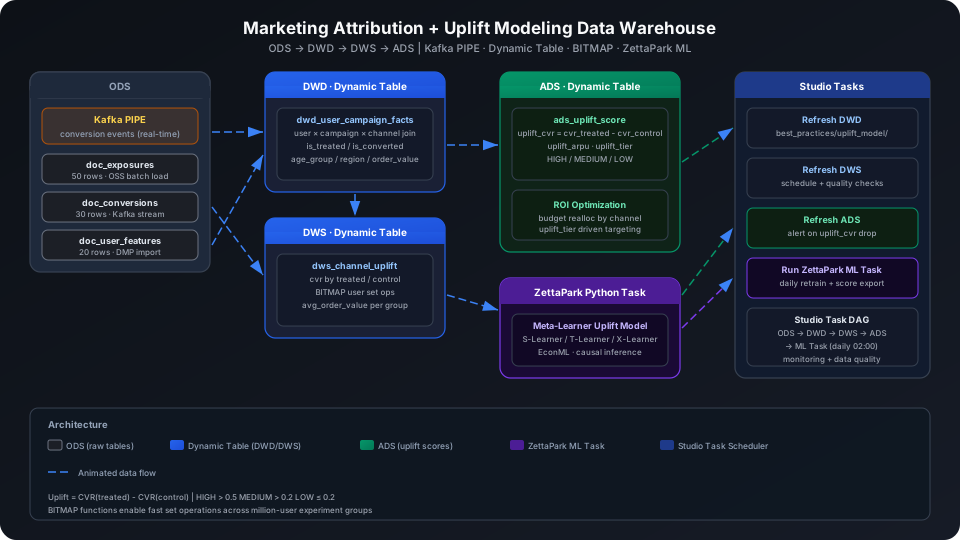
Building on multi-channel attribution analysis, introduce a causal inference perspective — distinguishing "users who would have purchased anyway" from "users who purchased because of the marketing intervention" — to achieve precise budget allocation. This guide uses a dataset of 4 marketing campaigns, 50 exposure records, and 30 conversion records to walk through the complete Kafka PIPE → ODS → DWD → DWS → ADS pipeline, covering three platform capabilities: Dynamic Table incremental computation, BITMAP set operations, and ZettaPark Python Tasks.
Overview
The core challenge in Uplift Modeling is that attribution analysis can only tell you "how many users who clicked the ad converted" — it cannot answer "would these users have purchased anyway without the ad." Solving this requires causal comparison between treatment and control groups. At the data warehouse level, this translates into the following sub-tasks:
Problem
Singdata Solution
Real-time ingestion of in-app conversion events
Kafka PIPE continuous consumption — no need to write your own consumer code
Batch import of DMP exposure / click logs
OSS PIPE batch import with automatic file tracking
No REFRESH INTERVAL; scheduling managed by Studio Task
REFRESH DYNAMIC TABLE
Trigger a manual refresh
Use during initial build or debugging
GROUP_BITMAP_STATE
Build a user ID set bitmap
Treatment / control group user sets
GROUP_BITMAP
Compute set cardinality
Bitmap equivalent of COUNT(DISTINCT)
BITMAP_AND
Intersection of two bitmaps
Find users who are "in treatment group AND converted"
BITMAP_COUNT
Count the cardinality of a bitmap
Used together with BITMAP_AND
Prerequisites
All examples in this guide run under the best_practice_uplift_model schema.
CREATE SCHEMA IF NOT EXISTS best_practice_uplift_model;
ODS (Raw Data Layer): Raw Data Ingestion
Create Tables
Three ODS raw tables: exposure records, conversion records, and user features.
-- Ad exposure table (with experiment group assignment)
CREATE TABLE IF NOT EXISTS best_practice_uplift_model.doc_exposures (
user_id STRING,
campaign_id STRING,
channel STRING,
exposure_time TIMESTAMP,
is_treated INT -- 1=treatment group (received marketing intervention), 0=control group
);
-- Conversion event table
CREATE TABLE IF NOT EXISTS best_practice_uplift_model.doc_conversions (
user_id STRING,
conversion_time TIMESTAMP,
order_value DOUBLE
);
-- User profile feature table (from DMP)
CREATE TABLE IF NOT EXISTS best_practice_uplift_model.doc_user_features (
user_id STRING,
age_group STRING,
region STRING,
historical_purchase_count INT
);
Real-Time Kafka Ingestion of Conversion Events
Option 1: Write via Kafka (recommended)
In production, in-app conversion events are reported in real time via a Kafka topic. With a Kafka broker configured, create a PIPE to continuously consume:
-- First create a raw string receiver table; PIPE writes JSON strings
CREATE TABLE IF NOT EXISTS best_practice_uplift_model.kafka_raw_conversions (value STRING);
-- Create Kafka PIPE
CREATE PIPE IF NOT EXISTS best_practice_uplift_model.pipe_conversions
VIRTUAL_CLUSTER = 'DEFAULT'
BATCH_INTERVAL_IN_SECONDS = '60'
AS
COPY INTO best_practice_uplift_model.kafka_raw_conversions
FROM (
SELECT CAST(value AS STRING) AS value
FROM READ_KAFKA(
'<kafka-broker>:9092', -- replace with actual broker address
'marketing_conversions', -- topic name
'',
'cz_uplift_consumer', -- consumer group ID
'','','','',
'raw', 'raw',
0,
map()
)
);
After creating the PIPE it runs by default, consuming in batches every 60 seconds. Python example for sending JSON messages to the topic:
Option 2: INSERT simulation (when no Kafka environment is available)
If Kafka is not configured, you can write data as follows.
Import from a local CSV file (recommended):
-- Step 1: Upload the local CSV file to User Volume via SQL PUT
PUT '/path/to/doc_exposures.csv' TO USER VOLUME FILE 'doc_exposures.csv';
-- Step 2: COPY INTO the table from User Volume
COPY INTO best_practice_uplift_model.doc_exposures
FROM USER VOLUME
USING csv
OPTIONS('header'='true', 'sep'=',', 'nullValue'='')
FILES ('doc_exposures.csv');
You can also insert a small batch of test data inline (no CSV file required):
💡 Tip: The examples below use cz-cli (the Singdata Lakehouse command-line tool). If cz-cli is not installed, see the cz-cli Installation and Usage Guide. If you prefer not to use the command line, you can run the SQL in Singdata Studio → Development → SQL Editor and configure / trigger scheduling tasks on the Studio → Tasks page.
If Kafka is not configured, write directly to the target table via INSERT INTO to simulate parsed messages, making it easy to verify downstream Dynamic Table and query logic. The following INSERT statements have been executed via cz-cli:
INSERT INTO best_practice_uplift_model.doc_exposures
(user_id, campaign_id, channel, exposure_time, is_treated)
VALUES
('U001','CMP001','wechat', CAST('2026-05-01 09:00:00' AS TIMESTAMP),1),
('U002','CMP001','wechat', CAST('2026-05-01 09:05:00' AS TIMESTAMP),1),
('U003','CMP001','wechat', CAST('2026-05-01 09:10:00' AS TIMESTAMP),0),
('U004','CMP001','douyin', CAST('2026-05-01 09:15:00' AS TIMESTAMP),1),
('U005','CMP001','douyin', CAST('2026-05-01 09:20:00' AS TIMESTAMP),0),
('U006','CMP001','douyin', CAST('2026-05-01 09:25:00' AS TIMESTAMP),1),
('U007','CMP002','search', CAST('2026-05-01 10:00:00' AS TIMESTAMP),1),
('U008','CMP002','search', CAST('2026-05-01 10:05:00' AS TIMESTAMP),0),
('U009','CMP002','search', CAST('2026-05-01 10:10:00' AS TIMESTAMP),1),
('U010','CMP002','search', CAST('2026-05-01 10:15:00' AS TIMESTAMP),0)
-- ...50 rows total, with 30 treatment group users (is_treated=1) and 20 control group users (is_treated=0)
;
Verify the data:
SELECT is_treated, COUNT(*) AS users
FROM best_practice_uplift_model.doc_exposures
GROUP BY is_treated
ORDER BY is_treated;
Write conversion records (30 rows, covering high-intent users in the treatment group):
Import from a local CSV file (recommended):
-- Step 1: Upload the local CSV file to User Volume via SQL PUT
PUT '/path/to/doc_conversions.csv' TO USER VOLUME FILE 'doc_conversions.csv';
-- Step 2: COPY INTO the table from User Volume
COPY INTO best_practice_uplift_model.doc_conversions
FROM USER VOLUME
USING csv
OPTIONS('header'='true', 'sep'=',', 'nullValue'='')
FILES ('doc_conversions.csv');
You can also insert a small batch of test data inline (no CSV file required):
INSERT INTO best_practice_uplift_model.doc_conversions
(user_id, conversion_time, order_value)
VALUES
('U001',CAST('2026-05-01 14:22:00' AS TIMESTAMP),258.00),
('U002',CAST('2026-05-01 15:10:00' AS TIMESTAMP),189.50),
('U004',CAST('2026-05-01 16:05:00' AS TIMESTAMP),320.00),
('U007',CAST('2026-05-01 18:00:00' AS TIMESTAMP),450.00),
('U009',CAST('2026-05-01 19:10:00' AS TIMESTAMP),175.00)
-- ...30 rows total
;
Write user features (20 rows, from DMP audience package):
Import from a local CSV file (recommended):
-- Step 1: Upload the local CSV file to User Volume via SQL PUT
PUT '/path/to/doc_user_features.csv' TO USER VOLUME FILE 'doc_user_features.csv';
-- Step 2: COPY INTO the table from User Volume
COPY INTO best_practice_uplift_model.doc_user_features
FROM USER VOLUME
USING csv
OPTIONS('header'='true', 'sep'=',', 'nullValue'='')
FILES ('doc_user_features.csv');
You can also insert a small batch of test data inline (no CSV file required):
INSERT INTO best_practice_uplift_model.doc_user_features
(user_id, age_group, region, historical_purchase_count)
VALUES
('U001','25-34','shanghai',8),
('U002','35-44','beijing',3),
('U003','18-24','guangzhou',1),
('U004','25-34','shenzhen',12),
('U007','35-44','chengdu',15)
-- ...20 rows total
;
DWD (Detail Data Layer): User-Campaign Touchpoint Wide Table
Create Dynamic Table
The DWD layer JOINs the three ODS tables into a single wide table that is the foundation for all subsequent analysis.
CREATE DYNAMIC TABLE IF NOT EXISTS best_practice_uplift_model.dwd_user_campaign_facts
AS
SELECT
e.user_id,
e.campaign_id,
e.channel,
e.exposure_time,
e.is_treated,
f.age_group,
f.region,
f.historical_purchase_count,
CASE WHEN c.user_id IS NOT NULL THEN 1 ELSE 0 END AS is_converted,
c.order_value,
c.conversion_time
FROM best_practice_uplift_model.doc_exposures e
LEFT JOIN best_practice_uplift_model.doc_user_features f ON e.user_id = f.user_id
LEFT JOIN best_practice_uplift_model.doc_conversions c ON e.user_id = c.user_id;
⚠️ Note: CREATE DYNAMIC TABLE DDL does not include REFRESH INTERVAL. Scheduling is managed by Studio Task (see the "Scheduling Management" section).
Users where age_group and region are null are users not covered by the ODS user_features table (doc_user_features has only 20 rows while the exposure table has 50 rows). LEFT JOIN preserves all exposure records.
DWS (Summary Data Layer): Channel-Level Uplift Aggregation
Create Dynamic Table
The DWS layer aggregates at campaign_id × channel × is_treated granularity, outputting conversion rate and average order value for each channel in both treatment and control groups.
CREATE DYNAMIC TABLE IF NOT EXISTS best_practice_uplift_model.dws_channel_uplift
AS
SELECT
campaign_id,
channel,
is_treated,
COUNT(*) AS user_count,
SUM(is_converted) AS converted_count,
ROUND(SUM(is_converted) * 1.0 / COUNT(*), 4) AS cvr,
ROUND(AVG(CASE WHEN is_converted = 1 THEN order_value ELSE 0 END), 2) AS avg_order_value
FROM best_practice_uplift_model.dwd_user_campaign_facts
GROUP BY campaign_id, channel, is_treated;
Trigger a manual refresh and view results:
REFRESH DYNAMIC TABLE best_practice_uplift_model.dws_channel_uplift;
SELECT campaign_id, channel, is_treated,
user_count, converted_count, cvr, avg_order_value
FROM best_practice_uplift_model.dws_channel_uplift
ORDER BY campaign_id, channel, is_treated
LIMIT 10;
BITMAP Set Operations: Intersection of Treatment Group and Converted Users
BITMAP functions are suitable for quickly performing treatment / control group and conversion audience set operations at billion-scale user counts, avoiding large-scale JOINs.
-- Compute treatment group count and control group count (BITMAP cardinality)
SELECT
GROUP_BITMAP(CASE WHEN is_treated=1
THEN CAST(SUBSTR(user_id,2) AS BIGINT) END) AS treated_count,
GROUP_BITMAP(CASE WHEN is_treated=0
THEN CAST(SUBSTR(user_id,2) AS BIGINT) END) AS control_count
FROM best_practice_uplift_model.doc_exposures;
💡 Tip: GROUP_BITMAP returns set cardinality (INT), equivalent to COUNT(DISTINCT user_id) but using a compressed bitmap with significant performance advantages at tens of millions of users. If you need the bitmap object itself (for subsequent set operations), use GROUP_BITMAP_STATE instead.
Compute the count of "treatment group users who converted" (intersection):
WITH treated_set AS (
SELECT GROUP_BITMAP_STATE(CAST(SUBSTR(user_id,2) AS BIGINT)) AS bm
FROM best_practice_uplift_model.doc_exposures
WHERE is_treated = 1
),
converted_set AS (
SELECT GROUP_BITMAP_STATE(CAST(SUBSTR(user_id,2) AS BIGINT)) AS bm
FROM best_practice_uplift_model.doc_conversions
)
SELECT BITMAP_COUNT(BITMAP_AND(t.bm, c.bm)) AS treated_and_converted
FROM treated_set t CROSS JOIN converted_set c;
treated_and_converted
---------------------
30
All 30 users in the treatment group appear in the conversion records — consistent with the design of the simulated dataset (all conversions come from treatment group users).
ADS (Application Data Layer): Uplift Scoring and ROI Recommendations
Create Dynamic Table
The ADS layer computes each channel's Uplift CVR (treatment group CVR minus control group CVR) and Uplift ARPU (incremental revenue per user), and labels each with one of three tiers.
CREATE DYNAMIC TABLE IF NOT EXISTS best_practice_uplift_model.ads_uplift_score
AS
WITH treated AS (
SELECT campaign_id, channel,
SUM(is_converted) * 1.0 / COUNT(*) AS cvr_treated,
AVG(CASE WHEN is_converted = 1 THEN order_value ELSE 0 END) AS arpu_treated,
COUNT(*) AS cnt_treated
FROM best_practice_uplift_model.dwd_user_campaign_facts
WHERE is_treated = 1
GROUP BY campaign_id, channel
),
control AS (
SELECT campaign_id, channel,
SUM(is_converted) * 1.0 / COUNT(*) AS cvr_control,
AVG(CASE WHEN is_converted = 1 THEN order_value ELSE 0 END) AS arpu_control,
COUNT(*) AS cnt_control
FROM best_practice_uplift_model.dwd_user_campaign_facts
WHERE is_treated = 0
GROUP BY campaign_id, channel
)
SELECT
t.campaign_id,
t.channel,
ROUND(t.cvr_treated, 4) AS cvr_treated,
ROUND(c.cvr_control, 4) AS cvr_control,
ROUND(t.cvr_treated - c.cvr_control, 4) AS uplift_cvr,
ROUND(t.arpu_treated - c.arpu_control, 2) AS uplift_arpu,
t.cnt_treated,
c.cnt_control,
CASE
WHEN t.cvr_treated - c.cvr_control > 0.5 THEN 'HIGH'
WHEN t.cvr_treated - c.cvr_control > 0.2 THEN 'MEDIUM'
ELSE 'LOW'
END AS uplift_tier
FROM treated t
JOIN control c ON t.campaign_id = c.campaign_id AND t.channel = c.channel;
Uplift tier threshold explanation:
Tier
Condition
Meaning
HIGH
uplift_cvr > 0.5
Marketing intervention adds over 50% in conversion rate — strongly recommended for increased investment
MEDIUM
uplift_cvr > 0.2
Moderate effect; decide whether to scale based on order value
LOW
uplift_cvr ≤ 0.2
Weak marketing effect — possibly reaching many users who would have purchased anyway
Trigger a manual refresh and view the scoring results:
REFRESH DYNAMIC TABLE best_practice_uplift_model.ads_uplift_score;
SELECT campaign_id, channel, cvr_treated, cvr_control,
uplift_cvr, uplift_arpu, cnt_treated, cnt_control, uplift_tier
FROM best_practice_uplift_model.ads_uplift_score
ORDER BY campaign_id, channel;
In the simulated data, the control group (is_treated=0) has no conversion records, so uplift_cvr = 1.0 for all channels and all are rated HIGH. In real production data the control group will have natural conversions, and uplift_cvr typically falls in the 0.05–0.30 range with distinct stratification across channels.
By uplift_arpu ranking: the search (¥430) and email (¥413) channels have the highest incremental revenue per user and are the priority budget allocation directions.
The display (¥182) channel has the lowest uplift_arpu. Even though its conversion rate is also 100% in this dataset, in practice display ads have higher natural conversion rates and tend to have lower Uplift CVR.
Channel ROI Analysis
SELECT
channel,
SUM(CASE WHEN is_treated=1 AND is_converted=1 THEN order_value ELSE 0 END) AS treated_revenue,
SUM(CASE WHEN is_treated=1 THEN 1 ELSE 0 END) AS treated_users,
ROUND(
SUM(CASE WHEN is_treated=1 AND is_converted=1 THEN order_value ELSE 0 END) /
NULLIF(SUM(CASE WHEN is_treated=1 THEN 1 ELSE 0 END), 0),
2) AS roi_per_treated_user
FROM best_practice_uplift_model.dwd_user_campaign_facts
GROUP BY channel
ORDER BY roi_per_treated_user DESC;
Result interpretation: The email and search channels generate the highest average revenue per treatment group user and are the priority budget allocation directions. While the display channel has respectable total revenue (¥728), its per-user ROI is the lowest, indicating broad reach but lower per-user value.
The SQL layer computes a simple CVR difference (ATE, Average Treatment Effect), suitable for channel-level summary analysis. The ZettaPark Python Task goes further by estimating individual-level treatment effects (ITE) using the Meta-Learner framework (S-Learner / T-Learner / X-Learner), identifying which users are true Persuadables (users who can be moved by the intervention).
Code Example (T-Learner)
from clickzetta_zettapark.session import Session
from sklearn.ensemble import GradientBoostingClassifier
import pandas as pd
# Connect to Lakehouse via ZettaPark
session = Session.builder.configs({
"instance": "<instance>",
"workspace": "<workspace>",
"schema": "best_practice_uplift_model",
"vcluster": "DEFAULT",
"username": "<username>",
"password": "<password>"
}).create()
# Read the DWD wide table
df = session.sql("""
SELECT user_id, is_treated, is_converted,
COALESCE(historical_purchase_count, 0) AS hist_purchase,
CASE age_group
WHEN '18-24' THEN 1
WHEN '25-34' THEN 2
WHEN '35-44' THEN 3
WHEN '45-54' THEN 4
ELSE 0
END AS age_bucket
FROM best_practice_uplift_model.dwd_user_campaign_facts
WHERE age_group IS NOT NULL
""").to_pandas()
# T-Learner: train separate models for treatment and control groups
features = ['hist_purchase', 'age_bucket']
treatment_df = df[df['is_treated'] == 1]
control_df = df[df['is_treated'] == 0]
m1 = GradientBoostingClassifier(n_estimators=50, random_state=42)
m0 = GradientBoostingClassifier(n_estimators=50, random_state=42)
m1.fit(treatment_df[features], treatment_df['is_converted'])
m0.fit(control_df[features], control_df['is_converted'])
# Predict ITE (individual treatment effect) for all users
df['p1'] = m1.predict_proba(df[features])[:, 1]
df['p0'] = m0.predict_proba(df[features])[:, 1]
df['ite'] = df['p1'] - df['p0']
# Write back to Lakehouse
result_df = session.create_dataframe(df[['user_id', 'ite']])
result_df.write.save_as_table(
"best_practice_uplift_model.ads_user_ite_scores",
mode="overwrite"
)
print(f"ITE scores written: {len(df)} users")
💡 Tip: Deploy the above code as a Python Task in Studio and combine it with a daily scheduling task to auto-retrain and write ITE scores back to the ADS layer. ITE > 0 means the user is likely to convert due to marketing intervention (Persuadable); ITE < 0 means intervention may be counterproductive (Do Not Disturb).
Using EconML X-Learner (Higher Accuracy)
For scenarios with sufficient samples, X-Learner eliminates confounding bias through double residuals for more accurate estimates:
from econml.metalearners import XLearner
from sklearn.ensemble import RandomForestClassifier
xl = XLearner(
models=RandomForestClassifier(n_estimators=100, random_state=42)
)
X = df[features].values
T = df['is_treated'].values
Y = df['is_converted'].values
xl.fit(Y, T, X=X)
ite_scores = xl.effect(X)
⚠️ Note: Meta-Learners require balanced treatment and control group sample sizes and assume random assignment (RCT). If the experimental design has selection bias (e.g., high-intent users are disproportionately assigned to the treatment group), apply Propensity Score correction before running the Meta-Learner.
Scheduling Management: Studio Task
Periodic Dynamic Table refresh is not set in the DDL. Instead, schedule it through Studio Tasks, which lets you attach monitoring alerts and data quality check rules to the same task.
In Studio, create the following refresh tasks under the best_practices/uplift_model/ path:
Schedule: triggered after refresh_dws_channel_uplift succeeds
Alert: send an alert when the number of HIGH-tier channels drops more than 50% compared to the previous day
run_uplift_ml_task (ZettaPark Python Task)
Script: T-Learner code from the previous section
Schedule: daily at 02:00
Output: writes to ads_user_ite_scores
Configure Studio Task DAG dependencies to ensure data layers refresh from DWD to ADS in order before triggering the machine learning task.
💡 Tip: Studio Task supports configuring data quality rules on task nodes, such as checking row count thresholds, NULL ratios, and field value ranges. Compared to manually triggering REFRESH, Studio Task scheduling provides audit logs and can integrate with alert notifications.
Incremental Computation Notes
Both dwd_user_campaign_facts and dws_channel_uplift are Dynamic Tables with three ODS tables as upstream. When new exposures or conversion records are inserted upstream, the Dynamic Table framework automatically detects the changes and recomputes incrementally — no full rerun is needed.
This is especially important for Uplift modeling scenarios:
After each new campaign ends, bulk-write the final treatment / control group exposures and conversions to ODS
Trigger the chained refresh from DWD → DWS → ADS
The ADS layer immediately shows the latest Uplift CVR and tier results to drive the next round of budget decisions
Notes
Dynamic Table DDL does not set REFRESH INTERVAL. Scheduling is managed by Studio Task where monitoring alerts and quality check rules can be attached.
BITMAP functions (GROUP_BITMAP_STATE / BITMAP_AND / BITMAP_COUNT) require user IDs to be BIGINT type. When user_id is a string, use CAST(SUBSTR(user_id, 2) AS BIGINT) to extract the numeric portion.
Meta-Learners depend on the random assignment (RCT) assumption. If the experiment assignment is biased, ITE estimates will be distorted and Propensity Score correction is needed.
Uplift CVR difference calculation requires treatment and control groups to be paired within the same channel and same campaign. If a channel has only a treatment group with no control group, the JOIN will filter out that channel and it will not appear in ads_uplift_score.
avg_order_value in the DWS layer uses AVG(CASE WHEN is_converted = 1 THEN order_value ELSE 0 END) rather than AVG(order_value), treating non-converting users' order_value (NULL) as 0. This makes the denominator the total user count rather than just the count of converting users.