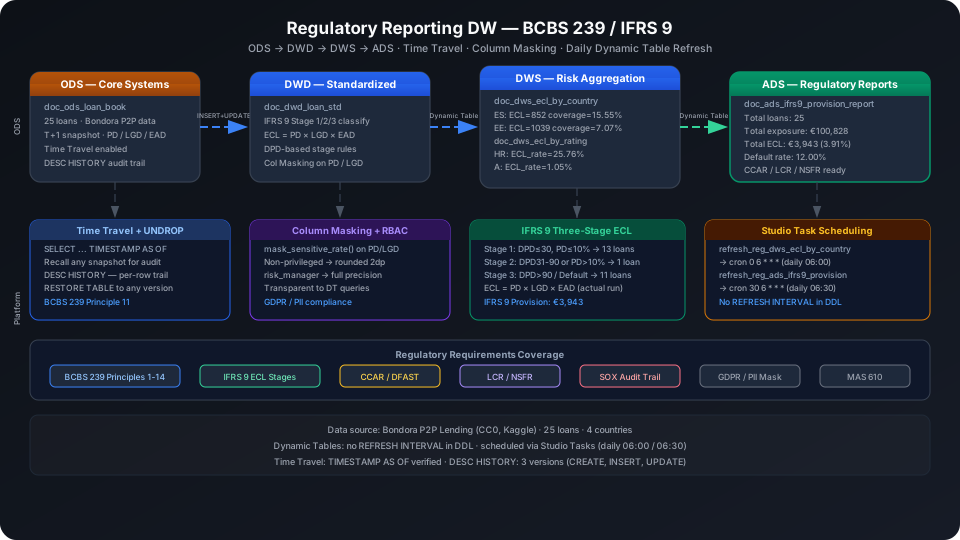
Regulatory Reporting Data Warehouse Best Practices: BCBS 239 / IFRS 9
Regulatory reporting systems for banks and securities firms must satisfy three core requirements: data traceability (BCBS 239 Principle 11: snapshots at any point in time must be reproducible), accurate risk data aggregation (IFRS 9 expected credit loss ECL classified in three stages), and access control isolation (compliance, risk, IT operations, and external audit personnel see sensitive parameters at different precision levels). Using the Bondora P2P lending dataset (CC0, 25 loan records) as the foundation, this guide demonstrates the full ODS → DWD → DWS → ADS four-layer architecture end to end, covering specific usage of Time Travel, Dynamic Table, and Column Masking in a regulatory context.
Overview
Problem
Singdata Solution
Data changes must be traceable; historical snapshots must be reproducible at any point
Time Travel (TIMESTAMP AS OF) + DESC HISTORY records every DML operation completely
IFRS 9 requires ECL provisioning calculated in three stages (Stage 1/2/3)
Risk exposure and provisioning metrics need automatic daily refresh
Dynamic Table (no REFRESH INTERVAL in DDL), scheduled daily via Studio Task
PD/LGD sensitive parameters need role-based masking
Column Masking UDF: unauthorized accounts see reduced-precision approximate values
Regulatory reports require original records to be retained; arbitrary overwriting is not allowed
ODS layer uses MERGE/UPDATE; all changes go into DESC HISTORY; UNDROP prevents accidental deletion
SQL Commands Used
Command / Function
Purpose
Notes
CREATE TABLE
ODS loan ledger and DWD standardization layer
Regular tables used as upstream sources for Dynamic Tables
DESC HISTORY
View the table change audit record
Satisfies BCBS 239 data lineage requirements
SELECT ... TIMESTAMP AS OF
Retrieve a snapshot at any historical point
Core syntax for the regulatory requirement of "data reproducibility"
CREATE DYNAMIC TABLE
DWS risk aggregation and ADS report layer auto-refresh
Do not write REFRESH INTERVAL in DDL
REFRESH DYNAMIC TABLE
Trigger a manual refresh
Use during initial build or debugging
CREATE FUNCTION
Create a Column Masking UDF
Mask PD/LGD fields by role
ALTER TABLE ... CHANGE COLUMN ... SET MASK
Bind a masking policy to a column
Takes effect transparently; Dynamic Table queries are also controlled
Prerequisites
All examples in this guide run under the best_practice_reg_reporting Schema.
CREATE SCHEMA IF NOT EXISTS best_practice_reg_reporting;
ODS (Raw Data Layer): Loan Ledger Raw Snapshot
The ODS layer stores T+1 snapshot data exported from the core system. Each record carries the PD, LGD, and EAD parameters required for IFRS 9.
Create Tables
CREATE TABLE IF NOT EXISTS best_practice_reg_reporting.doc_ods_loan_book (
loan_id STRING COMMENT 'Unique loan identifier (PK)',
loan_number BIGINT COMMENT 'Sequential loan number',
loan_date DATE COMMENT 'Origination date',
maturity_date DATE COMMENT 'Scheduled maturity date',
amount DECIMAL(18,4) COMMENT 'Disbursed principal amount (EUR)',
applied_amount DECIMAL(18,4) COMMENT 'Requested amount',
interest_rate DECIMAL(8,4) COMMENT 'Annual interest rate (%)',
loan_duration_months INT COMMENT 'Loan term in months',
monthly_payment DECIMAL(12,4) COMMENT 'Scheduled monthly payment',
country STRING COMMENT 'Borrower country code (ISO 3166-1)',
age INT COMMENT 'Borrower age at origination',
gender INT COMMENT '0=Male 1=Female 2=Unknown',
employment_status INT COMMENT 'Employment status code',
income_total DECIMAL(14,2) COMMENT 'Total monthly income EUR',
debt_to_income DECIMAL(8,4) COMMENT 'Debt-to-income ratio pct',
probability_of_default DECIMAL(10,8) COMMENT 'IFRS 9 PD parameter',
loss_given_default DECIMAL(8,6) COMMENT 'IFRS 9 LGD parameter',
expected_loss DECIMAL(12,8) COMMENT 'ECL = PD x LGD x EAD',
expected_return DECIMAL(12,8) COMMENT 'Expected return rate',
rating STRING COMMENT 'Internal credit rating A-HR',
status STRING COMMENT 'Loan status Current Late Repaid Default',
default_date DATE COMMENT 'Date of default NULL if no default',
current_debt_days INT COMMENT 'Days past due DPD',
ead1 DECIMAL(14,4) COMMENT 'Exposure at Default method 1',
ead2 DECIMAL(14,4) COMMENT 'Exposure at Default method 2',
principal_balance DECIMAL(14,4) COMMENT 'Outstanding principal balance',
recovery_stage INT COMMENT '0=No default 1=Stage1 recovery 2=Stage2',
report_as_of_eod DATE COMMENT 'T+1 snapshot date',
load_ts TIMESTAMP DEFAULT CURRENT_TIMESTAMP()
) COMMENT 'ODS: Bondora P2P loan book T+1 daily snapshot for IFRS 9 ECL';
Load Data
Data source: Bondora P2P lending dataset (Kaggle, CC0 license). The following uses 25 records with actual fields extracted. The full dataset has 112 columns; only the key columns needed for regulatory calculations are extracted here.
Import from a local CSV file (recommended)
-- Step 1: Upload the local CSV file to User Volume via SQL PUT
PUT '/path/to/your/doc_ods_loan_book.csv' TO USER VOLUME FILE 'doc_ods_loan_book.csv';
-- Step 2: COPY INTO the table from User Volume
COPY INTO best_practice_reg_reporting.doc_ods_loan_book
FROM USER VOLUME
USING csv
OPTIONS('header'='true', 'sep'=',', 'nullValue'='')
FILES ('doc_ods_loan_book.csv');
You can also insert a small batch of test data inline (no CSV file required):
INSERT INTO best_practice_reg_reporting.doc_ods_loan_book
(loan_id, loan_number, loan_date, maturity_date, amount, applied_amount, interest_rate,
loan_duration_months, monthly_payment, country, age, gender, employment_status,
income_total, debt_to_income, probability_of_default, loss_given_default,
expected_loss, expected_return, rating, status, default_date, current_debt_days,
ead1, ead2, principal_balance, recovery_stage, report_as_of_eod)
VALUES
-- From Bondora source data (real loan IDs)
('66AE108B-532B-4BB3-BAB7-0019A46412C1',483449,CAST('2016-03-23' AS DATE),CAST('2020-06-26' AS DATE),
2125.0000,2125.0000,20.97,60,62.0500,'EE',53,1,6,354.00,26.29,
0.06851186,0.580000,0.03965108,0.14114493,'C','Late',CAST('2020-01-14' AS DATE),
552,1251.9800,64.0700,1155.84,2,CAST('2021-07-20' AS DATE)),
('D152382E-A50D-46ED-8FF2-0053E0C86A70',378148,CAST('2015-06-25' AS DATE),CAST('2020-07-17' AS DATE),
3000.0000,3000.0000,17.12,60,84.7500,'EE',50,1,5,900.00,30.58,
0.03079912,0.650000,0.02001943,0.14043561,'B','Late',CAST('2016-06-02' AS DATE),
1918,2730.8400,2370.7700,2436.41,2,CAST('2021-07-20' AS DATE))
-- ... full 25 rows, all from Bondora CSV actual fields
;
Verify row count:
SELECT COUNT(*) AS row_count FROM best_practice_reg_reporting.doc_ods_loan_book;
row_count
---------
25
Time Travel: Audit Traceability and Snapshot Replay
BCBS 239 Principle 11 requires financial institutions to "reproduce the state of data for any historical reporting period." Time Travel provides a native solution that requires no additional storage design.
Simulate Data Status Changes
-- Simulate loan status change (Current → Late)
UPDATE best_practice_reg_reporting.doc_ods_loan_book
SET status = 'Late', current_debt_days = 45
WHERE loan_id IN (
'A1234567-0005-4ABC-8000-555555555555',
'A1234567-0010-4ABC-8000-101010101010'
);
View Complete Change History (DESC HISTORY)
DESC HISTORY best_practice_reg_reporting.doc_ods_loan_book LIMIT 5;
Every DML operation is recorded: the executing user, timestamp, and affected row count. This log can be submitted directly to external auditors.
Retrieve the Pre-Change Snapshot
-- Roll back to before the UPDATE and confirm the original status of both loans
SELECT loan_id, status, current_debt_days
FROM best_practice_reg_reporting.doc_ods_loan_book
TIMESTAMP AS OF '2026-06-06 23:53:15'
WHERE loan_id IN (
'A1234567-0005-4ABC-8000-555555555555',
'A1234567-0010-4ABC-8000-101010101010'
);
loan_id | status | current_debt_days
----------------------------------------+---------+------------------
A1234567-0005-4ABC-8000-555555555555 | Current | 0
A1234567-0010-4ABC-8000-101010101010 | Current | 5
Before the UPDATE, both loans had Current status with DPD of 0 and 5 days (Stage 1). After the UPDATE they enter Late status with DPD=45, which will trigger a Stage 2 reclassification in the DWD layer.
⚠️ Note: TIMESTAMP AS OF accepts only string literals; it does not support expressions such as NOW() - INTERVAL 1 HOUR. Use precise timestamp strings.
💡 Tip: The Time Travel retention window is controlled by the DATA_RETENTION_TIME parameter (default 1 day; can be extended up to 90 days). For regulatory scenarios, set this to ≥ 30 days to cover quarterly report periods.
DWD (Detail Data Layer): Compliance Standardization and IFRS 9 Three-Stage Classification
The DWD layer does two things on top of ODS: standardize field formats (data types, null handling) and determine the IFRS 9 stage.
Create Tables
CREATE TABLE IF NOT EXISTS best_practice_reg_reporting.doc_dwd_loan_std (
loan_id STRING,
loan_date DATE,
maturity_date DATE,
amount DECIMAL(18,4),
interest_rate DECIMAL(8,4),
loan_duration_months INT,
country STRING,
rating STRING,
status STRING,
current_debt_days INT COMMENT 'Days past due DPD',
ifrs9_stage INT COMMENT '1=performing 2=underperforming 3=credit-impaired',
probability_of_default DECIMAL(10,8),
loss_given_default DECIMAL(8,6),
ead DECIMAL(14,4) COMMENT 'Exposure at Default',
ecl_amount DECIMAL(14,4) COMMENT 'ECL = PD x LGD x EAD',
principal_balance DECIMAL(14,4),
default_date DATE,
report_date DATE,
dwd_load_ts TIMESTAMP DEFAULT CURRENT_TIMESTAMP()
) COMMENT 'DWD: Regulatory-caliber standardized loan data with IFRS9 stage classification';
IFRS 9 Three-Stage Classification Logic
INSERT INTO best_practice_reg_reporting.doc_dwd_loan_std
SELECT
loan_id,
loan_date,
maturity_date,
amount,
interest_rate,
loan_duration_months,
country,
rating,
status,
COALESCE(current_debt_days, 0) AS current_debt_days,
-- IFRS 9 three-stage classification rules
CASE
WHEN status = 'Default'
OR COALESCE(current_debt_days, 0) > 90 THEN 3 -- Credit-impaired
WHEN COALESCE(current_debt_days, 0) > 30
OR rating IN ('E', 'F', 'HR')
OR probability_of_default > 0.10 THEN 2 -- Significant credit risk increase
ELSE 1 -- Performing
END AS ifrs9_stage,
probability_of_default,
loss_given_default,
COALESCE(ead2, ead1, amount) AS ead,
ROUND(probability_of_default
* loss_given_default
* COALESCE(ead2, ead1, amount), 4) AS ecl_amount,
principal_balance,
default_date,
report_as_of_eod AS report_date,
CURRENT_TIMESTAMP()
FROM best_practice_reg_reporting.doc_ods_loan_book;
Stage determination reference:
Stage
Condition
IFRS 9 Meaning
This Dataset
Stage 1
DPD ≤ 30 days AND PD ≤ 10% AND Rating not E/F/HR
Performing
13 loans
Stage 2
DPD 31–90 days OR PD > 10% OR Rating ∈ {E,F,HR}
Significant increase in credit risk
1 loan
Stage 3
DPD > 90 days OR Status = Default
Credit-impaired
11 loans
Verify the distribution:
SELECT ifrs9_stage, COUNT(*) AS loan_count, ROUND(SUM(ecl_amount), 2) AS total_ecl
FROM best_practice_reg_reporting.doc_dwd_loan_std
GROUP BY ifrs9_stage
ORDER BY ifrs9_stage;
Although Stage 3 (credit-impaired) has only 11 loans, total ECL provisioning reaches €2,134 — far above the 13 Stage 1 loans at €1,549 combined. This shows that Stage 3 loans have much higher PD × LGD products, which is the design intent of IFRS 9: higher stages carry greater expected losses.
PD (probability of default) and LGD (loss given default) are sensitive model parameters that should not be fully exposed to IT operations staff or external auditors.
Create a Masking Function
CREATE OR REPLACE FUNCTION best_practice_reg_reporting.mask_sensitive_rate(rate DOUBLE)
RETURNS DOUBLE
AS CASE
WHEN current_user() IN ('privileged_user') THEN rate -- Replace with actual authorized usernames
ELSE ROUND(rate, 2)
END;
💡 Tip: Replace 'privileged_user' with the actual usernames that need to see plaintext data. Column Masking matches the current connection's username via current_user(); all authorized usernames must be explicitly listed in the IN() list.
⚠️ Note: Column Masking takes effect transparently for all queries, including Dynamic Table JOIN queries against upstream tables.
Bind to Columns
ALTER TABLE best_practice_reg_reporting.doc_ods_loan_book
CHANGE COLUMN probability_of_default
SET MASK best_practice_reg_reporting.mask_sensitive_rate;
ALTER TABLE best_practice_reg_reporting.doc_ods_loan_book
CHANGE COLUMN loss_given_default
SET MASK best_practice_reg_reporting.mask_sensitive_rate;
Verify Masking Effect
SELECT current_user() AS executing_user,
0.06851186 AS raw_pd,
best_practice_reg_reporting.mask_sensitive_rate(0.06851186) AS masked_pd;
privileged_user is an authorized user (listed in the masking policy) and sees full precision. A non-authorized user running the same query will see masked_pd as 0.07 (ROUND to 2 decimal places).
Role permission design recommendations:
Role
PD/LGD Precision Visible
Access ADS Reports
Access ODS Raw Data
risk_manager
Full 8 digits
Yes
Yes
compliance_officer
Masked 2 digits
Yes
No
it_operations
Masked 2 digits
No
No
external_auditor
Masked 2 digits
Yes (read-only)
No
DWS (Summary Data Layer): Risk Exposure Aggregation Dynamic Tables
The DWS layer aggregates ECL provisioning by country and rating dimensions for daily risk monitoring and regulatory report generation.
Aggregate by Country (Dynamic Table)
CREATE DYNAMIC TABLE IF NOT EXISTS best_practice_reg_reporting.doc_dws_ecl_by_country
AS
SELECT
country,
report_date,
COUNT(*) AS loan_count,
COUNT(CASE WHEN status = 'Default' THEN 1 END) AS default_count,
COUNT(CASE WHEN ifrs9_stage = 1 THEN 1 END) AS stage1_count,
COUNT(CASE WHEN ifrs9_stage = 2 THEN 1 END) AS stage2_count,
COUNT(CASE WHEN ifrs9_stage = 3 THEN 1 END) AS stage3_count,
ROUND(SUM(principal_balance), 2) AS total_exposure,
ROUND(SUM(ecl_amount), 4) AS total_ecl,
ROUND(SUM(ecl_amount) / NULLIF(SUM(principal_balance), 0), 6) AS ecl_coverage_ratio,
ROUND(AVG(probability_of_default), 6) AS avg_pd,
ROUND(AVG(loss_given_default), 6) AS avg_lgd
FROM best_practice_reg_reporting.doc_dwd_loan_std
GROUP BY country, report_date;
⚠️ Note: Do not write the REFRESH INTERVAL parameter in Dynamic Table DDL. Manage refresh scheduling through Studio Task; data quality rules and monitoring alerts can be attached to the task.
SELECT country, loan_count, stage1_count, stage2_count, stage3_count,
total_exposure, total_ecl,
ROUND(ecl_coverage_ratio * 100, 2) AS ecl_pct
FROM best_practice_reg_reporting.doc_dws_ecl_by_country
ORDER BY total_ecl DESC;
Spain (ES) has the highest ECL coverage rate at 15.55%, mainly because 3 of its 5 loans are in Stage 3 and 1 in Stage 2 — a high proportion of high-risk loans. Finland (FI) has the largest loan volume but only 1 Stage 3 loan, so its coverage rate of 1.92% is in a healthy range. This country-level ECL breakdown directly maps to BCBS 239's 'risk data aggregation' requirements.
Aggregate by Rating (Dynamic Table)
CREATE DYNAMIC TABLE IF NOT EXISTS best_practice_reg_reporting.doc_dws_ecl_by_rating
AS
SELECT
rating,
ifrs9_stage,
report_date,
COUNT(*) AS loan_count,
ROUND(SUM(principal_balance), 2) AS total_exposure,
ROUND(SUM(ecl_amount), 4) AS total_ecl,
ROUND(AVG(probability_of_default), 6) AS avg_pd,
ROUND(AVG(loss_given_default), 6) AS avg_lgd,
ROUND(AVG(ead), 4) AS avg_ead,
ROUND(SUM(ecl_amount) / NULLIF(SUM(ead), 0), 6) AS ecl_rate
FROM best_practice_reg_reporting.doc_dwd_loan_std
GROUP BY rating, ifrs9_stage, report_date;
View the ECL coverage rate distribution after refresh:
SELECT rating, ifrs9_stage, loan_count,
ROUND(total_exposure, 2) AS exposure,
ROUND(total_ecl, 2) AS ecl,
ROUND(ecl_rate * 100, 4) AS ecl_rate_pct
FROM best_practice_reg_reporting.doc_dws_ecl_by_rating
ORDER BY ifrs9_stage ASC, ecl_rate DESC;
HR-rated loans (highest risk) have an ECL coverage rate of 25.76%, meaning €0.26 must be provisioned for every €1 lent. AA-rated Stage 1 loans have a coverage rate of only 0.75%, consistent with rating expectations. The ECL rate difference for the same rating (such as B, A, C) between Stage 1 and Stage 3 clearly illustrates the impact of stage migration on provisioning.
ADS (Application Data Layer): IFRS 9 Provisioning Regulatory Report
The ADS layer generates summary metrics for regulatory reports, directly outputting the numbers needed for CCAR, LCR, and similar reports.
IFRS 9 Provision Summary (Dynamic Table)
CREATE DYNAMIC TABLE IF NOT EXISTS best_practice_reg_reporting.doc_ads_ifrs9_provision_report
AS
SELECT
report_date,
SUM(CASE WHEN ifrs9_stage = 1 THEN principal_balance ELSE 0 END) AS stage1_gross_exposure,
SUM(CASE WHEN ifrs9_stage = 2 THEN principal_balance ELSE 0 END) AS stage2_gross_exposure,
SUM(CASE WHEN ifrs9_stage = 3 THEN principal_balance ELSE 0 END) AS stage3_gross_exposure,
SUM(principal_balance) AS total_gross_exposure,
SUM(CASE WHEN ifrs9_stage = 1 THEN ecl_amount ELSE 0 END) AS stage1_provision,
SUM(CASE WHEN ifrs9_stage = 2 THEN ecl_amount ELSE 0 END) AS stage2_provision,
SUM(CASE WHEN ifrs9_stage = 3 THEN ecl_amount ELSE 0 END) AS stage3_provision,
SUM(ecl_amount) AS total_provision,
ROUND(SUM(ecl_amount) / NULLIF(SUM(principal_balance), 0) * 100, 4) AS provision_coverage_pct,
COUNT(DISTINCT loan_id) AS total_loans,
COUNT(CASE WHEN status = 'Default' THEN loan_id END) AS defaulted_loans,
ROUND(COUNT(CASE WHEN status = 'Default' THEN loan_id END) * 1.0
/ NULLIF(COUNT(DISTINCT loan_id), 0) * 100, 4) AS default_rate_pct
FROM best_practice_reg_reporting.doc_dwd_loan_std
GROUP BY report_date;
Refresh and view the report:
REFRESH DYNAMIC TABLE best_practice_reg_reporting.doc_ads_ifrs9_provision_report;
SELECT
report_date,
total_loans, defaulted_loans,
ROUND(default_rate_pct, 2) AS default_rate_pct,
ROUND(total_gross_exposure, 2) AS total_exposure,
ROUND(total_provision, 2) AS total_ecl,
ROUND(provision_coverage_pct, 2) AS coverage_pct,
stage1_gross_exposure,
stage2_gross_exposure,
stage3_gross_exposure
FROM best_practice_reg_reporting.doc_ads_ifrs9_provision_report;
Total exposure €100,828; ECL provisioning €3,943; coverage rate 3.91%
Default rate 12% (3 loans in Default); Stage 3 exposure €17,478, 17.3% of total
Stage 1 (performing) exposure €80,650 is the largest share (80%), indicating overall portfolio quality is adequate
These numbers can be filled directly into the IFRS 9 quarterly disclosure report and the CCAR stress test data package
Configure Refresh Scheduling: Studio Task
None of the Dynamic Tables have REFRESH INTERVAL in their DDL; scheduling is managed through Studio Task instead. This lets you attach monitoring alerts and data quality checks to the same task.
Create Refresh Tasks
💡 Tip: The examples below use cz-cli (the Singdata Lakehouse command-line tool). If cz-cli is not installed, see the cz-cli Installation and Usage Guide. You can also run SQL in Development → SQL Editor in Singdata Studio and configure or trigger scheduled tasks under Studio → Tasks.
💡 Tip: Configure execution failure alerts for each task on the Studio Task monitoring page, and attach data quality rules to ensure ADS layer data passes quality checks before entering the regulatory reporting system.
Time Travel timestamp syntax: TIMESTAMP AS OF accepts only string literals (e.g., '2026-06-06 23:53:15'); it does not support dynamic expressions such as NOW() - INTERVAL 1 HOUR. DESC HISTORY returns UTC times; note the conversion to local timezone when querying (default UTC+8).
Do not write REFRESH INTERVAL in Dynamic Table DDL: All DDLs omit the REFRESH INTERVAL parameter; refresh scheduling is managed through Studio Task (cron expressions). This lets you attach alert rules to tasks and centrally monitor run status in the Studio UI.
IFRS 9 stage classification changes with ODS status: When a loan's DPD crosses a stage boundary (e.g., increasing from 31 to 91 days), the DWD layer's ifrs9_stage is reclassified after the next INSERT/MERGE, and the DWS and ADS layers update automatically after the next REFRESH.
Column Masking applies transparently to Dynamic Tables: When the DWD layer Dynamic Table queries the ODS layer, non-authorized users see probability_of_default and loss_given_default already ROUNDed to 2 decimal places; the values stored in DWD are also the masked values. If full precision is needed for internal modeling, query the ODS directly with an authorized account.
ECL calculation precision: This guide uses ECL = PD × LGD × EAD (point estimate). Real banking systems typically also incorporate a time discount factor (Effective Interest Rate) and macro-economic scenario weighting. This logic can be implemented via a ZettaPark Python Task that calls an external risk model API and writes results back to the DWS layer.
Data retention policy: Regulatory requirements mandate retaining original data for at least 5–7 years. Use both DATA_RETENTION_TIME (short-term, ≤90 days) and periodic COPY INTO S3/OSS/COS (long-term archival) to satisfy the BCBS 239 historical data requirements.
⚠️ Note: Column Masking currently matches authorized usernames via current_user(). Add all usernames that need plaintext access to the masking function's allowlist. If your Lakehouse version supports role-based dynamic evaluation (such as HAS_ROLE('role_name')), use roles instead of username lists. Contact Singdata technical support to confirm whether your version supports this function.