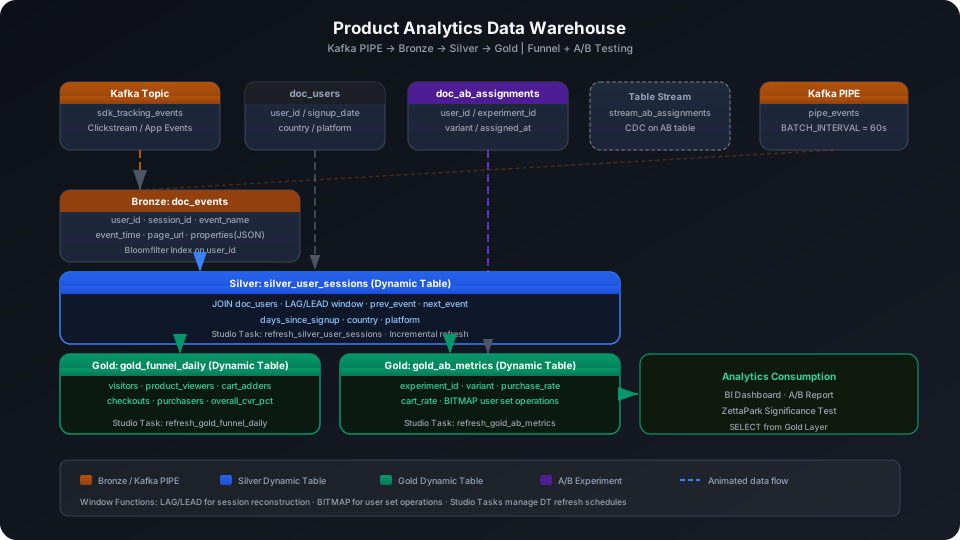
Product Data Analysis Data Warehouse Best Practices (Funnel + A/B Testing)
Build a multi-layer analytics data warehouse from Web/App tracking event streams to implement full-pipeline funnel analysis (registration → browse → add-to-cart → order) and A/B experiment conversion rate measurement. This guide uses a dataset of 52 simulated tracking events, 10 users, and 15 experiment assignment records to walk through the complete Kafka PIPE → Bronze → Silver → Gold pipeline, covering three key platform capabilities: Window Functions (LAG/LEAD), BITMAP user set operations, and Table Stream + MERGE INTO.
Overview
The typical pipeline for product data analysis is: tracking SDK reporting → real-time ingestion → raw storage (Bronze) → session reconstruction (Silver) → funnel & A/B metric aggregation (Gold).
Singdata Lakehouse addresses the core challenges with the following combination:
Problem
Solution
High-frequency millisecond-level writes of tracking events
Kafka PIPE continuous ingestion — no need to write your own consumer
The system detects upstream changes and refreshes incrementally
CREATE TABLE STREAM
Create a Stream on doc_ab_assignments
Captures new experiment assignments to drive MERGE INTO
MERGE INTO
Incrementally update the A/B assignment wide table
Handles upsert scenarios when users are reassigned
LAG / LEAD
Compute previous and next event steps
Silver layer session path reconstruction
GROUP_BITMAP
User set cardinality statistics
A/B experiment group user count / behavior user count
REFRESH DYNAMIC TABLE
Trigger a manual refresh
Use during initial build or debugging
Prerequisites
All examples in this guide run under the best_practice_product_analytics schema.
CREATE SCHEMA IF NOT EXISTS best_practice_product_analytics;
Bronze Layer: Raw Tracking Event Table
Create Tables
doc_events is the central event table carrying the raw tracking event stream from the SDK.
CREATE TABLE IF NOT EXISTS best_practice_product_analytics.doc_events (
user_id STRING,
session_id STRING,
event_name STRING,
event_time TIMESTAMP,
page_url STRING,
properties STRING -- JSON string storing business properties
);
properties uses STRING type to store JSON, parsed later with GET_JSON_OBJECT. When stored in Parquet format, JSON fields compress well — splitting into many columns is not recommended.
Create Bloomfilter Index
Both the Silver and Gold layers will filter by user_id. A Bloomfilter Index speeds up point queries on this column.
CREATE BLOOMFILTER INDEX idx_bf_pa_user_id
ON TABLE doc_events (user_id);
⚠️ Note: CREATE BLOOMFILTER INDEX requires the same Schema context as the target table. Run USE SCHEMA first or use the -s parameter; otherwise you see an "index and table must in the same schema" error.
User Dimension Table and A/B Assignment Table
CREATE TABLE IF NOT EXISTS best_practice_product_analytics.doc_users (
user_id STRING,
signup_date DATE,
country STRING,
platform STRING
);
CREATE TABLE IF NOT EXISTS best_practice_product_analytics.doc_ab_assignments (
user_id STRING,
experiment_id STRING,
variant STRING,
assigned_at TIMESTAMP
);
Configure Kafka PIPE
Kafka PIPE implements millisecond-level continuous ingestion from a Kafka topic to doc_events. Replace the broker address and topic name for your production environment.
Option 1: Write via Kafka (recommended)
With a Kafka broker configured, send event messages to the topic via a Python producer; the PIPE automatically ingests them:
CREATE PIPE IF NOT EXISTS best_practice_product_analytics.pipe_events
VIRTUAL_CLUSTER = 'DEFAULT'
BATCH_INTERVAL_IN_SECONDS = '60'
AS
COPY INTO best_practice_product_analytics.doc_events
FROM (
SELECT
GET_JSON_OBJECT(CAST(value AS STRING), '$.user_id') AS user_id,
GET_JSON_OBJECT(CAST(value AS STRING), '$.session_id') AS session_id,
GET_JSON_OBJECT(CAST(value AS STRING), '$.event_name') AS event_name,
CAST(GET_JSON_OBJECT(CAST(value AS STRING), '$.event_time') AS TIMESTAMP) AS event_time,
GET_JSON_OBJECT(CAST(value AS STRING), '$.page_url') AS page_url,
GET_JSON_OBJECT(CAST(value AS STRING), '$.properties') AS properties
FROM READ_KAFKA(
'<kafka-broker>:9092',
'sdk_tracking_events',
'',
'cz_pa_consumer',
'','','','',
'raw', 'raw',
0,
map()
)
);
💡 Tip: READ_KAFKA positional parameters 5–8 (start/end offsets, timestamps) are left empty in the PIPE DDL; they are managed automatically by the PIPE runtime.
Option 2: INSERT simulation (when no Kafka environment is available)
If Kafka is not configured, write directly to doc_events via INSERT INTO to simulate PIPE-parsed writes and verify downstream Dynamic Table and query logic. All examples in this guide are based on data loaded this way.
Import from a local CSV file (recommended):
-- Step 1: Upload the local CSV file to User Volume via SQL PUT
PUT '/path/to/your/data.csv' TO USER VOLUME FILE 'data.csv';
-- Step 2: COPY INTO the table from User Volume
COPY INTO best_practice_product_analytics.doc_events
FROM USER VOLUME
USING csv
OPTIONS('header'='true', 'sep'=',', 'nullValue'='')
FILES ('data.csv');
You can also insert a small batch of test data inline (no CSV file required):
INSERT INTO best_practice_product_analytics.doc_events VALUES
-- S001: U001 complete funnel (2026-05-10)
('U001','S001','page_view', CAST('2026-05-10 10:00:00' AS TIMESTAMP),'/home', '{"referrer":"google","duration_s":12}'),
('U001','S001','product_view',CAST('2026-05-10 10:01:30' AS TIMESTAMP),'/product/101', '{"product_id":"101","category":"electronics"}'),
('U001','S001','add_to_cart', CAST('2026-05-10 10:03:00' AS TIMESTAMP),'/product/101', '{"product_id":"101","price":299}'),
('U001','S001','checkout', CAST('2026-05-10 10:05:00' AS TIMESTAMP),'/checkout', '{"cart_value":299,"currency":"CNY"}'),
('U001','S001','purchase', CAST('2026-05-10 10:07:00' AS TIMESTAMP),'/order/done', '{"order_id":"ORD001","amount":299}'),
-- S002: U002 complete funnel (2026-05-10)
('U002','S002','page_view', CAST('2026-05-10 10:10:00' AS TIMESTAMP),'/home', '{"referrer":"direct"}'),
('U002','S002','product_view',CAST('2026-05-10 10:11:00' AS TIMESTAMP),'/product/202', '{"product_id":"202","category":"clothing"}'),
('U002','S002','add_to_cart', CAST('2026-05-10 10:13:00' AS TIMESTAMP),'/product/202', '{"product_id":"202","price":99}'),
('U002','S002','checkout', CAST('2026-05-10 10:15:00' AS TIMESTAMP),'/checkout', '{"cart_value":99,"currency":"CNY"}'),
('U002','S002','purchase', CAST('2026-05-10 10:17:00' AS TIMESTAMP),'/order/done', '{"order_id":"ORD002","amount":99}'),
-- S003: U003 complete funnel (2026-05-10)
('U003','S003','page_view', CAST('2026-05-10 10:20:00' AS TIMESTAMP),'/home', '{"referrer":"email"}'),
('U003','S003','product_view',CAST('2026-05-10 10:21:30' AS TIMESTAMP),'/product/303', '{"product_id":"303","category":"books"}'),
('U003','S003','add_to_cart', CAST('2026-05-10 10:23:00' AS TIMESTAMP),'/product/303', '{"product_id":"303","price":49}'),
('U003','S003','checkout', CAST('2026-05-10 10:25:00' AS TIMESTAMP),'/checkout', '{"cart_value":49,"currency":"CNY"}'),
('U003','S003','purchase', CAST('2026-05-10 10:27:00' AS TIMESTAMP),'/order/done', '{"order_id":"ORD003","amount":49}'),
-- S004: U004 complete funnel (2026-05-10)
('U004','S004','page_view', CAST('2026-05-10 10:30:00' AS TIMESTAMP),'/home', '{"referrer":"social"}'),
('U004','S004','product_view',CAST('2026-05-10 10:31:30' AS TIMESTAMP),'/product/404', '{"product_id":"404","category":"sports"}'),
('U004','S004','add_to_cart', CAST('2026-05-10 10:33:00' AS TIMESTAMP),'/product/404', '{"product_id":"404","price":159}'),
('U004','S004','checkout', CAST('2026-05-10 10:35:00' AS TIMESTAMP),'/checkout', '{"cart_value":159,"currency":"CNY"}'),
('U004','S004','purchase', CAST('2026-05-10 10:37:00' AS TIMESTAMP),'/order/done', '{"order_id":"ORD004","amount":159}'),
-- S005: U005 abandoned at checkout; returned on 05-11 to complete purchase (2026-05-10)
('U005','S005','page_view', CAST('2026-05-10 10:40:00' AS TIMESTAMP),'/home', '{"referrer":"google"}'),
('U005','S005','product_view',CAST('2026-05-10 10:41:30' AS TIMESTAMP),'/product/505', '{"product_id":"505","category":"beauty"}'),
('U005','S005','add_to_cart', CAST('2026-05-10 10:43:00' AS TIMESTAMP),'/product/505', '{"product_id":"505","price":89}'),
('U005','S005','checkout', CAST('2026-05-10 10:45:00' AS TIMESTAMP),'/checkout', '{"cart_value":89,"currency":"CNY"}'),
-- S006: U006 abandoned after add-to-cart (2026-05-10)
('U006','S006','page_view', CAST('2026-05-10 11:00:00' AS TIMESTAMP),'/home', '{"referrer":"direct"}'),
('U006','S006','product_view',CAST('2026-05-10 11:01:30' AS TIMESTAMP),'/product/606', '{"product_id":"606","category":"electronics"}'),
('U006','S006','add_to_cart', CAST('2026-05-10 11:03:00' AS TIMESTAMP),'/product/606', '{"product_id":"606","price":499}'),
-- S007: U007 abandoned after add-to-cart (2026-05-10)
('U007','S007','page_view', CAST('2026-05-10 11:10:00' AS TIMESTAMP),'/home', '{"referrer":"social"}'),
('U007','S007','product_view',CAST('2026-05-10 11:11:30' AS TIMESTAMP),'/product/707', '{"product_id":"707","category":"clothing"}'),
('U007','S007','add_to_cart', CAST('2026-05-10 11:13:00' AS TIMESTAMP),'/product/707', '{"product_id":"707","price":129}'),
-- S008: U008 viewed product then exited (2026-05-10)
('U008','S008','page_view', CAST('2026-05-10 11:20:00' AS TIMESTAMP),'/home', '{"referrer":"google"}'),
('U008','S008','product_view',CAST('2026-05-10 11:21:30' AS TIMESTAMP),'/product/808', '{"product_id":"808","category":"sports"}'),
-- S009: U009 viewed product then exited; returned on 05-11 to complete purchase (2026-05-10)
('U009','S009','page_view', CAST('2026-05-10 11:30:00' AS TIMESTAMP),'/home', '{"referrer":"email"}'),
('U009','S009','product_view',CAST('2026-05-10 11:31:30' AS TIMESTAMP),'/product/909', '{"product_id":"909","category":"books"}'),
-- S010: U010 viewed product then exited (2026-05-10)
('U010','S010','page_view', CAST('2026-05-10 11:40:00' AS TIMESTAMP),'/home', '{"referrer":"direct"}'),
('U010','S010','product_view',CAST('2026-05-10 11:41:30' AS TIMESTAMP),'/product/101', '{"product_id":"101","category":"electronics"}'),
-- S011: U003 return visit complete funnel (2026-05-11)
('U003','S011','page_view', CAST('2026-05-11 09:00:00' AS TIMESTAMP),'/home', '{"referrer":"push_notification"}'),
('U003','S011','product_view',CAST('2026-05-11 09:01:30' AS TIMESTAMP),'/product/303', '{"product_id":"303","category":"books"}'),
('U003','S011','add_to_cart', CAST('2026-05-11 09:03:00' AS TIMESTAMP),'/product/303', '{"product_id":"303","price":49}'),
('U003','S011','checkout', CAST('2026-05-11 09:05:00' AS TIMESTAMP),'/checkout', '{"cart_value":49,"currency":"CNY"}'),
('U003','S011','purchase', CAST('2026-05-11 09:07:00' AS TIMESTAMP),'/order/done', '{"order_id":"ORD005","amount":49}'),
-- S012: U005 return visit; completes yesterday's unfinished purchase (2026-05-11)
('U005','S012','page_view', CAST('2026-05-11 09:15:00' AS TIMESTAMP),'/home', '{"referrer":"email"}'),
('U005','S012','product_view',CAST('2026-05-11 09:16:30' AS TIMESTAMP),'/product/505', '{"product_id":"505","category":"beauty"}'),
('U005','S012','add_to_cart', CAST('2026-05-11 09:18:00' AS TIMESTAMP),'/product/505', '{"product_id":"505","price":89}'),
('U005','S012','checkout', CAST('2026-05-11 09:20:00' AS TIMESTAMP),'/checkout', '{"cart_value":89,"currency":"CNY"}'),
('U005','S012','purchase', CAST('2026-05-11 09:22:00' AS TIMESTAMP),'/order/done', '{"order_id":"ORD006","amount":89}'),
-- S013: U009 return visit; completes full funnel for the first time (2026-05-11)
('U009','S013','page_view', CAST('2026-05-11 09:30:00' AS TIMESTAMP),'/home', '{"referrer":"push_notification"}'),
('U009','S013','product_view',CAST('2026-05-11 09:31:30' AS TIMESTAMP),'/product/909', '{"product_id":"909","category":"books"}'),
('U009','S013','add_to_cart', CAST('2026-05-11 09:33:00' AS TIMESTAMP),'/product/909', '{"product_id":"909","price":79}'),
('U009','S013','checkout', CAST('2026-05-11 09:35:00' AS TIMESTAMP),'/checkout', '{"cart_value":79,"currency":"CNY"}'),
('U009','S013','purchase', CAST('2026-05-11 09:37:00' AS TIMESTAMP),'/order/done', '{"order_id":"ORD007","amount":79}'),
-- S014: U010 return visit bounce (2026-05-11)
('U010','S014','page_view', CAST('2026-05-11 09:45:00' AS TIMESTAMP),'/home', '{"referrer":"direct"}')
;
Verify row count after loading:
SELECT COUNT(*) AS event_count FROM best_practice_product_analytics.doc_events;
event_count
-----------
52
Insert user dimension data (10 users; U001 registered on 2026-01-10, which is exactly 120 days before 2026-05-10):
INSERT INTO best_practice_product_analytics.doc_users VALUES
('U001', CAST('2026-01-10' AS DATE), 'CN', 'iOS'),
('U002', CAST('2026-01-15' AS DATE), 'CN', 'Android'),
('U003', CAST('2026-02-01' AS DATE), 'CN', 'Web'),
('U004', CAST('2026-02-10' AS DATE), 'CN', 'iOS'),
('U005', CAST('2026-02-20' AS DATE), 'CN', 'Android'),
('U006', CAST('2026-03-01' AS DATE), 'CN', 'Web'),
('U007', CAST('2026-03-10' AS DATE), 'CN', 'iOS'),
('U008', CAST('2026-03-20' AS DATE), 'CN', 'Android'),
('U009', CAST('2026-04-01' AS DATE), 'CN', 'Web'),
('U010', CAST('2026-04-10' AS DATE), 'CN', 'iOS');
Insert A/B experiment assignment data (15 records, two experiments):
exp_checkout_v2: treatment = {U001–U003, U005, U009}, control = {U004, U006–U010}
exp_homepage_banner: control = {U001, U002}, treatment = {U003, U004, U006}
INSERT INTO best_practice_product_analytics.doc_ab_assignments VALUES
('U001', 'exp_checkout_v2', 'treatment', CAST('2026-05-09 08:00:00' AS TIMESTAMP)),
('U002', 'exp_checkout_v2', 'treatment', CAST('2026-05-09 08:00:00' AS TIMESTAMP)),
('U003', 'exp_checkout_v2', 'treatment', CAST('2026-05-09 08:00:00' AS TIMESTAMP)),
('U005', 'exp_checkout_v2', 'treatment', CAST('2026-05-09 08:00:00' AS TIMESTAMP)),
('U009', 'exp_checkout_v2', 'treatment', CAST('2026-05-09 08:00:00' AS TIMESTAMP)),
('U004', 'exp_checkout_v2', 'control', CAST('2026-05-09 08:00:00' AS TIMESTAMP)),
('U006', 'exp_checkout_v2', 'control', CAST('2026-05-09 08:00:00' AS TIMESTAMP)),
('U007', 'exp_checkout_v2', 'control', CAST('2026-05-09 08:00:00' AS TIMESTAMP)),
('U008', 'exp_checkout_v2', 'control', CAST('2026-05-09 08:00:00' AS TIMESTAMP)),
('U010', 'exp_checkout_v2', 'control', CAST('2026-05-09 08:00:00' AS TIMESTAMP)),
('U001', 'exp_homepage_banner', 'control', CAST('2026-05-09 08:00:00' AS TIMESTAMP)),
('U002', 'exp_homepage_banner', 'control', CAST('2026-05-09 08:00:00' AS TIMESTAMP)),
('U003', 'exp_homepage_banner', 'treatment', CAST('2026-05-09 08:00:00' AS TIMESTAMP)),
('U004', 'exp_homepage_banner', 'treatment', CAST('2026-05-09 08:00:00' AS TIMESTAMP)),
('U006', 'exp_homepage_banner', 'treatment', CAST('2026-05-09 08:00:00' AS TIMESTAMP));
Silver Layer Dynamic Table: Session Reconstruction and Path Calculation
The Silver layer does three things on top of Bronze raw events:
LEFT JOIN doc_users to join user registration date, country, and platform dimensions
Use LAG / LEAD window functions to compute the previous and next step for each event, reconstructing user behavior paths
Compute days_since_signup for downstream new vs. returning user funnel comparisons
CREATE DYNAMIC TABLE IF NOT EXISTS best_practice_product_analytics.silver_user_sessions
AS
SELECT
e.user_id,
e.session_id,
e.event_name,
e.event_time,
e.page_url,
e.properties,
u.signup_date,
u.country,
u.platform,
LAG(e.event_name) OVER (PARTITION BY e.user_id, e.session_id ORDER BY e.event_time) AS prev_event,
LEAD(e.event_name) OVER (PARTITION BY e.user_id, e.session_id ORDER BY e.event_time) AS next_event,
DATEDIFF(CAST(e.event_time AS DATE), u.signup_date) AS days_since_signup
FROM best_practice_product_analytics.doc_events e
LEFT JOIN best_practice_product_analytics.doc_users u ON e.user_id = u.user_id;
⚠️ Note: Dynamic Table DDL does not include REFRESH INTERVAL. Refresh scheduling is managed through Studio Tasks (see the next section), which lets you attach monitoring alerts and data quality rules to the same task.
SELECT user_id, session_id, event_name, prev_event, next_event, days_since_signup
FROM best_practice_product_analytics.silver_user_sessions
WHERE user_id = 'U001' AND session_id = 'S001'
ORDER BY event_time;
prev_event = NULL indicates the session start; next_event = NULL indicates the session end. days_since_signup = 120 shows that U001 is a returning user 120 days after registration.
Configure Studio Task for Refresh Scheduling
Silver layer refresh scheduling is managed through Studio Tasks:
Create a SQL task refresh_silver_user_sessions under the Studio best_practices/product_analytics/ path
Configure a data quality alert on the task: trigger an alert when the Silver layer row count decreases more than 10% from the previous refresh
💡 Tip: The examples below use cz-cli (the Singdata Lakehouse command-line tool). If cz-cli is not installed, see the cz-cli Installation and Usage Guide. If you prefer not to use the command line, you can run the SQL in Singdata Studio → Development → SQL Editor and configure / trigger scheduling tasks on the Studio → Tasks page.
Funnel analysis aggregates unique user counts per step to compute the conversion rate at each step and the overall CVR.
Aggregate by Event Step
SELECT
event_name,
COUNT(DISTINCT user_id) AS user_count,
ROUND(COUNT(DISTINCT user_id) * 100.0 /
MAX(COUNT(DISTINCT user_id)) OVER (), 1) AS pct_of_top
FROM best_practice_product_analytics.doc_events
WHERE event_name IN ('page_view','product_view','add_to_cart','checkout','purchase')
GROUP BY event_name
ORDER BY user_count DESC;
Result interpretation: 20% dropped between browse and add-to-cart; 25% dropped from add-to-cart to checkout (8→6); overall CVR is 60%. The largest drop-off is at add-to-cart → checkout, making checkout experience the priority optimization target.
Horizontal Funnel (Overall CVR in a Single Row)
WITH funnel AS (
SELECT
user_id,
MAX(CASE WHEN event_name = 'page_view' THEN 1 ELSE 0 END) AS step1,
MAX(CASE WHEN event_name = 'product_view' THEN 1 ELSE 0 END) AS step2,
MAX(CASE WHEN event_name = 'add_to_cart' THEN 1 ELSE 0 END) AS step3,
MAX(CASE WHEN event_name = 'checkout' THEN 1 ELSE 0 END) AS step4,
MAX(CASE WHEN event_name = 'purchase' THEN 1 ELSE 0 END) AS step5
FROM best_practice_product_analytics.doc_events
GROUP BY user_id
)
SELECT
SUM(step1) AS page_view,
SUM(step2) AS product_view,
SUM(step3) AS add_to_cart,
SUM(step4) AS checkout,
SUM(step5) AS purchase,
ROUND(SUM(step5) * 100.0 / NULLIF(SUM(step1), 0), 1) AS overall_cvr_pct
FROM funnel;
gold_funnel_daily aggregates unique user counts per funnel step at daily granularity.
CREATE DYNAMIC TABLE IF NOT EXISTS best_practice_product_analytics.gold_funnel_daily
AS
SELECT
CAST(event_time AS DATE) AS event_date,
COUNT(DISTINCT CASE WHEN event_name = 'page_view' THEN user_id END) AS visitors,
COUNT(DISTINCT CASE WHEN event_name = 'product_view' THEN user_id END) AS product_viewers,
COUNT(DISTINCT CASE WHEN event_name = 'add_to_cart' THEN user_id END) AS cart_adders,
COUNT(DISTINCT CASE WHEN event_name = 'checkout' THEN user_id END) AS checkouts,
COUNT(DISTINCT CASE WHEN event_name = 'purchase' THEN user_id END) AS purchasers,
ROUND(COUNT(DISTINCT CASE WHEN event_name = 'purchase' THEN user_id END) * 100.0
/ NULLIF(COUNT(DISTINCT CASE WHEN event_name = 'page_view' THEN user_id END), 0), 1) AS overall_cvr_pct
FROM best_practice_product_analytics.doc_events
GROUP BY CAST(event_time AS DATE);
⚠️ Note: Do not set REFRESH INTERVAL in the DDL. Refresh is managed by Studio Task refresh_gold_funnel_daily.
REFRESH DYNAMIC TABLE best_practice_product_analytics.gold_funnel_daily;
SELECT * FROM best_practice_product_analytics.gold_funnel_daily ORDER BY event_date;
Result interpretation: May 11 overall CVR (75%) is significantly higher than May 10 (40%) because May 11 traffic comes from high-intent returning users (Sessions S011–S014) with better conversion quality.
For the exp_checkout_v2 experiment, compute purchase rates for the treatment and control groups:
SELECT
a.variant,
COUNT(DISTINCT a.user_id) AS total_users,
COUNT(DISTINCT CASE WHEN e.event_name = 'purchase' THEN e.user_id END) AS purchasers,
ROUND(COUNT(DISTINCT CASE WHEN e.event_name = 'purchase' THEN e.user_id END) * 100.0
/ COUNT(DISTINCT a.user_id), 1) AS purchase_rate_pct
FROM best_practice_product_analytics.doc_ab_assignments a
LEFT JOIN best_practice_product_analytics.doc_events e
ON a.user_id = e.user_id
WHERE a.experiment_id = 'exp_checkout_v2'
GROUP BY a.variant
ORDER BY a.variant;
Result interpretation: The treatment group purchase rate (100%) is far higher than the control group (20%), indicating the new checkout flow is significantly more effective. In practice, this should be combined with sample size and statistical significance testing.
BITMAP User Set Operations
BITMAP functions are suitable for quickly computing the cardinality of experiment group users and behavior users, and finding the intersection:
SELECT
a.variant,
GROUP_BITMAP(CAST(REGEXP_REPLACE(a.user_id, '[0-9]', '') AS BIGINT)) AS ab_users,
GROUP_BITMAP(CAST(REGEXP_REPLACE(e.user_id, '[0-9]', '') AS BIGINT)) AS purchasers
FROM best_practice_product_analytics.doc_ab_assignments a
LEFT JOIN (
SELECT DISTINCT user_id
FROM best_practice_product_analytics.doc_events
WHERE event_name = 'purchase'
) e ON a.user_id = e.user_id
WHERE a.experiment_id = 'exp_checkout_v2'
GROUP BY a.variant;
💡 Tip: GROUP_BITMAP returns set cardinality (INT) stored internally as a Roaring Bitmap. When user IDs are purely numeric you can cast directly; for alphanumeric IDs first create a hash mapping. REGEXP_REPLACE(user_id, '[0-9]', '') extracts the numeric part "1" from "U001" — this approach works for the simple ID format in this example but may produce collisions in production; maintaining a unified integer mapping table is recommended.
CREATE DYNAMIC TABLE IF NOT EXISTS best_practice_product_analytics.gold_ab_metrics
AS
SELECT
a.experiment_id,
a.variant,
COUNT(DISTINCT a.user_id) AS total_users,
COUNT(DISTINCT CASE WHEN e.event_name = 'purchase' THEN e.user_id END) AS purchasers,
ROUND(COUNT(DISTINCT CASE WHEN e.event_name = 'purchase' THEN e.user_id END) * 100.0
/ NULLIF(COUNT(DISTINCT a.user_id), 0), 2) AS purchase_rate,
COUNT(DISTINCT CASE WHEN e.event_name = 'add_to_cart' THEN e.user_id END) AS cart_adders,
ROUND(COUNT(DISTINCT CASE WHEN e.event_name = 'add_to_cart' THEN e.user_id END) * 100.0
/ NULLIF(COUNT(DISTINCT a.user_id), 0), 2) AS cart_rate
FROM best_practice_product_analytics.doc_ab_assignments a
LEFT JOIN best_practice_product_analytics.doc_events e ON a.user_id = e.user_id
GROUP BY a.experiment_id, a.variant;
Trigger refresh and query:
REFRESH DYNAMIC TABLE best_practice_product_analytics.gold_ab_metrics;
SELECT * FROM best_practice_product_analytics.gold_ab_metrics ORDER BY experiment_id, variant;
When users are reassigned to experiment groups (reassignment or de-biasing), changes need to be captured and synced to the wide table. Use a Table Stream to monitor new rows in doc_ab_assignments, then merge them into the analytics wide table via MERGE INTO.
Create Table Stream
CREATE TABLE STREAM IF NOT EXISTS stream_ab_assignments
ON TABLE doc_ab_assignments
WITH PROPERTIES ('TABLE_STREAM_MODE' = 'APPEND_ONLY');
APPEND_ONLY mode only captures INSERT operations. A/B assignments are typically append-only with no UPDATE/DELETE, so this mode is appropriate.
Create the Analytics Wide Table and Update Incrementally via MERGE INTO
The following example demonstrates the Stream consumption pattern: use MERGE INTO to merge new assignments from the Stream into the wide table, updating the variant for existing users and inserting new users directly.
-- Create the A/B analytics wide table (if not exists)
CREATE TABLE IF NOT EXISTS best_practice_product_analytics.ab_wide_table (
user_id STRING,
experiment_id STRING,
variant STRING,
assigned_at TIMESTAMP
);
-- MERGE INTO incremental update (run once per schedule, consuming new rows from Stream)
MERGE INTO best_practice_product_analytics.ab_wide_table t
USING (
SELECT user_id, experiment_id, variant, assigned_at
FROM best_practice_product_analytics.stream_ab_assignments
WHERE __change_type = 'INSERT'
) s ON t.user_id = s.user_id AND t.experiment_id = s.experiment_id
WHEN MATCHED THEN
UPDATE SET variant = s.variant, assigned_at = s.assigned_at
WHEN NOT MATCHED THEN
INSERT (user_id, experiment_id, variant, assigned_at)
VALUES (s.user_id, s.experiment_id, s.variant, s.assigned_at);
⚠️ Note: The Table Stream consumption cursor advances automatically after each successful DML transaction. If the MERGE INTO transaction fails, the Stream offset does not move and the same batch will be reprocessed on the next run, ensuring no data is lost.
Data Warehouse Object Summary
After the full build, all objects under the best_practice_product_analytics schema:
Dynamic Table does not set REFRESH INTERVAL: The DDL does not include a scheduling parameter. The refresh interval is configured via Studio Task's Cron setting, which lets you attach monitoring alerts and data quality checks to the same task.
LAG/LEAD window function partition dimension: The Silver layer uses PARTITION BY user_id, session_id to ensure path reconstruction happens within a single session. If you partition only by user_id, events across different sessions will be linked together, resulting in incorrect paths.
BITMAP user ID format requirement: GROUP_BITMAP requires BIGINT type parameters. If user IDs contain non-numeric characters, create an ID mapping at Bronze write time (e.g., hash), or use REGEXP_REPLACE to extract the numeric portion. Note that different user IDs may produce the same number after extraction — maintaining a unified integer mapping table is recommended for production.
Table Stream is not visible to existing data: A Stream created with default settings (SHOW_INITIAL_ROWS=FALSE) only captures rows added after creation. If you need to process data that already exists when the Stream is created, add WITH PROPERTIES ('TABLE_STREAM_MODE'='APPEND_ONLY','SHOW_INITIAL_ROWS'='TRUE') at creation time.
Dynamic Table incremental refresh depends on upstream change tracking: The first REFRESH computes a full snapshot; subsequent incremental refreshes only process changes since the last refresh point. Using INSERT OVERWRITE in the Bronze layer causes Dynamic Tables to fall back to a full refresh.
Bloomfilter Index on existing data: CREATE BLOOMFILTER INDEX only takes effect for data written after the index is created. For large volumes of existing data, the Bloomfilter's filtering acceleration is limited for that data (the BLOOMFILTER type does not support BUILD INDEX for existing data coverage).