
Multi-Engine Iceberg Data Lake Federated Query Pipeline Best Practices
Upstream Spark, Flink, or PyIceberg writes data in Iceberg format to S3/OSS/COS. Singdata Lakehouse performs federated queries directly through an External Catalog (Iceberg REST) without copying data, and Dynamic Tables complete incremental Silver/Gold layer processing to produce report metrics. Using a dataset of 30 simulated orders and 10 product dimension records, this guide demonstrates the full setup of this architecture end to end.
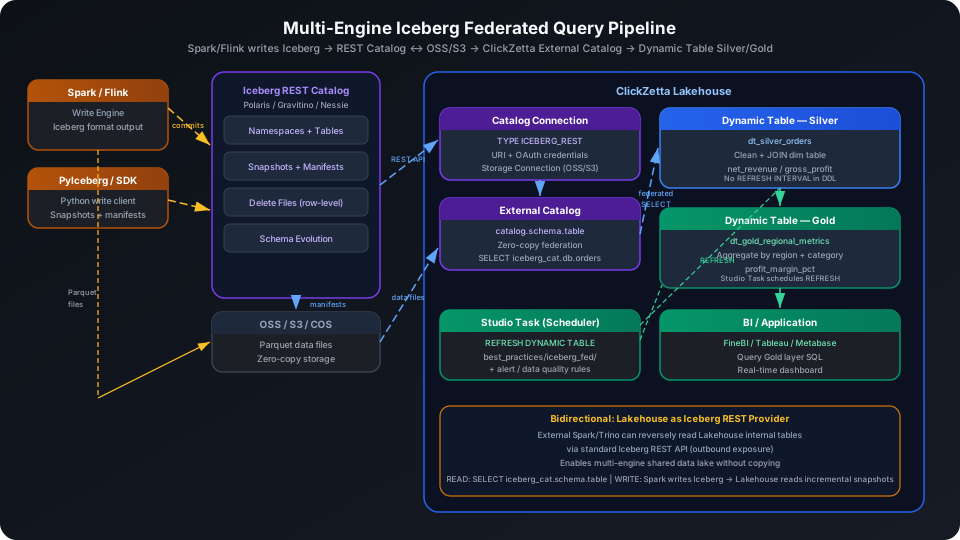
Overview
The typical challenge in a multi-engine Iceberg data lake is that multiple write engines each maintain their own Iceberg tables. The analytics layer needs to join this data with internal tables while correctly handling Iceberg DELETE/UPDATE semantics.
Singdata Lakehouse addresses these core challenges with the following combination:
| Problem | Solution |
|---|---|
| Iceberg tables written by Spark contain DELETE files that PIPE cannot recognize | External Catalog reads snapshots via the REST API and correctly applies deletion vectors |
| Multiple engines write separately; schema may evolve | External Catalog automatically tracks Iceberg schema versions; no manual column mapping needed |
| Large data volumes make full copies into the Lakehouse undesirable | External Catalog provides zero-copy federated queries; data files remain in S3/OSS/COS |
| Analytics layer requires Silver/Gold multi-layer processing | Dynamic Table uses the External Catalog table as upstream and refreshes incrementally |
| Downstream Spark/Trino needs to read internal Lakehouse tables | The Lakehouse itself exposes an Iceberg REST Catalog interface for bidirectional interoperability |
SQL Commands Used
| Command / Feature | Purpose | Notes |
|---|---|---|
CREATE STORAGE CONNECTION | Declare credentials for accessing S3/OSS/COS | Used by External Catalog when reading Parquet data files |
CREATE CATALOG CONNECTION TYPE ICEBERG_REST | Connect to an Iceberg REST Catalog service | Stores authentication information (URI, OAuth, etc.) |
CREATE EXTERNAL CATALOG | Mount an Iceberg Catalog and map it to a three-level catalog.schema.table namespace | Federated query entry point |
SELECT catalog.schema.table | Federated query of Iceberg data without materializing | Supports snapshot skipping and delete file merging |
CREATE DYNAMIC TABLE | Define Silver/Gold processing logic with the External Catalog table as upstream | Declarative SQL; the system refreshes incrementally |
REFRESH DYNAMIC TABLE | Trigger a manual refresh | Use during initial build or debugging |
PIPE vs External Catalog (Iceberg REST): Selection Guide
Two common approaches for ingesting Iceberg data have different use cases:
| Dimension | PIPE (LIST_PURGE / EVENT_NOTIFICATION) | External Catalog (Iceberg REST) |
|---|---|---|
| File understanding | Scans Parquet files without reading Iceberg metadata | Reads snapshots/manifests via REST API |
| DELETE/UPDATE handling | Cannot recognize delete files; only sees data files | Correctly applies deletion vectors; accurate results |
| Schema evolution | Requires manual column mapping maintenance; error-prone | Automatically detects column changes; follows Iceberg schema versions |
| Data landing | Data is written to Lakehouse internal tables | Data stays in S3/OSS/COS; zero-copy federation |
| Use case | One-time historical file import; append-only writes | Multi-engine shared Iceberg; scenarios with UPDATE/DELETE |
| Prerequisites | Requires Volume + Storage Connection | Requires an Iceberg REST Catalog service |
Prerequisites
All examples in this guide run under the best_practice_iceberg_fed Schema.
External Catalog Layer: Connect to Iceberg REST Catalog
Prerequisites
An External Catalog (Iceberg REST) requires the following environment to be set up in advance:
- Write side: An engine that can write in Iceberg format (Apache Spark, Flink, PyIceberg)
- Iceberg REST Catalog service: Choose one of the following
- Open source self-hosted: Apache Polaris, Apache Gravitino, Project Nessie
- Cloud managed: Snowflake Open Catalog, AWS Glue (Iceberg REST mode)
- Object storage: OSS (Alibaba Cloud), S3 (AWS), or COS (Tencent Cloud) for Parquet data files
Step 1: Create a Storage Connection
A Storage Connection stores the credentials needed to read Parquet data files. The External Catalog uses it to authenticate when reading data files.
OSS (Alibaba Cloud) example:
S3 (AWS) example:
Step 2: Create a Catalog Connection (TYPE ICEBERG_REST)
A Catalog Connection stores the API endpoint and authentication credentials for the Iceberg REST Catalog service.
Generic Iceberg REST Catalog (no authentication, e.g., Nessie or self-hosted Gravitino):
With OAuth authentication (e.g., Apache Polaris / Snowflake Open Catalog):
Step 3: Create an External Catalog
Create an External Catalog based on the Catalog Connection, mapped to a three-level catalog.schema.table namespace:
After creation, view the Schemas and tables in the Catalog:
Simulation Layer: Local Tables as Iceberg External Table Substitutes
When no Iceberg REST Catalog environment is available, use Lakehouse internal tables to simulate the effect of reading from Iceberg external tables. This lets you validate the downstream Dynamic Table processing logic.
Create the Product Dimension Table
Import from a local CSV file (recommended):
You can also insert a small batch of test data inline (no CSV file required):
Create the Order Fact Table (Simulating Iceberg External Table Read)
Import from a local CSV file (recommended):
You can also insert a small batch of test data inline (no CSV file required):
Verify the data was written:
Returns:
| order_count |
|---|
| 30 |
Silver Layer: Dynamic Table with Cleansing and Dimension Join
The Silver layer JOINs the order table (corresponding to the Iceberg external table) with the product dimension table, filters out cancelled orders, and calculates actual revenue and gross profit.
In a real Iceberg federation environment, replace doc_orders_local with iceberg_catalog.ecommerce.orders to use the same DDL.
Trigger the initial refresh manually, then query the Silver layer results:
Returns:
| order_id | customer_id | product_name | category | region | order_date | net_revenue | gross_profit |
|---|---|---|---|---|---|---|---|
| ORD001 | C101 | Smartphone X1 | Electronics | East | 2024-01-05 | 3299.0 | 1499.0 |
| ORD002 | C102 | Laptop Pro 14 | Electronics | West | 2024-01-06 | 7599.05 | 3609.05 |
| ORD003 | C103 | Wireless Earbuds | Electronics | East | 2024-01-07 | 998.0 | 638.0 |
| ORD004 | C104 | Cotton T-Shirt | Apparel | South | 2024-01-08 | 348.3 | 267.3 |
| ORD005 | C105 | Running Shoes | Apparel | North | 2024-01-09 | 699.0 | 479.0 |
| ORD006 | C101 | Coffee Maker | Kitchen | East | 2024-01-10 | 899.0 | 549.0 |
| ORD007 | C106 | Yoga Mat | Sports | West | 2024-01-11 | 398.0 | 308.0 |
| ORD008 | C107 | Backpack 30L | Accessories | South | 2024-01-12 | 299.0 | 219.0 |
| ORD009 | C108 | Smartphone X1 | Electronics | North | 2024-01-13 | 5938.2 | 2698.2 |
| ORD010 | C109 | LED Desk Lamp | Furniture | East | 2024-01-14 | 199.0 | 144.0 |
The Silver layer filtered out ORD026 (cancelled, 3,299 USD) and retains 29 completed orders. net_revenue has the discount applied; gross_profit has the cost deducted.
Gold Layer: Dynamic Table Aggregation Metrics
The Gold layer aggregates Silver data by region, category, and year-month to produce order count, total revenue, gross profit, and profit margin per dimension for direct BI consumption.
Returns:
| region | category | order_year | order_month | order_count | total_revenue | total_profit | profit_margin_pct |
|---|---|---|---|---|---|---|---|
| North | Electronics | 2024 | 1 | 2 | 13937.2 | 6497.2 | 46.62 |
| East | Electronics | 2024 | 2 | 1 | 7999.0 | 3799.0 | 47.49 |
| West | Electronics | 2024 | 1 | 1 | 7599.05 | 3609.05 | 47.49 |
| North | Electronics | 2024 | 2 | 1 | 7599.05 | 3609.05 | 47.49 |
| East | Electronics | 2024 | 1 | 3 | 4796.0 | 2456.0 | 51.21 |
| South | Electronics | 2024 | 1 | 1 | 3299.0 | 1499.0 | 45.44 |
| West | Electronics | 2024 | 2 | 1 | 1347.3 | 861.3 | 63.93 |
| South | Health | 2024 | 2 | 1 | 1047.0 | 687.0 | 65.62 |
| East | Kitchen | 2024 | 1 | 1 | 899.0 | 549.0 | 61.07 |
| West | Kitchen | 2024 | 2 | 1 | 899.0 | 549.0 | 61.07 |
Electronics has the highest revenue (North January: 13,937 USD). Health and Kitchen categories have relatively higher profit margins (60%+). BI tools can connect directly to this table for a regional sales dashboard.
Configure Refresh Scheduling
Dynamic Table periodic refresh is managed through Studio Task rather than written in the DDL. The advantage is that you can attach monitoring alerts and data quality check rules to the same task as a unified operations entry point.
Create the following tasks under the best_practices/iceberg_fed/ path:
| Task Name | SQL Content | Schedule |
|---|---|---|
refresh_dt_silver_orders | REFRESH DYNAMIC TABLE best_practice_iceberg_fed.dt_silver_orders | Hourly (0 0/1 * * ?) |
refresh_dt_gold_metrics | REFRESH DYNAMIC TABLE best_practice_iceberg_fed.dt_gold_regional_metrics | Hourly (0 0/1 * * ?) |
cz-cli workflow for creating tasks:
Bidirectional Interoperability: Lakehouse as an Iceberg REST Provider
In addition to reading external Iceberg tables, Singdata Lakehouse itself exposes a standard Iceberg REST Catalog interface. External Spark, Trino, and other engines can read internal Lakehouse tables in reverse, enabling bidirectional data sharing:
- Direction 1 (main flow in this guide): External Spark writes Iceberg → Lakehouse External Catalog federated read
- Direction 2 (reverse): Lakehouse internal tables → exposed Iceberg REST API → external Spark/Trino reads
For configuration of the outbound Iceberg REST API, see Access Lakehouse via Spark and Iceberg REST Catalog.
Notes
- External Catalog and Catalog Connection creation validates REST API reachability; DDL fails if the Iceberg REST Catalog service is down or the network is unreachable.
- Currently, External Catalog queries are available only to the
instance_adminrole. Write results from a Dynamic Table into an internal table so that downstream consumers can apply regular table-level permissions. - When a Dynamic Table references an External Catalog table, use three-level naming (
catalog.schema.table) in the DDL. Use two-level naming (schema.table) for internal tables. REFRESH DYNAMIC TABLEtriggers a full Iceberg snapshot read. If the upstream Iceberg table changes frequently, a refresh interval of at least 5 minutes is recommended to avoid excessive REST API calls.- In
CREATE CATALOG CONNECTION TYPE ICEBERG_REST, do not add=afterTYPEand do not add commas between parameters. These are common syntax errors.
Related Documentation
- CREATE CATALOG CONNECTION — Full syntax and parameter reference for TYPE ICEBERG_REST
- CREATE EXTERNAL CATALOG — CREATE EXTERNAL CATALOG command reference
- External Catalog Concepts — External Catalog vs External Schema selection guide
- Dynamic Table — Dynamic Table core concepts and usage guide
- Access Lakehouse via Spark and Iceberg REST Catalog — Bidirectional interoperability configuration