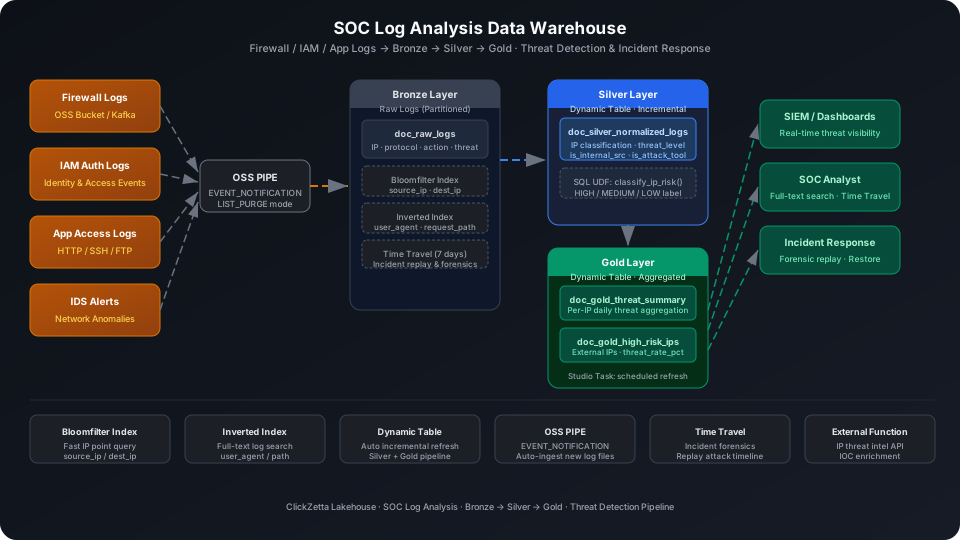
Centrally load firewall logs, identity authentication logs (IAM), and application access logs into Singdata Lakehouse to build a low-cost, high-coverage threat detection data warehouse that replaces or augments traditional SIEM analytics capabilities. This guide uses a Kaggle cybersecurity threat detection log dataset (containing three log types: firewall, IDS, and application — 30 representative samples) to walk through the complete OSS PIPE → Bronze → Silver → Gold pipeline, covering five key platform capabilities: Bloomfilter Index, Inverted Index, Dynamic Table, SQL UDF, and Time Travel.
Overview
The core challenge in SOC log analysis: rapidly ingesting massive heterogeneous logs (firewall/IDS/application), identifying genuinely threatening behaviors, and supporting post-incident forensic analysis.
Problem
Singdata Solution
Log agents write to OSS storage buckets and need auto-loading
OSS PIPE (EVENT_NOTIFICATION mode) — new files in the bucket trigger ingestion immediately
source_ip / dest_ip are high-cardinality columns with frequent point queries
Bloomfilter Index — filters out non-matching data blocks to reduce scan volume
Attack tool fingerprint and request path keyword searches
Inverted Index (english / keyword tokenizers) — supports full-text matching
Raw logs → normalization → threat aggregation automatic refresh
Dynamic Table with declarative SQL, incremental computation
IP threat intelligence API for real-time malicious IP labeling
External Function — embed SQL calls to external threat intelligence services
Post-incident need to rewind to complete data at the time of attack
Time Travel — query historical snapshots by timestamp or version
SQL Commands Used
Command / Function
Purpose
Notes
CREATE TABLE
Create Bronze layer raw log table
Regular table, upstream source for Dynamic Tables
CREATE BLOOMFILTER INDEX
Create Bloomfilter indexes on source_ip / dest_ip
Suitable for point query filtering on high-cardinality IP columns
CREATE INVERTED INDEX
Create inverted indexes on user_agent / request_path
Supports full-text search for attack tool fingerprints
CREATE PIPE
Create an OSS continuous ingestion pipeline
EVENT_NOTIFICATION mode — new files trigger automatically
ingest_time uses DEFAULT CURRENT_TIMESTAMP() and is automatically populated when OSS PIPE writes; it does not need to be included in the log payload.
Create Bloomfilter Index
source_ip and dest_ip are high-cardinality string columns that security analysts frequently query with specific IP conditions. A Bloomfilter Index is well-suited here.
CREATE BLOOMFILTER INDEX IF NOT EXISTS idx_bf_source_ip
ON TABLE doc_raw_logs (source_ip);
CREATE BLOOMFILTER INDEX IF NOT EXISTS idx_bf_dest_ip
ON TABLE doc_raw_logs (dest_ip);
⚠️ Note: CREATE BLOOMFILTER INDEX requires the same Schema context as the target table. Run USE SCHEMA first or use the -s parameter; otherwise you see an "index and table must in the same schema" error.
Create Inverted Index
Attack tools typically leave characteristic strings in user_agent (e.g., SQLMap, Nmap, Metasploit); request_path contains injection payloads (e.g., /admin?id=1 OR 1=1). Build an Inverted Index on both columns for full-text search:
CREATE INVERTED INDEX IF NOT EXISTS idx_inv_user_agent
ON TABLE doc_raw_logs (user_agent)
PROPERTIES('analyzer'='english');
CREATE INVERTED INDEX IF NOT EXISTS idx_inv_request_path
ON TABLE doc_raw_logs (request_path)
PROPERTIES('analyzer'='keyword');
user_agent uses the english tokenizer (splits by word); request_path uses keyword (no splitting — matches as a whole, preserving URL semantics).
Verify the index creation results:
SHOW INDEXES FROM best_practice_soc_log.doc_raw_logs;
Data Ingestion: OSS PIPE (EVENT_NOTIFICATION Mode)
In production, log agents (Fluentd / Logstash) write logs to an OSS storage bucket, and OSS event notifications trigger the PIPE to automatically ingest them.
Option 1: Continuous ingestion via OSS PIPE (recommended)
First create a Storage Connection and Volume pointing to the log storage bucket, then create the PIPE:
-- Create Volume after you have an OSS Storage Connection
CREATE VOLUME soc_log_vol EXTERNAL
STORAGE_CONNECTION = '<your_oss_connection>'
LOCATION = 'oss://<your-bucket>/soc-logs/';
-- Create OSS PIPE (EVENT_NOTIFICATION mode)
CREATE PIPE IF NOT EXISTS best_practice_soc_log.pipe_raw_logs
VIRTUAL_CLUSTER = 'DEFAULT'
AUTO_INGEST = TRUE
AS
COPY INTO best_practice_soc_log.doc_raw_logs
(log_timestamp, source_ip, dest_ip, protocol, action,
threat_label, log_type, bytes_transferred, user_agent, request_path)
FROM (
SELECT
TO_TIMESTAMP($1, 'YYYY-MM-DD"T"HH24:MI:SS'),
$2, $3, $4, $5, $6, $7, $8::BIGINT, $9, $10
FROM VOLUME soc_log_vol
)
USING csv
OPTIONS('header'='true', 'sep'=',');
💡 Tip: AUTO_INGEST = TRUE enables EVENT_NOTIFICATION mode. After the OSS bucket is configured to send event notifications to the PIPE, new files arriving in the bucket trigger ingestion — typically with under 1 minute of latency. To batch-import historical logs, also manually run ALTER PIPE pipe_raw_logs SET INGEST_MODE = LIST_PURGE.
Option 2: INSERT simulation (when no OSS environment is available)
If OSS is not configured, write directly via INSERT INTO to simulate OSS PIPE-parsed writes:
Import from a local CSV file (recommended):
-- Step 1: Upload the local CSV file to User Volume via SQL PUT
PUT '/path/to/your/data.csv' TO USER VOLUME FILE 'data.csv';
-- Step 2: COPY INTO the table from User Volume
COPY INTO best_practice_soc_log.doc_raw_logs
FROM USER VOLUME
USING csv
OPTIONS('header'='true', 'sep'=',', 'nullValue'='')
FILES ('data.csv');
You can also insert test data inline (no CSV file required):
Verify Bronze layer row count and threat distribution:
SELECT threat_label, log_type, COUNT(*) AS cnt
FROM best_practice_soc_log.doc_raw_logs
GROUP BY threat_label, log_type
ORDER BY threat_label, cnt DESC;
Found 4 log rows carrying SQLMap signatures, with 1 already labeled suspicious. The benign rows indicate this tool's current operation didn't trigger a threat determination, but they still warrant attention.
Search by Request Path Keyword (Bloomfilter-Assisted IP Filtering)
Combine Bloomfilter Index point queries on specific IPs with path analysis of attack intent:
SELECT log_id, source_ip, threat_label, action
FROM best_practice_soc_log.doc_raw_logs
WHERE source_ip = '185.220.101.33';
The Bloomfilter Index quickly eliminates data blocks that don't contain this IP at the block level, scanning only the matching blocks.
IP Risk Classification UDF
Encapsulate the IP risk assessment logic into a SQL UDF, reusable in both Silver and Gold layers:
CREATE OR REPLACE FUNCTION best_practice_soc_log.classify_ip_risk(
ip STRING,
threat_label STRING,
is_attack_tool INT
)
RETURNS STRING
AS CASE
WHEN threat_label = 'malicious' THEN 'HIGH'
WHEN threat_label = 'suspicious' AND is_attack_tool = 1 THEN 'HIGH'
WHEN threat_label = 'suspicious' THEN 'MEDIUM'
WHEN is_attack_tool = 1 THEN 'MEDIUM'
ELSE 'LOW'
END;
💡 Tip: In production, replace this UDF with an External Function that calls an external threat intelligence API (e.g., AbuseIPDB, VirusTotal) for direct SQL labeling. See the Related Documentation section for the External Function development guide.
Verify the UDF:
SELECT source_ip, threat_label, is_attack_tool,
best_practice_soc_log.classify_ip_risk(source_ip, threat_label, is_attack_tool) AS ip_risk_level
FROM best_practice_soc_log.doc_silver_normalized_logs
WHERE threat_label != 'benign'
ORDER BY ip_risk_level
LIMIT 8;
source_ip | threat_label | is_attack_tool | ip_risk_level
-----------------|--------------|----------------|---------------
103.22.200.174 | suspicious | 1 | HIGH
45.142.213.99 | suspicious | 1 | HIGH
185.220.101.33 | malicious | 1 | HIGH
198.199.119.1 | malicious | 0 | HIGH
91.240.118.172 | malicious | 1 | HIGH
104.21.58.152 | malicious | 0 | HIGH
45.95.147.236 | malicious | 1 | HIGH
177.52.183.80 | suspicious | 0 | MEDIUM
Silver Layer Dynamic Table: Normalization and Threat Labeling
The Silver layer does three things on top of Bronze raw logs: classify IPs as internal/external, numerically encode threat levels, and flag attack tool signatures.
CREATE DYNAMIC TABLE IF NOT EXISTS best_practice_soc_log.doc_silver_normalized_logs
AS
SELECT
log_id,
log_timestamp,
DATE(log_timestamp) AS log_date,
HOUR(log_timestamp) AS log_hour,
source_ip,
dest_ip,
protocol,
action,
threat_label,
log_type,
bytes_transferred,
user_agent,
request_path,
ingest_time,
-- Whether source IP is an internal address (RFC 1918 ranges)
CASE
WHEN source_ip LIKE '192.168.%'
OR source_ip LIKE '10.%'
OR source_ip LIKE '172.16.%'
THEN 1 ELSE 0
END AS is_internal_src,
-- Threat level numeric encoding
CASE threat_label
WHEN 'malicious' THEN 3
WHEN 'suspicious' THEN 2
WHEN 'benign' THEN 1
ELSE 0
END AS threat_level,
-- Attack tool fingerprint
CASE WHEN user_agent IN (
'SQLMap/1.6-dev','Nmap Scripting Engine',
'Metasploit v6.3','Cobalt Strike','Havoc/0.7')
THEN 1 ELSE 0
END AS is_attack_tool
FROM best_practice_soc_log.doc_raw_logs;
⚠️ Note: Dynamic Table DDL does not include REFRESH INTERVAL. Refresh scheduling is managed through Studio Tasks (see the "Configure Refresh Tasks" section below).
The Gold layer provides two aggregation tables: daily per-IP threat summary, and external high-risk IP rankings.
Daily Threat Summary
CREATE DYNAMIC TABLE IF NOT EXISTS best_practice_soc_log.doc_gold_threat_summary
AS
SELECT
source_ip,
log_date,
log_type,
COUNT(*) AS total_events,
SUM(CASE WHEN threat_label = 'malicious' THEN 1 ELSE 0 END) AS malicious_cnt,
SUM(CASE WHEN threat_label = 'suspicious' THEN 1 ELSE 0 END) AS suspicious_cnt,
SUM(CASE WHEN action = 'blocked' THEN 1 ELSE 0 END) AS blocked_cnt,
SUM(is_attack_tool) AS attack_tool_cnt,
MAX(threat_level) AS max_threat_level,
SUM(bytes_transferred) AS total_bytes,
COUNT(DISTINCT dest_ip) AS unique_dest_count
FROM best_practice_soc_log.doc_silver_normalized_logs
GROUP BY source_ip, log_date, log_type;
High-Risk External IP Rankings
CREATE DYNAMIC TABLE IF NOT EXISTS best_practice_soc_log.doc_gold_high_risk_ips
AS
SELECT
source_ip,
COUNT(DISTINCT log_date) AS active_days,
COUNT(*) AS total_events,
SUM(CASE WHEN threat_label IN ('malicious','suspicious') THEN 1 ELSE 0 END) AS threat_events,
SUM(is_attack_tool) AS attack_tool_hits,
ROUND(
SUM(CASE WHEN threat_label IN ('malicious','suspicious') THEN 1.0 ELSE 0.0 END)
/ COUNT(*) * 100, 2
) AS threat_rate_pct,
MAX(log_timestamp) AS last_seen,
COUNT(DISTINCT dest_ip) AS targets_count
FROM best_practice_soc_log.doc_silver_normalized_logs
WHERE is_internal_src = 0
GROUP BY source_ip
HAVING threat_events > 0;
⚠️ Note: Neither of the two Gold layer Dynamic Tables sets REFRESH INTERVAL — refresh is scheduled through Studio Tasks (see below).
max_threat_level = 3 is the highest threat level (malicious). The DNS tunneling behavior of 104.21.58.152 (blocked_cnt = 0 but malicious_cnt = 1) warrants particular attention — this traffic was not blocked.
Configure Refresh Tasks
Dynamic Table periodic refresh is managed through Studio Tasks, where monitoring alerts and data quality checks can be attached.
💡 Tip: The examples below use cz-cli (the Singdata Lakehouse command-line tool). If cz-cli is not installed, see the cz-cli Installation and Usage Guide. If you prefer not to use the command line, you can run the SQL in Singdata Studio → Development → SQL Editor and configure / trigger scheduling tasks on the Studio → Tasks page.
Create Silver Layer Refresh Task
# Create a SQL-type task in the best_practices folder
cz-cli task create refresh_soc_silver --type SQL --folder best_practices -p skill_test
# Set refresh SQL content
cz-cli task save-content refresh_soc_silver \
--content "REFRESH DYNAMIC TABLE best_practice_soc_log.doc_silver_normalized_logs;" \
-p skill_test
# Set to refresh every 5 minutes
cz-cli task save-cron refresh_soc_silver --cron "*/5 * * * *" -p skill_test
💡 Tip: In the Studio task UI, you can add a dependency on refresh_soc_gold to ensure it only runs after Silver refresh completes. You can also attach data quality rules to the same task (e.g., alert when malicious_cnt spikes above a threshold) and execution failure notifications.
After a security incident, analysts need to rewind to the complete data state at the time of the attack. Time Travel provides timestamp-based historical snapshot queries.
View Historical Versions
DESC HISTORY best_practice_soc_log.doc_raw_logs LIMIT 5;
-- Rewind to data state at 2026-06-06 23:37:30
SELECT COUNT(*) AS row_count
FROM best_practice_soc_log.doc_raw_logs
TIMESTAMP AS OF '2026-06-06 23:37:30';
row_count
---------
30
Trace Attack Paths
For known malicious IPs, rewind to retrieve all operations within the attack time window:
SELECT log_timestamp, source_ip, dest_ip, protocol, action, request_path
FROM best_practice_soc_log.doc_raw_logs
TIMESTAMP AS OF '2026-06-06 23:39:07'
WHERE source_ip IN ('185.220.101.33', '198.199.119.1', '45.95.147.236')
ORDER BY log_timestamp;
The default Time Travel retention period is 7 days. Within this window you can rewind to any historical version at any time without additional backups.
Attack Path Analysis
Combine Gold layer aggregated data to quickly identify high-frequency attack paths:
SELECT
request_path,
COUNT(*) AS total_hits,
SUM(CASE WHEN threat_label IN ('malicious','suspicious') THEN 1 ELSE 0 END) AS threat_hits
FROM best_practice_soc_log.doc_raw_logs
GROUP BY request_path
ORDER BY threat_hits DESC, total_hits DESC
LIMIT 8;
The / path has 13 hits with 3 threat behaviors. /etc/passwd and /shell.php are characteristic of system file probing and Webshell upload attempts — even a single access warrants immediate response.
Notes
Bloomfilter Index only applies to new data: After the index is created, run BUILD INDEX idx_bf_source_ip ON TABLE doc_raw_logs to rebuild it for existing historical data; it automatically applies to newly written data.
Inverted Index tokenizer selection: user_agent uses english (splits by word); request_path uses keyword (no splitting — whole match). Choosing the wrong tokenizer will cause MATCH_ALL to fail to match expected content.
Dynamic Table does not set REFRESH INTERVAL: Refresh scheduling must be managed through Studio Tasks, which lets you attach alerts and data quality checks to the same task.
Dynamic Table static partition mode: If you need to partition Silver/Gold layer Dynamic Tables by log_date, you must use PARTITION BY + static partition declaration — dynamic partition inference is not supported.
Time Travel retention period: Default 7 days; historical versions beyond the retention window cannot be queried. For compliance scenarios requiring longer retention, configure DATA_RETENTION_TIME_IN_DAYS at table creation time.
OSS PIPE EVENT_NOTIFICATION mode: Configure event notification rules in the OSS console to direct ObjectCreated:* events to the message queue endpoint provided by Lakehouse.
External Function for threat intelligence APIs: The classify_ip_risk example is a SQL UDF — a simplified version. Production scenarios should use an External Function to call real APIs like AbuseIPDB. See the Related Documentation section.
Column Masking: You can set masking policies for PII data like source_ip.
Related Documentation
CREATE PIPE — OSS PIPE and Kafka PIPE syntax reference
⚠️ Note (pending manual verification): Column Masking currently matches by username via current_user(), and all usernames authorized to view plaintext must be added individually to the IN() list in the masking function. If your Lakehouse version supports role-based dynamic matching (e.g., HAS_ROLE('role_name')), you can use roles instead of a username list for easier maintenance. Contact Singdata technical support to confirm whether your version supports this function.