
User Behavior Funnel Analysis
Based on Singdata Lakehouse Dynamic Table + Window Functions + MERGE INTO, this solution automatically aggregates raw user behavior event streams into per-channel funnel conversion metrics, with end-to-end latency ≤1 hour — pinpointing the largest drop-off stage and driving conversion rate optimization decisions.
1. Business Background
User behavior funnel analysis is a core tool for e-commerce operations. By quantifying user loss at each conversion step, it helps teams identify the optimization areas with the highest return on investment.
| Industry | Typical Scenario | Core Funnel Steps |
|---|---|---|
| General E-commerce Platform | Product Detail Page → Cart → Checkout → Payment | Browse → Add to Cart → Place Order → Pay |
| Vertical E-commerce (Apparel / Beauty) | Campaign Landing Page → Product Page → Cart → Payment | Impression → Click → Add to Cart → Pay |
| Local Services (Food Delivery / In-Store) | Search → Browse → Order → Complete | Search → Browse → Order → Complete |
| Cross-border E-commerce | Ad Landing Page → Product Selection → Cart → Payment | Visit → Browse → Add to Cart → Checkout |
2. Industry Pain Points
Quantitative Data
- The global e-commerce average overall conversion rate (browse → pay) is only 2–3%, meaning more than 97% of visitors do not complete a purchase (Baymard Institute, 2025)
- Cart abandonment rate is as high as 70.22% — 7 out of every 10 users who add items to their cart do not check out (Baymard Institute, average of 50 studies)
- Mobile abandonment rate is 85.65%, significantly higher than desktop, yet mobile accounts for 68% of all-channel orders (Statista, Q1 2025)
- The add-to-cart → checkout stage is the largest drop-off point: more than 48% of users leave the checkout page due to extra fees (shipping / taxes)
- Industry average add-to-cart rate is approximately 11–11.5% (ecdb.com, 2025); place-order → payment conversion is typically below 50%
Three Core Flaws of Traditional Solutions
Flaw 1: Data Lag, Delayed Decisions Traditional data warehouses rely on T+1 batch scheduling, meaning funnel reports are only available the next day. If a channel's conversion rate collapses during a major promotional event, the operations team has no visibility that day and misses the window to respond.
Flaw 2: Siloed Multi-System Data, No Channel Comparison Behavioral data from app, PC, and mini-programs is scattered across different systems. BI tools require manual alignment of definitions, and producing cross-channel conversion rate comparison reports typically requires cross-departmental collaboration, taking days.
Flaw 3: Complex Metric Calculation, High Maintenance Cost Funnel metrics depend on complex SQL (multiple COUNT DISTINCT + CASE WHEN + division guards). Adding a new channel or step requires changing logic in multiple places; data lineage is unclear and QA is difficult.
Transition
The key to solving these problems is: storing all channel behaviors in a unified event table, expressing funnel calculation logic declaratively in SQL, and letting the data platform handle incremental refresh and metric maintenance automatically. Singdata Lakehouse's Dynamic Table mechanism turns the funnel pipeline into a "living aggregation table" — no extra scheduler required.
3. Solution
Overall Architecture
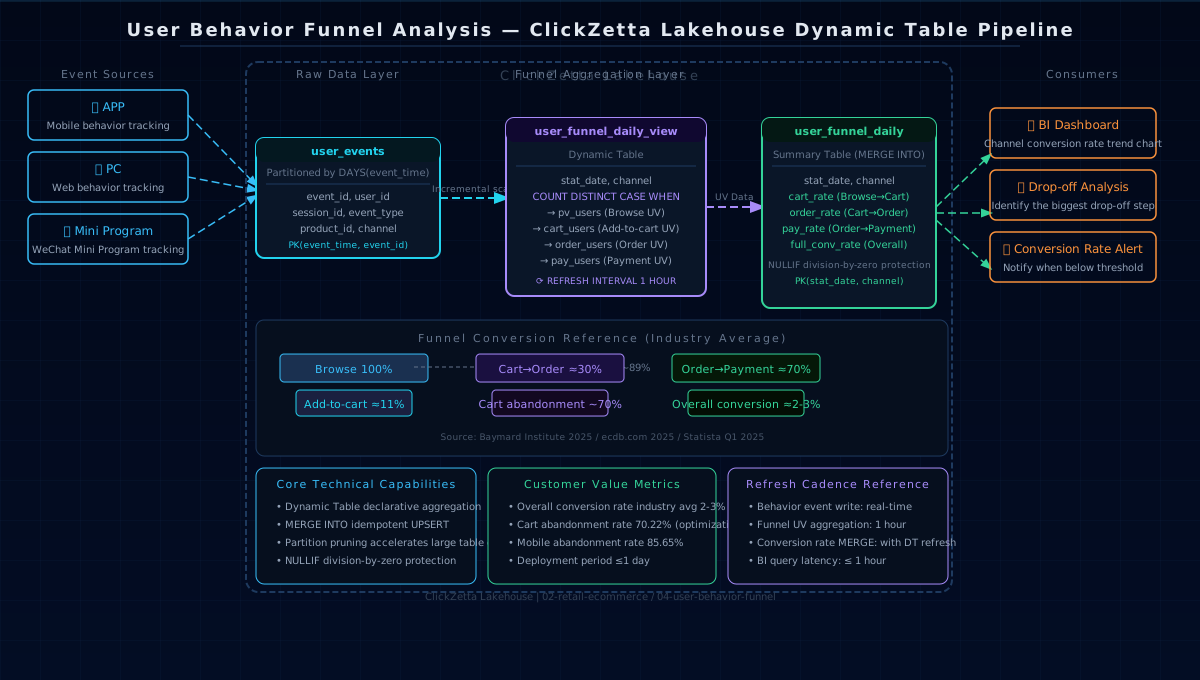
Data Model
Three-Layer Pipeline
Layer 1 (Source Table): user_events is partitioned by day; the event_type field enumerates all steps. Behavioral events from all channels are written to the same table and distinguished by the channel field.
Layer 2 (Dynamic Table): user_funnel_daily_view uses COUNT DISTINCT CASE WHEN to compute UV for all four steps in a single scan, grouped by (stat_date, channel). It auto-refreshes every hour, processing only events added within the window.
Layer 3 (MERGE INTO): Processes the raw UV data from the Dynamic Table into conversion rate metrics, using NULLIF to prevent division by zero. MERGE mode supports both historical backfill and incremental updates simultaneously.
4. Singdata Technical Advantages
Dynamic Table — Automatic Maintenance of Funnel Aggregations
Why Dynamic Table suits this scenario: funnel metrics are aggregations over a historical window; hourly refresh is sufficient for operations decision-making and does not require row-level real-time inference. Dynamic Table's declarative definition keeps funnel logic version-traceable — changing the metric definition only requires modifying the SQL, not rewriting scheduling scripts.
MERGE INTO — Idempotent Summary Table Updates
Why MERGE INTO suits this scenario: the funnel summary table must support both "backfill historical dates" and "real-time update for the current day" write modes simultaneously. MERGE INTO's UPSERT semantics guarantee idempotency — multiple refreshes on the same day do not produce duplicate rows, ensuring data quality.
Partition Pruning — Accelerating Large Table Queries
user_events is partitioned by DAYS(event_time). The WHERE event_time >= CURRENT_TIMESTAMP() - INTERVAL 30 DAY condition in funnel queries can precisely prune to the target partitions, avoiding full-table scans. Aggregate query response times on tables with tens of millions of daily events can be kept at the second level.
NULLIF Division Guard — Data Robustness
During the early stages of a new channel launch or in data backfill scenarios, some (stat_date, channel) combinations may have pv_users = 0. NULLIF converts the zero denominator to NULL, preventing a division-by-zero error; the conversion rate field returns NULL rather than an error value, which BI tools can handle as needed.
5. Customer Value
ROI Comparison
| Metric | Traditional T+1 Batch | Real-Time Streaming (Flink) | Lakehouse Dynamic Table |
|---|---|---|---|
| Data Latency | T+1 (next day) | Minute-level | ≤1 hour |
| Channel Comparison | Manual definition alignment | Unified data source required | Unified event table, naturally aligned |
| Metric Maintenance | Edit multiple scripts | Edit streaming job + restart | Edit SQL definition only |
| Infrastructure Cost | Low (batch scheduling) | High (Flink cluster) | Low (Lakehouse native) |
| Time to Go Live | — | 2–4 weeks | ≤1 day |
Operational Efficiency
- Real-time monitoring during promotions: The funnel refreshes every hour; within 1 hour of a promotion starting, conversion rate changes are visible for each channel, enabling immediate strategy adjustments when anomalies are detected.
- Channel ROI decisions: Side-by-side comparison of APP / PC / MiniProgram conversion rates directly supports ad budget allocation decisions, avoiding wasted spend on low-converting channels.
- Drop-off stage identification: The three drop-off segments (browse → add to cart, add to cart → place order, place order → pay) are quantified and broken down, pinpointing the direction for A/B testing (page optimization vs. promotion strategy vs. payment experience).
Industry Benchmark Comparison
| Funnel Stage | Industry Average | Best-in-Class | Gap = Optimization Opportunity |
|---|---|---|---|
| Browse → Add-to-Cart | 11–11.5% | 15–20% | Product page optimization, recommendation algorithm |
| Add-to-Cart → Place Order | ~30% | 50%+ | Reduce extra fees, strengthen promotions |
| Place Order → Payment | ~70% | 85%+ | Simplify payment flow, trust mechanisms |
| Overall Conversion | 2–3% | 5%+ | End-to-end coordinated optimization |
6. Quick Start
Prerequisites
- Singdata Lakehouse workspace (standard SQL capabilities, no additional components required)
- Tracking data ingestion (or use the simulated data in test_data.sql to validate)
Execution Order
Validation Queries
Related Documentation
Dynamic Table
| Document | Description |
|---|---|
| Dynamic Table Overview | Core concepts of Dynamic Table, incremental refresh mechanism, and latency comparison with T+1 batch scheduling |
| Dynamic Table Development Guide | End-to-end example: create, refresh, and view history |
| CREATE DYNAMIC TABLE | Syntax reference including REFRESH INTERVAL, change_tracking, and other parameters |
| Dynamic Table Refresh Scheduling | Scheduled refresh configuration for controlling funnel metric update frequency |
| Monitoring Dynamic Tables in Studio | Visualize Dynamic Table refresh status in Studio |
MERGE INTO
| Document | Description |
|---|---|
| MERGE INTO | Syntax reference including UPSERT mode (MATCHED UPDATE + NOT MATCHED INSERT); used in this solution to idempotently write funnel UV to the summary table |
| Product Dimension History Tracking: SCD Type 2 with MERGE INTO | MERGE INTO idempotent archive practical case, using the same pattern as the hourly refresh write to the summary table in this solution |
Partitioned Tables
| Document | Description |
|---|---|
| Partitioning and Bucketing | Partitioned table design concepts, including time-partitioning with PARTITIONED BY (DAYS(...)) |
| Partitioned Table Usage Guide | Partitioned table guidelines, including the requirement that composite primary keys must include the partition key (the basis for requiring event_time as the first element of the primary key in this solution) |
Aggregation and Conditional Functions
| Document | Description |
|---|---|
| count | COUNT(DISTINCT ...) for exact deduplication counts; used here to count UV at each funnel step |
| nullif | Converts a specified value to NULL; used here as NULLIF(pv_users, 0) to prevent division-by-zero errors in conversion rate calculations |
| date_format | Date formatting function; used here to convert event_time to a yyyy-MM-dd date grouping dimension |
| Aggregate Functions Overview | Complete list of aggregate functions including COUNT, SUM, AVG, and others commonly used in funnel statistics |
Advanced Reference
| Document | Description |
|---|---|
| Funnel Analysis and User Behavior | Funnel analysis SQL guide, including multi-step ordered funnels and session segmentation |
| User Behavior Funnel Analysis: Tracking Conversions from Impression to Order | Complete case study of implementing ordered funnels with window functions; applicable as the session-level funnel extension direction for this solution |
| User Behavior Analysis and Precision Marketing: BITMAP Practical Guide | BITMAP deduplication solution for extremely large-scale UV counting scenarios (more efficient than COUNT DISTINCT at hundreds of millions of users) |