Media Content Copyright Monitoring and Royalty Settlement Data Warehouse Best Practices
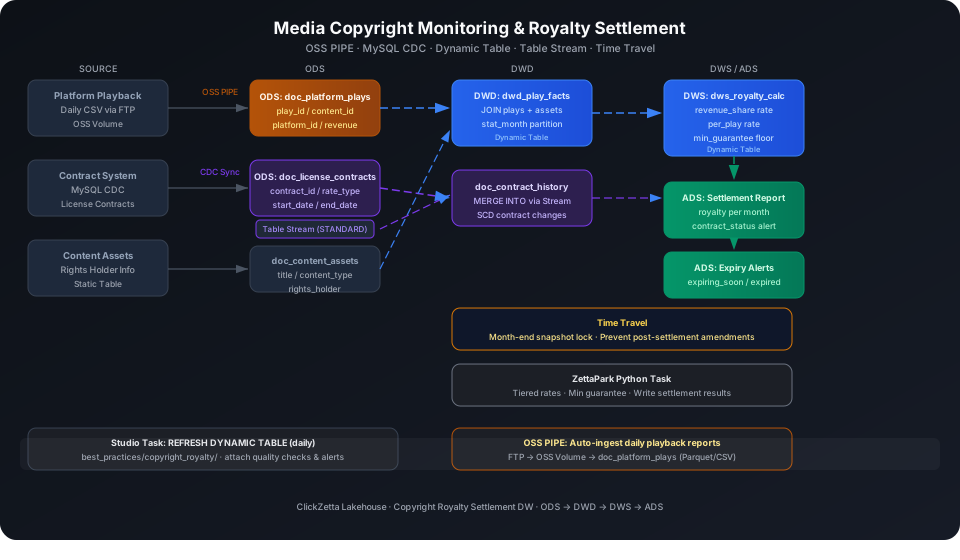
This guide shows how to integrate a content asset library, license contract table, and multi-platform play records into a multi-layer data warehouse that automatically calculates royalty attribution, tracks contract expiry risk, and locks historical play snapshots at month-end to prevent data retroactivity disputes. Using a dataset of 15 content assets, 20 license contracts, and 60 play records, it demonstrates the full ODS → DWD → DWS → ADS four-layer architecture end to end, covering five core capabilities: OSS PIPE, CDC contract sync, Dynamic Table royalty attribution, Table Stream + MERGE INTO contract SCD, and Time Travel month-end snapshot locking.
Overview
The core challenges of a media copyright data warehouse are that play data comes from multiple platforms, revenue-sharing arrangements differ across contracts (per-play count, revenue percentage, or flat license fee), and settled amounts cannot be retroactively modified after month-end.
Singdata Lakehouse addresses these challenges with the following combination:
Problem
Solution
Multiple platforms push daily play CSV files
OSS PIPE ingests automatically on file change; no custom scheduling scripts needed
Contract management system states change in real time
MySQL CDC sync + Table Stream captures row-level changes and drives SCD processing
Three revenue-sharing types require unified royalty calculation
Dynamic Table with declarative SQL; monthly group aggregation with contract terms applied
Platforms submit late or corrected historical play data after month-end
Time Travel snapshot queries lock the data version at settlement time as an audit record
System detects upstream changes and refreshes incrementally
REFRESH DYNAMIC TABLE
Trigger a manual refresh
Use during initial build or debugging
MERGE INTO
Merge Stream changes into the contract history table
SCD scenario: new rows inserted, status changes updated
DESC HISTORY
View the table's historical version records
Confirm available versions before using Time Travel
TIMESTAMP AS OF
Query a data snapshot at a historical point in time
Lock month-end snapshots to prevent retroactive modification
DATEDIFF
Calculate remaining days on a contract
Contract near-expiry alerts in the ADS layer
Prerequisites
All examples in this guide run under the best_practice_copyright_royalty Schema.
CREATE SCHEMA IF NOT EXISTS best_practice_copyright_royalty;
ODS (Raw Data Layer): Raw Data Ingestion
Content Assets Table
CREATE TABLE IF NOT EXISTS best_practice_copyright_royalty.doc_content_assets (
content_id STRING,
title STRING,
content_type STRING, -- movie / tv_series / music / documentary / podcast / short_video
rights_holder STRING,
release_year INT,
region STRING -- CN / GLOBAL
);
Load 15 content asset records.
Import from a local CSV file (recommended):
-- Step 1: Upload the local CSV file to User Volume via SQL PUT
PUT '/path/to/doc_content_assets.csv' TO USER VOLUME FILE 'doc_content_assets.csv';
-- Step 2: COPY INTO the table from User Volume
COPY INTO best_practice_copyright_royalty.doc_content_assets
FROM USER VOLUME
USING csv
OPTIONS('header'='true', 'sep'=',', 'nullValue'='')
FILES ('doc_content_assets.csv');
You can also insert a small batch of test data inline (no CSV file required):
rate_type supports three revenue-sharing methods: revenue_share (revenue percentage), per_play (per-play fee), and flat_fee (fixed annual license fee).
CREATE TABLE IF NOT EXISTS best_practice_copyright_royalty.doc_license_contracts (
contract_id STRING,
content_id STRING,
platform_id STRING,
start_date DATE,
end_date DATE,
rate_type STRING, -- revenue_share / per_play / flat_fee
rate_value DOUBLE, -- rate ratio (revenue_share), unit price (per_play), or annual fee (flat_fee)
min_guarantee DOUBLE, -- minimum annual guarantee (in local currency)
status STRING -- active / expired / renewed
);
Load 20 contracts covering all three revenue-sharing types.
Import from a local CSV file (recommended):
-- Step 1: Upload the local CSV file to User Volume via SQL PUT
PUT '/path/to/doc_license_contracts.csv' TO USER VOLUME FILE 'doc_license_contracts.csv';
-- Step 2: COPY INTO the table from User Volume
COPY INTO best_practice_copyright_royalty.doc_license_contracts
FROM USER VOLUME
USING csv
OPTIONS('header'='true', 'sep'=',', 'nullValue'='')
FILES ('doc_license_contracts.csv');
You can also insert a small batch of test data inline (no CSV file required):
INSERT INTO best_practice_copyright_royalty.doc_license_contracts VALUES
('CTR001','C001','PLT_A',CAST('2025-01-01' AS DATE),CAST('2025-12-31' AS DATE),'revenue_share',0.30,50000,'active'),
('CTR002','C001','PLT_B',CAST('2025-03-01' AS DATE),CAST('2025-08-31' AS DATE),'revenue_share',0.25,30000,'active'),
('CTR003','C002','PLT_A',CAST('2025-01-01' AS DATE),CAST('2025-06-30' AS DATE),'per_play',0.005,10000,'expired'),
('CTR004','C002','PLT_C',CAST('2025-04-01' AS DATE),CAST('2025-12-31' AS DATE),'revenue_share',0.20,20000,'active'),
('CTR005','C003','PLT_A',CAST('2025-01-01' AS DATE),CAST('2025-12-31' AS DATE),'per_play',0.003,5000,'active'),
('CTR006','C003','PLT_B',CAST('2025-02-01' AS DATE),CAST('2026-01-31' AS DATE),'flat_fee',8000,0,'active'),
('CTR007','C004','PLT_C',CAST('2024-12-01' AS DATE),CAST('2025-11-30' AS DATE),'revenue_share',0.15,15000,'active'),
('CTR008','C005','PLT_A',CAST('2025-01-01' AS DATE),CAST('2025-12-31' AS DATE),'per_play',0.002,3000,'active'),
('CTR009','C006','PLT_B',CAST('2025-01-01' AS DATE),CAST('2025-06-30' AS DATE),'revenue_share',0.18,12000,'expired'),
('CTR010','C007','PLT_A',CAST('2025-03-01' AS DATE),CAST('2025-12-31' AS DATE),'per_play',0.004,6000,'active'),
('CTR011','C008','PLT_C',CAST('2025-01-01' AS DATE),CAST('2025-12-31' AS DATE),'revenue_share',0.22,25000,'active'),
('CTR012','C009','PLT_A',CAST('2025-05-01' AS DATE),CAST('2026-04-30' AS DATE),'revenue_share',0.28,40000,'active'),
('CTR013','C010','PLT_B',CAST('2025-01-01' AS DATE),CAST('2025-12-31' AS DATE),'per_play',0.001,2000,'active'),
('CTR014','C011','PLT_C',CAST('2025-02-01' AS DATE),CAST('2025-07-31' AS DATE),'flat_fee',5000,0,'expired'),
('CTR015','C012','PLT_A',CAST('2025-01-01' AS DATE),CAST('2025-12-31' AS DATE),'revenue_share',0.20,18000,'active'),
('CTR016','C013','PLT_B',CAST('2025-04-01' AS DATE),CAST('2026-03-31' AS DATE),'per_play',0.003,4000,'active'),
('CTR017','C014','PLT_A',CAST('2024-11-01' AS DATE),CAST('2025-10-31' AS DATE),'revenue_share',0.25,35000,'active'),
('CTR018','C014','PLT_C',CAST('2025-01-01' AS DATE),CAST('2025-12-31' AS DATE),'per_play',0.006,8000,'active'),
('CTR019','C015','PLT_B',CAST('2025-03-01' AS DATE),CAST('2025-08-31' AS DATE),'revenue_share',0.18,14000,'active'),
('CTR020','C015','PLT_C',CAST('2025-06-01' AS DATE),CAST('2026-05-31' AS DATE),'revenue_share',0.15,10000,'active');
Verify the revenue-sharing type distribution:
SELECT rate_type, COUNT(*) AS cnt, ROUND(AVG(rate_value), 4) AS avg_rate
FROM best_practice_copyright_royalty.doc_license_contracts
GROUP BY rate_type;
In the OSS PIPE scenario, video platforms push daily play volume reports (CSV or Parquet via FTP) to an OSS Volume. The PIPE ingests them into this table automatically.
CREATE TABLE IF NOT EXISTS best_practice_copyright_royalty.doc_platform_plays (
play_id STRING,
content_id STRING,
platform_id STRING,
play_date DATE,
play_count BIGINT,
revenue DOUBLE
);
💡 Tip: In production, doc_platform_plays is written by the OSS PIPE automatically. When no OSS environment is available, use the following methods to load data and validate downstream Dynamic Table logic.
Import from a local CSV file (recommended):
-- Step 1: Upload the local CSV file to User Volume via SQL PUT
PUT '/path/to/doc_platform_plays.csv' TO USER VOLUME FILE 'doc_platform_plays.csv';
-- Step 2: COPY INTO the table from User Volume
COPY INTO best_practice_copyright_royalty.doc_platform_plays
FROM USER VOLUME
USING csv
OPTIONS('header'='true', 'sep'=',', 'nullValue'='')
FILES ('doc_platform_plays.csv');
You can also insert a small batch of test data inline (no CSV file required).
Load 60 play records covering platforms PLT_A, PLT_B, and PLT_C across multiple months from January to July 2025:
INSERT INTO best_practice_copyright_royalty.doc_platform_plays VALUES
('P001','C001','PLT_A',CAST('2025-01-15' AS DATE),12500,18750.00),
('P002','C001','PLT_A',CAST('2025-02-15' AS DATE),14200,21300.00),
('P003','C001','PLT_A',CAST('2025-03-15' AS DATE),16800,25200.00),
('P004','C001','PLT_A',CAST('2025-04-15' AS DATE),15000,22500.00),
('P005','C009','PLT_A',CAST('2025-05-15' AS DATE),25000,37500.00),
('P006','C009','PLT_A',CAST('2025-06-15' AS DATE),28000,42000.00),
('P007','C009','PLT_A',CAST('2025-07-15' AS DATE),31000,46500.00),
('P008','C014','PLT_A',CAST('2025-02-15' AS DATE),21000,31500.00),
('P009','C014','PLT_A',CAST('2025-03-15' AS DATE),19500,29250.00),
('P010','C014','PLT_A',CAST('2025-05-15' AS DATE),20000,30000.00),
('P011','C003','PLT_A',CAST('2025-01-15' AS DATE),300000,900.00),
('P012','C003','PLT_A',CAST('2025-04-15' AS DATE),400000,1200.00),
('P013','C005','PLT_A',CAST('2025-06-15' AS DATE),350000,700.00),
('P014','C007','PLT_A',CAST('2025-03-15' AS DATE),250000,1000.00),
('P015','C012','PLT_A',CAST('2025-07-15' AS DATE),300000,6000.00),
('P016','C015','PLT_A',CAST('2025-06-15' AS DATE),100000,18000.00),
('P017','C005','PLT_A',CAST('2025-05-15' AS DATE),61000,24803.00),
('P018','C001','PLT_B',CAST('2025-03-15' AS DATE),10000,8000.00),
('P019','C001','PLT_B',CAST('2025-04-15' AS DATE),12000,9000.00),
('P020','C001','PLT_B',CAST('2025-05-15' AS DATE),15000,9500.00),
('P021','C003','PLT_B',CAST('2025-02-15' AS DATE),80000,6000.00),
('P022','C003','PLT_B',CAST('2025-05-15' AS DATE),100000,4000.00),
('P023','C006','PLT_B',CAST('2025-01-15' AS DATE),120000,7000.00),
('P024','C006','PLT_B',CAST('2025-06-15' AS DATE),160000,6500.00),
('P025','C010','PLT_B',CAST('2025-01-15' AS DATE),200000,2200.00),
('P026','C010','PLT_B',CAST('2025-05-15' AS DATE),120000,1200.00),
('P027','C013','PLT_B',CAST('2025-03-15' AS DATE),210000,2100.00),
('P028','C013','PLT_B',CAST('2025-04-15' AS DATE),190000,1900.00),
('P029','C001','PLT_B',CAST('2025-06-15' AS DATE),8000,6000.00),
('P030','C003','PLT_B',CAST('2025-07-15' AS DATE),50000,5000.00),
('P031','C006','PLT_B',CAST('2025-02-15' AS DATE),40000,4800.00),
('P032','C010','PLT_B',CAST('2025-07-15' AS DATE),30000,3000.00),
('P033','C013','PLT_B',CAST('2025-06-15' AS DATE),20000,2000.00),
('P034','C001','PLT_B',CAST('2025-07-15' AS DATE),7000,5000.00),
('P035','C003','PLT_B',CAST('2025-01-15' AS DATE),25000,1500.00),
('P036','C006','PLT_B',CAST('2025-03-15' AS DATE),15000,2000.00),
('P037','C010','PLT_B',CAST('2025-02-15' AS DATE),12000,1000.00),
('P038','C013','PLT_B',CAST('2025-07-15' AS DATE),9800,424.00),
('P039','C002','PLT_C',CAST('2025-04-15' AS DATE),30000,6000.00),
('P040','C002','PLT_C',CAST('2025-05-15' AS DATE),40000,7000.00),
('P041','C004','PLT_C',CAST('2025-01-15' AS DATE),45000,9000.00),
('P042','C004','PLT_C',CAST('2025-05-15' AS DATE),50000,8000.00),
('P043','C008','PLT_C',CAST('2025-02-15' AS DATE),60000,12000.00),
('P044','C008','PLT_C',CAST('2025-05-15' AS DATE),70000,3000.00),
('P045','C011','PLT_C',CAST('2025-07-15' AS DATE),80000,10000.00),
('P046','C014','PLT_C',CAST('2025-03-15' AS DATE),90000,15000.00),
('P047','C014','PLT_C',CAST('2025-05-15' AS DATE),100000,1000.00),
('P048','C015','PLT_C',CAST('2025-06-15' AS DATE),70000,9000.00),
('P049','C002','PLT_C',CAST('2025-06-15' AS DATE),5000,7000.00),
('P050','C004','PLT_C',CAST('2025-02-15' AS DATE),4000,6000.00);
('P051','C008','PLT_C',CAST('2025-03-15' AS DATE),3000,5000.00),
('P052','C011','PLT_C',CAST('2025-04-15' AS DATE),4000,5000.00),
('P053','C014','PLT_C',CAST('2025-06-15' AS DATE),3000,4000.00),
('P054','C015','PLT_C',CAST('2025-07-15' AS DATE),3000,3000.00),
('P055','C011','PLT_C',CAST('2025-05-15' AS DATE),46300,471.00),
('P056','C002','PLT_C',CAST('2025-07-15' AS DATE),1000,1000.00),
('P057','C004','PLT_C',CAST('2025-03-15' AS DATE),1000,1000.00),
('P058','C008','PLT_C',CAST('2025-04-15' AS DATE),1000,1000.00),
('P059','C011','PLT_C',CAST('2025-06-15' AS DATE),700,792.00),
('P060','C001','PLT_A',CAST('2025-05-15' AS DATE),17200,25800.00);
Verify total data volume per platform:
```sql
SELECT
platform_id,
SUM(play_count) AS total_plays,
ROUND(SUM(revenue), 2) AS total_revenue,
COUNT(DISTINCT content_id) AS unique_contents
FROM best_practice_copyright_royalty.doc_platform_plays
GROUP BY platform_id
ORDER BY total_revenue DESC;
PLT_A has the highest revenue, driven primarily by high-unit-value revenue_share contracts for The Lost City (C009) and Thriller Night (C014).
Configure OSS PIPE (Production)
In production, create an OSS Storage Connection and Volume first, then create a PIPE to continuously scan the platform upload directory:
-- Create a Storage Connection (example using OSS)
CREATE STORAGE CONNECTION IF NOT EXISTS oss_media_conn
TYPE = 'OSS'
ACCESS_ID = '<your-access-id>'
ACCESS_KEY = '<your-access-key>'
ENDPOINT = '<oss-cn-hangzhou.aliyuncs.com>';
-- Create a Volume pointing to the platform daily report directory
CREATE EXTERNAL VOLUME IF NOT EXISTS vol_platform_plays
TYPE = 'OSS'
BUCKET = '<your-bucket>'
PATH = '/media/platform-plays/'
CONNECTION = oss_media_conn;
-- Create a PIPE to automatically ingest new Parquet files
CREATE PIPE IF NOT EXISTS best_practice_copyright_royalty.pipe_platform_plays
VIRTUAL_CLUSTER = 'DEFAULT'
AUTO_PURGE = FALSE
AS
COPY INTO best_practice_copyright_royalty.doc_platform_plays
FROM VOLUME vol_platform_plays
USING parquet;
⚠️ Note: A PIPE only processes files added to the Volume after it is created; it does not process files that already exist. Use COPY INTO to manually backfill historical data.
ODS (Raw Data Layer): Contract Change Table Stream
After the contract management system syncs MySQL data to doc_license_contracts via CDC, create a Table Stream on that table to capture row-level changes and drive contract SCD processing.
CREATE TABLE STREAM IF NOT EXISTS stream_contract_changes
ON TABLE doc_license_contracts
WITH PROPERTIES ('TABLE_STREAM_MODE' = 'STANDARD');
⚠️ Note: CREATE TABLE STREAM syntax requires omitting the Schema prefix; run it in the Schema context using -s best_practice_copyright_royalty or USE SCHEMA first. TABLE_STREAM_MODE is required. Use STANDARD to track all DML changes, or APPEND_ONLY to track only INSERT.
Create the contract history table to store before and after values for each status change:
Use MERGE INTO to consume the Stream and write contract changes to the history table:
MERGE INTO best_practice_copyright_royalty.doc_contract_history AS t
USING (
SELECT
CONCAT(contract_id, '_', CAST(CURRENT_TIMESTAMP() AS STRING)) AS history_id,
contract_id,
content_id,
platform_id,
CASE WHEN __change_type = 'UPDATE_AFTER' THEN NULL
WHEN __change_type = 'UPDATE_BEFORE' THEN status
WHEN __change_type = 'DELETE' THEN status
ELSE NULL END AS old_status,
CASE WHEN __change_type = 'UPDATE_AFTER' THEN status
WHEN __change_type = 'INSERT' THEN status
ELSE NULL END AS new_status,
__change_type AS change_reason
FROM best_practice_copyright_royalty.stream_contract_changes
WHERE __change_type IN ('UPDATE_AFTER', 'INSERT', 'DELETE')
) AS s
ON t.contract_id = s.contract_id AND t.new_status = s.new_status
WHEN NOT MATCHED THEN
INSERT (history_id, contract_id, content_id, platform_id, old_status, new_status, change_reason)
VALUES (s.history_id, s.contract_id, s.content_id, s.platform_id, s.old_status, s.new_status, s.change_reason);
💡 Tip: After the Stream is consumed, its read checkpoint advances automatically. The next query to stream_contract_changes returns only changes that occurred after this consumption; previously consumed data does not reappear.
DWD (Detail Data Layer): Play Fact Wide Table
The DWD layer JOINs play records with the content asset table to add content metadata and adds a monthly partition label for downstream DWS monthly aggregation.
CREATE DYNAMIC TABLE IF NOT EXISTS best_practice_copyright_royalty.dwd_play_facts
AS
SELECT
p.play_id,
p.content_id,
p.platform_id,
p.play_date,
p.play_count,
p.revenue,
c.title,
c.content_type,
c.rights_holder,
c.release_year,
c.region,
DATE_FORMAT(p.play_date, 'yyyy-MM') AS stat_month
FROM best_practice_copyright_royalty.doc_platform_plays p
LEFT JOIN best_practice_copyright_royalty.doc_content_assets c
ON p.content_id = c.content_id;
Trigger the initial refresh manually:
REFRESH DYNAMIC TABLE best_practice_copyright_royalty.dwd_play_facts;
SELECT COUNT(*) AS row_count FROM best_practice_copyright_royalty.dwd_play_facts;
row_count
---------
60
DWS (Summary Data Layer): Royalty Attribution Calculation
The DWS layer is the core layer of the copyright data warehouse. It aggregates play data by content_id + platform_id + stat_month, joins contract terms, applies the appropriate calculation formula based on rate_type, and compares against the monthly prorated minimum guarantee.
MAX(monthly play count × unit price, annual guarantee / 12)
flat_fee
annual license fee / 12 (fixed, does not vary with play count)
CREATE DYNAMIC TABLE IF NOT EXISTS best_practice_copyright_royalty.dws_royalty_calc
AS
SELECT
f.content_id,
f.platform_id,
f.stat_month,
f.title,
f.content_type,
f.rights_holder,
SUM(f.play_count) AS total_plays,
SUM(f.revenue) AS total_revenue,
c.contract_id,
c.rate_type,
c.rate_value,
c.min_guarantee,
c.end_date,
CASE
WHEN c.rate_type = 'revenue_share'
THEN GREATEST(SUM(f.revenue) * c.rate_value, c.min_guarantee / 12)
WHEN c.rate_type = 'per_play'
THEN GREATEST(SUM(f.play_count) * c.rate_value, c.min_guarantee / 12)
WHEN c.rate_type = 'flat_fee'
THEN c.rate_value / 12
ELSE 0
END AS estimated_royalty,
DATEDIFF(c.end_date, CURRENT_DATE()) AS days_to_expiry
FROM best_practice_copyright_royalty.dwd_play_facts f
LEFT JOIN best_practice_copyright_royalty.doc_license_contracts c
ON f.content_id = c.content_id AND f.platform_id = c.platform_id
GROUP BY
f.content_id, f.platform_id, f.stat_month, f.title, f.content_type, f.rights_holder,
c.contract_id, c.rate_type, c.rate_value, c.min_guarantee, c.end_date;
SELECT
content_id, platform_id, stat_month, title,
total_plays, ROUND(total_revenue, 2) AS total_revenue
FROM best_practice_copyright_royalty.dws_royalty_calc
ORDER BY total_revenue DESC
LIMIT 8;
content_id | platform_id | stat_month | title | total_plays | total_revenue
-----------+-------------+------------+--------------------+-------------+--------------
C009 | PLT_A | 2025-07 | The Lost City | 31000 | 46500
C009 | PLT_A | 2025-06 | The Lost City | 28000 | 42000
C009 | PLT_A | 2025-05 | The Lost City | 25000 | 37500
C014 | PLT_A | 2025-02 | Thriller Night | 21000 | 31500
C014 | PLT_A | 2025-05 | Thriller Night | 20000 | 30000
C014 | PLT_A | 2025-03 | Thriller Night | 19500 | 29250
C001 | PLT_A | 2025-05 | The Dragon Legacy | 17200 | 25800
C001 | PLT_A | 2025-03 | The Dragon Legacy | 16800 | 25200
The Lost City (C009) on PLT_A has a 28% revenue_share contract. Its July revenue of 46,500 produces a royalty of 13,020 — the highest single-month royalty record.
ADS (Application Data Layer): Settlement Report and Near-Expiry Alerts
The ADS layer adds contract status labels on top of DWS output, producing a settlement report and near-expiry alerts that can be used directly for reconciliation.
CREATE DYNAMIC TABLE IF NOT EXISTS best_practice_copyright_royalty.ads_settlement_report
AS
SELECT
content_id,
platform_id,
title,
content_type,
rights_holder,
stat_month,
contract_id,
rate_type,
total_plays,
ROUND(total_revenue, 2) AS total_revenue,
ROUND(estimated_royalty, 2) AS estimated_royalty,
days_to_expiry,
CASE
WHEN days_to_expiry < 0 THEN 'expired'
WHEN days_to_expiry <= 30 THEN 'expiring_soon'
WHEN days_to_expiry <= 90 THEN 'expiring_in_quarter'
ELSE 'active'
END AS contract_status
FROM best_practice_copyright_royalty.dws_royalty_calc
WHERE estimated_royalty > 0;
SELECT
rights_holder,
stat_month,
ROUND(SUM(estimated_royalty), 2) AS total_royalty,
COUNT(DISTINCT content_id) AS content_cnt
FROM best_practice_copyright_royalty.ads_settlement_report
GROUP BY rights_holder, stat_month
ORDER BY total_royalty DESC, rights_holder, stat_month DESC
LIMIT 10;
StarFilms Ltd leads in total royalties across multiple months, driven by revenue_share contracts for The Dragon Legacy, The Lost City, and Thriller Night. May 2025 is the annual peak (28,906.67), coinciding with high play volume for multiple titles in the same month.
View near-expiry contract alerts (days_remaining is negative for expired contracts):
SELECT
c.content_id, a.title, a.rights_holder,
c.contract_id, c.platform_id, c.end_date,
DATEDIFF(c.end_date, CURRENT_DATE()) AS days_remaining
FROM best_practice_copyright_royalty.doc_license_contracts c
LEFT JOIN best_practice_copyright_royalty.doc_content_assets a
ON c.content_id = a.content_id
ORDER BY days_remaining ASC
LIMIT 8;
💡 Tip: days_remaining is calculated dynamically using CURRENT_DATE() at query time. The values above are from a run on 2026-06-09; they will change on subsequent runs.
⚠️ Note: Contracts with contract_status = 'expired' may still have play records. Plays during a copyright gap are a licensing risk. Query separately for records where contract_status = 'expired' and play_date > end_date in the ADS layer, and notify the copyright compliance team promptly.
Dynamic Table Scheduling
Omit REFRESH INTERVAL from the Dynamic Table DDL and create scheduled refresh tasks in Studio instead. This lets you attach data quality checks and alert rules to the same task.
Create three refresh tasks under best_practices/copyright_royalty/ in Studio:
Task Name
Target Dynamic Table
Recommended Schedule
Notes
refresh_dwd_play_facts
dwd_play_facts
Daily 02:00
Wait for T+1 platform push before refreshing
refresh_dws_royalty_calc
dws_royalty_calc
Daily 03:00
Compute royalties after DWD refresh completes
refresh_ads_settlement_report
ads_settlement_report
Daily 04:00
Generate the latest daily settlement snapshot
💡 Tip: Attach data quality rules to Studio tasks (for example, "total monthly royalty must not fall below 50% of last month"). The check runs automatically after each Dynamic Table refresh; alerts are sent on anomalies. This is easier to operate than writing REFRESH INTERVAL in the DDL.
Time Travel: Month-End Snapshot Locking
Platforms may submit late corrections to historical play data after month-end, causing already-confirmed settlement amounts to change and triggering royalty disputes. Use Time Travel to lock the data version at settlement time as an audit record.
First, view the table's historical versions:
DESC HISTORY best_practice_copyright_royalty.doc_platform_plays;
Query a play snapshot using the settlement timestamp (May settlement cutoff in this example):
SELECT
SUM(play_count) AS total_plays,
ROUND(SUM(revenue), 2) AS total_revenue
FROM best_practice_copyright_royalty.doc_platform_plays
TIMESTAMP AS OF '2026-06-06 23:53:00'
WHERE play_date >= CAST('2025-05-01' AS DATE)
AND play_date <= CAST('2025-05-31' AS DATE);
⚠️ Note: TIMESTAMP AS OF accepts only literal timestamp values; it does not support dynamic expressions such as CURRENT_TIMESTAMP() - INTERVAL. Record the settlement cutoff timestamp in a settlement order table when the settlement process begins. Retrieve that timestamp from the table when running reconciliation queries.
Export the historical snapshot to a settlement archive table (append-only, immutable):
For tiered rate structures, minimum guarantees combined with excess bonuses, and other complex business rules, use a ZettaPark Python Task:
from clickzetta_zettapark.session import Session
def calc_complex_royalty(session):
"""
Tiered rate example:
- Monthly play count < 100,000: 0.003 per play
- Monthly play count 100,000–500,000: 0.003 + excess at 0.005 per play
- Monthly play count > 500,000: 0.003 + excess at 0.008 per play
Minimum monthly guarantee: annual contract guarantee / 12
"""
df = session.sql("""
SELECT content_id, platform_id, stat_month, total_plays, min_guarantee
FROM best_practice_copyright_royalty.dws_royalty_calc
WHERE rate_type = 'per_play'
""").to_pandas()
def tiered_rate(plays, min_guarantee_monthly):
if plays <= 100000:
royalty = plays * 0.003
elif plays <= 500000:
royalty = 100000 * 0.003 + (plays - 100000) * 0.005
else:
royalty = 100000 * 0.003 + 400000 * 0.005 + (plays - 500000) * 0.008
return max(royalty, min_guarantee_monthly)
df['tiered_royalty'] = df.apply(
lambda r: tiered_rate(r['total_plays'], r['min_guarantee'] / 12), axis=1
)
# Write back to the settlement table
session.write_pandas(df[['content_id','platform_id','stat_month','tiered_royalty']],
'best_practice_copyright_royalty.doc_tiered_royalty_result',
overwrite=True)
return df.shape[0]
Create a Python Task calc_tiered_royalty under best_practices/copyright_royalty/ in Studio. Mount the script above and configure it to run after the refresh_ads_settlement_report task completes.
Contract table updates trigger Dynamic Table incremental refresh: dws_royalty_calc uses doc_license_contracts as an upstream source. When a contract rate or expiry date is modified, affected contract-month combinations are recomputed on the next refresh. Export the current month's data to doc_settlement_archive after month-end confirmation to prevent subsequent contract changes from affecting already-settled amounts.
Table Stream read checkpoints cannot be rewound: Once MERGE INTO consumes a Stream, the checkpoint advances and processed changes do not reappear. If MERGE INTO fails, use SHOW TABLE STREAMS to confirm the checkpoint and re-consume.
OSS PIPE only processes new files: A PIPE scans and ingests only files added to the Volume after it is created; it ignores files that already exist. Use COPY INTO to manually backfill historical data.
TIMESTAMP AS OF accepts only literal timestamps: Do not use dynamic expressions such as CURRENT_TIMESTAMP() - INTERVAL. Persist the settlement cutoff timestamp to a settlement order table and retrieve it when running reconciliation queries.
days_to_expiry is based on query execution time: The ADS layer uses DATEDIFF(end_date, CURRENT_DATE()), so results differ between queries. For a stable near-expiry alert report, capture CURRENT_DATE() as a fixed parameter field at refresh time, or generate snapshots at a fixed scheduled time using a task.