
Implementing Data Warehouse Slowly Changing Dimensions (SCD) on Lakehouse Using Streams, Pipes, and SQL Tasks
This article addresses the problem: customer, product, and other data in dimension tables changes over time. How do you correctly handle these changes in a data warehouse while preserving historical records?
After completing this guide, you will have a runnable SCD Type 1 / Type 2 implementation based on Singdata Lakehouse's Table Stream + MERGE INTO, capable of automatically capturing dimension changes and writing them to history tables.
Prerequisites: Understanding of basic SQL operations, a Singdata Lakehouse account, and AK information for accessing Alibaba Cloud OSS.
About SCD
Slowly Changing Dimensions (SCD) is a key concept in data warehouse design, used for managing how data in dimension tables is handled as it changes over time. Dimension tables contain descriptive data, such as customer information and product information, which may change over time. SCD provides methods for handling and recording these changes so that both historical and current data in the data warehouse remain consistent and accurate.
SCD is typically divided into several types:
SCD Type 1
SCD Type 1 handles changes by overwriting old data. This means that when dimension data changes, the old data is overwritten by the new data, so no historical records are preserved. This method is simple and fast, but historical data is lost.
Example: Suppose a customer's address changes. SCD Type 1 will directly update the customer's address field, and the old address information will be overwritten by the new address.
SCD Type 2
SCD Type 2 handles changes by creating new rows to preserve historical records. This method adds a new record to the dimension table and updates it with the new data, while retaining the old data row, and may use effective date columns or version columns to track different versions of the data.
Example: When a customer's address changes, SCD Type 2 inserts a new record into the dimension table containing the new address, and may add an effective date range to indicate the validity period of that address.
SCD Type 3
SCD Type 3 handles changes by adding additional columns to the table to preserve limited history. This method adds a new column to the dimension table to store the old data. When a change occurs, the old data is moved to the new column, and the new data overwrites the original position.
Example: If a customer's address changes, SCD Type 3 adds an "old address" column to the table, stores the old address in that column, and stores the new address in the original column.
Comparison of the Three Types
| SCD Type | Handling Method | Preserves History | Storage Overhead | Suitable Scenarios |
|---|---|---|---|---|
| Type 1 | Directly overwrite old values | No | Low | Data corrections, no historical traceability needed |
| Type 2 | Add new rows for changes; mark old rows as invalid | Yes (complete) | High | Dimensions requiring full history (customer addresses, product prices) |
| Type 3 | Add "old value" column to original row | Yes (previous version only) | Medium | Only need to compare current value with previous version |
This guide implements Type 1 and Type 2; Type 3 is outside the scope of this article.
What You Need
- Singdata Lakehouse account
- GitHub repository for this guide
- AK information for accessing Alibaba Cloud OSS
Introduction to SCD Implementation on Lakehouse
A modern approach to implementing Slowly Changing Dimensions (SCD) in the Lakehouse, leveraging automated data pipelines and native Lakehouse features for efficient change tracking and historical data management.
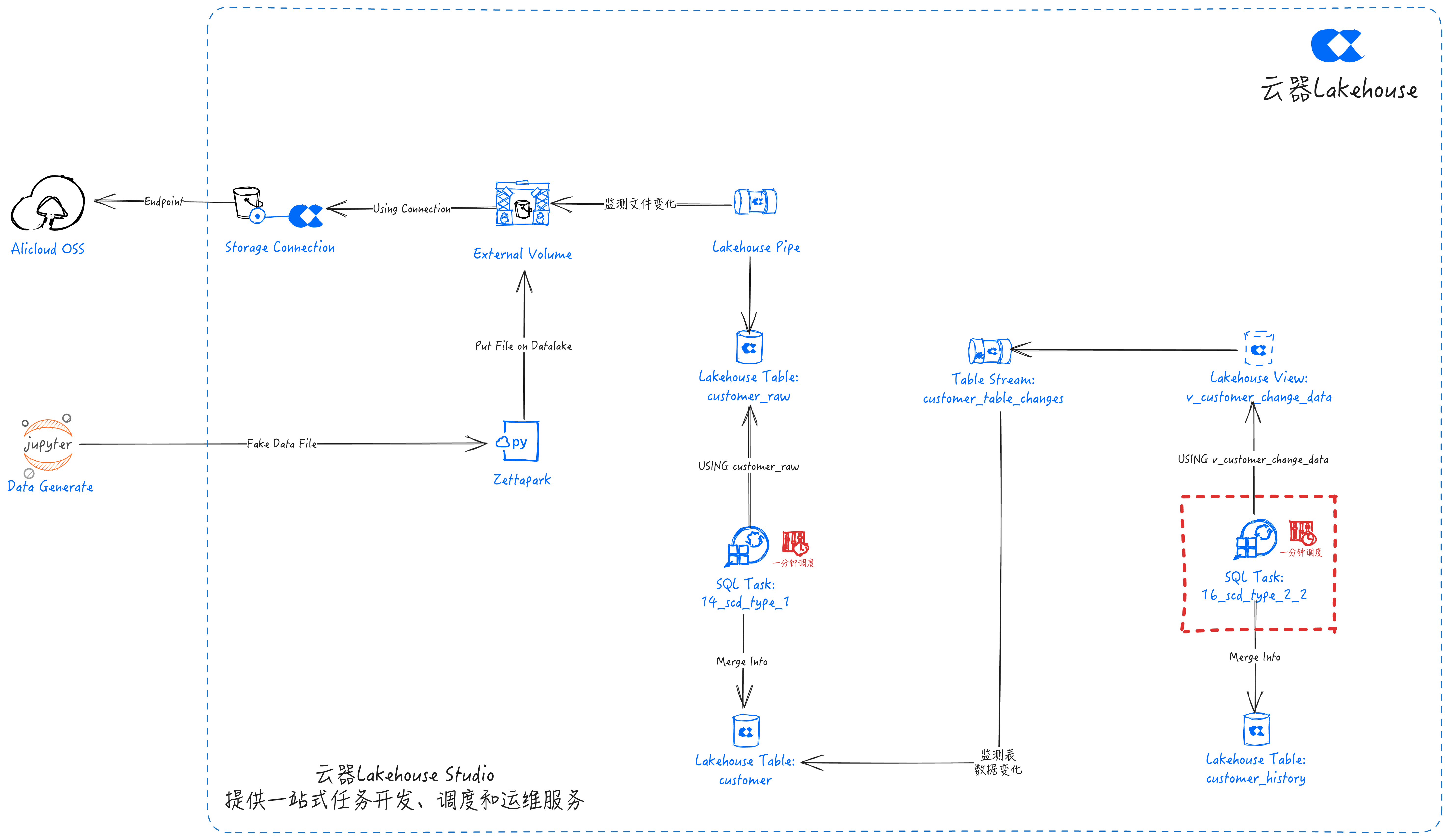
Pipeline Overview
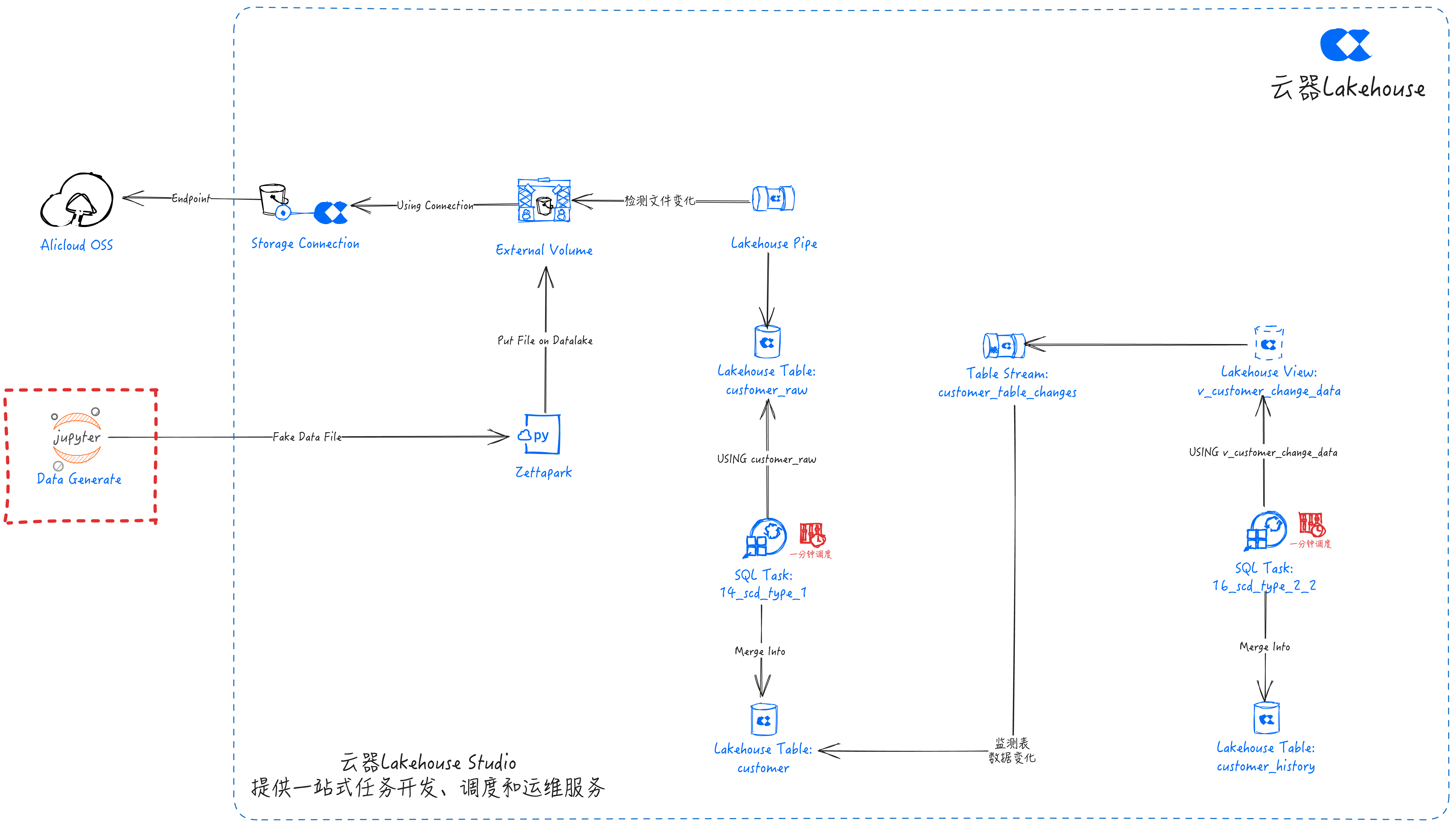
An end-to-end data pipeline that automatically captures and processes data changes:
-
Data Source (Jupyter calling Faker to generate test data) -> Use Python to create data simulating real-world events.
-
Zettapark PUT -> Use Zettapark to pull and load data onto the data lake Volume.
-
Data Lake Volume -> Data lake storage based on Alibaba Cloud OSS.
-
Lakehouse Pipe Captures data lake file changes -> Lakehouse Pipe efficiently streams data from the data lake Volume into the Lakehouse.
-
Lakehouse Table Stream Captures table data changes -> Captures changed data in the base table for incremental consumption.
-
SQL Tasks For SCD Processing -> Develop SQL tasks to implement SCD processing logic, with task scheduling through Singdata Lakehouse Studio.
-
Lakehouse Data Management: Lakehouse manages data through three tables:
customer_raw: Stores raw ingested data.customer: Reflects the latest updates from the streaming pipeline.customer_history: Retains records of all updates for analysis and auditing change history.
Key Components
Data Generation
- Tools Used: Python
- Python scripts dynamically generate simulated customer data to simulate real-time data sources.
Data Ingestion Layer
-
Data Lake Volume: Storage area for source files; Lakehouse's data lake storage. This case uses Alibaba Cloud OSS. Achieve unified management with tables by creating an External Volume.
-
Zettapark: PUTs the generated simulated data onto the data lake Volume.
-
Pipe: Lakehouse's built-in real-time data ingestion service. Use Pipe for real-time streaming:
- Automatically detects new files in the data lake Volume
- Loads data into the staging table
customer_rawwithout manual intervention
Change Detection Layer
-
Lakehouse Table Stream:
- Captures INSERT, UPDATE, DELETE operations
- Maintains change tracking metadata
- Capable of efficiently handling incremental changes
- Stores change data detected from
customerintocustomer_table_changes
Processing Layer
-
Lakehouse SQL Tasks:
- Scheduled jobs for SCD processing
- Handles Type 1 (overwrite) and Type 2 (history) changes
- Maintains referential integrity
- Tasks:
- Insert new or updated records into the
customertable (SCD Type 1) - Record updates to the
customer_historytable (SCD Type 2) to preserve audit trail
- Insert new or updated records into the
Storage Layer
-
Staging Table: Temporary storage area for raw data
-
Dimension Tables: Final tables with historical tracking
- Include effective dates
- Maintain current and historical records
- Support point-in-time analysis
Application Scenarios
- Customer dimension management
- Product catalog versioning
- Employee data tracking
- Any dimension requiring historical change tracking
Technology Stack
Required Components:
- Singdata Lakehouse
- Alibaba Cloud OSS (Data Lake Storage)
- Jupyter Notebook (for test data generation and PUTing files to the data lake Volume), or another Python environment
Implementation Steps
Task Development
Navigate to Development -> Tasks in Lakehouse Studio.
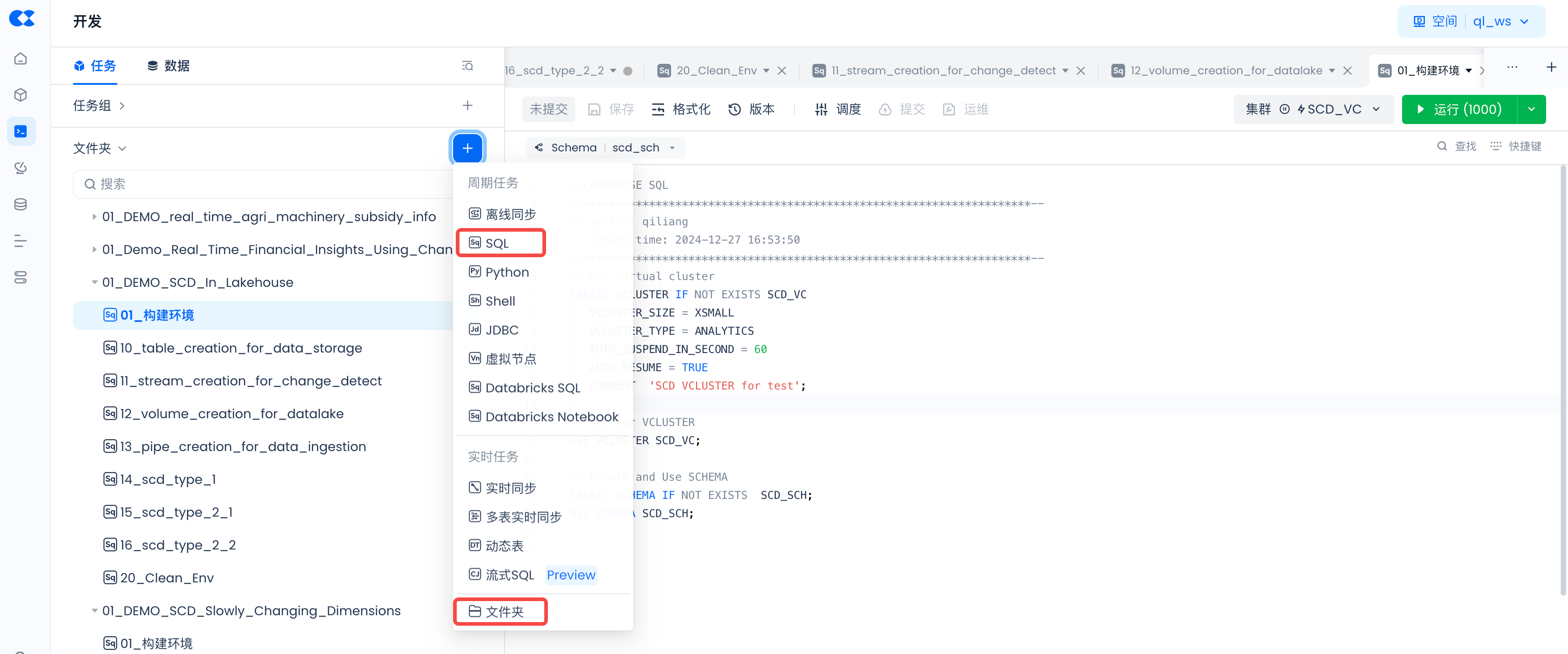
Click "+" to create the following directory:
- 01_DEMO_SCD_In_Lakehouse
Click "+" to create the following SQL tasks:
- 01_setup_env
- 10_table_creation_for_data_storage
- 11_stream_creation_for_change_detect
- 12_volume_creation_for_datalake
- 13_pipe_creation_for_data_ingestion
- 14_scd_type_1
- 15_scd_type_2_1
- 16_scd_type_2_2
- 20_clean_env
Copy the following code into the corresponding tasks. You can also download the files from GitHub and copy the content into the corresponding tasks.
Lakehouse Environment Setup
SQL Task: 01_setup_env
Create Tables
SQL Task: 10_table_creation_for_data_storage
After execution: the three tables customer, customer_history, and customer_raw are created. Confirm with SHOW TABLES.
Create Stream
SQL Task: 11_stream_creation_for_change_detect
After execution: Stream customer_table_changes begins listening for INSERT / UPDATE / DELETE changes on the customer table.
Create Data Lake Volume
SQL Task: 12_volume_creation_for_datalake
Creating a Volume requires a Connection to Alibaba Cloud OSS. Refer to Create Connection.
Create Pipe
SQL Task: 13_pipe_creation_for_data_ingestion
SCD Type 1
SQL Task: 14_scd_type_1
After execution: existing records in the customer table are overwritten with updates, new records are inserted; select count(*) returns the current total row count.
SCD Type 2-1
SQL Task: 15_scd_type_2_1
SCD Type 2-2
SQL Task: 16_scd_type_2_2
After execution: new or updated historical records are added to the customer_history table; old version rows have is_current set to FALSE; new version rows have end_time as 9999-12-31 and is_current as TRUE.
Building the Environment
Run the developed tasks to build the Lakehouse runtime environment. Navigate to Development -> Tasks, open the following tasks, and run them one by one:
- 01_setup_env
- 10_table_creation_for_data_storage
- 11_stream_creation_for_change_detect
- 12_volume_creation_for_datalake
- 13_pipe_creation_for_data_ingestion
- 15_scd_type_2_1
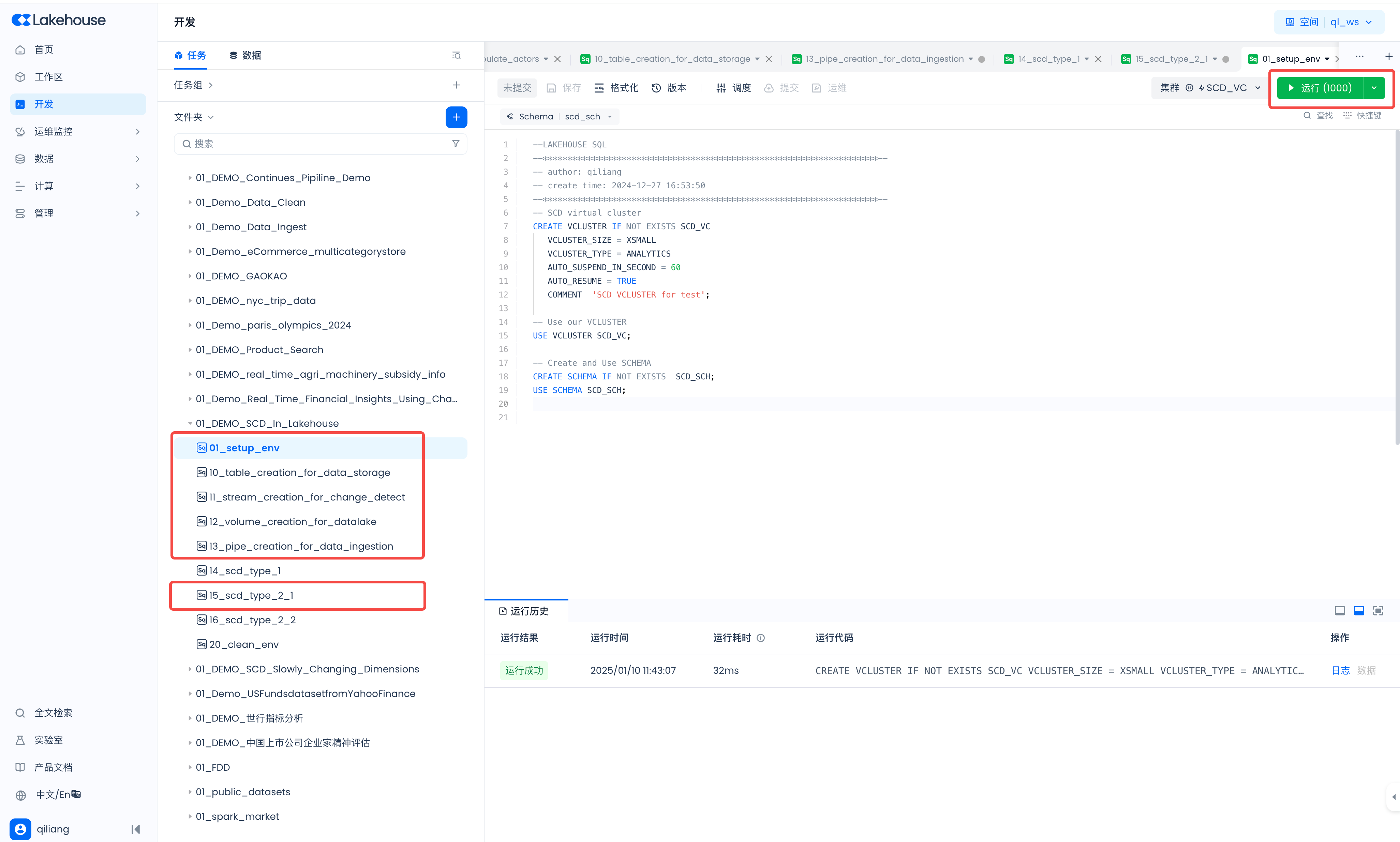
Task Scheduling and Commit
Schedule the developed SCD tasks to execute once per minute. Navigate to Development -> Tasks, open the following tasks, and configure scheduling for each:
- 14_scd_type_1
- 16_scd_type_2_2
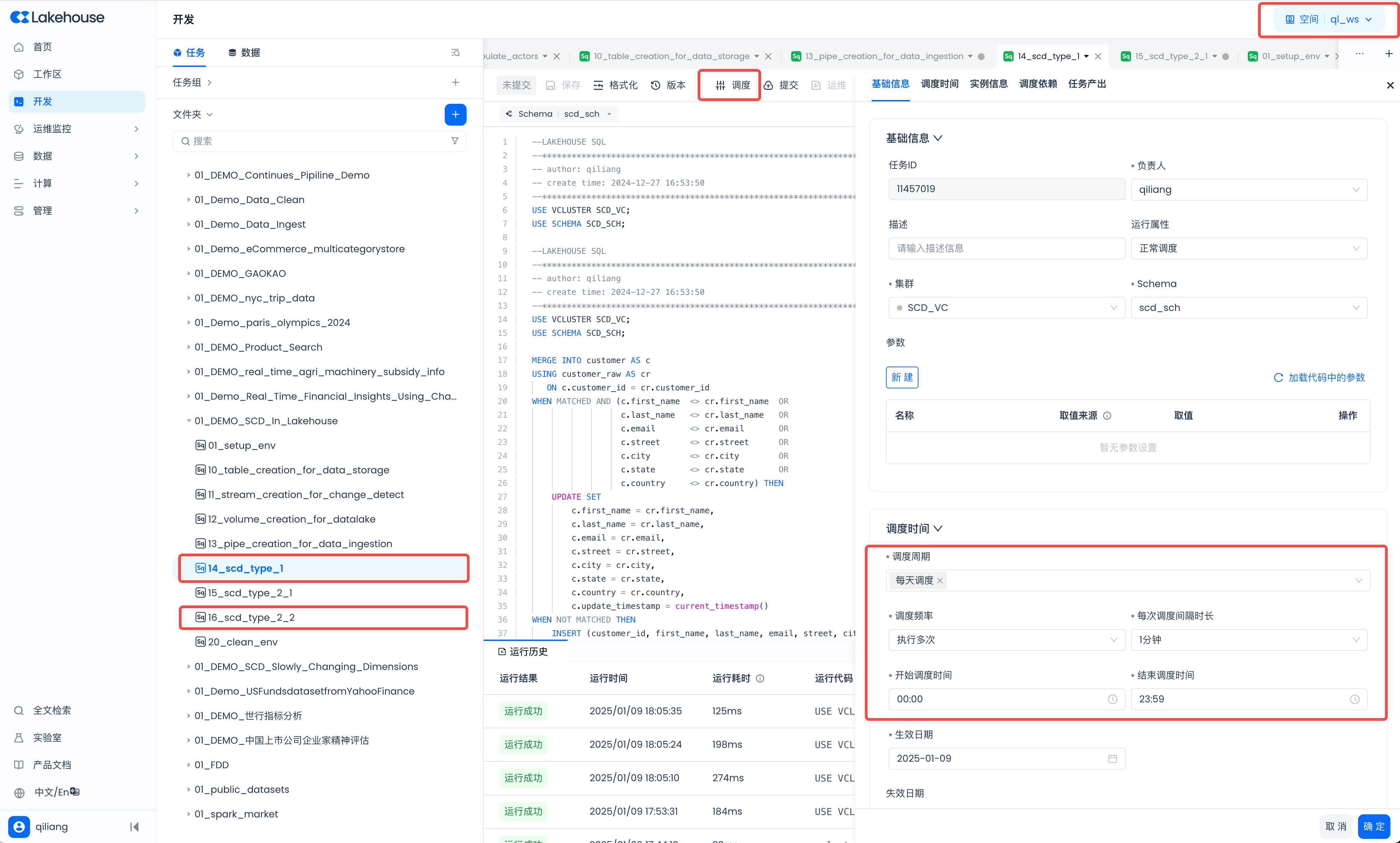
Commit Tasks
After configuring the schedule, click "Commit." The tasks will run on a one-minute cycle, updating the data in the target tables.

Generate Test Data
Generate Test Data and PUT to Data Lake Volume
- Executing the above code PUTs a new file to the Volume. The Pipe automatically detects the new file and writes its data into the
customer_rawtable.
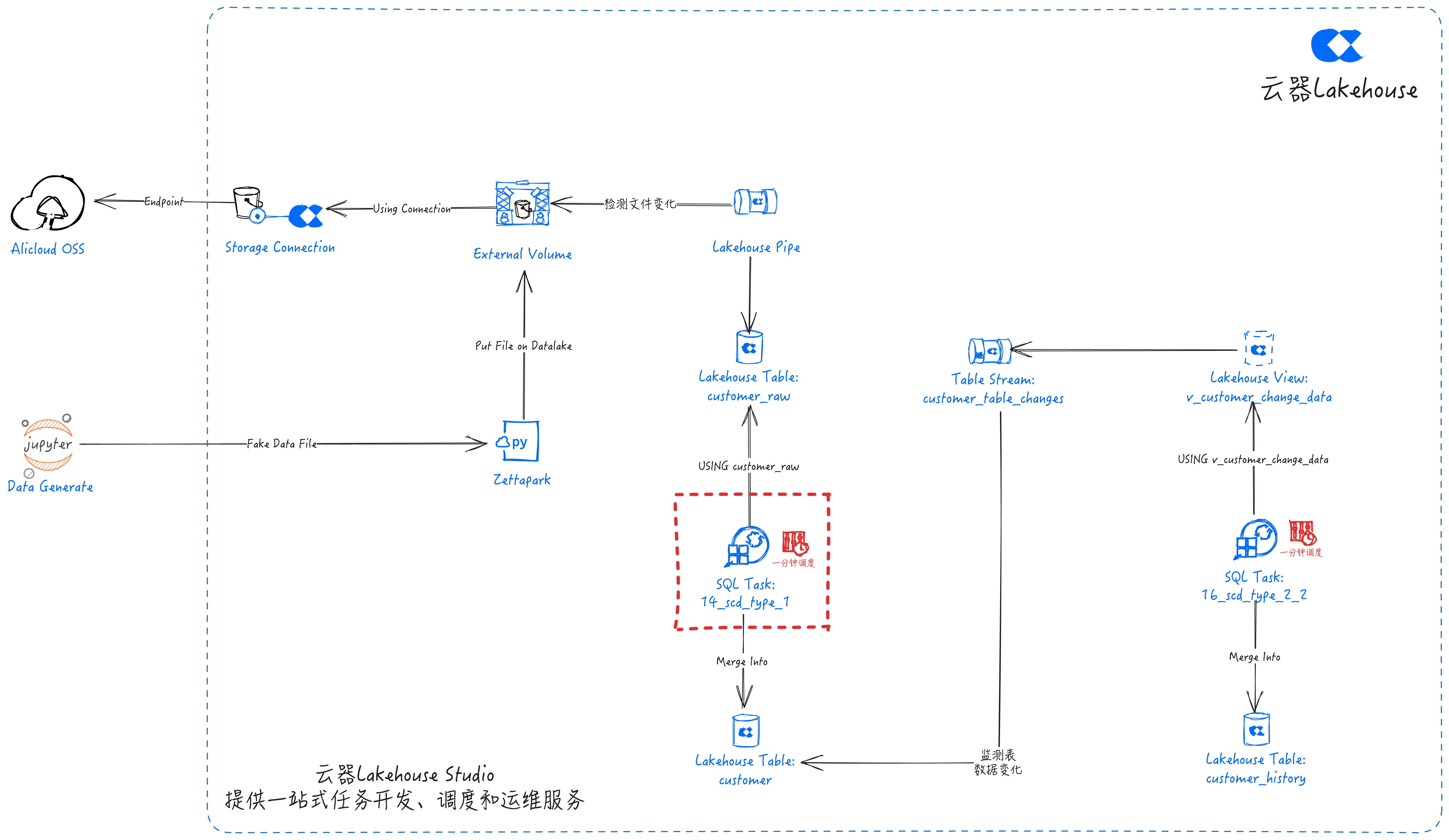
- The 14_scd_type_1 task, configured with periodic scheduling, performs SCD Type 1 computation every minute and merges the results into the
customertable.
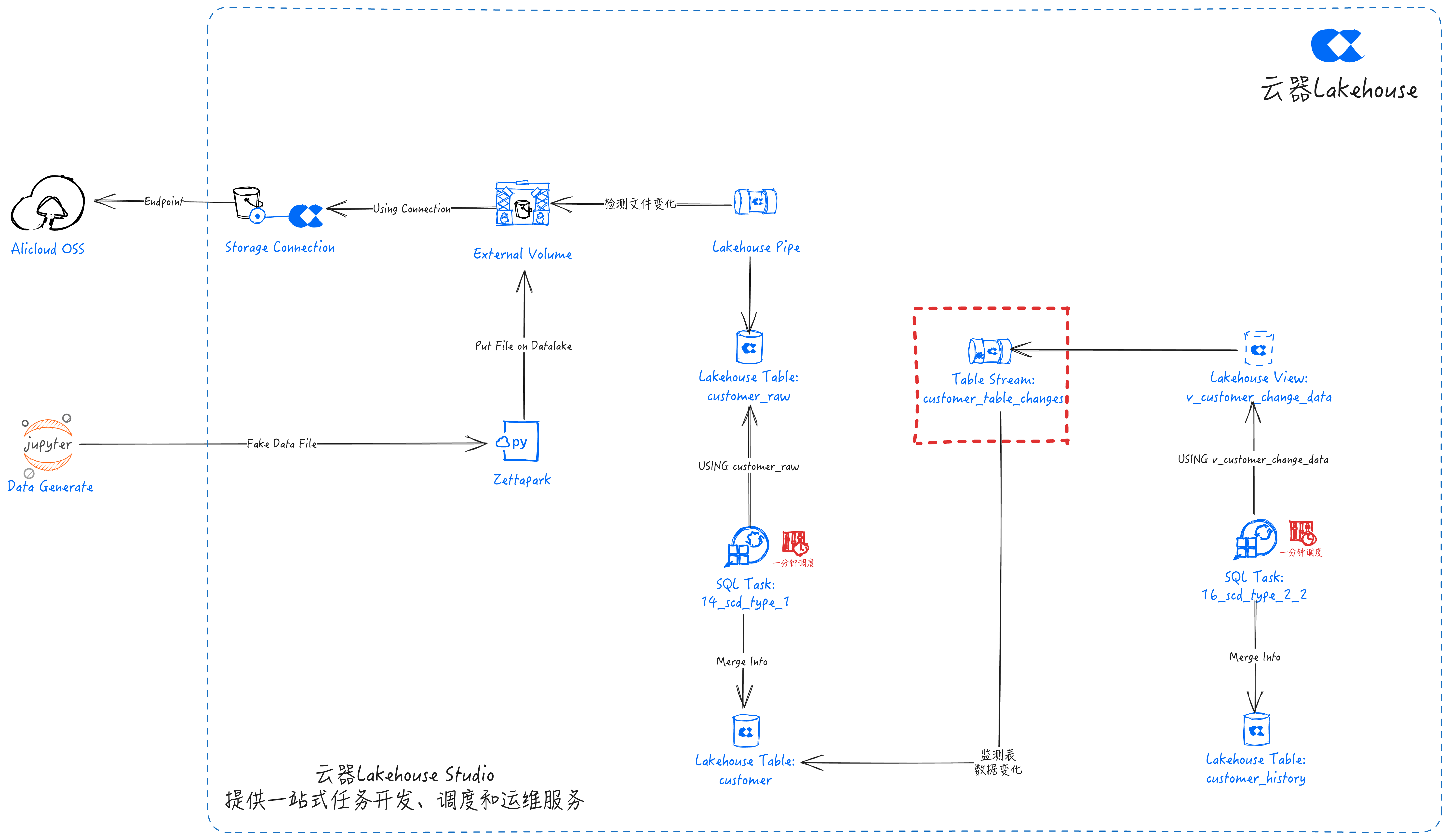
- Table Stream automatically detects changes in the
customertable data and stores the changed data incustomer_table_changes.
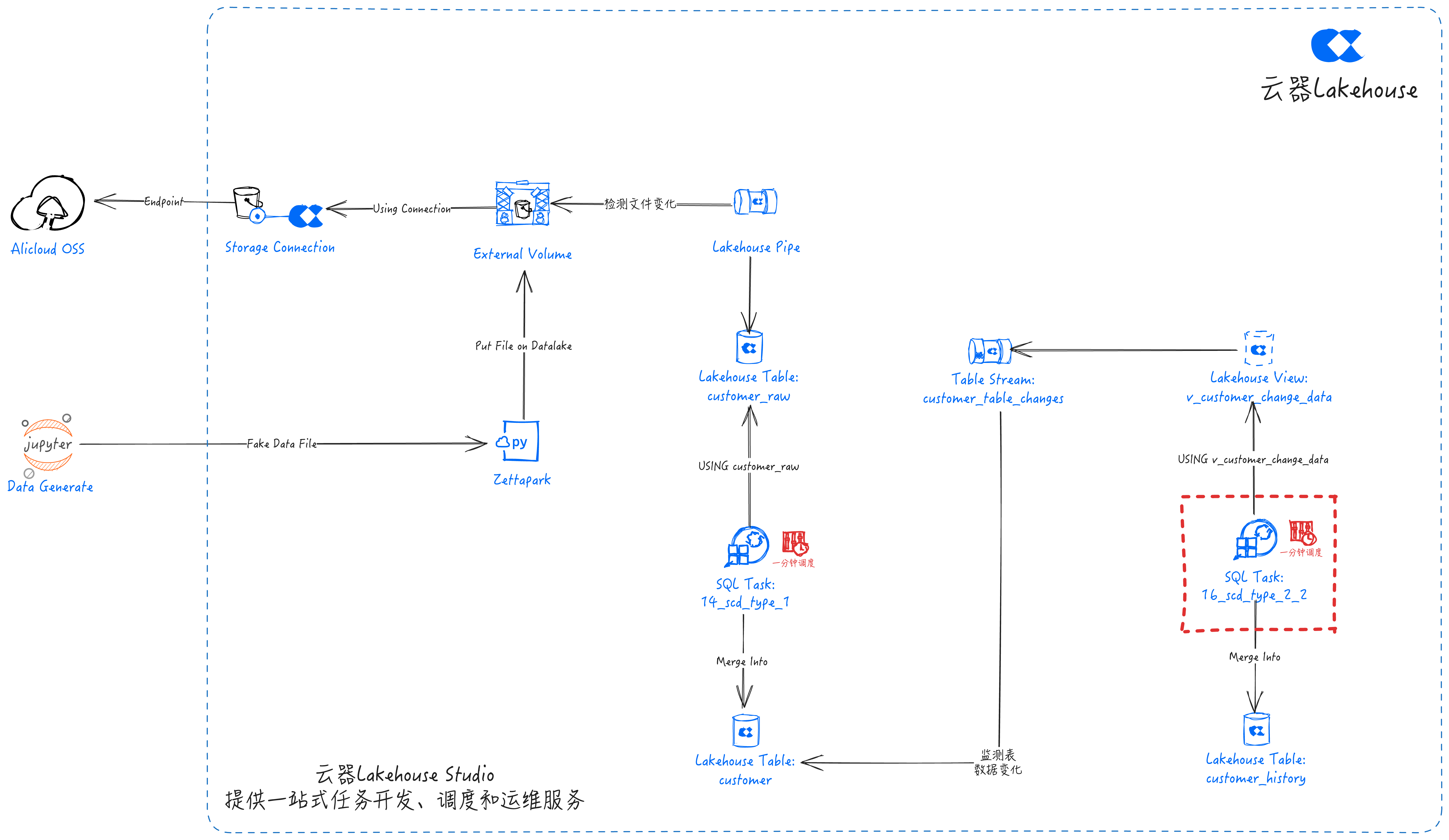
- The 16_scd_type_2_2 task, configured with periodic scheduling, performs SCD Type 2 computation every minute and merges the results into the
customer_historytable.
Monitoring and Maintenance
Pipe Monitoring
- Use the SHOW PIPES command to view the list of PIPE objects
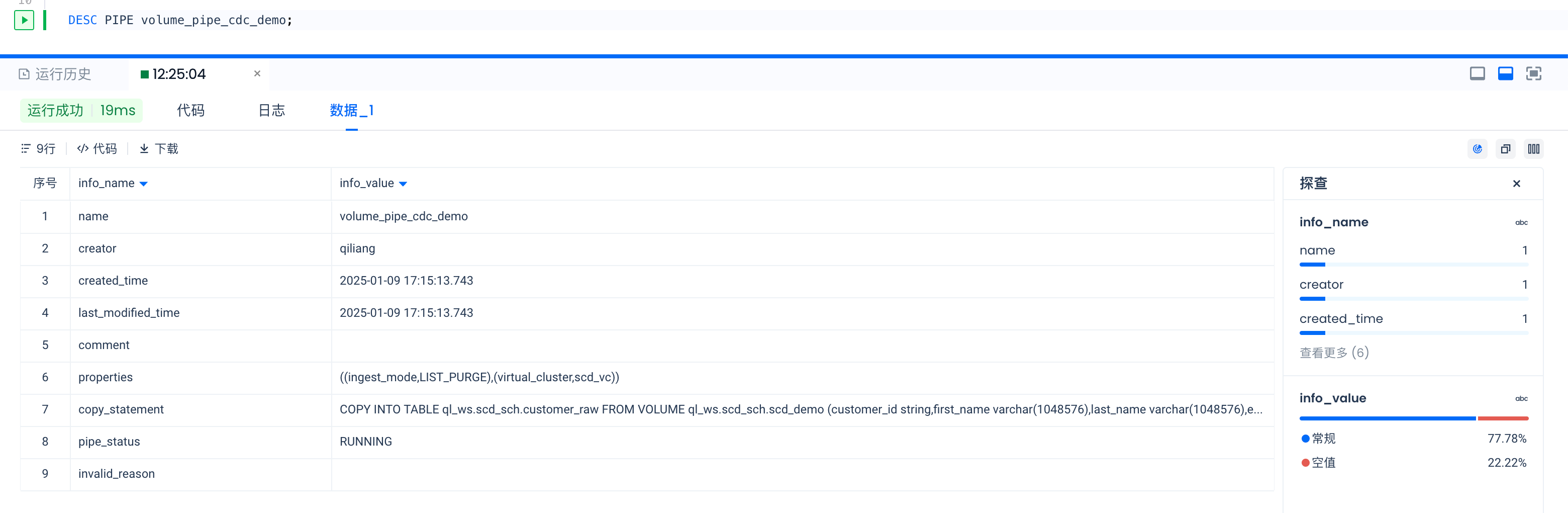
- Use the DESC PIPE command to view detailed information for a specified PIPE object
- View Pipe COPY job executions
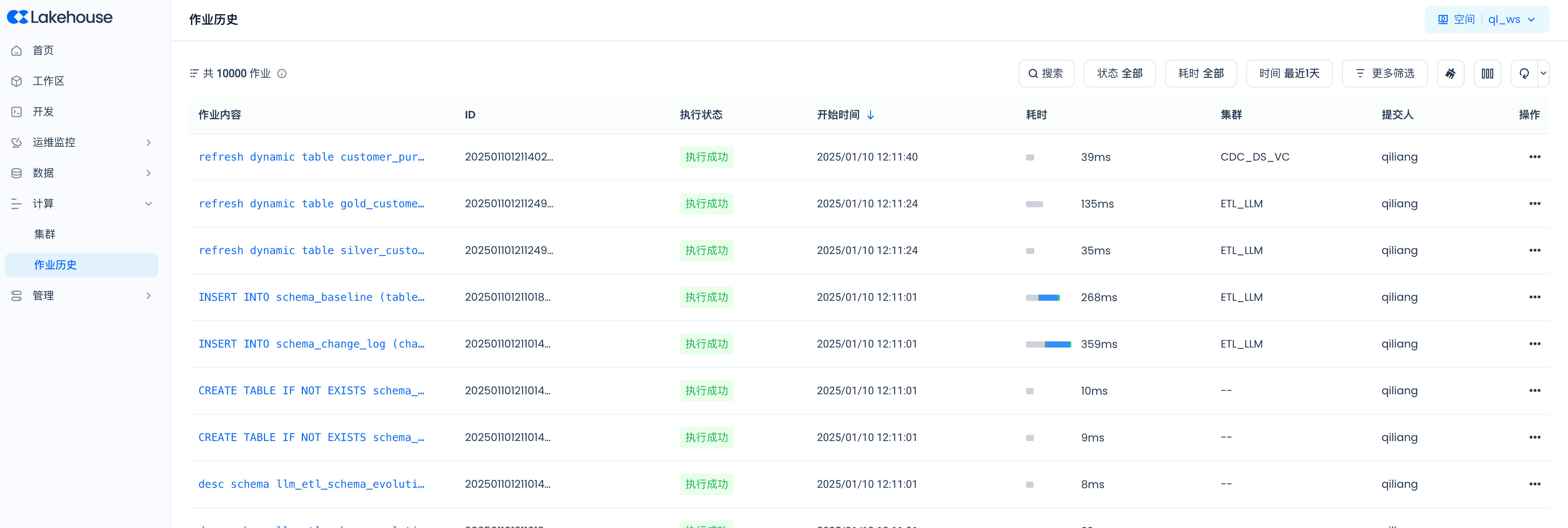
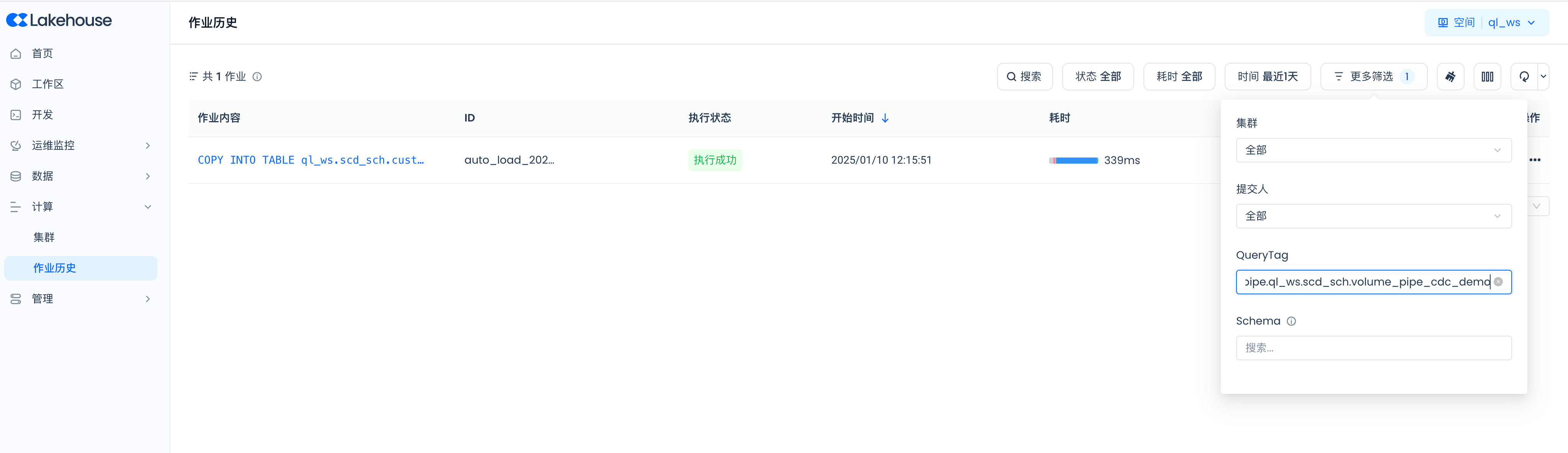
Filter by query_tag in the job history. All Pipe COPY job executions are tagged in query_tag with the format: pipe.workspace_name.schema_name.pipe_name
In this guide, workspace_name is ql_ws, schema_name is SCD_SCH, and pipe name is volume_pipe_cdc_demo, so the query_tag is:
pipe.ql_ws.scd_sch.volume_pipe_cdc_demo
Navigate to Compute -> Job History:
Click "More Filters" and enter "pipe.ql_ws.scd_sch.volume_pipe_cdc_demo" in the QueryTag field to filter:
Scheduled Tasks
Navigate to Operations Monitoring -> Task Operations -> Scheduled Tasks:

View Task Instances:
