HR Employee Lifecycle Data Warehouse Best Practices
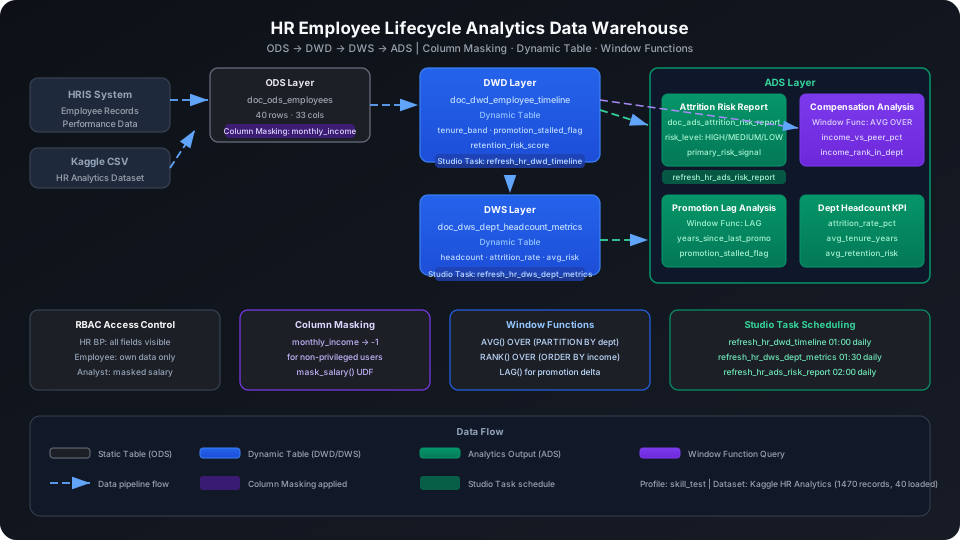
This guide integrates HRIS system, performance evaluation, and attendance data to build an analytics data warehouse covering the full employee lifecycle from hire to departure. It produces attrition risk predictions, pay equity analysis, and organizational effectiveness diagnostic reports. Using the Kaggle HR Analytics dataset (1,470 employee records), it demonstrates the full ODS → DWD → DWS → ADS four-layer architecture end to end, covering Column Masking (salary field masking), Dynamic Table (automatic monthly metric aggregation), and window functions (LEAD/LAG promotion analysis).
Overview
The core challenge in an HR data warehouse is that the data is highly sensitive (salaries, performance ratings, attrition reasons) while also needing to support different roles with different analysis needs (HR BPs see full data, employees see their own data, analysts see masked data). Singdata Lakehouse addresses these core challenges with the following combination:
Problem
Solution
Salary and performance fields are highly sensitive; different roles see different data
System detects upstream changes and refreshes incrementally
REFRESH DYNAMIC TABLE
Trigger a manual refresh
Use during initial build or debugging
AVG() OVER (PARTITION BY ...)
Calculate the average salary for the same department and level
Used for pay equity analysis
RANK() OVER (ORDER BY ...)
Calculate an employee's salary rank within their department
Used for pay competitiveness reports
LAG()
Calculate relative change in promotion intervals
Identify employees with stalled promotions
Prerequisites
All examples in this guide run under the best_practice_hr_analytics Schema.
CREATE SCHEMA IF NOT EXISTS best_practice_hr_analytics;
The dataset comes from the Kaggle HR Analytics Case Study (Apache 2.0), with 1,470 records and 35 columns covering employee age, department, job level, annual salary, performance rating, attrition label, and other core fields. This guide uses the first 40 rows as the demonstration dataset.
ODS (Raw Data Layer): Raw Employee Data
Create Tables
CREATE TABLE IF NOT EXISTS best_practice_hr_analytics.doc_ods_employees (
emp_id INT,
age INT,
attrition STRING, -- 'Yes'/'No', whether the employee has left
business_travel STRING,
daily_rate INT,
department STRING,
distance_from_home INT,
education INT, -- 1=Below College ... 5=Doctor
education_field STRING,
employee_number INT,
env_satisfaction INT, -- 1-4
gender STRING,
hourly_rate INT,
job_involvement INT, -- 1-4
job_level INT, -- 1=Entry ... 5=C-Level
job_role STRING,
job_satisfaction INT, -- 1=Low 4=Very High
marital_status STRING,
monthly_income INT, -- Sensitive field, will be bound to Column Masking
monthly_rate INT,
num_companies_worked INT,
overtime STRING, -- 'Yes'/'No'
pct_salary_hike INT, -- Last salary increase percentage (%)
performance_rating INT, -- 3=Excellent 4=Outstanding
relationship_satisfaction INT, -- 1-4
stock_option_level INT,
total_working_years INT,
training_times_last_year INT,
work_life_balance INT, -- 1-4
years_at_company INT,
years_in_current_role INT,
years_since_last_promo INT,
years_with_curr_mgr INT
);
Import Data
This guide loads data from a local CSV file (first 40 rows downloaded from Kaggle) via INSERT. In production, use MySQL batch sync or COPY INTO from a Volume to import the full dataset:
-- Step 1: Upload the local CSV file to User Volume via SQL PUT
PUT '/path/to/your/data.csv' TO USER VOLUME FILE 'data.csv';
-- Step 2: COPY INTO the table from User Volume
COPY INTO best_practice_hr_analytics.doc_ods_employees
FROM USER VOLUME
USING csv
OPTIONS('header'='true', 'sep'=',', 'nullValue'='')
FILES ('data.csv');
You can also insert a small batch of test data inline (no CSV file required):
SELECT COUNT(*) AS ods_row_count
FROM best_practice_hr_analytics.doc_ods_employees;
ods_row_count
-------------
40
Column Masking: Salary Field Masking
monthly_income is a highly sensitive field. The approach: HR administrators see original values; other users get -1 in query results.
-- Create the masking function
CREATE OR REPLACE FUNCTION best_practice_hr_analytics.mask_salary(salary INT)
RETURNS INT
AS CASE
WHEN current_user() IN ('privileged_user') THEN salary -- replace with the actual authorized username
ELSE -1
END;
-- Bind to the monthly_income column
ALTER TABLE best_practice_hr_analytics.doc_ods_employees
CHANGE COLUMN monthly_income
SET MASK best_practice_hr_analytics.mask_salary;
Replace 'privileged_user' with the actual usernames that need to see plaintext data. Column Masking matches the current connection's username via current_user(); all authorized usernames must be explicitly listed in the IN() list.
⚠️ Note: Column Masking takes effect transparently for all queries (including Dynamic Tables). When the DWD layer inherits from ODS, non-privileged users receive the masked value -1.
Verify the masking effect (admin account sees the original values):
SELECT emp_id, department, job_role, monthly_income
FROM best_practice_hr_analytics.doc_ods_employees
LIMIT 5;
emp_id | department | job_role | monthly_income
-------+--------------------------+------------------------+---------------
31 | Research & Development | Laboratory Technician | 2496
32 | Research & Development | Healthcare Representative | 6465
33 | Research & Development | Laboratory Technician | 2206
34 | Sales | Sales Representative | 2086
35 | Research & Development | Research Scientist | 2293
DWD (Detail Data Layer): Employee Event Timeline
The DWD layer derives three types of analysis fields from ODS raw data: tenure segmentation (tenure_band), promotion stall flag (promotion_stalled_flag), and retention risk score (retention_risk_score).
Create Tables
CREATE DYNAMIC TABLE IF NOT EXISTS best_practice_hr_analytics.doc_dwd_employee_timeline
AS
SELECT
emp_id,
department,
job_role,
job_level,
age,
gender,
marital_status,
education,
education_field,
years_at_company,
years_in_current_role,
years_since_last_promo,
years_with_curr_mgr,
total_working_years,
monthly_income,
pct_salary_hike,
performance_rating,
job_satisfaction,
work_life_balance,
env_satisfaction,
overtime,
business_travel,
attrition,
-- Tenure tier for group analysis
CASE
WHEN years_at_company <= 1 THEN 'New'
WHEN years_at_company <= 3 THEN 'Junior'
WHEN years_at_company <= 7 THEN 'Mid'
WHEN years_at_company <= 15 THEN 'Senior'
ELSE 'Veteran'
END AS tenure_band,
-- Promotion stall flag: no promotion in 2+ years and performance score >= 3
CASE
WHEN years_since_last_promo >= 2 AND performance_rating >= 3 THEN 1
ELSE 0
END AS promotion_stalled_flag,
-- Retention risk score (0.0–1.0, higher = more at risk)
ROUND(
CASE WHEN overtime = 'Yes' THEN 0.25 ELSE 0.0 END
+ CASE WHEN job_satisfaction <= 2 THEN 0.25 ELSE 0.0 END
+ CASE WHEN work_life_balance <= 2 THEN 0.20 ELSE 0.0 END
+ CASE WHEN years_since_last_promo >= 3 THEN 0.15 ELSE 0.0 END
+ CASE WHEN pct_salary_hike <= 12 THEN 0.15 ELSE 0.0 END
, 2) AS retention_risk_score
FROM best_practice_hr_analytics.doc_ods_employees;
⚠️ Note: Do not write REFRESH INTERVAL in CREATE DYNAMIC TABLE DDL. Manage refresh scheduling through Studio Task (see the "Scheduling Configuration" section); monitoring alerts and data quality rules can be attached to the same task.
Configure Studio Refresh Tasks
💡 Tip: The examples below use cz-cli (the Singdata Lakehouse command-line tool). If cz-cli is not installed, see the cz-cli Installation and Usage Guide. You can also run SQL in Development → SQL Editor in Singdata Studio and configure or trigger scheduled tasks under Studio → Tasks.
Task path: best_practices/hr_analytics/refresh_hr_dwd_timeline, triggered daily at 01:00. Additional configurations can be added to this task: row count alerts (notify when DWD row count drops sharply), data quality rules (retention_risk_score must not all be 0), and so on.
Trigger the Initial Refresh Manually
REFRESH DYNAMIC TABLE best_practice_hr_analytics.doc_dwd_employee_timeline;
SELECT COUNT(*) AS dwd_count
FROM best_practice_hr_analytics.doc_dwd_employee_timeline;
dwd_count
---------
40
Attrition Risk Analysis by Tenure Segment
Tenure segmentation helps HR identify which stage has the highest employee attrition risk:
SELECT
tenure_band,
COUNT(*) AS emp_count,
ROUND(AVG(retention_risk_score), 2) AS avg_risk,
SUM(CASE WHEN attrition = 'Yes' THEN 1 ELSE 0 END) AS attrition_cnt
FROM best_practice_hr_analytics.doc_dwd_employee_timeline
GROUP BY tenure_band
ORDER BY avg_risk DESC;
Senior (7–15 years) and Mid (3–7 years) employees have the highest average retention risk at 0.39 and 0.36 respectively, suggesting these groups face more pressure from overtime and stalled promotions. Veteran (15+ years) employees have the lowest risk, likely having reached stable positions.
DWS (Summary Data Layer): Department Workforce Metrics Aggregation
The DWS layer aggregates DWD layer data at department granularity, outputting department-level attrition rate, average tenure, salary benchmarks, and risk index.
Create Tables
CREATE DYNAMIC TABLE IF NOT EXISTS best_practice_hr_analytics.doc_dws_dept_headcount_metrics
AS
SELECT
department,
COUNT(*) AS headcount,
SUM(CASE WHEN attrition = 'Yes' THEN 1 ELSE 0 END) AS attrition_count,
ROUND(SUM(CASE WHEN attrition = 'Yes' THEN 1 ELSE 0 END)
* 100.0 / COUNT(*), 2) AS attrition_rate_pct,
ROUND(AVG(years_at_company), 2) AS avg_tenure_years,
ROUND(AVG(monthly_income), 0) AS avg_monthly_income,
ROUND(AVG(performance_rating), 2) AS avg_performance,
ROUND(AVG(job_satisfaction), 2) AS avg_job_satisfaction,
ROUND(AVG(retention_risk_score), 2) AS avg_retention_risk,
SUM(CASE WHEN overtime = 'Yes' THEN 1 ELSE 0 END) AS overtime_headcount,
SUM(promotion_stalled_flag) AS promotion_stalled_count
FROM best_practice_hr_analytics.doc_dwd_employee_timeline
GROUP BY department;
Sales department attrition rate (44.44%) is far higher than R&D (16.13%), but Sales average salary (6,973) is higher than R&D (4,650), indicating salary is not the main driver of Sales attrition. Looking at avg_retention_risk, R&D's overall risk average (0.34) is actually higher than Sales (0.29), likely because overtime and promotion stalls are more prevalent in R&D.
Performance rating averages are similar across both departments (3.11 vs 3.16), indicating that employees who leave are not low performers. HR should prioritize organizational culture and career development paths.
ADS (Application Data Layer): Attrition Risk Report and Pay Analysis
Attrition Risk Report
CREATE DYNAMIC TABLE IF NOT EXISTS best_practice_hr_analytics.doc_ads_attrition_risk_report
AS
SELECT
emp_id,
department,
job_role,
job_level,
tenure_band,
years_at_company,
years_since_last_promo,
overtime,
job_satisfaction,
work_life_balance,
performance_rating,
monthly_income,
pct_salary_hike,
promotion_stalled_flag,
retention_risk_score,
attrition,
-- Risk tier
CASE
WHEN retention_risk_score >= 0.6 THEN 'HIGH'
WHEN retention_risk_score >= 0.3 THEN 'MEDIUM'
ELSE 'LOW'
END AS risk_level,
-- Primary attrition signals
CASE
WHEN overtime = 'Yes' AND job_satisfaction <= 2 THEN 'Overwork+LowSatisfaction'
WHEN overtime = 'Yes' THEN 'Overwork'
WHEN job_satisfaction <= 2 THEN 'LowSatisfaction'
WHEN years_since_last_promo >= 3 THEN 'PromotionStalled'
WHEN pct_salary_hike <= 12 THEN 'LowPayRaise'
ELSE 'Normal'
END AS primary_risk_signal
FROM best_practice_hr_analytics.doc_dwd_employee_timeline;
REFRESH DYNAMIC TABLE best_practice_hr_analytics.doc_ads_attrition_risk_report;
SELECT risk_level,
COUNT(*) AS emp_count,
ROUND(AVG(retention_risk_score), 2) AS avg_risk,
SUM(CASE WHEN attrition = 'Yes' THEN 1 ELSE 0 END) AS actual_attrition
FROM best_practice_hr_analytics.doc_ads_attrition_risk_report
GROUP BY risk_level
ORDER BY avg_risk DESC;
SELECT emp_id, department, job_role, years_at_company,
years_since_last_promo, monthly_income,
pct_salary_hike, retention_risk_score, risk_level, primary_risk_signal
FROM best_practice_hr_analytics.doc_ads_attrition_risk_report
WHERE risk_level = 'HIGH'
ORDER BY retention_risk_score DESC;
emp_id | department | job_role | years_at_company | years_since_last_promo | monthly_income | pct_salary_hike | retention_risk_score | risk_level | primary_risk_signal
-------+--------------------------+----------------------+------------------+------------------------+----------------+-----------------+----------------------+------------+--------------------------
17 | Research & Development | Research Scientist | 6 | 0 | 3298 | 12 | 0.85 | HIGH | Overwork+LowSatisfaction
7 | Research & Development | Laboratory Technician| 1 | 0 | 2670 | 20 | 0.70 | HIGH | Overwork+LowSatisfaction
27 | Research & Development | Research Scientist | 10 | 6 | 3919 | 22 | 0.65 | HIGH | Overwork+LowSatisfaction
30 | Sales | Manager | 2 | 2 | 18947 | 12 | 0.60 | HIGH | LowSatisfaction
1 | Sales | Sales Executive | 6 | 0 | 5993 | 11 | 0.60 | HIGH | Overwork
Results interpretation:
emp_id=17 (R&D Research Scientist) has the highest risk (0.85), triggered by the combination of overtime and low job satisfaction, plus a salary increase of only 12% — at the LowPayRaise threshold. Priority one-on-one conversations and compensation review are recommended.
emp_id=27 (R&D Research Scientist, 10 years tenure) has not been promoted for 6 consecutive years (years_since_last_promo=6). Although the salary increase rate is relatively reasonable (22%), the stalled career progression is the primary risk signal.
emp_id=30 (Sales Manager, salary 18,947) has a high salary but low job satisfaction, indicating that retention for management must address non-monetary factors.
Overtime × Job Satisfaction Cross-Analysis
SELECT
overtime,
job_satisfaction,
COUNT(*) AS emp_count,
ROUND(AVG(retention_risk_score), 2) AS avg_risk,
SUM(CASE WHEN attrition = 'Yes' THEN 1 ELSE 0 END) AS attrition_cnt
FROM best_practice_hr_analytics.doc_dwd_employee_timeline
GROUP BY overtime, job_satisfaction
ORDER BY avg_risk DESC
LIMIT 8;
The overtime=Yes + job_satisfaction <= 2 combination has significantly higher average risk (0.62–0.85) than other combinations — the highest-priority cross-dimension for intervention. Notably, no-overtime but low-satisfaction (overtime=No, satisfaction=1) employees have an average risk of 0.41, close to the overtime + medium-satisfaction group, showing that job satisfaction has a substantial independent effect.
Pay Equity Analysis (Window Functions)
The following queries do not build a Dynamic Table; they run directly against the DWD layer as ad-hoc analysis requests.
Same-Level Pay Equity Analysis
SELECT
emp_id,
department,
job_role,
job_level,
monthly_income,
years_at_company,
pct_salary_hike,
AVG(monthly_income) OVER (PARTITION BY department, job_level) AS dept_level_avg_income,
ROUND(
(monthly_income - AVG(monthly_income) OVER (PARTITION BY department, job_level))
/ AVG(monthly_income) OVER (PARTITION BY department, job_level) * 100
, 1) AS income_vs_peer_pct,
RANK() OVER (PARTITION BY department ORDER BY monthly_income DESC) AS income_rank_in_dept
FROM best_practice_hr_analytics.doc_dwd_employee_timeline
WHERE department = 'Sales'
ORDER BY job_level DESC, monthly_income DESC;
emp_id=34 (Sales Representative, job_level=2) earns 58.9% below the same-level average with only 1 year at the company — a low-pay, high-risk employee. Check whether the initial compensation was set appropriately at hire.
emp_id=28 (Sales Executive) earns 34.6% above the same-level average. Given their 9-year tenure, this is a normal seniority premium; however, their salary increase rate (11%) is below peers, and if it continues, dissatisfaction may build up.
Promotion Lag Analysis (LAG)
SELECT
emp_id,
department,
job_role,
job_level,
years_at_company,
years_since_last_promo,
performance_rating,
LAG(performance_rating) OVER (
PARTITION BY department ORDER BY years_at_company
) AS prev_emp_perf,
years_since_last_promo - LAG(years_since_last_promo) OVER (
PARTITION BY department ORDER BY years_at_company
) AS promo_lag_delta
FROM best_practice_hr_analytics.doc_dwd_employee_timeline
WHERE department = 'Research & Development'
ORDER BY years_since_last_promo DESC
LIMIT 10;
emp_id | department | job_role | job_level | years_at_company | years_since_last_promo | performance_rating | prev_emp_perf | promo_lag_delta
-------+--------------------------+-----------------------------+-----------+------------------+------------------------+--------------------+---------------+----------------
16 | Research & Development | Manufacturing Director | 3 | 10 | 8 | 3 | 4 | 7
10 | Research & Development | Healthcare Representative | 2 | 7 | 7 | 3 | 3 | 4
27 | Research & Development | Research Scientist | 1 | 10 | 6 | 4 | 3 | -2
29 | Research & Development | Healthcare Representative | 3 | 22 | 5 | 3 | 3 | 1
13 | Research & Development | Research Scientist | 1 | 5 | 4 | 3 | 3 | 4
26 | Research & Development | Manager | 5 | 14 | 4 | 3 | 3 | 2
Results interpretation:
emp_id=16 (Manufacturing Director) has not been promoted for 8 years with performance rating consistently at 3 (Excellent). promo_lag_delta=7 means their promotion wait time is 7 years longer than the preceding employee with similar tenure in the department — a clear promotion anomaly.
emp_id=27 (Research Scientist, 10 years tenure, no promotion for 6 consecutive years, performance rating 4 = Outstanding) is the most typical "high-performer blocked from promotion" case. Already appearing on the HIGH risk list, this requires HR BP intervention to evaluate the promotion path.
Data Warehouse Object Summary
After the full build, all objects under the best_practice_hr_analytics Schema:
Column Masking applies transparently to Dynamic Tables: After the DWD layer inherits monthly_income from ODS, non-privileged users see the salary field as the masked value (-1) across DWD / DWS / ADS. To run pay equity analysis, you must use an account authorized in the Column Masking policy (explicitly listed in the mask function's IN() list) to see the original unmasked values.
Do not write REFRESH INTERVAL in Dynamic Table DDL: All Dynamic Table DDLs omit the REFRESH INTERVAL parameter; refresh scheduling is managed centrally through Studio Task. This lets you attach data quality rules (such as checking whether retention_risk_score is all 0) and alert notifications to the same task node.
Retention risk score is a heuristic model: retention_risk_score is based on accumulated rules for overtime, satisfaction, promotion stalls, and salary increase rates. It is suitable for quickly screening high-risk groups but does not replace a professional statistical prediction model. For production, use a ZettaPark Python Task to run a machine learning model and write results back to the ADS layer.
Dynamic Table incremental refresh depends on ODS change tracking: The first REFRESH performs a full snapshot. Subsequent incremental refreshes process only rows added or changed in the ODS layer since the last refresh. Using INSERT OVERWRITE or full rewrites in the ODS layer causes the Dynamic Table to degrade to a full refresh, significantly increasing computation cost.
Window semantics for the LAG promotion lag analysis: The LAG with PARTITION BY department ORDER BY years_at_company sorts employees within the same department by tenure, comparing promotion-stall differences between employees with similar tenure — not a single employee's historical timeline. For comparing a single employee at different points in time, you need an employee history snapshot table with a time dimension.
⚠️ Note: Column Masking currently matches authorized usernames via current_user(). Add all usernames that need plaintext access to the masking function's allowlist. If your Lakehouse version supports role-based dynamic evaluation (such as HAS_ROLE('role_name')), use roles instead. Contact Singdata technical support to confirm whether your version supports this function.