
AI Gateway in Practice: Calling LLMs with SQL
Calling large language models (LLMs) directly in SQL queries is the key leap that takes data analysis from "querying data" to "understanding data." Singdata Lakehouse, through AI Gateway + the AI_COMPLETE function, lets you complete text analysis, sentiment evaluation, content generation, and intelligent classification within standard SQL — all processing happens inside the same query engine, with no need to export data to a Python environment.
This article uses the Kimi K2.6 (Moonshot AI) model together with NHL hockey data to demonstrate practical patterns for SQL + AI.
Core Capabilities
| Capability | Traditional approach | SQL + AI approach |
|---|---|---|
| Text sentiment analysis | Python + Transformers | SELECT AI_COMPLETE(model, prompt) |
| Content classification | Export CSV → Python script | Built-in SQL function, batch processing |
| Intelligent report generation | BI tool with external scripts | SQL query outputs analysis text directly |
| Multilingual translation | API call + ETL write-back | AI_COMPLETE join-based translation |
| Data augmentation | Manual annotation | LLM auto-labeling, evaluation, enrichment |
Architecture Overview
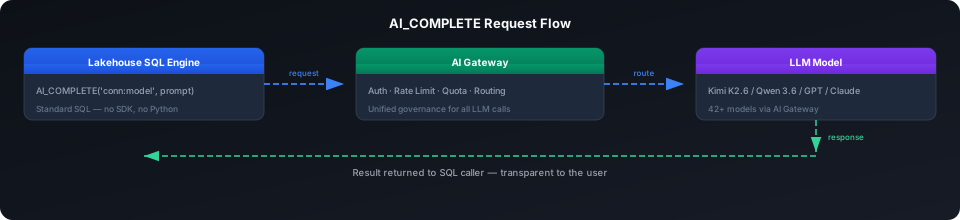
The SQL engine forwards AI_COMPLETE() calls to AI Gateway. The Gateway handles authentication, rate limiting, and quota management, then routes requests to the configured LLM. The entire process is transparent to SQL users — you only need to write SQL, with no API Key management or rate-limit retry handling required.
Configuring the AI Gateway Connection
Option 1: AI Gateway Endpoint (Recommended, requires Studio UI)
In Studio → API Key Management → New API Key; in Model Marketplace → select a model → View → check Endpoint Management and model invocation examples.
Option 2: API Connection (Create directly in SQL)
AI Gateway Base URLs vary by region:
| Region | Base URL |
|---|---|
| Alibaba Cloud Shanghai | https://cn-shanghai-alicloud-aimesh.api.clickzetta.com/gateway/v1 |
| Tencent Cloud Shanghai | https://ap-shanghai-tencentcloud-aimesh.api.clickzetta.com/gateway/v1 |
| AWS Singapore | https://ap-southeast-1-aws-aimesh.api.singdata.com/gateway/v1 |
Format
AI_COMPLETE Basic Usage
Connectivity Test
Response (measured at 3.1 seconds):
General Prompt Templates
Practice: AI-Enhanced NHL Data Analysis
Scenario 1: Player Scouting Reports
Feed Gold layer aggregated data (career goals, assists, points) into the LLM to generate professional scouting evaluations:
Query results (5 rows, 10.2 seconds):
| Player | AI Scouting Report |
|---|---|
| Alex Ovechkin | A goal-scorer who redefined the left wing position with unstoppable heavy shots and dominant presence in the slot, combining violent aesthetics with remarkable longevity across nearly two decades at the peak |
| Sidney Crosby | A generational center defined by complete two-way play, relentless competitiveness, and exceptional hockey IQ, who set the modern benchmark for an elite NHL core player through intelligence and hard work |
| Joe Thornton | A traditional center renowned for elite playmaking vision and organizational ability, whose career assists far outnumber goals, embodying an unselfish and all-around style of play |
| Patrick Kane | A technically brilliant and highly creative offensive force, who became one of the most entertaining wingers in NHL history with his ghostly puck-handling and clutch game-winning ability |
| Evgeni Malkin | An elite offensive center who blends Eastern European technical finesse with North American physicality, celebrated at his peak for his unstoppable puck possession and improvisational creativity |
Scenario 2: Team Season Reviews
Generate season summaries from team standings:
Query results (5 rows, 10.1 seconds):
| Team | AI Season Review |
|---|---|
| TBL (Lightning) | An outstanding season with powerful offense and solid defense, ultimately winning the Stanley Cup championship |
| VGK (Golden Knights) | A solid season with offense slightly outpacing defense and an overall winning record above .500 |
| COL (Avalanche) | Decent offensive output but inconsistent defense, with an overall winning rate approaching .500 |
Scenario 3: Sentiment Analysis + Classification
Perform instant analysis on any text without a pre-trained model:
Query results:
| sentiment_1 | sentiment_2 | category |
|---|---|---|
| positive | negative | sports |
Batch AI Processing Patterns
Pattern A: Row-by-row Processing
Suitable for small datasets (< 1000 rows) — use SELECT + AI_COMPLETE directly:
Pattern B: Dynamic Table Auto-batch Processing
Persist AI analysis results into a Dynamic Table for zero-latency subsequent queries:
Pattern C: Materialize AI Results into a Regular Table
More granular cost control — manually trigger only when needed:
Performance and Cost
Measured Performance (Kimi K2.6, Alibaba Cloud Shanghai)
| Scenario | Rows | Total time | Average per row |
|---|---|---|---|
| Single call | 1 | 1.9-3.1s | ~2.5s |
| Scouting reports (with data concatenation) | 5 | 10.2s | 2.0s |
| Season reviews (with data concatenation) | 5 | 10.1s | 2.0s |
| Sentiment + classification (simple output) | 3 | 2.4s | 0.8s |
Three Cost Control Principles
| Principle | Method |
|---|---|
| Reduce call count | Filter key rows with WHERE, materialize results to a table, use DT to only analyze incremental rows |
| Shorten output length | Add "in one sentence", "reply with one word only", or set max_tokens in the prompt |
| Control refresh frequency | Lower DT refresh from 1 HOUR to 1 DAY or 7 DAY |
AI Gateway Quota Management
AI Gateway provides tenant-level and Endpoint-level quota controls:
- Tenant quota: Monthly total token cap for the organization (e.g., 5 million/month)
- Endpoint quota: Independent quota per model (e.g., Kimi 1 million/month)
- Actual available = min(tenant remaining, Endpoint quota)
View real-time consumption in Studio → AI Model Management → Usage.
Notes
| Note | Description |
|---|---|
| AI_COMPLETE does not support OR REPLACE | The function is built-in and does not need to be created |
| AI_SUMMARIZE / AI_SENTIMENT and other specialized functions coming soon | Only AI_COMPLETE is available in the current version; other functions will be released in the next version. All capabilities can be implemented in advance using AI_COMPLETE + prompts |
| Output format is non-deterministic | LLM output may contain extra text; add "reply with one word only" constraints |
| AI_COMPLETE cost in DT must be evaluated | DT recomputes everything on each REFRESH; recommend analyzing only incremental rows |
| Connection name and model name use an English colon | 'conn:model'; do not use the connection: prefix |
| Do not SELECT AI_COMPLETE directly on production tables | Materialize results first then query, to avoid repeated API calls |
| Function call timeout | The default SQL timeout may not be sufficient; use asynchronous processing for long text |
Related Documentation
- AI Gateway Product Overview — Endpoint management, quotas, monitoring
- AI Functions Overview — Detailed parameters for all AI functions
- AI_COMPLETE Detailed Documentation — options parameters, image mode
- AI_EMBEDDING Detailed Documentation — Embedding and semantic search
- CREATE API CONNECTION — Full syntax
- Medallion Pure-SQL DT Architecture — NHL data layered modeling
- Multi-cloud Unified Data Lake Acceleration — Volume + Pipe + DT cross-cloud solution