
AI Gateway in Action: Analyzing Images in SQL to Build a Multimodal AI Pipeline
The image mode of AI_COMPLETE allows SQL to handle not just text, but also directly analyze image content—product image classification, document OCR recognition, monitoring screenshot anomaly detection, all completed in a single SQL query. Combined with Volume storage + presigned URLs, it forms a fully managed pipeline from image upload to AI analysis.
This article uses the Kimi K2.6 multimodal model as an example to demonstrate how to build an end-to-end multimodal AI pipeline in Singdata Lakehouse.
Pipeline Architecture
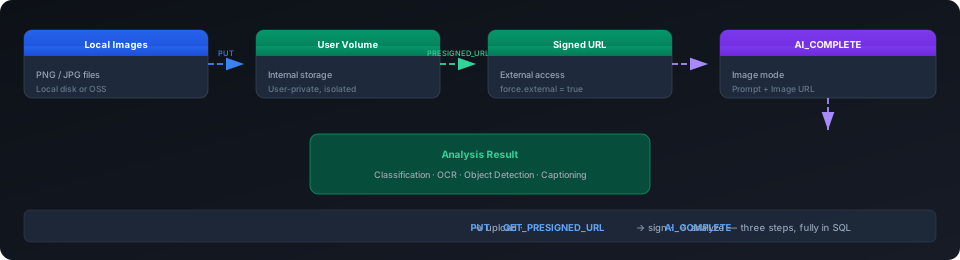
Three key steps:
PUTuploads images to User Volume (internal storage, user-isolated)GET_PRESIGNED_URLgenerates a time-limited OSS signed URL so the LLM can access itAI_COMPLETEimage mode sends the image URL + Prompt to get analysis results
Upload Images to Volume
Generate Presigned URL
GET_PRESIGNED_URL generates a time-limited OSS signed URL for files in the Volume, which the LLM uses to download the image.
Example return value:
Parameter descriptions:
- First parameter: Volume type and name (
USER VOLUME/VOLUME my_vol) - Second parameter: File path within the Volume
- Third parameter: Validity period (seconds), recommended 3600 (1 hour), maximum 7 days
AI_COMPLETE Image Mode
Image mode uses the row value syntax (prompt AS prompt, image_url AS image) to pass both the Prompt and image URL together:
Output (1.3 seconds):
Syntax Details
| Parameter | Format | Description |
|---|---|---|
| model | 'ai_gateway_conn:moonshotai/kimi-k2.6' | Must use a model that supports multimodal capabilities |
| prompt | 'Describe this image' AS prompt | Text prompt; AS prompt cannot be omitted |
| image | GET_PRESIGNED_URL(...) AS image | Image URL; AS image cannot be omitted |
Supported Models
Image mode requires a model with multimodal (vision) support, such as moonshotai/kimi-k2.6 (confirmed working, 1.3s response). Text-only models will not throw an error when passed an image URL but cannot recognize image content.
In Practice: Batch Image Analysis
Scenario: Automatic Product Image Classification
Suppose an e-commerce system uploads thousands of product images to OSS daily and needs to automatically identify the product type in each image.
Query Results
Dynamic Table for Automatic Incremental Analysis
Wrap the above logic in a Dynamic Table so new images are automatically analyzed after upload:
Applicable Scenarios
| Scenario | Implementation |
|---|---|
| Automatic product image classification | AI_COMPLETE image mode + classification Prompt |
| Document OCR extraction | "Extract all text from the image" |
| Monitoring screenshot anomaly detection | "Determine if there is an anomaly in the image, reply normal/abnormal only" |
| Social media image content moderation | "Determine if the image content violates rules, reply safe/unsafe only" |
| Invoice/document information extraction | "Extract the amount, date, and company name from the image" |
| Preliminary medical imaging screening | "Determine if there is an abnormal area in the image, reply yes/no only" |
Notes
| Note | Description |
|---|---|
| Presigned URL must use force.external | SET cz.sql.function.get.presigned.url.force.external = true, otherwise generates internal URL |
| Image formats | Supports PNG, JPG, JPEG. SVG has a null MIME type, causing Invalid image MIME type error |
| Model selection | Must use a multimodal (vision) model. Text-only models won't error but cannot recognize image content |
| URL validity | Presigned URL default recommendation is 3600 seconds (1 hour), maximum 7 days |
| DT cost | AI_COMPLETE in DT fully recomputes on every REFRESH; use regular table + manual INSERT instead |
| Concurrency limits | For large-scale concurrent image analysis, watch AI Gateway TPM/RPM quota limits |
| File size | Images recommended to be < 10MB; oversized images may time out or consume too many tokens |
| User Volume isolation | User Volume is private; other users cannot see images you upload |
Related Documents
- AI_COMPLETE documentation — Image mode parameters, options configuration
- AI-Enhanced Data Analysis — AI_COMPLETE text mode in practice
- Volume Overview — User Volume and External Volume concepts
- GET_PRESIGNED_URL — Presigned URL generation
- AI Gateway Product Overview — Endpoint management, quota control
- Multi-Cloud Unified Data Lake Acceleration — Volume + Pipe cross-cloud approach