
Databricks vs. Singdata Lakehouse
Compare Databricks vs. Singdata Lakehouse for cost, performance, setup, and scalability. See which platform best fits your data analytics and business needs.
You want a platform that saves money and sets up quickly. Singdata Lakehouse often costs much less than Databricks, especially for log analytics. You may find that Databricks needs extra tools, which can make setup harder. Your decision depends on what matters most to you: cost, setup, or platform maturity. The table below shows how these aspects compare:
Aspect | Databricks Data Lakehouse | Singdata Lakehouse |
|---|---|---|
Cost Implications | Significant costs for external data transfers | N/A |
Ease of Setup | Needs third-party tools for advanced features | N/A |
Platform Maturity | Flexible and cost-efficient, influences user decisions | N/A |
When you compare Databricks vs. Singdata Lakehouse, match their strengths to your needs in performance, cost, architecture, scalability, and use cases.
Key Takeaways
Singdata Lakehouse is often more cost-effective than Databricks, especially for log analytics, saving you 6x to 12x on similar workloads.
Benchmark tests show that Singdata Lakehouse performs queries significantly faster than Databricks, helping you get results quickly.
Both platforms allow for flexible storage and compute management, but Singdata Lakehouse supports more cloud providers, offering greater deployment options.
Consider your specific needs: Databricks excels in advanced features and platform maturity, while Singdata Lakehouse focuses on cost savings and speed.
Regularly monitor your platform's performance to ensure it meets your growing data and user demands, adjusting resources as necessary.
Databricks vs. Singdata Lakehouse: Performance & Cost

Performance Benchmarks
When you compare Databricks vs. Singdata Lakehouse, you see big differences in speed. Benchmark tests measure how fast each platform runs common queries. These tests use datasets like SSB-FLAT, TPC-H, and TPC-DS. You can look at the table below to see how each platform performs:
Benchmark | Singdata | Snowflake | Databricks | BigQuery |
|---|---|---|---|---|
SSB-FLAT 100GB | 1.9s | 5.0s | 12.7s | 9.3s |
TPC-H 100GB | 22.7s | 28.36s | 50.6s | 201s |
TPC-DS 1TB | 208s | 314s | 386s | 1248s |
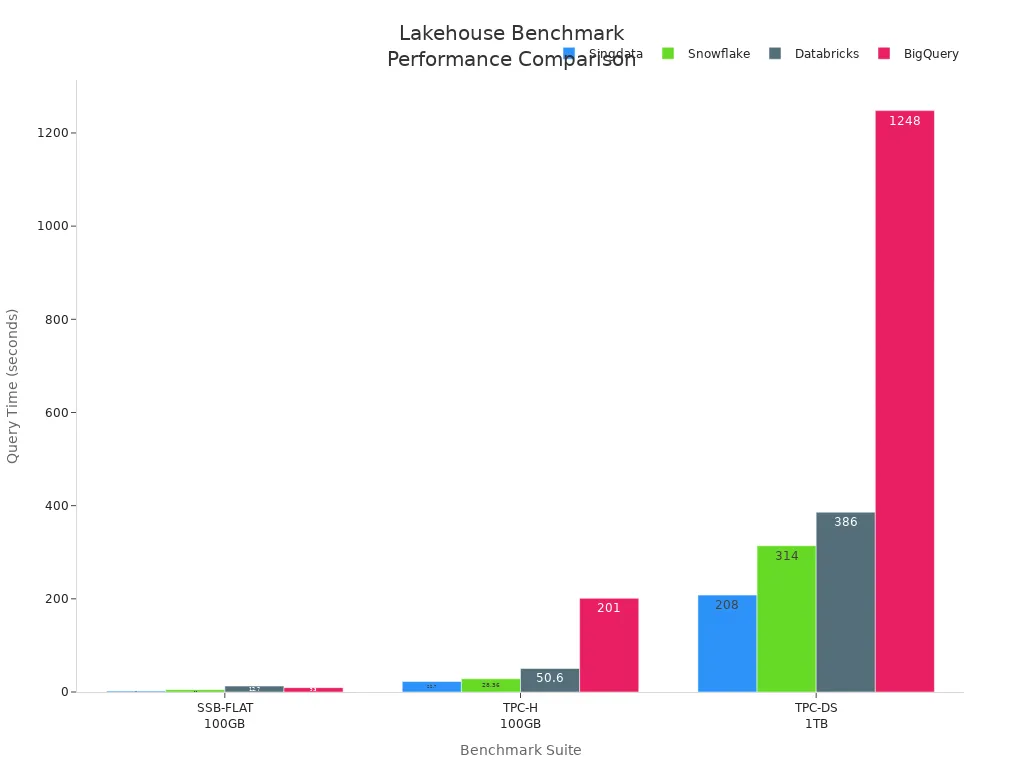
You notice that Singdata Lakehouse finishes queries much faster than Databricks. For example, on the SSB-FLAT 100GB test, Singdata takes less than 2 seconds, while Databricks takes over 12 seconds. This speed can help you get results quickly, especially when you work with large datasets.
Cost Comparison
You want to know how much each platform costs. The pricing models for Databricks vs. Singdata Lakehouse are very different. Databricks uses a pay-as-you-go system. You pay for what you use, measured in Databricks Units (DBUs). The total cost depends on several things:
Cloud provider (AWS, Azure, GCP)
Region where you deploy
Databricks Edition (Standard, Premium, Enterprise)
Instance type (memory-optimized, compute-optimized)
Compute type (like serverless)
Discounts for long-term contracts
Databricks offers three editions:
Standard Edition: Basic features, lowest DBU rates
Premium Edition: More features, moderate DBU rates (about 1.5 times Standard)
Enterprise Edition: Advanced governance, highest DBU rates (about 2 times Standard)
Singdata Lakehouse uses a simpler pricing model. You pay much less for the same workloads. The table below shows the cost advantage:
Platform | Cost Advantage |
|---|---|
Singdata Lakehouse | |
Snowflake | 3x-6x lower than Snowflake |
You can also see the actual costs for running benchmark queries:
Pricing Model | Singdata | Snowflake | Databricks | BigQuery |
|---|---|---|---|---|
SSB-FLAT 100GB | $0.010 | $0.059 | $0.12 | $0.08 |
TPC-H 100GB | $0.12 | $0.31 | $0.50 | $0.16 |
TPC-DS 1TB | $2.21 | $5.39 | $6.32 | $10.23 |
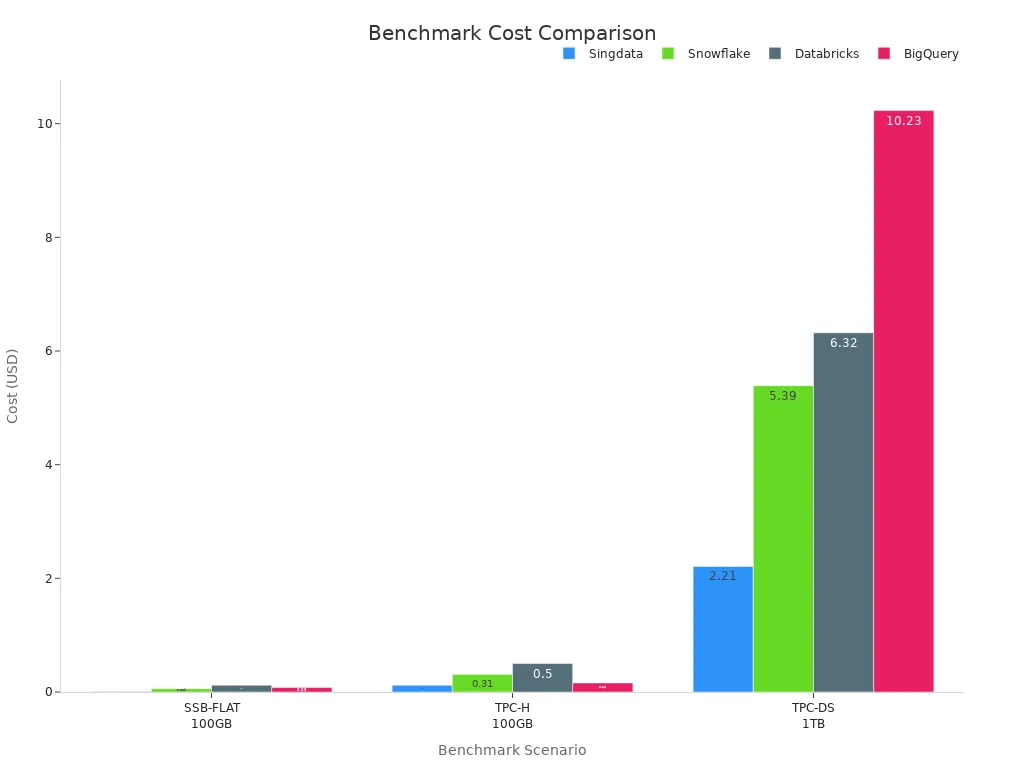
You see that Singdata Lakehouse costs much less than Databricks for the same tasks. For example, running the TPC-DS 1TB benchmark costs $2.21 on Singdata, but $6.32 on Databricks.
Cost Efficiency
You want your platform to be fast and affordable. Databricks vs. Singdata Lakehouse shows a clear winner in cost efficiency. Singdata Lakehouse gives you results faster and at a much lower price. If you run many queries or work with big data, you save more money with Singdata.
You should think about your needs. If you want advanced features and a mature platform, Databricks may fit your goals. If you care most about saving money and getting fast results, Singdata Lakehouse stands out. Many organizations choose Singdata for log analytics and large-scale data processing because of its cost advantage.
Tip: You can use these benchmarks and cost tables to estimate your own expenses. Try to match your workload to the platform that gives you the best value.
When you compare Databricks vs. Singdata Lakehouse, you see that cost and performance can change your decision. You need to balance speed, price, and features to pick the right platform for your business.
Architecture Comparison
Storage & Data Management
You want your data platform to handle storage and management with flexibility. Both Databricks and Singdata Lakehouse separate storage from compute, which helps you scale resources as needed. You can see the main differences in the table below:
Feature | Singdata Lakehouse | Databricks |
|---|---|---|
Storage/Compute Separation | Yes | Yes |
Supported Cloud Infrastructure | AWS, GCP, Alibaba Cloud, Tencent Cloud, Huawei Cloud | AWS, Azure, Google Cloud |
Deployment Mode | SaaS, VPC On Premise | Hybrid SaaS and PaaS (BYOC) |
Isolated Tenancy | Multi-tenant pooled resources; VPC tier for isolation | Control plane in Databricks account; Data plane and storage in customer VPC (optional) |
Compute Control | Cluster size (1-128 nodes, up to 512 preview); General or Analysis Purpose | Configurable clusters, instance types; Serverless option |
You can manage data versions and schema changes with both platforms. Singdata Lakehouse uses Apache Iceberg, which lets you add, drop, or reorder columns easily. Databricks uses Delta Lake, which also supports schema changes but may need manual steps for partitions. Both platforms let you travel back in time to see older data and keep track of changes for audits.
Note: Time travel and data versioning help you recover lost data and meet compliance needs.
Compute & Processing
You need strong compute power for batch and streaming workloads. Both platforms let you pick cluster sizes and types. Singdata Lakehouse offers clusters from 1 to 128 nodes, with larger sizes in preview. Databricks gives you ready-to-use instances and lets you choose the runtime version before starting. This setup saves you time when launching clusters.
Automated data movement and cost-effective storage classes help you lower costs.
Table partitioning and clustering improve query speed and reduce expenses.
Converged storage and metadata management can cut down on operational overhead.
If you run both batch and streaming jobs, you want to avoid duplicate data and compute. Databricks vs. Singdata Lakehouse shows that minimizing data copies and using unified storage can help you save money and work faster.
Deployment & Cloud Support
You want your platform to work on your preferred cloud provider. Singdata Lakehouse supports AWS, GCP, Alibaba Cloud, Tencent Cloud, and Huawei Cloud. Databricks works with AWS, Azure, and Google Cloud. You can deploy Singdata as SaaS or in your own VPC. Databricks offers hybrid SaaS and PaaS options, with control and data planes that can run in your account.
Cloud Provider | |
|---|---|
AWS | S3 for Data Lake, Glue for ETL, Redshift as Data Warehouse |
Azure | ADLS Gen 2 for Data Lake, Databricks for ETL, Synapse as Data Warehouse |
GCP | N/A |
Databricks gives you a streamlined setup. You can start clusters quickly and choose your runtime version. Singdata Lakehouse may need more configuration, especially if you want isolated resources or advanced options.
Tip: If you want fast setup and easy management, Databricks may suit you. If you need more control or support for different clouds, Singdata Lakehouse gives you more choices.
Databricks vs. Singdata Lakehouse shows that your choice depends on your need for flexibility, control, and cloud support.
Scalability & Concurrency
Large Data Volumes
You want your data platform to handle big data without slowing down. Both Databricks and Singdata Lakehouse support large datasets. You can store petabytes of data and run complex queries. Databricks uses Delta Lake to manage data efficiently. Singdata Lakehouse uses Apache Iceberg, which helps you organize and update tables quickly.
You can scale your clusters up or down based on your workload. Databricks lets you choose different cluster sizes and types. Singdata Lakehouse offers flexible node options. You can add more nodes when your data grows. This helps you keep performance high even with large volumes.
Tip: Start with a cluster size that matches your current needs. You can increase resources as your data grows.
High User Load
You may need to support many users running queries at the same time. Both platforms offer tools to help you manage high concurrency. You can avoid slowdowns and keep your system healthy by following best practices.
Right-size your SQL Warehouses. Choose a slightly larger serverless warehouse at first. Test your workload and adjust the size as needed.
Monitor concurrency health. Watch for query delays and resource saturation. Use built-in monitoring tools to track system performance.
Use the Databricks UI monitoring tab. You can see SQL Warehouse activity and analyze query patterns with Query History and Query Profiles.
Singdata Lakehouse also provides monitoring features. You can check system health and spot problems early. This helps you keep your platform running smoothly when many users connect.
Note: Regular monitoring helps you catch issues before they affect users. You can adjust resources and settings to keep performance steady.
You want a platform that grows with your business. Both Databricks and Singdata Lakehouse give you the tools to scale up for big data and high user loads. You can keep your queries fast and your costs under control by following these tips.
Use Cases: Databricks vs. Singdata Lakehouse
Databricks Strengths
You can use Databricks for many enterprise data tasks. It helps you manage and govern your data, build scalable systems, and unlock insights for smarter decisions. You get advanced analytics and AI tools to drive your business forward. Databricks supports large workloads with parallel processing and gives you real-time access to data.
Use Case Category | Description |
|---|---|
Data Management | Manage and govern enterprise data for accuracy and consistency. |
Data Engineering | Build scalable systems to collect, process, and store data. |
Data Insights | Unlock insights from data to support smarter decisions. |
Data Intelligence | Use advanced analytics and AI to drive strategic decisions. |
Driving Business Growth | Unify analytics, AI, and real-time decision-making to boost profitability and efficiency. |
Tip: Databricks focuses on broad capabilities like data storage and AI/ML development. You can partner with experts for industry-specific needs such as deep OT protocol connectivity.
Singdata Lakehouse Strengths
You get cost-effective data management with Singdata Lakehouse. The platform lets business analysts access data directly, so you do not need to depend on platform teams for every question. You keep one copy of your data, organized for your business needs. This setup lowers your total cost of ownership and enables self-service analysis.
Aspect | Old Architecture | New Architecture |
|---|---|---|
Data Dependency | Business teams depend on platform teams | |
Data Management | Data copied and reshaped across systems | One copy of data, organized for business needs |
Team Interaction | Cross-team negotiation required for analysis | Self-service and governance enabled for analysts |
Role of Platform Teams | Act as carriers | Act as enablers of data access |
Total Cost of Ownership | Higher due to inefficiencies | Lower due to unified architecture |
Note: Singdata Lakehouse helps you save money and gives you more control over your data.
Industry Applications
You see Databricks vs. Singdata Lakehouse used in many industries. Retailers analyze shopping trends and predict inventory needs. Finance teams detect fraud instantly and manage risk. Healthcare providers speed up drug discovery and improve patient care. Manufacturers optimize supply chains and predict equipment health.
Industry | Outcomes |
|---|---|
Retail | Real-time shopping trend analysis, personalized recommendations, predictive inventory management |
Finance | Instant fraud detection, streamlined data pipelines for compliance and risk management |
Healthcare | Accelerated drug discovery, enhanced patient care through data analysis |
Manufacturing | Advanced supply chain management, predictive maintenance for equipment health |
You should match your platform choice to your industry needs. Databricks offers horizontal solutions and guides you with outcome maps for use cases like predictive maintenance. Singdata Lakehouse gives you cost savings and direct data access, which suits teams that want fast answers and lower costs.
You see clear differences between Databricks and Singdata Lakehouse. Singdata Lakehouse offers much lower costs, while Databricks can reduce expenses with careful optimization. Both platforms need you to think about architecture and scalability during setup. To choose the best fit, review your data inventory, check legacy systems, and focus on governance and performance. Use a checklist to match technical, business, and security needs. For deeper insights, explore platform guides and case studies.
FAQ
What makes Singdata Lakehouse more cost-effective than Databricks?
You save money with Singdata Lakehouse because it uses efficient storage and compute. You pay less for the same workloads. Many users report costs that are 6x to 12x lower than Databricks.
Can you use Databricks or Singdata Lakehouse on any cloud provider?
You can run Databricks on AWS, Azure, and Google Cloud. Singdata Lakehouse supports AWS, GCP, Alibaba Cloud, Tencent Cloud, and Huawei Cloud. You get more choices with Singdata.
How do you scale your data platform for more users?
You add more nodes or increase cluster size. Both platforms let you adjust resources to handle more data or users. You monitor performance and change settings as your needs grow.
Which platform is easier to set up for beginners?
Databricks gives you a streamlined setup. You start clusters quickly and pick your runtime version. Singdata Lakehouse may need more configuration, especially for advanced options.
See Also
Enhancing Dataset Freshness by Linking PowerBI with Singdata Lakehouse
A Comprehensive Guide to Safely Connect Superset to Singdata Lakehouse
Comparing Apache Iceberg and Delta Lake: Key Differences
The Significance of Lakehouse Architecture in Modern Data Environments
A Comparison of Apache Superset and Tableau for Data Visualization