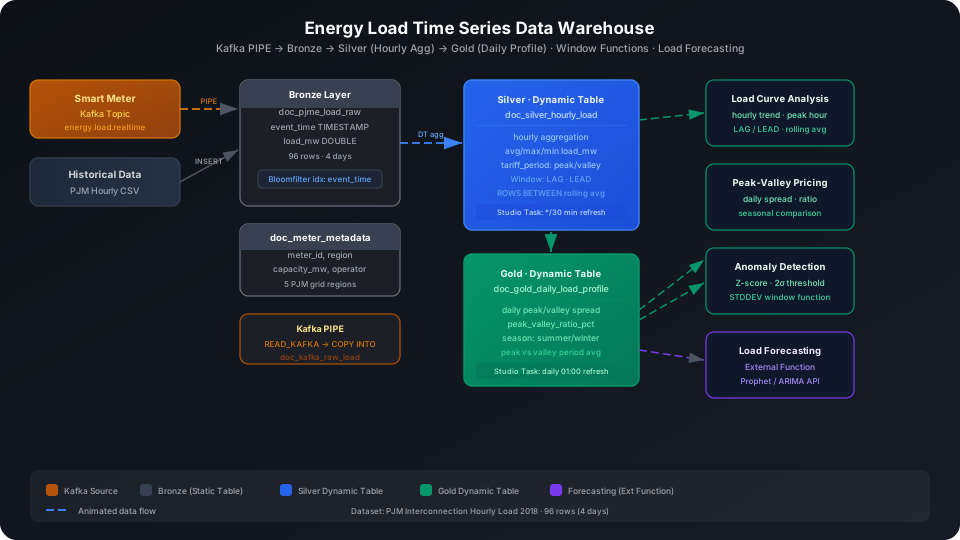
Time-Series Data Warehouse: Power Load Analysis and Forecasting
Build a multi-layer time-series data warehouse from PJM grid hourly load data to support peak-valley pricing strategies, load curve analysis, and anomaly detection alerts. This guide uses a real PJM Interconnection power dataset (2018, 4 days, 96 hourly records) to walk through the complete Kafka PIPE → Bronze → Silver → Gold pipeline, covering four core time-series capabilities: Window Functions (LAG / LEAD / ROWS BETWEEN), peak-valley identification, same-period comparison, and Z-score anomaly detection.
Overview
The typical pipeline for a power load data warehouse is: smart meter reporting → real-time ingestion → raw storage (Bronze) → hourly aggregation and cleansing (Silver) → daily peak-valley metrics (Gold) → load forecasting and BI.
Singdata Lakehouse addresses the core challenges with the following combination:
Problem
Solution
High-volume real-time ingestion of smart meter minute-level data
Kafka PIPE continuous ingestion — no need to write your own consumer
Hourly aggregation and peak-valley labeling must update automatically as upstream data changes
Dynamic Table with declarative SQL; the system handles incremental computation
Load curve analysis requires comparing values across adjacent hours
LAG / LEAD window functions — cross-row references without self-joins
Rolling average to smooth noisy data
ROWS BETWEEN N PRECEDING AND CURRENT ROW
Same-season winter/summer comparison
Conditional aggregation with CASE WHEN MONTH()
Daily peak-valley spread and ratio statistics
Gold layer aggregation, supports drill-down to any granularity
SQL Commands Used
Command / Function
Purpose
Notes
CREATE TABLE
Create Bronze layer raw load table and meter metadata table
Static tables, used as upstream source for Dynamic Tables
The system detects upstream changes and refreshes incrementally
LAG / LEAD
Reference load values in previous/next rows
Compute hourly deltas and trends
AVG ... OVER (ROWS BETWEEN)
Rolling window average
Smooth noise and identify trends
STDDEV
Compute intra-day load standard deviation
Foundation for Z-score anomaly detection
REFRESH DYNAMIC TABLE
Trigger a manual refresh
Use during initial build or debugging
Prerequisites
All examples in this guide run under the best_practice_energy_ts schema.
CREATE SCHEMA IF NOT EXISTS best_practice_energy_ts;
Bronze Layer: Raw Load Data Tables
Create Tables
doc_pjme_load_raw stores hourly load data for the PJM East interconnection (PJME). Each row represents one hourly observation.
CREATE TABLE IF NOT EXISTS best_practice_energy_ts.doc_pjme_load_raw (
event_time TIMESTAMP,
load_mw DOUBLE
);
Also create a meter-region master table for later dimension joins:
CREATE TABLE IF NOT EXISTS best_practice_energy_ts.doc_meter_metadata (
meter_id STRING,
region STRING,
voltage_level STRING,
capacity_mw DOUBLE,
install_year INT,
operator STRING
);
Create Bloomfilter Index
Time-series queries almost always include a time range filter on event_time. A Bloomfilter Index on this column speeds up equality and range lookups.
CREATE BLOOMFILTER INDEX IF NOT EXISTS idx_bf_event_time
ON TABLE doc_pjme_load_raw (event_time);
⚠️ Note: CREATE BLOOMFILTER INDEX requires the same Schema context as the target table. Run USE SCHEMA first or use the -s parameter; otherwise you see an "index and table must in the same schema" error.
Configure Kafka PIPE
Smart meter data streams in through a Kafka topic in real time. Replace the broker address and topic name for your production environment before using.
Option 1: Write via Kafka (recommended)
Create a raw string receiver table first, then create the PIPE:
CREATE TABLE IF NOT EXISTS best_practice_energy_ts.doc_kafka_raw_load (
kafka_value STRING
);
CREATE PIPE IF NOT EXISTS best_practice_energy_ts.pipe_energy_load
VIRTUAL_CLUSTER = 'DEFAULT'
BATCH_INTERVAL_IN_SECONDS = '60'
AS
COPY INTO best_practice_energy_ts.doc_kafka_raw_load
FROM (
SELECT CAST(value AS STRING) AS kafka_value
FROM READ_KAFKA(
'<kafka-broker>:9092', -- replace with your actual broker address
'energy.load.realtime', -- topic name
'',
'cz_energy_consumer', -- consumer group ID
'','','','',
'raw', 'raw',
0,
map()
)
);
💡 Tip: In a PIPE DDL, READ_KAFKA positional parameters 5–8 (start/end offsets, timestamp) must be left empty — they are managed automatically by the PIPE runtime.
A Python producer example to trigger Kafka writes (using kafka-python):
from kafka import KafkaProducer
import json, time, random
producer = KafkaProducer(
bootstrap_servers=['<kafka-broker>:9092'],
value_serializer=lambda v: json.dumps(v).encode('utf-8')
)
# Simulate a smart meter reporting once per minute
while True:
record = {
"event_time": time.strftime('%Y-%m-%d %H:%M:%S'),
"meter_id": "PJME",
"load_mw": round(random.uniform(25000, 55000), 1)
}
producer.send('energy.load.realtime', value=record)
print(f"Sent: {record}")
time.sleep(60)
Option 2: INSERT simulation (when no Kafka environment is available)
If Kafka is not configured yet, you can write directly to the target table via INSERT INTO to simulate parsed messages already written in, which lets you verify the downstream Dynamic Table logic.
This guide uses the PJM Hourly Energy Consumption dataset (CC0 license), selecting two typical days each from winter (January) and summer (July) of 2018 — 96 hourly records in total:
Import from a local CSV file (recommended):
-- Step 1: Upload the local CSV file to User Volume via SQL PUT
PUT '/path/to/your/doc_pjme_load_raw.csv' TO USER VOLUME FILE 'doc_pjme_load_raw.csv';
-- Step 2: COPY INTO the table from User Volume
COPY INTO best_practice_energy_ts.doc_pjme_load_raw
FROM USER VOLUME
USING csv
OPTIONS('header'='true', 'sep'=',', 'nullValue'='')
FILES ('doc_pjme_load_raw.csv');
You can also insert a small batch of test data inline (no CSV file required):
INSERT INTO best_practice_energy_ts.doc_pjme_load_raw (event_time, load_mw) VALUES
(CAST('2018-01-01 00:00:00' AS TIMESTAMP), 39928.0),
(CAST('2018-01-01 01:00:00' AS TIMESTAMP), 38925.0),
-- ... 96 rows total, covering 2018-01-01, 2018-01-15, 2018-07-01, 2018-07-15
(CAST('2018-07-15 23:00:00' AS TIMESTAMP), 37301.0);
Verify the data load result:
SELECT COUNT(*) AS total_rows FROM best_practice_energy_ts.doc_pjme_load_raw;
total_rows
----------
96
Write meter metadata:
Import from a local CSV file (recommended):
-- Step 1: Upload the local CSV file to User Volume via SQL PUT
PUT '/path/to/your/doc_meter_metadata.csv' TO USER VOLUME FILE 'doc_meter_metadata.csv';
-- Step 2: COPY INTO the table from User Volume
COPY INTO best_practice_energy_ts.doc_meter_metadata
FROM USER VOLUME
USING csv
OPTIONS('header'='true', 'sep'=',', 'nullValue'='')
FILES ('doc_meter_metadata.csv');
You can also insert a small batch of test data inline (no CSV file required):
Silver Layer Dynamic Table: Hourly Aggregation and Peak-Valley Labeling
The Silver layer aggregates Bronze raw data at hourly granularity, computing average, peak, and valley values, and labeling each row with tariff_period (peak / valley) based on electricity pricing windows.
Peak-valley time windows (example — adjust to match your business rules):
Peak (peak): 09:00–21:59 daily
Valley (valley): 00:00–08:59 and 22:00–23:59
CREATE DYNAMIC TABLE IF NOT EXISTS best_practice_energy_ts.doc_silver_hourly_load
AS
SELECT
DATE_TRUNC('hour', event_time) AS hour_ts,
DATE(event_time) AS load_date,
HOUR(event_time) AS load_hour,
ROUND(AVG(load_mw), 1) AS avg_load_mw,
ROUND(MAX(load_mw), 1) AS max_load_mw,
ROUND(MIN(load_mw), 1) AS min_load_mw,
COUNT(*) AS data_points,
CASE
WHEN HOUR(event_time) BETWEEN 9 AND 21 THEN 'peak'
ELSE 'valley'
END AS tariff_period
FROM best_practice_energy_ts.doc_pjme_load_raw
WHERE load_mw IS NOT NULL AND load_mw > 0
GROUP BY DATE_TRUNC('hour', event_time), DATE(event_time), HOUR(event_time);
⚠️ Note: Do not set REFRESH INTERVAL in the Dynamic Table DDL. Refresh scheduling is managed through Studio Tasks. See the "Configure Refresh Scheduling Task" section below.
Trigger the initial refresh manually:
REFRESH DYNAMIC TABLE best_practice_energy_ts.doc_silver_hourly_load;
SELECT COUNT(*) AS silver_count FROM best_practice_energy_ts.doc_silver_hourly_load;
silver_count
------------
96
Configure Silver Layer Refresh Scheduling Task
💡 Tip: The examples below use cz-cli (the Singdata Lakehouse command-line tool). If cz-cli is not installed, see the cz-cli Installation and Usage Guide. If you prefer not to use the command line, you can run the SQL in Singdata Studio → Development → SQL Editor and configure / trigger scheduling tasks on the Studio → Tasks page.
Create the refresh task in the energy_ts folder via cz-cli:
After creating the task, you can attach data quality check rules (e.g. COUNT(*) > 0) and alert notifications to refresh_silver_hourly_load in the Studio Tasks UI, without modifying the Dynamic Table definition itself.
Time-Series Analysis: Window Functions in Practice
All analyses below are based on Silver layer data and demonstrate three typical time-series computation patterns.
Hourly Load Change (LAG / LEAD)
LAG references the previous hour's data and LEAD references the next hour's, computing hourly load deltas:
SELECT
load_date,
load_hour,
avg_load_mw,
LAG(avg_load_mw, 1) OVER (PARTITION BY load_date ORDER BY load_hour) AS prev_hour_mw,
LEAD(avg_load_mw, 1) OVER (PARTITION BY load_date ORDER BY load_hour) AS next_hour_mw,
ROUND(
avg_load_mw
- LAG(avg_load_mw, 1) OVER (PARTITION BY load_date ORDER BY load_hour),
1
) AS hour_delta_mw
FROM best_practice_energy_ts.doc_silver_hourly_load
WHERE load_date = CAST('2018-07-01' AS DATE)
ORDER BY load_hour;
Result interpretation: Load drops steadily from 1:00 to 7:00 (hour_delta_mw is negative), falling from 37,751 MW to 27,992 MW — a 26% decrease, consistent with reduced air conditioning demand during summer nights. At hour 7 the delta turns positive, marking the start of the morning peak.
3-Hour Rolling Average (ROWS BETWEEN)
ROWS BETWEEN 2 PRECEDING AND CURRENT ROW computes a rolling average over the past 3 hours to smooth short-term fluctuations:
SELECT
load_date,
load_hour,
avg_load_mw,
ROUND(AVG(avg_load_mw) OVER (
PARTITION BY load_date
ORDER BY load_hour
ROWS BETWEEN 2 PRECEDING AND CURRENT ROW
), 1) AS rolling_3h_avg_mw
FROM best_practice_energy_ts.doc_silver_hourly_load
WHERE load_date = CAST('2018-07-01' AS DATE)
ORDER BY load_hour;
Result interpretation: The rolling average (rolling_3h_avg_mw) changes more gradually than the instantaneous value (avg_load_mw). In particular, during the sharp morning load ramp (hours 8–9) the rolling average introduces a lag effect, which is useful for filtering out noise caused by meter fluctuations.
Intra-Day Peak-Valley Identification and Peak Percentage
Compute the daily peak, valley, and each hour's percentage of the peak:
SELECT
load_date,
load_hour,
avg_load_mw,
tariff_period,
MAX(avg_load_mw) OVER (PARTITION BY load_date) AS daily_peak_mw,
MIN(avg_load_mw) OVER (PARTITION BY load_date) AS daily_valley_mw,
ROUND(100.0 * avg_load_mw / MAX(avg_load_mw) OVER (PARTITION BY load_date), 1) AS pct_of_peak
FROM best_practice_energy_ts.doc_silver_hourly_load
WHERE load_date = CAST('2018-07-01' AS DATE)
ORDER BY load_hour;
Result interpretation: On 2018-07-01 the intra-day peak-valley spread reaches 23,811 MW (peak-valley ratio 46%, see Gold layer), far higher than winter (about 16%). The lowest point of the day is at 6:00 (27,992 MW), which is only 54% of the peak — the optimal window for energy storage charging and off-peak pricing.
The Gold layer aggregates Silver data at daily granularity to produce peak-valley spread, peak-valley ratio, and per-period averages, consumed by BI dashboards and pricing systems.
CREATE DYNAMIC TABLE IF NOT EXISTS best_practice_energy_ts.doc_gold_daily_load_profile
AS
SELECT
load_date,
COUNT(*) AS hours_recorded,
ROUND(AVG(avg_load_mw), 1) AS daily_avg_mw,
ROUND(MAX(max_load_mw), 1) AS daily_peak_mw,
ROUND(MIN(min_load_mw), 1) AS daily_valley_mw,
ROUND(MAX(max_load_mw) - MIN(min_load_mw), 1) AS peak_valley_spread_mw,
ROUND(
100.0 * (MAX(max_load_mw) - MIN(min_load_mw)) / MAX(max_load_mw), 1
) AS peak_valley_ratio_pct,
ROUND(
SUM(CASE WHEN tariff_period = 'peak' THEN avg_load_mw ELSE 0 END)
/ NULLIF(SUM(CASE WHEN tariff_period = 'peak' THEN 1 ELSE 0 END), 0),
1
) AS peak_period_avg_mw,
ROUND(
SUM(CASE WHEN tariff_period = 'valley' THEN avg_load_mw ELSE 0 END)
/ NULLIF(SUM(CASE WHEN tariff_period = 'valley' THEN 1 ELSE 0 END), 0),
1
) AS valley_period_avg_mw,
CASE
WHEN MONTH(load_date) IN (6,7,8) THEN 'summer'
WHEN MONTH(load_date) IN (12,1,2) THEN 'winter'
WHEN MONTH(load_date) IN (3,4,5) THEN 'spring'
ELSE 'autumn'
END AS season
FROM best_practice_energy_ts.doc_silver_hourly_load
GROUP BY load_date;
Trigger a manual refresh and view results:
REFRESH DYNAMIC TABLE best_practice_energy_ts.doc_gold_daily_load_profile;
SELECT load_date, daily_avg_mw, daily_peak_mw, daily_valley_mw,
peak_valley_spread_mw, peak_valley_ratio_pct,
peak_period_avg_mw, valley_period_avg_mw, season
FROM best_practice_energy_ts.doc_gold_daily_load_profile
ORDER BY load_date;
Winter vs. summer: In winter (January) the peak-valley spread is about 6,601–7,007 MW with a ratio of 15–17%; in summer (July) the spread reaches 15,636–23,811 MW with a ratio of 37–46%. Summer consumption is highly concentrated in the afternoon and evening (air conditioning load), making it the highest-value window for peak-valley pricing.
2018-07-01 extreme day: The peak of 51,803 MW is the highest in the dataset with a ratio of 46%; by contrast, 2018-07-15 only reached 42,348 MW, showing that load can vary significantly between days in the same month — monthly averages should not be used to estimate daily peaks.
Peak vs. valley period average difference: On summer day 2018-07-01, the peak-period average (46,463 MW) is 1.38× the valley-period average (33,638 MW), indicating that time-of-use pricing has the strongest load-shifting incentive effect in summer.
Configure Gold Layer Refresh Scheduling Task
# Create a daily 01:00 refresh task (depends on Silver layer data already being updated)
cz-cli task create refresh_gold_daily_load_profile --type SQL --folder energy_ts -p skill_test
cz-cli task save-content refresh_gold_daily_load_profile \
--content "REFRESH DYNAMIC TABLE best_practice_energy_ts.doc_gold_daily_load_profile;" \
-p skill_test
# Refresh every day at 01:00
cz-cli task save-cron refresh_gold_daily_load_profile \
--cron "0 0 1 * * ? *" -p skill_test
💡 Tip: In Studio you can set a dependency on the refresh_gold_daily_load_profile task so it only triggers after refresh_silver_hourly_load completes successfully, ensuring the Gold layer always reads the latest Silver layer data.
Winter-Summer Same-Period Comparison
Group Silver layer data by month and compare winter vs. summer average load at each hourly mark:
SELECT
load_hour,
ROUND(AVG(CASE WHEN MONTH(load_date) = 7 THEN avg_load_mw END), 1) AS summer_avg_mw,
ROUND(AVG(CASE WHEN MONTH(load_date) = 1 THEN avg_load_mw END), 1) AS winter_avg_mw,
ROUND(
AVG(CASE WHEN MONTH(load_date) = 7 THEN avg_load_mw END)
- AVG(CASE WHEN MONTH(load_date) = 1 THEN avg_load_mw END),
1
) AS summer_vs_winter_delta
FROM best_practice_energy_ts.doc_silver_hourly_load
GROUP BY load_hour
ORDER BY load_hour;
Result interpretation: Winter load from midnight to late morning (hours 0–11) is consistently higher than summer. The gap reaches -12,561 MW at hour 7 (winter is about 46% higher than summer), driven by heating demand and an earlier morning peak caused by late sunrise. Summer load overtakes winter from around noon onward as afternoon air conditioning dominates. This pattern provides important guidance for dynamically adjusting peak-valley windows by season.
Anomaly Detection: Z-Score Method
Identify anomalous hours within each day based on intra-day standard deviation. Hours where the absolute Z-score exceeds 2.0 are flagged as anomalies:
WITH stats AS (
SELECT
load_date,
AVG(avg_load_mw) AS mean_mw,
STDDEV(avg_load_mw) AS std_mw
FROM best_practice_energy_ts.doc_silver_hourly_load
GROUP BY load_date
)
SELECT
h.load_date,
h.load_hour,
h.avg_load_mw,
ROUND((h.avg_load_mw - s.mean_mw) / NULLIF(s.std_mw, 0), 2) AS z_score,
CASE
WHEN ABS((h.avg_load_mw - s.mean_mw) / NULLIF(s.std_mw, 0)) > 2.0 THEN 'anomaly'
ELSE 'normal'
END AS anomaly_flag
FROM best_practice_energy_ts.doc_silver_hourly_load h
JOIN stats s ON h.load_date = s.load_date
WHERE h.load_date = CAST('2018-07-01' AS DATE)
ORDER BY h.load_hour;
First 10 rows (excerpt):
load_date | load_hour | avg_load_mw | z_score | anomaly_flag
-----------+-----------+-------------+---------+-------------
2018-07-01 | 0 | 37751 | -0.32 | normal
2018-07-01 | 1 | 34716 | -0.66 | normal
2018-07-01 | 2 | 32345 | -0.93 | normal
2018-07-01 | 3 | 30546 | -1.14 | normal
2018-07-01 | 4 | 29300 | -1.28 | normal
2018-07-01 | 5 | 28511 | -1.37 | normal
2018-07-01 | 6 | 27992 | -1.43 | normal
2018-07-01 | 7 | 28211 | -1.4 | normal
2018-07-01 | 8 | 30337 | -1.16 | normal
2018-07-01 | 9 | 33759 | -0.77 | normal
Intra-day standard deviation statistics:
SELECT
load_date,
ROUND(AVG(avg_load_mw), 1) AS mean_mw,
ROUND(STDDEV(avg_load_mw), 1) AS stddev_mw,
ROUND(AVG(avg_load_mw) + 2 * STDDEV(avg_load_mw), 1) AS upper_2sigma,
ROUND(AVG(avg_load_mw) - 2 * STDDEV(avg_load_mw), 1) AS lower_2sigma
FROM best_practice_energy_ts.doc_silver_hourly_load
GROUP BY load_date
ORDER BY load_date;
Result interpretation: In winter (January) the intra-day standard deviation is about 2,000–2,500 MW, indicating a relatively flat load curve. In summer (July) the standard deviation reaches 5,000–8,800 MW, with extreme intra-day swings. On summer 2018-07-01 the 2σ upper bound is 58,252 MW, while the actual peak of 51,803 MW stays within that bound — so no Z-score anomaly fires. This means the high peak is within the statistical pattern for that day; a Z-score > 2 would only be triggered by an instantaneous spike caused by equipment failure.
Load Forecasting (External Function Integration)
Gold layer data can feed time-series forecasting models. The example below shows the architectural approach for calling an external Prophet / ARIMA forecasting service via an External Function (illustrative code — actual deployment requires configuring an API Connection):
-- Create an External Function that calls the Prophet forecasting service (illustrative)
-- CREATE EXTERNAL FUNCTION best_practice_energy_ts.predict_next_24h(
-- history_load ARRAY<DOUBLE>,
-- history_timestamps ARRAY<STRING>
-- )
-- RETURNS STRUCT<forecast_mw ARRAY<DOUBLE>, forecast_timestamps ARRAY<STRING>>
-- LANGUAGE PYTHON
-- HANDLER = 'ProphetForecast.predict'
-- RESOURCES = 'volume://functions/prophet_forecast.zip'
-- CONNECTION = my_api_connection;
-- Use the forecast function (illustrative — uncomment when External Function is configured)
SELECT
load_date,
daily_avg_mw,
daily_peak_mw
-- predict_next_24h(...) AS forecast_result -- uncomment when calling for real
FROM best_practice_energy_ts.doc_gold_daily_load_profile
ORDER BY load_date;
Smart Meter (real-time) Historical CSV (batch)
│ │
▼ pipe_energy_load ▼ INSERT
doc_kafka_raw_load doc_pjme_load_raw
│ Bloomfilter idx: event_time
│
doc_meter_metadata (dimension reference)
│
▼ Studio Task: */30 min
doc_silver_hourly_load (Dynamic Table)
avg/max/min load_mw · tariff_period
LAG / LEAD · ROWS BETWEEN rolling avg
│
▼ Studio Task: daily 01:00
doc_gold_daily_load_profile (Dynamic Table)
daily peak/valley · spread · ratio · season
│
┌─────────────┼─────────────┐
▼ ▼ ▼
Load Curve BI Peak-Valley External Function
Dashboard Pricing System Prophet Forecast
Notes
Do not set REFRESH INTERVAL in Dynamic Table DDL: None of the Dynamic Tables in this guide include REFRESH INTERVAL in their DDL. Refresh scheduling is managed centrally through Studio Tasks, which lets you attach monitoring alerts and data quality checks to the same task and makes it easy to adjust refresh frequency without rebuilding the Dynamic Table.
Bloomfilter Index only applies to new data: CREATE BLOOMFILTER INDEX takes effect for data written after the index is created. If the table already has a large volume of existing data, you would normally use BUILD INDEX to cover it — however, the BLOOMFILTER type does not currently support BUILD INDEX, so covering existing data requires rebuilding the table.
Idempotency of Silver layer aggregation: The Silver layer Dynamic Table groups Bronze data by DATE_TRUNC('hour', event_time). If Bronze contains multiple records within the same hour (e.g., minute-level data), AVG / MAX / MIN aggregate correctly. If Bronze is written with INSERT OVERWRITE, it causes the Dynamic Table to fall back to a full refresh — use append writes (INSERT INTO) instead.
Intra-day limitation of Z-score: The Z-score in this guide uses the current day's mean and standard deviation as the baseline, making it suitable for detecting anomalous hours within a single day. For cross-day detection (e.g., comparing against historical same-period values), switch to multi-day window statistics such as the historical mean and standard deviation for the same hourly slot.
Limitation on winter-summer comparison: This dataset includes only two days each from January and July 2018. The statistical conclusions here are illustrative of the analysis approach; production use should rely on the full annual dataset (the PJM dataset covers 2002–2018 with roughly 140,000 rows) for robust results.
Peak-valley windows are adjustable: This guide uses 09:00–21:59 as the peak window. You can change this to match your actual tariff policy (e.g., residential vs. commercial/industrial windows may differ) by modifying the CASE WHEN in the Silver layer DDL — no changes to downstream Gold layer logic are needed.