Ride-Hailing Operations Multi-City Supply-Demand Analysis Data Warehouse Best Practices
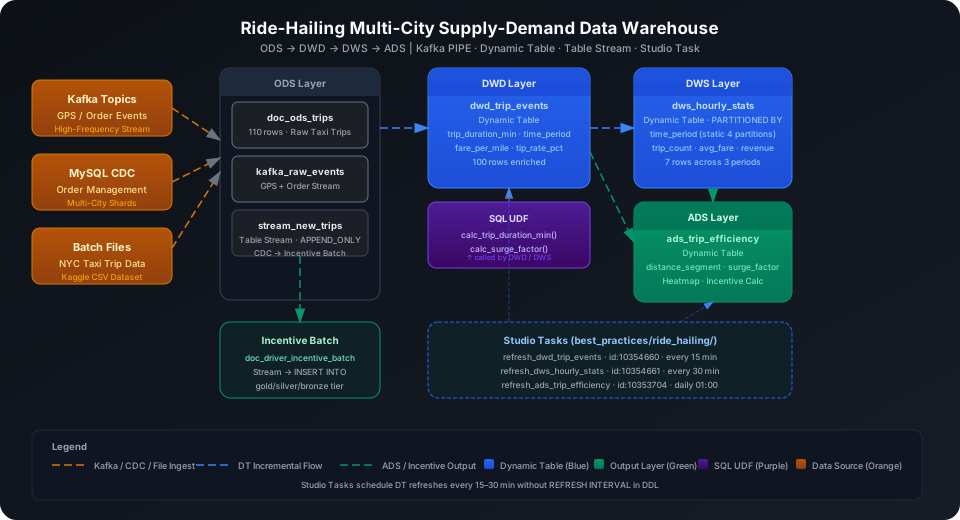
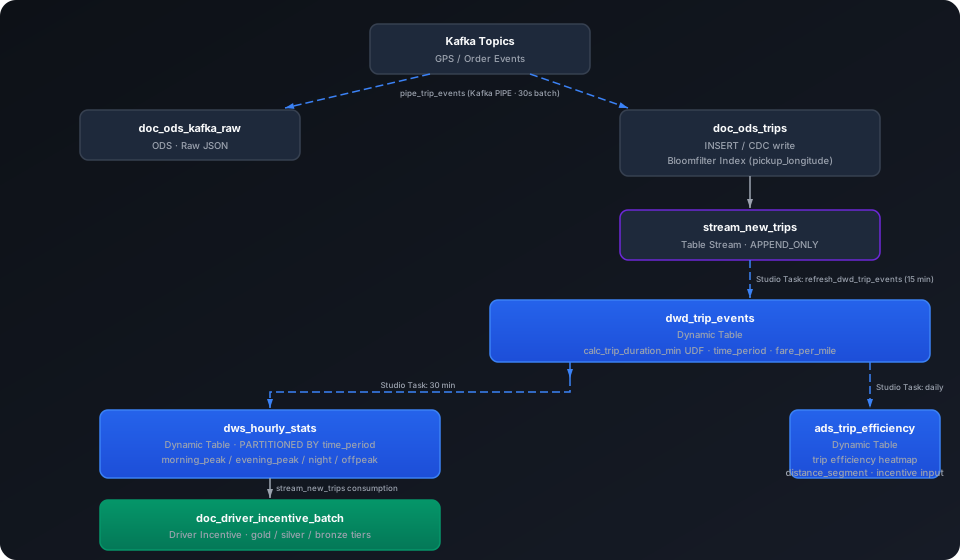
Integrate passenger order events, driver GPS tracks, and historical trip data from a mobility platform to build a city-level supply-demand analysis data warehouse supporting dynamic pricing and driver incentive strategy computation. This guide uses the NYC Yellow Taxi Trip Data dataset to walk through the complete Kafka PIPE → ODS → DWD → DWS → ADS pipeline, covering six core capabilities: Kafka real-time ingestion, Dynamic Table partitioned incremental aggregation, Table Stream + incentive batch processing, SQL UDF, and Studio Task scheduling.
Overview
The typical challenge in a mobility platform data warehouse is: high-frequency GPS events + multi-city sharded orders → real-time supply/demand ratio → dynamic pricing signals → driver incentive settlement.
Singdata Lakehouse addresses the core challenges with the following combination:
Problem
Solution
Driver GPS position reports at high frequency, second-level writes
Kafka PIPE continuous ingestion — no need to write your own consumer
Order system distributed across MySQL shards in multiple cities
MySQL CDC full-database mirror — single PIPE merges multiple sources
ODS → DWD → DWS automatic incremental computation
Dynamic Table with declarative SQL; the system maintains the refresh dependency chain
DWS needs partitioned queries by time period (morning/evening peak, night, off-peak)
Static-partition Dynamic Table with PARTITIONED BY (time_period)
New completed orders trigger driver incentive batch processing
Table Stream captures incremental trips; ZettaPark Task consumes them
After extraction you get 4 CSV files (January 2015, January–March 2016). This guide uses the first 100 rows of yellow_tripdata_2015-01.csv as the demo dataset, with 19 fields including pickup/dropoff times, location coordinates, trip distance, fare, tip, etc.
ingest_time uses DEFAULT CURRENT_TIMESTAMP() and is automatically populated when Kafka PIPE writes; it does not need to be in the message payload.
Create Bloomfilter Index
Geofencing queries by pickup coordinates are frequent on a mobility platform. The pickup_longitude column is high-cardinality, making it suitable for Bloomfilter acceleration.
CREATE BLOOMFILTER INDEX IF NOT EXISTS idx_bf_pickup_lon
ON TABLE doc_ods_trips (pickup_longitude);
⚠️ Note: CREATE BLOOMFILTER INDEX requires the same Schema context as the target table. Run USE SCHEMA first or use the -s parameter; otherwise you see an "index and table must in the same schema" error.
ODS (Raw Data Layer): Real-Time Ingestion and Historical Data Import
Kafka PIPE Real-Time Ingestion
In production, driver GPS positions and order status changes are reported in real time through Kafka. First create a raw JSON receiver table, then create the PIPE:
-- Raw table to receive Kafka messages
CREATE TABLE IF NOT EXISTS best_practice_ride_hailing.doc_ods_kafka_raw (
value STRING
);
-- Create Kafka PIPE
CREATE PIPE IF NOT EXISTS best_practice_ride_hailing.pipe_trip_events
VIRTUAL_CLUSTER = 'DEFAULT'
BATCH_INTERVAL_IN_SECONDS = '30'
AS
COPY INTO best_practice_ride_hailing.doc_ods_kafka_raw
FROM (
SELECT CAST(value AS STRING) AS value
FROM READ_KAFKA(
'<kafka-broker>:9092', -- replace with actual broker address
'nyc_trip_events', -- topic name
'',
'cz_ride_consumer', -- consumer group ID
'','','','',
'raw', 'raw',
0,
map()
)
);
💡 Tip: In a PIPE DDL, READ_KAFKA positional parameters 5–8 (start/end offsets, timestamps) must be left empty — they are managed automatically by the PIPE runtime.
Option 1: Write via Kafka (recommended)
When a Kafka environment is available, trigger PIPE ingestion by sending messages to the nyc_trip_events topic. The following kafka-python producer example shows how to construct and send one trip event message:
The PIPE consumes in batches every BATCH_INTERVAL_IN_SECONDS seconds; messages are automatically written to doc_ods_kafka_raw and parsed by the downstream Dynamic Table.
Option 2: INSERT simulation (when no Kafka environment is available)
If Kafka is not configured, you can save data as local CSV files, upload them to a User Volume via cz-cli, then import with COPY INTO (recommended):
💡 Tip: The examples below use cz-cli (the Singdata Lakehouse command-line tool). If cz-cli is not installed, see the cz-cli Installation and Usage Guide. If you prefer not to use the command line, you can run the SQL in Singdata Studio → Development → SQL Editor and configure / trigger scheduling tasks on the Studio → Tasks page.
Import from a local CSV file (recommended)
-- Step 1: Upload the local CSV file to User Volume via SQL PUT
PUT '/path/to/nyc_trips_data.csv' TO USER VOLUME FILE 'nyc_trips_data.csv';
-- Step 2: COPY INTO the table from User Volume
COPY INTO best_practice_ride_hailing.doc_ods_trips
FROM USER VOLUME
USING csv
OPTIONS('header'='true', 'sep'=',', 'nullValue'='')
FILES ('nyc_trips_data.csv');
Verify ODS row count:
SELECT COUNT(*) AS ods_row_count FROM best_practice_ride_hailing.doc_ods_trips;
ods_row_count
-------------
100
DWD Layer Dynamic Table: Trip Standardization and Feature Computation
The DWD layer does two things on top of ODS:
Calls the SQL UDF calc_trip_duration_min to compute trip duration, avoiding duplicate time-diff formulas in multiple places
Labels each row with a time period (time_period) and computes fare per mile (fare_per_mile) and tip rate (tip_rate_pct) for direct aggregation in the DWS layer
Create Trip Duration UDF
CREATE OR REPLACE FUNCTION best_practice_ride_hailing.calc_trip_duration_min(
pickup_ts TIMESTAMP,
dropoff_ts TIMESTAMP
)
RETURNS DOUBLE
AS ROUND((UNIX_TIMESTAMP(dropoff_ts) - UNIX_TIMESTAMP(pickup_ts)) / 60.0, 2);
Verify the function (first row: 19:05:39 → 19:23:42, trip duration 18.05 minutes):
SELECT best_practice_ride_hailing.calc_trip_duration_min(
CAST('2015-01-15 19:05:39' AS TIMESTAMP),
CAST('2015-01-15 19:23:42' AS TIMESTAMP)
) AS duration_min;
duration_min
------------
18.05
Create DWD Dynamic Table
CREATE DYNAMIC TABLE IF NOT EXISTS best_practice_ride_hailing.dwd_trip_events
AS
SELECT
vendor_id,
pickup_datetime,
dropoff_datetime,
passenger_count,
trip_distance,
pickup_longitude,
pickup_latitude,
dropoff_longitude,
dropoff_latitude,
rate_code_id,
store_fwd_flag,
payment_type,
fare_amount,
tip_amount,
tolls_amount,
total_amount,
best_practice_ride_hailing.calc_trip_duration_min(pickup_datetime, dropoff_datetime) AS trip_duration_min,
CASE
WHEN HOUR(pickup_datetime) BETWEEN 7 AND 9 THEN 'morning_peak'
WHEN HOUR(pickup_datetime) BETWEEN 17 AND 19 THEN 'evening_peak'
WHEN HOUR(pickup_datetime) BETWEEN 22 AND 23
OR HOUR(pickup_datetime) BETWEEN 0 AND 5 THEN 'night'
ELSE 'offpeak'
END AS time_period,
CASE
WHEN trip_distance > 0
AND best_practice_ride_hailing.calc_trip_duration_min(pickup_datetime, dropoff_datetime) > 0
THEN ROUND(fare_amount / (trip_distance + 0.001), 2)
ELSE NULL
END AS fare_per_mile,
CASE
WHEN best_practice_ride_hailing.calc_trip_duration_min(pickup_datetime, dropoff_datetime) > 0
THEN ROUND(tip_amount / (total_amount + 0.001) * 100, 2)
ELSE NULL
END AS tip_rate_pct,
ingest_time
FROM best_practice_ride_hailing.doc_ods_trips
WHERE pickup_datetime IS NOT NULL
AND dropoff_datetime IS NOT NULL
AND trip_distance >= 0
AND total_amount > 0;
⚠️ Note: CREATE DYNAMIC TABLE DDL does not include REFRESH INTERVAL. Refresh scheduling is managed through Studio Tasks (see the "Studio Task Scheduling" section below), which lets you attach data quality checks and alert rules to the same task.
SELECT COUNT(*) AS dwd_count FROM best_practice_ride_hailing.dwd_trip_events;
dwd_count
---------
100
View sample evening peak trips:
SELECT vendor_id, pickup_datetime, trip_distance, trip_duration_min,
time_period, fare_per_mile, tip_rate_pct
FROM best_practice_ride_hailing.dwd_trip_events
WHERE time_period = 'evening_peak'
ORDER BY total_amount DESC
LIMIT 5;
Result interpretation: Long-distance evening peak trip (18 miles, 43 minutes) has a fare of about $2.88/mile and a tip rate of 9.4%. The extreme short-trip value (0.01 miles) has a distorted fare_per_mile due to a near-zero denominator; add WHERE trip_distance > 0.5 in actual analysis to filter these out.
The DWS layer partitions by time period (time_period), storing morning/evening peak, night, and off-peak in separate partitions. Queries benefit from partition pruning to skip irrelevant partitions, accelerating supply-demand ratio computation.
Create Dynamic Pricing Multiplier UDF
CREATE OR REPLACE FUNCTION best_practice_ride_hailing.calc_surge_factor(
trip_count INT,
time_period STRING
)
RETURNS DOUBLE
AS CASE
WHEN time_period IN ('morning_peak', 'evening_peak') AND trip_count > 15 THEN 1.8
WHEN time_period IN ('morning_peak', 'evening_peak') AND trip_count > 10 THEN 1.5
WHEN time_period = 'night' AND trip_count > 10 THEN 1.3
ELSE 1.0
END;
Verify:
SELECT
best_practice_ride_hailing.calc_surge_factor(20, 'morning_peak') AS surge_peak,
best_practice_ride_hailing.calc_surge_factor(8, 'offpeak') AS surge_offpeak,
best_practice_ride_hailing.calc_surge_factor(12, 'night') AS surge_night;
CREATE DYNAMIC TABLE IF NOT EXISTS best_practice_ride_hailing.dws_hourly_stats (
hour_window, time_period, trip_count, total_passengers,
avg_distance_miles, avg_duration_min, avg_fare, avg_tip_rate_pct,
total_revenue, avg_fare_per_mile, credit_card_trips, cash_trips
)
PARTITIONED BY (time_period)
AS
SELECT
DATE_TRUNC('hour', pickup_datetime) AS hour_window,
time_period,
COUNT(*) AS trip_count,
SUM(passenger_count) AS total_passengers,
ROUND(AVG(trip_distance), 2) AS avg_distance_miles,
ROUND(AVG(trip_duration_min), 2) AS avg_duration_min,
ROUND(AVG(fare_amount), 2) AS avg_fare,
ROUND(AVG(tip_rate_pct), 2) AS avg_tip_rate_pct,
ROUND(SUM(total_amount), 2) AS total_revenue,
ROUND(AVG(fare_per_mile), 2) AS avg_fare_per_mile,
SUM(CASE WHEN payment_type = 1 THEN 1 ELSE 0 END) AS credit_card_trips,
SUM(CASE WHEN payment_type = 2 THEN 1 ELSE 0 END) AS cash_trips
FROM best_practice_ride_hailing.dwd_trip_events
WHERE time_period = SESSION_CONFIGS()['dt.args.time_period']
GROUP BY DATE_TRUNC('hour', pickup_datetime), time_period;
⚠️ Note: Partitioned Dynamic Tables must explicitly declare PARTITIONED BY — automatic partition inference cannot be relied on. SESSION_CONFIGS()['dt.args.xxx'] returns STRING type. This example compares directly against the STRING column time_period, so no additional CAST is needed.
SELECT hour_window, time_period, trip_count, avg_distance_miles,
avg_fare, total_revenue, credit_card_trips, cash_trips
FROM best_practice_ride_hailing.dws_hourly_stats
ORDER BY hour_window, time_period;
January 15 evening peak trips (22 count, avg fare $15.84) and off-peak trips (22 count, $17.75) have similar volume, but off-peak trips are longer (4.19 vs 3.22 miles) with higher total revenue ($481 vs $447).
Evening peak credit card payment proportion is high (19/22 = 86%), and night shift is also skewed toward credit cards (15/21 = 71%) — useful for targeted payment channel offers.
Supply-demand aggregate (merged by time period):
SELECT time_period,
SUM(trip_count) AS total_trips,
ROUND(AVG(avg_fare), 2) AS weighted_avg_fare,
ROUND(SUM(total_revenue), 2) AS total_revenue
FROM best_practice_ride_hailing.dws_hourly_stats
GROUP BY time_period
ORDER BY total_trips DESC;
ADS Layer Dynamic Table: Trip Efficiency and Driver Incentive Data Mart
The ADS layer aggregates at day × time period × payment type granularity, outputting trip efficiency profiles and distance segment labels for direct consumption by dynamic pricing models and driver incentive plans.
CREATE DYNAMIC TABLE IF NOT EXISTS best_practice_ride_hailing.ads_trip_efficiency
AS
SELECT
DATE(pickup_datetime) AS trip_date,
time_period,
payment_type,
COUNT(*) AS trip_count,
ROUND(AVG(trip_distance), 2) AS avg_distance_miles,
ROUND(AVG(trip_duration_min), 2) AS avg_duration_min,
ROUND(AVG(fare_per_mile), 2) AS avg_fare_per_mile,
ROUND(AVG(tip_rate_pct), 2) AS avg_tip_rate_pct,
ROUND(SUM(total_amount), 2) AS total_revenue,
ROUND(AVG(total_amount), 2) AS avg_trip_revenue,
CASE
WHEN AVG(trip_distance) >= 5 THEN 'long_haul'
WHEN AVG(trip_distance) >= 2 THEN 'medium'
ELSE 'short'
END AS distance_segment
FROM best_practice_ride_hailing.dwd_trip_events
GROUP BY DATE(pickup_datetime), time_period, payment_type;
January 15 evening peak credit card trips (19 count) have the highest total revenue ($402.95) with an average tip rate of 14.4% — the priority incentive time period.
The first row's avg_fare_per_mile of 291.86 is an extreme value from a 0.01-mile trip; add WHERE trip_distance > 0.5 in actual use to filter these out.
Off-peak long-haul trips (5+ miles, $310.02) are worth setting up a separate mileage bonus pool in incentive allocation.
Table Stream + Incentive Batch Processing
Driver incentive computation on a mobility platform requires: each new batch of completed orders → count each driver's trips for the day → determine incentive tier → write results to the incentive table. Table Stream + ZettaPark Task matches this pattern exactly.
Create Table Stream
CREATE TABLE STREAM IF NOT EXISTS best_practice_ride_hailing.stream_new_trips
ON TABLE best_practice_ride_hailing.doc_ods_trips
WITH PROPERTIES ('TABLE_STREAM_MODE' = 'APPEND_ONLY');
After new rows are written to doc_ods_trips, the Stream captures these incremental rows:
SELECT COUNT(*) AS stream_rows FROM best_practice_ride_hailing.stream_new_trips;
stream_rows
-----------
10
SELECT vendor_id, pickup_datetime, trip_distance, total_amount, fare_amount, tip_amount
FROM best_practice_ride_hailing.stream_new_trips
ORDER BY pickup_datetime
LIMIT 5;
INSERT INTO best_practice_ride_hailing.doc_driver_incentive_batch
(batch_date, vendor_id, new_trip_count, new_revenue, avg_trip_value, incentive_tier)
SELECT
DATE(pickup_datetime) AS batch_date,
vendor_id,
COUNT(*) AS new_trip_count,
ROUND(SUM(total_amount), 2) AS new_revenue,
ROUND(AVG(total_amount), 2) AS avg_trip_value,
CASE
WHEN COUNT(*) >= 5 THEN 'gold'
WHEN COUNT(*) >= 3 THEN 'silver'
ELSE 'bronze'
END AS incentive_tier
FROM best_practice_ride_hailing.stream_new_trips
GROUP BY DATE(pickup_datetime), vendor_id;
SELECT batch_date, vendor_id, new_trip_count, new_revenue, incentive_tier
FROM best_practice_ride_hailing.doc_driver_incentive_batch;
Result interpretation: Vendor 1 added 10 new trips that day with total revenue of $108.86, reaching the gold incentive tier (≥5 trips). After the Stream is consumed, the offset advances automatically; the next INSERT only processes rows added after that point, with no manual cursor management needed.
💡 Tip: In production, this INSERT INTO ... SELECT FROM stream operation should be orchestrated through a Studio ZettaPark Task with a scheduled trigger (e.g., hourly). After the task runs, the Stream offset updates automatically and re-execution will not produce duplicates.
Studio Task Scheduling
Dynamic Table periodic refresh is managed through Studio Tasks — do not set REFRESH INTERVAL in the DDL. This guide creates three refresh tasks under the skill_test profile:
💡 Tip: Studio Tasks support configuring data quality checks and alert notifications on the same task. If dws_hourly_stats has zero rows after a DWS refresh, set an alert on the task to trigger a notification. Example task URL: https://4560c64f.cn-shanghai-alicloud.app.singdata.com/ide?workspace_name=quick_start&fileId=10354660.
Data Warehouse Object Summary
After the full build, all objects under the best_practice_ride_hailing schema:
Bloomfilter Index does not automatically apply to existing data: CREATE BLOOMFILTER INDEX only takes effect for data written after the index is created. Existing trip data will not be covered by the index; the BLOOMFILTER type does not support BUILD INDEX rebuilding — covering existing data requires rebuilding the table.
Partitioned Dynamic Tables must use static partition declarations: dws_hourly_stats uses PARTITIONED BY (time_period) and must be refreshed per partition using SESSION_CONFIGS()['dt.args.time_period']. REFRESH INTERVAL cannot be set in the DDL; scheduling is managed through Studio Tasks.
Table Stream offset advances automatically after consumption: Every INSERT INTO ... SELECT FROM stream operation on stream_new_trips advances the consumption offset. If the same Stream is consumed by multiple downstream processes, each consumer needs its own independent Stream object — sharing a single Stream object causes consumption competition.
calc_surge_factor thresholds are example values: The current multiplier thresholds (peak at 15 trips triggers 1.5×) are based on the demo dataset. In production, thresholds should be dynamically calibrated based on city-level historical supply-demand data.
Dynamic Table first refresh is a full snapshot: dwd_trip_events performs a full scan on doc_ods_trips for the first REFRESH; subsequent incremental refreshes only process rows added or changed since the last refresh point. Using INSERT OVERWRITE in the ODS layer causes Dynamic Tables to fall back to a full refresh.