Online Education Learning Behavior Data Warehouse Best Practices
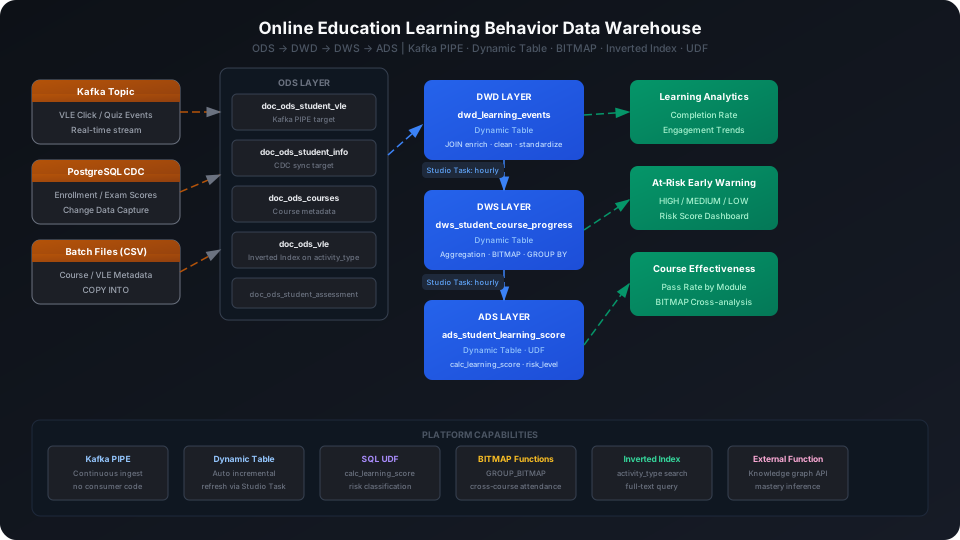
Integrate student learning behavior logs (course clicks, quiz answers, assignment submissions) with course metadata into a multi-layer data warehouse to output learning effectiveness scores and high-risk student alerts. This guide uses the Open University Learning Analytics (OULAD) public dataset to walk through the complete Kafka PIPE → ODS → DWD → DWS → ADS pipeline, covering three key platform capabilities: Inverted Index, BITMAP functions, and SQL UDF.
Overview
The typical data pipeline for an online education platform is: real-time behavior events (Kafka) → raw storage (ODS) → cleansing and joins (DWD) → student-course progress aggregation (DWS) → learning score and alert output (ADS).
Singdata Lakehouse addresses the core challenges with the following combination:
Problem
Solution
High-frequency millisecond-level writes of student click and quiz events
Kafka PIPE continuous ingestion — no need to write your own consumer code
The system detects upstream changes and refreshes incrementally
REFRESH DYNAMIC TABLE
Trigger a manual refresh
Use during initial build or debugging
GROUP_BITMAP
Count active students (deduplicated count)
Returns a BIGINT cardinality value
GROUP_BITMAP_STATE
Build a bitmap object for cross-course intersection analysis
Returns a bitmap type; supports AND/OR operations
Prerequisites
All examples in this guide run under the best_practice_education_dw schema.
CREATE SCHEMA IF NOT EXISTS best_practice_education_dw;
Result:
{}
ODS (Raw Data Layer): Raw Data Tables
The ODS layer receives three types of data: Kafka real-time behavior events, student enrollment and grade data synced via PostgreSQL CDC, and batch-imported course metadata. This guide uses the OULAD public dataset (real data from UK Open University) to build test data.
Create Tables
-- Student VLE behavior event table (Kafka PIPE write target)
CREATE TABLE IF NOT EXISTS best_practice_education_dw.doc_ods_student_vle (
code_module STRING,
code_presentation STRING,
id_student BIGINT,
id_site BIGINT,
event_date INT,
sum_click INT,
ingest_time TIMESTAMP DEFAULT CURRENT_TIMESTAMP()
);
-- Student basic information table (CDC sync target)
CREATE TABLE IF NOT EXISTS best_practice_education_dw.doc_ods_student_info (
code_module STRING,
code_presentation STRING,
id_student BIGINT,
gender STRING,
region STRING,
highest_education STRING,
imd_band STRING,
age_band STRING,
num_of_prev_attempts INT,
studied_credits INT,
disability STRING,
final_result STRING
);
-- Course metadata table
CREATE TABLE IF NOT EXISTS best_practice_education_dw.doc_ods_courses (
code_module STRING,
code_presentation STRING,
module_presentation_length INT
);
-- VLE resource type table
CREATE TABLE IF NOT EXISTS best_practice_education_dw.doc_ods_vle (
id_site BIGINT,
code_module STRING,
code_presentation STRING,
activity_type STRING,
week_from INT,
week_to INT
);
-- Assignment submission and grade table
CREATE TABLE IF NOT EXISTS best_practice_education_dw.doc_ods_student_assessment (
id_assessment BIGINT,
id_student BIGINT,
date_submitted INT,
is_banked INT,
score DOUBLE
);
ingest_time uses DEFAULT CURRENT_TIMESTAMP() and is automatically populated when Kafka PIPE writes; it does not need to be in the message payload.
Create Inverted Index
The activity_type column in doc_ods_vle stores activity type labels (quiz, oucontent, resource, forumng, etc.) that analysts frequently filter on.
CREATE INVERTED INDEX idx_inv_activity_type
ON TABLE doc_ods_vle (activity_type);
⚠️ Note: CREATE INVERTED INDEX requires the same schema context as the target table. Switch schema using the -s best_practice_education_dw parameter or prefix the table name with the schema, otherwise you will see an "index and table must in the same schema" error.
The index only applies to data written after it is created. If the table already has existing data, run BUILD INDEX to cover it:
BUILD INDEX idx_inv_activity_type ON doc_ods_vle;
Configure Kafka PIPE
Kafka PIPE will attempt to connect to the Kafka broker at DDL time to verify the subscription. Replace the broker address and topic name for your production environment before creating.
Option 1: Write via Kafka (recommended)
The following Python example shows how to push student behavior events to a Kafka topic to trigger PIPE ingestion:
-- First create a raw string receiver table; PIPE writes JSON strings
CREATE TABLE IF NOT EXISTS best_practice_education_dw.kafka_raw_vle (value STRING);
-- Create Kafka PIPE
CREATE PIPE IF NOT EXISTS best_practice_education_dw.pipe_student_vle
VIRTUAL_CLUSTER = 'DEFAULT'
BATCH_INTERVAL_IN_SECONDS = '60'
AS
COPY INTO best_practice_education_dw.kafka_raw_vle
FROM (
SELECT CAST(value AS STRING) AS value
FROM READ_KAFKA(
'<kafka-broker>:9092',
'edu_student_vle_events',
'',
'cz_edu_consumer',
'','','','',
'raw', 'raw',
0,
map()
)
);
💡 Tip: After being created, a PIPE runs by default and consumes in batches every BATCH_INTERVAL_IN_SECONDS seconds. JSON parsing from kafka_raw_vle to doc_ods_student_vle can be done through a Dynamic Table.
Option 2: INSERT simulation (when no Kafka environment is available)
If Kafka is not configured, you can save the data as a local CSV file, upload it to a User Volume via cz-cli, then import with COPY INTO (recommended):
💡 Tip: The examples below use cz-cli (the Singdata Lakehouse command-line tool). If cz-cli is not installed, see the cz-cli Installation and Usage Guide. If you prefer not to use the command line, you can run the SQL in Singdata Studio → Development → SQL Editor and configure / trigger scheduling tasks on the Studio → Tasks page.
Import from a local CSV file (recommended)
-- Step 1: Upload the local CSV file to User Volume via SQL PUT
PUT '/path/to/student_vle_data.csv' TO USER VOLUME FILE 'student_vle_data.csv';
-- Step 2: COPY INTO the table from User Volume
COPY INTO best_practice_education_dw.doc_ods_student_vle
FROM USER VOLUME
USING csv
OPTIONS('header'='true', 'sep'=',', 'nullValue'='')
FILES ('student_vle_data.csv');
You can also insert a small batch of test data inline (no CSV file required):
Verify the function — highly active student (120 clicks, average score 78, 3 submissions, 15 active days):
SELECT best_practice_education_dw.calc_learning_score(120, 78.0, 3, 15) AS sample_score;
sample_score
------------
68
💡 Tip: A learning score of 68 falls in the MEDIUM_RISK range (50–75), indicating this student has high engagement but below-average test performance. The focus should be on assignment quality rather than attendance frequency.
DWD Layer Dynamic Table: Cleansing and Joins
The DWD layer joins ODS raw events with student information, course metadata, and VLE resource types to produce a standardized learning event wide table for direct aggregation by the DWS layer.
CREATE DYNAMIC TABLE IF NOT EXISTS best_practice_education_dw.dwd_learning_events
AS
SELECT
v.code_module,
v.code_presentation,
v.id_student,
v.id_site,
vl.activity_type,
v.event_date,
v.sum_click,
v.ingest_time,
s.gender,
s.region,
s.highest_education,
s.age_band,
s.final_result AS enrollment_result,
c.module_presentation_length
FROM best_practice_education_dw.doc_ods_student_vle v
LEFT JOIN best_practice_education_dw.doc_ods_student_info s
ON v.code_module = s.code_module
AND v.code_presentation = s.code_presentation
AND v.id_student = s.id_student
LEFT JOIN best_practice_education_dw.doc_ods_vle vl
ON v.id_site = vl.id_site
LEFT JOIN best_practice_education_dw.doc_ods_courses c
ON v.code_module = c.code_module
AND v.code_presentation = c.code_presentation;
⚠️ Note: Dynamic Table DDL does not include REFRESH INTERVAL. Refresh scheduling is managed through Studio Tasks (see the "Studio Task Scheduling" section later in this guide).
Trigger the initial refresh manually:
REFRESH DYNAMIC TABLE best_practice_education_dw.dwd_learning_events;
SELECT COUNT(*) AS dwd_count FROM best_practice_education_dw.dwd_learning_events;
The DWS layer aggregates DWD data at id_student + code_module + code_presentation granularity, outputting each student's behavior statistics per course as direct input for ADS layer scoring.
CREATE DYNAMIC TABLE IF NOT EXISTS best_practice_education_dw.dws_student_course_progress
AS
SELECT
e.code_module,
e.code_presentation,
e.id_student,
e.gender,
e.region,
e.highest_education,
e.age_band,
e.enrollment_result,
e.module_presentation_length,
COUNT(DISTINCT e.event_date) AS days_active,
SUM(e.sum_click) AS total_clicks,
COUNT(DISTINCT e.id_site) AS distinct_resources,
SUM(CASE WHEN e.activity_type = 'quiz' THEN e.sum_click ELSE 0 END) AS quiz_clicks,
COUNT(DISTINCT CASE WHEN e.activity_type = 'quiz' THEN e.event_date END) AS quiz_days,
SUM(CASE WHEN e.activity_type = 'oucontent' THEN e.sum_click ELSE 0 END) AS content_clicks,
MAX(e.event_date) AS last_active_day
FROM best_practice_education_dw.dwd_learning_events e
GROUP BY
e.code_module, e.code_presentation, e.id_student,
e.gender, e.region, e.highest_education, e.age_band,
e.enrollment_result, e.module_presentation_length;
Trigger the initial refresh manually and view results:
REFRESH DYNAMIC TABLE best_practice_education_dw.dws_student_course_progress;
SELECT code_module, code_presentation, id_student,
days_active, total_clicks, distinct_resources, quiz_clicks, last_active_day
FROM best_practice_education_dw.dws_student_course_progress
ORDER BY total_clicks DESC
LIMIT 8;
Student 11391 (AAA course) has the highest engagement in the dataset — 52 total clicks and 7 active days. quiz_clicks=7 indicates quiz interaction; the overall learning score should fall in the MEDIUM_RISK range.
Student 70001 (EEE course) has 40 clicks but only 2 active days — a short-burst high-intensity learner. quiz_clicks=0 means no quiz participation; knowledge mastery should be monitored.
distinct_resources measures the breadth of resources a student explores: the more resource types accessed, the better the overall learning coverage.
BITMAP Functions: Course Active Student Count
GROUP_BITMAP deduplicates and counts student IDs, more efficient than COUNT(DISTINCT), and can be combined with GROUP_BITMAP_STATE for cross-course intersection analysis:
-- Active student count per course
SELECT
code_module,
code_presentation,
GROUP_BITMAP(CAST(id_student AS BIGINT)) AS active_student_count
FROM best_practice_education_dw.dws_student_course_progress
GROUP BY code_module, code_presentation
ORDER BY code_module;
Cross-course comparison: total enrolled students vs. high-engagement students (total clicks > 20) per course:
SELECT
a.code_module,
a.code_presentation,
GROUP_BITMAP(CAST(a.id_student AS BIGINT)) AS total_enrolled,
GROUP_BITMAP(CASE WHEN a.total_clicks > 20 THEN CAST(a.id_student AS BIGINT) END) AS high_engagement
FROM best_practice_education_dw.dws_student_course_progress a
GROUP BY a.code_module, a.code_presentation
ORDER BY a.code_module;
💡 Tip: GROUP_BITMAP returns cardinality (BIGINT), suitable for aggregated counting. GROUP_BITMAP_STATE returns a bitmap object that enables BITMAP_OR/BITMAP_AND cross-analysis across multiple queries — for example, counting "students enrolled in both AAA and BBB courses simultaneously".
ADS Layer Dynamic Table: Learning Score and High-Risk Alerts
The ADS layer calls the calc_learning_score UDF to score each student and outputs three risk levels for direct dashboard consumption.
CREATE DYNAMIC TABLE IF NOT EXISTS best_practice_education_dw.ads_student_learning_score
AS
SELECT
p.code_module,
p.code_presentation,
p.id_student,
p.gender,
p.region,
p.highest_education,
p.age_band,
p.enrollment_result,
p.days_active,
p.total_clicks,
p.distinct_resources,
p.quiz_clicks,
p.last_active_day,
COALESCE(a.submission_count, 0) AS submission_count,
COALESCE(a.avg_score, 0.0) AS avg_score,
COALESCE(a.max_score, 0.0) AS max_score,
best_practice_education_dw.calc_learning_score(
CAST(p.total_clicks AS INT),
a.avg_score,
CAST(COALESCE(a.submission_count, 0) AS INT),
CAST(p.days_active AS INT)
) AS learning_score,
CASE
WHEN best_practice_education_dw.calc_learning_score(
CAST(p.total_clicks AS INT), a.avg_score,
CAST(COALESCE(a.submission_count, 0) AS INT),
CAST(p.days_active AS INT)
) >= 75 THEN 'LOW_RISK'
WHEN best_practice_education_dw.calc_learning_score(
CAST(p.total_clicks AS INT), a.avg_score,
CAST(COALESCE(a.submission_count, 0) AS INT),
CAST(p.days_active AS INT)
) >= 50 THEN 'MEDIUM_RISK'
ELSE 'HIGH_RISK'
END AS risk_level
FROM best_practice_education_dw.dws_student_course_progress p
LEFT JOIN (
SELECT
sa.id_student,
COUNT(*) AS submission_count,
ROUND(AVG(CASE WHEN sa.is_banked = 0 THEN sa.score END), 2) AS avg_score,
MAX(CASE WHEN sa.is_banked = 0 THEN sa.score END) AS max_score
FROM best_practice_education_dw.doc_ods_student_assessment sa
GROUP BY sa.id_student
) a ON p.id_student = CAST(a.id_student AS STRING);
Trigger the initial manual refresh and view high-risk alert results:
REFRESH DYNAMIC TABLE best_practice_education_dw.ads_student_learning_score;
SELECT code_module, id_student, days_active, total_clicks, avg_score,
learning_score, risk_level
FROM best_practice_education_dw.ads_student_learning_score
ORDER BY learning_score ASC
LIMIT 10;
HIGH_RISK (10 students): avg_score=0 (student 41203) means this student has never submitted an assignment — a learning score of only 2.8 represents an extreme dropout risk. Several other students have scores in the 40–65 range with very low click counts, indicating neither engagement nor content mastery.
MEDIUM_RISK (3 students): Take student 11391 as an example — 52 clicks, average score 83, 7 active days, learning score 61.6. High engagement, but still below the LOW_RISK threshold (75) mainly because submission count (5) and active days (7) have room to improve.
The current dataset has no LOW_RISK students, consistent with the small simulated dataset (only 29 behavior records). In a real production environment, highly engaged students typically account for 30–50%.
Studio Task Scheduling
Periodic Dynamic Table refresh is managed through Studio Tasks, not via REFRESH INTERVAL in the DDL. Decoupling tasks from Dynamic Tables lets you attach monitoring alerts, data quality checks, and other rules to the same task.
💡 Tip: After all three tasks are created, configure upstream/downstream dependencies in the Studio UI (Refresh_DWS depends on Refresh_DWD; Refresh_ADS depends on Refresh_DWS) to ensure correct refresh ordering. Run cz-cli task deploy <task-name> to publish and activate scheduling. You can add alert rules to the same task so it automatically notifies when a refresh times out or fails.
In real online education scenarios, each question corresponds to several knowledge concepts. An external knowledge graph API can infer a student's mastery state for each concept, providing the basis for targeted remedial instruction. The following shows a typical External Function integration pattern.
External Function Framework
# knowledge_mastery.py — calls the knowledge graph API to infer concept mastery
from clickzetta.zettapark.functions import annotate
class KnowledgeMastery:
@annotate(
input_args=[("student_id", "BIGINT"), ("question_ids", "STRING"),
("scores", "STRING")],
return_type="STRING"
)
def evaluate(self, student_id: int, question_ids: str, scores: str) -> str:
"""
Calls the knowledge graph service to infer the student's mastery level
for each knowledge concept.
Returns a JSON string, e.g.:
{"concepts": [{"id": "C001", "name": "Linear Equations", "mastery": "proficient"}]}
"""
import json, requests
payload = {
"student_id": student_id,
"responses": [
{"question_id": qid, "score": float(sc)}
for qid, sc in zip(question_ids.split(","), scores.split(","))
]
}
# Replace with the actual knowledge graph service endpoint
resp = requests.post(
"https://<knowledge-graph-service>/api/mastery",
json=payload, timeout=5
)
return json.dumps(resp.json(), ensure_ascii=False)
After deploying as an External Function, you can call it directly in SQL:
-- Example: query knowledge mastery state for student 11391
SELECT
id_student,
best_practice_education_dw.infer_knowledge_mastery(
id_student,
'1752,1753,1754', -- corresponding question IDs
'78,85,88' -- corresponding question scores
) AS mastery_result
FROM best_practice_education_dw.doc_ods_student_info
WHERE id_student = 11391
LIMIT 1;
Data Warehouse Object Summary
After the full build, the core objects under the best_practice_education_dw schema:
Dynamic Table does not set REFRESH INTERVAL: Scheduling is managed through Studio Tasks. The DDL does not include a REFRESH INTERVAL parameter. Refresh tasks are created with cz-cli task create/save-content/save-cron and can have alert and data quality check rules attached.
Inverted Index does not automatically apply to existing data: CREATE INVERTED INDEX only takes effect for data written after the index is created. For existing data, run BUILD INDEX idx_inv_activity_type ON doc_ods_vle to cover it; otherwise MATCH_ALL queries may return empty results.
GROUP_BITMAP vs GROUP_BITMAP_STATE have different semantics: GROUP_BITMAP returns cardinality (BIGINT); GROUP_BITMAP_STATE returns a bitmap object (supports AND/OR cross-analysis). They cannot be mixed — BITMAP_COUNT(GROUP_BITMAP(...)) will produce a type error. Use GROUP_BITMAP_STATE and then call BITMAP_COUNT.
Dynamic Table incremental refresh depends on upstream change tracking: The first REFRESH computes a full snapshot; subsequent incremental refreshes only process rows added or changed in the upstream ODS layer since the last refresh point. Using INSERT OVERWRITE in the ODS layer causes Dynamic Tables to fall back to a full refresh.
Type matching in ADS layer JOINs: dws_student_course_progress.id_student may become STRING type after Dynamic Table aggregation. When joining with doc_ods_student_assessment.id_student (BIGINT), explicit CAST is required; otherwise the join fails or produces a full Cartesian product.
External Function network latency: Calls to an external knowledge graph API involve network round-trip latency and are not suitable for high-frequency queries. It is recommended to materialize inference results into a dedicated ADS layer table and update it in batch once per day or per learning stage.