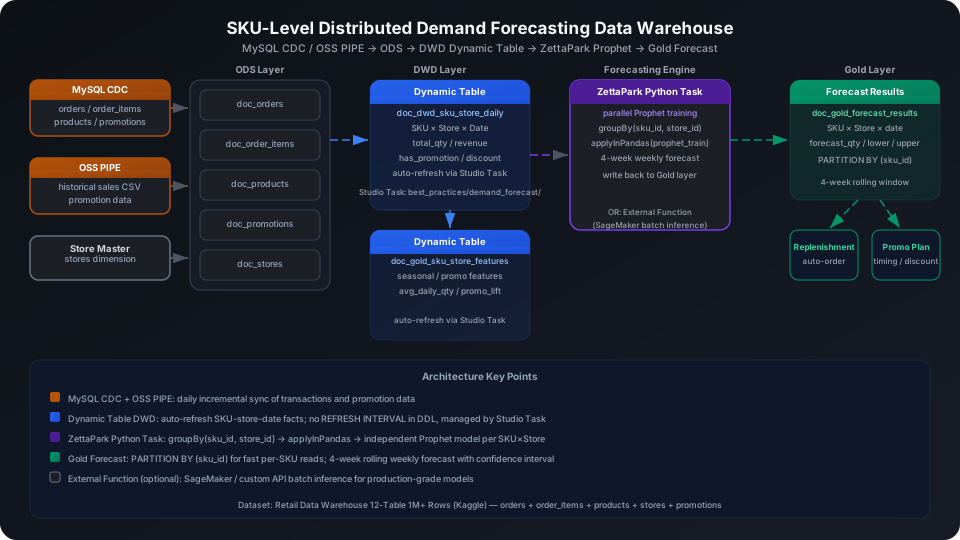
SKU-Level Distributed Demand Forecasting Data Warehouse Best Practices
Train individual time-series forecasting models for thousands of SKU × store combinations for a retailer, generate 4-week replenishment demand forecasts, and drive automated replenishment and promotional planning. This guide uses the Kaggle Retail Data Warehouse 12-Table dataset (orders / products / product master data / stores / promotions) to walk through the complete MySQL CDC / OSS PIPE → ODS → DWD Dynamic Table → ZettaPark parallel Prophet training → Gold forecast results table pipeline, covering partitioned tables and External Function calls to SageMaker batch inference.
Overview
The core challenge in SKU-level demand forecasting is scale combined with data quality: retailers typically have thousands to hundreds of thousands of SKU × store dimension combinations, each with different levels of sparsity in historical sales series and different promotion patterns.
Problem
Singdata Solution
Daily sales data incrementally synced from MySQL into the lake
MySQL CDC real-time ingestion, or OSS PIPE batch CSV import
ODS raw data needs to be cleaned into SKU × store × date sales facts
Dynamic Table automatic incremental computation with declarative SQL — no manual scheduling needed
Each SKU × store combination trains its own Prophet model
ZettaPark Python Task using groupBy + applyInPandas for parallel group-level inference
Forecast results partitioned by SKU for fast point queries
PARTITION BY (sku_id) partitioned table, optimizing SKU-dimension queries from replenishment systems
Need to connect external SageMaker or similar inference services
External Function encapsulates HTTP API calls for direct SQL use
SQL Commands Used
Command / Function
Purpose
Notes
CREATE TABLE
Create ODS layer raw tables and Gold layer forecast results table
Regular tables, upstream data sources for Dynamic Tables
CREATE PIPE
MySQL CDC or OSS object storage continuous ingestion
Bound to ODS target table; automatically batch consumes
CREATE DYNAMIC TABLE
DWD layer SKU × store × date sales facts + seasonal features
Declarative SQL; the system detects upstream changes and refreshes incrementally
REFRESH DYNAMIC TABLE
Trigger a manual refresh
Use during initial build or debugging
PARTITIONED BY
Partition forecast results table by sku_id
Optimizes batch read performance for SKU-dimension queries
ZettaPark applyInPandas
Execute Python functions in parallel groups
Each SKU × store combination runs Prophet training + inference independently
CREATE EXTERNAL FUNCTION
Encapsulate SageMaker batch inference API
Optional path: replace Prophet with production-grade model
Prerequisites
All examples in this guide run under the best_practice_demand_forecast schema.
CREATE SCHEMA IF NOT EXISTS best_practice_demand_forecast;
ODS (Raw Data Layer): Raw Sales Data Ingestion
The ODS layer stores raw tables synced from business systems, with no business logic transformations.
Create Tables
-- Store master data
CREATE TABLE IF NOT EXISTS best_practice_demand_forecast.doc_stores (
store_id INT,
city STRING
);
-- Product master data (with category and base price)
CREATE TABLE IF NOT EXISTS best_practice_demand_forecast.doc_products (
product_id INT,
category_id INT,
supplier_id INT,
price DOUBLE
);
-- Promotions (discount is a percentage, e.g., 24 means 24% off)
CREATE TABLE IF NOT EXISTS best_practice_demand_forecast.doc_promotions (
promotion_id INT,
discount DOUBLE
);
-- Orders master table
CREATE TABLE IF NOT EXISTS best_practice_demand_forecast.doc_orders (
order_id INT,
customer_id INT,
store_id INT,
order_date DATE,
promotion_id INT
);
-- Order items (one order can contain multiple SKUs)
CREATE TABLE IF NOT EXISTS best_practice_demand_forecast.doc_order_items (
order_item_id INT,
order_id INT,
product_id INT,
qty INT,
price DOUBLE
);
Configure MySQL CDC or OSS PIPE for Continuous Ingestion
Option 1: MySQL CDC (recommended for production)
Real-time sync of MySQL orders and order_items tables to ODS via data integration:
-- Create an OSS PIPE for batch import (suitable for daily offline batch scenarios)
CREATE PIPE IF NOT EXISTS best_practice_demand_forecast.pipe_orders_daily
VIRTUAL_CLUSTER = 'DEFAULT'
BATCH_INTERVAL_IN_SECONDS = '300'
AS
COPY INTO best_practice_demand_forecast.doc_orders
FROM (
SELECT
$1::INT AS order_id,
$2::INT AS customer_id,
$3::INT AS store_id,
$4::DATE AS order_date,
$5::INT AS promotion_id
FROM VOLUME best_practice_demand_forecast_vol
)
USING csv
OPTIONS('header'='true', 'sep'=',');
💡 Tip: In production, using Data Integration's MySQL CDC mode achieves minute-level latency sync. OSS PIPE is suited for T+1 daily batch CSV imports. Both approaches support COPY INTO semantics — the downstream Dynamic Tables in the ODS layer do not need to know which ingestion method was used.
Option 2: INSERT simulation (when no CDC / OSS environment is available)
Import from a local CSV file (recommended):
-- Step 1: Upload the local CSV file to User Volume via SQL PUT
PUT '/path/to/your/data.csv' TO USER VOLUME FILE 'data.csv';
-- Step 2: COPY INTO the table from User Volume
COPY INTO best_practice_demand_forecast.doc_stores
FROM USER VOLUME
USING csv
OPTIONS('header'='true', 'sep'=',', 'nullValue'='')
FILES ('data.csv');
You can also insert a small batch of test data inline (no CSV file required):
INSERT INTO best_practice_demand_forecast.doc_stores VALUES
(1,'Pune'),(2,'Pune'),(3,'Delhi'),(4,'Mumbai'),(5,'Mumbai'),
(8,'Bangalore'),(9,'Delhi'),(10,'Bangalore'),(11,'Delhi'),(12,'Pune');
-- actual execution includes all 100 stores
INSERT INTO best_practice_demand_forecast.doc_orders VALUES
(1,45308,33,CAST('2021-08-26' AS DATE),24),
(2,10070,81,CAST('2022-03-19' AS DATE),3),
(5,36546,81,CAST('2022-09-14' AS DATE),33),
(10,28094,21,CAST('2022-06-03' AS DATE),21);
-- actual execution includes 30 orders
INSERT INTO best_practice_demand_forecast.doc_order_items VALUES
(1001,1,5,2,4495),(1002,1,12,1,3422),(1003,2,8,3,3686),
(1009,5,10,3,316),(1010,5,18,2,4115),(1019,10,13,1,1910);
-- actual execution includes 60 order items
Verify ODS layer row count:
SELECT 'orders' AS tbl, COUNT(*) AS cnt FROM best_practice_demand_forecast.doc_orders
UNION ALL
SELECT 'order_items', COUNT(*) FROM best_practice_demand_forecast.doc_order_items
UNION ALL
SELECT 'products', COUNT(*) FROM best_practice_demand_forecast.doc_products
UNION ALL
SELECT 'stores', COUNT(*) FROM best_practice_demand_forecast.doc_stores
UNION ALL
SELECT 'promotions', COUNT(*) FROM best_practice_demand_forecast.doc_promotions;
DWD (Detail Data Layer): SKU × Store × Date Sales Fact Dynamic Table
The DWD layer aggregates ODS raw order data into SKU × store × date granularity sales facts — the input foundation for all forecasting models.
Create Dynamic Table
CREATE DYNAMIC TABLE IF NOT EXISTS best_practice_demand_forecast.doc_dwd_sku_store_daily
AS
SELECT
o.order_date AS sales_date,
oi.product_id AS sku_id,
o.store_id,
s.city AS store_city,
p.category_id,
COUNT(DISTINCT o.order_id) AS order_count,
SUM(oi.qty) AS total_qty,
SUM(oi.qty * oi.price) AS total_revenue,
MAX(COALESCE(promo.discount, 0)) AS max_discount_pct,
CASE WHEN MAX(COALESCE(promo.discount, 0)) > 0
THEN 1 ELSE 0 END AS has_promotion
FROM best_practice_demand_forecast.doc_orders o
JOIN best_practice_demand_forecast.doc_order_items oi ON o.order_id = oi.order_id
JOIN best_practice_demand_forecast.doc_stores s ON o.store_id = s.store_id
JOIN best_practice_demand_forecast.doc_products p ON oi.product_id = p.product_id
LEFT JOIN best_practice_demand_forecast.doc_promotions promo
ON o.promotion_id = promo.promotion_id
GROUP BY
o.order_date, oi.product_id, o.store_id, s.city, p.category_id;
⚠️ Note: Do not set REFRESH INTERVAL in the CREATE DYNAMIC TABLE DDL. Periodic refresh is managed by creating a "Refresh Dynamic Table" task in Studio under path best_practices/demand_forecast/, where you can also attach monitoring alerts and data quality check rules.
Historical Sales Summary (Feature Verification Before Prophet Training)
Before training forecasting models, confirm the historical data distribution for each SKU × store combination:
SELECT
d.sku_id,
d.store_city,
d.category_id,
SUM(d.total_qty) AS hist_total_qty,
ROUND(AVG(d.total_qty), 2) AS hist_avg_daily_qty,
SUM(d.has_promotion) AS promo_days,
COUNT(DISTINCT d.sales_date) AS data_days
FROM best_practice_demand_forecast.doc_dwd_sku_store_daily d
GROUP BY d.sku_id, d.store_city, d.category_id
ORDER BY hist_total_qty DESC
LIMIT 10;
Result interpretation: SKU 2 (category 18) in the Delhi store has the highest sales — an average of 4 units per day — and promotions were active on all 2 recorded days. This is a high-promotion-dependent SKU; the forecasting model should include the promotion flag as a regressor. promo_days / data_days = 1.0 means 100% promotion coverage, which means the baseline (non-promotional) sales volume may be overestimated.
DWD Seasonal Features Dynamic Table
The seasonal features table extracts weekly-granularity sales statistics and promotional uplift coefficients for each SKU × store combination, for use as external regressors in Prophet.
Create Dynamic Table
CREATE DYNAMIC TABLE IF NOT EXISTS best_practice_demand_forecast.doc_gold_sku_store_features
AS
SELECT
sku_id,
store_id,
store_city,
category_id,
EXTRACT(YEAR FROM sales_date) AS yr,
EXTRACT(MONTH FROM sales_date) AS mon,
EXTRACT(DAYOFWEEK FROM sales_date) AS dow,
EXTRACT(WEEK FROM sales_date) AS week_of_year,
COUNT(DISTINCT sales_date) AS active_days,
SUM(total_qty) AS total_qty,
ROUND(AVG(total_qty), 2) AS avg_daily_qty,
MAX(total_qty) AS peak_daily_qty,
SUM(total_revenue) AS total_revenue,
ROUND(AVG(max_discount_pct), 2) AS avg_discount_pct,
SUM(has_promotion) AS promo_days,
ROUND(
SUM(CASE WHEN has_promotion = 1 THEN total_qty ELSE 0 END) /
NULLIF(SUM(CASE WHEN has_promotion = 0 THEN total_qty ELSE 0 END), 0),
2
) AS promo_lift_ratio
FROM best_practice_demand_forecast.doc_dwd_sku_store_daily
GROUP BY sku_id, store_id, store_city, category_id,
EXTRACT(YEAR FROM sales_date),
EXTRACT(MONTH FROM sales_date),
EXTRACT(DAYOFWEEK FROM sales_date),
EXTRACT(WEEK FROM sales_date);
⚠️ Note: Same as the DWD layer — do not set REFRESH INTERVAL in the DDL. Create a refresh task under Studio Task path best_practices/demand_forecast/ and configure the schedule.
💡 Tip: promo_lift_ratio is null because in the test data every SKU × store combination has a promotion flag (has_promotion = 1), making the denominator (non-promotional days' sales) zero. In a complete historical dataset, this field measures the sales uplift during promotions relative to non-promotional periods — a key feature for assessing SKU promotion sensitivity.
ZettaPark Parallel Prophet Training and Inference
The ZettaPark Python Task uses applyInPandas to independently execute a Prophet time-series forecasting model for each SKU × store combination, fully leveraging distributed computing to process thousands of combinations in parallel.
ZettaPark Task Code Example
from clickzetta_zettapark.session import Session
from prophet import Prophet
import pandas as pd
from datetime import datetime, timedelta
def forecast_sku_store(pdf: pd.DataFrame) -> pd.DataFrame:
"""
Train Prophet for a single SKU × store combination and generate 4-week forecast.
Input DataFrame columns: sales_date, sku_id, store_id, store_city, total_qty
"""
sku_id = int(pdf['sku_id'].iloc[0])
store_id = int(pdf['store_id'].iloc[0])
store_city = str(pdf['store_city'].iloc[0])
# Build Prophet-format DataFrame
df_prophet = pdf[['sales_date', 'total_qty']].copy()
df_prophet.columns = ['ds', 'y']
df_prophet['ds'] = pd.to_datetime(df_prophet['ds'])
df_prophet = df_prophet.dropna().sort_values('ds')
# Skip if insufficient data (at least 2 records needed to fit parameters)
if len(df_prophet) < 2:
return pd.DataFrame()
# Train Prophet
model = Prophet(weekly_seasonality=True, yearly_seasonality=True)
model.fit(df_prophet)
# Generate 4-week forecast (one forecast point per week)
future = model.make_future_dataframe(periods=4, freq='W')
forecast = model.predict(future).tail(4)
return pd.DataFrame({
'sku_id': sku_id,
'store_id': store_id,
'store_city': store_city,
'forecast_date': forecast['ds'].dt.date,
'forecast_qty': forecast['yhat'].round(2),
'forecast_lower': forecast['yhat_lower'].round(2),
'forecast_upper': forecast['yhat_upper'].round(2),
'model_version': 'prophet-v1',
})
# Execute in ZettaPark Task
session = Session.builder.profile('skill_test').create()
df_dwd = session.table('best_practice_demand_forecast.doc_dwd_sku_store_daily').to_pandas()
# Group by SKU × store and run Prophet training in parallel
result_schema = 'sku_id INT, store_id INT, store_city STRING, forecast_date DATE, ' \
'forecast_qty DOUBLE, forecast_lower DOUBLE, forecast_upper DOUBLE, model_version STRING'
df_result = (
session.createDataFrame(df_dwd)
.groupBy('sku_id', 'store_id')
.applyInPandas(forecast_sku_store, schema=result_schema)
)
# Write back to the Gold layer forecast results table
df_result.write.mode('overwrite').saveAsTable(
'best_practice_demand_forecast.doc_gold_forecast_results'
)
⚠️ Note: applyInPandas requires each group's pandas function to be a side-effect-free pure function. Prophet depends on the pystan compiled backend — on first run in the ZettaPark environment, install the dependency with pip install prophet, or package it in an External Function.
💡 Tip: In production with tens of thousands of SKU × store combinations, first filter for active combinations with records in the past 90 days using LIMIT, then skip cold-start SKUs with long-term zero sales to reduce unnecessary computation.
Gold Layer: Forecast Results Table and Partition Design
PARTITIONED BY (sku_id) physically isolates forecast results by SKU. When the replenishment system batch-reads by SKU, it only needs to scan the relevant SKU partition rather than performing a full table scan.
⚠️ Note: For a Dynamic Table that needs partitioning, you must explicitly declare it as static partition mode (PARTITION BY + STATIC_PARTITIONS option) — dynamic partition inference is not supported. The forecast results table in this guide is a regular table (written by the ZettaPark Task) and uses PARTITIONED BY syntax directly, with no such restriction.
Scenario 1: 4-Week Forecast Detail for a Single SKU
Query the 4-week forecast for a specific SKU including confidence intervals and uncertainty percentage:
SELECT
f.sku_id,
f.store_city,
f.forecast_date,
f.forecast_qty,
f.forecast_lower,
f.forecast_upper,
ROUND((f.forecast_upper - f.forecast_lower) / f.forecast_qty * 100, 1) AS uncertainty_pct
FROM best_practice_demand_forecast.doc_gold_forecast_results f
WHERE f.sku_id = 10
ORDER BY f.forecast_date;
Result interpretation: SKU 10 in the Delhi store shows a 4-week forecast mean between 4.3–5.0 units with a mild upward trend. uncertainty_pct is in the 48–56% range, indicating high historical volatility. For replenishment, using forecast_upper (upper bound) as the reference quantity rather than the mean is recommended, with a safety stock buffer.
Replenishment systems typically need to aggregate by city and store to plan procurement volumes:
SELECT
store_city,
SUM(forecast_qty) AS city_4w_forecast_qty,
COUNT(DISTINCT sku_id) AS sku_count
FROM best_practice_demand_forecast.doc_gold_forecast_results
GROUP BY store_city
ORDER BY city_4w_forecast_qty DESC;
Result interpretation: Delhi stores have the highest 4-week projected demand (49.7 units) covering 3 SKUs — the city with the highest replenishment priority. The replenishment system can read this results table directly to generate purchase orders, replacing the traditional manual reporting process.
Promotional planning needs to prioritize inventory buffers for high-uncertainty SKUs:
SELECT
sku_id,
store_city,
ROUND(AVG(forecast_qty), 2) AS avg_4w_qty,
ROUND(AVG((forecast_upper - forecast_lower) / forecast_qty * 100), 1) AS avg_uncertainty_pct,
ROUND(SUM(forecast_upper), 2) AS safe_stock_ceiling
FROM best_practice_demand_forecast.doc_gold_forecast_results
GROUP BY sku_id, store_city
ORDER BY avg_uncertainty_pct DESC;
Result interpretation: SKU 5 (Delhi store) has the highest average uncertainty (60.8%), indicating significant historical sales volatility — possibly influenced by holidays or store promotions. The safe_stock_ceiling column is the sum of 4-week forecast_upper values, serving as the most conservative safety stock ceiling for direct input to the replenishment system.
Connect External SageMaker Batch Inference via External Function (Optional)
When the forecast scale exceeds ZettaPark single-machine processing limits, or when you need to connect to an existing SageMaker Endpoint, use an External Function to call batch inference APIs directly in SQL.
Create External Function
-- First create an API Connection (Alibaba Cloud FC example; replace with AWS Lambda + API Gateway for SageMaker)
CREATE API CONNECTION IF NOT EXISTS demand_forecast_fc_conn
PROVIDER = 'aliyun'
REGION = 'cn-hangzhou'
ROLE_ARN = 'acs:ram::xxx:role/xxx'
NAMESPACE = 'demand-forecast'
CODE_BUCKET = 'my-code-bucket';
-- Create External Function to encapsulate inference calls
CREATE OR REPLACE EXTERNAL FUNCTION best_practice_demand_forecast.call_forecast_api(
sku_id INT,
store_id INT,
hist_qty STRING -- JSON array, e.g. '[3,4,2,5,3]'
)
RETURNS STRING -- JSON: {"forecast":[4.2,4.5,3.8,5.1],"lower":[...], "upper":[...]}
CONNECTION demand_forecast_fc_conn;
Batch calls in SQL:
SELECT
sku_id,
store_id,
best_practice_demand_forecast.call_forecast_api(
sku_id,
store_id,
TO_JSON(COLLECT_LIST(total_qty))
) AS forecast_json
FROM best_practice_demand_forecast.doc_dwd_sku_store_daily
GROUP BY sku_id, store_id;
💡 Tip: External Function is well-suited for seamlessly connecting already-deployed production models (XGBoost, LSTM, custom algorithms) to the SQL layer without migrating the training framework. ZettaPark applyInPandas is better suited for early exploration stages where model logic needs frequent iteration.
Studio Task Scheduling Configuration
Dynamic Table periodic refresh is managed centrally through Studio Tasks at path best_practices/demand_forecast/.
Configuration steps:
In the Studio task management page, select New Task → Refresh Dynamic Table
Enter a task name, e.g., refresh_dwd_sku_store_daily
Select the target dynamic table: best_practice_demand_forecast.doc_dwd_sku_store_daily
Configure the schedule: daily at 02:00 (Cron expression 0 2 * * *)
Save and enable the task
Repeat the above steps for doc_gold_sku_store_features, configured to trigger after the DWD table refresh completes (dependency relationship), ensuring the features table always computes from the latest DWD data.
Attach monitoring alerts to Studio Tasks: After creating the task, you can configure:
Data quality check: after refresh, automatically execute SELECT COUNT(*) > 0 FROM doc_dwd_sku_store_daily WHERE sales_date = CURRENT_DATE() - 1 to confirm yesterday's data has been loaded
Latency alert: send an alert when refresh takes longer than 30 minutes to complete
Row count drop alert: trigger an alert when row count drops more than 20% compared to the previous day
Data Warehouse Object Summary
After the full build, all objects under the best_practice_demand_forecast schema:
Dynamic Table does not set REFRESH INTERVAL: Hard-coding a refresh interval in the DDL prevents attaching monitoring alerts and data quality rules. Manage all refresh scheduling in Studio Tasks, using the DWD refresh completion event as the trigger condition for the features table refresh task to ensure the correct execution order in the dependency chain.
INSERT performance for partitioned tables: doc_gold_forecast_results is partitioned by sku_id. The ZettaPark Task's full overwrite writes (mode='overwrite') trigger partition rebuilds. For very large scale SKUs (10,000+), consider writing in batches by date combined with MERGE INTO for incremental updates, avoiding excessively long single writes.
Prophet data sparsity issue: SKU × store combinations with fewer than 2 historical records cannot train a Prophet model (at least 2 data points are needed to fit parameters). In production, first filter for combinations with data_days >= 4 in the ZettaPark Task, and use category averages or similar SKU forecasts as fallbacks for cold-start SKUs.
Promotion effect modeling: The has_promotion flag in this guide can serve as an external regressor in Prophet (add_regressor('has_promotion')), allowing the model to automatically learn the promotional uplift effect on sales. Without this variable, historical peaks during promotions are misinterpreted as seasonal trends, causing non-promotional forecast values to be inflated.
Confidence interval width (uncertainty_pct): When (upper - lower) / forecast_qty * 100 exceeds 50%, it typically indicates highly unstable historical sales (affected by holidays, stockouts, or occasional large orders). For such high-uncertainty SKUs, use forecast_upper as the procurement baseline rather than the forecast_qty mean to avoid stockout risk.
Dynamic Table incremental refresh degradation: If the ODS layer uses INSERT OVERWRITE for full replacement, DWD Dynamic Tables automatically fall back to full refresh mode with significantly increased refresh time. Use INSERT INTO (append) mode in the ODS layer, or MERGE INTO for incremental upserts, to preserve Dynamic Table's incremental refresh capability.