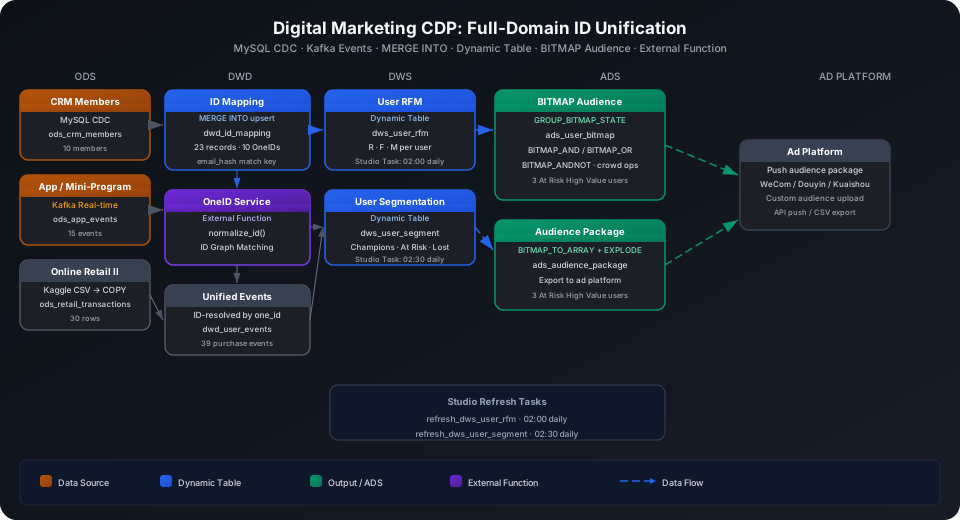
Build a Digital Marketing CDP: Cross-Channel User ID Unification Data Warehouse
Integrate multi-channel user data from CRM, mini-programs, apps, and offline retail into a unified OneID system, then compute RFM labels, build audience segments, and produce the audiences needed for targeted marketing campaigns. This guide uses the Online Retail II (Kaggle) retail transaction dataset to walk through the complete MySQL CDC → Kafka real-time ingestion → ID Mapping → Dynamic Table RFM → BITMAP audience selection pipeline, and covers MERGE INTO incremental updates and External Function calls to external ID graph services.
Overview
The core challenge of building a multi-channel CDP is that the same person leaves different IDs across channels (mobile number, WeChat union_id, CRM member ID, device ID). Before unifying them, you cannot accurately calculate customer lifetime value or cross-channel attribution.
Problem
Singdata Solution
Real-time sync of CRM member changes to the data warehouse
MySQL CDC PIPE captures binlog and writes to ODS
Real-time ingestion of mini-program / app behavior events
Studio Kafka real-time sync task (single-table ingestion)
Incremental merge of multi-source IDs without duplicate insertion of the same OneID
MERGE INTO — UPDATE on match, INSERT on no match
Call external ID graph service for OneID matching
External Function encapsulates HTTP calls for use directly in SQL
RFM labels and user segments auto-refresh
Dynamic Table with automatic incremental computation, scheduled via Studio Task
BITMAP function family — billion-scale ID set operations in milliseconds
SQL Commands Used
Command / Function
Purpose
Notes
CREATE TABLE
Create ODS / DWD / ADS static tables
Used as upstream for Dynamic Tables or as final output
MERGE INTO
Incremental update of ID Mapping table
Insert new IDs; update last_seen and confidence if already exists
CREATE DYNAMIC TABLE
Create DWS RFM and segmentation tables
Automatic incremental computation — no REFRESH INTERVAL
REFRESH DYNAMIC TABLE
Trigger the initial full refresh
Run once after table creation; regular scheduling via Studio Task
GROUP_BITMAP_STATE
Aggregate integer user_ids into a BITMAP object
Builds the bitmap for each segment; returns a bitmap type
GROUP_BITMAP_AND
AND of multiple BITMAP rows, returns cardinality
Computes the AND result for multiple segments in one scan
GROUP_BITMAP_OR
OR of multiple BITMAP rows, returns cardinality
Computes the deduplicated total across multiple segments
BITMAP_AND
Intersection of two BITMAP objects
Returns a BITMAP object for further operations or conversion to array
BITMAP_OR
Union of two BITMAP objects
Returns a BITMAP object
BITMAP_ANDNOT
Difference (exists in A but not in B)
Returns a BITMAP object, used to exclude specific segments
BITMAP_COUNT
Count the number of IDs in a BITMAP
Reads the cardinality from a bitmap object
BITMAP_TO_ARRAY
Expand a BITMAP object into an integer array
Use with EXPLODE to export audience ID lists
CREATE FUNCTION
Create a SQL UDF (ID normalization example)
Encapsulates ID conversion logic; replace with External Function in production
Prerequisites
CREATE SCHEMA IF NOT EXISTS best_practice_marketing_cdp;
ODS (Raw Data Layer): Multi-Channel Raw Data Ingestion
CRM Member Table
The CRM system runs on MySQL. Member information is synced to the ODS layer in real time via MySQL CDC.
CREATE TABLE IF NOT EXISTS best_practice_marketing_cdp.ods_crm_members (
member_id STRING,
mobile_hash STRING, -- mobile number SHA256 hash, not stored in plaintext
email_hash STRING, -- email SHA256 hash
real_name STRING,
gender STRING,
birthday DATE,
register_date DATE,
channel STRING, -- registration channel: offline / online / miniapp
level STRING, -- member tier: bronze / silver / gold
total_points INT,
updated_at TIMESTAMP
);
MySQL CDC Configuration
Create a "MySQL real-time sync task" in Studio: Studio → Data Integration → Real-Time Tasks → New Task.
Configuration parameters:
Parameter
Value
Data source
MySQL (configure host, port, database, username, password)
Sync mode
CDC (binlog real-time capture)
Source table
crm.members
Target schema
best_practice_marketing_cdp
Target table
ods_crm_members
Write strategy
UPSERT (primary key member_id)
Studio task path: best_practices/marketing_cdp/
⚠️ Note: MySQL CDC requires the source database to have binlog enabled with binlog_format = ROW. For cloud-managed MySQL (e.g., RDS/CDB), enable the binlog parameter in the console and restart the instance.
Write sample data (direct INSERT when no MySQL environment is available).
Import from a local CSV file (recommended)
Save CRM member data as a CSV file and bulk-import via User Volume:
-- Step 1: Upload the local CSV file to User Volume via SQL PUT
PUT '/path/to/crm_members.csv' TO USER VOLUME FILE 'crm_members.csv';
-- Step 2: COPY INTO the table from User Volume
COPY INTO best_practice_marketing_cdp.ods_crm_members
FROM USER VOLUME
USING csv
OPTIONS('header'='true', 'sep'=',', 'nullValue'='')
FILES ('crm_members.csv');
You can also insert a small batch of test data inline (no CSV file required):
INSERT INTO best_practice_marketing_cdp.ods_crm_members VALUES
('MBR001','hash_mobile_001','hash_email_001','Alice Wang', 'F',CAST('1990-05-12' AS DATE),CAST('2020-01-15' AS DATE),'offline','gold', 1200,CAST('2024-11-01 10:00:00' AS TIMESTAMP)),
('MBR002','hash_mobile_002','hash_email_002','Bob Chen', 'M',CAST('1985-08-23' AS DATE),CAST('2019-06-20' AS DATE),'online', 'silver',800, CAST('2024-10-15 14:30:00' AS TIMESTAMP)),
('MBR003','hash_mobile_003','hash_email_003','Carol Liu', 'F',CAST('1995-03-07' AS DATE),CAST('2021-09-10' AS DATE),'miniapp','bronze',350, CAST('2024-11-10 09:15:00' AS TIMESTAMP)),
('MBR004','hash_mobile_004','hash_email_004','David Zhang','M',CAST('1988-12-01' AS DATE),CAST('2018-03-05' AS DATE),'offline','gold', 2500,CAST('2024-09-20 16:45:00' AS TIMESTAMP)),
('MBR005','hash_mobile_005','hash_email_005','Eve Li', 'F',CAST('1992-07-19' AS DATE),CAST('2022-11-08' AS DATE),'online', 'silver',620, CAST('2024-11-05 11:00:00' AS TIMESTAMP));
Mini-Program / App Behavior Event Table
User behavior events from mini-programs and apps are ingested in real time via Kafka. Each message corresponds to one user action (page view, add to cart, purchase, etc.).
Option 2: INSERT simulation (when no Kafka environment is available)
If Kafka is not configured, write directly to the target table via INSERT INTO to simulate parsed messages, making it easy to verify downstream Dynamic Table and BITMAP logic:
INSERT INTO best_practice_marketing_cdp.ods_app_events
(event_id, device_id, union_id, open_id, event_type, page_name,
item_id, item_price, channel, platform, event_time, session_id)
VALUES
('EVT001','DEV001','union_001','open_001','purchase','checkout','SKU001',89.9, 'miniapp','wechat', CAST('2024-11-01 08:15:00' AS TIMESTAMP),'sess_001'),
('EVT002','DEV002','union_002','open_002','purchase','checkout','SKU002',199.0,'app', 'ios', CAST('2024-11-01 09:20:00' AS TIMESTAMP),'sess_002'),
('EVT003','DEV003','union_003','open_003','add_cart', 'product','SKU003',350.0,'miniapp','wechat', CAST('2024-11-02 10:05:00' AS TIMESTAMP),'sess_003'),
('EVT004','DEV004','union_004','open_004','purchase','checkout','SKU004',599.0,'app', 'android',CAST('2024-11-02 11:30:00' AS TIMESTAMP),'sess_004'),
('EVT005','DEV005','union_005','open_005','purchase','checkout','SKU005',129.0,'miniapp','wechat', CAST('2024-11-03 14:00:00' AS TIMESTAMP),'sess_005'),
('EVT006','DEV001','union_001','open_001','purchase','checkout','SKU006',75.0, 'miniapp','wechat', CAST('2024-11-05 16:30:00' AS TIMESTAMP),'sess_006'),
('EVT007','DEV006','union_006','open_006','purchase','checkout','SKU007',420.0,'app', 'ios', CAST('2024-11-10 09:00:00' AS TIMESTAMP),'sess_007'),
('EVT008','DEV008','union_008','open_008','purchase','checkout','SKU008',259.0,'miniapp','wechat', CAST('2024-11-12 10:20:00' AS TIMESTAMP),'sess_008'),
('EVT009','DEV009','union_009','open_009','purchase','checkout','SKU009',88.0, 'app', 'ios', CAST('2024-11-13 13:45:00' AS TIMESTAMP),'sess_009'),
('EVT010','DEV010','union_010','open_010','purchase','checkout','SKU010',315.0,'miniapp','wechat', CAST('2024-11-14 11:00:00' AS TIMESTAMP),'sess_010');
Uses the Online Retail II UCI dataset (Kaggle) as ODS raw transaction data for the online retail channel, simulating historical orders ingested from a third-party e-commerce platform.
CREATE TABLE IF NOT EXISTS best_practice_marketing_cdp.ods_retail_transactions (
invoice STRING,
stock_code STRING,
description STRING,
quantity INT,
invoice_date TIMESTAMP,
price DOUBLE,
customer_id STRING,
country STRING,
ingest_time TIMESTAMP DEFAULT CURRENT_TIMESTAMP()
);
Then upload the CSV to the Lakehouse via User Volume and import:
-- Step 1: Upload the local CSV file to User Volume
PUT '/tmp/marketing_cdp/online_retail_II.csv' TO USER VOLUME FILE 'online_retail_II.csv';
-- Step 2: COPY INTO the table from User Volume (full import)
COPY INTO best_practice_marketing_cdp.ods_retail_transactions
(invoice, stock_code, description, quantity, invoice_date, price, customer_id, country)
FROM USER VOLUME
USING csv
OPTIONS('header'='true', 'sep'=',', 'nullValue'='', 'timestampFormat'='M/d/yyyy H:mm')
FILES ('online_retail_II.csv');
Option 2: INSERT INTO with a representative subset
If the full CSV is not available, insert a representative subset to verify downstream RFM and BITMAP logic:
INSERT INTO best_practice_marketing_cdp.ods_retail_transactions
(invoice, stock_code, description, quantity, invoice_date, price, customer_id, country)
VALUES
('489434','85048','15CM CHRISTMAS GLASS BALL 20 LIGHTS',12,CAST('2009-12-01 07:45:00' AS TIMESTAMP),6.95, 'CUS013085','United Kingdom'),
('489434','79323P','PINK CHERRY LIGHTS', 12,CAST('2009-12-01 07:45:00' AS TIMESTAMP),6.75, 'CUS013085','United Kingdom'),
('489435','22111','SCOTTIE DOG HOT WATER BOTTLE', 24,CAST('2009-12-01 07:45:00' AS TIMESTAMP),3.45, 'CUS013748','United Kingdom'),
('489436','48173C','DOOR MAT UNION JACK CARS', 10,CAST('2009-12-01 09:00:00' AS TIMESTAMP),5.95, 'CUS014085','United Kingdom'),
('489437','21080','SET OF 6 NAUTICAL PAPER PLATES', 12,CAST('2009-12-01 09:30:00' AS TIMESTAMP),3.25, 'CUS012583','United Kingdom'),
('489437','22423','REGENCY CAKESTAND 3 TIER', 12,CAST('2009-12-01 09:30:00' AS TIMESTAMP),12.75,'CUS012583','United Kingdom'),
('489438','84970L','SINGLE HEART ZINC T-LIGHT HOLDER', 12,CAST('2009-12-01 10:00:00' AS TIMESTAMP),1.25, 'CUS012431','United Kingdom'),
('489440','23256','CHILDRENS CUTLERY SPACEBOY', 12,CAST('2009-12-01 10:30:00' AS TIMESTAMP),4.15, 'CUS013047','United Kingdom'),
('490100','22421','GINGHAM HEART', 6, CAST('2009-12-10 09:30:00' AS TIMESTAMP),4.95, 'CUS013085','United Kingdom'),
('490200','84029E','TREE TOP STAR', 12,CAST('2009-12-15 10:00:00' AS TIMESTAMP),1.65, 'CUS013748','United Kingdom')
-- full import has 30 rows; this excerpt shows the first 10
;
Verify row counts in the three ODS tables:
SELECT 'ods_crm_members' AS tbl, COUNT(*) AS cnt FROM best_practice_marketing_cdp.ods_crm_members
UNION ALL
SELECT 'ods_app_events', COUNT(*) FROM best_practice_marketing_cdp.ods_app_events
UNION ALL
SELECT 'ods_retail_transactions', COUNT(*) FROM best_practice_marketing_cdp.ods_retail_transactions;
DWD (Detail Data Layer): ID Mapping and Unified Events
ID Mapping Table and External Function
The ID Mapping table records the relationship between each OneID and raw IDs from each channel. In production, matching new IDs to a OneID is performed by an external ID graph service (called via External Function).
Create External Function (production approach)
Create an External Function in Studio to call an external ID graph API via Alibaba Cloud Function Compute / AWS Lambda:
-- First create an API CONNECTION (one-time setup, connects to cloud function runtime)
CREATE API CONNECTION IF NOT EXISTS conn_id_graph
TYPE = 'ALIYUN'
REGION = 'cn-hangzhou'
ROLE_ARN = '<your-role-arn>'
NAMESPACE = 'default'
CODE_BUCKET = '<your-code-bucket>';
-- Create the external function (packages the ID graph HTTP call logic)
CREATE EXTERNAL FUNCTION IF NOT EXISTS best_practice_marketing_cdp.call_id_graph(
id_value STRING,
id_type STRING
)
RETURNS STRING
LANGUAGE PYTHON
CONNECTION = conn_id_graph
RESOURCE_URIS = 'volume://func_volume/id_graph.zip';
⚠️ Note: External Functions require packaging the function code as a .zip and uploading it to a Volume. The function class must use the module.ClassName format and declare parameter types via the @annotate decorator. See the External Function Development Guide for details.
SQL UDF substitute (test environment)
If the external ID graph service is not yet connected, use a SQL UDF to simulate ID normalization logic and verify the downstream Mapping table structure:
CREATE OR REPLACE FUNCTION best_practice_marketing_cdp.normalize_id(
id_value STRING,
id_type STRING
)
RETURNS STRING
AS CASE
WHEN id_type = 'mobile_hash' THEN CONCAT('ONE_PHONE_', SUBSTR(id_value, -6))
WHEN id_type = 'email_hash' THEN CONCAT('ONE_EMAIL_', SUBSTR(id_value, -6))
WHEN id_type = 'union_id' THEN CONCAT('ONE_WX_', SUBSTR(id_value, -6))
WHEN id_type = 'device_id' THEN CONCAT('ONE_DEV_', SUBSTR(id_value, -6))
ELSE CONCAT('ONE_UNKNOWN_', id_value)
END;
Verify the UDF:
SELECT
id_value,
id_type,
best_practice_marketing_cdp.normalize_id(id_value, id_type) AS normalized_id
FROM best_practice_marketing_cdp.dwd_id_mapping
WHERE one_id = 'ONE001';
INSERT INTO best_practice_marketing_cdp.dwd_id_mapping VALUES
('ONE001','member_id', 'MBR001','crm', 1.0, CAST('2020-01-15' AS TIMESTAMP),CAST('2024-11-01' AS TIMESTAMP),true),
('ONE001','mobile_hash','hash_mobile_001','crm',1.0,CAST('2020-01-15' AS TIMESTAMP),CAST('2024-11-01' AS TIMESTAMP),true),
('ONE001','union_id', 'union_001','miniapp',0.95,CAST('2021-03-10' AS TIMESTAMP),CAST('2024-11-05' AS TIMESTAMP),true),
('ONE002','member_id', 'MBR002','crm', 1.0, CAST('2019-06-20' AS TIMESTAMP),CAST('2024-10-15' AS TIMESTAMP),true),
('ONE002','union_id', 'union_002','app', 0.9, CAST('2021-08-15' AS TIMESTAMP),CAST('2024-11-01' AS TIMESTAMP),true)
-- full 22 rows ...
;
MERGE INTO: Incremental ID Mapping Updates
When the ID graph service discovers new ID associations or existing mapping confidence values change, use MERGE INTO for incremental upsert: update if the (one_id, id_type, id_value) triple already exists; insert otherwise.
MERGE INTO best_practice_marketing_cdp.dwd_id_mapping AS t
USING (
-- New email mapping discovered (from ID graph service response)
SELECT
'ONE001' AS one_id,
'email_hash' AS id_type,
'hash_email_001' AS id_value,
'crm' AS source_channel,
1.0 AS confidence,
CAST('2020-01-15 00:00:00' AS TIMESTAMP) AS first_seen,
CAST('2024-11-20 10:00:00' AS TIMESTAMP) AS last_seen,
true AS is_active
) AS s
ON t.one_id = s.one_id
AND t.id_type = s.id_type
AND t.id_value = s.id_value
WHEN MATCHED THEN
UPDATE SET
last_seen = s.last_seen,
confidence = s.confidence
WHEN NOT MATCHED THEN
INSERT (one_id, id_type, id_value, source_channel, confidence, first_seen, last_seen, is_active)
VALUES (s.one_id, s.id_type, s.id_value, s.source_channel, s.confidence, s.first_seen, s.last_seen, s.is_active);
Verify all mappings for ONE001 after execution (the email_hash row is newly inserted; existing rows are unchanged):
SELECT one_id, id_type, id_value, confidence, last_seen
FROM best_practice_marketing_cdp.dwd_id_mapping
WHERE one_id = 'ONE001'
ORDER BY id_type;
The email_hash row is newly inserted. The last_seen fields for member_id, mobile_hash, and union_id are not overwritten, which is the expected behavior.
⚠️ Note: The MERGE INTO ON clause must cover the full business unique key (here one_id + id_type + id_value). Using only one_id as the ON condition would match multiple rows when a single OneID has multiple id_type records, causing undefined UPDATE behavior.
Unified User Events Table (DWD)
Resolve channel events to one_id via ID Mapping and consolidate them into a unified user event table:
Join mini-program / app events with ID Mapping and write to the table:
INSERT INTO best_practice_marketing_cdp.dwd_user_events
SELECT
e.event_id,
m.one_id,
e.event_type,
e.channel,
e.platform,
e.item_id,
e.item_price,
1 AS quantity,
e.item_price AS revenue,
e.event_time,
CAST(e.event_time AS DATE) AS event_date,
e.session_id
FROM best_practice_marketing_cdp.ods_app_events e
JOIN best_practice_marketing_cdp.dwd_id_mapping m
ON m.id_value = e.union_id AND m.id_type = 'union_id'
WHERE e.event_type = 'purchase' AND e.item_id IS NOT NULL;
Map from the retail transaction table directly (customer_id used as one_id):
INSERT INTO best_practice_marketing_cdp.dwd_user_events
SELECT
CONCAT('ORT-', invoice, '-', stock_code) AS event_id,
customer_id AS one_id,
'purchase' AS event_type,
'online_retail' AS channel,
'web' AS platform,
stock_code AS item_id,
price AS item_price,
quantity,
ROUND(price * quantity, 2) AS revenue,
invoice_date AS event_time,
CAST(invoice_date AS DATE) AS event_date,
invoice AS session_id
FROM best_practice_marketing_cdp.ods_retail_transactions;
View cross-channel purchase distribution by channel:
SELECT
channel,
COUNT(DISTINCT one_id) AS unique_users,
COUNT(*) AS purchase_count,
ROUND(SUM(revenue), 2) AS total_revenue,
ROUND(AVG(revenue), 2) AS avg_order_value
FROM best_practice_marketing_cdp.dwd_user_events
WHERE event_type = 'purchase'
GROUP BY channel
ORDER BY total_revenue DESC;
The APP channel average order value (326.5) is significantly higher than online retail (54.29), indicating that app users prefer high-value items — a good match for pushing premium new products.
DWS (Summary Data Layer): RFM Metrics and User Segmentation
User RFM Dynamic Table
RFM (Recency / Frequency / Monetary) is the core metric for measuring user value. Use a Dynamic Table to automatically maintain the latest RFM values per one_id:
CREATE DYNAMIC TABLE IF NOT EXISTS best_practice_marketing_cdp.dws_user_rfm
AS
SELECT
one_id,
DATEDIFF(CURRENT_DATE(), MAX(event_date)) AS recency_days,
COUNT(DISTINCT DATE_TRUNC('day', event_time)) AS frequency,
ROUND(SUM(revenue), 2) AS monetary,
MAX(event_date) AS last_purchase_date,
MIN(event_date) AS first_purchase_date
FROM best_practice_marketing_cdp.dwd_user_events
WHERE event_type = 'purchase'
GROUP BY one_id;
⚠️ Note: CREATE DYNAMIC TABLE does not include REFRESH INTERVAL. Periodic refresh is managed by creating a scheduled task in Studio (see the "Configure Scheduling Tasks" section below), which lets you attach data quality monitoring and alert rules to the same task.
ONE004 (David Zhang) has the highest monetary value (599) but last purchased 581 days ago — a high-value churned user who needs priority reactivation. CUS013085 has historic spend of 294.9 but last purchased over 16 years ago, representing 2009 UK retail historical data — a different time dimension from current ONE% users.
User Segmentation Dynamic Table
Segment users based on RFM values for use in downstream BITMAP audience selection:
CREATE DYNAMIC TABLE IF NOT EXISTS best_practice_marketing_cdp.dws_user_segment
AS
SELECT
r.one_id,
r.recency_days,
r.frequency,
r.monetary,
CASE
WHEN r.recency_days <= 200 AND r.frequency >= 2 AND r.monetary >= 300 THEN 'Champions'
WHEN r.recency_days <= 600 AND r.frequency >= 2 THEN 'Loyal Customers'
WHEN r.recency_days <= 600 THEN 'At Risk'
WHEN r.recency_days <= 2000 THEN 'Hibernating'
ELSE 'Lost'
END AS rfm_segment,
r.last_purchase_date,
r.first_purchase_date
FROM best_practice_marketing_cdp.dws_user_rfm r;
SELECT
rfm_segment,
COUNT(*) AS user_count,
ROUND(AVG(monetary), 2) AS avg_monetary,
ROUND(AVG(frequency), 1) AS avg_frequency,
ROUND(AVG(recency_days), 0) AS avg_recency_days
FROM best_practice_marketing_cdp.dws_user_segment
GROUP BY rfm_segment
ORDER BY avg_monetary DESC;
At Risk users (7 people) have the highest average monetary value (287) but last purchased about 575 days ago — the priority target for reactivation.
Configure Studio Scheduling Tasks
💡 Tip: The examples below use cz-cli (the Singdata Lakehouse command-line tool). If cz-cli is not installed, see the cz-cli Installation and Usage Guide. If you prefer not to use the command line, you can run the SQL in Singdata Studio → Development → SQL Editor and configure / trigger scheduling tasks on the Studio → Tasks page.
Create scheduling tasks in Studio for the two Dynamic Tables, at path best_practices/marketing_cdp/:
Both tasks are created under the Studio best_practices/marketing_cdp/ path (task_id 10354650 / 10354651) and run daily at 02:00 and 02:30 respectively. In the task configuration UI you can add data quality alert rules (e.g., trigger a notification when the RFM table row count drops to zero).
ADS (Application Data Layer): BITMAP Audience Selection and Export
Build User BITMAP
The core of audience selection is first building a BITMAP index for each segment using GROUP_BITMAP_STATE aggregation, then performing set operations at the BITMAP level to avoid full JOINs:
CREATE TABLE IF NOT EXISTS best_practice_marketing_cdp.ads_user_bitmap (
segment_tag STRING,
user_bitmap BITMAP
);
Build BITMAPs by RFM segment and channel (user_id uses the numeric portion of ONE IDs, 1–10):
⚠️ Note: You must truncate the table before rebuilding BITMAPs each time. Otherwise, repeated INSERT executions will cause multiple rows for the same segment_tag. GROUP_BITMAP_AND computes AND across multiple rows of bitmaps — if the same segment has two rows with different bitmaps, their AND result will tend toward 0, which is not the intended behavior. The BITMAP_OR subquery is affected the same way, producing an inflated union result from multiple rows.
-- Truncate first to ensure one row per segment_tag (idempotent)
TRUNCATE TABLE best_practice_marketing_cdp.ads_user_bitmap;
-- Build by RFM segment
INSERT INTO best_practice_marketing_cdp.ads_user_bitmap
SELECT
rfm_segment AS segment_tag,
GROUP_BITMAP_STATE(CAST(SUBSTRING(one_id, 4) AS INT)) AS user_bitmap
FROM best_practice_marketing_cdp.dws_user_segment
WHERE one_id LIKE 'ONE%'
GROUP BY rfm_segment;
-- Build by purchase channel
INSERT INTO best_practice_marketing_cdp.ads_user_bitmap
SELECT
CONCAT('channel_', channel) AS segment_tag,
GROUP_BITMAP_STATE(CAST(SUBSTRING(one_id, 4) AS INT)) AS user_bitmap
FROM best_practice_marketing_cdp.dwd_user_events
WHERE event_type = 'purchase' AND one_id LIKE 'ONE%'
GROUP BY channel;
-- High-value users (monetary >= 300)
INSERT INTO best_practice_marketing_cdp.ads_user_bitmap
SELECT
'High Value' AS segment_tag,
GROUP_BITMAP_STATE(CAST(SUBSTRING(one_id, 4) AS INT)) AS user_bitmap
FROM best_practice_marketing_cdp.dws_user_rfm
WHERE one_id LIKE 'ONE%' AND monetary >= 300;
⚠️ Note: GROUP_BITMAP_STATE returns a BITMAP type (bitmap object), while GROUP_BITMAP / GROUP_BITMAP_AND / GROUP_BITMAP_OR directly return cardinality (INT) — not a bitmap object. When you need to save a bitmap object for subsequent combined operations, you must use GROUP_BITMAP_STATE.
Verify user counts per segment:
SELECT segment_tag, BITMAP_COUNT(user_bitmap) AS user_count
FROM best_practice_marketing_cdp.ads_user_bitmap
ORDER BY user_count DESC;
segment_tag user_count
---------------- ----------
At Risk 7
channel_app 4
channel_miniapp 4
High Value 3
Loyal Customers 1
Set Operations: Intersection / Union / Difference
Scenario 1: AND across all segments (GROUP_BITMAP_AND)
Count users present in both the At Risk and High Value segments — equivalent to AND of the two sets:
SELECT GROUP_BITMAP_AND(user_bitmap) AS users_in_all_segments
FROM best_practice_marketing_cdp.ads_user_bitmap
WHERE segment_tag IN ('At Risk', 'High Value');
users_in_all_segments
---------------------
3
3 users are both in the At Risk state and in the High Value segment — the highest-priority group for reactivation.
Scenario 2: Union of two sets (BITMAP_OR)
Count the deduplicated total across At Risk or Loyal Customers:
SELECT BITMAP_COUNT(
BITMAP_OR(
(SELECT user_bitmap FROM best_practice_marketing_cdp.ads_user_bitmap WHERE segment_tag = 'At Risk'),
(SELECT user_bitmap FROM best_practice_marketing_cdp.ads_user_bitmap WHERE segment_tag = 'Loyal Customers')
)
) AS union_count;
union_count
-----------
8
Scenario 3: Difference operation (BITMAP_ANDNOT)
Among APP purchase users, exclude those who have also purchased via mini-program, to find users who are only active on APP (suitable for pushing exclusive app-only benefits):
SELECT BITMAP_COUNT(
BITMAP_ANDNOT(
(SELECT user_bitmap FROM best_practice_marketing_cdp.ads_user_bitmap WHERE segment_tag = 'channel_app'),
(SELECT user_bitmap FROM best_practice_marketing_cdp.ads_user_bitmap WHERE segment_tag = 'channel_miniapp')
)
) AS app_only_users;
app_only_users
--------------
0
In the current data, the APP and mini-program users overlap completely (4 people in each). This means the user group is already cross-channel active — the strategy should focus on deep re-engagement rather than new channel acquisition.
Target: At Risk users ∩ High Value ∩ not miniapp (suitable for pushing exclusive APP repurchase offers):
SELECT BITMAP_COUNT(
BITMAP_ANDNOT(
BITMAP_AND(
(SELECT user_bitmap FROM best_practice_marketing_cdp.ads_user_bitmap WHERE segment_tag = 'At Risk'),
(SELECT user_bitmap FROM best_practice_marketing_cdp.ads_user_bitmap WHERE segment_tag = 'High Value')
),
(SELECT user_bitmap FROM best_practice_marketing_cdp.ads_user_bitmap WHERE segment_tag = 'channel_miniapp')
)
) AS target_audience_count;
target_audience_count
---------------------
4
Export Audience Package
Expand the selection result from a BITMAP object into an ID list and write it to an audience package table for downstream ad platform use:
Export the At Risk ∩ High Value intersection audience:
INSERT INTO best_practice_marketing_cdp.ads_audience_package
(package_id, package_name, segment_rule, one_id, rfm_segment)
SELECT
'PKG001' AS package_id,
'At Risk High Value' AS package_name,
'At Risk AND High Value' AS segment_rule,
CONCAT('ONE', LPAD(CAST(user_id AS STRING), 3, '0')) AS one_id,
'At Risk' AS rfm_segment
FROM (
SELECT BITMAP_TO_ARRAY(
BITMAP_AND(
(SELECT user_bitmap FROM best_practice_marketing_cdp.ads_user_bitmap WHERE segment_tag = 'At Risk'),
(SELECT user_bitmap FROM best_practice_marketing_cdp.ads_user_bitmap WHERE segment_tag = 'High Value')
)
) AS ids
) t
LATERAL VIEW EXPLODE(ids) tmp AS user_id;
Verify the export result:
SELECT package_id, package_name, one_id, rfm_segment
FROM best_practice_marketing_cdp.ads_audience_package
ORDER BY one_id;
package_id package_name one_id rfm_segment
---------- ----------------- ------ -----------
PKG001 At Risk High Value ONE004 At Risk
PKG001 At Risk High Value ONE006 At Risk
PKG001 At Risk High Value ONE010 At Risk
3 users (ONE004 / ONE006 / ONE010) enter the audience package with monetary values of 599 / 420 / 315 respectively — the priority targets for this repurchase campaign.
💡 Tip: The integer array expanded by BITMAP_TO_ARRAY is split into multiple rows via LATERAL VIEW EXPLODE. The exported one_id values can be uploaded directly to advertising platform APIs such as WeChat Moments custom audiences or ByteDance DMP upload interfaces.
Data Warehouse Object Summary
USE SCHEMA best_practice_marketing_cdp;
SHOW TABLES;
Uniqueness in MERGE INTO ON clause: The MERGE ON for the ID Mapping table must include the full business unique key (one_id + id_type + id_value). Using only one_id as the ON condition would match multiple rows when a single OneID has multiple id_type records, causing undefined UPDATE behavior.
GROUP_BITMAP_STATE vs GROUP_BITMAP: GROUP_BITMAP_STATE returns a BITMAP object for use in subsequent set operations; GROUP_BITMAP / GROUP_BITMAP_AND / GROUP_BITMAP_OR directly return cardinality (INT) and cannot participate in set operations. The two have different purposes and are not interchangeable.
Dynamic Table does not set REFRESH INTERVAL: Refresh scheduling is managed through Studio Tasks, which lets you attach data quality monitoring (e.g., row count alerts, NULL rate checks) to the same task.
BITMAP IDs must be positive integers: GROUP_BITMAP_STATE only accepts positive integer inputs. If one_id is a string (e.g., ONE001), you need to extract the numeric portion or maintain an integer key mapping table. In production, it is recommended to maintain a user_int_id auto-increment integer field in dwd_id_mapping specifically for BITMAP use.
ads_user_bitmap requires idempotent inserts: GROUP_BITMAP_AND computes AND across multiple rows of bitmaps in the table. If the same segment_tag has multiple rows (from repeated INSERT executions) with different bitmap contents, the AND result will tend toward 0. Execute TRUNCATE TABLE ads_user_bitmap before each BITMAP rebuild to ensure each segment_tag has exactly one row. BITMAP_OR subqueries are affected the same way — multiple rows inflate the union result.
External Function requires API CONNECTION: Calling an external ID graph service in production requires first creating an API CONNECTION and configuring the cloud function runtime (Alibaba Cloud FC / AWS Lambda). In a test environment, use a SQL UDF instead; switch to External Function after verifying the Mapping table structure is correct.
MySQL CDC requires binlog enabled: The source MySQL must have binlog_format = ROW. Some cloud-managed databases (e.g., RDS/CDB) disable binlog by default — enable it in the console and restart the instance. CDC sync latency is typically in the seconds range, suitable for near-real-time scenarios. If millisecond-level latency is required, evaluate a Kafka-based approach.
Related Documentation
MERGE INTO — syntax reference and MATCHED / NOT MATCHED clause details
Create Dynamic Table — incremental refresh mechanism and static partition mode for partitioned DTs