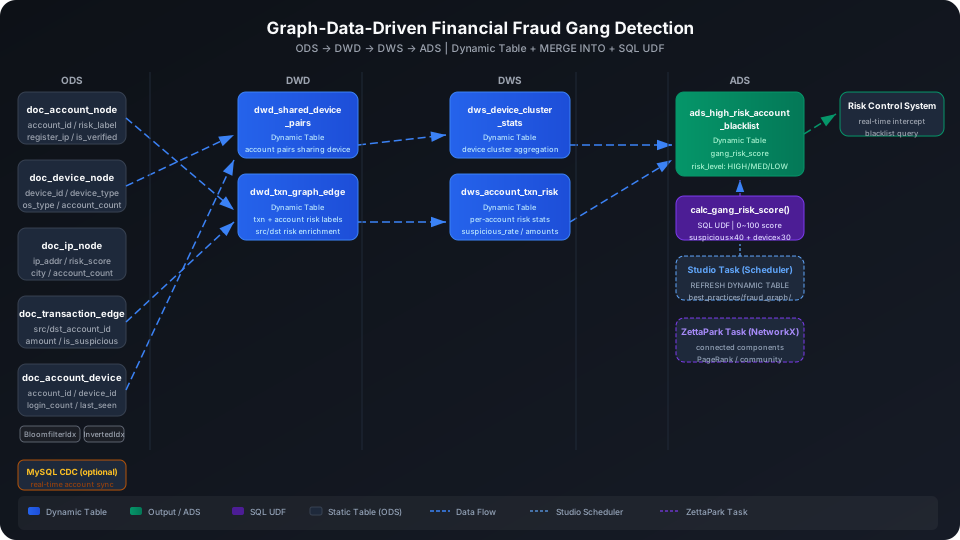
Graph-Driven Financial Fraud Gang Detection Data Warehouse Best Practices
This guide treats accounts, devices, and IPs as graph nodes and transaction relationships or login bindings as edges to build an entity relationship graph that identifies fraud gangs and underground ring networks. Using a dataset of 20 account nodes, 10 device nodes, 10 IP nodes, and 25 transaction edges, it demonstrates the full ODS → DWD → DWS → ADS four-layer data warehouse build end to end, covering MERGE INTO incremental edge table updates, Dynamic Table aggregation, SQL UDF gang risk scoring, and Bloomfilter Index efficient point lookups.
Overview
The typical data pipeline for financial fraud gang detection is: account registration/transaction data real-time ingestion → raw node/edge storage (ODS) → build edges for shared-device/transaction relationships (DWD) → gang aggregation and risk scoring (DWS) → high-risk account blocklist output (ADS).
Singdata Lakehouse addresses the core challenges with the following combination:
Problem
Solution
Shared device usage is the strongest signal for gang association
MERGE INTO incrementally maintains the account-device edge table with no misses or duplicates
Large number of transaction graph nodes makes cross-node aggregation slow
System detects upstream changes and refreshes incrementally
REFRESH DYNAMIC TABLE
Trigger a manual refresh
Use during initial build or debugging
Prerequisites
All examples in this guide run under the best_practice_fraud_graph Schema.
CREATE SCHEMA IF NOT EXISTS best_practice_fraud_graph;
ODS (Raw Data Layer): Raw Node and Edge Tables
Create Tables
-- Account node: stores registration info and risk labels for each account
CREATE TABLE IF NOT EXISTS best_practice_fraud_graph.doc_account_node (
account_id STRING,
register_time TIMESTAMP,
register_ip STRING,
phone_tail STRING,
id_cert_hash STRING,
account_age_days INT,
is_verified INT,
risk_label INT -- 0: normal 1: known fraud
);
-- Device node: stores basic device attributes
CREATE TABLE IF NOT EXISTS best_practice_fraud_graph.doc_device_node (
device_id STRING,
device_type STRING,
os_type STRING,
first_seen TIMESTAMP,
account_count INT
);
-- IP node: stores basic IP attributes and risk score
CREATE TABLE IF NOT EXISTS best_practice_fraud_graph.doc_ip_node (
ip_addr STRING,
isp STRING,
city STRING,
risk_score DOUBLE,
account_count INT
);
-- Transaction edge: fund transfer relationship between accounts
CREATE TABLE IF NOT EXISTS best_practice_fraud_graph.doc_transaction_edge (
txn_id STRING,
src_account_id STRING,
dst_account_id STRING,
amount DOUBLE,
txn_time TIMESTAMP,
channel STRING,
status STRING,
is_suspicious INT
);
-- Account-device edge: binding relationship between account and login device
CREATE TABLE IF NOT EXISTS best_practice_fraud_graph.doc_account_device_edge (
account_id STRING,
device_id STRING,
first_seen TIMESTAMP,
last_seen TIMESTAMP,
login_count INT
);
Create Bloomfilter Index and Inverted Index
doc_transaction_edge.src_account_id and doc_account_device_edge.device_id are both high-cardinality columns with frequent point lookups. Bloomfilter Indexes are well suited here.
-- Transaction edge: exact filter by originating account
CREATE BLOOMFILTER INDEX IF NOT EXISTS best_practice_fraud_graph.idx_bf_txn_src
ON TABLE best_practice_fraud_graph.doc_transaction_edge (src_account_id);
-- Account-device edge: exact filter by device ID
CREATE BLOOMFILTER INDEX IF NOT EXISTS best_practice_fraud_graph.idx_bf_device_id
ON TABLE best_practice_fraud_graph.doc_account_device_edge (device_id);
-- IP node: exact match by city keyword
CREATE INVERTED INDEX IF NOT EXISTS best_practice_fraud_graph.idx_inv_city
ON TABLE best_practice_fraud_graph.doc_ip_node (city)
PROPERTIES ('analyzer'='keyword');
⚠️ Note: CREATE BLOOMFILTER INDEX requires the index and target table to be in the same Schema context. When the table name in ON TABLE has no Schema prefix, the index name must also have no prefix, or both must have the same prefix. Recommended: add the best_practice_fraud_graph. prefix to both index name and table name, or run without prefixes after switching with USE SCHEMA.
Load Sample Data
This guide uses direct INSERT statements to construct entity relationship data simulating account registration, login binding, and fund transfers:
Import from a local CSV file (recommended):
-- Step 1: Upload the local CSV file to User Volume via SQL PUT
PUT '/path/to/your/doc_account_node.csv' TO USER VOLUME FILE 'doc_account_node.csv';
-- Step 2: COPY INTO the table from User Volume
COPY INTO best_practice_fraud_graph.doc_account_node
FROM USER VOLUME
USING csv
OPTIONS('header'='true', 'sep'=',', 'nullValue'='')
FILES ('doc_account_node.csv');
You can also insert a small batch of test data inline (no CSV file required):
SELECT COUNT(*) AS account_count FROM best_practice_fraud_graph.doc_account_node;
account_count
-------------
20
SELECT COUNT(*) AS txn_count FROM best_practice_fraud_graph.doc_transaction_edge;
SELECT COUNT(*) AS edge_count FROM best_practice_fraud_graph.doc_account_device_edge;
txn_count
---------
25
edge_count
----------
20
Data structure note: In the simulated data, accounts A001/A002/A003 all used the same IP 192.168.10.1 at registration and logged in via the same device D001. Multiple rapid transfer transactions among A001, A002, and A003 have is_suspicious=1. This represents a typical fraud gang pattern.
Incrementally Update the Edge Table with MERGE INTO
In production, new login events are constantly generated. Account-device bindings need incremental updates rather than full replacements. MERGE INTO updates last_seen and login_count when an existing (account_id, device_id) combination is found, and inserts a new row on first occurrence:
MERGE INTO best_practice_fraud_graph.doc_account_device_edge AS t
USING (
SELECT 'A001' AS account_id, 'D001' AS device_id,
CAST('2025-06-01 10:00:00' AS TIMESTAMP) AS last_seen,
1 AS new_logins
) AS s
ON t.account_id = s.account_id AND t.device_id = s.device_id
WHEN MATCHED THEN
UPDATE SET
last_seen = s.last_seen,
login_count = t.login_count + s.new_logins
WHEN NOT MATCHED THEN
INSERT (account_id, device_id, first_seen, last_seen, login_count)
VALUES (s.account_id, s.device_id, s.last_seen, s.last_seen, s.new_logins);
💡 Tip: In a Kafka CDC ingestion scenario, replace the USING subquery with a real-time login event stream parsed from a Kafka topic. The Dynamic Table upstream stays unchanged, and the MERGE INTO logic applies the same way.
Gang Risk Scoring UDF
The multi-factor gang risk scoring logic is encapsulated as a SQL UDF that can be reused in both the DWS and ADS layers.
Scoring formula: suspicious transaction rate × 40 + shared-device account pairs × 30 (≥ 2 pairs = full 30, = 1 pair = 15) + registration IP risk × 20 + unverified identity +10, capped at 100, floored at 0.
CREATE OR REPLACE FUNCTION best_practice_fraud_graph.calc_gang_risk_score(
suspicious_rate DOUBLE,
shared_device_pairs INT,
ip_risk_score DOUBLE,
is_verified INT
)
RETURNS DOUBLE
AS GREATEST(0.0, LEAST(100.0,
suspicious_rate * 40.0
+ CASE WHEN shared_device_pairs >= 2 THEN 30.0
WHEN shared_device_pairs = 1 THEN 15.0
ELSE 0.0 END
+ ip_risk_score * 20.0
+ CASE WHEN is_verified = 0 THEN 10.0 ELSE 0.0 END
));
Verify the function for a high-risk account (100% suspicious rate, 2 shared device pairs, high-risk IP, unverified identity):
SELECT best_practice_fraud_graph.calc_gang_risk_score(1.0, 2, 0.85, 0) AS sample_score;
sample_score
------------
97
This account scores 97, in the HIGH risk range. The system can block it directly.
DWD (Detail Data Layer) Dynamic Tables: Relationship Graph Edges
The DWD layer does two things: first, SELF JOIN the account-device edge table to find "shared-device account pairs"; second, JOIN the transaction edges with account nodes to add IP risk information for both parties.
Shared-Device Account Pairs
CREATE DYNAMIC TABLE IF NOT EXISTS best_practice_fraud_graph.dwd_shared_device_pairs
AS
SELECT
a1.account_id AS account_id_1,
a2.account_id AS account_id_2,
a1.device_id AS shared_device_id,
a1.login_count AS login_count_1,
a2.login_count AS login_count_2,
LEAST(a1.last_seen, a2.last_seen) AS last_shared_time
FROM best_practice_fraud_graph.doc_account_device_edge a1
JOIN best_practice_fraud_graph.doc_account_device_edge a2
ON a1.device_id = a2.device_id
AND a1.account_id < a2.account_id;
Transaction Graph Edges (with Risk Labels)
CREATE DYNAMIC TABLE IF NOT EXISTS best_practice_fraud_graph.dwd_txn_graph_edge
AS
SELECT
t.txn_id,
t.src_account_id,
t.dst_account_id,
t.amount,
t.txn_time,
t.channel,
t.status,
t.is_suspicious,
a_src.register_ip AS src_register_ip,
a_dst.register_ip AS dst_register_ip,
a_src.risk_label AS src_risk_label,
a_dst.risk_label AS dst_risk_label
FROM best_practice_fraud_graph.doc_transaction_edge t
JOIN best_practice_fraud_graph.doc_account_node a_src ON t.src_account_id = a_src.account_id
JOIN best_practice_fraud_graph.doc_account_node a_dst ON t.dst_account_id = a_dst.account_id;
Trigger the initial refresh manually:
REFRESH DYNAMIC TABLE best_practice_fraud_graph.dwd_shared_device_pairs;
REFRESH DYNAMIC TABLE best_practice_fraud_graph.dwd_txn_graph_edge;
SELECT COUNT(*) AS pair_count FROM best_practice_fraud_graph.dwd_shared_device_pairs;
SELECT COUNT(*) AS edge_count FROM best_practice_fraud_graph.dwd_txn_graph_edge;
pair_count
----------
11
edge_count
----------
25
View account pairs under device D001 — this is the most typical gang pattern:
SELECT account_id_1, account_id_2, shared_device_id, login_count_1, login_count_2
FROM best_practice_fraud_graph.dwd_shared_device_pairs
WHERE shared_device_id = 'D001';
D001 is shared by three accounts — A001/A002/A003. The three accounts form pairs with each other, producing 3 associated pairs (C(3,2)=3). These three accounts also share the same registration IP 192.168.10.1 in the ODS layer and registered on the same day, which is a typical batch-registration fraud gang pattern.
Create Scheduling Tasks in Studio
Manage Dynamic Table periodic refresh through Studio Task rather than writing REFRESH INTERVAL in the DDL. In Studio Development → Tasks, create two Dynamic Table refresh tasks under the path best_practices/fraud_graph/:
Attach data quality checks (for example, alert when pair_count < 1) and monitoring rules to the same task
💡 Tip: Combine all DWD refresh tasks into a single Studio Task and execute each REFRESH DYNAMIC TABLE in dependency order within the task. This lets you manage alerts and quality check rules from a single entry point.
DWS (Summary Data Layer) Dynamic Tables: Aggregation and Gang Features
The DWS layer aggregates the two DWD edge tables to produce: per-device account cluster statistics (whether multiple account pairs share the device), and per-account suspicious transaction statistics (suspicious rate, amount, destination diversity).
Device Cluster Statistics
CREATE DYNAMIC TABLE IF NOT EXISTS best_practice_fraud_graph.dws_device_cluster_stats
AS
SELECT
shared_device_id AS device_id,
COUNT(DISTINCT account_id_1)
+ COUNT(DISTINCT account_id_2) AS approx_account_count,
SUM(login_count_1 + login_count_2) AS total_login_count,
MIN(last_shared_time) AS earliest_shared,
MAX(last_shared_time) AS latest_shared,
COUNT(*) AS pair_count
FROM best_practice_fraud_graph.dwd_shared_device_pairs
GROUP BY shared_device_id;
Account Transaction Risk Statistics
CREATE DYNAMIC TABLE IF NOT EXISTS best_practice_fraud_graph.dws_account_txn_risk
AS
SELECT
src_account_id AS account_id,
COUNT(*) AS total_txn_count,
SUM(CASE WHEN is_suspicious = 1 THEN 1 ELSE 0 END) AS suspicious_count,
ROUND(SUM(amount), 2) AS total_amount,
ROUND(AVG(amount), 2) AS avg_amount,
COUNT(DISTINCT dst_account_id) AS unique_dst_count,
COUNT(DISTINCT channel) AS channel_diversity,
ROUND(
SUM(CASE WHEN is_suspicious = 1 THEN 1 ELSE 0 END) * 1.0 / COUNT(*),
4
) AS suspicious_rate
FROM best_practice_fraud_graph.dwd_txn_graph_edge
GROUP BY src_account_id;
SELECT device_id, approx_account_count, total_login_count, pair_count
FROM best_practice_fraud_graph.dws_device_cluster_stats
ORDER BY pair_count DESC;
D001 has pair_count=3, far above the other devices (all at 1), and also has the highest total_login_count=170 — it is the core device of the fraud gang. The other devices each have 2 accounts sharing them, forming several two-person fraud pairs.
View account transaction risk statistics (top 5):
SELECT account_id, total_txn_count, suspicious_count, total_amount, suspicious_rate
FROM best_practice_fraud_graph.dws_account_txn_risk
ORDER BY suspicious_rate DESC, total_amount DESC
LIMIT 5;
A001 has a 100% suspicious transaction rate and initiated 3 transactions totaling 1,230 — it is the core transfer node in this gang. The destination accounts for its transactions are A002, A003, and A004, all members of the same D001 device cluster.
ADS (Application Data Layer) Dynamic Table: High-Risk Account Blocklist
The ADS layer combines DWS aggregation features with ODS account registration information, calls the calc_gang_risk_score UDF to score each account, and outputs a high-risk account blocklist.
CREATE DYNAMIC TABLE IF NOT EXISTS best_practice_fraud_graph.ads_high_risk_account_blacklist
AS
SELECT
r.account_id,
r.total_txn_count,
r.suspicious_count,
r.suspicious_rate,
r.total_amount,
COALESCE(dc.pair_count, 0) AS shared_device_pair_count,
COALESCE(ip.risk_score, 0.0) AS register_ip_risk,
an.is_verified,
an.risk_label AS original_risk_label,
ROUND(
best_practice_fraud_graph.calc_gang_risk_score(
r.suspicious_rate,
CAST(COALESCE(dc.pair_count, 0) AS INT),
COALESCE(ip.risk_score, 0.0),
an.is_verified
), 2
) AS gang_risk_score,
CASE
WHEN best_practice_fraud_graph.calc_gang_risk_score(
r.suspicious_rate,
CAST(COALESCE(dc.pair_count, 0) AS INT),
COALESCE(ip.risk_score, 0.0),
an.is_verified
) >= 80 THEN 'HIGH'
WHEN best_practice_fraud_graph.calc_gang_risk_score(
r.suspicious_rate,
CAST(COALESCE(dc.pair_count, 0) AS INT),
COALESCE(ip.risk_score, 0.0),
an.is_verified
) >= 50 THEN 'MEDIUM'
ELSE 'LOW'
END AS risk_level,
CURRENT_TIMESTAMP() AS score_time
FROM best_practice_fraud_graph.dws_account_txn_risk r
JOIN best_practice_fraud_graph.doc_account_node an ON r.account_id = an.account_id
LEFT JOIN best_practice_fraud_graph.doc_account_device_edge ade ON r.account_id = ade.account_id
LEFT JOIN (
SELECT account_id_1 AS account_id, COUNT(*) AS pair_count
FROM best_practice_fraud_graph.dwd_shared_device_pairs GROUP BY account_id_1
UNION ALL
SELECT account_id_2 AS account_id, COUNT(*) AS pair_count
FROM best_practice_fraud_graph.dwd_shared_device_pairs GROUP BY account_id_2
) dc ON r.account_id = dc.account_id
LEFT JOIN best_practice_fraud_graph.doc_ip_node ip ON an.register_ip = ip.ip_addr;
SELECT account_id, gang_risk_score, risk_level, suspicious_rate, shared_device_pair_count
FROM best_practice_fraud_graph.ads_high_risk_account_blacklist
WHERE risk_level = 'HIGH'
GROUP BY account_id, gang_risk_score, risk_level, suspicious_rate, shared_device_pair_count
ORDER BY gang_risk_score DESC;
A003 (97 points): 100% suspicious rate, appears in 2 shared-device account pairs (one each with A001 and A002), registration IP risk 0.85, unverified identity — all four factors are high-risk, producing the highest score.
A001 (87 points): Also a D001 device gang member; verified identity (−10 points) slightly reduces the score, but still HIGH.
A012 (80.6 points): Shares device D006 with A011; 100% suspicious rate, unverified identity — a cross-device fraud pair member.
View risk level distribution:
SELECT risk_level, COUNT(DISTINCT account_id) AS account_count
FROM best_practice_fraud_graph.ads_high_risk_account_blacklist
GROUP BY risk_level
ORDER BY account_count DESC;
risk_level | account_count
-----------+--------------
MEDIUM | 14
HIGH | 3
LOW | 3
In the current dataset, 3 accounts are marked HIGH (recommend immediate account suspension), 14 are MEDIUM (strengthen verification or limit transactions), and 3 are LOW (normal operation).
ZettaPark Python Task: Graph Algorithm Extension
For graph algorithms that SQL cannot express directly (connected components, PageRank, community detection), create a ZettaPark Python Task in Studio, run it with NetworkX, and write the results back to the Lakehouse.
Reference code structure (runs in a Studio Python Task):
import networkx as nx
from clickzetta_zettapark.session import Session
session = Session.builder.config("profile", "skill_test").create()
# Read shared-device account pairs from the DWD layer
pairs = session.sql("""
SELECT account_id_1, account_id_2
FROM best_practice_fraud_graph.dwd_shared_device_pairs
""").to_pandas()
# Build an undirected graph where each node is an account and each edge is a shared-device relationship
G = nx.from_pandas_edgelist(pairs, 'account_id_1', 'account_id_2')
# Find connected components (gang groupings)
components = list(nx.connected_components(G))
gang_assignments = []
for gang_id, members in enumerate(components):
for account in members:
gang_assignments.append({
'account_id': account,
'gang_id': f'GANG_{gang_id:04d}',
'gang_size': len(members)
})
# Write results back to Lakehouse
import pandas as pd
df = pd.DataFrame(gang_assignments)
session.write_pandas(df, 'ads_gang_component_map',
schema='best_practice_fraud_graph',
overwrite=True)
💡 Tip: Create this task under best_practices/fraud_graph/ in Studio and set it as a dependency of the ADS refresh task. After the ADS refresh completes, the NetworkX graph algorithm task triggers automatically to output ads_gang_component_map for manual review.
Bloomfilter Index does not apply retroactively to existing data: CREATE BLOOMFILTER INDEX only accelerates new data written after the index is created. Bloomfilter indexes do not support BUILD INDEX; to cover existing data you must rebuild the table. Inverted Index supports BUILD INDEX and can rebuild the index over existing data.
Dynamic Table incremental refresh semantics: The first REFRESH performs a full snapshot computation. Subsequent incremental refreshes process only rows added or changed in the ODS layer since the last refresh checkpoint. If the ODS layer uses INSERT OVERWRITE, the Dynamic Table degrades to a full refresh. Use APPEND mode writes or continuous Kafka PIPE ingestion instead.
Do not write REFRESH INTERVAL in DDL: Manage Dynamic Table periodic refresh through Studio Task. Writing REFRESH INTERVAL in DDL makes it impossible to attach monitoring alerts and quality check rules to the same task. Use the refresh tasks under the Studio best_practices/fraud_graph/ path instead.
ADS layer CURRENT_TIMESTAMP() score timestamp: The score_time field uses CURRENT_TIMESTAMP() and is updated to the current time on each refresh, not a historical scoring snapshot. For historical auditing, include the refresh task execution timestamp when writing back.
UDF called multiple times in ADS layer: calc_gang_risk_score appears once in the SELECT and once in the CASE. To optimize, compute the score once in a subquery and apply the CASE logic in an outer query.
ZettaPark NetworkX Task timing dependency: The graph algorithm task should run after the ADS Dynamic Table refresh completes. Configure task dependencies in Studio to avoid reading stale data.