
Storage Connection + API Connection + External Function: Combined Practice
External Functions can look daunting at first — you need to configure an OSS Bucket, a serverless function runtime, a RAM role, write Python code, build a zip, and write DDL... three separate objects, many concepts, many steps, easy to get discouraged.
Once you get everything running, you'll find that the complexity is mostly concentrated in one-time environment setup. After that initial setup, the cost of adding new functions is extremely low: write Python logic → package → one DDL, done in three minutes. This guide walks you through four progressive scenarios to cover the full workflow across Alibaba Cloud, Tencent Cloud, and AWS.
By the end you'll realize: External Functions are not complex. You just configure "where to store code" and "where to run code" once, and every new function after that is just code + one SQL statement.
Full code on GitHub: clickzetta_external_function
The Iron Triangle: How the Three Objects Work Together
An External Function is not just one object — it is the result of three objects working together. Understanding their roles makes the entire mechanism clear:
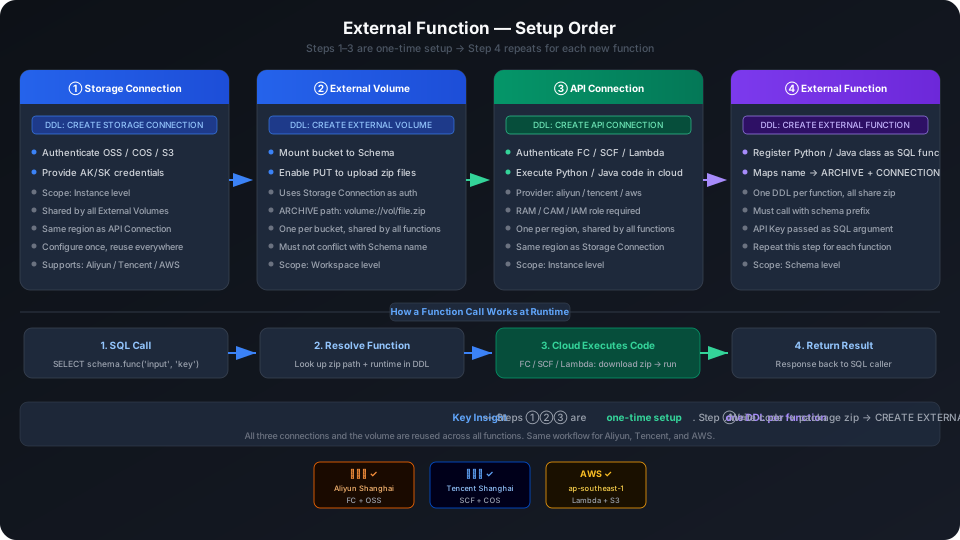
| Object | Analogy | What it does | How often configured |
|---|---|---|---|
| Storage Connection | Parking lot | Authenticates object storage (OSS/COS/S3), allows Lakehouse to read and write code packages | Once per Schema |
| API Connection | Workshop | Authenticates cloud function runtime (FC/SCF/Lambda), defines where code runs | Once per Region |
| External Volume | Shelf | Mounts the object storage Bucket to the Schema, enabling the PUT command to upload files | Once per Bucket |
| CREATE EXTERNAL FUNCTION | Registry | Maps a function name → entry class → zip package | Once per function |
The first three are one-time setups — once you configure Storage Connection + API Connection + External Volume, all functions share them. Adding a new function afterwards only requires one CREATE EXTERNAL FUNCTION statement.
Prerequisites (One-time, Shared Across All Four Scenarios)
All four scenarios share the same cloud environment configuration. This step is done only once, and all four scenarios can use it directly.
Step 1: Choose your cloud, configure config.json
Confirm which cloud your Lakehouse is on. The external function runtime (FC/SCF/Lambda) must be on the same cloud and in the same region:
Open config.json and change only the platform field:
Then follow SETUP.md to complete the cloud-specific environment setup (OSS/COS/S3 Bucket, FC/SCF/Lambda, RAM/CAM/IAM role, Bailian API Key) and fill in the details in config.json.
Step 2: Install cz-cli and verify
Step 3: Universal steps for all four scenarios
The execution flow for all four scenarios is identical:
Corresponding commands:
Scenario 1: Python External Function Quick Start
Deploy
What 4-deploy_generated.sql does:
Function Source Code
src/my_upper.py — one class, one evaluate method:
Local Testing
FC environments have no stdout and no stack traces. Always test locally before each deployment:
Key Takeaways
remote.udf.api='python3.mc.v0'specifies the Python 3.10 runtime for FC- Calling the function requires the schema prefix:
SELECT <schema>.my_upper('hello')— omitting it results infunction not found - The first call may take 5-10 seconds (FC cold start); subsequent calls are normal
Scenario 2: Python ML Functions + Third-Party Dependency Packaging
Function List
| Function | Libraries used | Purpose |
|---|---|---|
pii_mask | re | Phone/email/ID masking |
feature_normalize | numpy + sklearn | Numeric column normalization (minmax/zscore) |
anomaly_detect | numpy + sklearn | Isolation Forest anomaly detection |
sentiment_score | jieba | Chinese sentiment scoring (0-1) |
tfidf_keywords | sklearn | TF-IDF keyword extraction |
The Core Problem: FC Runs Linux, macOS Packages Won't Work
The FC runtime is Linux x86_64 + Python 3.10. Running pip install scikit-learn on macOS produces .dylib files that cannot be loaded on FC.
Solution: use two separate requirements files with two different install methods.
| File | Contents | Install method |
|---|---|---|
requirements.txt | Packages with C extensions (scikit-learn, numpy) | pip install --platform manylinux2014_x86_64 --only-binary :all: |
requirements_pure.txt | Pure Python packages (jieba) | Normal pip install |
Why can't they be in the same file? Putting jieba (pure Python) into requirements.txt with --only-binary :all: causes pip to throw No matching distribution found — pure Python packages don't have binary wheels.
Deploy
Local Testing
Using in SQL
Key Takeaways
- C extension packages require Linux binary wheels — macOS
.dylibfiles cannot run on FC - Pure Python packages must be separated — they cannot be mixed with binary packages in the same requirements file
- Zip size determines cold start time: scikit-learn + numpy is about 100MB; the first call takes 5-10 seconds
Scenario 3: 30 AI SQL Functions — Package Once, Call Anywhere
Design Highlights
One zip, 30 functions: All 30 functions share a single clickzetta_ai_functions_full.zip. The DDL only differs in the class name AS 'ai_functions_complete.ai_xxx'. Packaging and uploading a separate zip for each function would mean 30 zip files and exploding management complexity.
API Key as a SQL parameter: The Bailian API Key is not hardcoded in the source code or bundled into the zip — it is passed as a function parameter:
If the API Key were hardcoded in the zip, a zip leak would mean a Key leak. Passing it as a parameter lets callers manage their own keys.
Function Categories
| Category | Count | Typical functions |
|---|---|---|
| Text processing | 8 | Summarization, translation, sentiment analysis, entity extraction, keywords, classification, cleaning, tagging |
| Vector processing | 5 | Embedding, similarity, clustering preparation, similar search, document search |
| Multimodal | 8 | Image description, OCR, image analysis, image embedding, image similarity, video summarization, chart analysis, document parsing |
| Business scenarios | 9 | Customer intent, sales scoring, review analysis, risk detection, contract extraction, resume parsing, customer segmentation, product description, industry classification |
Deploy
Local Testing
FC has no logs and no stdout. Test locally before deploying to save a lot of time:
Using in SQL
Returns JSON; use JSON_EXTRACT to retrieve values:
Key Takeaways
- 30 functions share one zip — adding a new function = 20 lines of prompt + one DDL
- API Key is not hardcoded — passed as a SQL parameter, so a zip leak does not compromise security
- config.json serves dual roles: embedded in the zip at build time (for runtime model config), and used to replace SQL placeholders at render time
Scenario 4: Java UDF/UDAF/UDTF
Quick Overview of the Three Types
| Type | Base class | Input → Output | DDL special property | Example function |
|---|---|---|---|---|
| UDF | GenericUDF | 1 row → 1 row | — | pii_mask PII masking |
| UDAF | GenericUDAFResolver2 | Multiple rows → 1 row | AGGREGATOR | agg_stats SUM/AVG/MIN/MAX/COUNT |
| UDTF | GenericUDTF | 1 row → N rows | TABLE_VALUED | log_explode log row expansion |
Differences from Python External Functions
| Python | Java | |
|---|---|---|
| Runtime | Python 3.10 | Java 8 (Java 9+ not supported) |
| DDL property | python3.mc.v0 | java8.hive2.v0 |
| Function types | UDF | UDF / UDAF / UDTF |
| Packaging | zip | Maven jar-with-dependencies → zip |
| Dependencies | pip --platform manylinux | Maven scope=provided (Hive runtime included) |
Deploy
UDF Example
UDAF Example
UDTF Example
UDTF requires the LATERAL syntax and cannot be used with SELECT func(x):
Key Takeaways
- Java version must be 8 — FC only has a Java 8 runtime
- Hive dependency scope=provided: FC includes
hive-exec.jar; do not bundle it in the zip to avoid conflicts - UDAF DDL must include
AGGREGATOR, UDTF must includeTABLE_VALUED— omitting them causes creation to succeed but calls to fail - UDTF must use
LATERALsyntax;SELECT func(x)directly is not supported
Function Quick Reference
Python (quickstart + advanced + AI function)
| Function | Purpose | Source |
|---|---|---|
my_upper | String to uppercase | quickstart |
pii_mask | Phone/email/ID masking | advanced |
feature_normalize | Numeric column normalization | advanced |
anomaly_detect | Isolation Forest anomaly detection | advanced |
sentiment_score | Chinese sentiment scoring | advanced |
tfidf_keywords | TF-IDF keyword extraction | advanced |
ai_text_summarize | Text summarization | AI function |
ai_text_translate | Text translation | AI function |
ai_text_sentiment_analyze | Sentiment analysis | AI function |
ai_text_extract_entities | Entity extraction | AI function |
ai_text_extract_keywords | Keyword extraction | AI function |
ai_text_classify | Text classification | AI function |
ai_text_clean_normalize | Text cleaning | AI function |
ai_auto_tag_generate | Auto tagging | AI function |
ai_text_to_embedding | Text embedding | AI function |
ai_semantic_similarity | Semantic similarity | AI function |
ai_text_clustering_prepare | Clustering preparation | AI function |
ai_find_similar_text | Similar text search | AI function |
ai_document_search | Document search | AI function |
ai_image_describe | Image description | AI function |
ai_image_ocr | Image OCR | AI function |
ai_image_analyze | Image analysis | AI function |
ai_image_to_embedding | Image embedding | AI function |
ai_image_similarity | Image similarity | AI function |
ai_video_summarize | Video summarization | AI function |
ai_chart_analyze | Chart analysis | AI function |
ai_document_parse | Document parsing | AI function |
ai_customer_intent_analyze | Customer intent analysis | AI function |
ai_sales_lead_score | Sales lead scoring | AI function |
ai_review_analyze | Review analysis | AI function |
ai_risk_text_detect | Risk text detection | AI function |
ai_contract_extract | Contract extraction | AI function |
ai_resume_parse | Resume parsing | AI function |
ai_customer_segment | Customer segmentation | AI function |
ai_product_description_generate | Product description generation | AI function |
ai_industry_classification | Industry classification | AI function |
Java
| Function | Type | Purpose |
|---|---|---|
pii_mask | UDF | PII masking |
agg_stats | UDAF | SUM/AVG/MIN/MAX/COUNT |
log_explode | UDTF | Log row expansion |
Troubleshooting
| Error | Cause | Solution |
|---|---|---|
function not found | Missing schema prefix | Add <schema>. prefix when calling |
HTTP_GENERAL_ERROR(640) | RAM trust policy not configured / Bucket in a different region | Check RAM role trust policy (must include 1384322691904283); confirm Bucket and FC are in the same region |
AccessDenied | RAM role missing OSS permissions | Add AliyunOSSFullAccess or a custom OSS policy |
ImportError: No module named 'sklearn' | Dependencies not packaged in zip | Re-run python 2-package.py (advanced) / python 2-package.py --deps (AI function) |
OSError: cannot open shared object file | macOS .dylib was packaged | Confirm --platform manylinux2014_x86_64 was used |
ClassNotFoundException | Wrong Java class name or package name | Check that the AS path matches the actual class name inside the jar |
| UDAF created successfully but call fails | DDL missing AGGREGATOR | Check WITH PROPERTIES ('remote.udf.category'='AGGREGATOR') |
UDTF created successfully but not a table function | DDL missing TABLE_VALUED | Check WITH PROPERTIES ('remote.udf.category'='TABLE_VALUED') |
| First call takes a long time to return | FC cold start | Wait 5-10 seconds; it has not hung |
Changes to config.json not reflected after deployment | Forgot to re-render | Re-run python ../3-render-sql.py |