Manufacturing Quality Control Data Warehouse Best Practices (SPC Statistical Process Control)
Build a three-layer quality control data warehouse from MES system real-time inspection data and manual sampling records, supporting SPC control charts, Cpk process capability analysis, and defect Pareto analysis. This guide uses a dataset of 1,000 manufacturing defect records (covering 100 products, 3 production lines, and 3 defect types) to walk through the complete Kafka PIPE → Bronze → Silver → Gold pipeline, covering four platform capabilities: Bloomfilter Index, SQL UDF, Dynamic Table, and sliding window statistics.
Overview
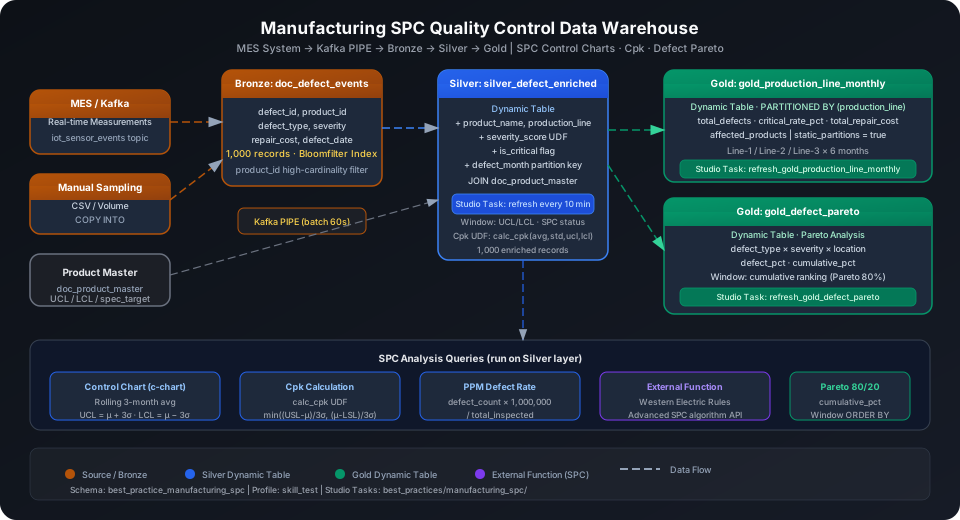
The typical data pipeline for manufacturing quality control is: online inspection reporting → real-time ingestion → raw storage (Bronze) → cleansing and labeling (Silver) → SPC metric aggregation (Gold).
Singdata Lakehouse addresses the core challenges with the following combination:
Problem
Singdata Solution
High-frequency real-time writes of MES inspection data
Kafka PIPE continuous ingestion — no need to write your own consumer
ingest_time uses DEFAULT CURRENT_TIMESTAMP() and is automatically populated when Kafka PIPE writes, so it does not need to be included in the message payload.
Create Bloomfilter Index
Both the Silver and Gold layers will filter by product_id. This is a high-cardinality column (100 products), making it a good candidate for a Bloomfilter Index.
CREATE BLOOMFILTER INDEX idx_bf_product_id
ON TABLE doc_defect_events (product_id);
⚠️ Note: CREATE BLOOMFILTER INDEX requires the same Schema context as the target table. Run USE SCHEMA first or use the -s parameter; otherwise you see an "index and table must in the same schema" error.
spec_ucl / spec_lcl are the product design specifications used for Cpk calculation. The UCL/LCL for production process control charts are computed from actual data (see the Silver layer).
Configure Kafka PIPE (Real-Time Ingestion)
Option 1: Write via Kafka (recommended)
In production, the MES system pushes inspection results to a Kafka topic and the PIPE automatically consumes them and writes to the Bronze layer. Python producer example:
Create the Kafka PIPE (the DDL phase will attempt to connect to the broker for validation):
CREATE TABLE IF NOT EXISTS best_practice_manufacturing_spc.kafka_raw_defects (value STRING);
CREATE PIPE IF NOT EXISTS best_practice_manufacturing_spc.pipe_defect_events
VIRTUAL_CLUSTER = 'DEFAULT'
BATCH_INTERVAL_IN_SECONDS = '60'
AS
COPY INTO best_practice_manufacturing_spc.kafka_raw_defects
FROM (
SELECT CAST(value AS STRING) AS value
FROM READ_KAFKA(
'<kafka-broker>:9092',
'mes_defect_events',
'',
'cz_mes_consumer',
'','','','',
'raw', 'raw',
0,
map()
)
);
💡 Tip: In a PIPE DDL, READ_KAFKA positional parameters 5–8 (start/end offsets) must be left empty — they are managed automatically by the PIPE runtime.
Option 2: INSERT simulation (when no Kafka environment is available)
💡 Tip: The examples below use cz-cli (the Singdata Lakehouse command-line tool). If cz-cli is not installed, see the cz-cli Installation and Usage Guide. If you prefer not to use the command line, you can run the SQL in Singdata Studio → Development → SQL Editor and configure / trigger scheduling tasks on the Studio → Tasks page.
If Kafka is not configured yet, you can save the data as a local CSV file, upload it to a User Volume via cz-cli, then import with COPY INTO (recommended):
Import from a local CSV file (recommended)
-- Step 1: Upload the local CSV file to User Volume via SQL PUT
PUT '/path/to/defect_events_data.csv' TO USER VOLUME FILE 'defect_events_data.csv';
-- Step 2: COPY INTO the table from User Volume
COPY INTO best_practice_manufacturing_spc.doc_defect_events
FROM USER VOLUME
USING csv
OPTIONS('header'='true', 'sep'=',', 'nullValue'='')
FILES ('defect_events_data.csv');
You can also insert a small batch of test data inline (no CSV file required):
This guide uses the Kaggle dataset (fahmidachowdhury/manufacturing-defects, 1,000 rows) written to the Bronze layer via batch INSERT to verify the full computation pipeline:
After uploading manual sampling files to a Volume, import them in bulk with COPY INTO, which automatically skips already-imported files (idempotent):
COPY INTO best_practice_manufacturing_spc.doc_defect_events
(defect_id, product_id, defect_type, defect_date,
defect_location, severity, inspection_method, repair_cost)
FROM (
SELECT
$1::INT AS defect_id,
$2::INT AS product_id,
$3 AS defect_type,
$4::DATE AS defect_date,
$5 AS defect_location,
$6 AS severity,
$7 AS inspection_method,
$8::DOUBLE AS repair_cost
FROM @best_practice_manufacturing_spc.sampling_volume/defects_data.csv
)
USING csv
OPTIONS('header'='true', 'sep'=',');
💡 Tip: COPY INTO deduplicates by file by default — running the same file multiple times will not import duplicates. Add FORCE = TRUE to allow re-importing the same file.
SQL UDFs: Cpk and Severity Score
Cpk Process Capability Index
Cpk (process capability index) measures how centered and stable a production process is relative to specification requirements. Cpk ≥ 1.33 indicates good process capability; < 1.0 means the process does not meet specifications.
CREATE OR REPLACE FUNCTION best_practice_manufacturing_spc.calc_cpk(
avg_val DOUBLE,
std_val DOUBLE,
ucl DOUBLE,
lcl DOUBLE
)
RETURNS DOUBLE
AS CASE
WHEN std_val <= 0 THEN NULL
ELSE LEAST((ucl - avg_val) / (3.0 * std_val),
(avg_val - lcl) / (3.0 * std_val))
END;
Verify the function (target value centered, process standard deviation 1.2, specification range ±5):
SELECT best_practice_manufacturing_spc.calc_cpk(100.5, 1.2, 105.0, 95.0) AS cpk_sample;
cpk_sample
----------
1.25
💡 Tip: Cpk = 1.25 corresponds to approximately 3.75σ, with PPM of about 197 — a "acceptable but still room for improvement" process state. Production line targets typically require Cpk ≥ 1.33 (PPM ≤ 64).
Severity Score UDF
Maps the text-based severity to a numeric score, making it easy to compute weighted risk in Silver layer aggregations:
CREATE OR REPLACE FUNCTION best_practice_manufacturing_spc.severity_score(
severity STRING
)
RETURNS INT
AS CASE severity
WHEN 'Critical' THEN 3
WHEN 'Moderate' THEN 2
WHEN 'Minor' THEN 1
ELSE 0
END;
Silver Layer Dynamic Table: Cleansing and Dimension Joins
The Silver layer does two things on top of the Bronze raw defect events:
LEFT JOIN doc_product_master to attach production line, product category, and specification limits to each event
Compute severity_score and is_critical flags for direct use in Gold layer aggregations
CREATE DYNAMIC TABLE IF NOT EXISTS best_practice_manufacturing_spc.silver_defect_enriched
REFRESH INTERVAL 10 MINUTE VCLUSTER DEFAULT
AS
SELECT
e.defect_id,
e.product_id,
e.defect_type,
e.defect_date,
e.defect_location,
e.severity,
e.inspection_method,
e.repair_cost,
e.ingest_time,
p.product_name,
p.production_line,
p.product_category,
p.spec_ucl,
p.spec_lcl,
p.spec_target,
best_practice_manufacturing_spc.severity_score(e.severity) AS severity_score,
CASE
WHEN e.severity = 'Critical' THEN 1
ELSE 0
END AS is_critical,
DATE_TRUNC('month', e.defect_date) AS defect_month
FROM best_practice_manufacturing_spc.doc_defect_events e
LEFT JOIN best_practice_manufacturing_spc.doc_product_master p ON e.product_id = p.product_id;
⚠️ Note: To implement periodic scheduling, do not set REFRESH INTERVAL in the Dynamic Table DDL. Instead, create a "refresh dynamic table" task in Studio with a Cron expression. This lets you attach monitoring alerts and data quality check rules to the same task (see the "Studio Refresh Task Configuration" section). The REFRESH INTERVAL 10 MINUTE in this guide's DDL sets the DT's refresh capability; actual triggering is controlled by Studio Task.
Trigger the initial refresh manually:
REFRESH DYNAMIC TABLE best_practice_manufacturing_spc.silver_defect_enriched;
SELECT COUNT(*) AS silver_count
FROM best_practice_manufacturing_spc.silver_defect_enriched;
silver_count
------------
1000
View distribution by production line and defect type (direct query on Silver layer):
SELECT
production_line,
defect_type,
COUNT(*) AS defect_count,
SUM(is_critical) AS critical_count,
ROUND(AVG(repair_cost), 2) AS avg_repair_cost
FROM best_practice_manufacturing_spc.silver_defect_enriched
GROUP BY production_line, defect_type
ORDER BY production_line, defect_count DESC;
Result interpretation: Line-3's Structural defects have the highest average repair cost (540.60), and their Critical proportion (42/122 = 34.4%) is also higher than the same defect type on Line-1 and Line-2 — this is the priority target for rework cost reduction.
SPC Control Chart: Sliding Window UCL/LCL Calculation
SPC control charts calculate process control upper and lower limits (UCL/LCL) from the statistical process mean (μ) and standard deviation (σ) to identify out-of-control points. This section implements a c control chart (attribute count type) using window functions, suitable for defect count data.
Control limit formulas:
UCL = μ + 3σ
LCL = max(0, μ − 3σ) (count data lower limit cannot be negative)
WITH monthly_stats AS (
-- First aggregate by product + month to avoid nested aggregate errors
SELECT
product_id,
defect_month,
COUNT(*) AS monthly_defects
FROM best_practice_manufacturing_spc.silver_defect_enriched
GROUP BY product_id, defect_month
)
SELECT
product_id,
defect_month,
monthly_defects,
-- 3-month rolling average (moving average)
ROUND(AVG(monthly_defects) OVER (
PARTITION BY product_id
ORDER BY defect_month
ROWS BETWEEN 2 PRECEDING AND CURRENT ROW
), 2) AS rolling_3m_avg,
-- Full-history process mean (control chart center line)
ROUND(AVG(monthly_defects) OVER (PARTITION BY product_id), 2) AS process_mean,
ROUND(STDDEV_SAMP(monthly_defects) OVER (PARTITION BY product_id), 2) AS process_std,
-- UCL / LCL
ROUND(AVG(monthly_defects) OVER (PARTITION BY product_id)
+ 3 * STDDEV_SAMP(monthly_defects) OVER (PARTITION BY product_id), 2) AS ucl,
ROUND(GREATEST(0, AVG(monthly_defects) OVER (PARTITION BY product_id)
- 3 * STDDEV_SAMP(monthly_defects) OVER (PARTITION BY product_id)), 2) AS lcl,
-- Process status determination
CASE
WHEN monthly_defects > AVG(monthly_defects) OVER (PARTITION BY product_id)
+ 3 * STDDEV_SAMP(monthly_defects) OVER (PARTITION BY product_id)
THEN 'OUT_OF_CONTROL'
WHEN monthly_defects < GREATEST(0, AVG(monthly_defects) OVER (PARTITION BY product_id)
- 3 * STDDEV_SAMP(monthly_defects) OVER (PARTITION BY product_id))
THEN 'OUT_OF_CONTROL'
ELSE 'IN_CONTROL'
END AS spc_status
FROM monthly_stats
WHERE product_id IN (10, 14, 15)
ORDER BY product_id, defect_month;
Result interpretation: All sample products (10, 14, 15) are IN_CONTROL during the observation period — no monthly defect count exceeds UCL. Product 15 has the smallest process variation (σ = 0.71), indicating the most stable inspection process. Product 14's June defect count of 4 is approaching the UCL (5.49) and warrants monitoring.
⚠️ Note: Window functions do not allow nested aggregates. Writing SUM(SUM(col)) OVER (...) will produce an "aggregate function cannot contain another aggregate function" error. The correct approach is to first complete the GROUP BY aggregation in a CTE, then apply window functions to the result columns in the outer query.
Cpk Analysis: Process Capability by Production Line
Apply the calc_cpk UDF to repair cost data aggregated by production line (using repair cost as a substitute for physical dimension measurements for demonstration):
WITH line_stats AS (
SELECT
production_line,
COUNT(*) AS total_defects,
ROUND(AVG(repair_cost), 2) AS avg_repair_cost,
ROUND(STDDEV_SAMP(repair_cost), 2) AS std_repair_cost
FROM best_practice_manufacturing_spc.silver_defect_enriched
GROUP BY production_line
)
SELECT
production_line,
total_defects,
avg_repair_cost,
std_repair_cost,
ROUND(best_practice_manufacturing_spc.calc_cpk(
avg_repair_cost,
std_repair_cost,
1000.0, -- specification upper limit (maximum acceptable repair cost)
0.0 -- specification lower limit
), 3) AS repair_cost_cpk
FROM line_stats
ORDER BY production_line;
Result interpretation: All three production lines have repair_cost_cpk far below 1.0, indicating that the repair cost distribution is too variable relative to the specification range (0–1000). The main cause is the wide cost distribution (10–1000), with a standard deviation of about 290. Line-2 has the highest Cpk (0.587), with slightly better cost concentration than the other two lines.
Gold Layer Dynamic Table: Monthly Production Line Aggregation
The Gold layer aggregates Silver data at production_line + defect_month granularity to output monthly defect trends and Critical rates for quality management dashboards.
CREATE DYNAMIC TABLE IF NOT EXISTS best_practice_manufacturing_spc.gold_production_line_monthly
PARTITIONED BY (production_line)
REFRESH INTERVAL 10 MINUTE VCLUSTER DEFAULT
TBLPROPERTIES ('static_partitions' = 'true')
AS
SELECT
production_line,
defect_month,
COUNT(*) AS total_defects,
SUM(is_critical) AS critical_defects,
ROUND(SUM(is_critical)*100.0/COUNT(*), 2) AS critical_rate_pct,
ROUND(SUM(repair_cost), 2) AS total_repair_cost,
ROUND(AVG(repair_cost), 2) AS avg_repair_cost,
COUNT(DISTINCT product_id) AS affected_products
FROM best_practice_manufacturing_spc.silver_defect_enriched
GROUP BY production_line, defect_month;
⚠️ Note: Partitioned Dynamic Tables must explicitly declare TBLPROPERTIES ('static_partitions' = 'true') to use static partition mode. Without this declaration, the system defaults to dynamic partition inference, which may cause partition data to be incorrectly overwritten during incremental refresh.
View Line-3 monthly trend (the production line with the most volatile Critical rate):
SELECT production_line, defect_month, total_defects, critical_rate_pct, total_repair_cost
FROM best_practice_manufacturing_spc.gold_production_line_monthly
WHERE production_line = 'Line-3'
ORDER BY defect_month;
Result interpretation: Line-3 had the highest defect count in January (86), but its Critical rate (38.37%) was not the highest for the period — April's Critical rate reached 48.89% with a lower total defect count (45). This "small batch but high severity" pattern suggests a possible raw material batch issue and warrants further investigation by product_id.
Gold Layer Dynamic Table: Defect Pareto Analysis
Pareto analysis applies the "80/20 rule" to identify the small number of root cause categories responsible for the majority of defect costs.
CREATE DYNAMIC TABLE IF NOT EXISTS best_practice_manufacturing_spc.gold_defect_pareto
REFRESH INTERVAL 10 MINUTE VCLUSTER DEFAULT
AS
SELECT
defect_type,
severity,
defect_location,
COUNT(*) AS defect_count,
ROUND(SUM(repair_cost), 2) AS total_repair_cost,
ROUND(COUNT(*)*100.0 / SUM(COUNT(*)) OVER (), 2) AS defect_pct,
SUM(COUNT(*)) OVER (
ORDER BY COUNT(*) DESC
ROWS BETWEEN UNBOUNDED PRECEDING AND CURRENT ROW
) AS cumulative_count,
ROUND(SUM(COUNT(*)) OVER (
ORDER BY COUNT(*) DESC
ROWS BETWEEN UNBOUNDED PRECEDING AND CURRENT ROW
) * 100.0 / SUM(COUNT(*)) OVER (), 2) AS cumulative_pct
FROM best_practice_manufacturing_spc.silver_defect_enriched
GROUP BY defect_type, severity, defect_location
ORDER BY defect_count DESC;
Result interpretation: The Top 10 categories account for 42.60% of total defects. Surface-location Structural defects are the most numerous, but when sorted by repair cost, Functional × Critical × Component (39 cases, total cost 23,047) has the highest per-unit cost (591 per case). Recommended Pareto remediation priority: tackle Surface Structural Minor defects first (highest count), then Component Functional Critical defects (highest per-unit cost).
View total comparison across the three main defect types:
SELECT defect_type,
SUM(defect_count) AS total,
ROUND(SUM(total_repair_cost), 2) AS total_cost
FROM best_practice_manufacturing_spc.gold_defect_pareto
GROUP BY defect_type
ORDER BY total DESC;
PPM (Parts Per Million) measures the number of defects per million units and is the standard quality metric in SPC and Six Sigma frameworks:
SELECT
defect_type,
COUNT(*) AS defect_count,
ROUND(COUNT(*) * 1000000.0 / 1000, 0) AS ppm_rate
FROM best_practice_manufacturing_spc.doc_defect_events
GROUP BY defect_type
ORDER BY ppm_rate DESC;
Result interpretation: All three defect types have PPM above 300,000, corresponding to approximately 2σ (the Six Sigma target is 3.4 PPM, i.e., 6σ). This is a characteristic of the dataset — all 1,000 records are defects. In practice, the denominator should be the total number of inspected units (including conforming ones).
Studio Refresh Task Configuration
Periodic Dynamic Table refreshes are scheduled via Studio Tasks. Monitoring alerts and data quality check rules can be attached to the same task.
Use cz-cli task commands to create refresh tasks (equivalent to operating in the Studio UI):
After tasks are created, you can see them at best_practices/manufacturing_spc/ in the Studio interface. Click a task → Alert Configuration to bind rules such as "notify on refresh failure" or "alert when row count is 0". Publish the tasks when ready:
MES System (Kafka) Manual Sampling (CSV)
│ │
▼ Kafka PIPE (60s batch) ▼ COPY INTO (Volume)
kafka_raw_defects doc_defect_events (Bronze)
│ Bloomfilter Index (product_id)
doc_product_master ────┤ LEFT JOIN
(production_line │ UCL / LCL / spec_target)
│
▼ Studio Task: refresh every 10 min
silver_defect_enriched (Dynamic Table)
severity_score UDF · is_critical · defect_month
│ │
┌─────────────────┘ └──────────────────┐
▼ Studio Task: refresh every 10 min ▼
gold_production_line_monthly (DT) gold_defect_pareto (DT)
PARTITIONED BY production_line cumulative_pct (Pareto 80%)
static_partitions = true Window Function ORDER BY
│ │
▼ ▼
Quality Dashboard Root Cause Analysis
Cpk · UCL/LCL 80/20 Defect Focus
Notes
Window functions do not support nested aggregates: Writing STDDEV_SAMP(COUNT(*)) OVER (...) — nesting an aggregate function inside a window function — will produce an "aggregate function cannot contain another aggregate function" error. The correct approach is to first complete the GROUP BY aggregation in a CTE, then apply window functions to the result columns in the outer query.
Partitioned Dynamic Tables must declare static_partitions: Dynamic Tables with PARTITIONED BY must set TBLPROPERTIES ('static_partitions' = 'true'). Without this declaration, the system uses dynamic partition inference, which may cause existing partition data to be overwritten or lost during incremental refresh.
Bloomfilter Index does not automatically apply to existing data: CREATE BLOOMFILTER INDEX only takes effect for data written after the index is created. It does not support BUILD INDEX to cover existing data (the BLOOMFILTER type lacks this capability; covering existing data requires rebuilding the table).
Dynamic Table refresh scheduling is managed through Studio Task: Do not rely on REFRESH INTERVAL in the DDL for production scheduling. Configure a Cron expression in Studio Task instead — this lets you bind alert rules and data quality checks to the same task for unified observability.
Denominator selection in PPM calculation: The PPM demonstration in this guide uses 1,000 inspection records as the denominator, for illustration purposes only. In production, the PPM denominator should be the total number of inspected units (including conforming ones), which typically comes from MES production completion records and requires an additional join.
Handling std_val = 0 in Cpk: The calc_cpk UDF returns NULL when std_val <= 0 to avoid division by zero. This occurs when the sample size is 1. Before Gold layer aggregation, filter out groups with insufficient sample sizes (HAVING COUNT(*) > 1).