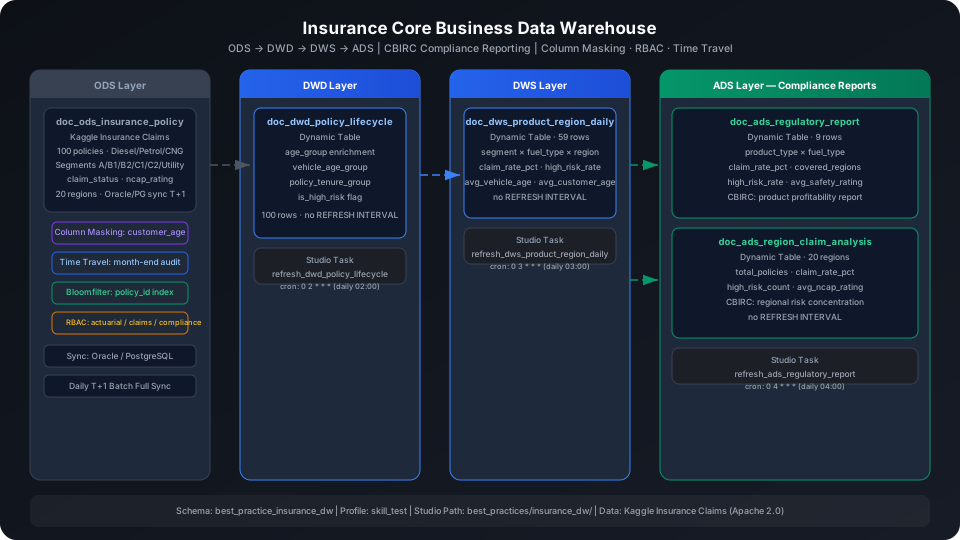
Insurance Core Business Data Warehouse (Compliance Reporting) Best Practices
Integrate policy, claims, and customer data from insurance core systems into a multi-layer data warehouse to meet CBIRC regulatory reporting requirements. This guide uses the Kaggle Insurance Claims dataset (100 auto insurance policies) to walk through the complete ODS → DWD → DWS → ADS pipeline, covering five key platform capabilities: Oracle/PostgreSQL batch sync, Dynamic Table scheduled refresh, Time Travel historical reconciliation, Column Masking data de-identification, and RBAC fine-grained authorization.
Overview
Insurance core business data warehouses face the following typical challenges:
Problem
Solution
Daily T+1 full sync from core systems (Oracle/PG) to the data warehouse
Batch offline sync task; ODS layer preserves original field structure
Daily refresh of DWS/ADS layers to compute product profitability and regional risk
Dynamic Table — no REFRESH INTERVAL in DDL; scheduled via Studio Task
Month-end reconciliation and regulatory historical retrieval require restoring data state at any point in time
Time Travel — TIMESTAMP AS OF queries historical snapshots
Sensitive fields such as policyholder ID numbers, bank card numbers, and medical information require masking
Column Masking bound to columns, transparently applied to non-privileged users
Tiered access management for actuarial, claims, compliance, and IT operations departments
RBAC with fine-grained role authorization and principle of least privilege
SQL Commands Used
Command / Function
Purpose
Notes
CREATE TABLE
Create ODS layer raw policy table
Regular table, used as upstream source for Dynamic Tables
CREATE BLOOMFILTER INDEX
Create a Bloomfilter index on the policy_id column
Speeds up point queries on high-cardinality policy numbers
-- Step 1: Upload the local CSV file to User Volume via SQL PUT
PUT '/path/to/your/data.csv' TO USER VOLUME FILE 'data.csv';
-- Step 2: COPY INTO the table from User Volume
COPY INTO best_practice_insurance_dw.doc_ods_insurance_policy
FROM USER VOLUME
USING csv
OPTIONS('header'='true', 'sep'=',', 'nullValue'='')
FILES ('data.csv');
You can also insert a small batch of test data inline (no CSV file required):
Verify the row count after loading:
SELECT COUNT(*) AS ods_row_count
FROM best_practice_insurance_dw.doc_ods_insurance_policy;
ods_row_count
-------------
100
Create Bloomfilter Index
policy_id is the core business primary key, a high-cardinality column. Subsequent DWD/DWS/ADS layers all join on policy number, making it a good candidate for a Bloomfilter Index.
CREATE BLOOMFILTER INDEX IF NOT EXISTS idx_bf_policy_id
ON TABLE doc_ods_insurance_policy (policy_id);
⚠️ Note: CREATE BLOOMFILTER INDEX requires the same Schema context as the target table. Run USE SCHEMA first or use the -s parameter; otherwise you see an "index and table must in the same schema" error.
Column Masking: Customer Age De-Identification
Compliance requirement: customer_age is personal sensitive information. Actuarial staff and compliance administrators can see the exact age; all other users can only see an "age band" (precision reduced to the nearest multiple of 10).
-- Create masking function
CREATE OR REPLACE FUNCTION best_practice_insurance_dw.mask_customer_age(age INT)
RETURNS INT
AS CASE
WHEN current_user() IN ('privileged_user') THEN age -- replace with actual authorized usernames
ELSE CAST(FLOOR(CAST(age AS DOUBLE) / 10.0) * 10 AS INT)
END;
-- Bind to the customer_age column
ALTER TABLE best_practice_insurance_dw.doc_ods_insurance_policy
CHANGE COLUMN customer_age
SET MASK best_practice_insurance_dw.mask_customer_age;
Replace 'privileged_user' with the actual usernames that need to see plaintext data. Column Masking matches the current connection's username via current_user(); all authorized usernames must be explicitly listed in the IN() list.
Verify the binding (admin account sees exact ages):
SELECT policy_id, customer_age
FROM best_practice_insurance_dw.doc_ods_insurance_policy
WHERE policy_id IN ('POL007194', 'POL016745', 'POL045360')
ORDER BY policy_id;
⚠️ Note: Column Masking takes effect transparently on all downstream queries (including Dynamic Tables). When the DWD layer queries ODS directly, non-privileged users see customer_age already as a masked age-band integer.
DWD (Detail Data Layer): Policy Lifecycle Standardization
The DWD layer does three things on top of the ODS raw policy data:
Adds customer age bands (age_group), vehicle age bands (vehicle_age_group), and policy tenure bands (policy_tenure_group)
Flags high-risk policies (is_high_risk): vehicle age ≥ 5 years or NCAP safety rating = 0
Retains all original fields for DWS/ADS layer aggregations on any dimension
Create Tables
CREATE DYNAMIC TABLE IF NOT EXISTS best_practice_insurance_dw.doc_dwd_policy_lifecycle
AS
SELECT
policy_id,
subscription_length,
vehicle_age,
customer_age,
region_code,
region_density,
segment,
model,
fuel_type,
engine_type,
airbags,
displacement,
cylinder,
transmission_type,
ncap_rating,
claim_status,
-- Customer age bands
CASE
WHEN customer_age < 30 THEN 'Young (<30)'
WHEN customer_age < 45 THEN 'Middle (30-44)'
WHEN customer_age < 60 THEN 'Senior (45-59)'
ELSE 'Elderly (60+)'
END AS age_group,
-- Vehicle age bands
CASE
WHEN vehicle_age < 1 THEN 'New (<1yr)'
WHEN vehicle_age < 3 THEN 'Recent (1-3yr)'
WHEN vehicle_age < 5 THEN 'Mid (3-5yr)'
ELSE 'Old (5+yr)'
END AS vehicle_age_group,
-- Policy tenure bands
CASE
WHEN subscription_length < 3 THEN 'Short (<3yr)'
WHEN subscription_length < 7 THEN 'Medium (3-7yr)'
ELSE 'Long (7+yr)'
END AS policy_tenure_group,
-- High-risk flag: vehicle age >= 5 years or NCAP rating = 0
CASE WHEN vehicle_age >= 5 OR ncap_rating = 0 THEN 1 ELSE 0 END AS is_high_risk
FROM best_practice_insurance_dw.doc_ods_insurance_policy;
⚠️ Note: Do not set REFRESH INTERVAL in the DDL. Refresh scheduling is managed through Studio Tasks (see the "Schedule Refresh Tasks" section below).
Trigger the initial refresh manually:
REFRESH DYNAMIC TABLE best_practice_insurance_dw.doc_dwd_policy_lifecycle;
SELECT COUNT(*) AS dwd_count
FROM best_practice_insurance_dw.doc_dwd_policy_lifecycle;
dwd_count
---------
100
Analysis Example: Claim Rate by Age Band × Vehicle Age Band
SELECT
age_group,
vehicle_age_group,
COUNT(*) AS policy_count,
SUM(claim_status) AS claim_count
FROM best_practice_insurance_dw.doc_dwd_policy_lifecycle
GROUP BY age_group, vehicle_age_group
ORDER BY claim_count DESC;
Result interpretation: Middle-aged customers (30–44) are the largest policy segment (60 policies) and also account for the most claims (3). Notably, the "vehicle age 1–3 years" band has higher claim counts than "vehicle age 5+ years", suggesting that recent vehicle buyers have higher risk exposure, possibly related to newer drivers' habits.
DWS (Summary Data Layer): Product Type / Region Aggregation
The DWS layer aggregates DWD data at the granularity of segment × fuel_type × region_code × age_group, producing metrics such as claim rate and high-risk rate for direct use by ADS compliance reports.
Create Tables
CREATE DYNAMIC TABLE IF NOT EXISTS best_practice_insurance_dw.doc_dws_product_region_daily
AS
SELECT
segment,
fuel_type,
region_code,
age_group,
COUNT(*) AS policy_count,
SUM(claim_status) AS claim_count,
ROUND(SUM(claim_status) * 100.0 / COUNT(*), 4) AS claim_rate_pct,
ROUND(AVG(vehicle_age), 2) AS avg_vehicle_age,
ROUND(AVG(customer_age), 2) AS avg_customer_age,
ROUND(AVG(subscription_length), 2) AS avg_subscription_length,
SUM(is_high_risk) AS high_risk_count,
ROUND(SUM(is_high_risk) * 100.0 / COUNT(*), 4) AS high_risk_rate_pct
FROM best_practice_insurance_dw.doc_dwd_policy_lifecycle
GROUP BY segment, fuel_type, region_code, age_group;
Trigger the initial manual refresh and verify:
REFRESH DYNAMIC TABLE best_practice_insurance_dw.doc_dws_product_region_daily;
SELECT COUNT(*) AS dws_count
FROM best_practice_insurance_dw.doc_dws_product_region_daily;
dws_count
---------
59
Segment-region combinations with claims:
SELECT segment, fuel_type, region_code,
policy_count, claim_count, claim_rate_pct, high_risk_count
FROM best_practice_insurance_dw.doc_dws_product_region_daily
WHERE claim_count > 0
ORDER BY claim_rate_pct DESC;
Result interpretation: Region C10's B2 segment (Petrol) has a 100% claim rate but only 1 policy — small-sample noise. Region C2's C1 and C2 segments (Diesel) have high claim rates (50% and 25%) across multiple policies, warranting close attention. Region C3's segment A (CNG) has all 5 policies flagged as high-risk (ncap_rating = 0), indicating insufficient safety equipment on budget vehicles in this region.
ADS (Application Data Layer): CBIRC Compliance Reports
Product Type Profitability Analysis Report
Aggregate by coverage segment and fuel type to produce claim rates, regional coverage, and high-risk policy counts, meeting CBIRC product management analysis reporting requirements.
CREATE DYNAMIC TABLE IF NOT EXISTS best_practice_insurance_dw.doc_ads_regulatory_report
AS
SELECT
segment AS product_type,
fuel_type,
COUNT(*) AS total_policies,
SUM(claim_status) AS total_claims,
ROUND(SUM(claim_status) * 100.0 / COUNT(*), 4) AS claim_rate_pct,
COUNT(DISTINCT region_code) AS covered_regions,
SUM(is_high_risk) AS high_risk_policies,
ROUND(SUM(is_high_risk) * 100.0 / COUNT(*), 4) AS high_risk_rate_pct,
ROUND(AVG(customer_age), 2) AS avg_customer_age,
ROUND(AVG(vehicle_age), 2) AS avg_vehicle_age,
ROUND(AVG(subscription_length), 2) AS avg_policy_tenure,
ROUND(AVG(ncap_rating), 2) AS avg_safety_rating
FROM best_practice_insurance_dw.doc_dwd_policy_lifecycle
GROUP BY segment, fuel_type;
REFRESH DYNAMIC TABLE best_practice_insurance_dw.doc_ads_regulatory_report;
SELECT product_type, fuel_type, total_policies, total_claims,
claim_rate_pct, covered_regions, high_risk_policies, avg_safety_rating
FROM best_practice_insurance_dw.doc_ads_regulatory_report
ORDER BY total_policies DESC;
Segment A (basic) CNG is the largest segment (27 policies), but 100% are flagged as high-risk (ncap_rating = 0), indicating this product type covers many low-cost vehicles with insufficient safety equipment — the compliance department should take note.
C1 Diesel has the highest claim rate (20%) with an average NCAP score of 4, showing that high-end safety equipment does not significantly reduce accident probability for C1-class vehicles.
B2 Petrol has the highest policy volume with a claim rate of only 3.2%, covering 11 regions — the most profitable product line.
Regional Risk Concentration Report
CREATE DYNAMIC TABLE IF NOT EXISTS best_practice_insurance_dw.doc_ads_region_claim_analysis
AS
SELECT
region_code,
COUNT(*) AS total_policies,
SUM(claim_status) AS total_claims,
ROUND(SUM(claim_status) * 100.0 / COUNT(*), 4) AS claim_rate_pct,
SUM(is_high_risk) AS high_risk_count,
ROUND(AVG(subscription_length), 2) AS avg_policy_tenure,
ROUND(AVG(vehicle_age), 2) AS avg_vehicle_age,
SUM(CASE WHEN ncap_rating >= 3 THEN 1 ELSE 0 END) AS high_safety_policies,
ROUND(AVG(ncap_rating), 2) AS avg_ncap_rating
FROM best_practice_insurance_dw.doc_dwd_policy_lifecycle
GROUP BY region_code;
REFRESH DYNAMIC TABLE best_practice_insurance_dw.doc_ads_region_claim_analysis;
SELECT region_code, total_policies, total_claims, claim_rate_pct,
high_risk_count, avg_ncap_rating
FROM best_practice_insurance_dw.doc_ads_region_claim_analysis
ORDER BY total_policies DESC
LIMIT 10;
Result interpretation: Region C2 has the most policies (21) with a 9.5% claim rate and 6 high-risk policies — the region with the greatest overall risk exposure. Region C3 has 10 high-risk policies (62.5% share) with an average NCAP score of only 0.94, indicating that vehicle safety equipment in this region is below average. Adjusting rates to redistribute risk is advisable.
Policy Tenure × Age Cross-Risk Analysis
This is the most common cross-dimensional analysis in compliance reports, used to identify high-risk customer segments:
SELECT
age_group,
policy_tenure_group,
COUNT(*) AS policy_count,
SUM(claim_status) AS claim_count,
ROUND(SUM(claim_status) * 100.0 / COUNT(*), 4) AS claim_rate_pct
FROM best_practice_insurance_dw.doc_dwd_policy_lifecycle
GROUP BY age_group, policy_tenure_group
ORDER BY claim_rate_pct DESC;
Result interpretation: Middle-aged (30–44) + long-term policies (7+ years) have the highest claim rate (11.5%), with 3 claims from 26 policies. The long policy tenure for this group indicates accumulated legacy risk; re-evaluating vehicle condition at renewal is advisable.
Schedule Refresh Tasks (Studio Task)
Dynamic Table DDL does not include REFRESH INTERVAL. Instead, create SQL-type scheduled tasks in Studio. The benefit is that monitoring alerts and data quality check rules can be added to the same task.
First create a Studio folder to store the tasks, and note the returned folder ID. Folder IDs differ across customer environments — replace --folder with the ID you get from this step:
💡 Tip: The examples below use cz-cli (the Singdata Lakehouse command-line tool). If cz-cli is not installed, see the cz-cli Installation and Usage Guide. If you prefer not to use the command line, you can run the SQL in Singdata Studio → Development → SQL Editor and configure / trigger scheduling tasks on the Studio → Tasks page.
💡 Tip: Tasks are in draft state by default after creation. Run cz-cli task deploy <task-name> -p skill_test to publish them. In the Studio UI you can attach data quality checks to the same task (e.g., alert on abnormal fluctuations in ADS-layer claim rates) without creating a separate monitoring task.
Time Travel: Month-End Reconciliation and Regulatory Historical Retrieval
Regulatory audits often require precisely restoring data state at a specific point in time. Singdata Lakehouse Time Travel supports queries at any historical timestamp without needing additional backups.
View the ODS table's version history:
DESC HISTORY best_practice_insurance_dw.doc_ods_insurance_policy;
Restore data state at a specific point in time (e.g., a historical snapshot after T+1 month-end sync completion):
-- Query the historical snapshot when 40 rows had been written
SELECT COUNT(*) AS historical_count
FROM best_practice_insurance_dw.doc_ods_insurance_policy
TIMESTAMP AS OF '2026-06-06T22:48:26.136';
historical_count
----------------
40
Typical month-end reconciliation usage:
-- Compare claim rate differences between this month-end and last month-end
WITH current_month AS (
SELECT
segment,
SUM(claim_status) AS claims,
COUNT(*) AS policies
FROM best_practice_insurance_dw.doc_ods_insurance_policy
GROUP BY segment
),
last_month AS (
SELECT
segment,
SUM(claim_status) AS claims,
COUNT(*) AS policies
FROM best_practice_insurance_dw.doc_ods_insurance_policy
TIMESTAMP AS OF '2026-06-06T22:48:26.136' -- replace with the last month-end timestamp
GROUP BY segment
)
SELECT
c.segment,
c.policies AS curr_policies,
c.claims AS curr_claims,
l.policies AS prev_policies,
l.claims AS prev_claims,
ROUND((c.claims * 1.0 / c.policies - l.claims * 1.0 / l.policies) * 100, 4) AS claim_rate_delta_pct
FROM current_month c
LEFT JOIN last_month l ON c.segment = l.segment
ORDER BY claim_rate_delta_pct DESC;
💡 Tip: TIMESTAMP AS OF accepts only literal constants — dynamic expressions like NOW() - INTERVAL 1 MONTH are not supported. In production, parameterize the timestamp and pass in scheduling variables such as ${bizdate} via Studio Task.
RBAC: Fine-Grained Access Tiering
Different insurance departments have significantly different data access requirements:
Role
Access Scope
Typical Use Case
Actuarial (role_actuarial)
ODS + DWD + DWS; can see customer_age (exact values)
Rate actuarial work, risk modeling
Claims (role_claims)
ODS + DWD; can see all policy fields, no write access
Claims processing, fraud investigation
Compliance (role_compliance)
ADS read-only; cannot see raw customer_age
Regulatory report generation, compliance review
IT Operations (role_ops)
Schema-level DDL access; cannot query data
Table structure management, index maintenance
Example for creating roles and assigning permissions:
-- Create roles
CREATE ROLE IF NOT EXISTS role_compliance;
CREATE ROLE IF NOT EXISTS role_actuarial;
CREATE ROLE IF NOT EXISTS role_claims;
-- Compliance: grant SELECT on only the two ADS Dynamic Table reports
GRANT SELECT ON DYNAMIC TABLE best_practice_insurance_dw.doc_ads_regulatory_report TO ROLE role_compliance;
GRANT SELECT ON DYNAMIC TABLE best_practice_insurance_dw.doc_ads_region_claim_analysis TO ROLE role_compliance;
-- Actuarial: grant SELECT on ODS + DWD + DWS, and add to the plaintext customer_age whitelist
GRANT SELECT ON TABLE best_practice_insurance_dw.doc_ods_insurance_policy TO ROLE role_actuarial;
GRANT SELECT ON TABLE best_practice_insurance_dw.doc_dwd_policy_lifecycle TO ROLE role_actuarial;
GRANT SELECT ON TABLE best_practice_insurance_dw.doc_dws_product_region_daily TO ROLE role_actuarial;
-- Claims: grant SELECT on ODS + DWD
GRANT SELECT ON TABLE best_practice_insurance_dw.doc_ods_insurance_policy TO ROLE role_claims;
GRANT SELECT ON TABLE best_practice_insurance_dw.doc_dwd_policy_lifecycle TO ROLE role_claims;
💡 Tip: The Column Masking whitelist is controlled by current_user() IN (...) in the masking function. To add a user with access to plaintext, just update the function definition — no need to rebuild the masking policy.
Data Warehouse Object Summary
After the full build, all objects under the best_practice_insurance_dw schema:
Do not set REFRESH INTERVAL in Dynamic Table DDL: None of the Dynamic Tables in this guide include REFRESH INTERVAL in their DDL. Refresh scheduling is managed centrally through Studio Tasks, which lets you attach monitoring alerts and data quality check rules to the same task.
Partitioned Dynamic Tables require static partitions: If you need to partition the ADS layer by month, you must explicitly declare PARTITION BY with static partition options — dynamic partition inference is not supported.
Time Travel timestamp limitation: TIMESTAMP AS OF accepts only literal constants; dynamic expressions like NOW() - INTERVAL 1 MONTH are not supported. DESC HISTORY returns UTC timestamps; be aware of your local timezone offset (default UTC+8).
Column Masking works transparently on Dynamic Tables: When the DWD layer queries ODS, non-authorized users see customer_age as a masked age-band integer, and this masked value is also what is stored in the DWD table. If the actuarial team needs exact precision, they should query ODS directly with a privileged account.
Bloomfilter Index does not automatically apply to existing data: CREATE BLOOMFILTER INDEX only takes effect for data written after the index is created. For existing data in the table, the Bloomfilter filtering acceleration is limited. The BLOOMFILTER type does not support BUILD INDEX; covering existing data requires rebuilding the table.
RBAC permission change synchronization: Column Masking whitelist changes take effect immediately, but GRANT/REVOKE permission changes may require users to restart their sessions before taking effect in some scenarios.
⚠️ Note (pending manual verification): Column Masking currently matches by username via current_user(), and all usernames authorized to view plaintext must be added individually to the IN() list in the masking function. If your Lakehouse version supports role-based dynamic matching (e.g., HAS_ROLE('role_name')), you can use roles instead of a username list for easier maintenance. Contact Singdata technical support to confirm whether your version supports this function.