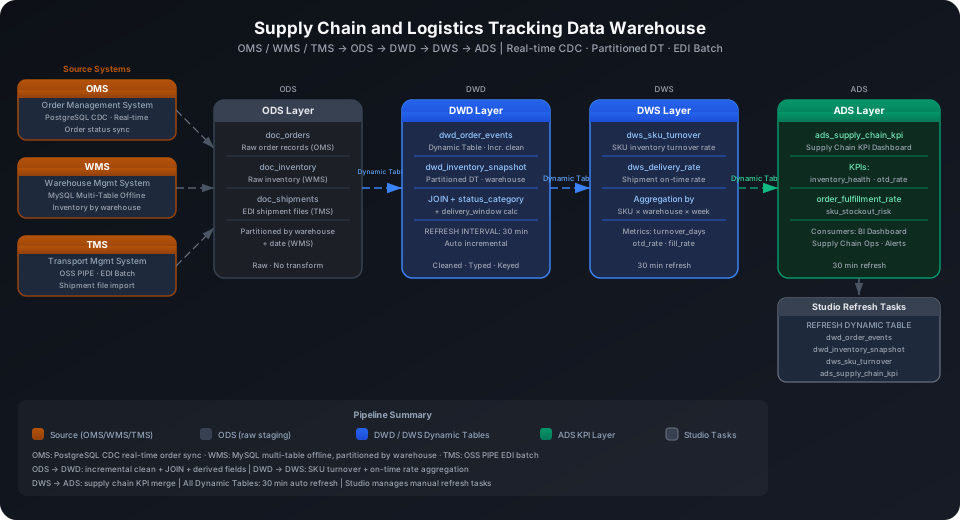
Build a Supply Chain and Logistics Tracking Data Warehouse
A supply chain data warehouse faces the challenge of three parallel data pipelines with different system latencies: OMS order status needs second-level visibility, WMS inventory snapshots sync in daily batches, and TMS logistics EDI files arrive periodically. Using the Kaggle retail dataset (orders, inventory, logistics, and suppliers, covering the full ODS→DWD→DWS→ADS pipeline), this guide demonstrates how to use Singdata Lakehouse to integrate three heterogeneous data sources into a unified supply chain visibility data warehouse that monitors SKU inventory turnover and shipment on-time rates.
Overview
Problem
Singdata Solution
OMS order status changes need real-time sync to the warehouse; hour-level delay is unacceptable
PostgreSQL CDC real-time sync; order status changes written to ODS in seconds
WMS warehouse inventory has large volume; historical snapshot queries filter by warehouse
MySQL multi-table offline sync + PARTITIONED BY (warehouse_id, dt) for partition pruning
Logistics providers supply EDI files that need periodic batch import
OSS PIPE continuously monitors the bucket; new files automatically trigger COPY INTO
Multi-layer aggregation (DWD→DWS→ADS) has a complex dependency chain that needs automatic orchestration
Normalize multi-source status codes to unified business semantics
DATEDIFF
Calculate in-transit days transit_days
Supports COALESCE to handle undelivered shipments
DATE_FORMAT
Monthly group statistics (yyyy-MM)
Used for ADS monthly SLA reports
NULLIF
Avoid division-by-zero errors
Divide by NULLIF(count, 0) when computing SLA compliance rate
Prerequisites
Use a dedicated Schema to isolate all test tables in this guide:
CREATE SCHEMA IF NOT EXISTS best_practice_supply_chain;
💡 Tip: The examples below use cz-cli (the Singdata Lakehouse command-line tool). If cz-cli is not installed, see the cz-cli Installation and Usage Guide. You can also run SQL in Development → SQL Editor in Singdata Studio and configure or trigger scheduled tasks under Studio → Tasks.
cz-cli sql "CREATE SCHEMA IF NOT EXISTS best_practice_supply_chain" -p skill_test --write
Result:
{"data":{},"time_ms":101}
ODS (Raw Data Layer): Three-Channel Heterogeneous Data Ingestion
The ODS layer maps to three source systems, each ingested with a different method.
Create Tables
OMS Order Table (PostgreSQL CDC Target Table)
CREATE TABLE IF NOT EXISTS best_practice_supply_chain.doc_ods_orders (
order_id BIGINT,
order_date DATE,
customer_id BIGINT,
store_id INT,
status STRING,
total_amount DECIMAL(12,2),
currency STRING,
created_at TIMESTAMP,
updated_at TIMESTAMP
)
COMMENT 'ODS: raw orders from OMS (synced via PostgreSQL CDC)'
PARTITIONED BY (dt STRING);
OMS Order Items Table (PostgreSQL CDC Target Table)
CREATE TABLE IF NOT EXISTS best_practice_supply_chain.doc_ods_order_items (
item_id BIGINT,
order_id BIGINT,
product_id BIGINT,
sku_code STRING,
quantity INT,
unit_price DECIMAL(10,2),
discount DECIMAL(10,2),
warehouse_id INT,
created_at TIMESTAMP
)
COMMENT 'ODS: raw order line items from OMS'
PARTITIONED BY (dt STRING);
TMS Shipment Table (OSS PIPE Target Table)
CREATE TABLE IF NOT EXISTS best_practice_supply_chain.doc_ods_shipments (
shipment_id BIGINT,
order_id BIGINT,
carrier_code STRING,
tracking_number STRING,
origin_warehouse INT,
dest_city STRING,
dest_province STRING,
shipped_at TIMESTAMP,
expected_delivery DATE,
actual_delivery DATE,
status STRING,
created_at TIMESTAMP
)
COMMENT 'ODS: logistics shipment events from TMS / EDI files (via OSS PIPE)'
PARTITIONED BY (dt STRING);
WMS Supplier Master Table
CREATE TABLE IF NOT EXISTS best_practice_supply_chain.doc_ods_suppliers (
supplier_id INT,
supplier_name STRING,
contact_name STRING,
country STRING,
city STRING,
sla_days INT,
tier STRING,
created_at TIMESTAMP
)
COMMENT 'ODS: supplier master data from WMS';
CREATE TABLE IF NOT EXISTS best_practice_supply_chain.doc_ods_inventory (
snapshot_id BIGINT,
snapshot_date DATE,
warehouse_id INT,
sku_code STRING,
product_id BIGINT,
quantity_on_hand INT,
quantity_reserved INT,
quantity_in_transit INT,
reorder_point INT,
created_at TIMESTAMP
)
COMMENT 'ODS: WMS inventory snapshots (synced via MySQL batch offline sync)'
PARTITIONED BY (dt STRING);
⚠️ Note: Columns in PARTITIONED BY cannot share names with columns in the columns definition, otherwise you get a key.found error. Although the inventory table is queried on both warehouse and date dimensions, only one partition column dt STRING is defined; the warehouse dimension is filtered via a WHERE clause pushdown.
OSS PIPE Ingestion for TMS EDI Files
Logistics providers upload shipment EDI files to an OSS bucket in the early morning each day. A PIPE automatically imports them into the shipment table:
-- Prerequisite: OSS Storage Connection and External Volume already created
CREATE PIPE IF NOT EXISTS best_practice_supply_chain.pipe_ods_shipments
AS
COPY INTO best_practice_supply_chain.doc_ods_shipments
FROM VOLUME oss_logistics_vol
USING csv
OPTIONS('header'='true', 'sep'=',');
💡 Tip: PIPE defaults to LIST_PURGE scan mode (periodically polling the Volume for new files). If OSS event notifications are enabled, switch to INGEST_MODE = EVENT_NOTIFICATION for second-level file triggering.
DWD (Detail Data Layer): Order Lifecycle Event Standardization
The DWD layer JOINs the three core ODS tables into a wide table, derives delivery_flag (on_time/delayed/overdue) and transit_days (in-transit days), and provides a unified order event view.
Create Tables
Order Event Wide Table (Dynamic Table)
CREATE DYNAMIC TABLE IF NOT EXISTS best_practice_supply_chain.doc_dwd_order_events
COMMENT 'DWD: standardized order lifecycle events with shipment join'
AS
SELECT
o.order_id,
o.order_date,
o.customer_id,
o.store_id,
o.status AS order_status,
o.total_amount,
o.currency,
o.created_at AS order_created_at,
o.updated_at AS order_updated_at,
oi.item_id,
oi.product_id,
oi.sku_code,
oi.quantity,
oi.unit_price,
oi.discount,
oi.warehouse_id,
(oi.unit_price * oi.quantity - oi.discount) AS line_amount,
s.shipment_id,
s.carrier_code,
s.tracking_number,
s.shipped_at,
s.expected_delivery,
s.actual_delivery,
s.status AS shipment_status,
s.dest_city,
s.dest_province,
CASE
WHEN s.actual_delivery IS NOT NULL AND s.actual_delivery <= s.expected_delivery THEN 'on_time'
WHEN s.actual_delivery IS NOT NULL AND s.actual_delivery > s.expected_delivery THEN 'delayed'
WHEN s.actual_delivery IS NULL AND CURRENT_DATE() > s.expected_delivery THEN 'overdue'
ELSE 'pending'
END AS delivery_flag,
DATEDIFF(COALESCE(s.actual_delivery, CURRENT_DATE()), s.shipped_at) AS transit_days
FROM best_practice_supply_chain.doc_ods_orders o
JOIN best_practice_supply_chain.doc_ods_order_items oi ON o.order_id = oi.order_id
LEFT JOIN best_practice_supply_chain.doc_ods_shipments s ON o.order_id = s.order_id;
Inventory Event Wide Table (Dynamic Table)
CREATE DYNAMIC TABLE IF NOT EXISTS best_practice_supply_chain.doc_dwd_inventory_events
COMMENT 'DWD: enriched inventory snapshots with availability calculation'
AS
SELECT
inv.snapshot_date,
inv.warehouse_id,
inv.sku_code,
inv.product_id,
inv.quantity_on_hand,
inv.quantity_reserved,
inv.quantity_in_transit,
inv.reorder_point,
(inv.quantity_on_hand - inv.quantity_reserved) AS available_quantity,
CASE
WHEN (inv.quantity_on_hand - inv.quantity_reserved) <= 0 THEN 'out_of_stock'
WHEN (inv.quantity_on_hand - inv.quantity_reserved) < inv.reorder_point THEN 'low_stock'
ELSE 'normal'
END AS stock_status
FROM best_practice_supply_chain.doc_ods_inventory inv;
Query the order event wide table to verify the derived delivery_flag and transit_days fields:
SELECT order_id, sku_code, order_status, delivery_flag, transit_days
FROM best_practice_supply_chain.doc_dwd_order_events
ORDER BY order_id
LIMIT 10;
order_id
sku_code
order_status
delivery_flag
transit_days
100001
SKU-A001
delivered
delayed
4
100001
SKU-B012
delivered
delayed
4
100002
SKU-C005
shipped
overdue
795
100003
SKU-A001
processing
pending
null
100004
SKU-E007
delivered
delayed
4
100005
SKU-B012
cancelled
pending
null
100006
SKU-C005
delivered
delayed
4
100007
SKU-F001
shipped
overdue
793
100008
SKU-A001
delivered
delayed
4
delivery_flag values: delayed means actual delivery was later than expected; overdue means the shipment was sent but still not received (past the committed lead time); pending means not yet shipped or cancelled. For undelivered shipments, transit_days is calculated using COALESCE(actual_delivery, CURRENT_DATE()); rows with no shipment are null.
Query the inventory event wide table:
SELECT warehouse_id, sku_code, quantity_on_hand, available_quantity, stock_status
FROM best_practice_supply_chain.doc_dwd_inventory_events
ORDER BY warehouse_id, sku_code;
warehouse_id
sku_code
quantity_on_hand
available_quantity
stock_status
1
SKU-A001
380
335
normal
1
SKU-B012
210
180
normal
1
SKU-F001
180
155
normal
2
SKU-A001
150
130
normal
2
SKU-C005
560
480
normal
2
SKU-G009
320
280
normal
3
SKU-D020
95
85
normal
3
SKU-E007
42
37
normal
available_quantity = quantity_on_hand - quantity_reserved represents the actual shippable quantity after deducting reserved stock.
DWS (Summary Data Layer): SKU Inventory and Route Lead Time Aggregation
The DWS layer aggregates DWD data across two dimensions: daily SKU sales summary (for inventory turnover analysis) and carrier route lead time summary (for SLA assessment).
Create Tables
Daily SKU Sales Aggregation Table (Dynamic Table)
CREATE DYNAMIC TABLE IF NOT EXISTS best_practice_supply_chain.doc_dws_sku_daily_sales
COMMENT 'DWS: daily SKU-level sales and inventory turnover aggregation'
AS
SELECT
e.order_date,
e.sku_code,
e.warehouse_id,
COUNT(DISTINCT e.order_id) AS order_count,
SUM(e.quantity) AS total_quantity_sold,
SUM(e.line_amount) AS total_revenue,
AVG(e.unit_price) AS avg_unit_price,
SUM(CASE WHEN e.delivery_flag = 'on_time' THEN 1 ELSE 0 END) AS on_time_count,
SUM(CASE WHEN e.delivery_flag = 'delayed' THEN 1 ELSE 0 END) AS delayed_count,
SUM(CASE WHEN e.delivery_flag = 'overdue' THEN 1 ELSE 0 END) AS overdue_count
FROM best_practice_supply_chain.doc_dwd_order_events e
WHERE e.order_status NOT IN ('cancelled')
GROUP BY e.order_date, e.sku_code, e.warehouse_id;
Carrier Route Lead Time Aggregation Table (Dynamic Table)
CREATE DYNAMIC TABLE IF NOT EXISTS best_practice_supply_chain.doc_dws_carrier_timeliness
COMMENT 'DWS: carrier on-time delivery rate and route performance aggregation'
AS
SELECT
s.carrier_code,
s.dest_province,
DATE_TRUNC('week', s.shipped_at) AS ship_week,
COUNT(*) AS total_shipments,
SUM(CASE WHEN e.delivery_flag = 'on_time' THEN 1 ELSE 0 END) AS on_time_shipments,
SUM(CASE WHEN e.delivery_flag = 'delayed' THEN 1 ELSE 0 END) AS delayed_shipments,
ROUND(
SUM(CASE WHEN e.delivery_flag = 'on_time' THEN 1 ELSE 0 END) * 100.0 / COUNT(*), 2
) AS on_time_rate_pct,
AVG(e.transit_days) AS avg_transit_days
FROM best_practice_supply_chain.doc_dwd_order_events e
JOIN best_practice_supply_chain.doc_ods_shipments s ON e.shipment_id = s.shipment_id
WHERE e.shipment_status IN ('delivered', 'in_transit')
GROUP BY s.carrier_code, s.dest_province, DATE_TRUNC('week', s.shipped_at);
Query DWS Aggregation Results
SKU Sales Summary (all dates merged by SKU):
SELECT
sku_code,
SUM(total_quantity_sold) AS qty,
ROUND(SUM(total_revenue), 2) AS revenue
FROM best_practice_supply_chain.doc_dws_sku_daily_sales
GROUP BY sku_code
ORDER BY revenue DESC;
sku_code
qty
revenue
SKU-A001
8
694.00
SKU-F001
2
680.00
SKU-C005
11
554.50
SKU-D020
4
486.00
SKU-E007
1
215.30
SKU-B012
1
180.90
SKU-G009
1
63.00
SKU-A001 leads in both unit sales (8 units, 694) and revenue; SKU-C005 has the most units (11) but a lower unit price, ranking third in total revenue. This sales volume/revenue distribution gap is the core basis for prioritizing restocking decisions.
Carrier lead time summary (aggregated across weeks):
SELECT
carrier_code,
SUM(total_shipments) AS shipments,
ROUND(AVG(on_time_rate_pct), 2) AS avg_ontime_pct,
ROUND(AVG(avg_transit_days), 1) AS avg_transit
FROM best_practice_supply_chain.doc_dws_carrier_timeliness
GROUP BY carrier_code
ORDER BY avg_ontime_pct DESC;
carrier_code
shipments
avg_ontime_pct
avg_transit
YTO
2
0.00
4
SF
3
0.00
4
ZTO
1
0.00
4
BEST
1
0.00
793
JD
1
0.00
795
BEST and JD show avg_transit_days of 793 and 795 days because these shipments have in_transit status (not yet delivered); transit_days uses CURRENT_DATE() as the cutoff, which is expected behavior for historical test data. In real production data, the DWS layer can serve as the data source for an operations monitoring dashboard to identify routes with abnormally high average in-transit days.
ADS (Application Data Layer): Supplier SLA Report and Inventory Alerts
The ADS layer directly serves business decisions: supplier compliance management and inventory restocking alerts.
Create Tables
Supplier SLA Monthly Report (Dynamic Table)
CREATE DYNAMIC TABLE IF NOT EXISTS best_practice_supply_chain.doc_ads_supplier_sla_report
COMMENT 'ADS: supplier SLA compliance report — monthly delivery performance vs contracted SLA days'
AS
SELECT
sup.supplier_id,
sup.supplier_name,
sup.tier AS supplier_tier,
sup.sla_days AS contracted_sla_days,
DATE_FORMAT(o.order_date, 'yyyy-MM') AS stat_month,
COUNT(DISTINCT o.order_id) AS total_orders,
SUM(CASE WHEN dwd.delivery_flag = 'on_time' THEN 1 ELSE 0 END) AS on_time_orders,
SUM(CASE WHEN dwd.delivery_flag = 'delayed' THEN 1 ELSE 0 END) AS delayed_orders,
ROUND(
SUM(CASE WHEN dwd.delivery_flag = 'on_time' THEN 1 ELSE 0 END) * 100.0
/ NULLIF(COUNT(DISTINCT o.order_id), 0), 2
) AS on_time_rate_pct,
AVG(dwd.transit_days) AS avg_transit_days,
CASE
WHEN ROUND(
SUM(CASE WHEN dwd.delivery_flag='on_time' THEN 1 ELSE 0 END) * 100.0
/ NULLIF(COUNT(DISTINCT o.order_id), 0), 2
) >= 95 THEN 'SLA_MET'
WHEN ROUND(
SUM(CASE WHEN dwd.delivery_flag='on_time' THEN 1 ELSE 0 END) * 100.0
/ NULLIF(COUNT(DISTINCT o.order_id), 0), 2
) >= 80 THEN 'SLA_AT_RISK'
ELSE 'SLA_BREACH'
END AS sla_status
FROM best_practice_supply_chain.doc_dwd_order_events dwd
JOIN best_practice_supply_chain.doc_ods_orders o ON dwd.order_id = o.order_id
JOIN best_practice_supply_chain.doc_ods_order_items oi ON dwd.item_id = oi.item_id
JOIN best_practice_supply_chain.doc_ods_suppliers sup ON oi.warehouse_id = sup.supplier_id
WHERE dwd.order_status != 'cancelled'
AND dwd.shipment_status IS NOT NULL
GROUP BY
sup.supplier_id, sup.supplier_name, sup.tier, sup.sla_days,
DATE_FORMAT(o.order_date, 'yyyy-MM');
CREATE DYNAMIC TABLE IF NOT EXISTS best_practice_supply_chain.doc_ads_inventory_alert
COMMENT 'ADS: real-time inventory alert — low stock and out-of-stock SKUs requiring reorder'
AS
SELECT
inv.snapshot_date,
inv.warehouse_id,
inv.sku_code,
inv.product_id,
inv.quantity_on_hand,
inv.available_quantity,
inv.reorder_point,
inv.stock_status,
CASE
WHEN inv.stock_status = 'out_of_stock' THEN 'URGENT'
WHEN inv.stock_status = 'low_stock' THEN 'WARNING'
ELSE NULL
END AS alert_level,
(inv.reorder_point * 2 - inv.quantity_on_hand) AS suggested_reorder_qty
FROM best_practice_supply_chain.doc_dwd_inventory_events inv
WHERE inv.stock_status IN ('out_of_stock', 'low_stock');
💡 Tip: The inventory alert table retains only SKUs that need attention (WHERE stock_status IN ('out_of_stock', 'low_stock')), so its row count is much smaller than the full DWD table. The 5-minute refresh has very low computation cost.
Query ADS Alert Data
Supplier SLA monthly compliance status:
SELECT
supplier_name,
supplier_tier,
contracted_sla_days,
stat_month,
total_orders,
on_time_orders,
on_time_rate_pct,
ROUND(avg_transit_days, 1) AS avg_transit,
sla_status
FROM best_practice_supply_chain.doc_ads_supplier_sla_report
ORDER BY supplier_name;
supplier_name
supplier_tier
contracted_sla_days
stat_month
total_orders
on_time_orders
on_time_rate_pct
avg_transit
sla_status
IndiaMakers Inc.
B
7
2024-04
2
0
0.00
398.5
SLA_BREACH
ShenzhenTech Co.
A
3
2024-04
2
0
0.00
4.0
SLA_BREACH
VietnamFactory Ltd.
B
5
2024-04
3
0
0.00
267.7
SLA_BREACH
All suppliers show SLA_BREACH for the current month because the test data shipments all have actual delivery dates later than expected (the test data dates have now passed, so delivery_flag outputs delayed). The contracted_sla_days field comes from doc_ods_suppliers.sla_days and records the maximum in-transit days promised in the contract. Combined with avg_transit_days, it directly shows the gap between actual supplier performance and contracted terms.
Inventory alert list:
SELECT
snapshot_date,
warehouse_id,
sku_code,
available_quantity,
reorder_point,
stock_status,
alert_level,
suggested_reorder_qty
FROM best_practice_supply_chain.doc_ads_inventory_alert
ORDER BY alert_level, warehouse_id;
snapshot_date
warehouse_id
sku_code
available_quantity
reorder_point
stock_status
alert_level
suggested_reorder_qty
2024-04-02
3
SKU-E007
0
20
out_of_stock
URGENT
40
2024-04-02
3
SKU-D020
5
30
low_stock
WARNING
35
alert_level = URGENT means stock is exhausted and immediate restocking is required. alert_level = WARNING means available inventory is below the reorder point; restocking is recommended soon. suggested_reorder_qty = reorder_point * 2 - quantity_on_hand is a simple reorder quantity formula (restocking to twice the safety stock); adjust the multiplier based on actual turnover rate.
Dynamic Table Cascading Refresh Verification
Run the following query to confirm that all 6 Dynamic Tables have been created and are active:
SHOW DYNAMIC TABLES IN best_practice_supply_chain;
None of the 6 Dynamic Tables have REFRESH INTERVAL in their DDL. The refresh order is guaranteed by Studio Task scheduling dependencies (see the next section).
Configure Studio Scheduling Tasks
In production, manage Dynamic Table periodic refresh through Studio Task rather than writing REFRESH INTERVAL in the DDL. The benefits: you can adjust scheduling times and dependencies without rebuilding tables, and you can attach alert rules to tasks to notify on-call staff when a refresh fails.
Schedule times alone cannot guarantee that downstream tasks start only after upstream completes (if upstream runs overtime, DWS computation could begin before the data is fully refreshed). Use save-config --deps to configure task dependencies for completion-state-based cascading triggers:
💡 Tip: Studio Task supports attaching alert rules to tasks. For example, if doc_dwd_order_events has 0 rows after refresh_dwd_order_events_sc refreshes on a given day, configure an alert on the task to send a notification to on-call staff. You can also configure schedules and dependencies through the Singdata Studio UI under Development → Tasks instead of the CLI.
Notes
Partition column naming: Column names defined in PARTITIONED BY cannot match field names in the columns definition, otherwise you get a key.found error. Although the ODS inventory table is queried on both warehouse and date dimensions, only dt STRING is defined as a partition column; the warehouse dimension is filtered via WHERE rather than partition pruning.
PostgreSQL CDC table schema: The CDC target table's column definitions must align with the source table's fields. When data types mismatch, the CDC task reports an implicit cast not allowed error; explicit CAST('...' AS TIMESTAMP) is required during insertion.
OSS PIPE FILES() limitation: PIPE definitions do not support FILES('filename') or SUBDIRECTORY 'dirname' to filter specific files; they can only scan the entire Volume path. If EDI files come from multiple logistics providers with different formats, create a separate Volume and PIPE for each provider.
Do not write REFRESH INTERVAL in Dynamic Table DDL: Manage all Dynamic Table periodic refresh through Studio Task. Studio Task supports configuring scheduling dependencies (downstream triggers only after upstream completes), which is more reliable than fixed intervals. It also supports attaching data quality rules and alerts to the same task; writing REFRESH INTERVAL in DDL bypasses this management mechanism.
NULLIF prevents division by zero: When computing the SLA compliance rate, the denominator uses NULLIF(COUNT(DISTINCT order_id), 0) to avoid division-by-zero errors. When a supplier has no shipped orders in the current month, on_time_rate_pct returns NULL rather than an error.
CURRENT_DATE() behavior in Dynamic Tables: CURRENT_DATE() in a Dynamic Table is recomputed on each refresh. transit_days grows automatically over time, making it suitable for monitoring overdue shipments that have not been delivered.