
Autonomous Driving Full-Loop Data Platform Solution
1. Solution Background
Data Challenges in the Autonomous Driving Industry
The core competitive advantage in autonomous driving is data — whoever can more rapidly convert massive driving data into high-quality training data and iterate models will lead in the competition. In reality, however, the data challenges facing autonomous driving companies are extremely complex:
Diverse data sources, massive scale
- Each road-test vehicle generates several GB of data per hour (camera annotations + LiDAR point clouds + CAN bus)
- Mass production fleets reach millions of vehicles; high-frequency telemetry QPS peaks at 100K–1M msg/s
- Heterogeneous data formats: structured time-series (CAN signals), semi-structured (JSON events), large files (Parquet annotations)
Long data loop path, broken links From road-test collection to model updates deployed on-vehicle, the process spans annotation, simulation augmentation, training set construction, offline evaluation, OTA gradual rollout, and telemetry feedback — each step often completed by different teams using different tools, with data passing between silos inefficiently.
Long-tail scenarios are hard to cover Extreme weather, rare obstacles, and special traffic scenarios (NEAR_MISS, takeovers) occur at extremely low probability in real-world collection, yet are critical for safety validation. Manually collecting long-tail data is prohibitively expensive and time-consuming.
Strict compliance and safety requirements Regulators have explicit requirements for safety assessment, OTA upgrades, and fault tracing in autonomous driving — requiring a complete data evidence chain and risk event records.
2. Pain Points of Traditional Approaches
Fragmented architecture, bloated toolchain
| Stage | Traditional Tools | Pain Points |
|---|---|---|
| Batch data lake ingestion | Spark / Flink + HDFS | Requires standalone cluster, high ops cost, severe small-file problem |
| Real-time event ingestion | Flink + Kafka | Disconnected from offline pipeline, data consistency hard to guarantee |
| Annotation data management | Custom database + Python | Version control chaotic, hard to trace |
| AI inference integration | Python microservices calling LLM | Long engineering chain, difficult to couple with data processing |
| Metric aggregation | Hive / ClickHouse | Requires independent deployment, high query latency |
| Data quality monitoring | Custom scripts + cron jobs | Lacks real-time awareness, problems discovered late |
For a typical autonomous driving data team, maintaining the above toolchain requires Spark cluster + Flink cluster + message queue + multiple databases + LLM services — enormous infrastructure cost and operational burden, with data engineers spending most of their energy on pipeline maintenance rather than business value.
Long data loop cycle
Under traditional architecture, the time from a production vehicle uploading a takeover event to that event entering the next training set typically takes 2–4 weeks:
Leading domestic automakers have compressed the data loop cycle to within a few weeks. Traditional architecture has become the bottleneck.
Weak long-tail scenario supplementation capability
The simulation system and data platform operate independently. Edge cases from real-world collection cannot be automatically injected into the simulation scenario library, resulting in low long-tail scenario coverage and poor model performance in extreme situations.
3. Singdata Lakehouse Solution
Solution Architecture
This solution builds an integrated autonomous driving data platform based on Singdata Lakehouse, covering R&D, testing, and mass production operation stages. Through the Data Flywheel, mass production driving data is continuously converted into training data, driving model iteration to form a positive flywheel.
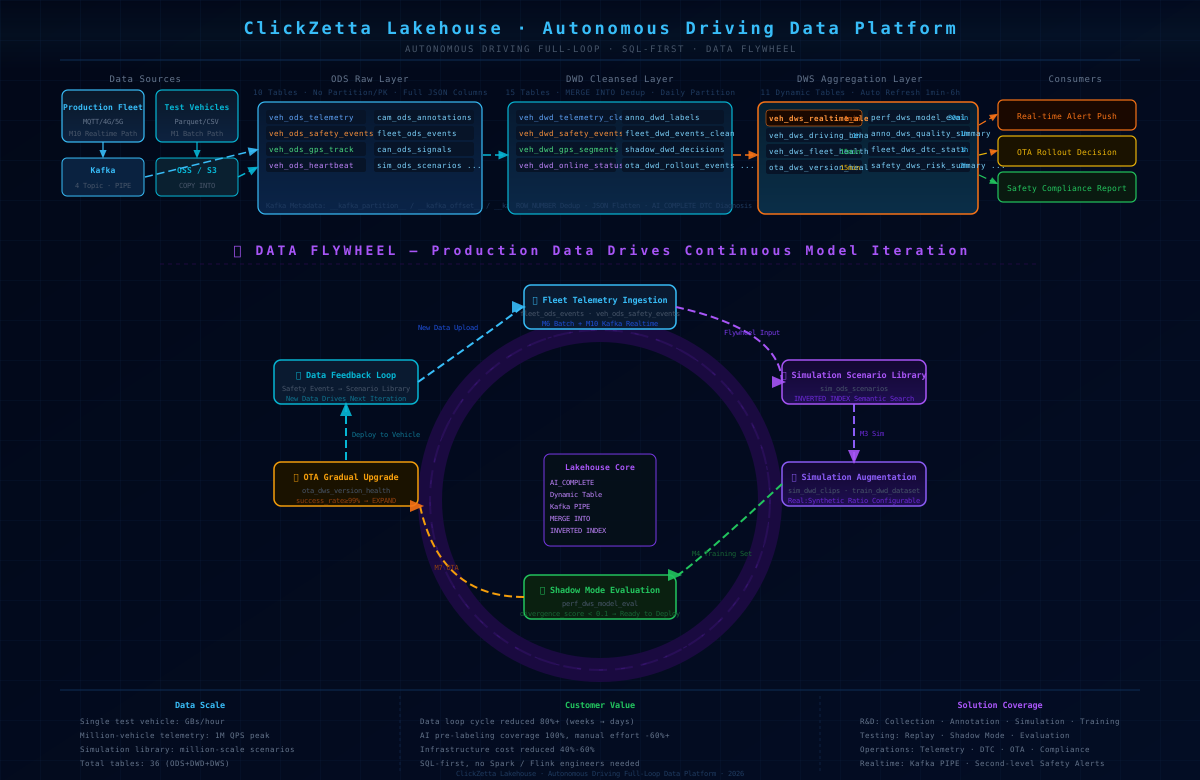
Ten Functional Modules
| Module | Core Capability | Business Value |
|---|---|---|
| M1 Multimodal Data Collection | COPY INTO batch lake ingestion, automatic deduplication | Road-test Parquet automated ingestion, no manual intervention |
| M2 Data Annotation | AI_COMPLETE pre-annotation + HITL human review | 100% pre-annotation coverage, 60%+ reduction in manual work |
| M3 Simulation and Synthetic Data | INVERTED INDEX scenario retrieval + AI scenario classification | Long-tail scenarios automatically supplemented, breaking real-data bottleneck |
| M4 Training Data Preparation | Versioned training sets + Window Function feature engineering | Controllable real/synthetic data ratio, fully traceable |
| M5 Road-Test Replay and Shadow Mode | divergence_score evaluation, 30-min auto-refresh | New algorithm evaluation without intervention, quantitative basis for launch decisions |
| M6 Mass Production Telemetry and Fault Diagnosis | AI_COMPLETE DTC diagnosis + Flywheel injection | DTC faults auto-described, edge scenarios continuously accumulated |
| M7 OTA Gradual Rollout Tracking | 15-min refresh, dual-metric driven expansion decisions | OTA health fully visible, anomalies auto-alerted |
| M8 Safety and Compliance | Multi-module risk aggregation, L1-L4 severity grading | Complete evidence chain, meeting regulatory compliance requirements |
| M9 End-to-End Demo | Full-chain one-click execution, Flywheel closed-loop validation | Fast POC, lower solution validation cost |
| M10 Vehicle Kafka Real-Time Reporting | 4 PIPEs, minute-level lake ingestion, second-level alerts | Mass production vehicle data real-time ingestion, fills road-test blind spots |
Data Flywheel: Two Parallel Paths
Batch Path (M6): Daily road-test data from production vehicles enters the lake in bulk via COPY INTO, is cleaned with MERGE INTO, then 06_flywheel_scene_extract.sql automatically injects HARD_BRAKE / TAKEOVER / ANOMALY events into the simulation scenario library.
Real-time Path (M10): Real-time safety events from production vehicles enter the lake at second-level latency via Kafka PIPE. After 1-minute Dynamic Table refresh, 04_flywheel_bridge.sql injects events into the scenario library in real time, simultaneously triggering safety alerts written to the M8 compliance pipeline.
Both paths feed into the unified sim_ods_scenarios. Scenario types are automatically classified (LONG_TAIL / CORNER_CASE), INVERTED INDEX supports semantic retrieval, and the simulation platform can extract scenarios on demand.
4. Singdata Lakehouse Technical Advantages
1. SQL-first, zero additional dependencies
All processing logic is based on standard SQL — no Python / Spark / Flink environment required. AI inference (DTC diagnosis, scenario classification, annotation quality scoring) is embedded in SQL via AI_COMPLETE(), eliminating the engineering complexity of microservice calls:
2. Dynamic Table replaces Spark Streaming
Traditional solutions require maintaining standalone Flink/Spark Streaming clusters for incremental data processing. Lakehouse Dynamic Table implements automatic incremental refresh with a single SQL declaration:
No Streaming cluster to deploy, no checkpoints to manage. Refresh intervals are flexibly configurable from 1 minute to 6 hours.
3. Kafka PIPE for near-real-time ingestion
Native support for continuous Kafka consumption. 4 topics correspond to 4 independent PIPEs; the safety event PIPE batches every 10 seconds to ensure <30 seconds end-to-end alert latency:
4. INVERTED INDEX for scenario semantic retrieval
At millions-of-records scale in the simulation scenario library, full-text inverted index enables millisecond semantic retrieval without a standalone search engine (Elasticsearch, etc.):
5. Storage-compute separation, on-demand scaling
Lakehouse storage-compute separation architecture allows elastic scaling of compute resources during road-test batch processing, with automatic scale-down during idle periods — saving 40%–70% infrastructure cost compared to fixed-cluster solutions.
6. Unified governance, eliminate data silos
ODS / DWD / DWS three layers are all managed within a single Lakehouse instance. Annotation data, telemetry data, training data, and evaluation data share a unified permission system, data lineage, and Time Travel (historical version recovery) capability.
5. Customer Value
Efficiency Improvement
| Metric | Traditional Solution | Lakehouse Solution | Improvement |
|---|---|---|---|
| Data loop cycle | 2–4 weeks | Days (batch) / minutes (real-time) | 80%+ reduction |
| Annotation manual effort | 100% manual | AI pre-annotation + human review | 60%+ reduction |
| Long-tail scenario supplementation | Manual curation, long cycle | Production events auto-injected into scenario library | 100% automated |
| OTA decision basis | Experience-based judgment | success_rate + divergence dual metrics | Quantified and traceable |
Cost Reduction
- Infrastructure: Eliminates standalone deployment of Spark cluster + Flink cluster + multiple databases, reducing infrastructure cost by 40%–60%
- Operations staffing: SQL-first requires no Spark/Flink engineers; data engineers maintain directly
- Model iteration: Accelerated data loop shortens each model iteration cycle, indirectly reducing GPU training costs
Safety and Compliance
- L1-L4 risk events recorded end-to-end with complete evidence chain, meeting autonomous driving regulations such as GB/T 40429
- OTA gradual rollout decisions maintain complete logs, traceable evaluation basis for each upgrade
- Safety events and simulation scenarios are bi-directionally linked — traceable to "which production event this scenario originated from"
Competitive Advantage
Reducing the data loop cycle from weeks to days means more model iterations can be completed in the same time — establishing a Data Flywheel advantage in fast-evolving tracks like NOA urban features.
6. Solution Notes
6.1 Lakehouse Table Creation Compatibility
The following issues were all encountered and resolved during real testing. Strictly follow these rules before deployment:
| Rule | Description | Consequence of Violation |
|---|---|---|
| ODS layer tables with JSON columns: no partition, no PK | JSON column + partition + PK together causes error | CZLH-67000 |
| Partitioned table PRIMARY KEY must include partition column | e.g., PRIMARY KEY(event_id, trigger_ts) | Table creation fails |
| INVERTED INDEX created separately per column | Multi-column joint index (col1, col2) not supported | Syntax error |
change_tracking set separately via ALTER after table creation | Cannot be declared inline in CREATE TABLE | Property has no effect |
| MERGE INTO source side must deduplicate first | Duplicate PKs in the same batch causes error | CZLH-71001 |
| Nested partition functions require redundant column substitution | DAYS(TIMESTAMP_MILLIS(ts_ms)) not supported | Table creation fails |
JSON field access uses col['key'] syntax | Colon syntax col:key not supported | CZLH-42000 |
6.2 Kafka PIPE Network Configuration
Most critical prerequisite: read_kafka only supports SASL_PLAINTEXT, not SASL_SSL.
Confirm before deployment:
If the network cannot be connected temporarily, use the OSS relay solution:
6.3 Data Scale and Performance Planning
| Data Type | Scale Reference | Recommended Strategy |
|---|---|---|
| Road-test annotation Parquet | Several GB per vehicle per hour, TB-level daily growth | COPY INTO with daily partitions, MERGE INTO with partition pruning |
| Mass production vehicle high-frequency telemetry | ~86,400 records/day/vehicle, fleet of millions with 1M peak QPS | Downsample on Kafka side (10s aggregation) before lake ingestion |
| Simulation scenario library | Millions of records scale | INVERTED INDEX for retrieval, periodically clean low-value scenarios |
| Dynamic Table | DWS layer minimum 1-min refresh | High-frequency refresh tables hold only aggregation results, avoid full table scans |
6.4 AI_COMPLETE Cost Control
AI_COMPLETE is billed per token. Pay attention in high-throughput scenarios:
- On-demand triggering: Only call for new records where
WHERE ai_diagnosis IS NULL— no repeated inference - Tiered invocation: Rule layer (Window Function) filters anomalies first; AI is only triggered for records matching rules — e.g., anomaly detection only calls AI for L2+ risk
- Concise prompts: Closed-form output (returning only label names) consumes 5–10x fewer tokens than open-ended generation
- Batch processing: Dynamic Table batch refresh naturally implements batch inference rather than real-time per-record calls
6.5 Studio Task Scheduling Recommendations
- M1 batch lake ingestion should set
AUTO_SUSPEND_IN_SECOND = 600to avoid CZLH-60011 from frequent Virtual Cluster suspensions - Solidify Session Flags in Studio Tasks (e.g.,
set cz.sql.cast.string.to.json.as.parse=true) — these must be reset on each connection RESET_KAFKA_GROUP_OFFSETSfor PIPE only takes effect when first created; record the current offset before rebuilding a PIPE
7. Validation Status (Tested 2026-06-05)
| Validation Item | Status | Notes |
|---|---|---|
| Create 27 tables (M1-M8, ODS+DWD+DWS) | Passed | 00_create_schema.sql executed successfully, all compatibility issues resolved |
| M10 real-time pipeline table creation (9 tables) | Passed | Three files under 10-vehicle-kafka-ingest/ executed successfully, total 36 tables |
| Data Flywheel closed loop | Passed | fleet events auto-injected into sim_ods_scenarios (FLEET_EVENT×4) |
| OTA gradual rollout decision logic | Passed | success_rate=66.7% → RECOMMEND_PAUSE |
| Shadow mode evaluation | Passed | avg_divergence=0.267 < 0.3 → PASS |
| Annotation quality dashboard | Passed | avg_confidence=0.855, ai_prelabel_rate=100% |
| Kafka producer (Python) | Passed | 54 messages successfully sent to Alibaba Cloud Kafka (SASL_SSL/PLAIN) |
| Kafka PIPE lake ingestion | Passed | Kafka PIPE data pipeline validated |
| Offline Pipeline M2→M6→Flywheel | Passed | End-to-end full pipeline validated, row counts in 10 tables match expectations |
| Studio Task deployment | Passed | 8 Tasks deployed to ads_full_loop folder, including DDL + real-time pipeline + offline pipeline |
8. Quick Deployment Steps
Prerequisites
- Singdata Lakehouse workspace is ready
- If using AI_COMPLETE, pre-create
CREATE CONNECTION(conn_dashscope, etc.) - If using Kafka PIPE, ensure Lakehouse Virtual Cluster and Kafka are in the same VPC (see §6.2)
Step 1: Create Tables (choose A or B)
Option A — Execute SQL directly
Option B — Execute via Studio Task
In the ads_full_loop folder in Lakehouse Studio, execute in order:
ads_01_ddl_ods— ODS layer 10 tablesads_02_ddl_dwd— DWD layer 15 tablesads_03_ddl_dws— DWS layer 8 Dynamic Tablesads_04_rt_ods_pipe— M10 real-time pipeline ODS + PIPE (requires Kafka VPC connectivity)ads_05_rt_dwd— M10 DWD Dynamic Tableads_06_rt_dws— M10 DWS Dynamic Table
Step 2: Write Demo Data
Step 3: Run Full-Chain Pipeline
Step 4: Validate Data Flywheel
Step 5: Deploy Scheduled Tasks
Execute the ads_offline_pipeline task in Studio (configured with cron 0 2 * * *), or manually trigger a test run.
9. Studio Task List
| Task Name | Folder | Content | Schedule |
|---|---|---|---|
ads_01_ddl_ods | ads_full_loop | ODS layer table creation (10 tables) | Manual |
ads_02_ddl_dwd | ads_full_loop | DWD layer table creation (15 tables) | Manual |
ads_03_ddl_dws | ads_full_loop | DWS Dynamic Tables (8 tables) | Manual |
ads_04_rt_ods_pipe | ads_full_loop | M10 ODS + Kafka PIPE | Manual |
ads_05_rt_dwd | ads_full_loop | M10 DWD Dynamic Table | Manual |
ads_06_rt_dws | ads_full_loop | M10 DWS Dynamic Table | Manual |
ads_07_rt_flywheel | ads_full_loop | Flywheel bridge SQL | Manual |
ads_offline_pipeline | ads_full_loop | Offline Pipeline (M2→M6→DWS) | Daily at 02:00 |
Related Documents
Core Data Processing
| Technology | Document |
|---|---|
| Batch lake ingestion | Lakehouse File Batch Import/Export Guide (COPY INTO) |
| Upsert / incremental writes | Lakehouse Upsert Operations Guide (MERGE INTO) |
| Incremental auto-refresh | Lakehouse Dynamic Table Development Guide |
| Continuous Kafka consumption | Lakehouse Continuous Data Ingestion Guide (Pipe) |
| Change data capture | Lakehouse CDC Change Data Capture Guide (Table Stream) |
| Historical version recovery | Lakehouse Historical Data Recovery Guide (Time Travel) |
| Window functions / feature engineering | Window Functions |
Query Acceleration and Retrieval
| Technology | Document |
|---|---|
| Inverted index / scenario retrieval | Lakehouse Query Acceleration Index Guide |
| Full-text search | Full-Text Search and Text Analysis Practical Guide |
AI and Python
| Technology | Document |
|---|---|
| In-SQL AI inference | AI_COMPLETE Function Reference |
| AI Functions overview | Lakehouse AI Functions Overview |
| Python DataFrame API | ZettaPark Python SDK |
Security and Governance
| Technology | Document |
|---|---|
| Row-level access control | Row-Level Security (Row Filter) |
| Column-level dynamic masking | Lakehouse Column-Level Security (Dynamic Masking) |
| Data quality checks | Data Quality Check (DQC): SQL-Driven Automated Validation |
Task Scheduling and Operations
| Technology | Document |
|---|---|
| Studio task scheduling | Studio Task Development and Operations |