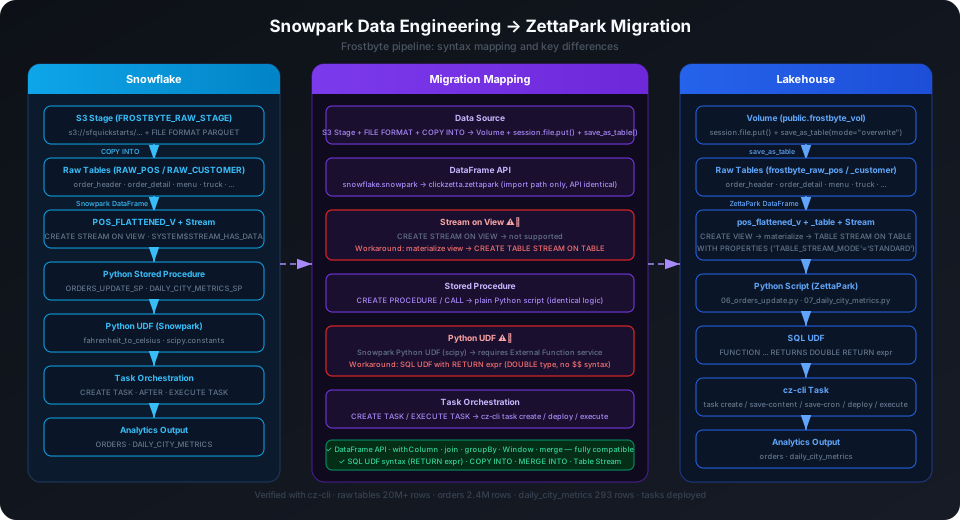
Snowpark → ZettaPark Migration in Practice: Frostbyte Data Engineering Pipeline
If you have built a data engineering pipeline on Snowflake using Snowpark Python, migrating to Singdata Lakehouse involves work in 3 areas: data loading (Stage → Volume), stored procedures (replaced by Python scripts), and task scheduling (TASK → cz-cli task). The DataFrame API itself is highly compatible — business logic does not need to be rewritten.
This article demonstrates the complete migration process with a real project: migrating the official Snowflake Frostbyte Data Engineering Lab (sfguide-data-engineering-with-snowpark-python, 150 stars) to Singdata Lakehouse, using the original Frostbyte S3 public dataset. All code has been validated with actual runs.
The migrated code is in 03_lakehouse/; the original Snowflake code is preserved in 01_snowflake/ for comparison.
Conclusion First
DataFrame business logic does not need a single line changed. All 3 changes are platform infrastructure replacements: data loading from S3 Stage to Volume, stored procedures replaced by regular Python scripts, and task scheduling from TASK to cz-cli. with_column, join, group_by, merge, Window functions — these core operations are identical in ZettaPark and Snowpark.
Python UDFs and Stream on View have additional limitations (see migration steps), but they do not affect the core data processing logic.
Technology Stack Comparison
Original (Snowflake)
After Migration (Lakehouse)
Data loading
S3 External Stage + COPY INTO
Volume + session.file.put() + save_as_table()
DataFrame API
snowflake.snowpark
clickzetta.zettapark (import path; API identical)
Stored procedures
Python Stored Procedure (CREATE PROCEDURE)
Regular Python scripts (logic unchanged)
Python UDF
Snowpark Python UDF (supports scipy)
SQL UDF (RETURN expr syntax)
Stream on View
CREATE STREAM ON VIEW
Not supported; materialize View as Table first, then create Stream
Task scheduling
CREATE TASK ... WHEN SYSTEM$STREAM_HAS_DATA(...)
cz-cli task create/deploy/execute
Compute resource
WAREHOUSE = HOL_WH
VCLUSTER default
The core DataFrame operations (with_column, join, group_by, agg, merge, Window functions) are identical in ZettaPark and Snowpark — business logic does not need a single line changed.
git clone https://github.com/clickzetta/snowflake2lakehouse-data-engineering.git
cd snowflake2lakehouse-data-engineering/03_lakehouse
cp .env.example .env
# Fill in connection info in .env
pip install clickzetta_zettapark_python python-dotenv
# Download Frostbyte data (public S3, no AWS account needed)
aws s3 sync s3://sfquickstarts/data-engineering-with-snowpark-python/ ./datasets/ \
--no-sign-request \
--exclude "pos/order_header/*" --exclude "pos/order_detail/*"
# Take one year=2021 file each for order_header and order_detail (~90MB)
aws s3 cp s3://sfquickstarts/data-engineering-with-snowpark-python/pos/order_header/year=2021/data_01a91b48-0605-6a9c-0000-711101079122_005_4_0.snappy.parquet \
./datasets/pos/order_header/ --no-sign-request
aws s3 cp s3://sfquickstarts/data-engineering-with-snowpark-python/pos/order_detail/year=2021/data_01a91b50-0605-721e-0000-71110107a166_008_0_0.snappy.parquet \
./datasets/pos/order_detail/ --no-sign-request
# Run full pipeline and validate (24 data checks)
python e2e.py --teardown
# Or run step by step:
python setup.py # Create schema/volume, upload data, register cz-cli profile
python steps/02_load_raw.py # Load raw data into Lakehouse
python steps/04_create_pos_view.py # Create View + Table Stream
cz-cli sql -f steps/05_udf.sql --profile frostbyte --sync --write # Create SQL UDF
python steps/06_orders_update.py # Merge order data
python steps/07_daily_city_metrics.py # Calculate daily city metrics
export $(grep -v '#' .env | xargs) && bash steps/08_orchestrate_tasks.sh # Deploy scheduled tasks
# Clean up all objects (Studio task + SQL objects + Volume)
bash steps/11_teardown.sh
Migration Steps
Step 1: Data Loading (Stage → Volume)
This is the first difference in the migration, and the most straightforward.
Snowflake uses External Stage pointing to S3, loading via COPY INTO:
CREATE STAGE FROSTBYTE_RAW_STAGE
URL = 's3://sfquickstarts/data-engineering-with-snowpark-python/';
COPY INTO RAW_POS.ORDER_HEADER
FROM @FROSTBYTE_RAW_STAGE/pos/order_header/
FILE_FORMAT = (FORMAT_NAME = PARQUET_FORMAT)
MATCH_BY_COLUMN_NAME = CASE_SENSITIVE;
Lakehouse uses Volume as managed storage, uploading files via ZettaPark then loading with save_as_table:
# Upload to Volume (replaces S3 Stage)
session.file.put(str(local_file), "vol://frostbyte_raw_pos.frostbyte_vol/pos/order_header/",
auto_compress=False, overwrite=True)
# Read from Volume and write to table (replaces COPY INTO)
df = session.read.option("compression", "snappy").parquet(
"vol://frostbyte_raw_pos.frostbyte_vol/pos/order_header/"
)
df.write.save_as_table("frostbyte_raw_pos.order_header", mode="overwrite")
⚠️ Note: Volume must be created under an existing schema. setup.py first creates the frostbyte_raw_pos schema via cz-cli, then creates the Volume, so the Volume can be placed in frostbyte_raw_pos rather than public. The ZettaPark session connects using the public schema (always exists), but session.file.put() can write to a Volume under any existing schema.
Step 2: DataFrame API (Almost No Changes)
The Snowpark and ZettaPark DataFrame APIs are highly compatible — only the import paths need to change:
# Snowflake
from snowflake.snowpark import Session
from snowflake.snowpark import functions as F
from snowflake.snowpark.window import Window
# Lakehouse (only change imports; rest of code unchanged)
from clickzetta.zettapark.session import Session
from clickzetta.zettapark import functions as F
from clickzetta.zettapark.window import Window
The following operations are written identically on both platforms:
Snowflake supports creating a Stream directly on a View:
CREATE STREAM HARMONIZED.POS_FLATTENED_V_STREAM
ON VIEW HARMONIZED.POS_FLATTENED_V;
Lakehouse Table Stream only supports ON TABLE, not ON VIEW. The solution is to materialize the View as a Table first, then create a Stream on the Table:
# 1. Create View (SQL approach, ensures persistence)
session.sql("""
CREATE OR REPLACE VIEW frostbyte_harmonized.pos_flattened_v AS
SELECT od.order_detail_id, oh.order_ts, m.truck_brand_name, ...
FROM frostbyte_raw_pos.order_detail od
JOIN frostbyte_raw_pos.order_header oh ON od.order_id = oh.order_id
...
""").collect()
# 2. Materialize as Table (Stream can only be created on a Table)
session.sql("""
CREATE TABLE IF NOT EXISTS frostbyte_harmonized.pos_flattened_v_table
AS SELECT * FROM frostbyte_harmonized.pos_flattened_v
""").collect()
# 3. Create Stream on Table (TABLE_STREAM_MODE is required)
session.sql("""
CREATE TABLE STREAM IF NOT EXISTS frostbyte_harmonized.pos_flattened_v_stream
ON TABLE frostbyte_harmonized.pos_flattened_v_table
WITH PROPERTIES ('TABLE_STREAM_MODE' = 'STANDARD')
""").collect()
⚠️ Note: Lakehouse CREATE TABLE STREAM requires WITH PROPERTIES ('TABLE_STREAM_MODE' = 'STANDARD'); omitting it causes a syntax error.
When consuming from a Stream, Lakehouse Table Stream appends metadata columns (__change_type, __commit_version, etc.) alongside the data columns. When inserting, explicitly specify column names to exclude these metadata columns:
# When consuming from stream, use SQL INSERT with explicit column names
session.sql("""
INSERT INTO frostbyte_harmonized.orders
SELECT
order_detail_id, order_id, truck_id, ...,
CURRENT_TIMESTAMP() AS meta_updated_at
FROM frostbyte_harmonized.pos_flattened_v_stream
""").collect()
Step 4: Stored Procedures → Python Scripts
Snowflake Python Stored Procedures encapsulate business logic inside the database and are triggered via CALL:
CREATE OR REPLACE PROCEDURE HARMONIZED.ORDERS_UPDATE_SP()
RETURNS STRING
LANGUAGE PYTHON
RUNTIME_VERSION = '3.8'
PACKAGES = ('snowflake-snowpark-python')
HANDLER = 'main'
AS $$
def main(session):
# Business logic
...
$$;
CALL HARMONIZED.ORDERS_UPDATE_SP();
Lakehouse does not support stored procedures, but the logic can be converted to a regular Python script that runs directly:
# 06_orders_update.py — identical logic to the stored procedure, just a different execution method
from clickzetta.zettapark.session import Session
def merge_order_updates(session):
# Business logic from the original stored procedure, unchanged
...
if __name__ == "__main__":
session = create_session()
merge_order_updates(session)
Step 5: Python UDF → SQL UDF
Snowflake Python UDFs can use third-party packages (such as scipy):
Lakehouse Python UDFs require configuring an External Function service (cloud function deployment). For simple mathematical calculations, a SQL UDF is simpler:
-- Lakehouse SQL UDF
-- Note: use RETURN expr syntax (not AS $$ ... $$), use DOUBLE type (avoids DECIMAL precision overflow)
CREATE OR REPLACE FUNCTION frostbyte_analytics.fahrenheit_to_celsius_udf(temp_f DOUBLE)
RETURNS DOUBLE
RETURN (temp_f - 32.0) * 5.0 / 9.0;
Step 6: Task Scheduling (TASK → cz-cli task)
Snowflake Tasks can monitor Stream data changes and trigger automatically:
CREATE OR REPLACE TASK ORDERS_UPDATE_TASK
WAREHOUSE = HOL_WH
WHEN SYSTEM$STREAM_HAS_DATA('POS_FLATTENED_V_STREAM')
AS CALL HARMONIZED.ORDERS_UPDATE_SP();
ALTER TASK DAILY_CITY_METRICS_UPDATE_TASK RESUME;
EXECUTE TASK ORDERS_UPDATE_TASK;
Lakehouse uses cz-cli task to create scheduled tasks, with script content embedded directly in the task:
⚠️ Note: Studio tasks run in an isolated environment and cannot read local .env files. Connection info must be embedded in the script, or passed via heredoc after expanding with export $(grep -v '#' .env | xargs) in the shell.
Validation Results
All code has been validated end-to-end with python e2e.py, with 24/24 data checks passing:
Layer
Table
Row Count
Check
Raw
order_header
7,336,341
Row count match
Raw
order_detail
6,230,167
Row count match
Raw
customer_loyalty
222,540
Row count match
Raw
menu / truck / location / ...
100 / 450 / 13,093 / ...
Row count match
Harmonized
pos_flattened_v
378,941
Row count, 15 brands, 58 menu items
Harmonized
orders
378,941
Row count, no null primary keys, top brand Freezing Point
Harmonized
orders
—
Total revenue $5,547,817.75, date range 2021-01-01 ~ 2022-01-01
Analytics
daily_city_metrics
247
Row count, top city New York City
UDF
fahrenheit_to_celsius_udf
—
212°F = 100°C ✓
UDF
inch_to_millimeter_udf
—
1 inch = 25.4mm ✓
Migration Conclusion
ZettaPark and Snowpark DataFrame APIs are highly compatible. This project validates the following conclusions: