
MaxCompute → Lakehouse Migration in Practice: E-commerce Data Engineering Project
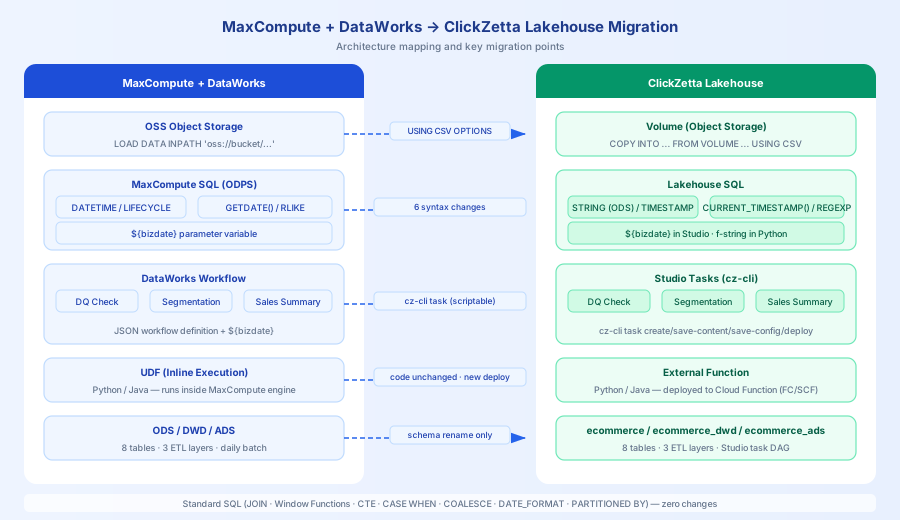
If your data engineering project runs on MaxCompute + DataWorks, migrating to Singdata Lakehouse requires effort in two main areas: SQL syntax adaptation and task orchestration replacement. The differences between MaxCompute SQL and Lakehouse SQL are fewer than you might expect — most standard SQL (JOIN, window functions, CTE, aggregation) is identical, and the changes are mainly 6 MaxCompute-specific syntax items plus migrating DataWorks task nodes to Studio tasks.
This article validates this with a real project: a complete migration of an e-commerce data engineering project from MaxCompute + DataWorks to Singdata Lakehouse, covering ODS/DWD/ADS three layers, 8 source tables, and 5 ETL tasks, with full end-to-end validation passing.
Original Project
- Source: rcdelacruz/dataworks-maxcompute-practice
- Dataset: E-commerce scenario, 8 tables (customers / products / orders / order_items / web_sessions / page_views / user_events / suppliers)
- Task orchestration: DataWorks
daily_etl_workflow.json, 5 nodes, triggered daily at 02:00 - UDF: Python text analysis (sentiment analysis, keyword extraction) + Java string processing
Conclusion First
You don't need to rewrite business logic or rebuild the task orchestration system. 6 SQL syntax replacements cover all changes; DataWorks task dependencies can be fully migrated to Studio, and after migration, cz-cli enables full automation — easier to maintain than before.
- SQL changes: 6 syntax replacements; all other standard SQL unchanged
- Task orchestration: 5 DataWorks nodes → 5 Studio tasks, dependencies fully preserved; after migration, fully automated via
cz-cli, one-click withsetup.py - Data validation: ODS 8 tables / DWD 3 summary tables / ADS 3 analytics tables, all passing
- UDF: Zero code logic changes; deployment method changed from "in-engine" to "cloud function service"
Technology Stack Comparison
| Dimension | MaxCompute + DataWorks | Singdata Lakehouse |
|---|---|---|
| Compute engine | MaxCompute (ODPS) | Lakehouse SQL Engine |
| Task orchestration | DataWorks Workflow JSON (descriptive config; original project did not implement API automation, required manual console creation) | Studio tasks + cz-cli (fully command-line, setup.py one-click auto-creates tasks, configures dependencies, deploys) |
| Object storage | OSS (LOAD DATA INPATH) | Volume (COPY INTO FROM VOLUME) |
| UDF | Inline Python/Java (in-engine execution) | External Function (cloud function service) |
| Data retention | LIFECYCLE 365 (auto-deletes data, no upper limit) | TBLPROPERTIES ('data_retention_days' = '7') (Time Travel history retention, max 90 days; physical data deletion requires manual or scheduled tasks) |
| Partitioning | PARTITIONED BY (ds STRING) | Same |
| Parameter variables | ${bizdate} | Studio task SQL supports ${bizdate} directly; Python/cz-cli direct execution uses f-string interpolation |
Project Background
The original project is a standard e-commerce data engineering practice with a three-layer data architecture:
- ODS layer: 8 source tables, loading CSV data from OSS
- DWD layer: Daily sales summary, customer segmentation, product performance analysis
- ADS layer: Web traffic analysis, incremental change detection, data quality monitoring
The DataWorks Workflow defines dependencies for 5 task nodes:
Migration Steps
Step 1: Set Up Repository and Connection Configuration
Fork the original repo to the clickzetta/ organization and reorganize the directory structure:
Original code goes into 01_source/, migration code into 03_lakehouse/:
Configure connection (.env):
Initialize environment (create profile, tables, upload data, create Studio tasks):
setup.py automatically completes 6 steps: create cz-cli profile → create schema → create Volume and upload CSV → create tables → COPY INTO load data → create Studio tasks (with dependency configuration and cron scheduling).
Step 2: SQL Syntax Adaptation (6 Changes)
The differences between MaxCompute and Lakehouse SQL are concentrated in the following 6 areas; all other standard SQL is identical.
1. LIFECYCLE → TBLPROPERTIES data_retention_days
MaxCompute uses LIFECYCLE to control automatic data deletion days (no upper limit). Lakehouse uses data_retention_days to control Time Travel history retention (max 90 days). The semantics are not identical — data_retention_days does not automatically delete current data; it only affects the time window for historical version rollback:
2. DATETIME → STRING (ODS layer)
MaxCompute's DATETIME type cannot be implicitly converted from CSV strings during COPY INTO. The ODS layer uniformly uses STRING to receive raw values; the DWD layer uses CAST during transformation:
3. LOAD DATA INPATH → COPY INTO FROM VOLUME
MaxCompute loads data from OSS using LOAD DATA INPATH; Lakehouse uses COPY INTO FROM VOLUME with a different syntax structure:
4. ${bizdate} Parameter Variables
Studio task SQL can use ${bizdate} directly; it is replaced by the scheduling system at runtime, consistent with DataWorks behavior. Only when executing SQL directly via Python code or cz-cli will ${bizdate} not be replaced (returns empty string); in that case, use f-string dynamic interpolation:
5. GETDATE() → CURRENT_TIMESTAMP()
6. RLIKE → REGEXP, CAST AS STRING → CAST AS VARCHAR
Fully compatible, zero changes:
JOIN(INNER / LEFT / RIGHT / FULL OUTER / SELF)- Window functions (
ROW_NUMBER,RANK,DENSE_RANK,NTILE,LAG,LEAD,SUM OVER,AVG OVER) - CTE (
WITH ... AS (...)) CASE WHEN,COALESCE,NULLIFDATE_FORMAT,DATEDIFF,YEAR,MONTH,DAYOFWEEKCONCAT,UPPER,LOWER,LIKEPARTITIONED BY (ds STRING)partition syntaxINSERT OVERWRITE TABLE ... PARTITION (...)UNION ALL,HAVING,LIMIT,OFFSET
Step 3: Data Loading
setup.py uploads the 8 CSV files in the data/ directory to Volume, then loads with COPY INTO:
Actual load results:
| Table | Row Count |
|---|---|
| customers | 10 |
| products | 10 |
| orders | 10 |
| order_items | 30 |
| web_sessions | 20 |
| page_views | 30 |
| user_events | 30 |
| suppliers | 9 |
Step 4: Migrate DataWorks Workflow → Studio Tasks
The original project's daily_etl_workflow.json is a descriptive configuration file. DataWorks provides an API for task automation, but the original project did not implement it — actual use required logging into the console to manually create nodes, configure dependencies, and set schedules one by one.
After migration, step 6 of setup.py completes everything automatically via cz-cli task: create tasks, write SQL content, configure dependencies, set cron, deploy — no manual operations needed.
For manual operations or to understand the underlying commands, the core steps are:
DataWorks → Studio task mapping:
| DataWorks Node | Studio Task | Dependencies |
|---|---|---|
| data_quality_check | data_quality_check | None (entry point) |
| customer_segmentation | customer_segmentation | data_quality_check |
| product_performance | product_performance_etl | data_quality_check |
| web_analytics_summary | web_analytics_etl | data_quality_check |
| daily_sales_summary | daily_sales_summary | customer_segmentation + product_performance_etl |
Step 5: UDF Migration
MaxCompute UDFs execute directly in the engine; Lakehouse UDFs need to be deployed to a cloud function service (Alibaba Cloud FC / Tencent Cloud SCF). Zero code logic changes — only adapt to the Lakehouse External Function specification:
Register the function:
Notes
1. COPY INTO Syntax Differs from Snowflake
The first attempt used Snowflake-style FILE_FORMAT = (TYPE = 'CSV' ...) syntax, resulting in CZLH-60001 parser return null. The correct Lakehouse syntax is USING CSV OPTIONS(...):
2. ODS Layer Date Columns Cannot Use TIMESTAMP
COPY INTO does not support implicit conversion from CSV strings to TIMESTAMP, resulting in CZLH-42000 implicit cast not allowed. ODS layer date columns must use STRING to receive values; the DWD layer uses CAST:
3. CSV Fields Containing Commas Cause Column Count Overflow
Row 30 of user_events.csv has an event_data field value of products:PROD006,PROD007, containing a comma without quotes, causing COPY INTO to report Expected 9 columns, got 10. Lakehouse's on_error='continue' option fails before the Arrow parsing layer and cannot skip the row.
Solution: Fix the source data in Python by merging extra columns back into the last column:
4. cz-cli task save-config --deps Parameter Meaning
--deps does not accept a task name; it controls the dependency operation mode (keep / replace / clear). The actual upstream tasks are passed via --dep-tasks as a JSON array:
End-to-End Validation
Run python 03_lakehouse/e2e.py --reset for full validation. All 26/26 checks pass across ODS (8 tables), DWD (3 tables), and ADS (3 tables), plus all 5 Studio tasks triggered successfully.
Full Syntax Reference
| Scenario | MaxCompute | Lakehouse |
|---|---|---|
| Data retention | LIFECYCLE 365 | TBLPROPERTIES ('data_retention_days' = 'N') (max 90 days, controls Time Travel retention) |
| Date/time type | DATETIME | TIMESTAMP (ODS layer uses STRING) |
| Current time | GETDATE() | CURRENT_TIMESTAMP() |
| Partition write | INSERT OVERWRITE TABLE t PARTITION (ds='${bizdate}') | Studio task SQL supports ${bizdate}; Python direct execution uses f-string |
| Parameter variables | ${bizdate} | Supported in Studio task SQL; Python/cz-cli direct execution uses f-string |
| Data loading | LOAD DATA INPATH 'oss://...' | COPY INTO ... FROM VOLUME ... USING CSV OPTIONS(...) |
| Regex matching | col RLIKE 'pattern' | col REGEXP 'pattern' |
| Cast to string | CAST(x AS STRING) | CAST(x AS VARCHAR) |
| UDF registration | CREATE FUNCTION f AS 'Class' USING 'file.py' | CREATE EXTERNAL FUNCTION f ... CONNECTION = conn |
| Task orchestration | DataWorks Workflow JSON | Studio tasks + cz-cli task |
| Task dependency config | Workflow JSON dependencies field | cz-cli task save-config --deps replace --dep-tasks '[...]' |