Migrating Snowflake Real-Time ETL Pipeline to Singdata Lakehouse
Highlights
This article demonstrates how to quickly migrate a Snowflake real-time ETL pipeline to Singdata Lakehouse, and reveals that the Singdata Lakehouse-based solution offers the following unique advantages:
- Global multi-cloud support. In this solution, both Singdata Lakehouse and Snowflake are based on AWS, providing cloud experience consistency. This solution is also suitable for migration on GCP. Additionally, Singdata Lakehouse supports Alibaba Cloud, Tencent Cloud, and Huawei Cloud, beyond just mainstream global cloud service providers.
- You don't need to learn a new set of product concepts. Singdata Lakehouse's product model is highly similar to Snowflake's, and the SQL syntax requires only minimal changes — engineers familiar with Snowflake can get started directly.
- You can eliminate Airflow. Singdata Lakehouse has a built-in Python runtime environment where SQL tasks and Python tasks are scheduled, operated, and monitored together. No separate Airflow service is needed, resulting in a simpler architecture and lower operations cost.
Introduction to the Real-Time Insurance Data ETL Pipeline with Snowflake Project
Project Overview
If you are familiar with Snowflake operations and applications, the Real-Time Insurance Data ETL Pipeline with Snowflake on GitHub should be very familiar to you. This project involves creating a real-time ETL (Extract, Transform, Load) data pipeline in Snowflake to process insurance data from Kaggle and load it into Snowflake. The data pipeline is managed using Apache Airflow and involves several steps to clean, normalize, and transform data before loading it into Snowflake for further processing. AWS S3 is used as a data lake to store raw and transformed data.
After developing this project, Airflow DAGs can be scheduled to run as needed, ensuring the ETL process executes at the desired frequency. The final cleaned, normalized, and transformed data will be available for real-time visualization in Tableau, providing the latest insights and reports. The project architecture diagram is as follows:
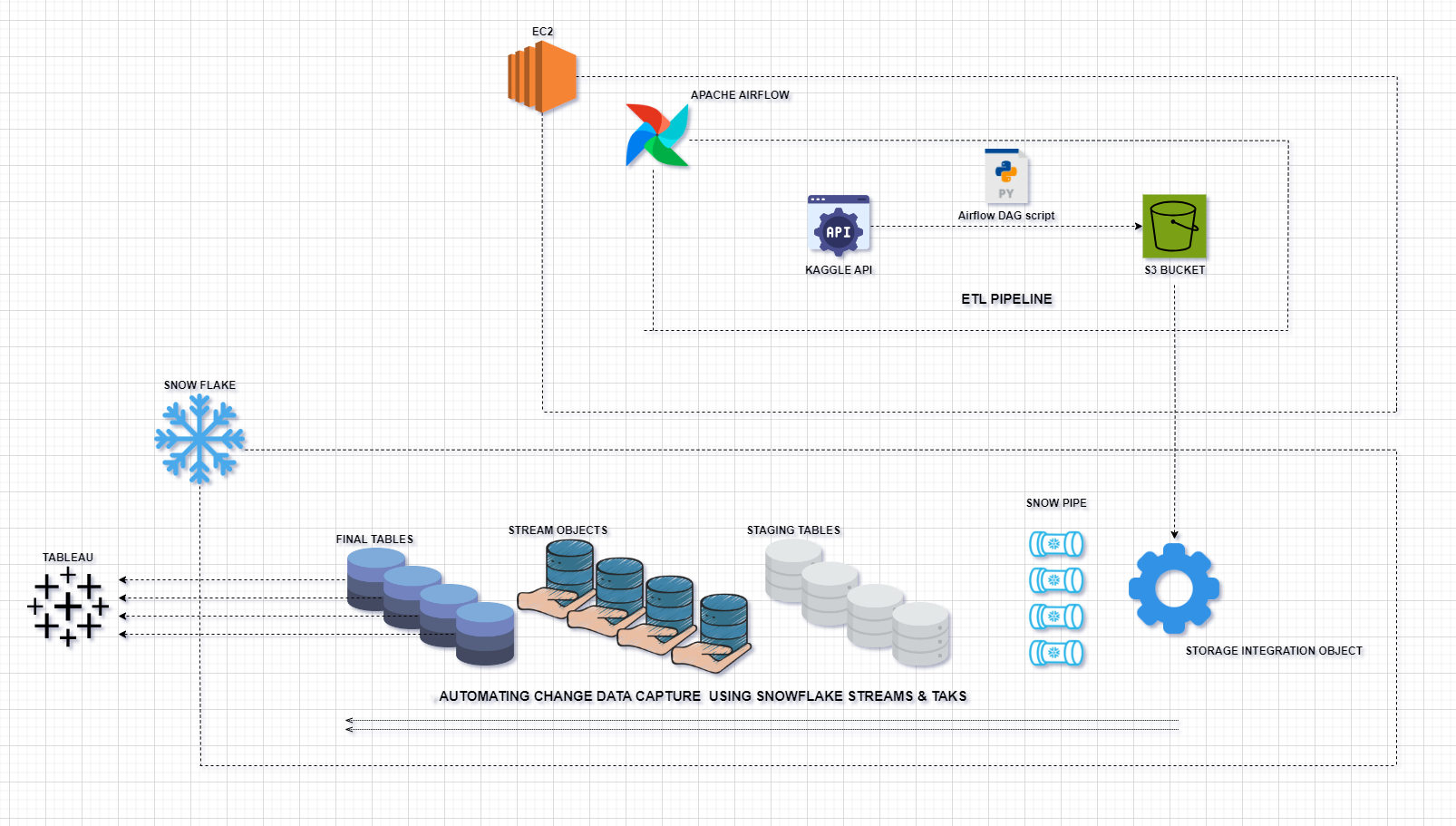
- Python: For scripting and data processing.
- Pandas: For data manipulation and analysis.
- AWS S3: As a data lake for storing raw and transformed data.
- Snowflake: For data modeling and storage.
- Apache Airflow: For orchestrating ETL workflows.
- EC2: For hosting the Airflow environment.
- Kaggle API: For extracting data from Kaggle.
- Tableau: For data visualization.
ETL Workflow
-
Data Extraction
-
Create Airflow DAG scripts to extract a random number of rows from the Kaggle insurance dataset using the Kaggle API.
-
Clean, normalize, and transform data into four tables:
policy_datacustomers_datavehicles_dataclaims_data
-
Data Storage
- Store the transformed data in S3 buckets, organized into separate folders for each type of normalized data (
policy_data, customers_data, vehicles_data, claims_data).
-
Data Processing in Snowflake
- Create Snowflake SQL worksheets to define the database schema.
- Create staging tables in Snowflake for each type of normalized data.
- Define Snowpipes to automatically load data from S3 buckets into staging tables.
- Create stream objects for each staging table to capture changes.
- Create final tables to merge new data from stream objects, ensuring only distinct or new rows are inserted.
-
Change Data Capture Using Snowflake Streams and Tasks
- Create tasks in Snowflake to automatically capture change data.
- Each task is triggered to load data into the final table when new data is available in the stream object.
-
Airflow DAG Tasks
- Task 1: Check whether the Kaggle API is available.
- Task 2: Upload transformed data to the S3 bucket.
Migration Solution
Prerequisites
Singdata Lakehouse and Snowflake Object Concept Mapping
| Singdata Lakehouse Concept | Snowflake Concept |
|---|
| WORKSPACE | DATABASE |
| SCHEMA | SCHEMA |
| VCLUSTER | WAREHOUSE |
| STORAGE CONNECTION | STORAGE INTEGRATION |
| VOLUME | STAGE |
| TABLE | TABLE |
| PIPE | SNOWPIPE |
| TABLE STREAM | STREAM |
| STUDIO Task | TASK |
| Lakehouse SQL | Snowflake SQL |
Architecture Based on Singdata Lakehouse
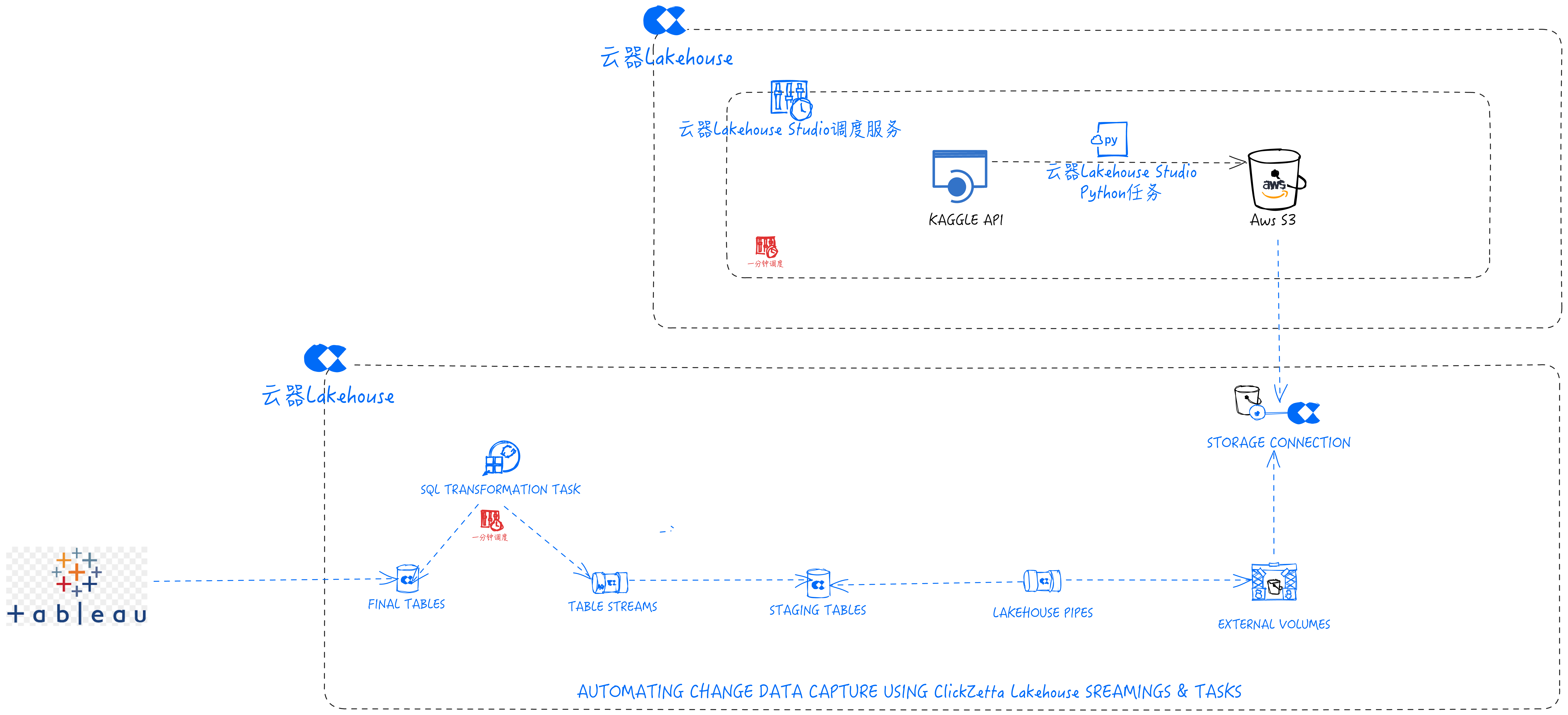
| Tools and Services in Singdata Lakehouse Solution | Purpose | Tools and Services in Snowflake Solution | Purpose |
|---|
| Python | For scripting and data processing | Python | For scripting and data processing |
| Pandas | For data manipulation and analysis | Pandas | For data manipulation and analysis |
| AWS S3 | As a data lake for storing raw and transformed data | AWS S3 | As a data lake for storing raw and transformed data |
| Singdata Lakehouse | For data modeling and storage | Snowflake | For data modeling and storage |
| Singdata Lakehouse Studio IDE | For orchestrating ETL workflows | Apache Airflow | For orchestrating ETL workflows |
| Singdata Lakehouse Studio Python Task | For hosting the Airflow environment | EC2 | For hosting the Airflow environment |
| Singdata Lakehouse JDBC Driver | For connecting Tableau | Tableau Snowflake Connector | For connecting Tableau |
| Kaggle API | For extracting data from Kaggle | Kaggle API | For extracting data from Kaggle |
| Tableau | For data visualization | Tableau | For data visualization |
Syntax Differences Encountered During Migration
| Feature | Singdata Lakehouse | Snowflake |
|---|
| Code comments | -- or -- | /// or // |
| Stream metadata | __change_type field | METADATA$ACTION |
| Create object DDL | Some objects do not support CREATE OR REPLACE; use CREATE IF NOT EXISTS and ALTER instead | CREATE OR REPLACE |
Migration Steps
Task Development
Task Tree
Navigate to Lakehouse Studio Development -> Tasks,
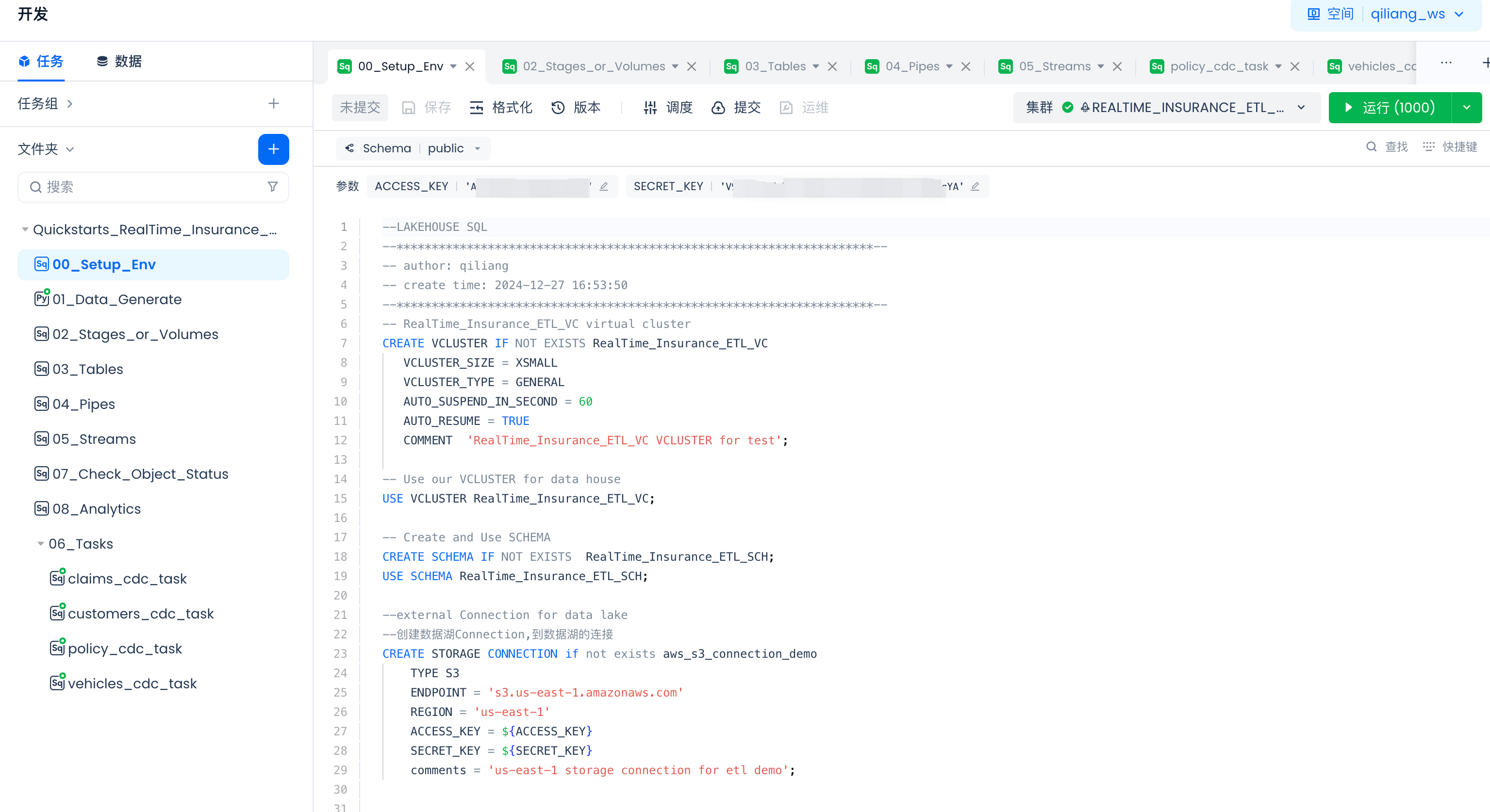
Click "+" to create the following directory:
- Quickstarts_RealTime_Insurance_claims_Data_ETL_Pipeline
Click "+" to create the following SQL tasks:
- 00_Setup_Env
- 02_Stages_or_Volumes
- 03_Tables
- 04_Pipes
- 05_Streams
After developing the above tasks, click "Run" to complete object creation.
Click "+" to create the following PYTHON tasks:
- 01_Data_Generate
- 06_Tasks(directory)
- claims_cdc_task
- customers_cdc_task
- policy_cdc_task
- vehicles_cdc_task
After developing the above tasks, click "Run" to test first (refer to the scheduling and publishing guidance later in this document for subsequent steps).
Copy the following code into the corresponding tasks. Alternatively, you can download the files from GitHub and copy the content into the corresponding tasks.
Parameter Configuration in Tasks
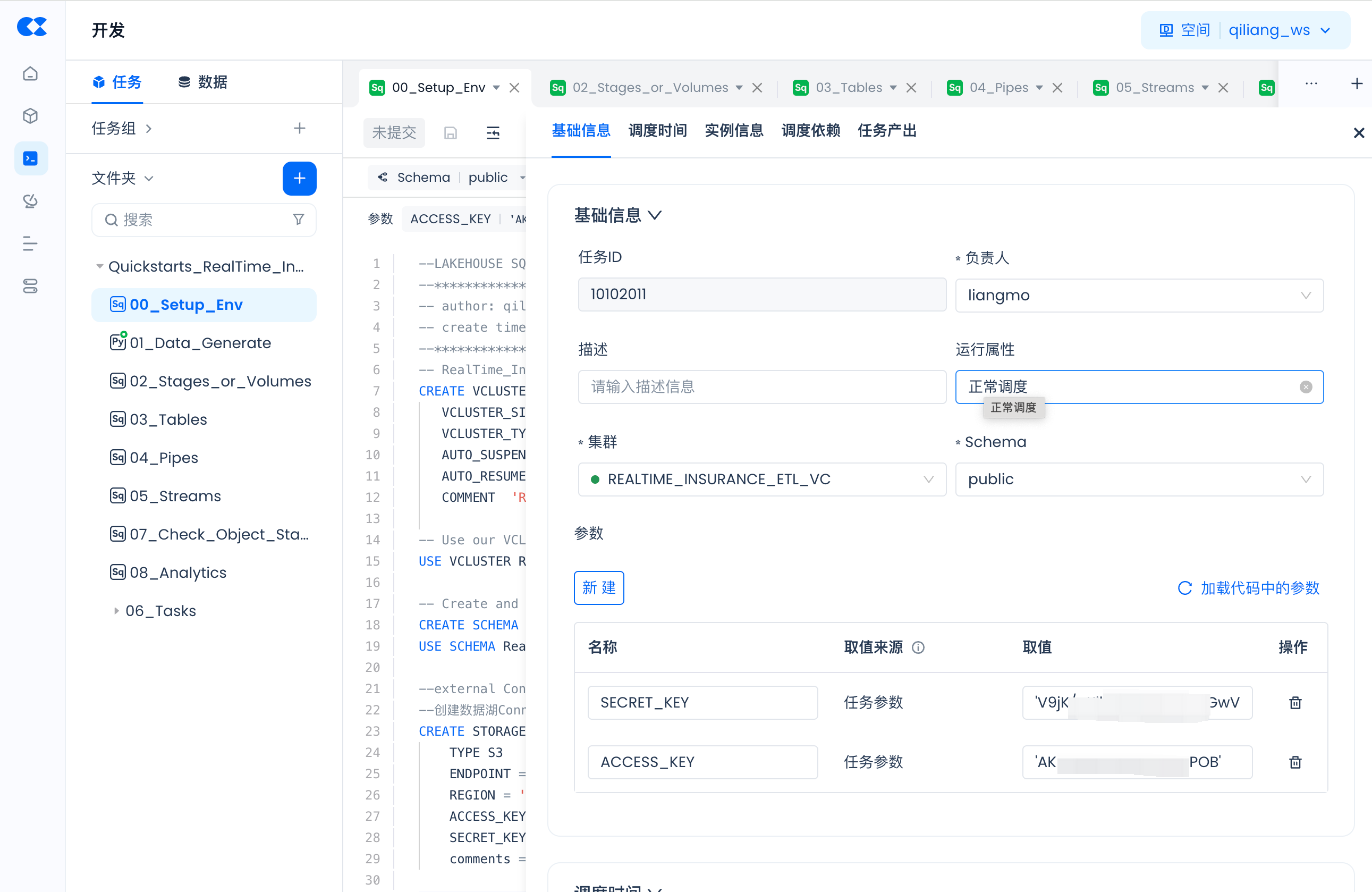
For tasks (00_Setup_Env and 01_Data_Generate) that contain parameters, such as:
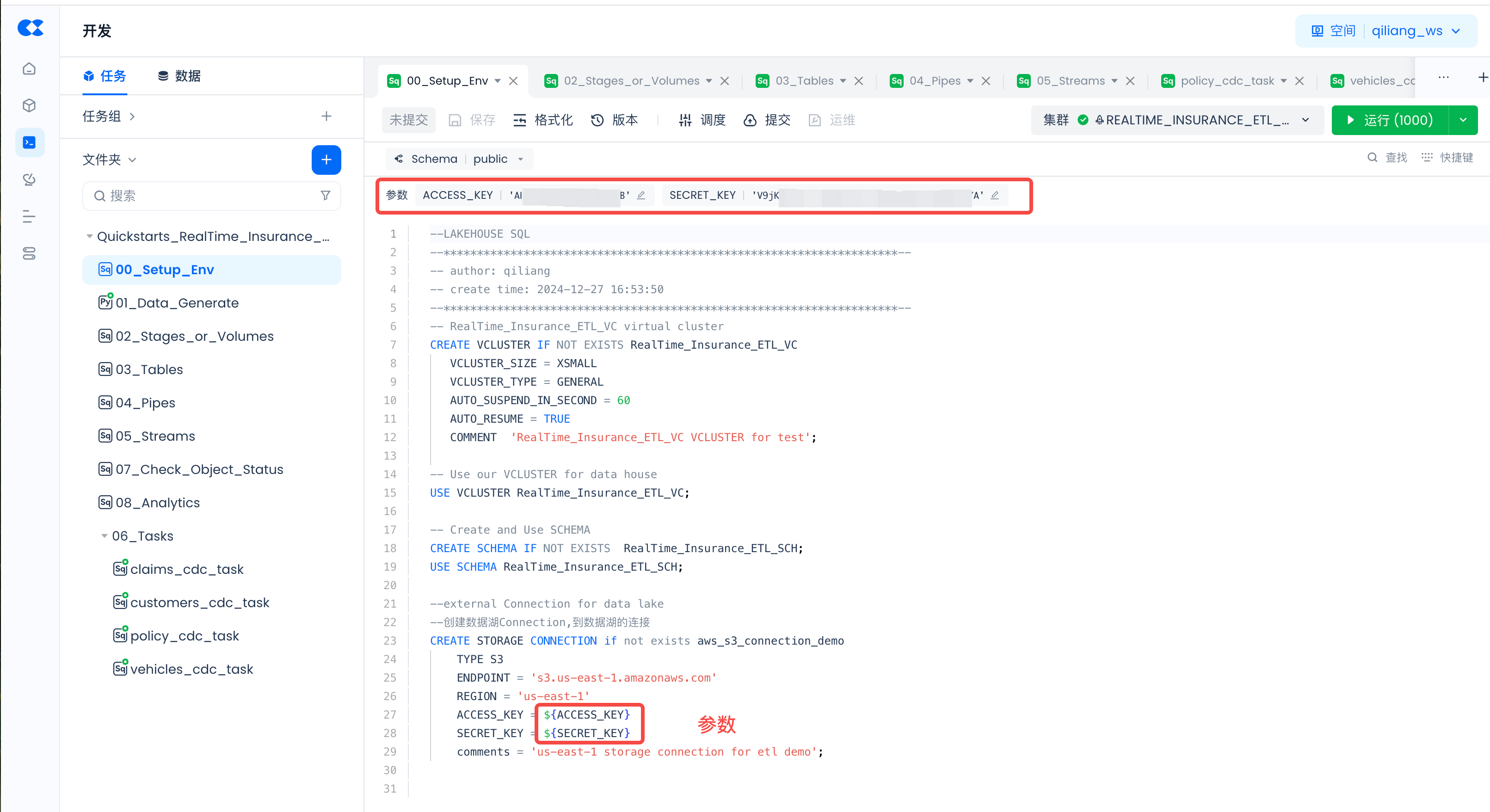
Click "Schedule":

Then "Load Parameters from Code" and fill in the actual values:
Build Singdata Lakehouse Environment
00_Setup_Env:
-- RealTime_Insurance_ETL_VC virtual cluster
CREATE VCLUSTER IF NOT EXISTS RealTime_Insurance_ETL_VC
VCLUSTER_SIZE = XSMALL
VCLUSTER_TYPE = GENERAL
AUTO_SUSPEND_IN_SECOND = 60
AUTO_RESUME = TRUE
COMMENT 'RealTime_Insurance_ETL_VC VCLUSTER for test';
-- Use our VCLUSTER for data house
USE VCLUSTER RealTime_Insurance_ETL_VC;
-- Create and Use SCHEMA
CREATE SCHEMA IF NOT EXISTS RealTime_Insurance_ETL_SCH;
USE SCHEMA RealTime_Insurance_ETL_SCH;
-- External Connection for data lake
-- Create Storage Connection to the data lake
CREATE STORAGE CONNECTION if not exists aws_s3_connection_demo
TYPE S3
ENDPOINT = 's3.us-east-1.amazonaws.com'
REGION = 'us-east-1'
ACCESS_KEY = ${ACCESS_KEY}
SECRET_KEY = ${SECRET_KEY}
comments = 'us-east-1 storage connection for etl demo';
Migrate SNOWFLAKE_ETL.py to Singdata Lakehouse Built-in Python Task Data_Generate
Singdata Lakehouse provides a managed Python runtime environment. Python tasks developed in Singdata Lakehouse Studio can be run directly or configured to run periodically through scheduling settings.
01_Data_Generate:
import subprocess
import sys
import warnings
import contextlib
import os
# Suppress warnings
warnings.filterwarnings("ignore", message="A value is trying to be set on a copy of a slice from a DataFrame")
# Suppress stderr
@contextlib.contextmanager
def suppress_stderr():
with open(os.devnull, 'w') as devnull:
old_stderr = sys.stderr
sys.stderr = devnull
try:
yield
finally:
sys.stderr = old_stderr
with suppress_stderr():
# Install kaggle
subprocess.run([sys.executable, "-m", "pip", "install", "kaggle", "--target", "/tmp/python_packages", "-i", "https://pypi.tuna.tsinghua.edu.cn/simple"], stderr=subprocess.DEVNULL)
sys.path.insert(0, '/tmp/python_packages')
import pandas as pd
import boto3
import random
import os, json, io
import zipfile
from datetime import datetime
def load_random_sample(csv_file, sample_size):
# Count total rows in the CSV file
total_rows = sum(1 for line in open(csv_file, encoding='utf-8')) - 1 # Subtract header row
# Calculate indices of rows to skip (non-selected)
skip_indices = random.sample(range(1, total_rows + 1), total_rows - sample_size)
# Load DataFrame with random sample of rows
df = pd.read_csv(csv_file, skiprows=skip_indices)
policy_table = df[['policy_id', 'subscription_length', 'region_code', 'segment']].copy()
vehicles_table = df[['policy_id', 'vehicle_age', 'fuel_type', 'is_parking_sensors', 'is_parking_camera', 'rear_brakes_type', 'displacement', 'transmission_type', 'steering_type', 'turning_radius', 'gross_weight', 'is_front_fog_lights', 'is_rear_window_wiper', 'is_rear_window_washer', 'is_rear_window_defogger', 'is_brake_assist', 'is_central_locking', 'is_power_steering', 'is_day_night_rear_view_mirror', 'is_speed_alert', 'ncap_rating']].copy()
customers_table = df[['policy_id', 'customer_age', 'region_density']].copy()
claims_table = df[['policy_id', 'claim_status']].copy()
vehicles_table.rename(columns={'policy_id': 'vehicle_id'}, inplace=True)
customers_table.rename(columns={'policy_id': 'customer_id'}, inplace=True)
claims_table.rename(columns={'policy_id': 'claim_id'}, inplace=True)
return policy_table, vehicles_table, customers_table, claims_table
def upload_df_to_s3():
try:
with suppress_stderr():
# Setup Kaggle API
# Ensure the directory exists
config_dir = '/tmp/kaggle_data/.config/kaggle'
if not os.path.exists(config_dir):
os.makedirs(config_dir)
# Create the kaggle.json file with the given credentials
kaggle_json = {
"username": ${kaggle_username},
"key": ${kaggel_key}
}
with open(os.path.join(config_dir, 'kaggle.json'), 'w') as f:
json.dump(kaggle_json, f)
# Set the environment variable to the directory containing kaggle.json
os.environ['KAGGLE_CONFIG_DIR'] = config_dir
from kaggle.api.kaggle_api_extended import KaggleApi
# Authenticate the Kaggle API
api = KaggleApi()
api.authenticate()
# Define the dataset
dataset = 'litvinenko630/insurance-claims'
# Define the CSV file name
csv_file = 'Insurance claims data.csv'
# Download the entire dataset as a zip file
api.dataset_download_files(dataset, path='/tmp/kaggle_data')
# Extract the CSV file from the downloaded zip file
with zipfile.ZipFile('/tmp/kaggle_data/insurance-claims.zip', 'r') as zip_ref:
zip_ref.extract(csv_file, path='/tmp/kaggle_data')
policy_data, vehicles_data, customers_data, claims_data = load_random_sample(f'/tmp/kaggle_data/{csv_file}', 20)
# Convert DataFrame to CSV string
policy = policy_data.to_csv(index=False)
vehicles = vehicles_data.to_csv(index=False)
customers = customers_data.to_csv(index=False)
claims = claims_data.to_csv(index=False)
current_datetime = datetime.now().strftime("%Y%m%d_%H%M%S")
# Ensure you have set your AWS credentials in environment variables or replace the following with your credentials
s3_client = boto3.client(
's3',
aws_access_key_id= ${aws_access_key_id},
aws_secret_access_key= ${aws_secret_access_key},
region_name= ${aws_region_name}
)
# Define S3 bucket and keys with current date and time
s3_bucket = 'insurance-data-clickzetta-etl-project'
s3_key_policy = f'policy/policy_{current_datetime}.csv'
s3_key_vehicles = f'vehicles/vehicles_{current_datetime}.csv'
s3_key_customers = f'customers/customers_{current_datetime}.csv'
s3_key_claims = f'claims/claims_{current_datetime}.csv'
# Upload to S3
s3_client.put_object(Bucket=s3_bucket, Key=s3_key_policy, Body=policy)
s3_client.put_object(Bucket=s3_bucket, Key=s3_key_vehicles, Body=vehicles)
s3_client.put_object(Bucket=s3_bucket, Key=s3_key_customers, Body=customers)
s3_client.put_object(Bucket=s3_bucket, Key=s3_key_claims, Body=claims)
printf("upload_df_to_s3 down:{s3_key_policy},{s3_key_vehicles},{s3_key_customers},{s3_key_claims}")
except Exception as e:
pass # Ignore errors
# Run the upload function
upload_df_to_s3()
Create Singdata Lakehouse Volumes (Corresponding to Snowflake Stages)
02_Stages_or_Volumes:
Please replace the bucket name insurance-data-clickzetta-etl-project in LOCATION 's3://insurance-data-clickzetta-etl-project/policy' with your own bucket name.
-- Create Volume, the location of data lake storage files
CREATE EXTERNAL VOLUME if not exists policy_data_stage
LOCATION 's3://insurance-data-clickzetta-etl-project/policy'
USING connection aws_s3_connection_demo -- storage Connection
DIRECTORY = (
enable = TRUE
)
recursive = TRUE;
-- Sync the data lake Volume directory to Lakehouse
ALTER volume policy_data_stage refresh;
-- View files on the Singdata Lakehouse data lake Volume
SELECT * from directory(volume policy_data_stage);
--********************************************************************--
-- Create Volume, the location of data lake storage files
CREATE EXTERNAL VOLUME if not exists vehicles_data_stage
LOCATION 's3://insurance-data-clickzetta-etl-project/vehicles'
USING connection aws_s3_connection_demo -- storage Connection
DIRECTORY = (
enable = TRUE
)
recursive = TRUE;
-- Sync the data lake Volume directory to Lakehouse
ALTER volume vehicles_data_stage refresh;
-- View files on the Singdata Lakehouse data lake Volume
SELECT * from directory(volume vehicles_data_stage);
--********************************************************************--
-- Create Volume, the location of data lake storage files
CREATE EXTERNAL VOLUME if not exists customers_data_stage
LOCATION 's3://insurance-data-clickzetta-etl-project/customers'
USING connection aws_s3_connection_demo -- storage Connection
DIRECTORY = (
enable = TRUE
)
recursive = TRUE;
-- Sync the data lake Volume directory to Lakehouse
ALTER volume customers_data_stage refresh;
-- View files on the Singdata Lakehouse data lake Volume
SELECT * from directory(volume customers_data_stage);
--********************************************************************--
-- Create Volume, the location of data lake storage files
CREATE EXTERNAL VOLUME if not exists claims_data_stage
LOCATION 's3://insurance-data-clickzetta-etl-project/claims'
USING connection aws_s3_connection_demo -- storage Connection
DIRECTORY = (
enable = TRUE
)
recursive = TRUE;
-- Sync the data lake Volume directory to Lakehouse
ALTER volume claims_data_stage refresh;
-- View files on the Singdata Lakehouse data lake Volume
SELECT * from directory(volume claims_data_stage);
Create Singdata Lakehouse Tables
03_Tables:
--- STAGING TABLES ---
--creating staging tables for each normalized tables created by data pipeline
CREATE TABLE IF NOT EXISTS staging_policy(
policy_id VARCHAR(15) ,
subscription_length FLOAT,
region_code VARCHAR(5),
segment VARCHAR(10));
CREATE TABLE IF NOT EXISTS staging_vehicles (
vehicle_id VARCHAR(15) ,
vehicle_age FLOAT,
fuel_type VARCHAR(10),
parking_sensors VARCHAR(5),
parking_camera VARCHAR(5),
rear_brakes_type VARCHAR(10),
displacement INT,
trasmission_type VARCHAR(20),
steering_type VARCHAR(15),
turning_radius FLOAT,
gross_weight INT,
front_fog_lights VARCHAR(5),
rear_window_wiper VARCHAR(5),
rear_window_washer VARCHAR(5),
rear_window_defogger VARCHAR(5),
brake_assist VARCHAR(5),
central_locking VARCHAR(5),
power_steering VARCHAR(5),
day_night_rear_view_mirror VARCHAR(5),
is_speed_alert VARCHAR(5),
ncap_rating INT);
CREATE TABLE IF NOT EXISTS staging_customers(
customer_id VARCHAR(20) ,
customer_age INT,
region_density INT);
CREATE TABLE IF NOT EXISTS staging_claims(
claim_id VARCHAR(20) ,
claim_status INT);
--- FINAL TABLES ---
--creating final table to store transformed data captured by stream objects
CREATE TABLE IF NOT EXISTS policy(
policy_id VARCHAR(15) ,
subscription_length FLOAT,
region_code VARCHAR(5),
segment VARCHAR(10));
SELECT * FROM policy;
TRUNCATE TABLE policy;
CREATE TABLE IF NOT EXISTS vehicles (
vehicle_id VARCHAR(15) ,
vehicle_age FLOAT,
fuel_type VARCHAR(10),
parking_sensors VARCHAR(5),
parking_camera VARCHAR(5),
rear_brakes_type VARCHAR(10),
displacement INT,
trasmission_type VARCHAR(20),
steering_type VARCHAR(15),
turning_radius FLOAT,
gross_weight INT,
front_fog_lights VARCHAR(5),
rear_window_wiper VARCHAR(5),
rear_window_washer VARCHAR(5),
rear_window_defogger VARCHAR(5),
brake_assist VARCHAR(5),
central_locking VARCHAR(5),
power_steering VARCHAR(5),
day_night_rear_view_mirror VARCHAR(5),
is_speed_alert VARCHAR(5),
ncap_rating INT);
CREATE TABLE IF NOT EXISTS customers(
customer_id VARCHAR(20) ,
customer_age INT,
region_density INT);
CREATE TABLE IF NOT EXISTS claims(
claim_id VARCHAR(20) ,
claim_status INT);
Create Singdata Lakehouse Pipes
04_Pipes:
create pipe policy_pipe
VIRTUAL_CLUSTER = 'RealTime_Insurance_ETL_VC'
-- Use LIST_PURGE mode to scan for the latest files
INGEST_MODE = 'LIST_PURGE'
as
copy into staging_policy from volume policy_data_stage(
policy_id VARCHAR(15) ,
subscription_length FLOAT,
region_code VARCHAR(5),
segment VARCHAR(10))
using csv OPTIONS(
'header'='true'
)
-- Must add purge parameter to delete data after successful import
purge=true
;
--********************************************************************--
create pipe vehicles_pipe
VIRTUAL_CLUSTER = 'RealTime_Insurance_ETL_VC'
-- Use LIST_PURGE mode to scan for the latest files
INGEST_MODE = 'LIST_PURGE'
as
copy into staging_vehicles from volume vehicles_data_stage(
vehicle_id VARCHAR(15) ,
vehicle_age FLOAT,
fuel_type VARCHAR(10),
parking_sensors VARCHAR(5),
parking_camera VARCHAR(5),
rear_brakes_type VARCHAR(10),
displacement INT,
trasmission_type VARCHAR(20),
steering_type VARCHAR(15),
turning_radius FLOAT,
gross_weight INT,
front_fog_lights VARCHAR(5),
rear_window_wiper VARCHAR(5),
rear_window_washer VARCHAR(5),
rear_window_defogger VARCHAR(5),
brake_assist VARCHAR(5),
central_locking VARCHAR(5),
power_steering VARCHAR(5),
day_night_rear_view_mirror VARCHAR(5),
is_speed_alert VARCHAR(5),
ncap_rating INT)
using csv OPTIONS(
'header'='true'
)
-- Must add purge parameter to delete data after successful import
purge=true
;
--********************************************************************--
create pipe customers_pipe
VIRTUAL_CLUSTER = 'RealTime_Insurance_ETL_VC'
-- Use LIST_PURGE mode to scan for the latest files
INGEST_MODE = 'LIST_PURGE'
as
copy into staging_customers from volume customers_data_stage(
customer_id VARCHAR(20),
customer_age INT,
region_density INT)
using csv OPTIONS(
'header'='true'
)
-- Must add purge parameter to delete data after successful import
purge=true
;
--********************************************************************--
create pipe claims_pipe
VIRTUAL_CLUSTER = 'RealTime_Insurance_ETL_VC'
-- Use LIST_PURGE mode to scan for the latest files
INGEST_MODE = 'LIST_PURGE'
as
copy into staging_claims from volume claims_data_stage(
claim_id VARCHAR(20) ,
claim_status INT)
using csv OPTIONS(
'header'='true'
)
-- Must add purge parameter to delete data after successful import
purge=true
;
Create Singdata Lakehouse Table Streams (Corresponding to Snowflake Streams)
05_Streams:
--********************************************************************--
--- CREATING TABLE STREAM OBJECTS FOR EACH STAGING TABLES TO CAPTURE NEW DATA
-- creating TABLE STREAM objects for staging tables
CREATE TABLE STREAM IF NOT EXISTS STREAM_policy ON TABLE staging_policy
WITH
PROPERTIES ('TABLE_STREAM_MODE' = 'APPEND_ONLY');
--********************************************************************--
CREATE TABLE STREAM IF NOT EXISTS STREAM_vehicles ON TABLE staging_vehicles
WITH
PROPERTIES ('TABLE_STREAM_MODE' = 'APPEND_ONLY');
--********************************************************************--
CREATE TABLE STREAM IF NOT EXISTS STREAM_customers ON TABLE staging_customers
WITH
PROPERTIES ('TABLE_STREAM_MODE' = 'APPEND_ONLY');
--********************************************************************--
CREATE TABLE STREAM IF NOT EXISTS STREAM_claims ON TABLE staging_claims
WITH
PROPERTIES ('TABLE_STREAM_MODE' = 'APPEND_ONLY');
--********************************************************************--
-- check total streams
SHOW TABLE STREAMS;
Check Newly Created Objects
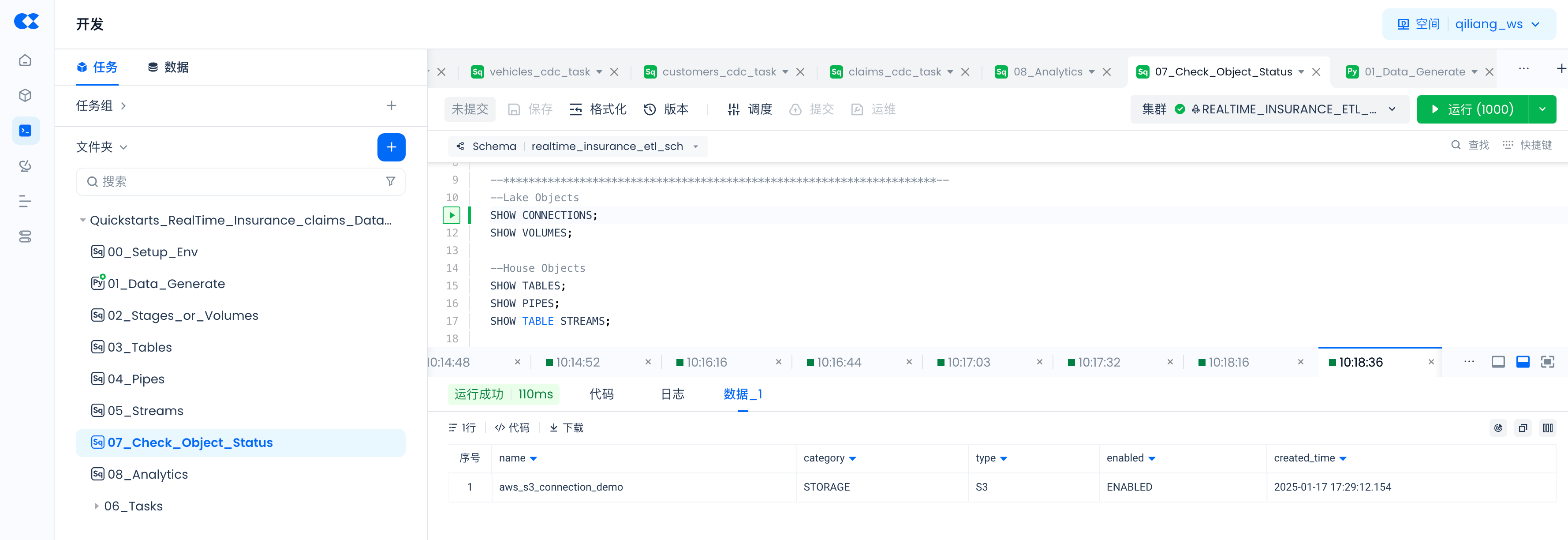
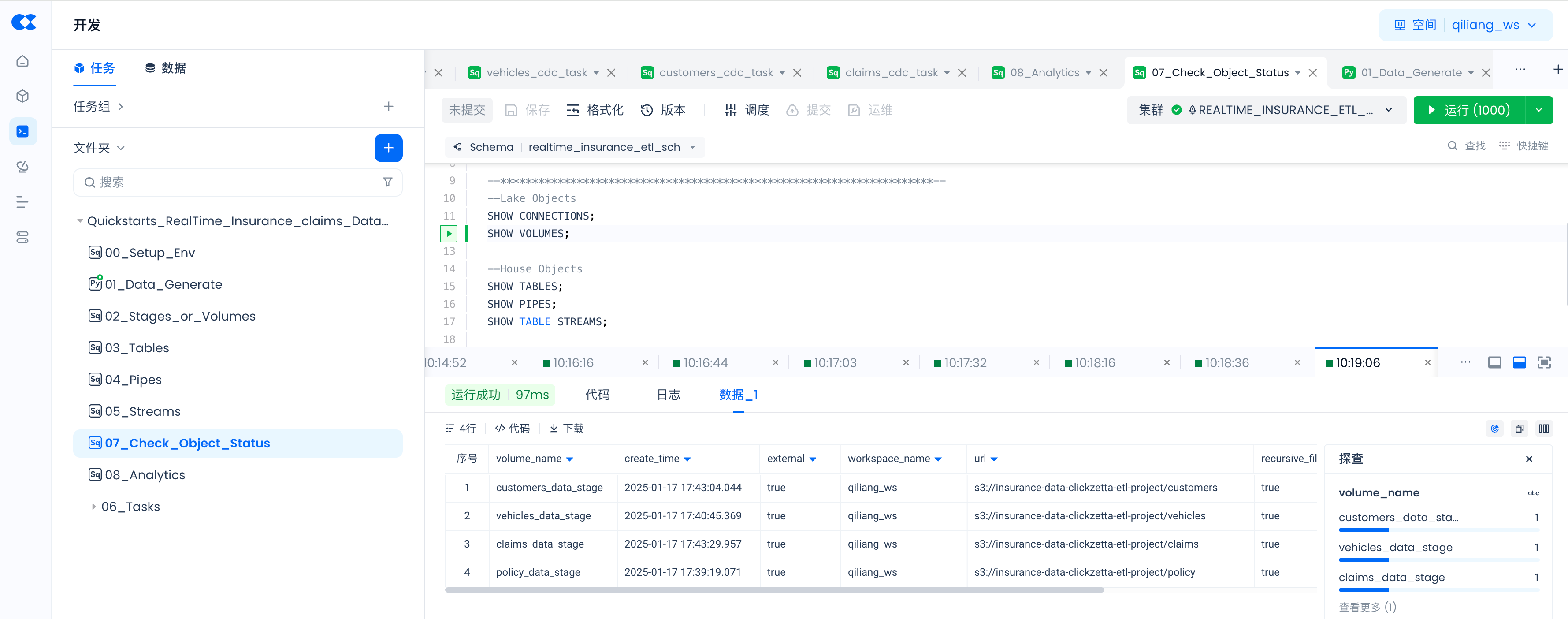
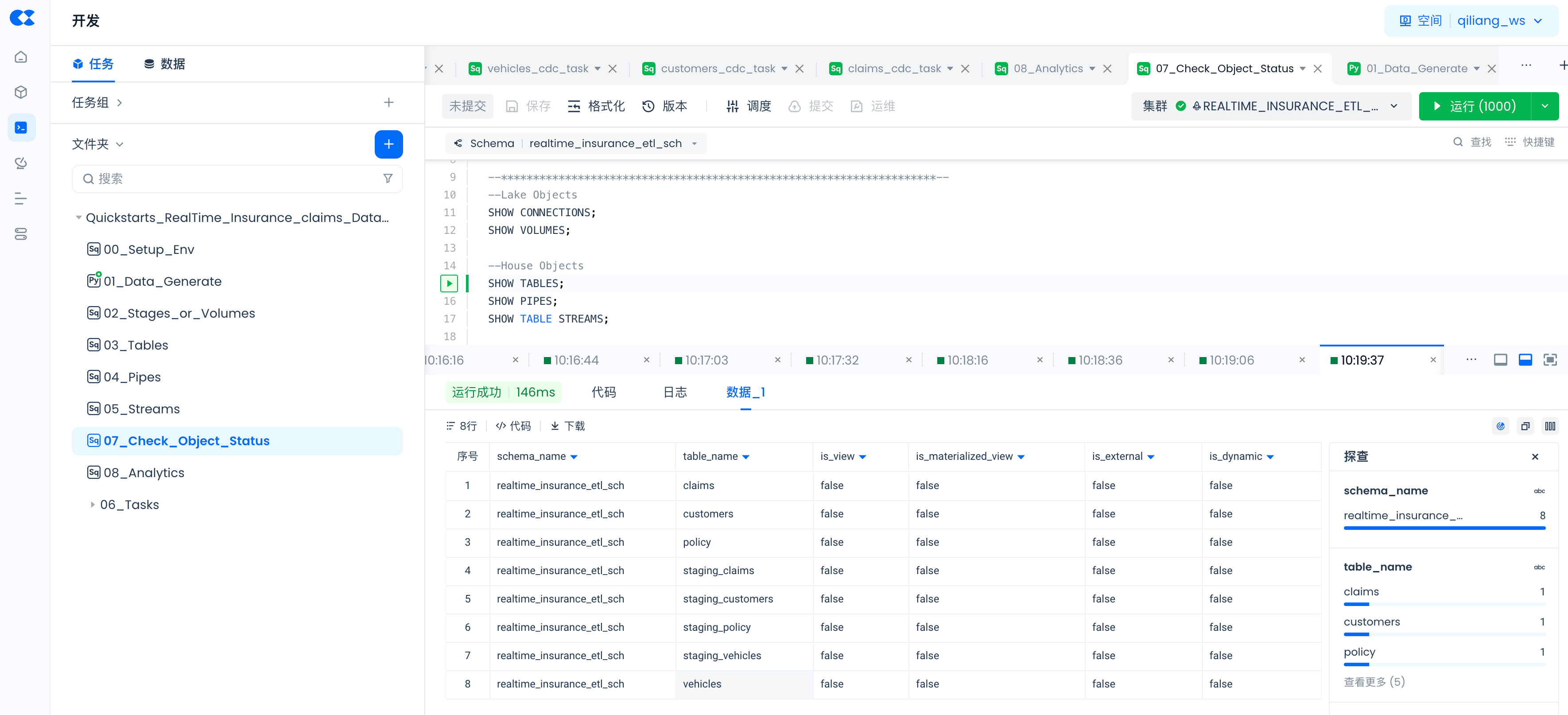
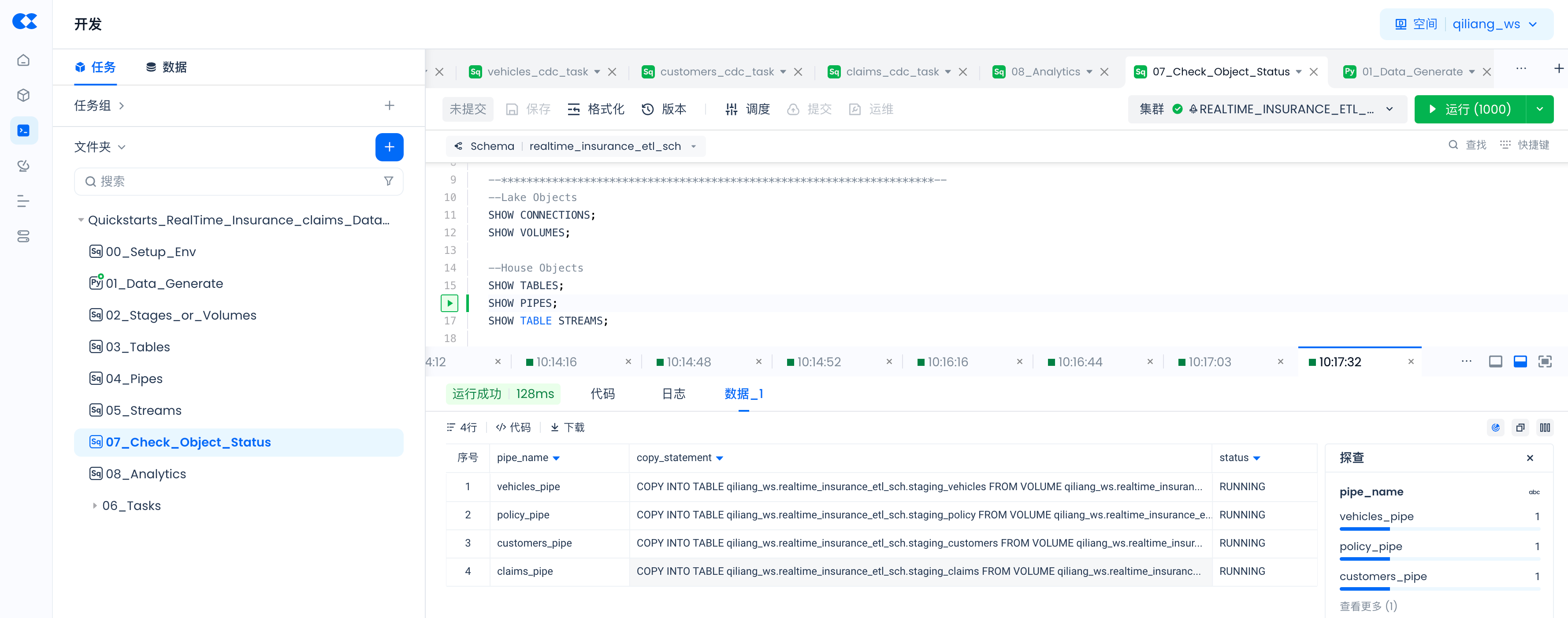
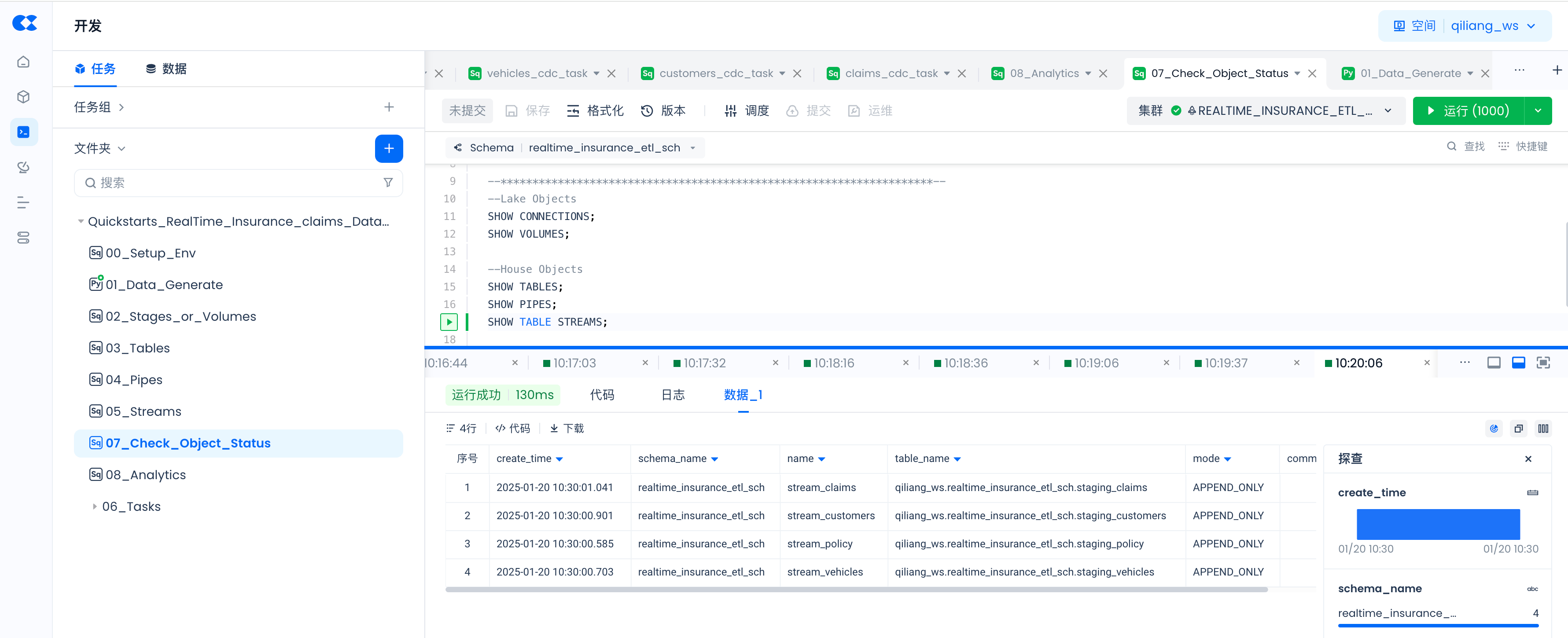
Use the following commands to check whether objects created via SQL commands are successful, and the status of PIPES.
--Lake Objects
SHOW CONNECTIONS;
SHOW VOLUMES;
--House Objects
SHOW TABLES;
SHOW PIPES;
SHOW TABLE STREAMS;
SHOW CONNECTIONS;
SHOW VOLUMES;
SHOW TABLES;
SHOW PIPES;
SHOW TABLE STREAMS;
06_Tasks:claims_cdc_task
MERGE INTO claims AS a
USING stream_claims AS b
ON a.claim_id = b.claim_id
WHEN NOT MATCHED AND b.__change_type = 'INSERT' THEN
INSERT (claim_id, claim_status)
VALUES (b.claim_id, b.claim_status);
06_Tasks:customers_cdc_task
MERGE INTO customers AS a
USING stream_customers AS b
ON a.customer_id = b.customer_id
WHEN NOT MATCHED AND b.__change_type = 'INSERT' THEN
INSERT (customer_id, customer_age, region_density)
VALUES (b.customer_id, b.customer_age, b.region_density);
06_Tasks:policy_cdc_task
MERGE INTO policy AS a
USING stream_policy AS b
ON a.policy_id = b.policy_id
WHEN NOT MATCHED AND b.__change_type = 'INSERT' THEN
INSERT (policy_id, subscription_length, region_code, segment)
VALUES (b.policy_id, b.subscription_length, b.region_code, b.segment);
06_Tasks:vehicles_cdc_task
MERGE INTO vehicles AS a
USING stream_vehicles AS b
ON a.vehicle_id = b.vehicle_id
WHEN NOT MATCHED AND b.__change_type = 'INSERT' THEN
INSERT (vehicle_id, vehicle_age, fuel_type, parking_sensors, parking_camera, rear_brakes_type, displacement, trasmission_type, steering_type, turning_radius, gross_weight, front_fog_lights, rear_window_wiper, rear_window_washer, rear_window_defogger, brake_assist, central_locking, power_steering, day_night_rear_view_mirror, is_speed_alert, ncap_rating)
VALUES (b.vehicle_id, b.vehicle_age,b.fuel_type, b.parking_sensors, b.parking_camera, b.rear_brakes_type, b.displacement, b.trasmission_type, b.steering_type, b.turning_radius, b.gross_weight, b.front_fog_lights, b.rear_window_wiper, b.rear_window_washer, b.rear_window_defogger, b.brake_assist, b.central_locking, b.power_steering, b.day_night_rear_view_mirror, b.is_speed_alert, b.ncap_rating);
Production Operations
Job Scheduling
Navigate to Lakehouse Studio Development -> Tasks,
Configure the scheduling parameters for the following tasks and submit them to the production environment.
Tasks that need scheduling configuration and online submission:
- 01_Data_Generate
- claims_cdc_task
- customers_cdc_task
- policy_cdc_task
- vehicles_cdc_task
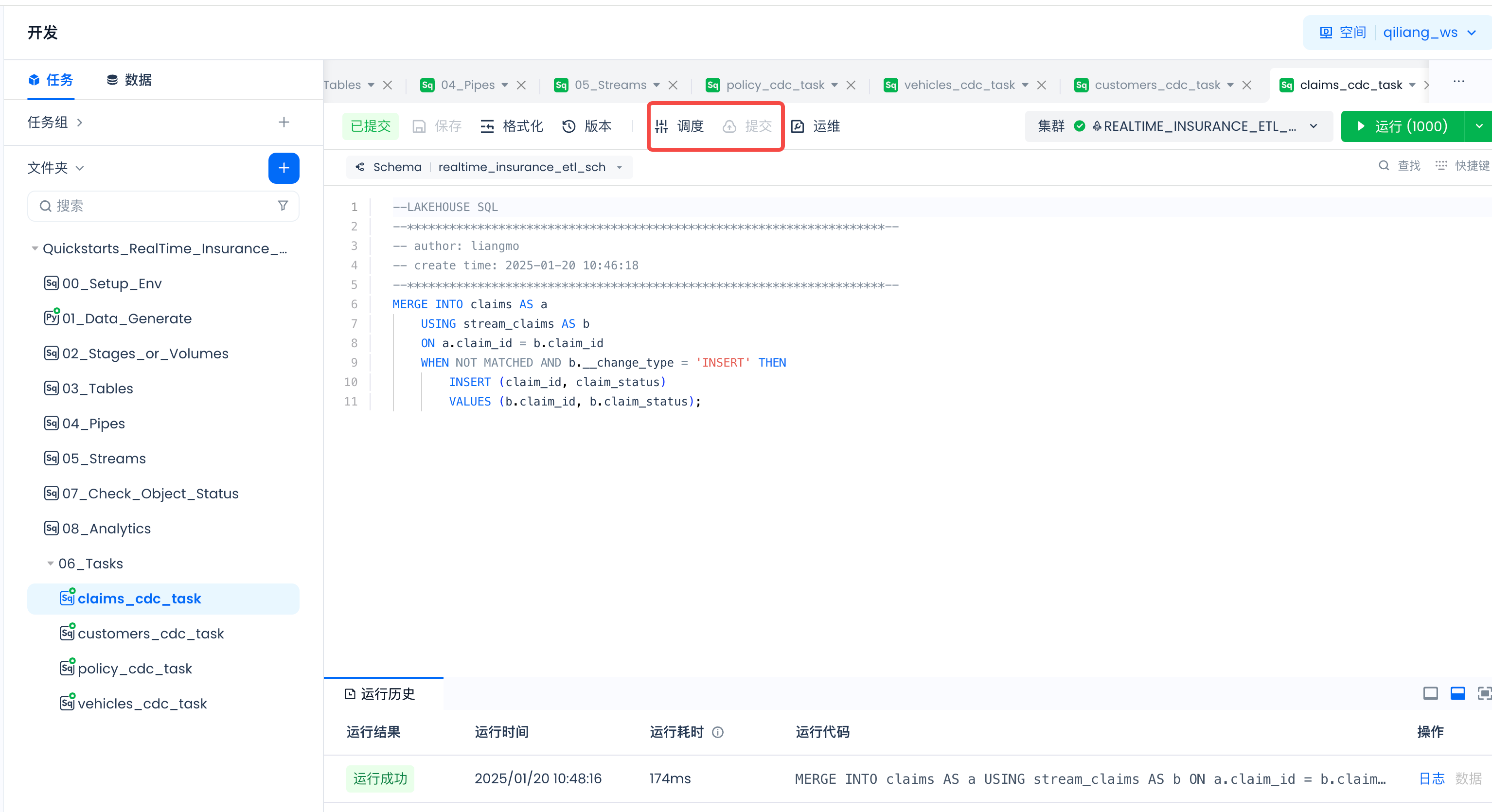
Scheduling parameter configuration:
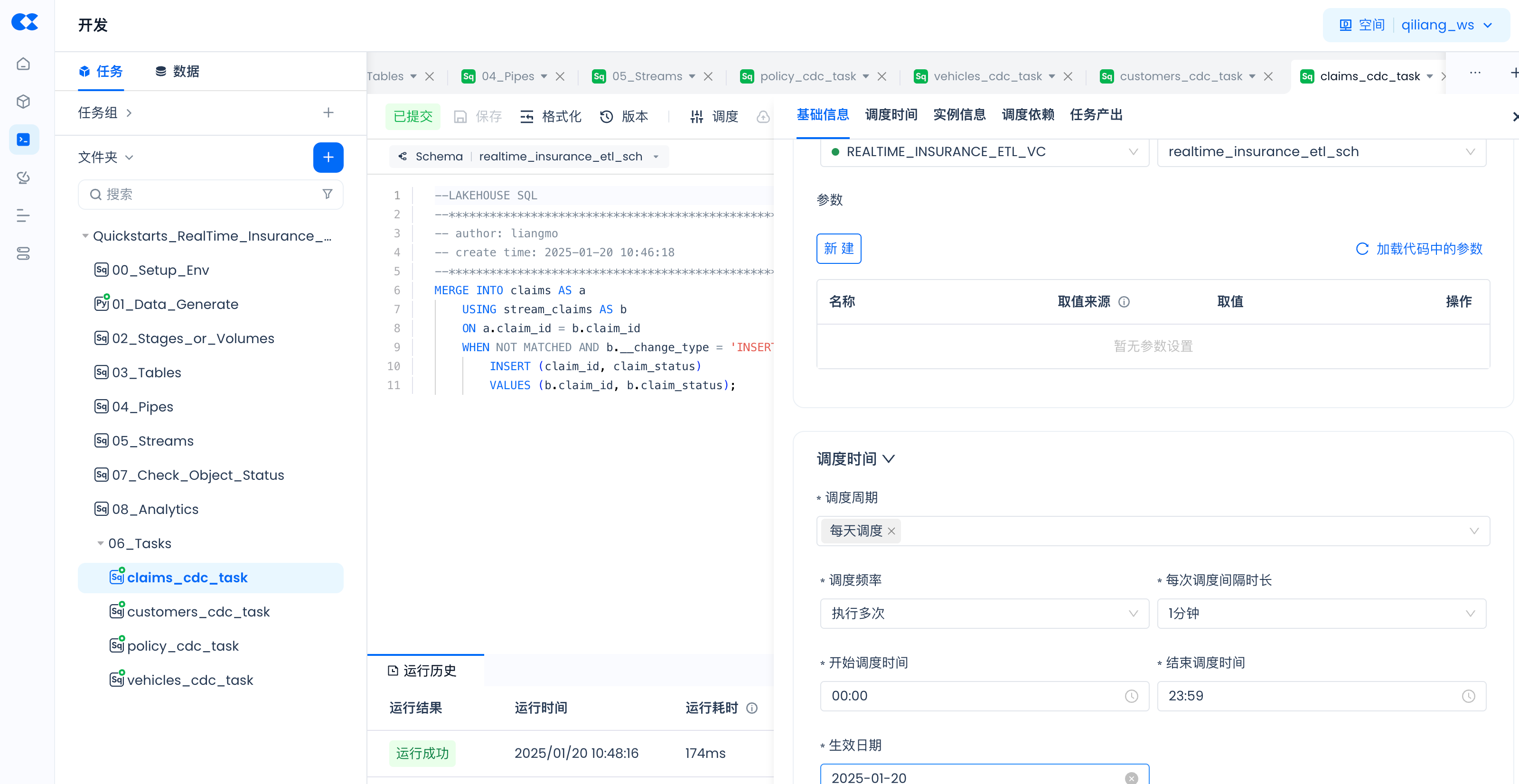
Streams and Pipes run automatically after creation and do not require scheduling.
Analyzing Singdata Lakehouse Data via Tableau
Refer to this article to connect Tableau to Singdata Lakehouse via JDBC, explore and analyze data in Lakehouse, and create BI reports.
Periodic Task Operations
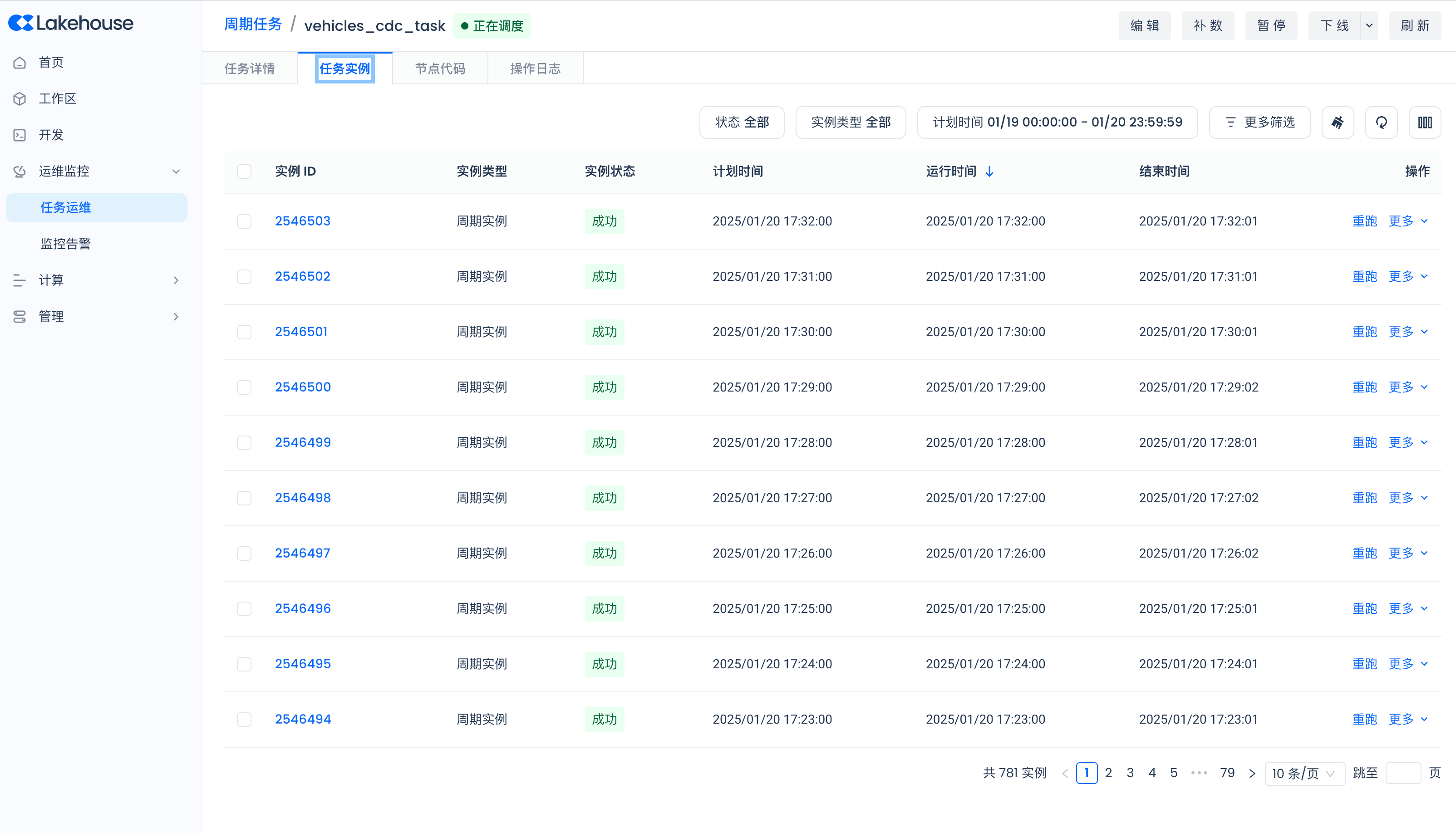
Navigate to Lakehouse Studio Operations Monitoring -> Task Operations -> Periodic Tasks to view the running status of each scheduled task:
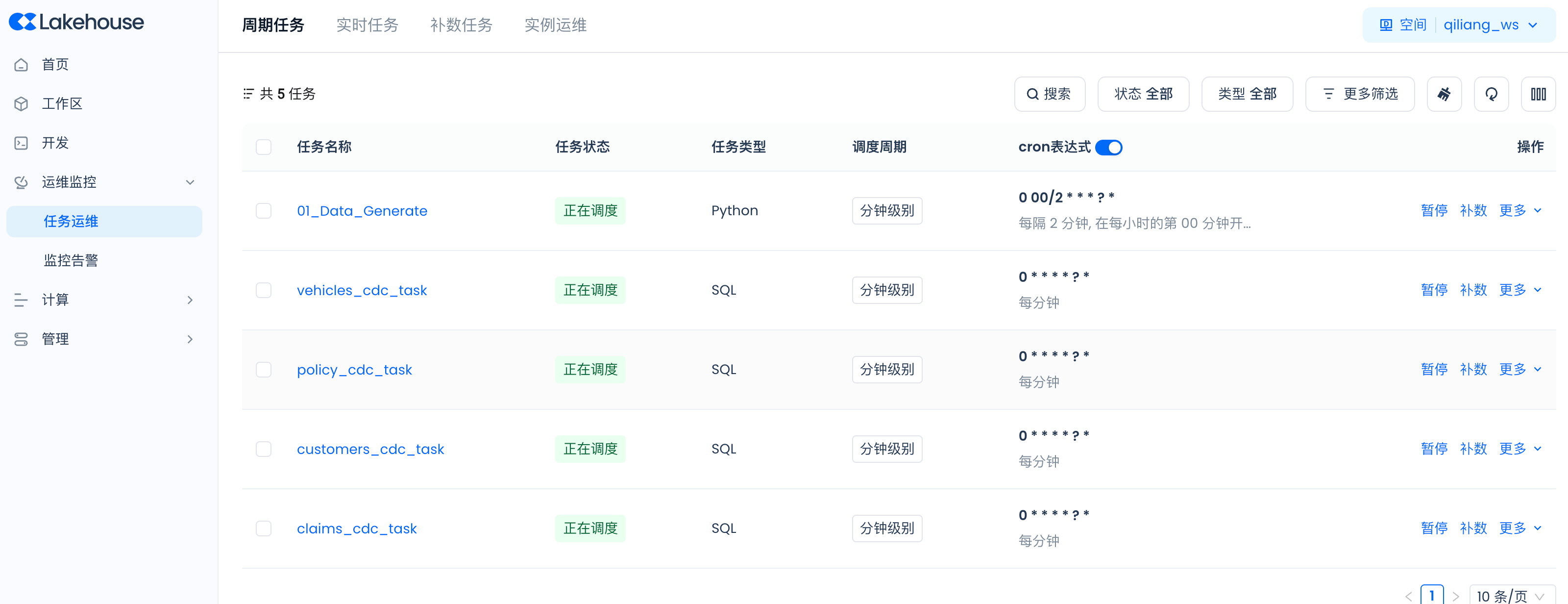
Task Instance Management for Periodic Tasks
Pipe Operations
-- Pause and Start PIPE
-- Pause
ALTER pipe policy_pipe SET PIPE_EXECUTION_PAUSED = true;
-- Start
ALTER pipe policy_pipe SET PIPE_EXECUTION_PAUSED = false;
-- View pipe copy job execution status
-- Within 7 days, with 30-minute delay
SELECT * FROM INFORMATION_SCHEMA.JOB_HISTORY WHERE QUERY_TAG="pipe.qiliang_ws.realtime_insurance_etl_sch.policy_pipe";
-- Real-time
SHOW JOBS IN VCLUSTER SCD_VC WHERE QUERY_TAG="pipe.qiliang_ws.realtime_insurance_etl_sch.policy_pipe";
SHOW JOBS where length(QUERY_TAG)>10;
-- View historical files imported by copy jobs
select * from load_history('RealTime_Insurance_ETL_SCH.staging_policy');
select * from load_history('RealTime_Insurance_ETL_SCH.staging_vehicles');
select * from load_history('RealTime_Insurance_ETL_SCH.staging_customers');
select * from load_history('RealTime_Insurance_ETL_SCH.staging_claims');
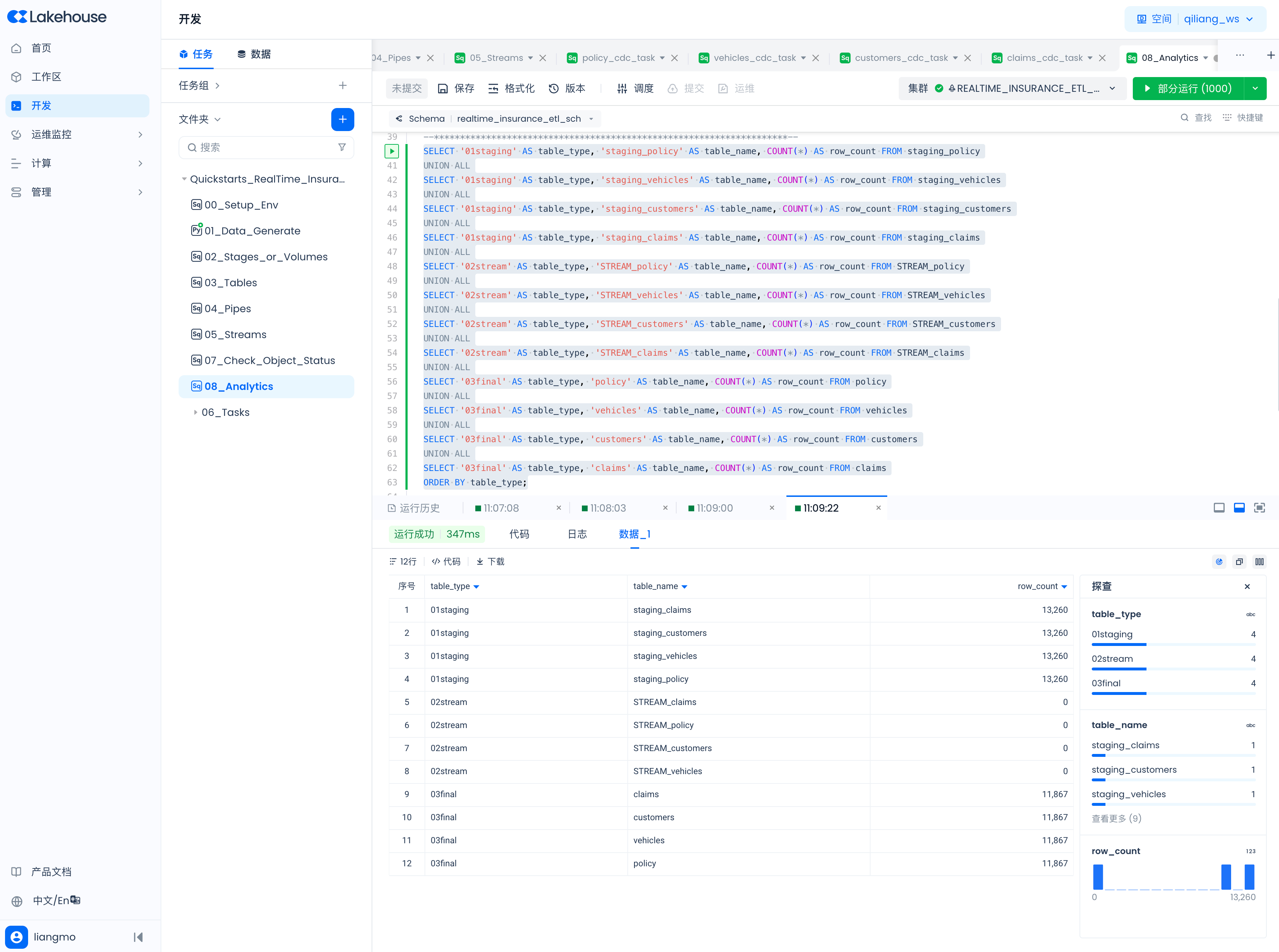
View Data in Staging Tables, Table Streams, and Final Tables
SELECT '01staging' AS table_type, 'staging_policy' AS table_name, COUNT(*) AS row_count FROM staging_policy
UNION ALL
SELECT '01staging' AS table_type, 'staging_vehicles' AS table_name, COUNT(*) AS row_count FROM staging_vehicles
UNION ALL
SELECT '01staging' AS table_type, 'staging_customers' AS table_name, COUNT(*) AS row_count FROM staging_customers
UNION ALL
SELECT '01staging' AS table_type, 'staging_claims' AS table_name, COUNT(*) AS row_count FROM staging_claims
UNION ALL
SELECT '02stream' AS table_type, 'STREAM_policy' AS table_name, COUNT(*) AS row_count FROM STREAM_policy
UNION ALL
SELECT '02stream' AS table_type, 'STREAM_vehicles' AS table_name, COUNT(*) AS row_count FROM STREAM_vehicles
UNION ALL
SELECT '02stream' AS table_type, 'STREAM_customers' AS table_name, COUNT(*) AS row_count FROM STREAM_customers
UNION ALL
SELECT '02stream' AS table_type, 'STREAM_claims' AS table_name, COUNT(*) AS row_count FROM STREAM_claims
UNION ALL
SELECT '03final' AS table_type, 'policy' AS table_name, COUNT(*) AS row_count FROM policy
UNION ALL
SELECT '03final' AS table_type, 'vehicles' AS table_name, COUNT(*) AS row_count FROM vehicles
UNION ALL
SELECT '03final' AS table_type, 'customers' AS table_name, COUNT(*) AS row_count FROM customers
UNION ALL
SELECT '03final' AS table_type, 'claims' AS table_name, COUNT(*) AS row_count FROM claims
ORDER BY table_type;
References
Singdata Lakehouse Basic Concepts
Singdata Lakehouse JDBC Driver
Singdata Lakehouse Python Tasks
Singdata Lakehouse Scheduling and Operations
