
Lakehouse Studio Overview
Lakehouse Studio is the built-in Singdata Lakehouse toolset for development, data sync, scheduling, operations, and governance. It provides a unified web entry point for common work: connecting data, developing tasks, configuring schedules, observing runs, handling issues, managing data assets, and coordinating across teams.
Many teams building a data platform find that the real complexity comes not from SQL or the compute engine itself, but from these tasks being scattered across multiple tools:
- Data source connections in one place
- Sync tasks in another
- Development and orchestration in yet another
- Run monitoring and backfill in another
- Data catalog, quality, and permissions in yet another
Lakehouse Studio consolidates these fragmented, high-frequency tasks into one product. Teams can complete development, scheduling, operations, and governance in the same place instead of switching between multiple systems.
Where Studio Fits in Singdata Lakehouse
Think of Singdata Lakehouse as a complete data platform:
- Objects like
Workspace / Schema / Table / Volume / External Catalog / VClusterdefine how data and compute resources are organized - Capabilities like
SQL,Dynamic Table,Table Stream, andPipedefine how data is ingested, processed, and continuously updated Lakehouse Studioturns those capabilities into daily workflows: data sync, task scheduling, operations monitoring, environment management, and collaborative governance
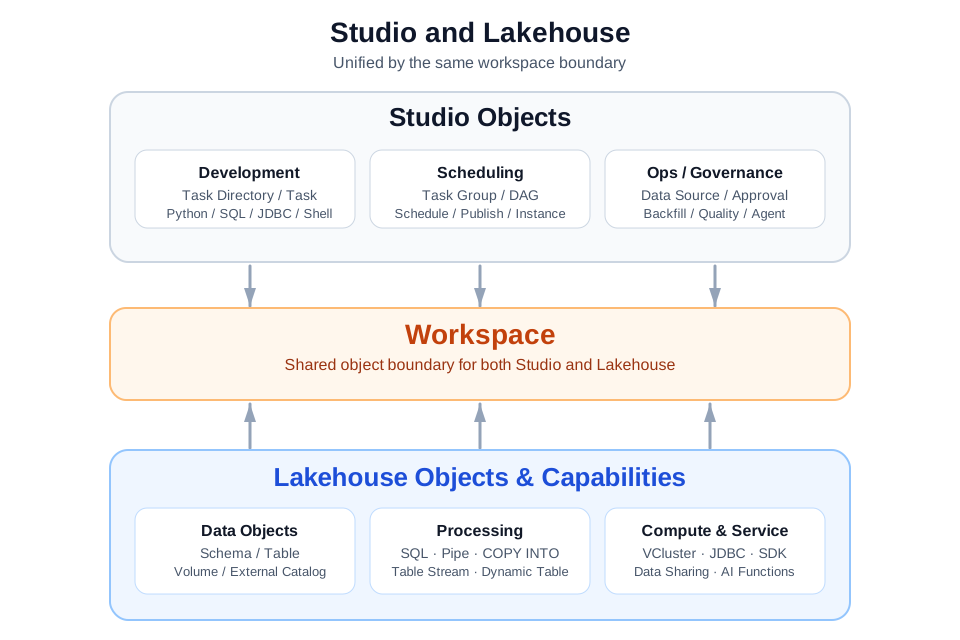
For most teams, Studio is one of the most-used entry points into Lakehouse. Data integration, task development, scheduling and publishing, operations monitoring, and governance collaboration typically all happen here.
In Key Concepts, a Workspace is not only the top-level namespace for data objects; it also defines isolation for Studio development environments. For users, the key point is that Workspace is the shared object boundary for both Lakehouse and Studio.
Within a single Workspace, there are both Lakehouse objects and Studio objects. Lakehouse objects include data and compute objects such as Schema, Table, Volume, and Dynamic Table. Studio objects include development and runtime objects such as task directories, tasks, task groups, scheduling configurations, and run instances. Because they share the same Workspace, data objects and development runtime objects are organized, run, and governed within the same boundary.
Studio is also more than a page-level view of Lakehouse's underlying objects. Beyond the shared Workspace boundary, Studio has its own engineering and runtime objects for data development and production runs:
- Workspace
- Task directory
- Regular task
- Composite task
- Task group
- Scheduling config
- Publish state
- Run instance
- Backfill instance
- Data quality rules
These objects do not answer "how is data stored?" They answer how development objects are organized, how tasks enter the scheduling system, whether a run actually happened, and how anomalies and governance actions map to specific objects. To understand Studio, you need to understand both its relationship with Lakehouse data objects and its own object relationships and lifecycle.
What Teams Typically Do in Studio
Most teams complete seven types of high-frequency work in Studio.
| Work type | What Studio handles |
|---|---|
| Environment and collaboration management | Manage service instances, workspaces, data sources, compute clusters, and approval workflows |
| Data integration | Configure data sources; create offline sync, real-time sync, and multi-table real-time sync tasks |
| Data development | Write SQL, Python (including ZettaPark), Shell, and JDBC tasks |
| Orchestration and scheduling | Organize task groups and composite tasks, view and maintain DAG relationship graphs, configure dependencies, set scheduling intervals and run parameters |
| Operations and troubleshooting | View instance status, logs, and job history; handle backfills, reruns, and alerts |
| Data governance | Manage data catalog, data quality, and some collaborative governance objects |
| Analysis and exploration | Interactive analysis in Notebook, result exploration, and visualization entry points |
Together, these work types make Studio the engineering and governance layer of Lakehouse.
In terms of specific product features, Studio organizes this work into the following modules:
Data Source and Connection Management. Register and manage database, message queue, and object storage data source connections in Studio. Studio currently supports more than 50 data source types, including MySQL, PostgreSQL, Oracle, SQL Server, MongoDB, Kafka, Hive, and MaxCompute. These connections provide the base configuration for offline sync, real-time sync, and CDC. See Data Source Management Overview and Supported Data Sources.
Data Integration and Sync. Create and manage offline sync (scheduled batch), real-time sync (continuous CDC), and multi-table real-time sync (full-database CDC) tasks in Studio. Sync tasks have dedicated configuration pages, run monitoring, and operations entry points in Studio. See Data Integration.
Task Development. Create SQL, Python, Shell, JDBC, data integration, composite task, and other task types in the task directory. You can edit and maintain task content, parameters, and configuration in the Studio IDE. The Data Engineering Agent also operates Studio task objects directly: creating tasks, writing content, saving configuration, and publishing schedules. This means Agents and Studio operate on the same engineering objects.
Orchestration and Scheduling. Task Groups and Composite Tasks (Flows) organize upstream and downstream dependencies. DAG relationship graphs show the pipeline structure directly. Scheduling configuration (cron, retry, timeout, and self-dependency) determines when and how tasks run.See Getting Things Done with Studio.
Publishing and Running. Save persists task content. Publish adds the task to the scheduling system. After publishing, you can view instance and attempt records in run monitoring, and use logs and execution details to locate issues. Backfill reprocesses historical time windows.
Data Quality. Create DQC rules in Studio (built-in metrics or custom SQL), associate them with tasks, and trigger validation after execution.
Environment and Governance. Manage service instances, Workspaces, and VClusters. Approval workflows cover permission requests, data source authorization, and other collaborative scenarios.
Together, these modules bring data ingestion, task definition and execution, anomaly handling, team collaboration, and security boundaries into one product boundary.
Environment and collaboration management is also an important category of work. Many teams use Studio not only for task development, but also to manage runtime environments and collaboration boundaries: service instances, Workspaces, data sources, compute clusters, and permission request and approval workflows.
Studio also includes a built-in Data Engineering Agent. In task development, scheduling and publishing, run diagnosis, data source handling, and engineering troubleshooting, you can let the Agent assist with exploration, checks, generation, and execution in addition to manual operations.
Why Studio Complements Lakehouse
Without Studio, teams can still accomplish many tasks through SQL, CLI, SDKs, or external tools. But when data pipelines grow longer, more roles get involved, and tasks need to run continuously, teams quickly encounter another set of problems:
- Where to store task objects and how to organize them for easier future maintenance
- What the relationship is between sync tasks, development tasks, scheduling config, and run instances
- What the difference is between publishing and saving configuration
- Which layer to look at first when a task fails
- Where to perform governance actions like backfill, approval, quality checks, and monitoring
Studio puts these questions into a unified object model, service system, and operating environment. Teams do not need to assemble separate data integration, scheduling, operations, quality, and management tools before explaining how they relate.
Why Understanding Studio's Object Relationships Matters
Teams new to Studio usually focus on creating a task or getting a sync task running. But as the number of tasks, participating roles, and run frequency grow, complexity rises quickly. Teams begin encountering these questions:
- Where should task objects be placed so they are easier to maintain later
- The task was created — why hasn't it actually run
- The scheduling configuration was saved, but why is it not scheduled yet
- Why are there no instances visible in run monitoring
- What does backfill, rerun, publish, and quality rule each affect
These questions do not mean that an entry point is hard to find. They show that Studio has its own engineering and runtime object system. In this system, Workspaces, task directories, regular tasks, composite tasks, task groups, scheduling configurations, publish state, run instances, backfill instances, and data quality rules all have clear positions and lifecycles.
This object-relationship overview belongs in the product introduction for this reason. It explains the most commonly confused concepts in Studio and describes Studio's engineering object system, which is distinct from underlying data objects. Understanding this layer first makes the feature documentation easier to follow.
Studio and SQL, CLI, and Agents
Studio is not the only entry point into Lakehouse, but it is usually the entry point where teams form a shared way of working.
| Entry point | Better suited for |
|---|---|
| Studio | Daily development, data sync, task orchestration, scheduling and publishing, run observation, operations governance |
| SQL / JDBC / MySQL protocol | Query analysis, programmatic access, BI tool connection |
| Python / Java SDK / ZettaPark | Application development, DataFrame processing, programmatic read/write |
| cz-cli / MCP / Agent | Automated execution, bulk operations, CI/CD, Agent collaboration |
These entry points are suited for different working styles. Many teams use Studio for data sync, visual development, publishing, and governance, and use SQL, CLI, SDKs, and Agents for automation, integration, and programmatic calls.
Who Studio Serves
Studio does not serve only one role.
- Data engineers work here for data integration, task development, orchestration, and scheduling
- Data operations teams work here to view instances, handle anomalies, backfill, and respond to alerts
- Data governance teams or platform administrators work here on Workspaces, data catalog, quality, and approval objects
- Analysts also use parts of Studio through Notebook, result exploration, and visualization entry points
Studio therefore often becomes the most collaborative place for Lakehouse teams.
Why This Document is in the Product Introduction
This document is in the product introduction because many users learning Lakehouse need to judge more than whether they can create tables and write SQL. They also need to know whether the platform provides a built-in system for development, sync, scheduling, operations, and governance around those objects.
With this context, readers can better understand why the Studio manual, task development, data integration, operations monitoring, and approval governance documentation are part of the same product.
Further Reading
- Studio Object Relationships and Lifecycle
- Getting Things Done with Studio
- Data Integration — configure and manage sync tasks in Studio
- Data Source Management — register and manage 50+ data source connections
- Lakehouse Studio Quick Tour
- Lakehouse Studio Getting Started Guide
- Studio Manual