
Usage Guide
This document is not organized by job role, but by what you need to do right now. The same person may cover both zones at different times — asking questions and checking data today, adding tables and adjusting semantics tomorrow — this is the norm, not the exception.
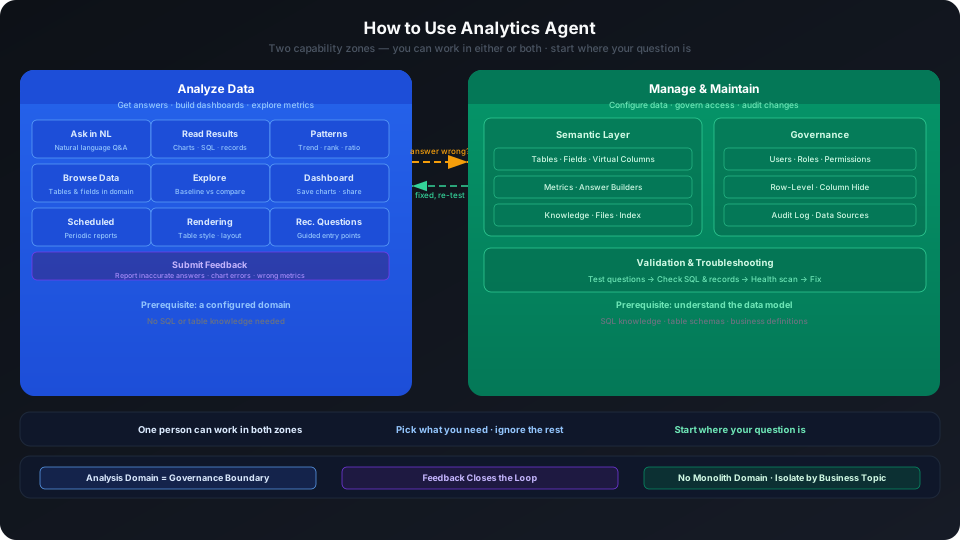
Analytics Agent capabilities fall into two zones:
| Zone | What You Do | What You Need to Know |
|---|---|---|
| Analyze Data | Ask questions, read answers, dashboards, explore, feedback | What data is in the analytics domain, how to ask better questions |
| Administer & Maintain | Add tables, configure fields, build metrics, set permissions, check audits | Data model, SQL syntax, permission system |
These two zones are not independent. The simpler and more natural the business users' experience, the more thoroughly the administration side needs to nail domain boundaries, field semantics, metric definitions, knowledge, answer builders, permissions, and validation. Without this backend foundation, a natural language frontend won't consistently produce stable, accurate answers.
Think of administration and maintenance as the process of "harnessing a large model into an enterprise analysis Agent": not letting the model directly guess at enterprise data, but giving it explicit business context, available resources, field meanings, metric definitions, permission boundaries, and validation feedback. Only then can business users rely less on underlying technology and more on natural language to complete analysis.
Analyze Data
In the Analyze Data zone, you use natural language to get answers, explore metrics, and build and use dashboards. You don't need to know underlying table names or SQL.
Features You'll Use
| Feature | What It Does | Entry Point |
|---|---|---|
| Analytics Q&A | Look up numbers, view trends, make comparisons using natural language | Analytics > Select Domain > Analytics |
| Data Tab | View what tables and fields the current domain has, confirm what can be asked | Analytics > Select Domain > Data |
| Explore | Perform benchmark/comparative time analysis and drill-down around configured metrics | Analytics > Select Domain > Explore |
| Recommended Questions | Click example questions when you don't know what to ask | Analytics > Popular Question Search |
| SQL Statement | For BI analysts or maintainers to verify what fields and conditions important answers used | Q&A Result > SQL Statement |
| Logs | For BI analysts or maintainers to see why the system responded this way and which configurations were matched | Q&A Result > Logs |
| Save to Dashboard | Preserve valuable charts to a dashboard | Q&A Result > Chart top-right > Save to Dashboard |
| My Dashboards / Shared Dashboards | Maintain or view team dashboards | Dashboards |
| Scheduled Tasks | Periodically push analysis results or anomaly monitoring | Scheduled Tasks |
| Table Rendering | Adjust table style and layout | Q&A Result > Table Rendering |
| Dashboard Versions | View or revert dashboard change history | Dashboard Detail > Version History |
| Chart Refresh | Set automatic dashboard data refresh frequency | Dashboard Detail > Refresh Configuration |
| Feedback | Submit correction feedback when answers are wrong or charts are incorrect | Q&A Result > Feedback |
Typical Path
Boundaries of the Analyze Data Zone
When you encounter the following, you have entered the Administer & Maintain zone:
- Looking at recommended questions and finding the domain is missing tables or fields → Need to add tables or configure field semantics
- Explore page doesn't show needed metrics → Need to create metrics or answer builders
- The system consistently misunderstands a business term → Need to configure knowledge or field aliases
- Users can't see data they should see → Need to check permissions or row-level permissions
You don't have to do these yourself — but if you're a one-person team, see the next section.
Administer & Maintain
In the Administer & Maintain zone, you enable the system to correctly understand data, manage who can see what, and track who changed what.
The delivery goal of administration and maintenance is not "fill in all configuration items" — it's to let business users get answers that match business definitions and permission boundaries with less need to understand underlying fields, write technical conditions, or judge SQL.
Features You'll Use
Semantic Layer
| Feature | What It Does | Entry Point |
|---|---|---|
| Table Management | View and add tables available for Q&A | Data > Tables |
| Field Semantics | Configure aliases, descriptions, types, usage, hidden status | Data > Tables > Field Configuration |
| Virtual Columns | Create derived fields using expressions | Data > Tables > Virtual Columns |
| Metrics | Solidify aggregation definitions | Data > Metrics |
| Answer Builder | Encapsulate complex SQL templates, support dynamic dimensions and filters | Data > Answer Builder |
| Knowledge | Supplement business terminology, definitions, and synonyms | Data > Knowledge |
| Files | Upload documents for document Q&A | Data > Files |
| Index Management | Manage field retrieval indexes | Data > Index Management |
| Recommended Questions | Design guidance questions for the analytics domain | Domain > Basic Information > Recommended Questions |
Governance
| Feature | What It Does | Entry Point |
|---|---|---|
| User Management | Manage accounts, user groups | Administration > User Management |
| Role Authorization | Create roles, configure feature permissions and resource permissions | Administration > User Management > Authorization Management |
| Row-level Permissions | Control users to see only designated data rows | Administration > User Management > Row-level Permissions |
| Analytics Domain Permissions | Control who can enter which domain | Domain Configuration > Permissions |
| Audit Log | Track who did what at what time | Administration > Audit Log |
| Feedback Management | Centrally view and assign user feedback | Administration > Feedback |
| Data Sources | Manage underlying data connections | Administration > Data Sources |
| Model Configuration | Manage available LLM models | Administration > Model Configuration |
| Scheduled Task Governance | View task status, send addresses, disable/enable | Scheduled Tasks |
Validation
| Feature | What It Does | Entry Point |
|---|---|---|
| Q&A Validation | Test configurations using typical questions | Analytics > Ask Question → Check SQL and Logs |
| Health Score Scan | Check for missing field descriptions, metrics, and table relationship anomalies | Domain > Basic Information > Health Score |
Typical Path
This path needs to form a closed loop: business users expose problems through natural language, BI analysts convert problems into verifiable cases, semantic layer maintainers fix fields, metrics, knowledge, or answer builders, administrators check permissions and audits, then the same business questions are used to validate the results. Without this loop, simply lowering the barrier for business users to ask questions won't make answers more accurate.
Relationship Between the Two Zones
Dashboards
Dashboards are analytical assets, not administrative operations.
| Zone | What You Do |
|---|---|
| Analyze Data | Create dashboards, add charts, organize content, share with team |
| Administer & Maintain | Adjust permission boundaries when needed, track dashboard changes through audits |
Scheduled Tasks
Scheduled tasks span both zones — anyone can create them, but governance needs to manage them.
| Zone | What You Do |
|---|---|
| Analyze Data | Design monitoring scenarios, create tasks, edit execution time and content |
| Administer & Maintain | Govern send addresses, disable abnormal tasks, check execution permissions |
Feedback
Feedback is the closed-loop entry point between both zones.
| Zone | What You Do |
|---|---|
| Analyze Data | Submit "what's wrong" and the correct business understanding |
| Administer & Maintain | View, assign, fix, and re-validate in Administration > Feedback |
Column Hiding
Column hiding is a semantic configuration that achieves column-level governance — it belongs to the Administer & Maintain zone.
Reading Path
Starting from Analyze Data
- Question Asking Guide — Structure of good questions
- Analysis Patterns Guide — Looking up numbers, comparisons, trends, rankings, attribution
- Reading Analysis Results — Reading values, tables, charts, SQL, logs
- DataGPT Dashboard User Guide — From Q&A to dashboards
- Using Data & Exploration — Data tab + structured exploration
- Handling Feedback — Submitting and improving
- Notifications — Viewing background task status
- Change Logo, Theme, and Chart Colors — Account info, Logo, theme, and chart colors
Starting from Administer & Maintain
- Analytics Domain Planning Guide — Plan domains first, then add data
- Configure Analytics Domain — Create domain, add tables, configure table details
- Configure Field Semantics — Aliases, descriptions, types, usage
- Configure Virtual Columns — Derived fields
- Answer Builder Best Practices — SQL template design
- Configure Knowledge — Definitions and terminology
- Troubleshooting Q&A Accuracy Issues — Diagnosis and fixes
- Governance Overview — Permissions, audits, domain isolation
- Permission Management — Accounts, roles, domain permissions
- View Audit Logs — Operation record tracking
- Full Download and Data Export Governance — Download permissions and export auditing
Validation Loop After Configuration
Core Principles
- Act based on capability, not job title labels. The same person can both analyze data and manage the system.
- Dashboards are analytical assets; the person asking questions and building dashboards manages content; permissions and audits belong to Administer & Maintain.
- Feedback is the closed loop between both zones — data analyzers submit, maintainers fix.
- Analytics domains are governance boundaries. Don't mix unrelated business in one domain; don't put all permission governance pressure on row-level permissions.
Related Documentation
- Quick Start — Run through your first Q&A in 5 minutes
- Analyst Guide — Complete documentation directory for the Analyze Data zone
- Configuration Guide — Complete documentation directory for the Administer & Maintain zone
- Governance Overview — Permissions, audits, domain isolation system
- Notifications — Background task status viewing
- Change Logo, Theme, and Chart Colors — Settings entry in the user avatar menu