
Governance Overview
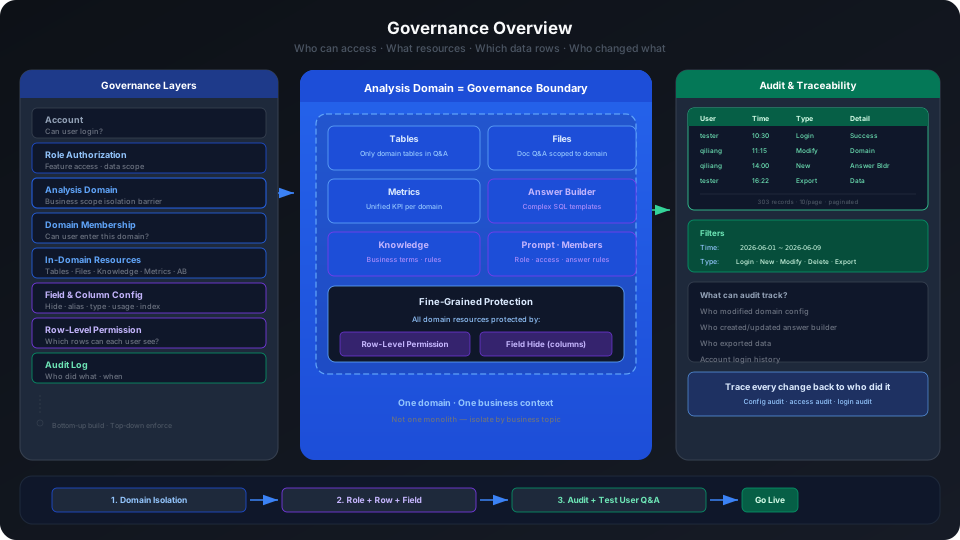
Analytics Agent's governance capabilities address three questions:
- Who can access the system and use which features.
- Who can access a specific analytics domain and use which resources within it.
- After users initiate Q&A, modify configurations, or export data, how administrators can track operation records.
Governance configuration is not just a set of permission switches. It affects which analytics domains users can see, which data assets they can access, whether they can edit metrics or answer builders, and whether the system automatically appends data scope constraints when generating SQL for Q&A.
From a practical standpoint, the less business users need to understand underlying fields, SQL, and system configuration, the more important governance and semantic maintenance become. Administrators and maintainers need to configure in advance "who can ask what, under what definitions, what data they can see, and who is responsible when something goes wrong". Otherwise, the natural language interface only lowers the form barrier for questions — it does not automatically eliminate table misselection, field ambiguity, definition conflicts, or permission mismatches.
Therefore, governance aims not only to prevent unauthorized access but also to improve Q&A accuracy, reduce the cognitive load on business users, and shorten the path for troubleshooting.
The Essence of Administration Configuration: Making Large Language Models Controllable Enterprise Analysis Agents
Analytics Agent does not let a large language model directly access all enterprise data and reason freely. Enterprise data analysis requires consistent definitions, controllable permissions, verifiable results, and traceable issues. Therefore, administration configuration must constrain and enhance a general-purpose large model into an Agent suitable for enterprise analysis scenarios.
The value of administration work can be understood as follows:
| Administration Configuration | Effect on the Large Model | Value to Business Users |
|---|---|---|
| Analytics domain | Defines the business context and available data scope | Users don't need to specify which tables to search. |
| Field semantics | Tells the model the business meaning, aliases, usage, and visibility of each field | Users can speak in business terms rather than field names. |
| Metrics | Locks in frequently used aggregation definitions | Users asking about core metrics don't need to explain calculation rules every time. |
| Knowledge | Supplements business terminology, synonyms, policy descriptions, and definition explanations | When users use company-internal language, the model understands more easily. |
| Answer builder | Encapsulates complex analysis logic and dynamic parameters | Complex analysis can be executed within a controllable template. |
| Permissions and row-level permissions | Restricts the data scope the model can access | Users cannot bypass permission boundaries through natural language. |
| Recommended questions | Gives the model and users a stable set of business entry points | Users entering an analytics domain for the first time find it easier to ask the right questions. |
| Feedback and audit | Records questions, fixes, and change history | Errors can be located, assigned, fixed, and tracked. |
| Q&A validation | Uses real business questions to verify whether configurations are working | Proves the Agent can answer reliably before go-live. |
So administrators and maintainers are not doing "miscellaneous backend configuration" — they are building the context, semantics, definitions, permissions, and validation boundaries that the large model needs for enterprise analysis. The more complete the configuration, the easier it is for business users to get trustworthy answers using simple natural language.
Analytics Domains Are Also Governance Boundaries
An analytics domain is not just a data catalog or Q&A entry point. It is itself a very important governance mechanism in Analytics Agent — it can isolate different business topics, data assets, metric definitions, knowledge, and user access scope.
An analytics domain typically corresponds to a specific business scenario, such as sales operations analysis, financial analysis, membership operations analysis, or HR analysis. After a user enters an analytics domain, the system only conducts Q&A around resources that have been added and configured within that domain, including tables, files, knowledge, metrics, and answer builders. This prevents users from crossing into unrelated data assets during natural language Q&A and reduces the model's chances of selecting the wrong table, misusing fields, or mixing definitions across multiple business contexts.
From a governance perspective, analytics domains provide at least the following value:
| Governance Value | Description |
|---|---|
| Business boundary isolation | Separate different business topics into different analytics domains to reduce cross-topic misquestions and wrong answers. |
| Data asset isolation | Only tables, files, knowledge, metrics, and answer builders added to the current analytics domain participate in Q&A for that domain. |
| Definition isolation | Different analytics domains can maintain their own metrics, knowledge, and answer builders, preventing financial, operational, and sales definitions from mixing. |
| Personnel scope isolation | Control which users can enter a domain through analytics domain permissions. |
| Q&A context convergence | The model selects tables, fields, and metrics from a smaller, more clearly defined resource set, generally producing more accurate answers. |
| Launch and change control | Domains can go live in batches, be validated independently, and have audit logs traced per domain, reducing the impact range of configuration changes. |
Therefore, it is recommended to first use analytics domains for the first layer of governance isolation, then use role authorization, resource data permissions, field hiding, and row-level permissions for more granular control. Do not put all tables and all users in one large "catch-all" analytics domain — this increases the complexity of permission governance, definition governance, and Q&A accuracy troubleshooting.
How Large Organizations Should Plan Analytics Domains
If an enterprise has tens of thousands of tables, hundreds of business departments, and thousands of users, it is not recommended to put all tables and all users in one large "catch-all" analytics domain.
The reason is not that the system cannot accommodate more resources, but that this approach undermines the value of analytics domains as governance boundaries:
| Problem | Impact |
|---|---|
| Business context is too large | When users ask questions, the model needs to choose from too many tables, fields, metrics, and knowledge entries, increasing the probability of misselection. |
| Permission boundaries are unclear | Users from different departments are mixed in the same domain, requiring more complex roles, field hiding, and row-level permissions to compensate. |
| Definition conflicts | Different departments may have different definitions for "revenue", "active users", "valid orders", etc., which become mixed in the same domain. |
| Difficult configuration maintenance | Field semantics, knowledge, metrics, and answer builders are all concentrated in one domain, making it harder to assess the impact of any change. |
| Difficult Q&A troubleshooting | When an answer is inaccurate, it's hard to determine whether it's due to wrong table selection, field ambiguity, knowledge conflict, metric definition error, or permission restriction. |
| Increased launch risk | A domain carrying too many business topics means configuration changes can affect many users and scenarios. |
It is more recommended to plan multiple analytics domains based on "business topic + user group + data definitions".
Recommended Segmentation Methods
| Segmentation Dimension | Applicable Approach | Example |
|---|---|---|
| By business department | Each department maintains its own core analytics domain. | Finance domain, Sales domain, Operations domain, HR domain. |
| By business topic | Split stable analysis topics within the same department. | Sales leads analysis, contract payment analysis, customer renewal analysis. |
| By data sensitivity | Create separate domains for sensitive data with strict access and field controls. | Compensation analysis domain, financial voucher analysis domain, customer privacy analysis domain. |
| By user group | Different roles use data domains at different granularity. | Executive operations overview domain, regional manager analysis domain, front-line operations analysis domain. |
| By launch phase | Build core high-frequency question domains first, then expand gradually. | Launch sales operations analysis first, then add channel, leads, and payment topics. |
Recommended Organization Structure
For scenarios with "10,000+ tables, 100+ business departments, and 2,000+ users", a layered organization can be adopted:
-
Establish a small number of cross-department overview domains
Aimed at executives or business analysis teams, containing only cross-department shared core metrics, summary tables, and confirmed unified definitions. -
Build department analytics domains for major business departments
Each department only adds the tables, metrics, knowledge, files, and answer builders it uses frequently. -
Split specialized analytics domains for complex departments
If a department has a very large data volume or significantly different scenarios, further split into specialized domains, e.g., "Sales Leads", "Sales Contracts", "Sales Payments". -
Place sensitive data in independent analytics domains
Compensation, financial details, and customer privacy data should not be mixed into regular business domains — control members, field hiding, and row-level permissions independently. -
Use roles and row-level permissions for intra-domain fine-grained control
Analytics domains handle the first layer of isolation; role authorization, resource data permissions, field hiding, and row-level permissions handle more granular intra-domain control.
Determining When an Analytics Domain Is Too Large
The following situations usually indicate the domain should be split:
- Users frequently ask "why did the system select another table?"
- The same business term has different definitions in different departments.
- There are too many tables in the domain, making it difficult for maintainers to supplement field semantics one by one.
- Recommended questions, knowledge, and metrics cover multiple unrelated business topics.
- Permission differences between different user groups are very large, requiring many exception rules.
- Q&A accuracy problems are difficult to trace to specific tables, fields, knowledge, or metrics.
Practical Recommendations
Do not plan analytics domains starting from "what tables do I have" — start from "which users are analyzing which business questions".
A healthy analytics domain should meet:
- Clear business topic.
- Relatively well-defined user group.
- Tables and metrics centered around the same set of business questions.
- Definitions can remain consistent within the domain.
- Maintainers can continuously manage field semantics, knowledge, and metrics.
- Q&A effectiveness can be validated through a representative set of questions.
If a table will be used by multiple departments, it does not need to be placed in one large domain. A better approach is to add that table to different analytics domains by department or topic, and configure field semantics, knowledge, and metric definitions appropriate for each scenario.
Governance Objects
| Governance Object | Configuration Entry | Primary Role |
|---|---|---|
| Account | Administration > User Management > Account Management | Manage users who can log in to the system; configure row-level permissions from the More menu in user rows. |
| Role | Administration > User Management > Authorization Management | Manage users' feature permissions and resource data permissions. |
| Row-level permission points | Administration > User Management > Row-level Permissions | Define which table and field a permission point applies to. |
| Analytics domain members | Analytics domain configuration > Permissions | Add users to the analytics domain so they can access it. |
| Domain resources | Analytics domain configuration > Data | Configure tables, files, knowledge, metrics, answer builders, and other resources available for Q&A. |
| Full download permission | Administration > User Management > Authorization Management | Control whether roles can use the full download capability. |
| Audit log | Administration > Audit Log > Operation Records | View login, create, modify, delete, and export operation records. |
Relationships Between Permissions
Common permission configurations in Analytics Agent are not mutually substitutable — they take effect in layers.
| Layer | Problem It Solves | Example |
|---|---|---|
| Account existence | Whether the user can log in to the system. | The tester user can be added to an analytics domain. |
| Role authorization | Which features and resource types the user can access. | For example, financial staff can be configured with "can view metrics, cannot edit answer builders". |
| Analytics domain isolation | Which business context the user enters and which domain resources participate in Q&A. | Finance domain and Sales domain maintain separate tables, metrics, knowledge, and members. |
| Analytics domain permission | Whether the user can enter a specific analytics domain. | Add tester to doc_ops_test_domain_20260608. |
| Domain resource configuration | After entering the domain, which tables, files, knowledge, and metrics can be used in Q&A. | Tables added to the domain, files added to the domain, knowledge enabled. |
| Field and column configuration | During Q&A, which fields are visible, filterable, aggregatable, and groupable. | Hidden fields are not prioritized for Q&A exposure, effectively providing column-level visibility control. |
| Row-level permissions | Within the same table, which rows different users can see. | North China sales can only see North China regional data. |
| Full download | Whether the user can bulk export visible data. | Only grant full download to roles that need offline analysis or verification. |
| Audit log | Who did what at what time. | Check whether a user modified domain configuration, created an answer builder, or exported data. |
Therefore, whether a user "can access certain data" is usually not determined by a single configuration. Troubleshooting should simultaneously check roles, domain membership, resource addition status, field hiding, and row-level permissions.
Common Governance Scenarios
Letting a User Access an Analytics Domain
At minimum, the following conditions must be met:
- The user account exists.
- The user has a role with permissions to use Analytics Agent-related features.
- The user has been added to the target analytics domain's permission list.
- The analytics domain has necessary data tables, files, knowledge, metrics, or answer builders added.
In practice, when adding a user in the analytics domain "Permissions" tab, only the user is selected, not the role. The role shown for the user comes from the account's existing global role, not from a separate assignment within the analytics domain.
Controlling Which Features a User Can Use
Configure roles in "Authorization Management". Custom roles can be edited; built-in roles may be restricted by the system.
In practice, a custom role "Finance Staff" can enter edit mode and configure:
- Feature & operation permissions.
- Data permissions.
Feature permissions determine whether users can see and operate on related modules; data permissions determine users' visible or editable scope for resources like answer builders, data sources, knowledge, tables, files, and metrics.
"Full download" should be evaluated separately. It relates to whether users can bulk export visible data and is not recommended to be granted to all business users by default. It should be governed together with data privacy, row-level permissions, field hiding, and audit logs.
Controlling Different Users Seeing Different Data in the Same Table
Use row-level permissions.
Row-level permissions involve two steps:
- Define permission points on the "Row-level Permissions" page and map them to the target table and target column.
- In "Account Management", open the More menu in the user row, go to "Row-level Permissions", and configure permission rule values for that user.
In practice, the More menu in user rows includes a "Row-level Permissions" entry; the authorization form supports selecting predefined row-level permission points and configuring "enumeration value" or "expression" type rules.
Controlling Whether Fields Are Exposed to Q&A
Use hidden, field usage, column type, and field description capabilities in table field configuration.
While hidden fields are not bottom-level database permissions, for Analytics Agent Q&A, they can achieve column-level visibility control: hidden fields should not be prioritized as visible, selectable, or explainable fields in Q&A.
Fields suitable for hiding include:
- Sensitive fields that business users should not see.
- Intermediate calculation fields.
- Technical fields that are prone to misuse.
- Redundant fields not relevant to the current analytics domain.
Tracking Configuration Changes and User Operations
Use audit logs.
In practice, "Administration > Audit Log > Operation Records" supports filtering by time range, operator, and operation type. Table fields include username, user account, time, operation type, and operation content.
Operation type filter options include:
- Login
- Create
- Modify
- Delete
- Export
Audit logs are suitable for post-launch troubleshooting of "who changed a configuration", "who exported data", "who created an answer builder", and similar questions.
Governance Launch Recommendations
Before launching an analytics domain for business users, the following checks are recommended:
| Check Item | Recommendation |
|---|---|
| Are roles clearly defined? | Do not have all users use the administrator role. Configure separate permissions for finance, operations, sales, and other roles. |
| Is domain membership minimized? | Only add users who need to use the domain to the domain permission list. |
| Are resource permissions tiered? | Distinguish between "can view" and "can edit" for answer builders, tables, files, knowledge, and metrics. |
| Are fields governed? | Hide sensitive fields; supplement field aliases, descriptions, usage, and column types. |
| Have row-level permissions been validated? | Use a test user to verify that restricted users can only see data within their authorized scope. |
| Is full download controlled? | Grant full download only to roles that genuinely need it, and check export audits. |
| Is audit log traceable? | Confirm that key configuration changes are visible in the audit log. |