
Singdata CLI (cz-cli)
cz-cli is the command-line operations tool for Singdata Lakehouse. For human users, it lets data developers query tables, run SQL, manage tasks, and view run logs from the terminal—no browser required. For AI Agents, it provides a high-level operation interface tailored to data warehouse scenarios, letting agents complete full operations with minimal context overhead.
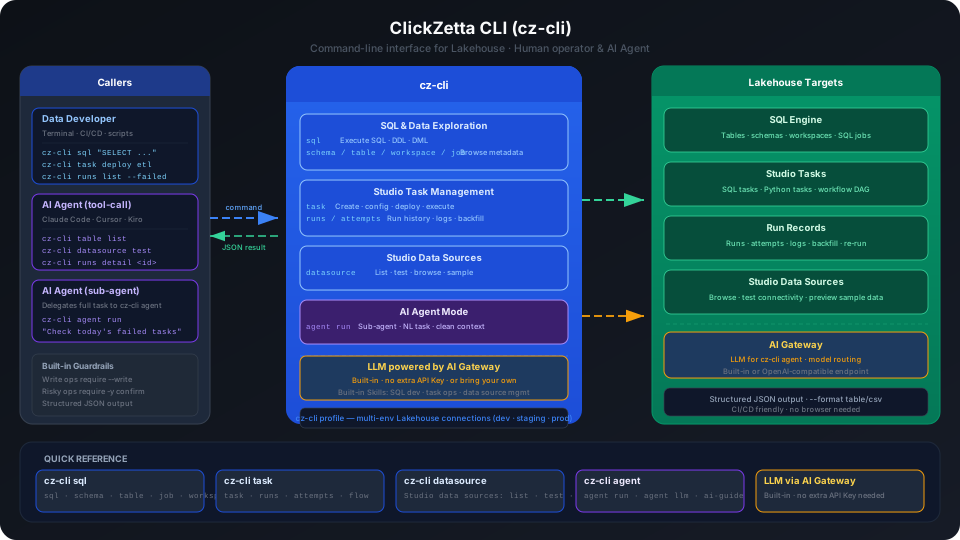
Why cz-cli?
Lakehouse already offers Studio Web UI, MCP Server, JDBC, REST API, and other access methods—but each has fundamental limitations for AI Agents. cz-cli provides differentiated value for two core scenarios:
Scenario 1: Agent Calls Commands Directly (Tool-Call Mode)
The agent uses cz-cli commands to perform data warehouse operations—one command per complete business action.
Limitations of other interfaces:
| Interface | Core Limitation |
|---|---|
| JDBC / SQL | Agent must inject the full schema before writing SQL; large warehouse schemas can cost tens of thousands of tokens. Without schema context, hallucinations are severe (fabricated table and column names). Studio task status, run logs, and other operational actions have no SQL interface at all. |
| REST API | No unified interface discovery mechanism—agents cannot automatically know which endpoints exist. Even with an OpenAPI spec, the full spec is a context bomb. A single business action requires chaining 3-5 API calls; any intermediate failure silently breaks the flow. |
| MCP Server | Each tool description costs ~300-600 tokens; 3 MCP servers can consume 70%+ of the context window. As tool count grows, agent selection accuracy drops significantly—quality degrades noticeably beyond 50 tools. |
| Studio Web UI | Requires simulating browser interactions; many steps, unstable state, high agent operation cost, low accuracy. |
cz-cli advantages:
- Self-describing and discoverable:
cz-cli --helpandcz-cli <subcommand> --helpare self-describing. Agents query on demand without preloading any documentation. - Business-semantic encapsulation: Each command maps to one complete business action—agents get it done in one step, no multi-step composition, no pagination, authentication, or error code handling.
- Covers capabilities beyond SQL: Studio task management, run inspection, backfill, data source browsing—all unreachable via JDBC.
- Built-in guardrails: Write operations require
--write; high-risk operations require-yconfirmation, reducing agent error risk. - Structured output: JSON by default—agents parse directly without processing natural language or HTML.
- Headless-friendly: A plain process, no persistent connection needed. Works directly in CI/CD pipelines, scheduled scripts, and enterprise bots.
Scenario 2: As a Specialized Sub-Agent (cz-cli agent Mode)
When a primary agent (Claude Code, Cursor, Kiro, etc.) loads too many skills, two problems emerge: context pollution—information accumulated from a previous task interferes with reasoning on the next—and attention dilution—the more tools available, the higher the probability of choosing the wrong one.
The solution is Anthropic's recommended orchestrator-subagent pattern: the primary agent handles planning and coordination, delegating specialized domain problems wholesale to a specialized sub-agent, which completes the work in an isolated, clean context and returns results to the primary agent.
cz-cli agent is the specialized sub-agent for data warehouse operations:
Anthropic's Research feature uses the same architecture—benchmarks show a 90.2% improvement over single-agent approaches with 90% less research time. Data warehouse operations (checking task status, reading logs, backfilling, diagnosing SQL) are a natural fit for this delegation pattern—tasks are independent, boundaries are clear, and results are verifiable.
Command Overview
| Command | Object | Description |
|---|---|---|
cz-cli profile | Local connection configuration | Create, switch, update Lakehouse connections |
cz-cli status | Current connection | Verify connection is working |
cz-cli sql | Lakehouse SQL engine | Execute SQL queries, DDL/DML |
cz-cli schema | Schemas under Workspace | View and manage Schemas |
cz-cli table | Lakehouse tables | View table structure, preview data, count rows |
cz-cli workspace | Workspaces under instance | View and switch workspaces |
cz-cli task | Studio tasks | Create, configure, deploy, execute Studio tasks |
cz-cli runs | Studio task run records | View run logs, backfill, rerun |
cz-cli attempts | Retry records for a single run | View retry details and logs |
cz-cli job | SQL Jobs | SQL Job performance diagnostics |
cz-cli datasource | Studio external data sources | Browse schemas/tables in data sources, test connectivity |
cz-cli agent | (Agent only) Local AI Agent | Start AI Agent session, operate Lakehouse in natural language |
Quick Start
Install:
Configure connection:
The command opens a browser for OAuth sign-in and automatically creates Profiles for the instances and Workspaces your account can access. See the Installation and Configuration Guide for details.
Verify connection:
Run a query:
For detailed installation and configuration steps, see the Installation and Configuration Guide.
Use Cases
| Scenario | Recommended Approach |
|---|---|
| Daily data queries, viewing table structure, sample data | cz-cli sql / cz-cli table |
| Managing and debugging Studio tasks, viewing run logs | cz-cli task / cz-cli runs |
| Automated DDL or task execution in CI/CD pipelines | cz-cli commands + --write |
| AI Agent performing data warehouse operations | cz-cli tool-call mode |
| AI Agent handling complex warehouse operations | cz-cli agent run sub-agent mode |
| Visual configuration of data sync or complex task orchestration | Studio Web UI |
LLM Source
The LLM model used by cz-cli agent is provided uniformly by AI Gateway. New users should use cz-cli login to configure OAuth, Lakehouse Profiles, and the Singdata built-in LLM in one step, with no separate model API Key required. External LLMs can also be integrated via cz-cli agent llm add—in this case, enter the AI Gateway Endpoint as an OpenAI-compatible gateway:
After adding the configuration, list the available models and set the default model using the full <configuration-name>/<model-id> reference. See cz-cli Installation and Usage Guide → Configure an LLM for the cz-cli Agent for details.
Related Documents
cz-cli Documentation
- Installation and Configuration Guide — Installation, Profile, MCP, Agent LLM configuration, output formats, upgrades, FAQ
- SQL Execution and Data Exploration — Full reference for sql, schema, table, job, workspace commands
- Studio Task Development and Operations — Task creation, scheduling, runs operations, backfill, task flow
- Studio External Data Source Management — Data source browsing, connectivity testing, sample data preview
Lakehouse Related Documents
- Studio Guide — Complete Studio Web UI operations guide
- Workspace — Workspace concepts, user management, permission model
- Virtual Cluster — Virtual Cluster types, specs, start/stop management
- Task Development and Scheduling — Studio SQL task development, scheduling configuration
- Real-time Sync Tasks — CDC real-time sync configuration and management
- Batch Sync Tasks — Batch offline sync configuration and management
- Data Source Management — External data source connection configuration