
Alibaba Cloud BYOS Configuration
This guide will help you configure BYOS (Private Storage) on Alibaba Cloud Object Storage Service (OSS), enabling the Singdata Lakehouse to use your OSS bucket as a data storage location.
Prerequisites
- Have an Alibaba Cloud account with OSS service enabled
- Know the cloud platform and region of your Singdata Lakehouse instance
- Have administrative permissions for OSS buckets
Step 1: Prepare an OSS Bucket
Create a New Bucket (Recommended)
If you choose to create a new bucket dedicated to the Singdata Lakehouse:
-
Log in to the Alibaba Cloud OSS Console
-
Click "Create Bucket"
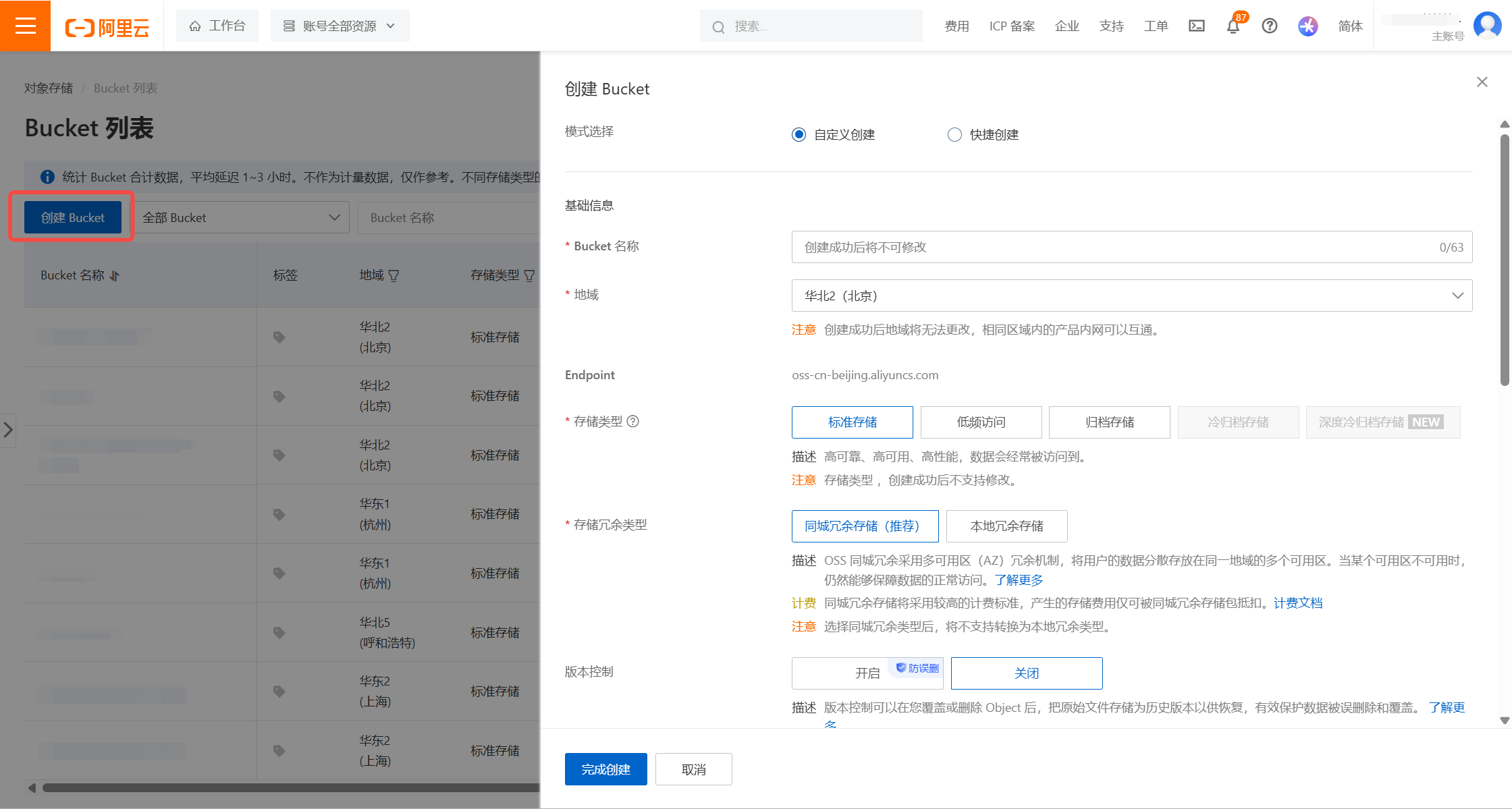
Configure Bucket Basic Information
| Item | Setting | Description |
|---|---|---|
| Bucket Name | Custom (e.g., my-company-lakehouse) | Globally unique; recommend including a usage identifier. |
| Region | Same as the Lakehouse instance | :warning: Critical Requirement: Must be the same region as the Singdata Lakehouse instance. |
| Storage Class | Standard | Avoid Infrequent Access or Archive storage; frequent reads will incur excessive retrieval fees. |
| Storage Redundancy | Locally Redundant Storage (LRS) | You may choose Zone-Redundant Storage (ZRS) based on your requirements. |
| Read/Write Access | Private | Ensure data security. |
| Server-Side Encryption | None | The Lakehouse manages encryption on its own; global encryption may affect performance. |
| Versioning | Disabled | Avoid additional costs. |
| Scheduled Backup | Disabled | Backups in object storage lack metadata, so separately backed-up data is unreadable. If backups are needed, use the Lakehouse's Time Travel feature. |
Use an Existing Bucket
If you choose to use an existing bucket:
Verify Region Configuration
The bucket must be in the same Region as the Singdata Lakehouse instance. For example:
- Lakehouse instance in: Alibaba Cloud China East 2 (Shanghai)
- OSS Bucket must be in: China East 2 (Shanghai)
Your service instance's "Cloud Provider and Region" information can be found on the service instance homepage:

Choose a Storage Path
You can choose one of the following:
Option 1: Use the Entire Bucket (Recommended)
Applicable scenario: Bucket dedicated to the Lakehouse
Option 2: Use a Specific Directory Under the Bucket
Applicable scenario: Need to isolate data for different purposes within the same bucket
Data Security Warning:
- Ensure the selected path is not shared with other business systems.
- The Singdata Lakehouse will perform read, write, and delete operations on files under this path.
- Sharing paths may lead to:
- Data being accidentally deleted or overwritten.
- Impact on the normal operation of other business systems.
- Data consistency issues.
Recommendation: Create a dedicated bucket or use a dedicated directory for the Lakehouse.
Record Required Information
Please record the following information, which will be needed for subsequent configuration:
- Bucket Name
- Bucket Region
- Storage Path (if using a subdirectory)
- Your Alibaba Cloud Root Account ID
How to view the root account ID:
- Log in to the Alibaba Cloud console
- Click the avatar in the upper right corner
- In "Account Information", view the "Account ID"
Step 2: Configure Bucket Access Policy
1. Go to the Bucket Management Page
- Find your bucket in the OSS console
- Click the bucket name to enter the details page
2. Go to the Access Control Page
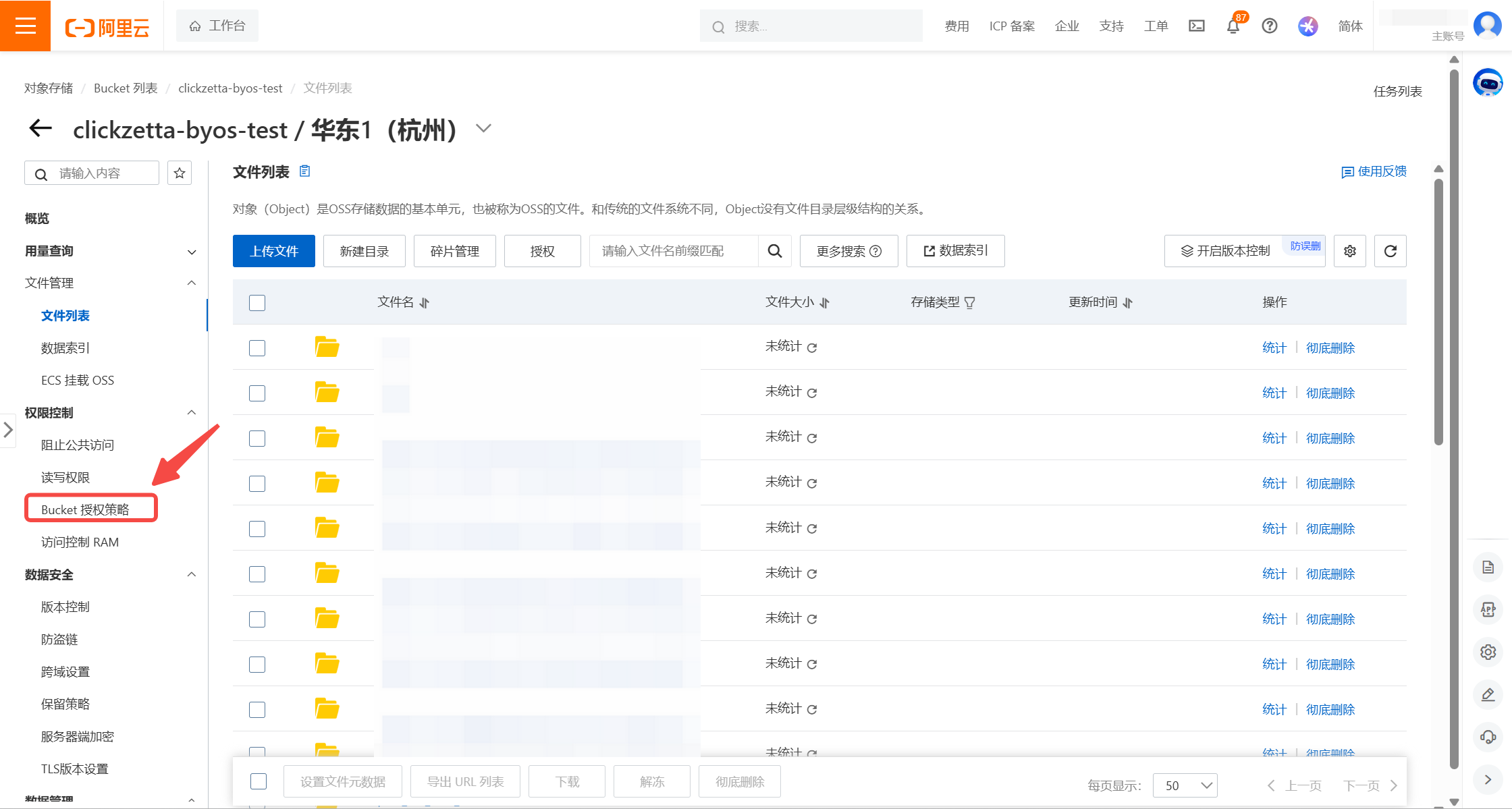
- Click "Access Control" -> "Bucket Authorization Policy" in the left menu.
- Click "Add Authorization".
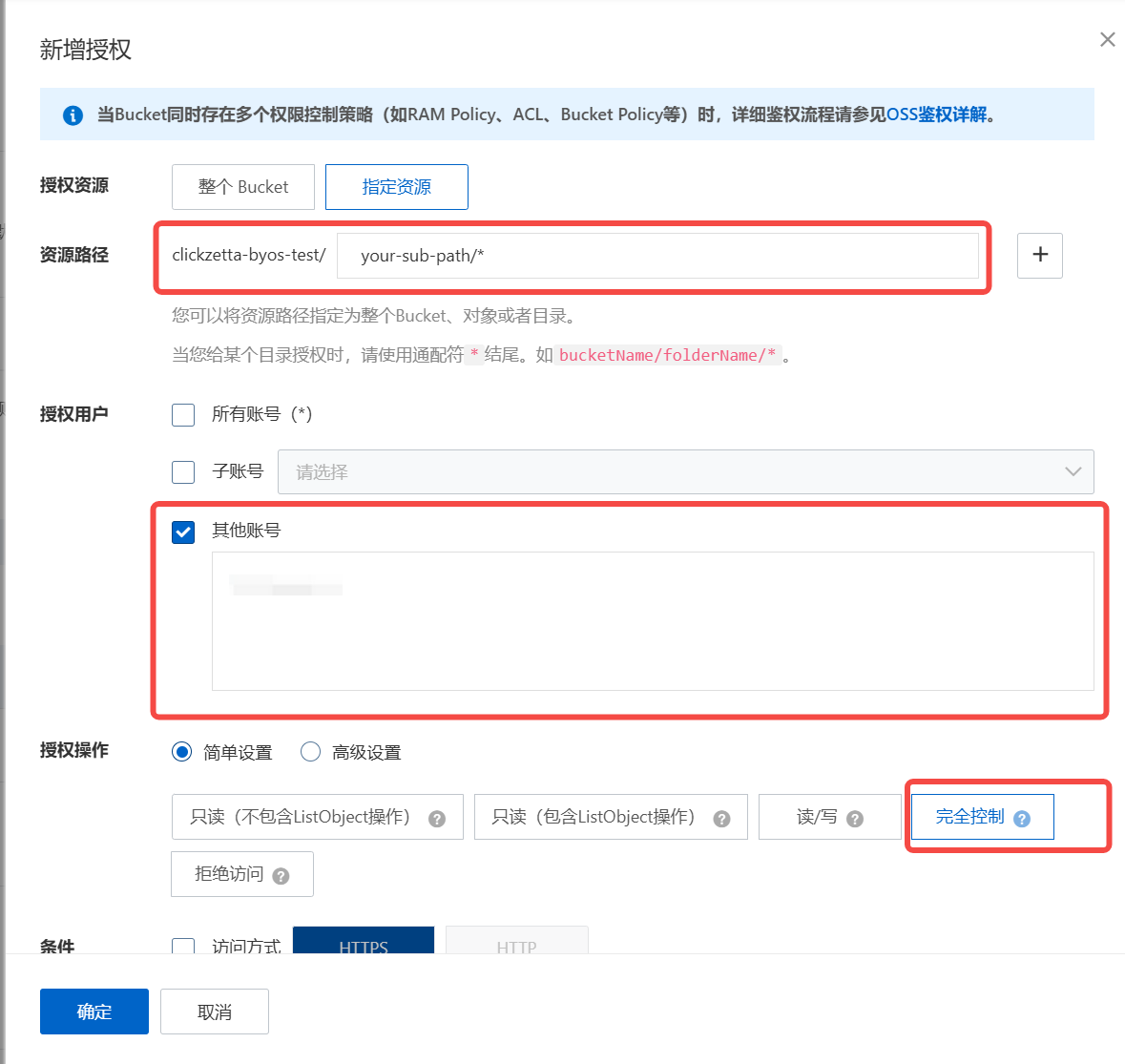
3. Configure the Authorization Policy
Select "Custom Authorization" and fill in the following information:
| Item | Setting |
|---|---|
| Authorized Resource | acs:oss:*:*:your-bucket-name/* or acs:oss:*:*:your-bucket-name/your-path/* |
| Authorized User | Enter Singdata Lakehouse's root account ID: 1384322691904283 |
| Authorized Actions | Select "Full Control". |
| Condition | Do not set. |
Why is full control permission required?
The Singdata Lakehouse needs full control permissions under this path to ensure normal data addition, deletion, reading, and writing operations.
After completing the above configuration, you can use your private storage path and cloud platform root account ID when creating a private storage.