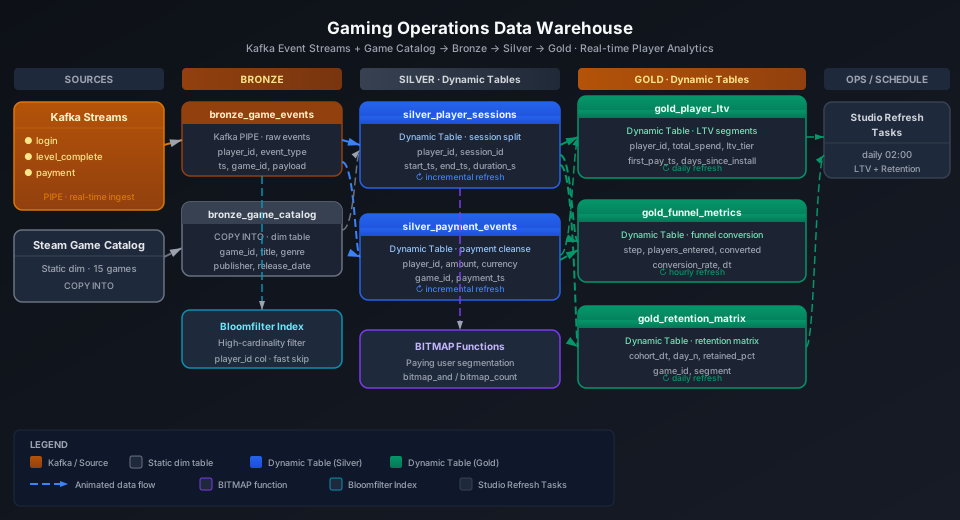
This guide builds a multi-layer data warehouse from a complete game behavior event stream, producing user LTV segmentation, payment conversion funnels, and retention matrices. Using the Steam platform game catalog (15 mainstream game dimension records), it simulates player login, level completion, and payment events, demonstrating the full Kafka PIPE → Bronze → Silver → Gold build process end to end. Four key platform capabilities are covered: Dynamic Table, BITMAP functions, LAG/LEAD window functions, and Bloomfilter Index.
Overview
The core challenge in a gaming operations data warehouse is converting high-frequency, multi-type behavior event streams into actionable business metrics.
Problem
Singdata Solution
Game events (login/payment/level) written at high frequency in real time, tens of millions per day
Kafka PIPE continuous ingestion; no custom consumer code needed
Client logs batch-uploaded daily to OSS need automatic ingestion
Dynamic Table declarative SQL; system detects upstream changes automatically
user_id and app_id are high-cardinality columns with frequent user-level funnel queries
Bloomfilter Index for fast determination of whether a user is in a data block
Payment path analysis needs to reconstruct preceding and following behavior sequences
LAG/LEAD window functions to reconstruct payment decision context
DAU deduplication and N-day retention cross-day COUNT DISTINCT
GROUP_BITMAP function family for precise cardinality counting
SQL Commands Used
Command / Function
Purpose
Notes
CREATE TABLE
Create Bronze layer event table and game dimension table
Regular tables used as upstream sources for Dynamic Tables
CREATE BLOOMFILTER INDEX
Create Bloomfilter indexes on user_id and app_id columns
High-cardinality column point-lookup filtering to reduce scanned data blocks
CREATE PIPE
Create a Kafka continuous ingestion pipeline
BATCH_INTERVAL controls ingestion latency
CREATE DYNAMIC TABLE
Create incremental computation tables for Silver and Gold layers
System refreshes automatically along the dependency chain
LAG / LEAD
Get the previous/next event in the same session
Reconstruct the payment path (step before, step after)
GROUP_BITMAP
Precise cardinality counting (DAU calculation)
Returns the set cardinality, not the bitmap object itself
GROUP_BITMAP_STATE
Generate daily bitmap state snapshots
Used for cross-day merge deduplication (MAU)
GROUP_BITMAP_MERGE
Merge multiple bitmap states
Used together with GROUP_BITMAP_STATE
REFRESH DYNAMIC TABLE
Trigger a manual refresh
Use when creating tables for the first time or debugging
Prerequisites
All examples in this guide run under the best_practice_gaming_dw Schema.
CREATE SCHEMA IF NOT EXISTS best_practice_gaming_dw
COMMENT 'Gaming Operations DW Best Practices';
Dimension Tables: Game Catalog and Categories
Create Tables
The game dimension table comes from the Steam Games Dataset (Kaggle, ~1 GB) and contains game name, tags, price, review count, and other metadata. This guide extracts 15 mainstream games as a representative sample.
CREATE TABLE IF NOT EXISTS best_practice_gaming_dw.doc_dim_game (
app_id BIGINT COMMENT 'Steam App ID',
name STRING COMMENT 'Game title',
release_date DATE COMMENT 'Release date',
developer STRING COMMENT 'Developer name',
publisher STRING COMMENT 'Publisher name',
genres STRING COMMENT 'Comma-separated genre tags',
tags STRING COMMENT 'User-defined tags (top 20)',
price_usd DOUBLE COMMENT 'Current price in USD',
is_free BOOLEAN COMMENT 'True if free-to-play',
positive_reviews BIGINT COMMENT 'Number of positive reviews',
negative_reviews BIGINT COMMENT 'Number of negative reviews',
estimated_owners STRING COMMENT 'Estimated owner range',
avg_playtime_forever INT COMMENT 'Average playtime in minutes (lifetime)',
ingest_time TIMESTAMP DEFAULT CURRENT_TIMESTAMP()
) COMMENT 'Dim: Steam game catalog (sourced from Steam Games Dataset on Kaggle)';
CREATE TABLE IF NOT EXISTS best_practice_gaming_dw.doc_dim_genre (
genre_id INT COMMENT 'Genre surrogate key',
genre_name STRING COMMENT 'Genre name',
category STRING COMMENT 'Meta-category: Core / Casual / Strategy'
) COMMENT 'Dim: Game genre taxonomy';
After loading the game dimension data (15 Steam popular games), query the top 5:
SELECT app_id, name, genres, price_usd, is_free, positive_reviews
FROM best_practice_gaming_dw.doc_dim_game
ORDER BY positive_reviews DESC
LIMIT 5;
The Steam game catalog covers both free-to-play (CS2, Dota 2) and paid (PUBG, BG3, Stardew Valley, Cyberpunk 2077) games. Review counts range from 140,000 to 1.2 million.
Bronze Layer: Raw Game Event Table
Create Tables
The Bronze layer receives the real-time event stream from the Kafka PIPE. The schema covers common attributes for all event types; event-specific attributes are stored as JSON in extra_props.
CREATE TABLE IF NOT EXISTS best_practice_gaming_dw.doc_bronze_game_events (
event_id STRING COMMENT 'Unique event identifier',
user_id STRING COMMENT 'Player user ID',
app_id BIGINT COMMENT 'Steam App ID (FK to dim_game)',
event_type STRING COMMENT 'login / logout / level_complete / purchase / achievement',
event_time TIMESTAMP COMMENT 'Client-side event timestamp (UTC)',
session_id STRING COMMENT 'Session identifier (pre-assigned by client SDK)',
level_id INT COMMENT 'Level/map number (null if not applicable)',
level_name STRING COMMENT 'Level name or map name',
amount_usd DOUBLE COMMENT 'Payment amount in USD (null if not a purchase)',
item_id STRING COMMENT 'Item SKU for purchase events',
item_name STRING COMMENT 'Item display name',
country_code STRING COMMENT 'ISO 3166-1 alpha-2 country code',
device_type STRING COMMENT 'PC / Console / Mobile',
client_version STRING COMMENT 'Game client version string',
extra_props STRING COMMENT 'JSON blob for event-specific extra properties',
ingest_time TIMESTAMP DEFAULT CURRENT_TIMESTAMP()
) COMMENT 'Bronze: raw in-game event stream (Kafka PIPE target)';
Create Bloomfilter Index
Subsequent Silver and Gold layer queries filter frequently on user_id and app_id. Both are high-cardinality columns (user IDs in the millions, game IDs in the tens of thousands), making them well-suited for Bloomfilter Indexes.
CREATE BLOOMFILTER INDEX IF NOT EXISTS idx_bf_user_id
ON TABLE doc_bronze_game_events (user_id);
CREATE BLOOMFILTER INDEX IF NOT EXISTS idx_bf_app_id
ON TABLE doc_bronze_game_events (app_id);
⚠️ Note: CREATE BLOOMFILTER INDEX requires the same Schema context as the target table. Run USE SCHEMA best_practice_gaming_dw first or use the -s best_practice_gaming_dw parameter, otherwise you will see an "index and table must in the same schema" error.
Configure Kafka PIPE
Game behavior events are collected by the client SDK and sent to a Kafka topic. The PIPE continuously consumes and writes them to the Bronze table.
-- Create the raw string staging table (Kafka PIPE writes JSON strings here)
CREATE TABLE IF NOT EXISTS best_practice_gaming_dw.kafka_raw_game_events (value STRING);
-- Create the Kafka PIPE
CREATE PIPE IF NOT EXISTS best_practice_gaming_dw.pipe_game_events
VIRTUAL_CLUSTER = 'DEFAULT'
BATCH_INTERVAL_IN_SECONDS = '60'
AS
COPY INTO best_practice_gaming_dw.kafka_raw_game_events
FROM (
SELECT CAST(value AS STRING) AS value
FROM READ_KAFKA(
'<kafka-broker>:9092', -- replace with actual broker address
'game_tracking_events', -- topic name
'',
'cz_gaming_consumer', -- consumer group ID
'','','','',
'raw', 'raw',
0,
map()
)
);
💡 Tip: Game event Kafka topics are often split by event type (login_events, purchase_events). You can also use a single topic and differentiate by the event_type field. BATCH_INTERVAL_IN_SECONDS = 60 suits minute-level latency; change to 10 when lower latency is required for payment events.
Configure OSS PIPE (Daily Offline Logs)
Client logs cached in low-connectivity environments are batch-uploaded daily to OSS. Create a Storage Connection, mount an External Volume, and then configure a PIPE to auto-scan and import.
Step 1: Create an OSS Storage Connection
-- Replace ACCESS_ID / ACCESS_KEY with RAM user credentials that have OSS read/write permissions
-- Replace ENDPOINT with the regional endpoint for the OSS bucket
CREATE STORAGE CONNECTION IF NOT EXISTS best_practice_gaming_dw.gaming_oss_conn
TYPE oss
ENDPOINT = 'oss-cn-hangzhou.aliyuncs.com'
ACCESS_ID = '<your_access_key_id>'
ACCESS_KEY = '<your_access_key_secret>';
Step 2: Create an External Volume Mounting the OSS Path
-- Replace LOCATION with the actual OSS bucket path
CREATE EXTERNAL VOLUME IF NOT EXISTS best_practice_gaming_dw.gaming_offline_logs
LOCATION 'oss://<your-bucket>/game_offline_logs/'
USING CONNECTION best_practice_gaming_dw.gaming_oss_conn
DIRECTORY = (enable = true, auto_refresh = true)
RECURSIVE = true;
Step 3: Create the OSS PIPE
CREATE PIPE IF NOT EXISTS best_practice_gaming_dw.pipe_offline_logs
VIRTUAL_CLUSTER = 'DEFAULT'
INGEST_MODE = 'LIST_PURGE'
AS
COPY INTO best_practice_gaming_dw.doc_bronze_game_events
FROM VOLUME best_practice_gaming_dw.gaming_offline_logs
USING json;
💡 Tip: LIST_PURGE mode deletes the original files from the Volume after a successful import to prevent duplicate ingestion. If you need to retain original files, use LIST (non-deleting) mode.
Load Simulated Behavior Data
This guide simulates 7 players and 45 events covering five types: login, logout, level_complete, purchase, and achievement.
Import from a local CSV file (recommended)
Save the event data as a CSV file, then batch-import via User Volume:
-- Step 1: Upload the local CSV file to User Volume via SQL PUT
PUT '/path/to/game_events.csv' TO USER VOLUME FILE 'game_events.csv';
-- Step 2: COPY INTO the table from User Volume
COPY INTO best_practice_gaming_dw.doc_bronze_game_events
FROM USER VOLUME
USING csv
OPTIONS('header'='true', 'sep'=',', 'nullValue'='')
FILES ('game_events.csv');
You can also insert simulated test data inline (no CSV file required):
INSERT INTO best_practice_gaming_dw.doc_bronze_game_events
(event_id, user_id, app_id, event_type, event_time, session_id,
level_id, level_name, amount_usd, item_id, item_name,
country_code, device_type, client_version, extra_props)
VALUES
('E0001','U001',730,'login',CAST('2026-05-20 09:00:00' AS TIMESTAMP),'S001',NULL,NULL,NULL,NULL,NULL,'CN','PC','v1.40.1','{}'),
('E0002','U001',730,'level_complete',CAST('2026-05-20 09:12:00' AS TIMESTAMP),'S001',1,'de_dust2',NULL,NULL,NULL,'CN','PC','v1.40.1','{"kills":18,"deaths":5,"mvp":true}'),
('E0003','U001',730,'purchase',CAST('2026-05-20 09:15:00' AS TIMESTAMP),'S001',NULL,NULL,1.99,'skin_001','AK-47 | Redline','CN','PC','v1.40.1','{}'),
('E0004','U001',730,'level_complete',CAST('2026-05-20 09:30:00' AS TIMESTAMP),'S001',2,'de_inferno',NULL,NULL,NULL,'CN','PC','v1.40.1','{"kills":22,"deaths":8,"mvp":false}'),
('E0005','U001',730,'logout',CAST('2026-05-20 10:00:00' AS TIMESTAMP),'S001',NULL,NULL,NULL,NULL,NULL,'CN','PC','v1.40.1','{}'),
('E0006','U001',730,'login',CAST('2026-05-21 09:00:00' AS TIMESTAMP),'S005',NULL,NULL,NULL,NULL,NULL,'CN','PC','v1.40.1','{}'),
('E0007','U001',730,'level_complete',CAST('2026-05-21 09:30:00' AS TIMESTAMP),'S005',3,'de_mirage',NULL,NULL,NULL,'CN','PC','v1.40.1','{"kills":15,"deaths":6}'),
('E0008','U001',730,'purchase',CAST('2026-05-21 09:36:00' AS TIMESTAMP),'S005',NULL,NULL,14.99,'skin_002','M4A4 | Howl','CN','PC','v1.40.1','{}'),
('E0009','U001',730,'logout',CAST('2026-05-21 10:00:00' AS TIMESTAMP),'S005',NULL,NULL,NULL,NULL,NULL,'CN','PC','v1.40.1','{}'),
('E0010','U002',570,'login',CAST('2026-05-20 10:00:00' AS TIMESTAMP),'S002',NULL,NULL,NULL,NULL,NULL,'US','PC','v7.34','{}'),
('E0011','U002',570,'level_complete',CAST('2026-05-20 11:00:00' AS TIMESTAMP),'S002',1,'tutorial',NULL,NULL,NULL,'US','PC','v7.34','{}'),
('E0012','U002',570,'purchase',CAST('2026-05-20 11:10:00' AS TIMESTAMP),'S002',NULL,NULL,4.99,'hero_001','Crystal Maiden Set','US','PC','v7.34','{}'),
('E0013','U002',570,'logout',CAST('2026-05-20 12:30:00' AS TIMESTAMP),'S002',NULL,NULL,NULL,NULL,NULL,'US','PC','v7.34','{}'),
('E0014','U002',570,'login',CAST('2026-05-21 10:00:00' AS TIMESTAMP),'S010',NULL,NULL,NULL,NULL,NULL,'US','PC','v7.34','{}'),
('E0015','U002',570,'level_complete',CAST('2026-05-21 11:00:00' AS TIMESTAMP),'S010',2,'ranked',NULL,NULL,NULL,'US','PC','v7.34','{}'),
('E0016','U002',570,'logout',CAST('2026-05-21 12:00:00' AS TIMESTAMP),'S010',NULL,NULL,NULL,NULL,NULL,'US','PC','v7.34','{}'),
('E0017','U003',1172470,'login',CAST('2026-05-20 11:00:00' AS TIMESTAMP),'S003',NULL,NULL,NULL,NULL,NULL,'KR','PC','v3.24','{}'),
('E0018','U003',1172470,'level_complete',CAST('2026-05-20 11:20:00' AS TIMESTAMP),'S003',1,'Kings Canyon',NULL,NULL,NULL,'KR','PC','v3.24','{}'),
('E0019','U003',1172470,'level_complete',CAST('2026-05-20 11:40:00' AS TIMESTAMP),'S003',2,'World Edge',NULL,NULL,NULL,'KR','PC','v3.24','{}'),
('E0020','U003',1172470,'purchase',CAST('2026-05-20 12:10:00' AS TIMESTAMP),'S003',NULL,NULL,9.99,'legend_001','Revenant Legend Skin','KR','PC','v3.24','{}'),
('E0021','U003',1172470,'logout',CAST('2026-05-20 13:00:00' AS TIMESTAMP),'S003',NULL,NULL,NULL,NULL,NULL,'KR','PC','v3.24','{}'),
('E0022','U004',578080,'login',CAST('2026-05-10 10:00:00' AS TIMESTAMP),'S012',NULL,NULL,NULL,NULL,NULL,'US','PC','v30.5','{}'),
('E0023','U004',578080,'logout',CAST('2026-05-10 11:00:00' AS TIMESTAMP),'S012',NULL,NULL,NULL,NULL,NULL,'US','PC','v30.5','{}'),
('E0024','U004',578080,'login',CAST('2026-05-20 14:00:00' AS TIMESTAMP),'S004',NULL,NULL,NULL,NULL,NULL,'US','PC','v31.0','{}'),
('E0025','U004',578080,'level_complete',CAST('2026-05-20 14:30:00' AS TIMESTAMP),'S004',1,'Erangel',NULL,NULL,NULL,'US','PC','v31.0','{}'),
('E0026','U004',578080,'logout',CAST('2026-05-20 15:00:00' AS TIMESTAMP),'S004',NULL,NULL,NULL,NULL,NULL,'US','PC','v31.0','{}'),
('E0027','U005',1091500,'login',CAST('2026-05-18 09:00:00' AS TIMESTAMP),'S006',NULL,NULL,NULL,NULL,NULL,'DE','PC','v2.12','{}'),
('E0028','U005',1091500,'level_complete',CAST('2026-05-18 10:00:00' AS TIMESTAMP),'S006',1,'Prologue',NULL,NULL,NULL,'DE','PC','v2.12','{}'),
('E0029','U005',1091500,'purchase',CAST('2026-05-18 10:05:00' AS TIMESTAMP),'S006',NULL,NULL,59.99,'dlc_phantom','Phantom Liberty DLC','DE','PC','v2.12','{}'),
('E0030','U005',1091500,'logout',CAST('2026-05-18 11:00:00' AS TIMESTAMP),'S006',NULL,NULL,NULL,NULL,NULL,'DE','PC','v2.12','{}'),
('E0031','U005',1091500,'login',CAST('2026-05-19 09:00:00' AS TIMESTAMP),'S007',NULL,NULL,NULL,NULL,NULL,'DE','PC','v2.12','{}'),
('E0032','U005',1091500,'level_complete',CAST('2026-05-19 11:00:00' AS TIMESTAMP),'S007',1,'Heist',NULL,NULL,NULL,'DE','PC','v2.12','{}'),
('E0033','U005',1091500,'logout',CAST('2026-05-19 12:00:00' AS TIMESTAMP),'S007',NULL,NULL,NULL,NULL,NULL,'DE','PC','v2.12','{}'),
('E0034','U005',1091500,'login',CAST('2026-05-20 09:00:00' AS TIMESTAMP),'S008',NULL,NULL,NULL,NULL,NULL,'DE','PC','v2.12','{}'),
('E0035','U005',1091500,'purchase',CAST('2026-05-20 09:05:00' AS TIMESTAMP),'S008',NULL,NULL,9.99,'stash_001','Stash Tab','DE','PC','v2.12','{}'),
('E0036','U005',1091500,'logout',CAST('2026-05-20 10:30:00' AS TIMESTAMP),'S008',NULL,NULL,NULL,NULL,NULL,'DE','PC','v2.12','{}'),
('E0037','U005',1091500,'achievement',CAST('2026-05-20 09:10:00' AS TIMESTAMP),'S008',NULL,NULL,NULL,NULL,NULL,'DE','PC','v2.12','{"trophy":"platinum"}'),
('E0038','U006',892970,'login',CAST('2026-05-20 13:00:00' AS TIMESTAMP),'S009',NULL,NULL,NULL,NULL,NULL,'JP','Console','v1.15','{}'),
('E0039','U006',892970,'level_complete',CAST('2026-05-20 14:00:00' AS TIMESTAMP),'S009',1,'Limgrave',NULL,NULL,NULL,'JP','Console','v1.15','{}'),
('E0040','U006',892970,'logout',CAST('2026-05-20 14:00:00' AS TIMESTAMP),'S009',NULL,NULL,NULL,NULL,NULL,'JP','Console','v1.15','{}'),
('E0041','U007',2512000,'login',CAST('2026-05-21 14:00:00' AS TIMESTAMP),'S011',NULL,NULL,NULL,NULL,NULL,'BR','PC','v2.1.0','{}'),
('E0042','U007',2512000,'purchase',CAST('2026-05-21 14:25:00' AS TIMESTAMP),'S011',NULL,NULL,29.99,'hero_tank','Reinhardt Skin','BR','PC','v2.1.0','{}'),
('E0043','U007',2512000,'purchase',CAST('2026-05-21 14:30:00' AS TIMESTAMP),'S011',NULL,NULL,29.99,'hero_healer','Mercy Skin','BR','PC','v2.1.0','{}'),
('E0044','U007',2512000,'level_complete',CAST('2026-05-21 14:20:00' AS TIMESTAMP),'S011',1,'Control Point',NULL,NULL,NULL,'BR','PC','v2.1.0','{}'),
('E0045','U007',2512000,'logout',CAST('2026-05-21 16:00:00' AS TIMESTAMP),'S011',NULL,NULL,NULL,NULL,NULL,'BR','PC','v2.1.0','{}');
Verify the Bronze layer data distribution:
SELECT event_type, COUNT(*) AS cnt
FROM best_practice_gaming_dw.doc_bronze_game_events
GROUP BY event_type
ORDER BY cnt DESC;
The Bronze layer has 45 events in total, covering 5 types. 8 are purchase events (implicit pay rate: 8 purchases / 12 logins ≈ 67% — note this is the high pay rate typical of simulated data; real-world rates are generally 2–5%).
Silver Layer: Sessionized User Behavior Sequences
The Silver layer has two Dynamic Tables: silver_user_sessions (session aggregation) and silver_event_sequence (event stream with preceding and following event context).
Session Aggregation Table
Aggregate at session_id granularity: compute session duration, levels completed, and payment amount, and JOIN the game dimension table to add game name and genre information.
💡 Tip: In production, sessions are typically generated by the client SDK as session_id with a 30-minute idle timeout cutoff. This guide reuses the SDK-generated session_id directly; the Silver layer only aggregates without re-segmenting session boundaries. If the upstream does not provide session_id, use LAG to compute event intervals and re-partition sessions in the Silver layer.
CREATE OR REPLACE DYNAMIC TABLE best_practice_gaming_dw.doc_silver_user_sessions
REFRESH INTERVAL 5 MINUTE VCLUSTER DEFAULT
COMMENT 'Silver: sessionized user behavior with 30-min idle cutoff'
AS
SELECT
e.session_id,
e.user_id,
e.app_id,
g.name AS game_name,
g.genres AS game_genres,
g.is_free AS game_is_free,
e.country_code,
e.device_type,
MIN(e.event_time) AS session_start,
MAX(e.event_time) AS session_end,
TIMESTAMPDIFF(SECOND, MIN(e.event_time), MAX(e.event_time)) / 60.0
AS session_duration_min,
COUNT(*) AS total_events,
SUM(CASE WHEN e.event_type = 'level_complete' THEN 1 ELSE 0 END) AS levels_completed,
SUM(CASE WHEN e.event_type = 'purchase' THEN 1 ELSE 0 END) AS purchase_count,
SUM(COALESCE(e.amount_usd, 0.0)) AS session_revenue_usd,
MAX(CASE WHEN e.event_type = 'purchase' THEN 1 ELSE 0 END) AS has_purchase,
CAST(MIN(e.event_time) AS DATE) AS session_date
FROM best_practice_gaming_dw.doc_bronze_game_events e
LEFT JOIN best_practice_gaming_dw.doc_dim_game g ON e.app_id = g.app_id
GROUP BY
e.session_id, e.user_id, e.app_id, g.name, g.genres, g.is_free,
e.country_code, e.device_type;
SELECT session_id, user_id, game_name, session_duration_min,
levels_completed, purchase_count, session_revenue_usd
FROM best_practice_gaming_dw.doc_silver_user_sessions
ORDER BY session_start;
7 of 12 sessions resulted in a payment; session pay rate 58.3%. Total session duration ranges from 60 minutes (single-game sessions) to 180 minutes (RPG deep-play sessions).
Use LAG and LEAD to reconstruct the preceding and following steps for each event, along with the cumulative levels completed, providing the foundation for payment decision path analysis.
CREATE OR REPLACE DYNAMIC TABLE best_practice_gaming_dw.doc_silver_event_sequence
REFRESH INTERVAL 5 MINUTE VCLUSTER DEFAULT
COMMENT 'Silver: event sequence with LAG/LEAD for payment path analysis'
AS
SELECT
event_id,
user_id,
app_id,
event_type,
event_time,
session_id,
amount_usd,
item_id,
item_name,
country_code,
-- previous event in the same session
LAG(event_type, 1) OVER (PARTITION BY user_id, session_id ORDER BY event_time)
AS prev_event_type,
LAG(event_time, 1) OVER (PARTITION BY user_id, session_id ORDER BY event_time)
AS prev_event_time,
-- next event in the same session
LEAD(event_type, 1) OVER (PARTITION BY user_id, session_id ORDER BY event_time)
AS next_event_type,
LEAD(event_time, 1) OVER (PARTITION BY user_id, session_id ORDER BY event_time)
AS next_event_time,
-- seconds elapsed since the previous event
TIMESTAMPDIFF(SECOND,
LAG(event_time, 1) OVER (PARTITION BY user_id, session_id ORDER BY event_time),
event_time
) AS seconds_since_prev,
-- cumulative levels completed before this event (global per user, cross-session)
SUM(CASE WHEN event_type = 'level_complete' THEN 1 ELSE 0 END)
OVER (PARTITION BY user_id ORDER BY event_time
ROWS BETWEEN UNBOUNDED PRECEDING AND 1 PRECEDING)
AS levels_before,
CAST(event_time AS DATE) AS event_date
FROM best_practice_gaming_dw.doc_bronze_game_events;
⚠️ Note: The default window frame for LAST_VALUE is ROWS BETWEEN UNBOUNDED PRECEDING AND CURRENT ROW. To get the last value in the entire partition, explicitly specify ROWS BETWEEN UNBOUNDED PRECEDING AND UNBOUNDED FOLLOWING; otherwise only the current row value is returned.
Query the preceding and following steps for all purchase events:
SELECT user_id, event_type,
prev_event_type AS prev_step,
next_event_type AS next_step,
levels_before AS levels_done_before_pay,
seconds_since_prev AS secs_to_decide
FROM best_practice_gaming_dw.doc_silver_event_sequence
WHERE event_type = 'purchase'
ORDER BY event_time;
Further aggregation — distribution of steps preceding payment:
SELECT prev_event_type AS prev_step,
COUNT(*) AS pay_count,
ROUND(AVG(seconds_since_prev), 0) AS avg_decision_secs
FROM best_practice_gaming_dw.doc_silver_event_sequence
WHERE event_type = 'purchase'
GROUP BY prev_event_type
ORDER BY pay_count DESC;
75% of purchases follow a level completion (level_complete → purchase), with an average decision time of 590 seconds (~10 minutes). Another 12.5% of purchases happen immediately after login — these are high-intent players returning specifically to top up, with an average wait of 300 seconds. This distribution can inform trigger timing: push product cards 5–10 minutes after level_complete.
Gold Layer: LTV Segmentation, Funnel, and Retention Matrix
User LTV Segmentation
At user_id granularity, compute cumulative payment, active days, and game variety, and output LTV segmentation (Whale/Dolphin/Minnow/Free) along with an overall engagement score.
CREATE OR REPLACE DYNAMIC TABLE best_practice_gaming_dw.doc_gold_user_ltv
REFRESH INTERVAL 10 MINUTE VCLUSTER DEFAULT
COMMENT 'Gold: user LTV segmentation - total spend, sessions, active days'
AS
SELECT
s.user_id,
COUNT(DISTINCT s.session_id) AS total_sessions,
COUNT(DISTINCT s.session_date) AS active_days,
SUM(s.session_duration_min) AS total_playtime_min,
SUM(s.session_revenue_usd) AS total_revenue_usd,
COUNT(DISTINCT s.app_id) AS distinct_games_played,
MAX(s.session_date) AS last_active_date,
MIN(s.session_date) AS first_active_date,
-- LTV tier: bucketed by cumulative spend
CASE
WHEN SUM(s.session_revenue_usd) >= 50 THEN 'Whale'
WHEN SUM(s.session_revenue_usd) >= 10 THEN 'Dolphin'
WHEN SUM(s.session_revenue_usd) > 0 THEN 'Minnow'
ELSE 'Free'
END AS ltv_tier,
-- engagement score: active days 40% + playtime 40% + spend 20%
ROUND(
0.4 * LEAST(COUNT(DISTINCT s.session_date) / 7.0, 1.0) * 100
+ 0.4 * LEAST(SUM(s.session_duration_min) / 300.0, 1.0) * 100
+ 0.2 * LEAST(SUM(s.session_revenue_usd) / 20.0, 1.0) * 100,
1) AS engagement_score
FROM best_practice_gaming_dw.doc_silver_user_sessions s
GROUP BY s.user_id;
SELECT user_id, total_sessions, active_days, total_playtime_min,
total_revenue_usd, ltv_tier, engagement_score
FROM best_practice_gaming_dw.doc_gold_user_ltv
ORDER BY total_revenue_usd DESC;
2 of 7 users are Whales (cumulative payment ≥ 50 USD), contributing 71.3% of total revenue (129.96/161.94) — this is the typical "80/20 effect" in F2P games. U005 has the highest engagement score of 77.1 because they were active for 3 consecutive days with the longest total playtime, showing a positive correlation between high engagement and high payment.
LTV segmentation summary:
SELECT ltv_tier,
COUNT(*) AS user_count,
ROUND(SUM(total_revenue_usd), 2) AS total_rev,
ROUND(AVG(total_revenue_usd), 2) AS avg_rev
FROM best_practice_gaming_dw.doc_gold_user_ltv
GROUP BY ltv_tier
ORDER BY avg_rev DESC;
BITMAP functions are suitable for scenarios requiring daily DAU counts and cross-day MAU calculations. Prerequisite: user IDs must be converted to integers (CAST(SUBSTR(user_id, 2) AS INT) converts "U001" to 1).
Option 1: GROUP_BITMAP to calculate daily unique user count directly
SELECT
CAST(event_time AS DATE) AS event_date,
GROUP_BITMAP(CAST(SUBSTR(user_id, 2) AS INT)) AS dau
FROM best_practice_gaming_dw.doc_bronze_game_events
GROUP BY CAST(event_time AS DATE)
ORDER BY event_date;
Option 2: GROUP_BITMAP_STATE + GROUP_BITMAP_MERGE for cross-day deduplication (MAU scenario)
GROUP_BITMAP_STATE generates daily bitmap state objects; GROUP_BITMAP_MERGE merges multiple days of bitmaps to compute the cross-day deduplicated user count:
WITH daily_bitmaps AS (
SELECT
CAST(event_time AS DATE) AS event_date,
GROUP_BITMAP_STATE(CAST(SUBSTR(user_id, 2) AS INT)) AS bm
FROM best_practice_gaming_dw.doc_bronze_game_events
GROUP BY CAST(event_time AS DATE)
)
SELECT
event_date,
GROUP_BITMAP_MERGE(bm) AS cumulative_unique_users
FROM daily_bitmaps
GROUP BY event_date
ORDER BY event_date;
⚠️ Note: The GROUP_BITMAP function family (GROUP_BITMAP, GROUP_BITMAP_AND, GROUP_BITMAP_OR, GROUP_BITMAP_MERGE) returns the cardinality (INT), not the bitmap object itself. To get a bitmap object for further operations, use GROUP_BITMAP_STATE.
Payment Conversion Funnel
Calculate the three-step funnel conversion rate for "login → engage with levels → complete purchase" on a daily basis.
CREATE OR REPLACE DYNAMIC TABLE best_practice_gaming_dw.doc_gold_payment_funnel
REFRESH INTERVAL 10 MINUTE VCLUSTER DEFAULT
COMMENT 'Gold: payment conversion funnel - login → engage → purchase'
AS
WITH user_daily AS (
SELECT
user_id,
event_date,
MAX(CASE WHEN event_type = 'login' THEN 1 ELSE 0 END) AS has_login,
MAX(CASE WHEN event_type = 'level_complete' THEN 1 ELSE 0 END) AS has_level,
MAX(CASE WHEN event_type = 'purchase' THEN 1 ELSE 0 END) AS has_purchase,
SUM(COALESCE(amount_usd, 0.0)) AS day_revenue
FROM best_practice_gaming_dw.doc_silver_event_sequence
GROUP BY user_id, event_date
),
funnel_agg AS (
SELECT
event_date,
SUM(has_login) AS step1_login,
SUM(has_level) AS step2_engage,
SUM(has_purchase) AS step3_purchase,
SUM(day_revenue) AS total_revenue
FROM user_daily
GROUP BY event_date
)
SELECT
event_date,
step1_login,
step2_engage,
step3_purchase,
ROUND(step2_engage * 100.0 / NULLIF(step1_login, 0), 1) AS engage_rate_pct,
ROUND(step3_purchase * 100.0 / NULLIF(step2_engage, 0), 1) AS purchase_rate_pct,
ROUND(step3_purchase * 100.0 / NULLIF(step1_login, 0), 1) AS overall_conversion_pct,
total_revenue
FROM funnel_agg
ORDER BY event_date;
💡 Tip: On May 10, there were only login events (U004 logged in but completed no levels), so engage_rate = 0.0 and purchase_rate is null (NULLIF returns null when the denominator is 0). On May 20, 6 users logged in; 5 engaged with levels and 4 ultimately paid, giving cvr_overall = 66.7%.
User Retention Matrix
Use each user's first login date as the cohort and calculate D1 and D7 retention rates.
CREATE OR REPLACE DYNAMIC TABLE best_practice_gaming_dw.doc_gold_retention_matrix
REFRESH INTERVAL 10 MINUTE VCLUSTER DEFAULT
COMMENT 'Gold: N-day retention cohort matrix'
AS
WITH first_login AS (
SELECT
user_id,
MIN(CAST(event_time AS DATE)) AS cohort_date
FROM best_practice_gaming_dw.doc_bronze_game_events
WHERE event_type = 'login'
GROUP BY user_id
),
active_days AS (
SELECT DISTINCT
e.user_id,
CAST(e.event_time AS DATE) AS active_date,
f.cohort_date,
DATEDIFF(CAST(e.event_time AS DATE), f.cohort_date) AS day_offset
FROM best_practice_gaming_dw.doc_bronze_game_events e
JOIN first_login f ON e.user_id = f.user_id
WHERE DATEDIFF(CAST(e.event_time AS DATE), f.cohort_date) BETWEEN 0 AND 30
)
SELECT
cohort_date,
COUNT(DISTINCT CASE WHEN day_offset = 0 THEN user_id END) AS d0_users,
COUNT(DISTINCT CASE WHEN day_offset = 1 THEN user_id END) AS d1_retained,
COUNT(DISTINCT CASE WHEN day_offset = 7 THEN user_id END) AS d7_retained,
ROUND(COUNT(DISTINCT CASE WHEN day_offset = 1 THEN user_id END) * 100.0
/ NULLIF(COUNT(DISTINCT CASE WHEN day_offset = 0 THEN user_id END), 0), 1)
AS d1_retention_pct,
ROUND(COUNT(DISTINCT CASE WHEN day_offset = 7 THEN user_id END) * 100.0
/ NULLIF(COUNT(DISTINCT CASE WHEN day_offset = 0 THEN user_id END), 0), 1)
AS d7_retention_pct
FROM active_days
GROUP BY cohort_date
ORDER BY cohort_date;
Users who joined the cohort on May 18 (U005) have 100% D1 retention (3 consecutive login days). 2 of 4 users who joined on May 20 returned the next day (D1 retention 50%). The simulated data spans only ~10 days, so all cohort D7 retention values are 0. Production requires at least 7 days of accumulated user behavior data.
Notes
Kafka PIPE DDL attempts to connect to the broker: When running CREATE PIPE, the system verifies that the broker address and topic are reachable. If Kafka is not available in the development environment, create the target table first and simulate the ingestion process with direct INSERT after the PIPE is created.
BLOOMFILTER INDEX does not apply to existing data: CREATE BLOOMFILTER INDEX only takes effect on newly written data blocks. For existing data, run BUILD INDEX ON TABLE ... (column) to rebuild (BLOOMFILTER type does not support BUILD INDEX, so existing data cannot be indexed retroactively; consider INVERTED INDEX for range query scenarios instead).
GROUP_BITMAP requires integer input: If user IDs are strings (such as "U001"), they must be converted to integers before using BITMAP functions. A common approach is to maintain a user_id → int_id mapping table in the Bronze layer and use int_id for BITMAP operations after joining in the Silver layer.
Funnel "pay rate > 100%" is normal: When the same user pays multiple times in a day, calculating "number of purchases / number of logins" can exceed 100%. Reports should provide both "paying users" (COUNT DISTINCT user_id) and "purchase count" to avoid misinterpretation.
Dynamic Table first refresh requires manual trigger: After CREATE DYNAMIC TABLE, the system does not perform the first computation immediately. Trigger it with REFRESH DYNAMIC TABLE <table>. Subsequent refreshes are automatic and incremental at the REFRESH INTERVAL.
LAST_VALUE window frame trap: The default frame for LAST_VALUE is ROWS BETWEEN UNBOUNDED PRECEDING AND CURRENT ROW, which returns the current row value rather than the last row value. Explicitly specify ROWS BETWEEN UNBOUNDED PRECEDING AND UNBOUNDED FOLLOWING.