
Memory Settings
Memory Settings let Analytics Agent remember how you prefer to work. They eliminate the need to repeatedly explain your preferred answer style, chart style, or communication habits in every conversation.
For example, if you want Agent to use a particular color palette, title style, or presentation format by default when creating charts, save that requirement as a personal preference. Agent can then refer to the preference in later conversations, reducing repeated instructions.
What Problems This Feature Helps You Solve
| Scenario | Example | Value |
|---|---|---|
| Chart-style preferences | You prefer charts that use green tones and concise titles by default. | Generated charts better match your presentation preferences. |
| Response-language preferences | You prefer responses in Chinese or in a more conversational style by default. | You do not need to repeat language requirements for every question. |
| Analysis-explanation preferences | You prefer responses to present the conclusion first, then explain the reasons. | The response structure better matches how you read and use analysis. |
| Personal areas of focus | You frequently focus on a particular region, store, or product. | You can provide less background in later questions. |
How Memory Settings Differ from the Knowledge Base
| Type | Best for recording | Typical content |
|---|---|---|
| Memory Settings | Individual habits that affect only your own experience. | Chart styles, response language, presentation preferences, and personal areas of focus. |
| Knowledge Base | Shared business knowledge for a team and analytics domain. | Metric definitions, business terms, policy documents, data dictionaries, and product documentation. |
If content represents only your personal preference, save it in Memory Settings. If it needs to be used by team members in the same analytics domain, maintain it in the Knowledge Base.
Opening Memory Settings
- Open an Analytics Agent conversation.
- Click Memory Settings under the "+" button on the left of the input box.
- Open the Memory Settings panel.
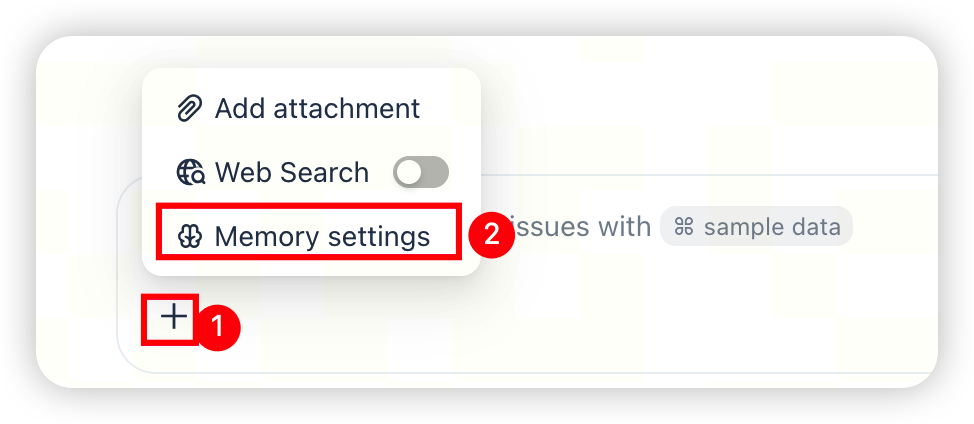
Viewing Memory Settings
In the Memory Settings panel, you can view saved memory. The page groups memory by type, such as personal preferences and language preferences.
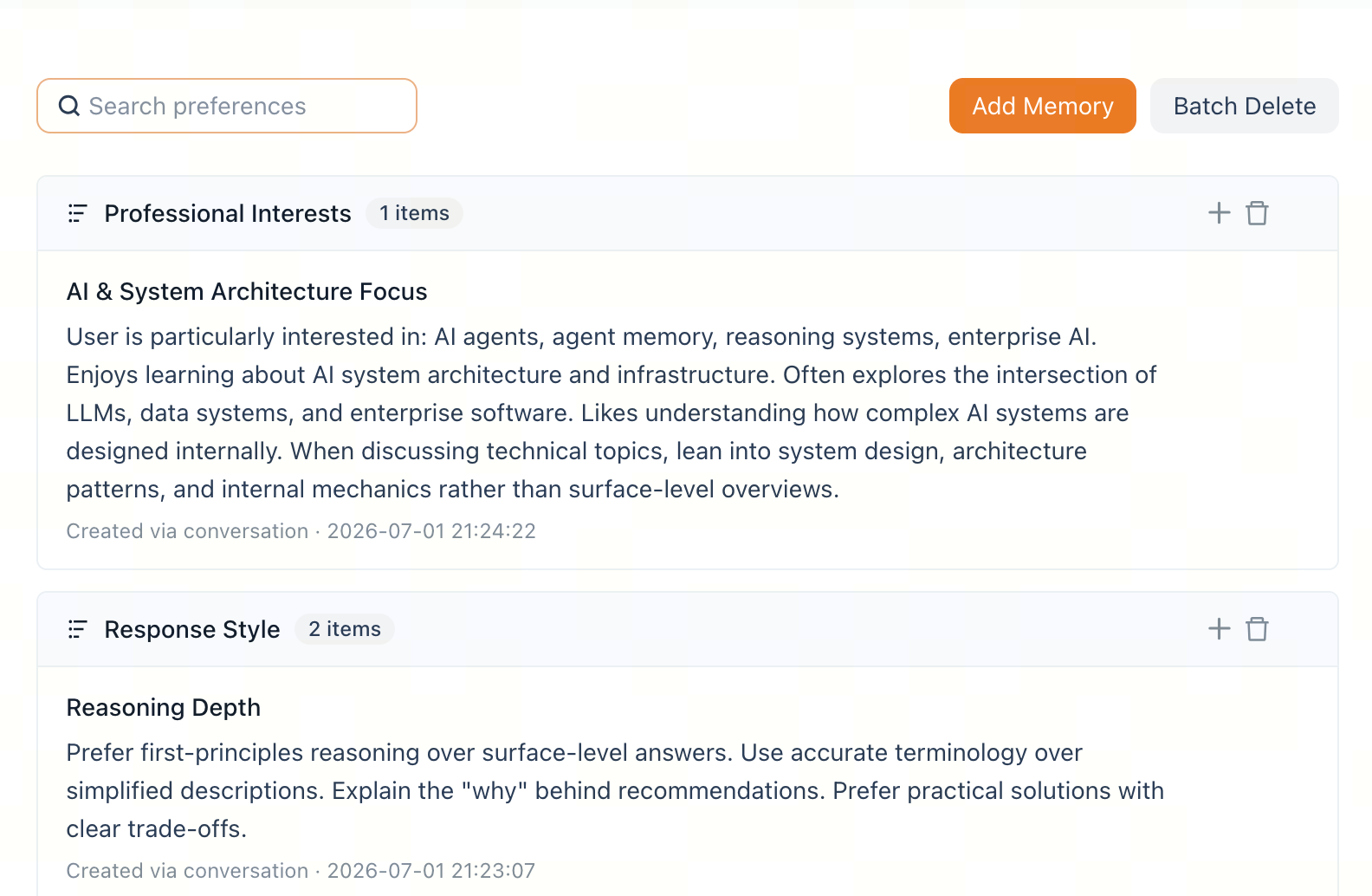
Use the search box to quickly find a specific item when you have many saved memories.
Adding a Memory
- Open the Memory Settings panel.
- Click Add Memory.
- Enter a preference title and content.
- After you save it, Analytics Agent can refer to the preference in later conversations.
Make preferences specific. For example:
When creating trend charts, prefer line charts.Use green tones for charts whenever possible, and keep titles concise.Present the conclusion first, then provide reasons and recommendations.Unless otherwise specified, respond in Chinese by default.
Managing Personal Memory
From the Personal Preferences panel, you can manage saved memory:
- Edit: Update inaccurate or outdated preferences.
- Delete: Remove a memory you no longer need.
- Bulk delete: Clear multiple unneeded memories at once.
- View by type: Distinguish among personal preferences, language preferences, and other types.
FAQ
Do personal preferences affect other people?
No. Memory Settings affect only your own experience; they do not change the responses received by other people.
Can Memory Settings replace the Knowledge Base?
No. Memory Settings record individual habits, while the Knowledge Base stores knowledge shared by a team or analytics domain.
Can I save chart-style preferences here?
Yes. Save preferences such as a default chart type, color style, or title format as personal preferences.
Should I save a temporary request as a personal preference?
Not necessarily. For a one-time request, state it directly in the current question. Save only habits that you use repeatedly as Memory Settings.
Can I save business rules as personal preferences?
This is not recommended. Business rules normally need to be followed by the whole team, so maintain them in the Knowledge Base.
Related Documentation
- Knowledge Base Guide — Manage business knowledge shared by your team.
- Question Asking Guide — Write clearer questions and preference requirements.
- Reading Analysis Results — Assess whether a response meets expectations.
- File Upload and Multimodal Q&A — Temporarily add images or files in a conversation.